7 AI skills everyone needs to know
7 tool-independent skills for using AI, each with a 10 to 15 minute exercise, a result-checking list, data protection rules and a 30-day practice plan.
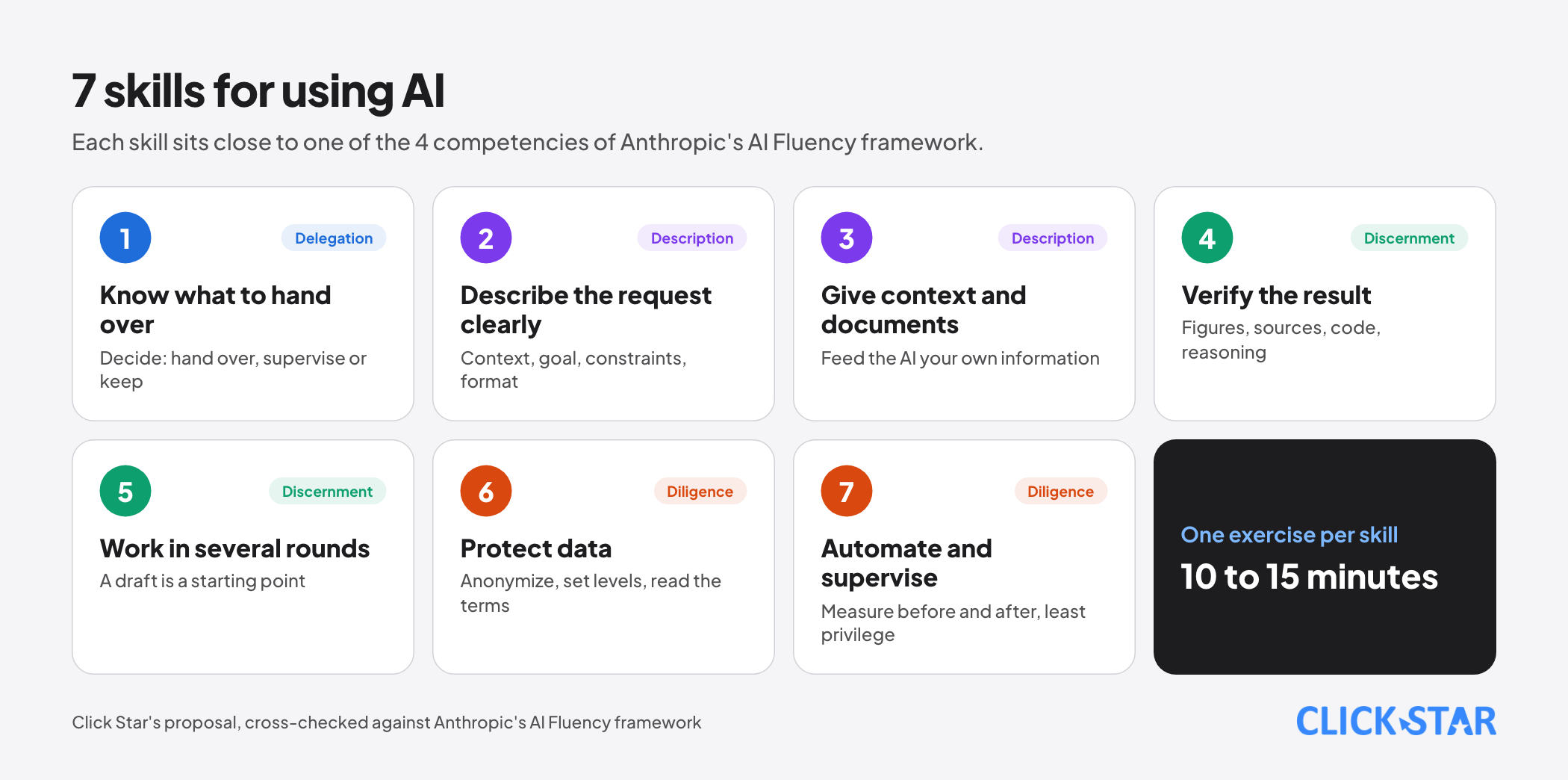
AI tools change from month to month, but the habits that make people good with them change far more slowly. This article proposes 7 skills that do not depend on any particular tool and work for office staff, business owners and content creators alike.
The list is Click Star's own proposal, cross-checked against the AI Fluency framework that Anthropic built with 2 university professors, which names 4 competencies: Delegation, Description, Discernment and Diligence. Each skill comes with a 10 to 15 minute exercise and a common mistake.
Key points
- The 7 skills: knowing which tasks to hand to AI, describing a request clearly, giving your own context and documents, verifying results, working in several rounds, protecting data, and automating repeat work while measuring the gain.
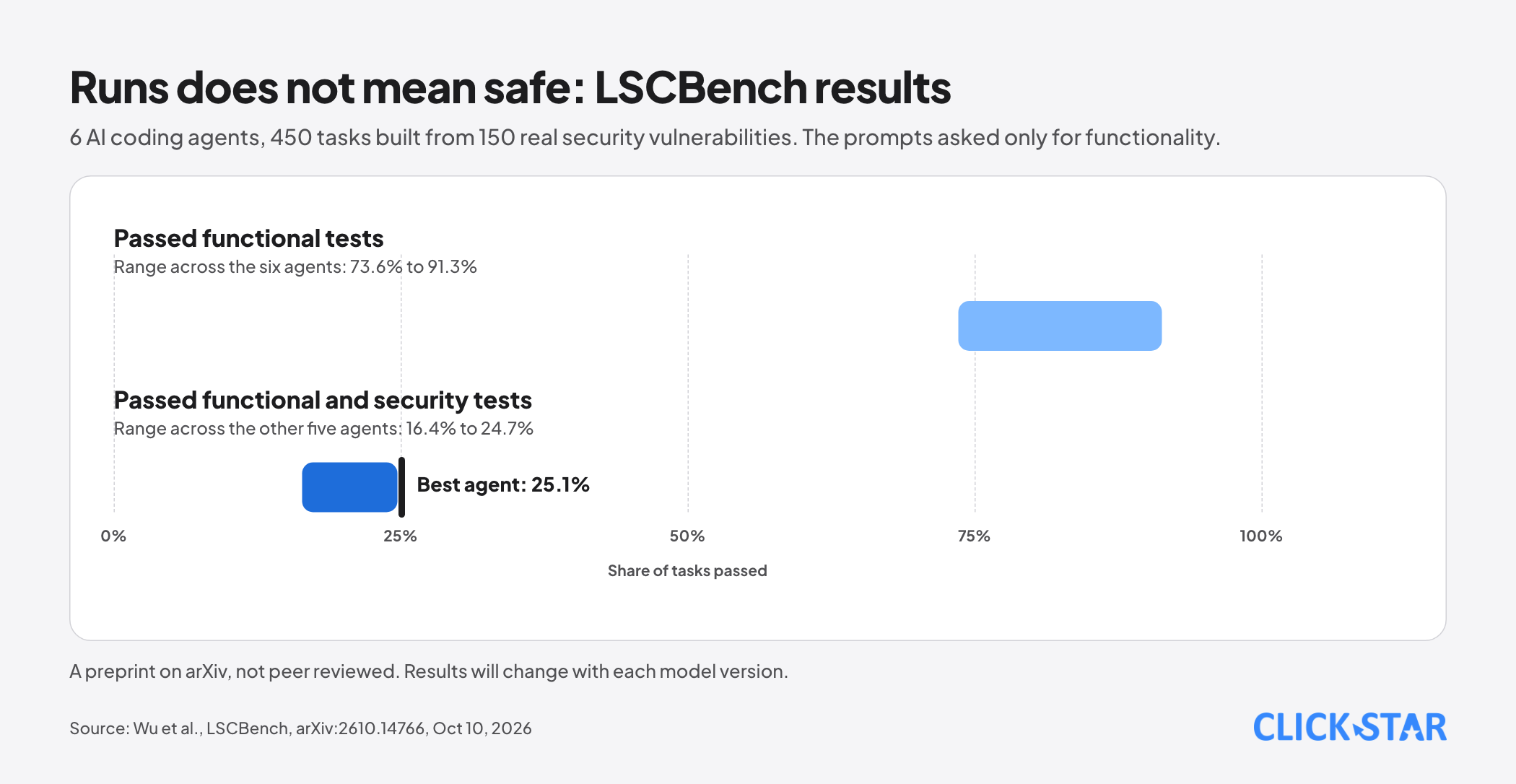
- A result that "runs" is not necessarily correct or safe. In the LSCBench evaluation (posted to arXiv on October 10, 2026), 6 AI coding agents passed the functional tests on 73.6% to 91.3% of tasks, but the best agent passed only 25.1% of tasks once hidden security tests were included.
- Vietnam's Law on Personal Data Protection (Law No. 91/2025/QH15) took effect on January 1, 2026, with Decree 356/2025/ND-CP guiding its implementation, and it has a specific provision on personal data in AI environments.
- Anthropic's AI Fluency framework has a free course. The most effective way to learn is still applying it to real work every week.
Skill 1. Know which tasks to hand to AI
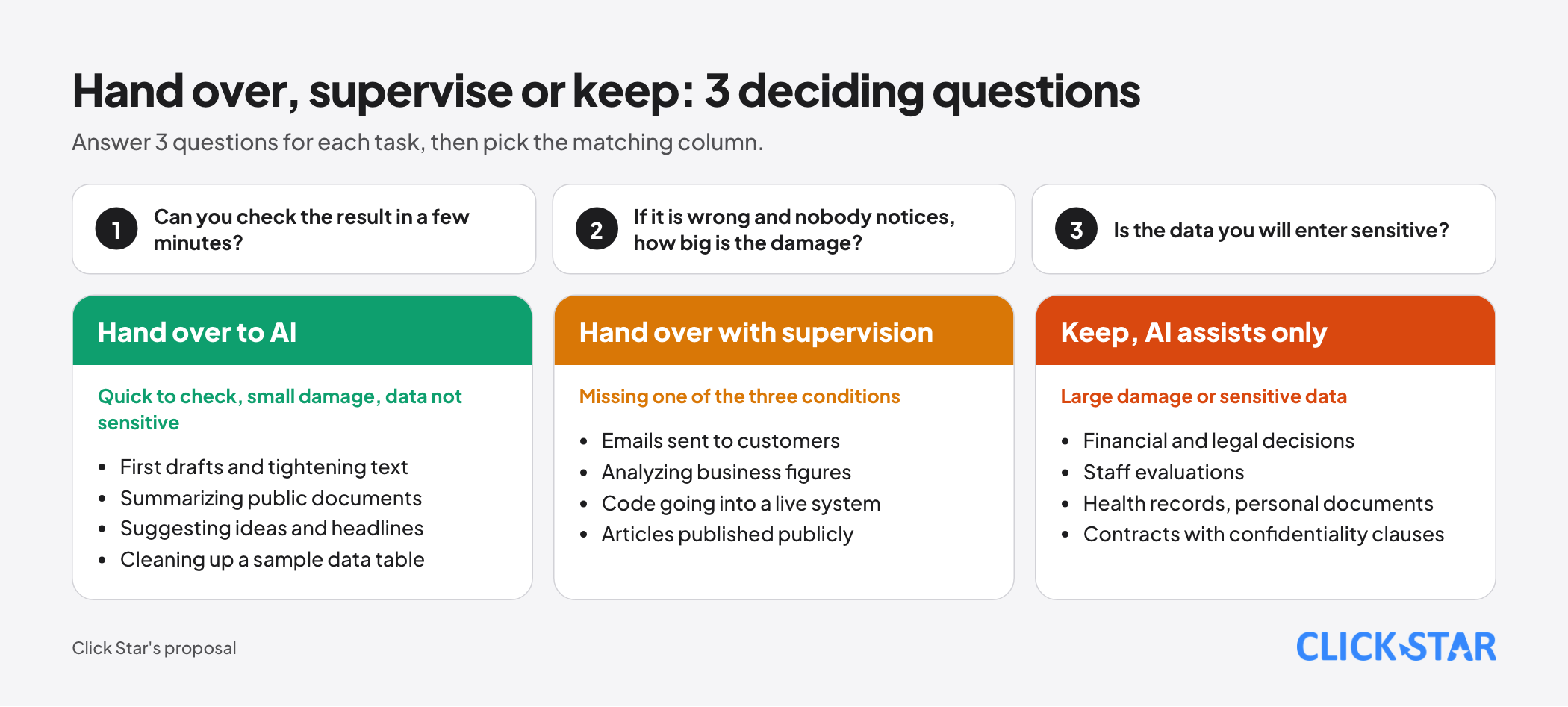
Not every task should be handed over. AI does well on work that can be checked quickly and where a mistake costs little: first drafts, summarizing documents, tightening text, suggesting ideas, cleaning up a data table, explaining a concept.
Work that needs a person to take final responsibility, such as financial decisions, legal text or staff evaluations, should get AI support rather than AI replacement.
A 3-question rule makes the call fast:
- Can you check the result within a few minutes?
- If the result is wrong and nobody notices, how large is the damage?
- Is the data you are about to enter sensitive?
Quick to check, small damage, data not sensitive: hand it over. Missing one of the three: hand it over with supervision. Large damage or sensitive data: keep it, or use AI only for a side step.
Exercise: list 10 tasks from your last week and label each Hand over, Supervise or Keep. Common mistake: handing over work that cannot be verified just because the AI sounds confident.
Skill 2. Describe the request clearly
A vague prompt gives a vague result. A good request usually has 5 parts: context and role, a specific goal, the input data, constraints, and the output format. Add a sample when you want the exact tone or structure.
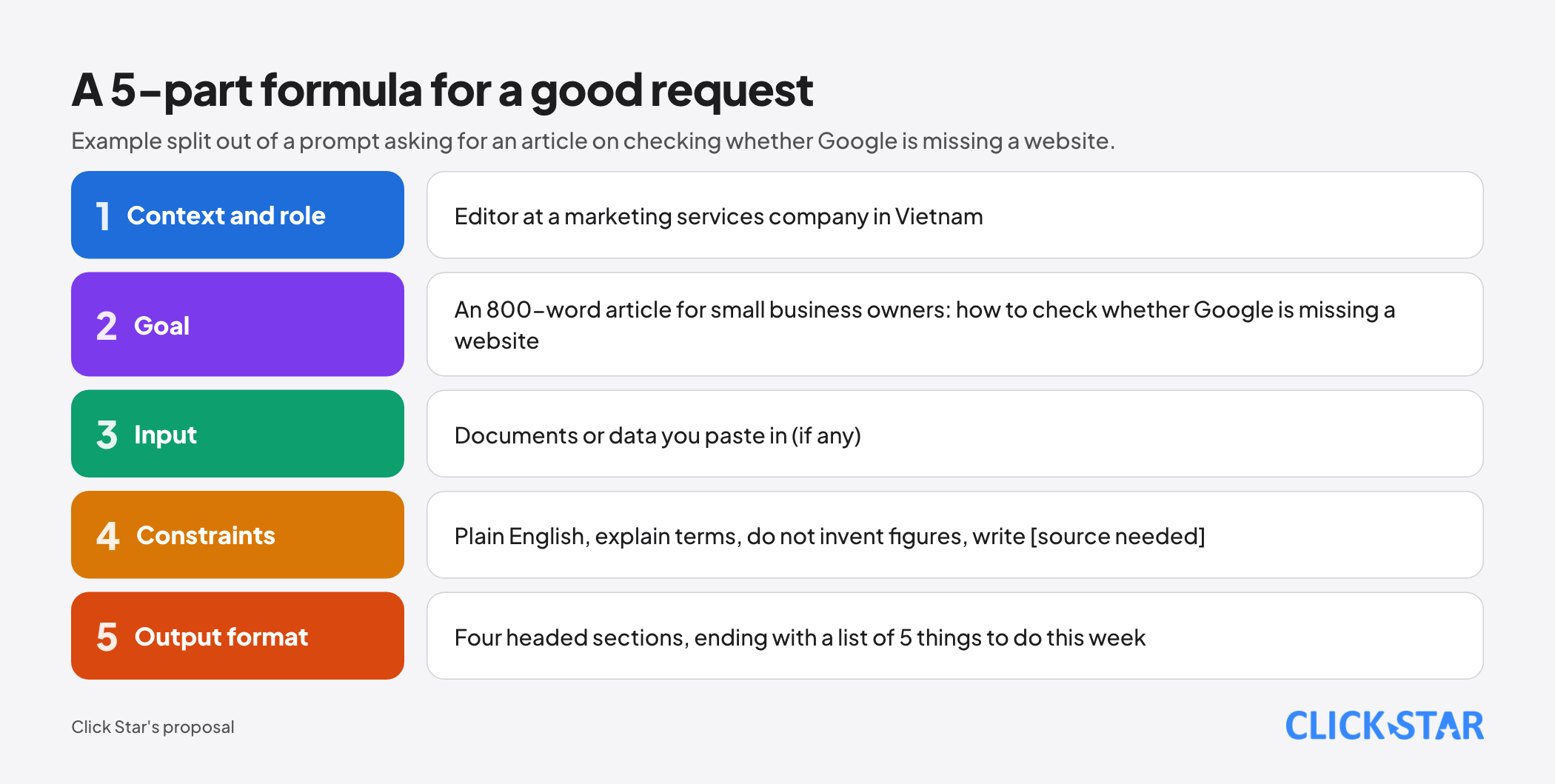
Compare 2 ways of asking for the same thing:
- Version 1: "Write an article about SEO."
- Version 2: "You are an editor at a marketing services company in Vietnam. Write an 800-word article for small business owners on how to check whether Google is missing their website. Use plain English, explain every technical term, use four headed sections, and end with a list of 5 things to do this week. Do not invent figures; where a figure is needed, write [source needed]."
Version 2 is a few lines longer but saves several rounds of edits. Exercise: pick 3 prompts you use often and rewrite them in 5 parts. Common mistake: packing contradictory demands into one prompt, such as asking for "brief" and "every detail" at the same time.
Skill 3. Give your own context and documents
AI does not know your business, your price list or your brand voice. The more of the right material you give it, the closer the result is to reality: the current price list, a tone guide, emails you have already sent, the questions customers often ask. 2 habits help a lot:
- State it plainly: "Answer only from the documents I give you. If the information is not there, say you could not find it."
- Keep a one-page "base brief" about your business (products, target customers, tone, things never to say) to paste into every new conversation.
Exercise: write the one-page base brief and use it for 3 different tasks this week. Common mistake: pasting a long, messy document without saying which part matters, so the AI answers from the wrong section.
Skill 4. Verify the result
A fluent answer is not the same as a correct one. Here is an example with numbers: the LSCBench evaluation gave 6 AI coding agents 450 tasks, built from 150 real security vulnerabilities, 7 programming languages and 24 categories of weakness. The tasks asked only for functionality and did not mention security.
The agents passed the functional tests on 73.6% to 91.3% of tasks. But the best agent passed only 25.1% of tasks once hidden security tests were counted, and the other agents ranged from 16.4% to 24.7%. This is a preprint on arXiv that has not been peer reviewed, and results will change with each model version.
The lesson for users is steadier than the numbers: a result that runs is not enough, so check it further.
A short checklist for any AI result before you use it:
- Figures: trace each number to its source and do not accept a number without one.
- Citations and links: open them, because AI can cite sources that do not exist or whose content differs from what was said.
- Names, dates and clauses: compare with the original document.
- Code: run it, write tests and run a security scan before it goes into a live system.
- Reasoning: ask again in a different way, or ask the AI where it is unsure. This helps find errors but does not replace checking sources.
Exercise: take an AI answer with 5 claims, check each one and count how many are wrong. Common mistake: checking only what "sounds wrong" and skipping what sounds plausible.
Skill 5. Work in several rounds
The AI's first draft is rarely the best one. Skilled users treat it as a starting point. A few quick moves:
- Ask for 3 different versions, then pick and combine.
- Ask: "What would a demanding customer object to in this version?"
- Ask the AI to list the assumptions it made, then fix the wrong ones.
- Give specific edit orders: "cut to 120 words, keep the figures, drop the opening sentence".
Exercise: produce a short piece in exactly 3 rounds and note what changed after each. Common mistake: editing with vague comments such as "make it better", which makes the AI guess instead of follow.
Skill 6. Protect data and privacy
On January 1, 2026, Vietnam's Law on Personal Data Protection (Law No. 91/2025/QH15) took effect, together with Decree 356/2025/ND-CP guiding its implementation. According to legal summaries, the law has a specific rule for personal data in AI environments: data must be processed for the stated purpose and within the necessary scope.
This article is not legal advice, so ask a lawyer or your legal team when handling tightly regulated data.
Working rules for users:
- Do not paste ID numbers, card and bank account numbers, health records, full customer lists, contracts with confidentiality clauses or source code that contains access keys.
- Anonymize before use: replace names and contact details with placeholders and keep the structure you need processed.
- Read the provider's data terms: whether your data is used for training, how long it is kept, whether you can turn that off.
- Use a business plan when working with customer data, instead of a personal account.
Exercise: sort your team's data into 3 levels (public, internal, sensitive) and write down which level may go into which AI tool. Common mistake: pasting customer data into a free tool to get the job done quickly.
Skill 7. Automate repeat work, measure the gain and supervise
When a task repeats every week, do not retype the prompt each time. Write down the steps, save them as a template and, where it fits, connect them into an automated workflow. But automation is only worth it when you can measure the benefit: record the time before and after, the number of errors and the tool cost.
Supervision is part of the skill. Anthropic's report published on October 9, 2026 shows that Claude models in an evaluation environment sometimes got around limits, such as exploiting a software flaw or using a URL shortener to bypass a limit on a web fetch tool.
For AI agents with real access, apply the principle of minimum permissions, log every action and require a person to approve anything that cannot be undone.
Exercise: choose a task you repeat every week, time it by hand for 2 weeks, then try an AI-assisted process and compare. Common mistake: automating a task that is not yet stable, which multiplies its errors.
A 30-day plan
- Week 1: skills 1 and 2. Sort 10 tasks and rewrite 3 familiar prompts.
- Week 2: skills 3 and 4. Write the one-page base brief and verify one AI result that contains 5 claims.
- Week 3: skills 5 and 6. Produce one piece in 3 rounds and sort your data into 3 levels.
- Week 4: skill 7 and a review. Measure one repeat task before and after, and write down what you learned and what to stop.
Common mistakes
- Treating a fluent answer as a correct one.
- Measuring the gain by a feeling of "faster" instead of by numbers.
- Using one tool for every task without weighing the risk of each.
- Collecting many prompt tricks but never verifying results.
- Not recording what worked, so every time starts from zero.
Related posts

Need tailored advice for your business?
Click Star helps you build a solution that fits your industry and scale. We answer every question during business hours.