How much cheaper is it to batch thousands of AI requests?
Batch calls to AI are priced at 50% of normal calls in exchange for later results. Based on Anthropic, OpenAI and Google documentation, this covers which jobs fit, the limits and a safe design.
An online shop has 10,000 customer comments from the past quarter and wants to tag each: delivery, advice, price or other. Nobody needs results within seconds, but calling AI one record at a time is slow and costly.
This article draws on 6 Anthropic documentation pages, the OpenAI Batch API page and Google's Batch API page for Gemini, checked on November 4, 2026.
Key points
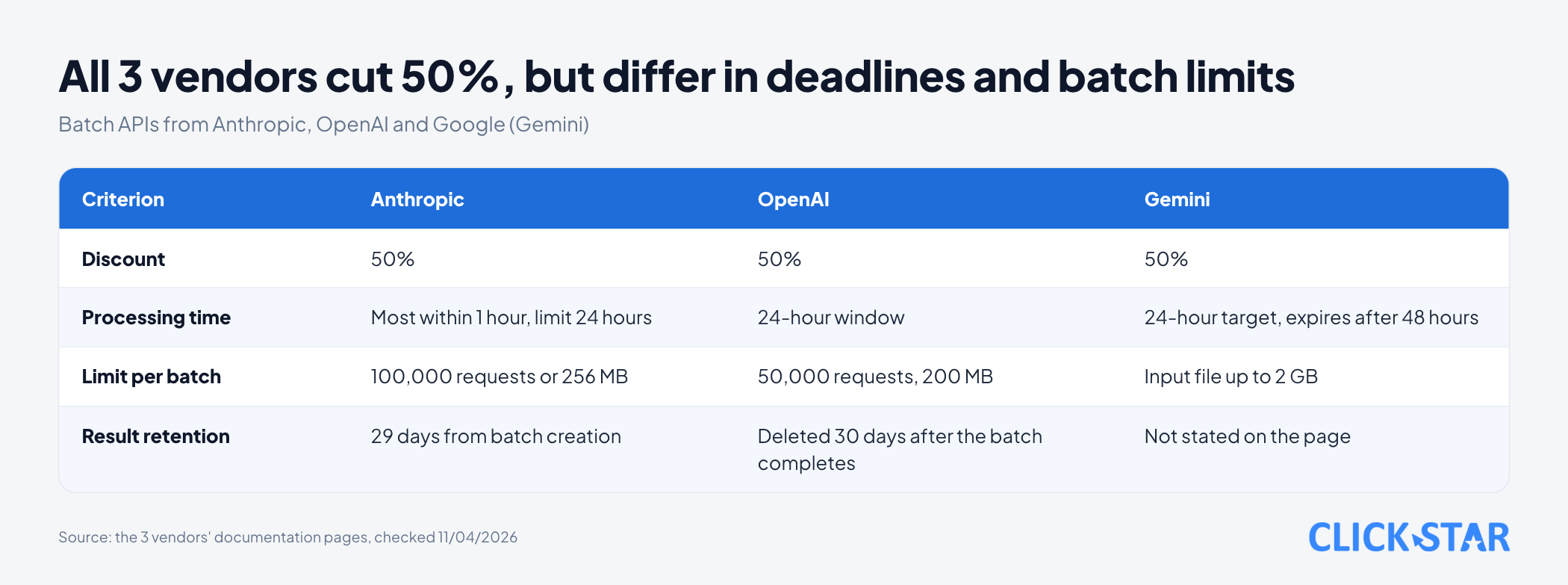
- Batch processing means sending many AI requests at once and receiving results later. The documentation of all 3 vendors states a price of 50% of the normal call price.
- At Anthropic, the 50% applies to both input and output tokens, the text units models bill by (Pricing page, read November 4, 2026).
- Timing: Anthropic says most batches finish within 1 hour, with a 24-hour limit. OpenAI sets a 24-hour window; Google targets 24 hours and expires jobs after 48 hours.
- Results may not come back in submission order, so match them with
custom_id. Per Anthropic, errored, canceled and expired requests are not billed. - Anthropic says batch data is kept up to 29 days after creation and is not eligible for zero data retention, so remove unneeded personal data before sending.
What batch processing is and which jobs fit
Batch processing is like handing a stack of files to a clerk to finish overnight instead of waiting at the counter.
Anthropic lists suitable jobs such as large-scale evaluations, content moderation and data analysis. Click Star reads these as jobs like tagging comments or support tickets, summarizing old files, extracting data from past invoices, and scoring a chatbot test set.
It does not suit a customer who is waiting, such as a website chatbot. Nor does it suit a later step that needs an earlier result in the same run, because each request in a batch is processed independently.
4-question screen (Click Star's reference framework, not taken from outside sources). A job fits a batch when all 4 answers are "yes":
- Can results arrive hours later, even close to 24 hours, without delaying anyone?
- Is each record independent, needing no other record's result?
- Is it acceptable for some records to fail or expire and be rerun?
- May the data sit on the vendor's servers for up to 29 days (at Anthropic)?
How Anthropic's Message Batches API works
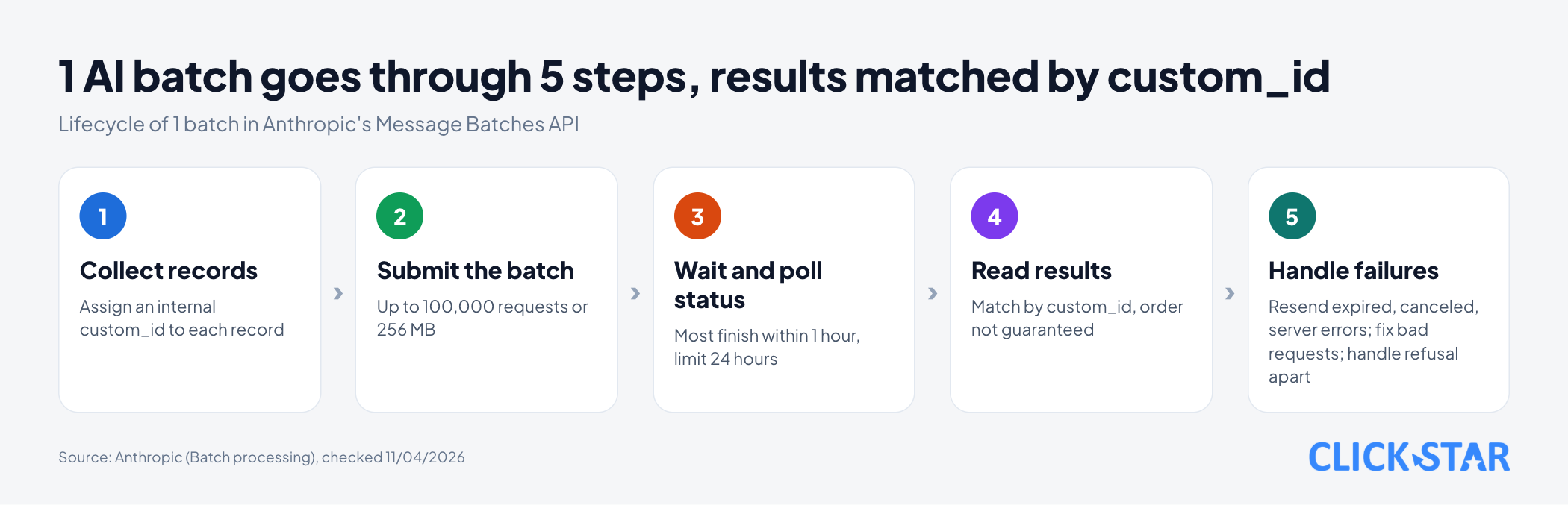
Anthropic allows up to 100,000 requests or 256 MB in 1 batch, whichever comes first. Per the Batch processing page (no date shown, read November 4, 2026), most batches finish within 1 hour and expire if not done after 24 hours; high demand can slow processing.
Each request has a custom_id (a code you choose, 1 to 64 letters, digits, hyphens or underscores) and params (the same as a normal Messages API call). custom_id maps each result back to its record.
The 4 possible outcomes
Each request ends in 1 of 4 states:
succeeded: a result exists.errored: an error, not billed. Aninvalid_request_errormust be fixed before resending; a server error can be resent as is.canceled: canceled before reaching the model, not billed.expired: hit the 24-hour limit before reaching the model, not billed.
An easy-to-miss detail: per the Refusals and fallback page (no date shown, read November 4, 2026), a refused request still returns as succeeded with stop_reason set to refusal, so check both fields.
Limits to know up front
stream: true,speed(Fast mode),fallbacksandmax_tokens: 0are not supported.- Parameter errors surface only when the whole batch ends. A submitted batch cannot be edited, only canceled and resubmitted.
- The queue holds up to 200,000 requests at the Start tier and 500,000 at the Scale tier (Rate limits page, no date shown, read November 4, 2026).
How much cheaper are batch calls
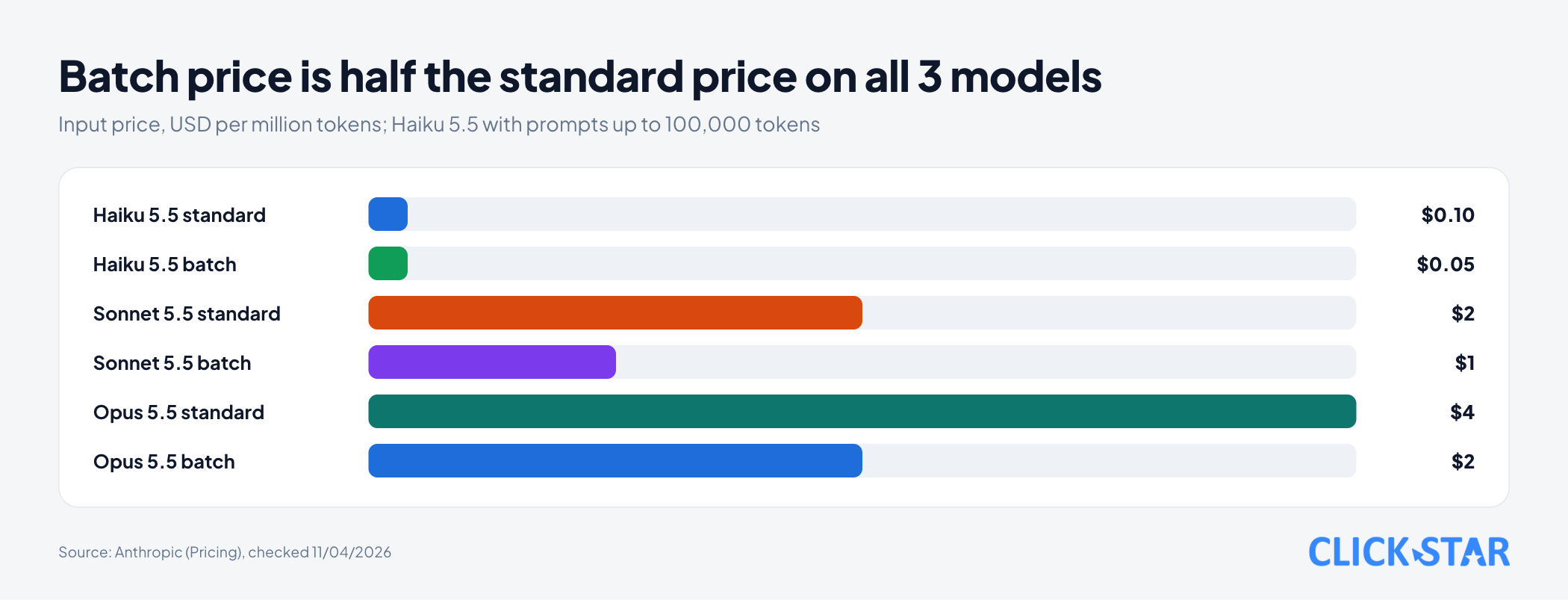
According to Anthropic's Pricing page (no date shown, read November 4, 2026), batches are billed at 50% of standard prices for both input and output tokens, in USD per million tokens, on the Claude API.
For input prices, Haiku 5.5 (prompts, the text sent to the model, up to 100,000 tokens) is $0.10 standard and $0.05 batch. Sonnet 5.5 is $2 and $1; Opus 5.5 is $4 and $2.
Illustrative example, not a measurement: for those 10,000 comments, each with 300 input tokens and 20 output tokens, so 3 million in and 0.2 million out. Haiku 5.5 costs $0.40 called normally and $0.20 in a batch; Sonnet 5.5 costs $8 and $4; Opus 5.5 costs $16 and $8.
Click Star already has a separate article on the Claude models and how to choose.
Combining with prompt caching
When many requests share a long opening, prompt caching (reusing the start of a prompt) avoids full price for the repeated part. Per the Pricing page, caching multipliers stack with the batch discount.
According to the Batch processing page, cache hits in a batch are not guaranteed; users typically see 30% to 98%.
The Prompt caching page (no date shown, read November 4, 2026) describes the cheapest approach: first submit a batch of 1 request carrying the shared opening with a 1-hour cache, wait for it to finish, then submit the rest. The opening must be at least 512 tokens for Haiku 5.5, Sonnet 5.5 and Opus 5.5.
OpenAI and Google: same idea, different details
OpenAI's Batch API page (no date shown, read November 4, 2026) states a 50% discount, a separate rate-limit pool and a 24-hour window. Each batch holds up to 50,000 requests and 200 MB; OpenAI deletes the output file 30 days after the batch completes.
Google's Batch API page for Gemini (no date shown, read November 4, 2026) states 50% and a 24-hour target. A job pending or running past 48 hours expires with no results; an input file can be up to 2 GB.
Google notes that creating a batch is not idempotent: 2 calls make 2 jobs.
Code example: create a batch and read results
The example uses Anthropic's Python SDK to tag comments, following the Batch processing page.
Per the Prompting Claude Haiku 5.5 page (no date shown, read November 4, 2026), Haiku 5.5 has thinking on by default and thinking counts toward max_tokens, so the code turns thinking off. If left on, raise max_tokens and recheck costs.
Click Star ran the result-reading part with the anthropic 0.125.0 SDK types and fake data, including a result with no text block.
import time
import anthropic
from anthropic.types.message_create_params import MessageCreateParamsNonStreaming
from anthropic.types.messages.batch_create_params import Request
client = anthropic.Anthropic()
SYSTEM = "Classify the comment into 1 label: delivery, advice, price, other. Return only the label."
rows = [("fb-0001", "My order arrived 3 days late"), ("fb-0002", "The advisor was very helpful")]
batch = client.messages.batches.create(requests=[
    Request(custom_id=row_id, params=MessageCreateParamsNonStreaming(
        model="claude-haiku-5-5", max_tokens=20, system=SYSTEM,
        thinking={"type": "disabled"},  # Haiku 5.5 thinks by default
        messages=[{"role": "user", "content": text}]))
    for row_id, text in rows])
while client.messages.batches.retrieve(batch.id).processing_status != "ended":
    time.sleep(60)
LABELS = {"delivery", "advice", "price", "other"}
labels, to_retry, to_fix, to_fallback = {}, [], [], []
for item in client.messages.batches.results(batch.id):
    res = item.result
    if res.type == "succeeded":
        msg = res.message
        text = next((b.text for b in msg.content if b.type == "text"), "").strip()
        if msg.stop_reason == "refusal":
            to_fallback.append(item.custom_id)  # refused: change model or prompt
        elif msg.stop_reason == "max_tokens" or text not in LABELS:
            to_fix.append(item.custom_id)  # unusable output: review the prompt
        else:
            labels[item.custom_id] = text
    elif res.type == "errored" and res.error.error.type == "invalid_request_error":
        to_fix.append(item.custom_id)  # bad request: fix before resending
    else:
        to_retry.append(item.custom_id)  # expired, canceled, server error: resend as is
print(len(labels), "done;", len(to_retry), "resend;", len(to_fix), "fix;", len(to_fallback), "other model")
Safe design: small batches, failures, reruns and personal data
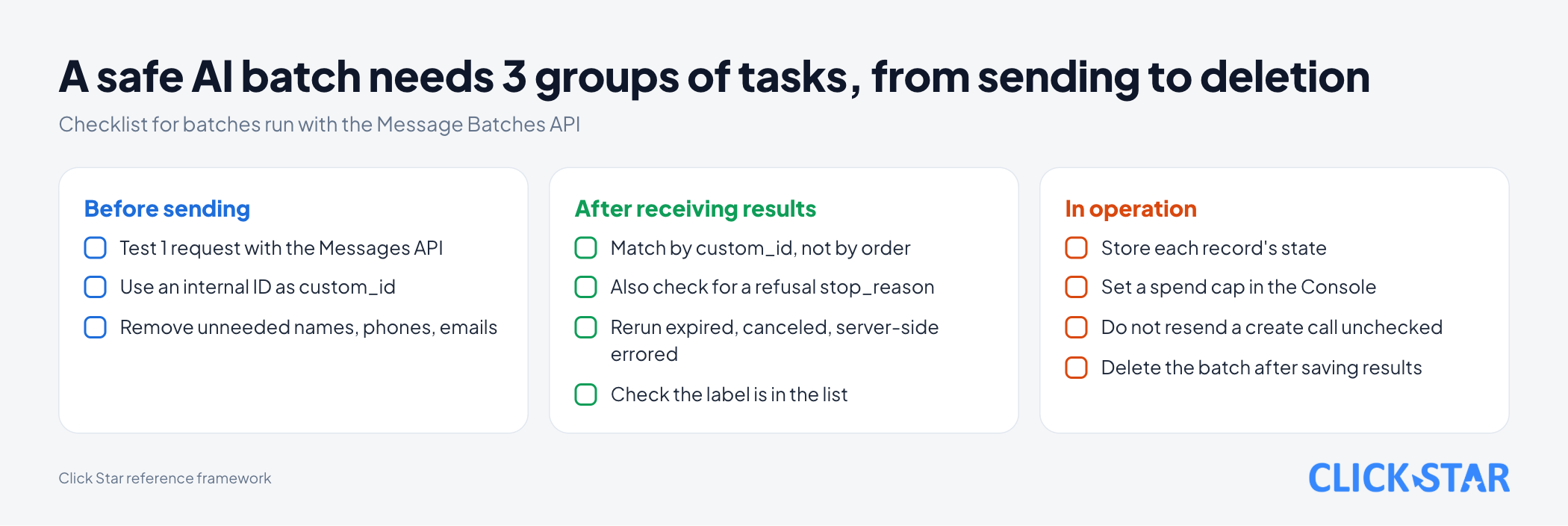
Track each record's state in your database: not sent, sent with a batch ID, result received, needs rerun. Anthropic's page does not say whether batch creation is idempotent and Google says it is not, so Click Star treats resubmitting a create call as unsafe.
Resend as is only expired, canceled or server-side errored records; an invalid_request_error must be fixed first.
Anthropic says resending a refused request to the same model usually earns another refusal, so try another model (see Refusals in Message Batches for how). For reasoning_extraction refusals (the prompt asks the model to write out its reasoning in the answer), Anthropic says to change the prompt rather than retry.
For personal data, the Batch processing page says batch data is kept 29 days, is not eligible for zero data retention, and can be deleted after processing (cancel a running batch first). Send internal IDs instead of names, phones or emails, and keep them out of custom_id.
What this means for Vietnamese businesses
Click Star found no public measurement of real savings for Vietnamese businesses using batch calls. The 50% is a list price per token, not a cut in the total bill, which also depends on rerun rates, the model chosen, engineering effort and the exchange rate.
Click Star's view. Batch processing suits scheduled background jobs such as tagging, summarizing, extraction and scoring test sets. It does not cut the cost of a feature a customer is waiting on.
The larger risk is governance, not price: missed failed records, unchecked output entering a CRM, and personal data sent needlessly. Click Star offers AI integration and AI automation services, so it has a related interest.
What to do: a 7-day plan
This is a reference plan from Click Star, not taken from outside sources.
Days 1 to 2: pick the job and data
- Pick 1 job that passes all 4 questions above.
- Build 50 to 100 sample records with answers checked by a person.
Days 3 to 5: test
- Run 1 sample request through the Messages API to fix parameter errors (the Batch processing page advises this).
- Compare 2 models on the sample; pick the cheapest with acceptable accuracy.
- Submit 1 test batch of 50 to 100 records (Click Star's suggestion) and record cost, time to
endedand the number of failed requests.
Days 6 to 7: go live
- Store each record's state and write separate handling: resend
expired,canceledand server errors, fixinvalid_request_error, wrong labels or truncated output (max_tokens), change model forrefusal. - Set a spend cap in the Console and alert when a batch is not done after 24 hours.
- Delete the batch after saving results.
How to measure
Track 4 measures per batch:
- Cost per record, calculated from the
usagefield in results. - Rates of
succeeded,errored,expired,canceledandrefusal. - Time from submission until the batch is
ended. - Accuracy against the sample set with correct answers.
Common mistakes
- Using a batch for work a customer is waiting on.
- Matching results by line order instead of
custom_id. - Treating
succeededas a pass without checking for arefusalstop reason. - Sending a huge batch before testing 1 request or 1 small batch.
- Resending a create call before checking the old batch, which creates 2 batches and pays twice.
What is not known
There is no Vietnam-specific measurement of real savings. Real batch times and the cache hit rate on your data are also unknown.
Anthropic's page does not say whether batch creation is idempotent, and Google's does not state result retention. Click Star has not called the real API with the code example, and has not read Vietnamese personal-data law. The shop scenario and the 10,000-comment calculation are illustrative.
Related posts


Need tailored advice for your business?
Click Star helps you build a solution that fits your industry and scale. We answer every question during business hours.