Who edited the customer record? Audit logs for internal apps
An audit log shows who edited customer data, when, and from what value. Based on OWASP, PostgreSQL, pgAudit and Supabase docs, with SQL that was test-run.
A sales rep reports that a VIP customer was demoted to standard. The customer table shows only the current value, not who changed it, when or from what. This is an illustrative example, not a real incident.
This article draws on documents from OWASP, PostgreSQL, pgAudit and Supabase, checked on November 4, 2026. Click Star ran the SQL in the article on PGlite 0.5.15 (PostgreSQL 18.6 running in WebAssembly) with fake data.
This article covers what to record, how, and how to keep the log from being edited. Click Star already has articles on website monitoring and incident reports.
Key points
- An audit log answers "who did what, to which data, and when". OWASP says it often should be kept apart from the security log.
- Each row must answer when, where, who and what (OWASP). For customer data, Click Star suggests adding the old and new values.
- Passwords, keys, tokens and card numbers should usually not be logged as-is. Phone numbers and emails may need masking or removal, since the log is a second copy of customer data (Click Star's judgment).
- A trigger catches row inserts, updates and deletes from any source, if it is on and not in
replicamode;TRUNCATEneeds its own trigger, and reads are missed. pgAudit logs statements, reads included, but its docs do not mention storing old values. - A trigger does not know the end user: the application passes the actor name in, so it can be forged.
- The log table must be append-only: revoke rights, block edits and deletes with a trigger, alert when logging stops, copy it elsewhere.
- Retention and logging personal data are legal questions; Click Star has not read Vietnamese law on this.
How an audit log differs from an error log
An error log shows where the system broke. An audit log shows who added, edited, deleted or exported which data.
OWASP's "Logging Cheat Sheet" (no date shown, read November 4, 2026) says audit logs usually serve a different purpose than security event logs, so they should often be kept separate.
OWASP Top 10:2025, item A09 (no date shown, read November 4, 2026), advises giving every transaction an audit trail with integrity controls, such as append-only tables.
What each row should record, and what it should not
Per the Logging Cheat Sheet, passwords, tokens, session IDs, database connection strings, encryption keys and payment card data should be removed, masked, hashed or encrypted. Names, phone numbers and emails count as non-sensitive but may still need special handling; OWASP suggests deleting, scrambling or pseudonymizing them when identity is not needed or the risk is too great.
OWASP's "Logging Vocabulary" page (no date shown, read November 4, 2026) advises that for deleted sensitive data you record the action and object ID, not the content.
Triggers, application code or pgAudit
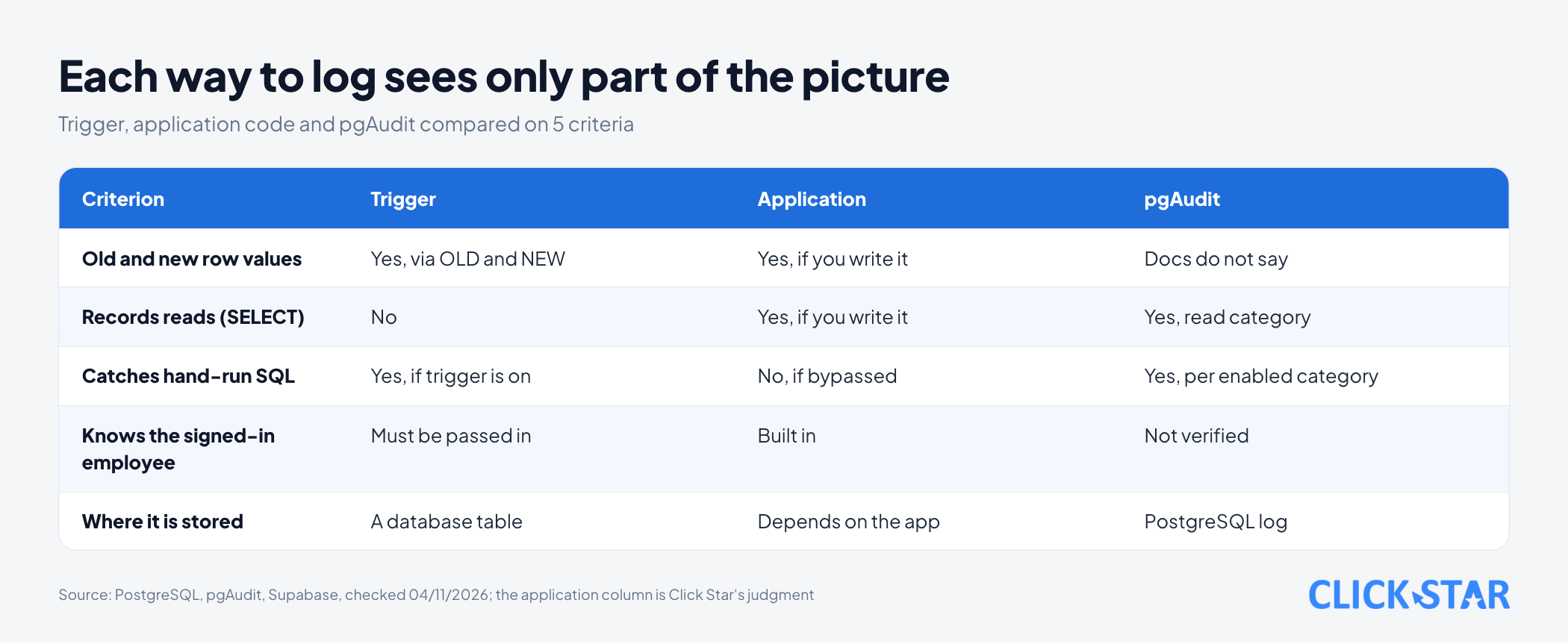
There are 3 ways to record, each seeing part of the picture. A trigger is a function that runs on a row event; PostgreSQL 18's "Trigger Functions" page lists 4 events: INSERT, UPDATE, DELETE and TRUNCATE.
A trigger fires on table events, so it also catches hand-run SQL, if it is on (inferred from how triggers work).
Application code knows the user and the business reason but misses changes made another way (Click Star's judgment). pgAudit, an extension, writes statements to PostgreSQL's log.
Supabase's PGAudit page (updated October 5, 2026) lists categories such as read, write and ddl, configurable only at the role level. The pgAudit README says superusers cannot be audited reliably, and that its logging is not transactional.
A working example: log table, trigger and actor name
Click Star ran the code below on November 4, 2026 on PGlite 0.5.15 with fake data, block by block; not on Supabase.
create schema audit;
create table audit.change_log (
  id          bigint generated always as identity primary key,
  occurred_at timestamptz not null default now(),
  actor       text not null,
  action      text not null check (action in ('INSERT', 'UPDATE', 'DELETE', 'TRUNCATE')),
  table_name  text not null,
  record_id   text,
  old_data    jsonb,
  new_data    jsonb
);
create index change_log_record_idx on audit.change_log (table_name, record_id, id);
create function audit.record_change() returns trigger
language plpgsql security definer set search_path = ''
as $$
begin
  insert into audit.change_log (actor, action, table_name, record_id, old_data, new_data)
  values (
    coalesce(nullif(pg_catalog.current_setting('app.actor', true), ''), session_user),
    tg_op, tg_table_name,
    coalesce(pg_catalog.to_jsonb(new) ->> tg_argv[0], pg_catalog.to_jsonb(old) ->> tg_argv[0]),
    case when tg_op in ('UPDATE', 'DELETE') then pg_catalog.to_jsonb(old) - tg_argv[1:] end,
    case when tg_op in ('INSERT', 'UPDATE') then pg_catalog.to_jsonb(new) - tg_argv[1:] end
  );
  return null;
end;
$$;
create table public.customers (
  id bigint generated always as identity primary key,
  name text not null, phone text, tier text not null default 'standard'
);
create trigger customers_audit
after insert or update or delete on public.customers
for each row execute function audit.record_change('id', 'phone');
create trigger customers_audit_truncate
after truncate on public.customers
for each statement execute function audit.record_change('id', 'phone');
The function uses security definer so the application role needs no write access to the log table; Supabase's "Database functions" page (updated October 29, 2026) says to set search_path then, so the code sets search_path = ''.
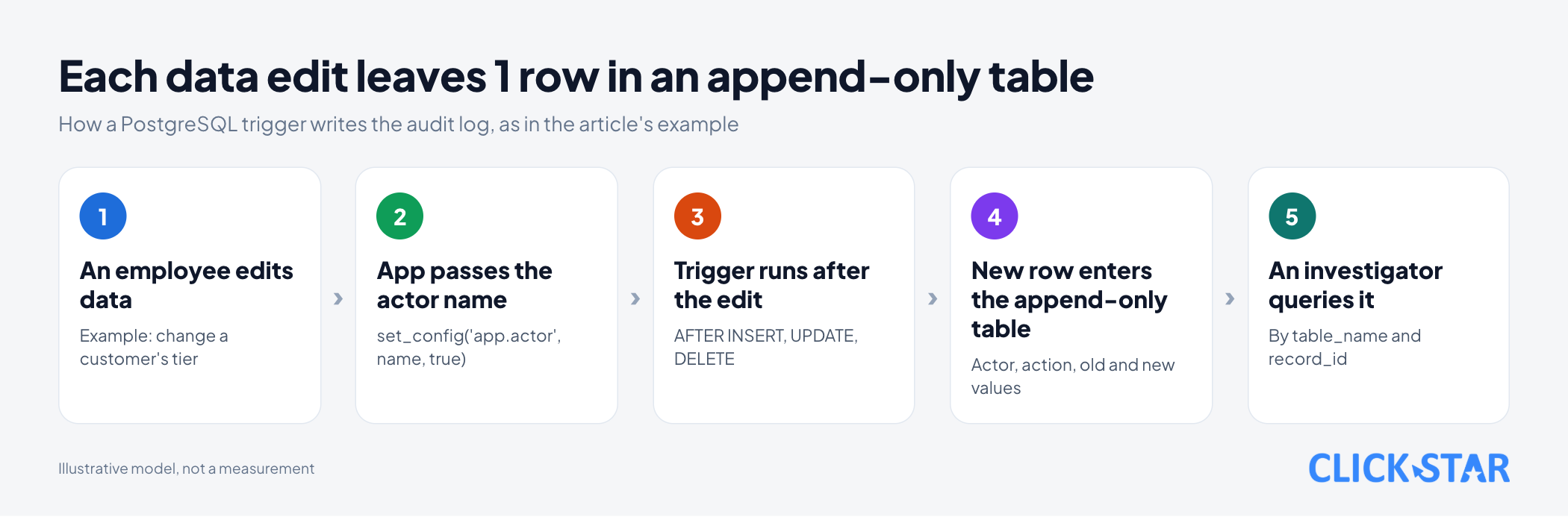
The first argument, 'id', names the key column; a table keyed by code must pass that name. A composite key needs a changed function, or record_id is NULL (tested). The other arguments, here 'phone', are columns dropped from the copy. A delete still logs the old row minus those columns, so for a sensitive table list every sensitive column.
The second trigger catches TRUNCATE, which the row-level trigger never sees. In the test, truncate public.customers created 1 TRUNCATE row with no record_id.
The actor comes from app.actor, falling back to session_user (the database role). PostgreSQL 18, section 9.28 "System Administration Functions" (no date shown, read November 4, 2026): the true argument of set_config lasts only for the transaction; in the test, outside one the name fell back to postgres.
begin;
select set_config('app.actor', 'nv-lan', true);
insert into public.customers (name, phone) values ('Khách A', '0900000001');
commit;
begin;
select set_config('app.actor', 'nv-minh', true);
update public.customers set tier = 'vip' where id = 1;
commit;
begin;
select set_config('app.actor', 'nv-minh', true);
delete from public.customers where id = 1;
commit;
select * from audit.change_log order by id;
Test result: customer A added by nv-lan, edited by nv-minh and deleted gave 3 rows with old and new values, no phone.
The application declares the actor name and the database does not verify it: in the test, the application role set app.actor to ceo-forged and the log kept that name.
Keeping anyone from editing the log
The Logging Cheat Sheet advises detecting modified or deleted records and copying logs to read-only media early.
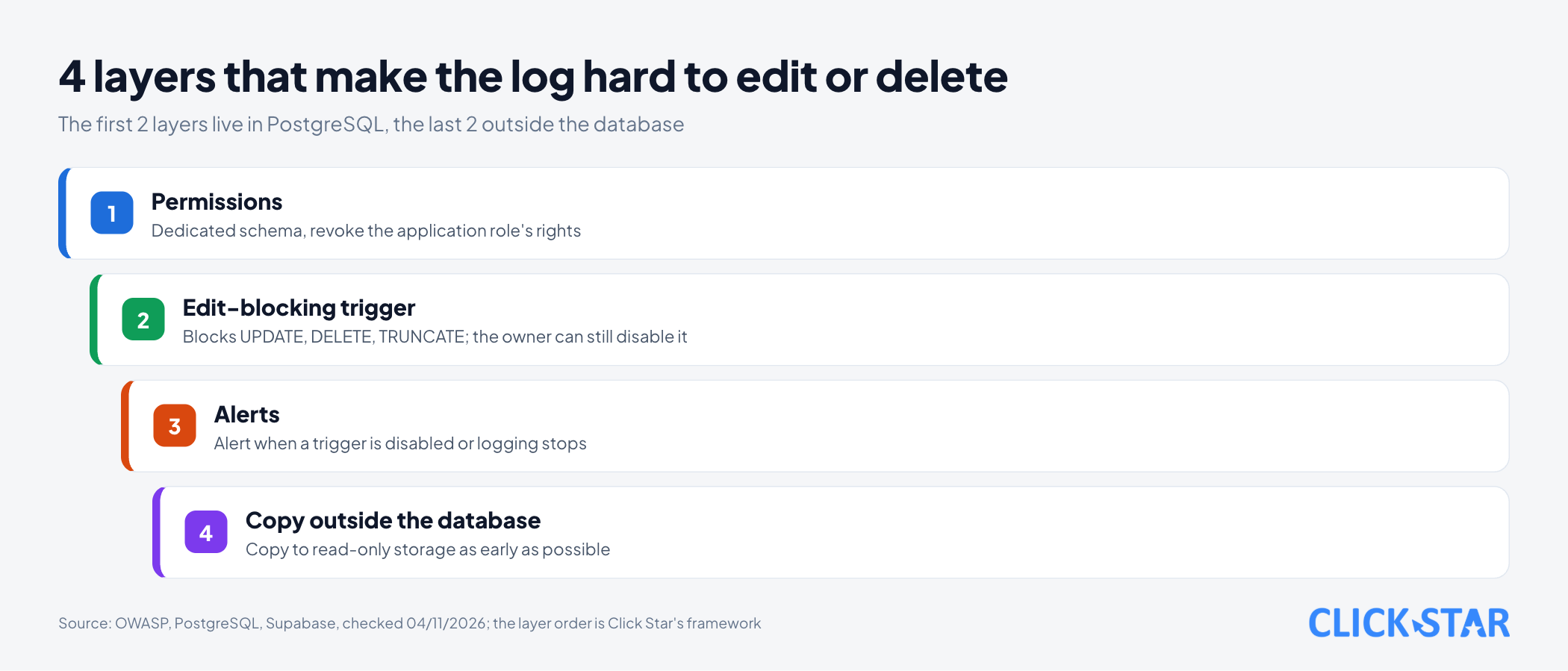
The first layer is permissions. Supabase's "Securing your API" page (updated October 22, 2026) says new tables in public on existing projects get select, insert, update, delete, truncate and a few other privileges by default for anon, authenticated and service_role; Supabase says it is changing this default.
So keep the log table outside public; in the test, the application role had no rights on the audit schema and was denied.
The second layer is a trigger that blocks edits. In the test, even the table owner got "audit.change_log is append-only".
create function audit.block_edit() returns trigger language plpgsql
as $$ begin raise exception 'audit.change_log is append-only'; end; $$;
create trigger change_log_no_edit before update or delete on audit.change_log
for each row execute function audit.block_edit();
create trigger change_log_no_truncate before truncate on audit.change_log
for each statement execute function audit.block_edit();
But the table owner can still disable the trigger. PostgreSQL 18's ALTER TABLE page (no date shown, read November 4, 2026) says you must own the table to use it, DISABLE TRIGGER included. In the test, once disabled, log rows could be edited.
The same page says triggers by default do not fire in replica mode; ENABLE ALWAYS overrides that. In the test, inserting a customer in that mode created 0 log rows, and 1 after enable always trigger.
So the third and fourth layers sit outside the database: an alert when a trigger is disabled or logging stops, and a copy in read-only storage.
Retention and reading the log after an incident
Retention is a legal question, so Click Star gives no figure. The Logging Cheat Sheet says not to destroy logs early or keep them past the retention period.
After an incident, query by table_name and record_id (indexed) and compare old_data with new_data to see which fields changed.
Click Star's measures (not from outside sources): the share of sensitive tables with a log trigger, the time to answer "who edited this row" in a drill, and the days since the last new row on a busy table.
What this means for Vietnamese businesses
Click Star found no public measurement of how many Vietnamese businesses keep audit logs for internal apps. On legal questions, ask a lawyer.
Click Star's view. For a CRM or internal management app, start with 3 to 5 tables holding money, permissions and customer information. A trigger plus an append-only table is enough to answer "who edited", plus 1 step to pass the actor name, which is only as trustworthy as the application layer.
A trade-off to settle early: the trigger shares the transaction, so if logging fails, the edit is rolled back too (tested). The Logging Cheat Sheet says logging failures should not stop the application, while item A09 says failed transactions should roll back and fail closed (pairing them is Click Star's reading). Click Star leans toward rejecting the edit for money and permission tables.
The log needs access control too, since it holds customer data. Click Star offers custom software, CRM and CDP services, so it has a related interest.
What to do: 3 groups, 10 tasks
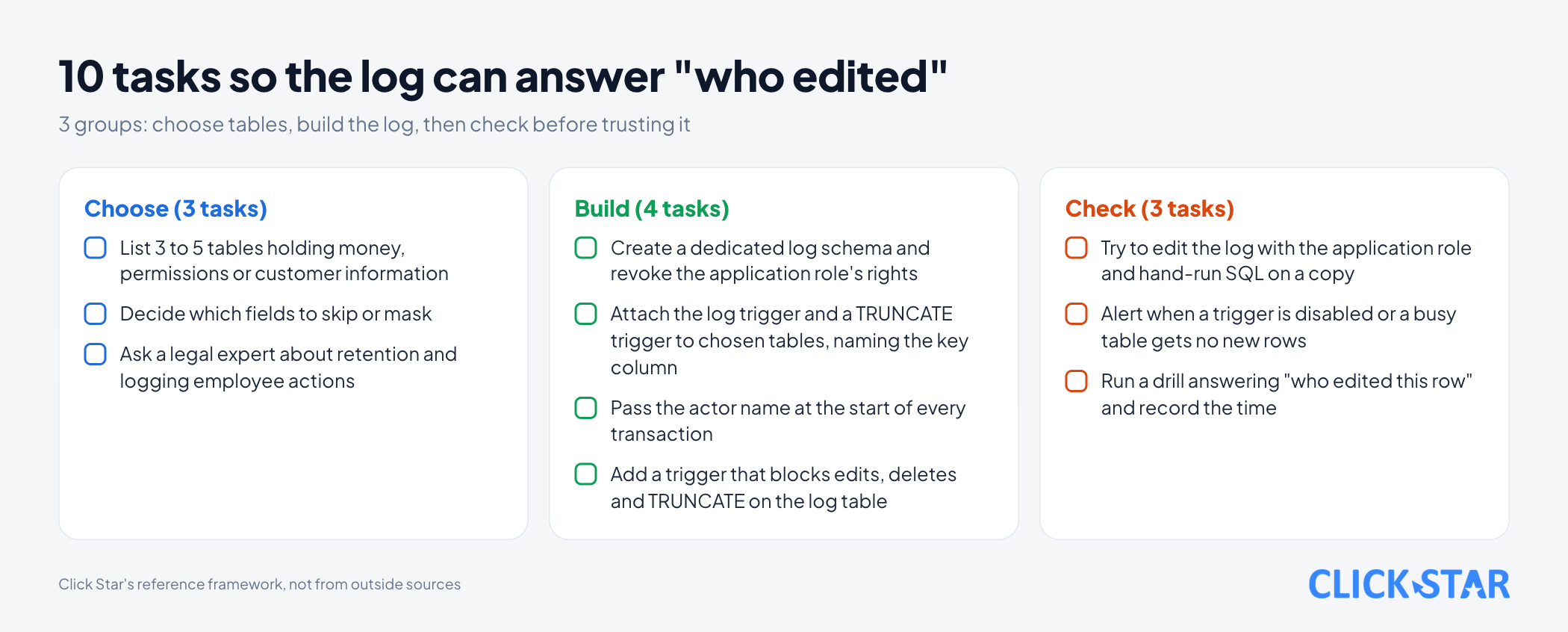
This is Click Star's reference framework, not from outside sources.
Choose (3 tasks)
- List 3 to 5 tables holding money, permissions or customer information.
- Decide which fields to skip or mask.
- Ask a legal expert about retention and logging employee actions.
Build (4 tasks)
- Create a dedicated log schema and revoke the application role's rights.
- Attach the log trigger and a
TRUNCATEtrigger to the chosen tables, naming the key column. - Pass the actor name at the start of every transaction.
- Add a trigger that blocks edits, deletes and
TRUNCATEon the log table.
Check (3 tasks)
- Try to edit the log with the application role and hand-run SQL on a copy.
- Alert when a trigger is disabled or a busy table gets no new rows.
- Run a drill answering "who edited this row" and record the time.
Common mistakes
- Believing server error logs are enough to know who edited data.
- Logging every table, then never reading it because it is too noisy.
- Keeping the log table in a schema where the application role can edit or delete it.
- Copying passwords, tokens or card numbers into the old and new values.
- Recording the database role, not the real employee, so every row carries the same name.
- Testing only when everything works, never with a trigger disabled.
What is not known
There is no public figure for log size against edit volume. Click Star has not read Vietnamese law on log retention.
Getting the user's name from Supabase's sign-in system, whether it can be forged, and revoking rights on a real Supabase project have not been tested.
Related posts


Need tailored advice for your business?
Click Star helps you build a solution that fits your industry and scale. We answer every question during business hours.