How to work with GPT effectively: from delegating to verifying in daily work
3 productivity studies, how to tell tasks worth handing to GPT from those that are not, a 6-step process, verification, data protection and how to measure results in daily work.
Most guides to GPT stop at the question "how do I write a good request". That is necessary but not enough to use GPT well in daily work, because the final result depends on the whole process around that request: which tasks to hand over, with what result to aim for, who checks it, what data may go in and how to know it really saves time.
This article focuses on working with GPT as a capable colleague who needs guidance and checking.
How to choose a model, write a request and use the API is already covered in Click Star's article "How to use GPT in the best way", so this one does not repeat it and instead covers process, evidence from 3 controlled studies, how to tell tasks worth handing over from those that are not, verification, data protection and measuring results.
The figures come from published studies and OpenAI documentation, each named in the sentence that uses it and checked as of October 20, 2026.
Key points
- 3 experimental studies show generative AI can raise productivity noticeably: ChatGPT cut writing time by 40% and raised quality by 18% (Noy and Zhang, Science, 2023), an AI assistant raised the issues resolved per hour of support agents by about 15% (Brynjolfsson and colleagues, Quarterly Journal of Economics), and BCG consultants completed 12.2% more tasks, 25.1% faster.
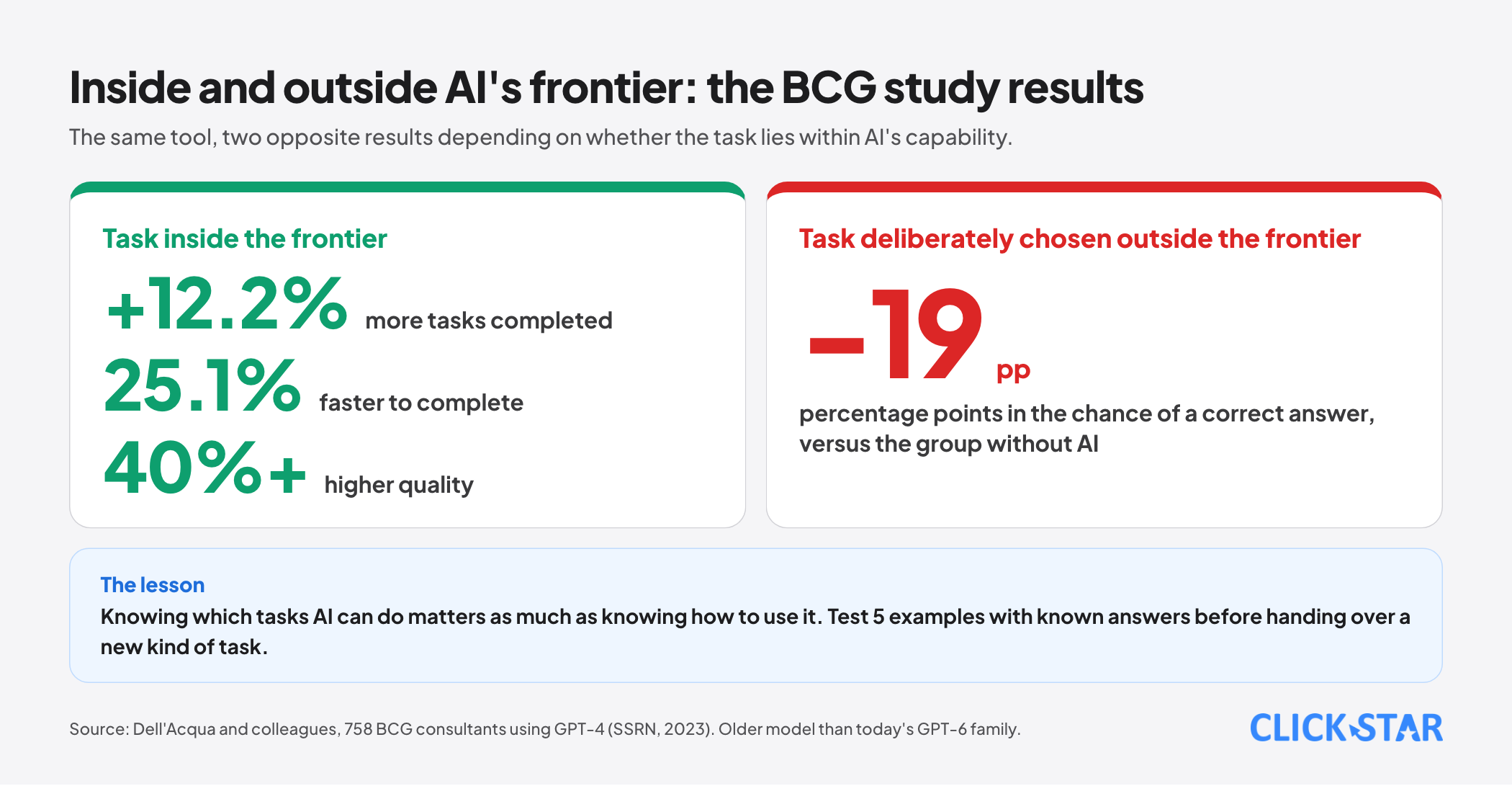
- The same BCG study shows the other side: on a task outside AI's capability, the group using AI was 19 percentage points less likely to give a correct answer than the group without AI. Knowing which tasks AI can do matters as much as knowing how to use it.
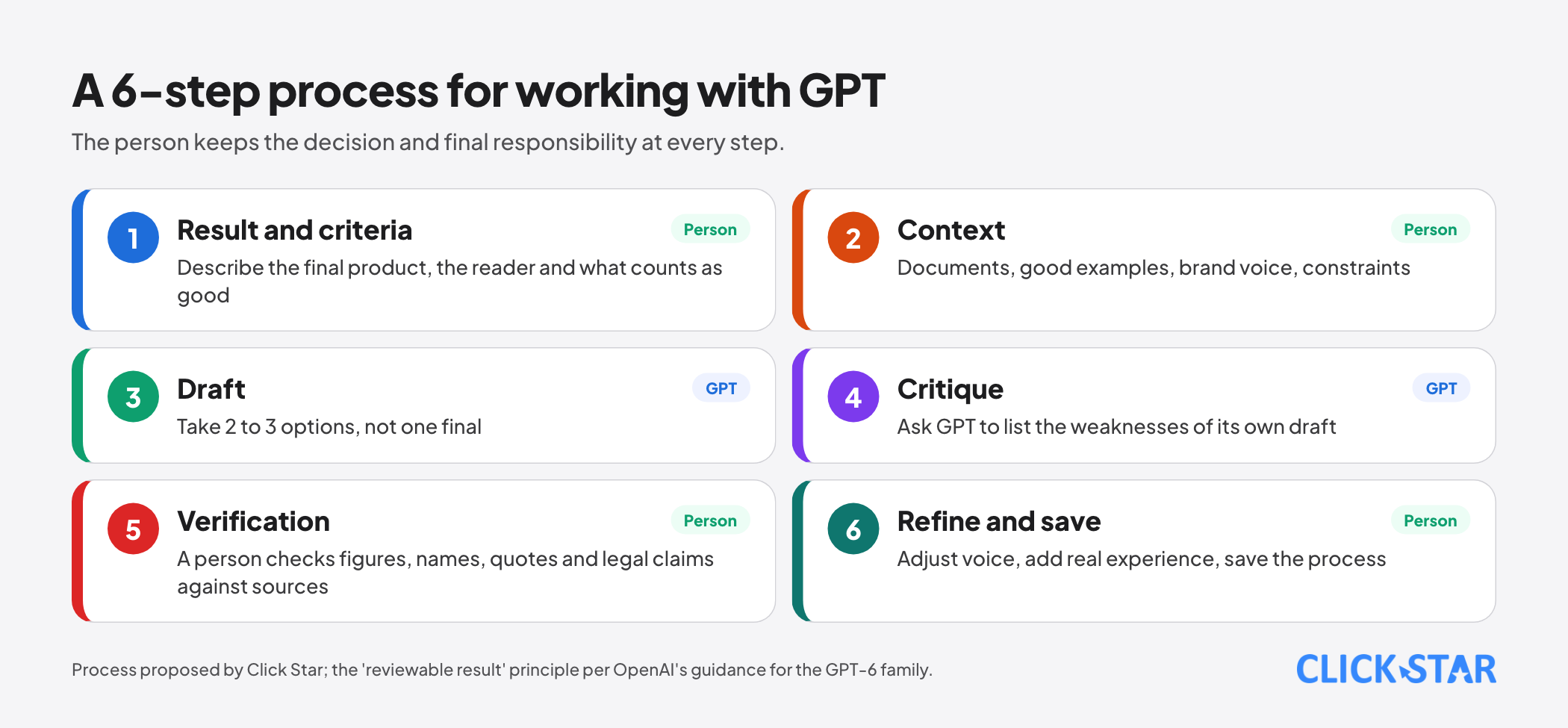
- A 6-step process makes GPT use steadier: state the result and the completion criteria, supply context, get a draft, ask for a critique, verify, then refine and save the process.
- For important work, hand tasks over in the form "complete the authorized work and produce a result that can be reviewed before asking for approval", in line with the guidance OpenAI gives for the GPT-6 family.
- Data is the hard boundary: according to OpenAI, its business plans and API do not use data for model training by default, but a business's duties under the Law on Personal Data Protection remain fully in force when customer information is entered.
- Results must be measured in numbers: time saved, the share that needs rework and the error rate, compared with the old way of working.
What the 3 studies say
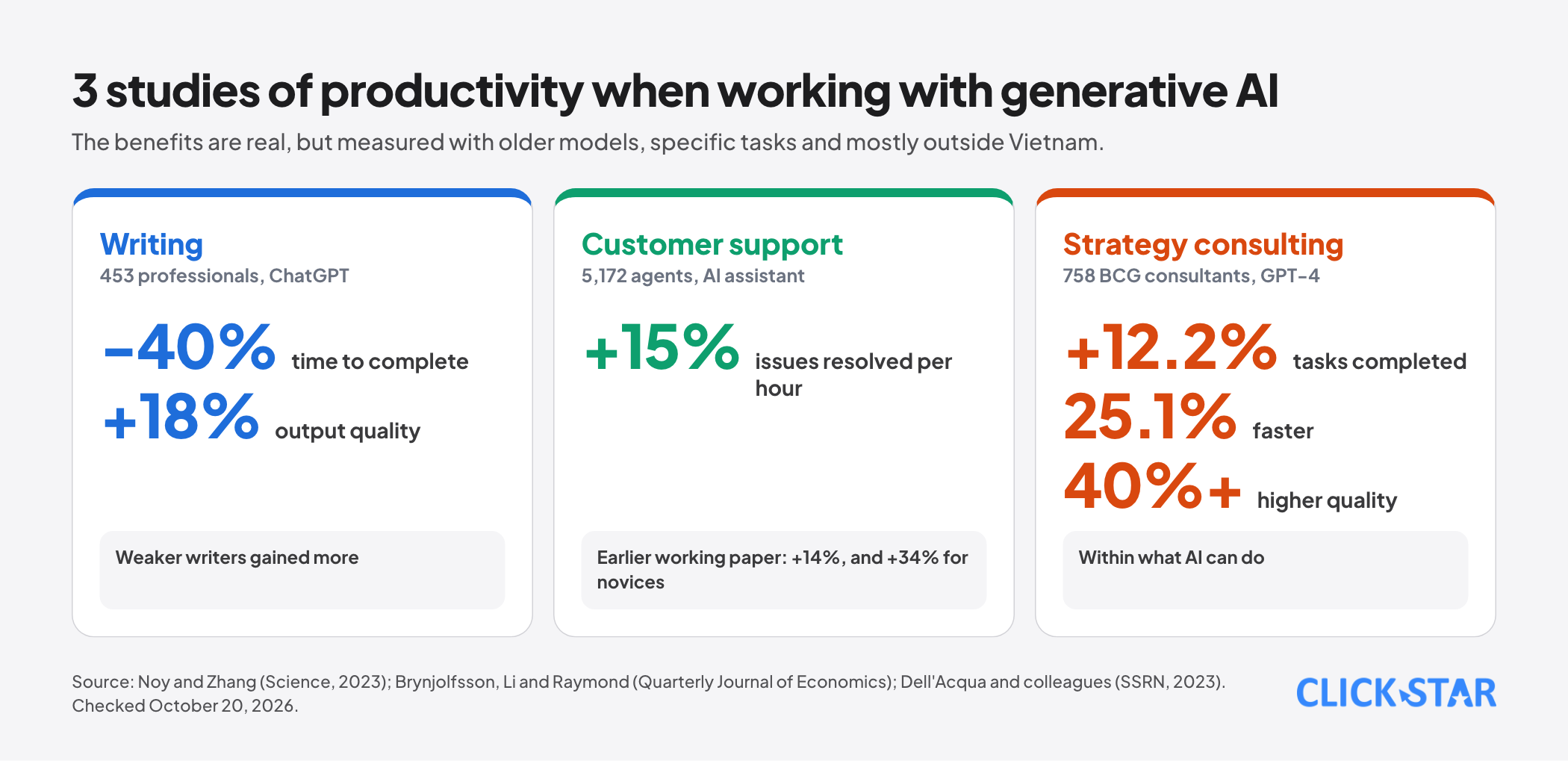
A writing task. The study by Shakked Noy and Whitney Zhang, published in Science in July 2023, assigned occupation-specific writing tasks to 453 college-educated professionals and randomly gave half of them ChatGPT. Average time to complete fell by 40% and output quality rose by 18%.
Weaker writers gained more, and the authors report that inequality between workers fell. 2 weeks after the experiment, the group exposed to ChatGPT was twice as likely to use it in their real job, and 2 months later 1.6 times as likely.
Customer support. The study by Erik Brynjolfsson, Danielle Li and Lindsey Raymond, in its Quarterly Journal of Economics version, followed 5,172 customer support agents and found that an AI assistant raised average productivity by 15%.
The same group's earlier working paper reported gains of 14%, and 34% for novice or low-skilled workers, and offered suggestive evidence that the AI model spreads the practices of more able workers so that newer workers move faster.
Strategy consulting. The study by Fabrizio Dell'Acqua and colleagues, from Harvard Business School, MIT Sloan and Boston Consulting Group, ran an experiment with 758 consultants using GPT-4. Within the range of what AI can do, the group using AI completed 12.2% more tasks, 25.1% faster and with over 40% higher quality.
On a task deliberately chosen to be outside AI's capability, the group using AI was 19 percentage points less likely to give a correct answer than the group without.
Click Star's view. These 3 studies used older models than today's GPT-6 family, in specific tasks and settings, mostly outside Vietnam, so the figures should not be read as the savings you will achieve.
What is worth taking away is the shape of the result: large benefits when the task is within AI's capability, especially for newer staff, and a real risk when the task is outside it and the user does not notice.
Know the boundary: which tasks to hand to GPT
The authors of the BCG study call the zone where AI does well and the zone where it does poorly the "jagged frontier", because the boundary does not follow intuition: 2 tasks that look similarly hard can fall on opposite sides. According to reports on this study, the boundary is hard to see in advance. So instead of guessing, sort tasks into 3 groups and check with small tests.
Group 1, hand over and skim the result: drafting a first version (emails, posts, product descriptions), summarizing documents or meetings, converting formats (notes into minutes, lists into tables), suggesting ideas and options, explaining concepts, proofreading style and spelling, building outlines.
Group 2, hand over but a person leads and checks closely: analysis with figures (GPT can easily calculate or interpret wrongly), market and competitor research (sources needed), specialist content such as legal, financial or medical, information newer than the model's training, and every figure or quotation that will go outside the company.
Group 3, do not hand over, or hand over only a side step: personnel decisions, legal commitments, high-risk decisions and processing sensitive customer data without a protection mechanism.
A boundary test for a new kind of task. Pick 5 past examples where you already know the right answer, have GPT do them, compare with the answers and note where it went wrong. If it errs in ways that are hard to spot, the task belongs to group 2 or 3, however fluent the output reads.
2 ways of working: divide or interleave
The BCG study describes 2 effective ways of working with AI. In the words of co-author Fabrizio Dell'Acqua in The Crimson, a "centaur" clearly defines which part the human does and which part the AI does. The second style, the "cyborg", is working in constant, deep interleaving with the tool; the paper reports that most consultants in the study behaved this way.
Click Star's view. Dividing the work (the centaur style) suits cases where the final result needs tight control, such as a report sent to a client: the person decides structure and conclusions, and GPT does drafting and format conversion.
Interleaving (the cyborg style) suits exploration and creativity, such as brainstorming a campaign: many rounds back and forth, with the person choosing direction. What they share is that the person always keeps the decision and final responsibility.
A 6-step process for working with GPT
Step 1. State the result and the completion criteria. OpenAI's guidance for the GPT-6 family advises letting the model infer intent and scope, complete the authorized work and produce a "concrete, reviewable result" before asking for approval, rather than stopping at each small step.
For a user this translates to: describe the final product (a 120-word email, a comparison table with 5 criteria), who the reader is and what counts as good.
Step 2. Supply context. Provide documents, good examples, the brand voice and constraints (do not promise what does not exist, do not use figures from outside the documents).
For recurring work, store this context where the product lets you keep shared documents and instructions, such as the projects feature in ChatGPT, instead of pasting it each time. Feature names and applicable plans change, so see OpenAI's help pages.
Step 3. Get a draft, not a final. Treat the first output as raw material. Ask for 2 or 3 options that differ in direction when the task needs creativity.
Step 4. Ask for a critique. Ask GPT to list the weaknesses of its own draft, what lacks evidence, which sentences could be misread and what a demanding customer would ask. This step is cheap and often exposes gaps.
Step 5. Verify. Every figure, proper name, quotation, date and legal claim is checked against its source. The person does the verifying; do not hand it back to GPT to confirm that it is right.
Step 6. Refine and save the process. The person adjusts the voice, adds real experience and makes the final decision. If the task recurs, save the request, the context and the verification checklist as a shared template for the team.
Working by role
- Marketing: hand over article outlines, headline variants, email drafts and summaries of campaign reports. The person checks: figures, brand consistency and unsupported claims in advertising.
- Sales: hand over drafts of outreach emails from a template, preparation of questions for a meeting and call summaries. The person checks: commitments on price, time and policy, and customers' personal information before pasting it into a tool.
- Customer care: hand over suggested replies, request classification and summaries of long conversations. The person checks: exceptional cases, tone with upset customers and sensitive information.
- Administration, HR, accounting: hand over drafting of template documents, summaries of internal rules and task lists. The person checks: every legal basis and figure, and decisions that affect employees.
- Management: hand over information roundups, meeting materials and options to compare. The person decides: choices and priorities.
Verification: the errors to look for
- Figures or sources that sound plausible but do not exist.
- Summaries that leave out an exception or an important condition in the original document.
- Smooth reasoning with one wrong calculation step.
- A voice that does not match the brand or does not suit Vietnamese readers.
- Information older than the training date or not applicable to Vietnam.
A 4-question checklist for every output that will go outside: which figures have sources, have those sources been opened, is any condition or exception missing, and if it is wrong what are the consequences and who is responsible.
Data and safety
OpenAI's business data page says that by default it does not use data from ChatGPT Enterprise, Business, Edu and its API platform, including inputs and outputs, to train or improve its models, and that the organization's data always remains owned by the organization.
A third-party summary notes that this is a disclosure page and that legally enforceable protection depends on the contract and the data processing addendum signed. For a personal account, check the data controls in the account's own settings.
On the legal side, according to summaries by Luat Viet An and Tilleke & Gibbins, the Law on Personal Data Protection and Decree 356/2025/ND-CP, in force since January 1, 2026, set duties on consent, data subject rights, breach reporting within 72 hours and conditions for cross-border transfers.
Entering customer information into a service hosted abroad may trigger these duties. Click Star has a separate article updating the law for 2027. A practical rule: do not enter personal data when it is not needed, mask or replace sample data, and use a business plan when real information must be processed.
Measuring results
Do not measure by feel. Pick 3 to 5 recurring tasks, record the time taken the old way for a week, then record the time with GPT for the next week, including time to check and fix. Track three more numbers: the share of outputs that needed heavy rework, the number of errors found after sending and the satisfaction of the recipients.
If the checking time is greater than the time saved, the task is not yet suitable to hand over.
10 rules for a team
- The person who assigns the task is responsible for the output, not GPT.
- Sort tasks into 3 groups and publish the list of tasks that must not be handed over.
- Every figure and quotation sent outside must be verified against its source.
- Do not enter personal data into a tool the business has not assessed.
- Use business accounts for work, not personal accounts.
- Save effective requests and checklists as a shared library.
- Record which work used AI assistance when customers or partners ask for transparency.
- Review request templates whenever the model changes, since old templates may no longer be optimal.
- Measure time and quality regularly and drop tasks that do not pay off.
- Train new staff with the team's real examples, including examples where GPT got it wrong.
Common mistakes
- Using GPT for everything without distinguishing the boundary, then being surprised by the tasks it does badly.
- Trusting fluent output. Fluent text does not mean correct text.
- Pasting real customer data into a personal account.
- Having no verification process, or letting GPT itself confirm its own output.
- Not measuring, so not knowing which tasks really benefit.
- Everyone doing it their own way, with effective templates neither saved nor shared.
- Handing GPT tasks that need judgment and final responsibility.
Related posts

Need tailored advice for your business?
Click Star helps you build a solution that fits your industry and scale. We answer every question during business hours.