Which keys does your AI agent hold? 5 questions to ask
An AI agent needs a key to call tools, and that key can easily be wider than needed. The article reads the new MCP specification, OWASP, and OpenAI and Claude Code documentation to produce 5 questions on rights, keys and logs.
A furniture company lets an AI agent look up orders and write notes into its CRM. To get it running fast, the installer pasted in the admin account's key, and nobody wrote down what that key can open. This is an illustrative scenario, not a real client.
This article reads the MCP specification version 2026-07-28 (released July 28, 2026), RFC 9207, OWASP's LLM06 entry, OpenAI's MCP documentation and the Claude Code permissions documentation, checked on November 16, 2026. The specification pages show no date beyond the version number.
It answers 3 things: what the agent may do, with which key, and where that is recorded. Click Star groups them into 5 questions to ask before granting access. Separate Click Star articles already cover MCP, AI agents and prompt injection.
Key points
- A notable agent risk is excess permission, not only the AI "getting it wrong". OWASP calls it Excessive Agency: excess functionality, permissions and autonomy.
- In MCP, authorization is optional. Over HTTP, specification 2026-07-28 recommends following OAuth 2.1 and requires clients to check the
issparameter (RFC 9207) when the authorization server sends it. - A key must be tied to the right server: an MCP server must reject tokens not issued for it and must not pass them on to other systems.
- The specification recommends that a person can always deny a tool call. OpenAI and Claude Code both offer per-tool approval settings.
- The specification recommends that clients log tool use; Click Star advises also logging who approved. Passing tokens through makes downstream logs lose sight of the real caller.
Why an agent needs a key, and where the risk sits
An agent is AI software that calls tools by itself. The system on the other side must know who is asking, so the agent carries 1 key (a token, a string that works like an access pass with limited rights).
OWASP's entry LLM06:2025 Excessive Agency (read November 16, 2026) describes the flaw as damaging actions triggered by unexpected, ambiguous or manipulated model output. Example from that page: a read-only tool connecting with an account that can also edit and delete.
Click Star's conclusion: AI can be wrong or tricked, so safety must live in the key's rights, not the prompt. Claude Code's documentation (read November 16, 2026) says the application enforces permission rules, not the model.
How MCP grants an agent access
According to the Authorization page of specification 2026-07-28, authorization is optional. Implementations over HTTP should follow it; local ones over STDIO (the standard input and output channel on one machine) should not, and take credentials from the environment.
The specification builds on the IETF's OAuth 2.1 draft (draft-ietf-oauth-v2-1-13). The MCP server holds the resource, the client asks for access for the user, and the authorization server issues the token. In 5 steps:
- Step 1: the client calls with no token yet, and the MCP server answers 401 with the address of its metadata.
- Step 2: the client reads that metadata (RFC 9728, April 2025) to learn which authorization server to use.
- Step 3: the client records the
issuer(the authorization server's identifier) and creates a PKCE code (proof that whoever redeems the code is whoever asked for it). - Step 4: the user consents; the authorization server returns a code with
iss; the client comparesisswith the recorded issuer. - Step 5: the client exchanges the code for a token, sends
resource, then calls MCP withAuthorization: Bearer.
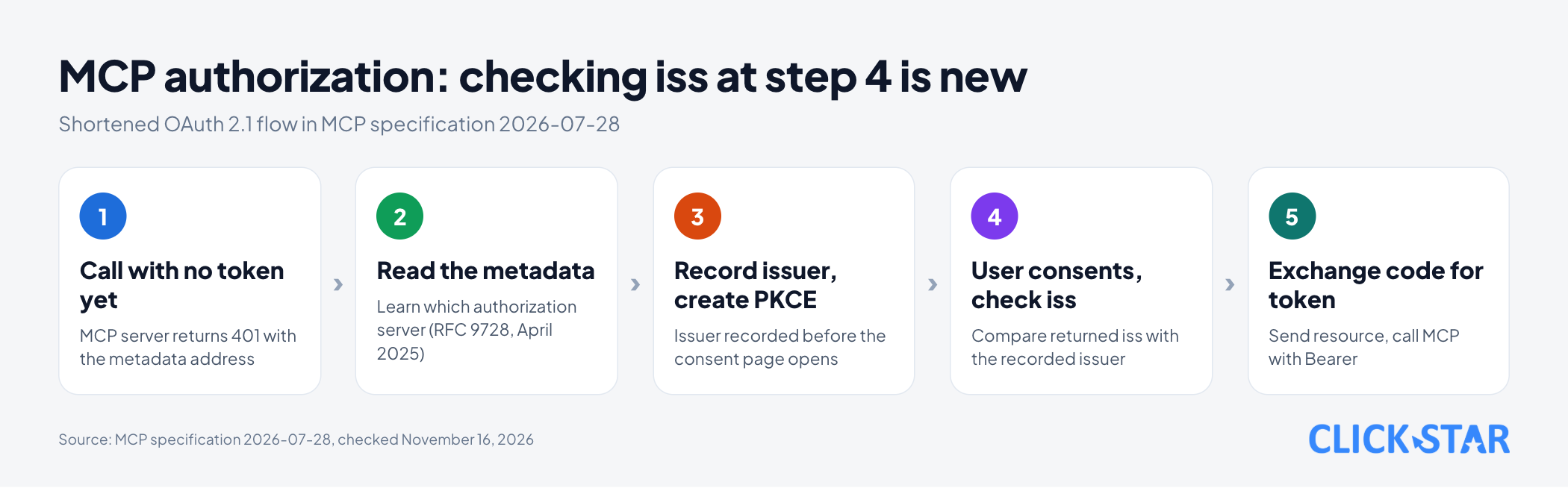
What is new in 2026-07-28 sits at step 4. Per the Key Changes page, the authorization server should send iss (RFC 9207) and the client must check it before redeeming the code.
The reason: RFC 9207 (March 2022) describes the mix-up attack. Whoever controls 1 authorization server a client uses can trick it into sending another server's code to them. The MCP Security Best Practices page says PKCE alone does not stop this.
The check, per the Authorization page's table: if iss is present, compare it as a plain string with the recorded issuer; if it is absent and the server declared authorization_response_iss_parameter_supported as true, reject.
In practice this check usually lives in the client's library (SDK), not in code a business writes. The MCP blog post "The 2026-07-28 Specification" (July 28, 2026) says the 4 Tier 1 SDKs (TypeScript, Python, Go, C#) support the new version; ask your vendor whether your client does.
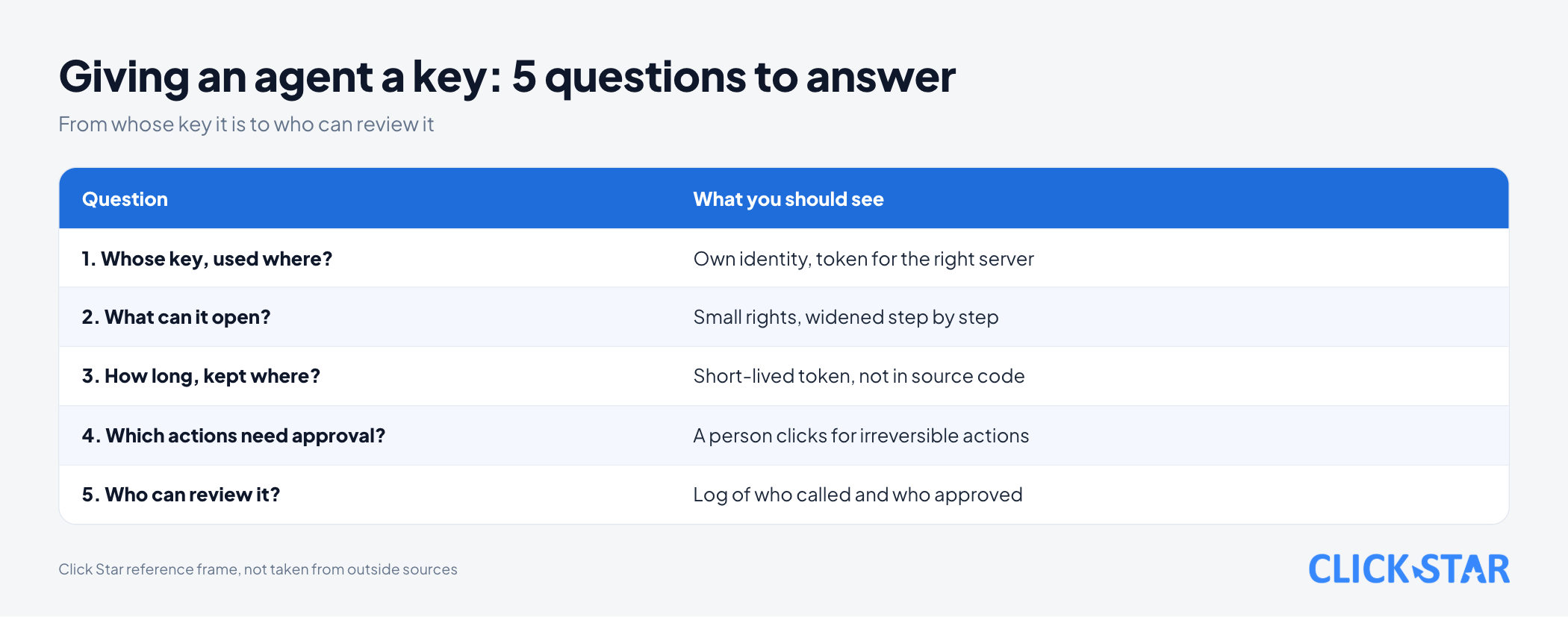
Question 1: Whose key is it and where does it work
An agent acting for 1 person should run with that person's rights, through OAuth with minimal scope, according to OWASP. Click Star advises that an agent running on a schedule use its own machine identity, not a person's account.
A key must also be tied to the right server, like a pass for building A that the guard of building B must refuse. The Authorization page requires the client to send resource (RFC 8707, February 2020) in both the authorization request and the token request.
The MCP server must check that a token was issued for itself, and must not accept or pass on other tokens. To call a service behind it, it uses a separate token issued by that service.
The Security Best Practices page lists 4 consequences of token passthrough: bypassed controls such as rate limits, a lost audit trail, broken trust boundaries and harder future controls.
Question 2: What can the key open
Start small. According to the Authorization page, the server should state the needed scope in the WWW-Authenticate header, and the client should request only that. When rights are missing, the server should return 403 insufficient_scope.
If the 401 response carries no scope, the client should request every scope in scopes_supported (if present). The longer the published list, the wider the key.
The Security Best Practices page also warns against bundling unrelated rights into 1 scope to avoid asking again, and against trusting a token's scope without checking on the server.
Question 3: How long does the key live and where is it kept
The specification's Authorization Security Considerations page (read November 16, 2026) says the authorization server should issue short-lived access tokens, and that tokens cached or logged on the server can be abused. For public clients, the refresh token (a token used to get new ones) must be rotated.
Per the Authorization page, an access token must not go in the URL query string, and a refresh token must stay confidential in transit and storage.
The specification does not say how many minutes "short-lived" means; choose by risk level. Click Star advises keeping tokens in environment variables or a secrets store, not in source code.
Question 4: Which actions need a person to approve
The specification's Tools page says a person should always be able to deny a tool call, and clients should show the inputs in a confirmation prompt.
OpenAI's documentation (no date shown, read November 16, 2026) says approval is requested by default before data goes to an MCP server. require_approval takes "always", "never" or a list of tools exempt from approval; allowed_tools limits which tools are imported.
Claude Code evaluates rules in the order deny, ask, allow; a broad deny still beats a narrower allow.
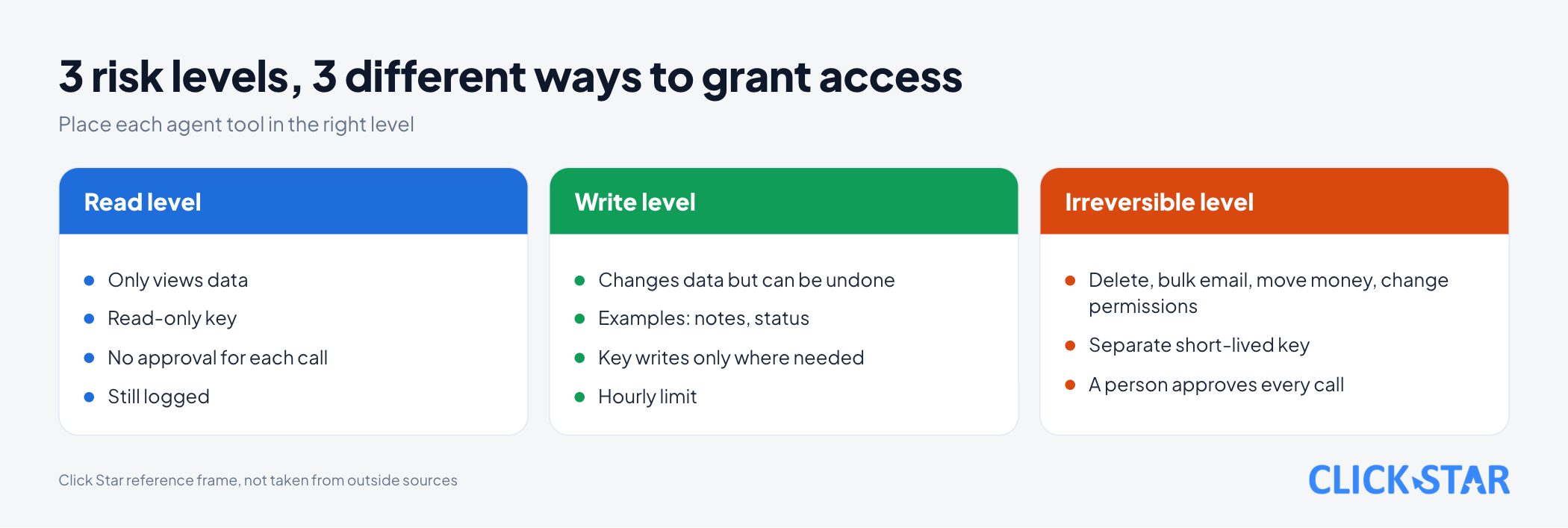
The frame below is Click Star's own reference, not from outside sources. Each tool goes into 1 of 3 levels:
- Read level: only views data. A read-only key, no approval for each call, still logged.
- Write level: changes data but can be undone, such as notes or status. A key that writes only where needed, with an hourly limit.
- Irreversible level: deleting data, bulk email, moving money, changing permissions. A separate short-lived key, with a person approving every call.
The read level is not automatically safe. OpenAI's documentation gives an example: a web page could tell the model to look up a customer in the CRM and put the email into a URL. Opening that URL leaks the email, though the CRM tool is read-only.
OpenAI suggests 2 separate requests: 1 with only web search, 1 with only the internal CRM tool. Labels such as readOnlyHint and destructiveHint are only hints; the specification says to treat them as untrusted unless the server is trusted.
Question 5: Who can review what the agent did
The Tools page recommends that clients log tool use for auditing. OpenAI advises keeping your own record of data sent to third-party MCP servers.
The Security Best Practices page advises logging each privilege elevation (scope requested, portion granted) with a correlation ID.
Per the specification's Streamable HTTP page (read November 16, 2026), POST requests must carry Mcp-Method; tools/call, resources/read and prompts/get also need Mcp-Name. The MCP blog says gateways can route on the headers; Click Star infers a gateway can log which tool was called via tools/call.
Click Star advises that each call leave 1 log line: agent, who delegated, tool, level, approver, result, correlation ID; never the raw token or personal data.
What this means for Vietnamese businesses
Click Star found no public measurement of how Vietnamese businesses grant agents access, or of incidents caused by excess permission, so there are no figures for that market.
For small and mid-sized businesses, inventory comes first: which agents run, and whose key each uses. If an agent touches customers' personal data, check the original legal text; this article does not analyze the law.
Click Star's view. A key's rights hold up better than a line in a prompt: a model can be tricked, a key does not "listen".
The hard part is process: without an owner per agent, a schedule to review rights and an approver, OAuth alone helps little. Click Star sells AI integration and AI automation services, so it has a commercial interest here.
What to do: a checklist in 3 groups
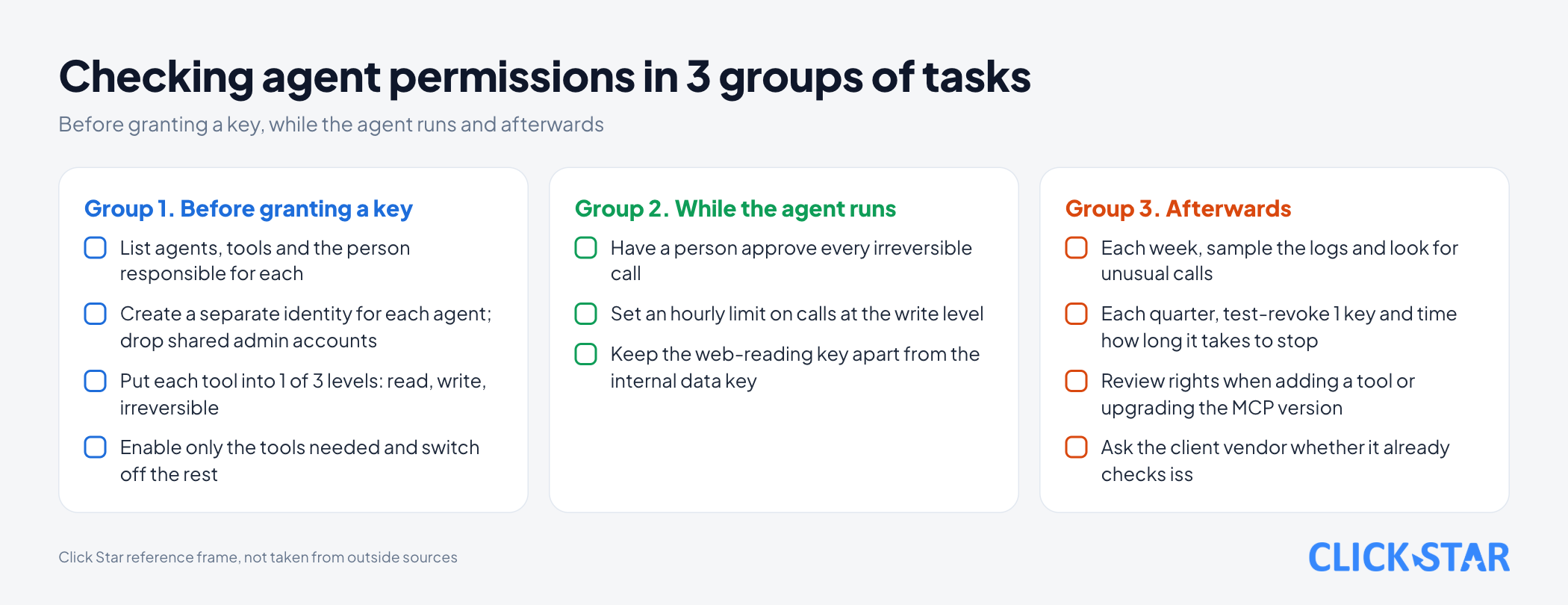
Click Star's reference frame, not taken from outside sources.
Group 1. Before granting a key
- List agents, tools and the person responsible for each.
- Create a separate identity for each agent; drop shared admin accounts.
- Put each tool into 1 of 3 levels: read, write, irreversible.
- Enable only the tools needed and switch off the rest.
Group 2. While the agent runs
- Have a person approve every irreversible call.
- Set an hourly limit on calls at the write level.
- Keep the web-reading key apart from the internal data key.
Group 3. Afterwards
- Each week, sample the logs and look for unusual calls.
- Each quarter, test-revoke 1 key and time how long it takes to stop.
- Review rights when adding a tool or upgrading the MCP version.
- Ask the client vendor whether it already checks
iss.
How to measure (Click Star's frame): the number of tools with write access and no named owner; the share of irreversible calls that had an approver (target 100%); the time from revoking a key to the key stopping working.
Common mistakes
- Pasting the admin account's key into the agent's configuration to save time, then nobody knows what it opens.
- Writing "never delete" in the prompt while the key still has the right to delete.
- Publishing every scope or using catch-all scopes such as
*,allorfull-access. - Letting an MCP server accept another service's token and pass it down to systems behind it.
- Setting
require_approvalto"never"for a whole server, including tools that can write. - Not logging who approved, or logging the raw token.
What is not known
How mature each SDK and client is with version 2026-07-28 has not been checked.
The Authorization page says a later revision is expected to raise sending iss from "should" to "must", with no date. Click Star has not read the PDF of OWASP's Top 10 for Agentic Applications for 2026 (overview page dated December 9, 2025).
The figures "3 levels" and "5 questions" are Click Star's own frame and have not been tested against outside evidence.
Related posts
Need tailored advice for your business?
Click Star helps you build a solution that fits your industry and scale. We answer every question during business hours.