What an AI agent is and how it differs from a chatbot: when to use it, permissions and monitoring
Separates chatbots, fixed workflows and agents using Anthropic, OpenAI, Google Cloud and OWASP documents, with permission limits, monitoring and a 30-day plan for small and mid-sized businesses.
The phrase "AI agent" is now attached to many things, from an auto-reply chatbot to software that reads email and updates a CRM. Small and mid-sized business owners struggle to tell when it is worth the investment, what permissions to grant and how to know it works.
This article draws on Anthropic's documentation, OpenAI's guide to building agents (an undated PDF), Google Cloud's explainer, OWASP and a few studies, checked as of October 21, 2026.
It covers how agents differ from chatbots and fixed workflows, when they pay off, how to limit permissions and how to monitor them. Click Star already has articles on website AI chatbots, on processes to automate first and on Claude Cowork; this one does not repeat them.
Key points
- Anthropic calls a system a workflow when models and tools follow code paths written in advance, and an agent when the model directs its own process. OpenAI excludes simple chatbots from agents; Google defines the term more broadly.
- Anthropic advises starting with the simplest solution, even if that means not building an agent. Agents trade cost and latency for the ability to handle open-ended work.
- According to Anthropic (June 13, 2025), agents use about 4 times the tokens of chat and multi-agent systems about 15 times. Errors can compound across steps, so reliability must be measured over repeated runs.
- OWASP names 3 roots of "excessive agency" risk: excessive functionality, permissions and autonomy. Mitigation: least privilege, narrow tools, human approval of high-impact actions.
- Good first candidates: triaging support requests, reviewing customer data and drafting reports, at read-only or draft level.
- There is no independent measurement of agents in Vietnamese small businesses. Measure on 20 to 50 real cases before widening permissions.
What an AI agent is, according to official documents
According to Anthropic (December 19, 2024), workflows are systems where models and tools are orchestrated through predefined code paths, while agents are systems where the model directs its own process and tool use.
OpenAI's guide (read October 21, 2026) defines an agent as a system that independently completes tasks on a user's behalf. Simple chatbots, single-turn models and sentiment classifiers are not agents, because the model does not control the workflow.
Google Cloud (page marked updated 04/02/2026) is broader: an agent is software that uses AI to pursue goals, with reasoning, planning, memory and some autonomy. In Google's split, an AI assistant suggests actions while the user decides.
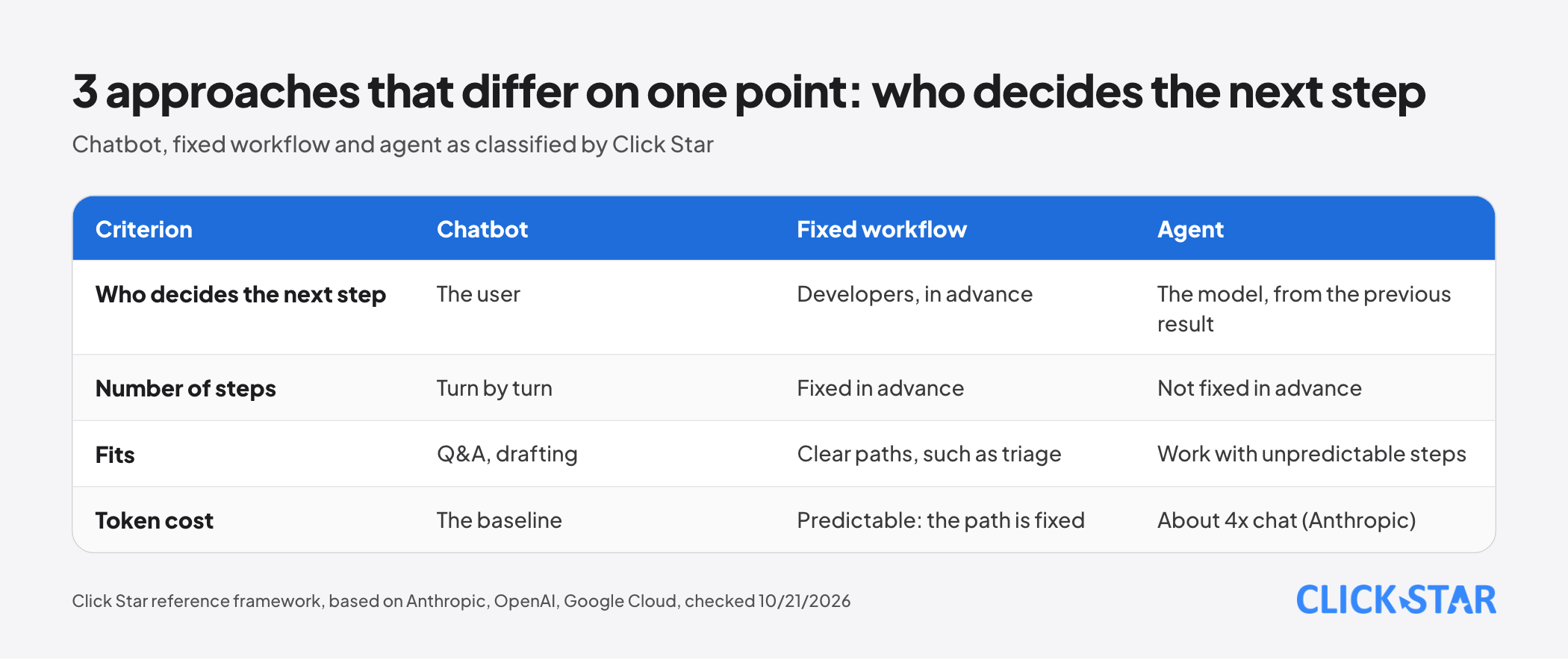
The sources differ at the boundary. Click Star uses 1 practical threshold: a system is an agent when the model itself decides the next step and which tool to call, based on the previous step's result.
Chatbot, fixed workflow and agent: where they differ
A chatbot answers turn by turn and the user decides the next step. For many question-and-answer and drafting needs, that is enough.
A fixed workflow is a sequence of steps written by developers, with the model doing small jobs inside. Anthropic lists 5 patterns: prompt chaining, routing, parallelization, orchestrator-workers and evaluator-optimizer.
Routing is the support-triage problem: the model labels a request and code sends it to the right queue. People design the path, so it is easy to test and to cost.
An agent runs a loop: the model plans, picks a tool, reads the result and decides the next step. The number of steps is not fixed, so it is hard to predict what it will do and what it will cost.
How an agent runs: the loop and 5 components
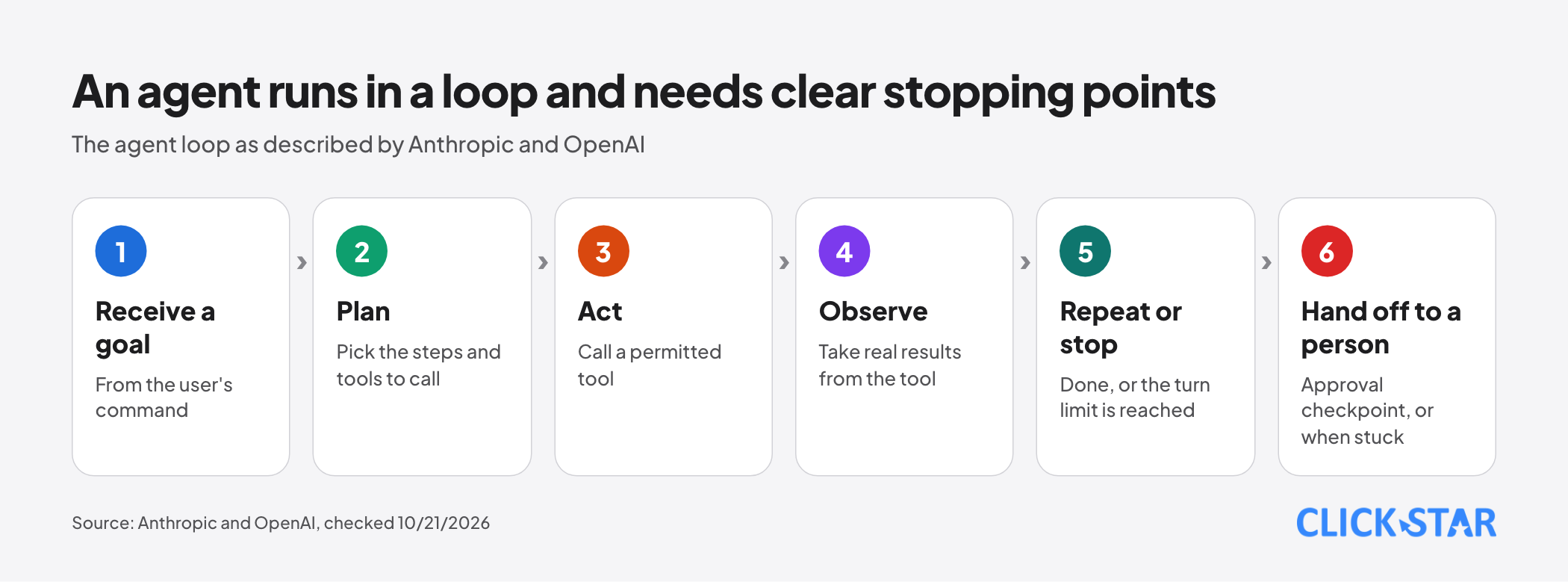
According to Anthropic, an agent starts from a user's command, plans and works on its own, and at each step takes real results from the environment (tool output, code execution) to judge progress. It can pause at checkpoints for feedback.
A maximum number of iterations is a common stopping condition for keeping control. OpenAI describes the same idea: the loop runs until an exit condition such as a final output, an error or a turn limit.
Click Star groups this into 5 components:
- Model: OpenAI advises prototyping with a capable model for a baseline, then testing smaller ones to cut cost.
- Tools: OpenAI names 3 kinds: data tools (read a CRM), action tools (send email, update a record) and orchestration tools (agents calling agents).
- Memory and context: Anthropic treats the basic block as a model augmented with retrieval, tools and memory.
- Instructions and guardrails: OpenAI advises building them from existing procedures and policies.
- Human approver: a checkpoint where a person agrees before a sensitive action.
When to use an agent, and when a chatbot or workflow is enough
OpenAI suggests prioritizing 3 kinds of work where rule-based methods struggle: complex decisions needing judgment (refund approval), rule sets that are hard to maintain, and heavy reliance on unstructured data. If a case clearly fails these criteria, a deterministic solution may suffice.
Anthropic agrees: many applications only need a single optimized model call with retrieval and examples. Agents fit work with unpredictable steps in a trusted environment.
Gartner (June 25, 2025) predicts over 40% of agentic AI projects will be canceled by the end of 2027 due to rising costs, unclear value or weak risk controls, and warns of "agent washing" (labeling chatbots or RPA as agents). The page blocks automated tools, so Click Star read it via search results; it is a forecast, not a measurement.
Click Star's view. The right question is not whether to use an agent but which step truly needs the model to decide. Most processes in a small business should be fixed workflows, with the model only where language understanding is needed, such as classifying or summarizing.
Click Star sells AI integration and AI automation services, so it has a related interest; this view deliberately favors the simpler solution first.
Cost, latency and reliability
Anthropic says agentic systems trade latency and cost for task performance. Its multi-agent research system article (June 13, 2025) reports agents use about 4 times the tokens of chat and multi-agent systems about 15 times. That is a measurement on Anthropic's own system, not a general rate.
On reliability, Anthropic warns about compounding errors. A Click Star illustration, not a measurement: if each step is 95% correct and steps are independent, a chain of 10 steps is correct only about 59.9% of the time.
Anthropic's agent evaluation article (January 9, 2026) defines pass^k as the probability that all k runs succeed; its example: 75% per run over 3 runs gives about 42% to pass all 3.
The τ-bench study (posted June 17, 2024) found that state-of-the-art function-calling agents of the time, including gpt-4o, succeeded on under 50% of tasks, with pass^8 under 25% in retail. These are older models in a simulation, shown only to explain why consistency must be measured.
Minimum permissions and risks
According to OWASP (LLM06:2025, read October 21, 2026), "excessive agency" lets a system take damaging actions in response to unexpected or manipulated output, such as hallucination or prompt injection through content the agent reads.
OWASP names 3 roots: excessive functionality (tools not needed), excessive permissions (downstream access broader than needed) and excessive autonomy (high-impact actions run without independent approval).
Its example: an assistant reads email to summarize it, but the plugin can also send mail. 1 malicious email can make it forward sensitive mail to an attacker. Removing the send function, using read-only scope or approving each outgoing message would each prevent it.
OWASP's mitigations include narrow tools instead of open-ended ones like a shell, least privilege, human approval of high-impact actions, and enforcing authorization in downstream systems instead of trusting the model's decision.
OpenAI suggests rating each tool low, medium or high on read-only or write access, reversibility, account permissions and financial impact. It names 2 triggers for human intervention: exceeding failure thresholds, and high-risk actions such as canceling orders, large refunds or payments.
Anthropic (April 9, 2026) describes per-action permissions (always allow, needs approval, block), for example reading a calendar freely but approving each invitation sent. It adds that no single defense layer guarantees safety against prompt injection.
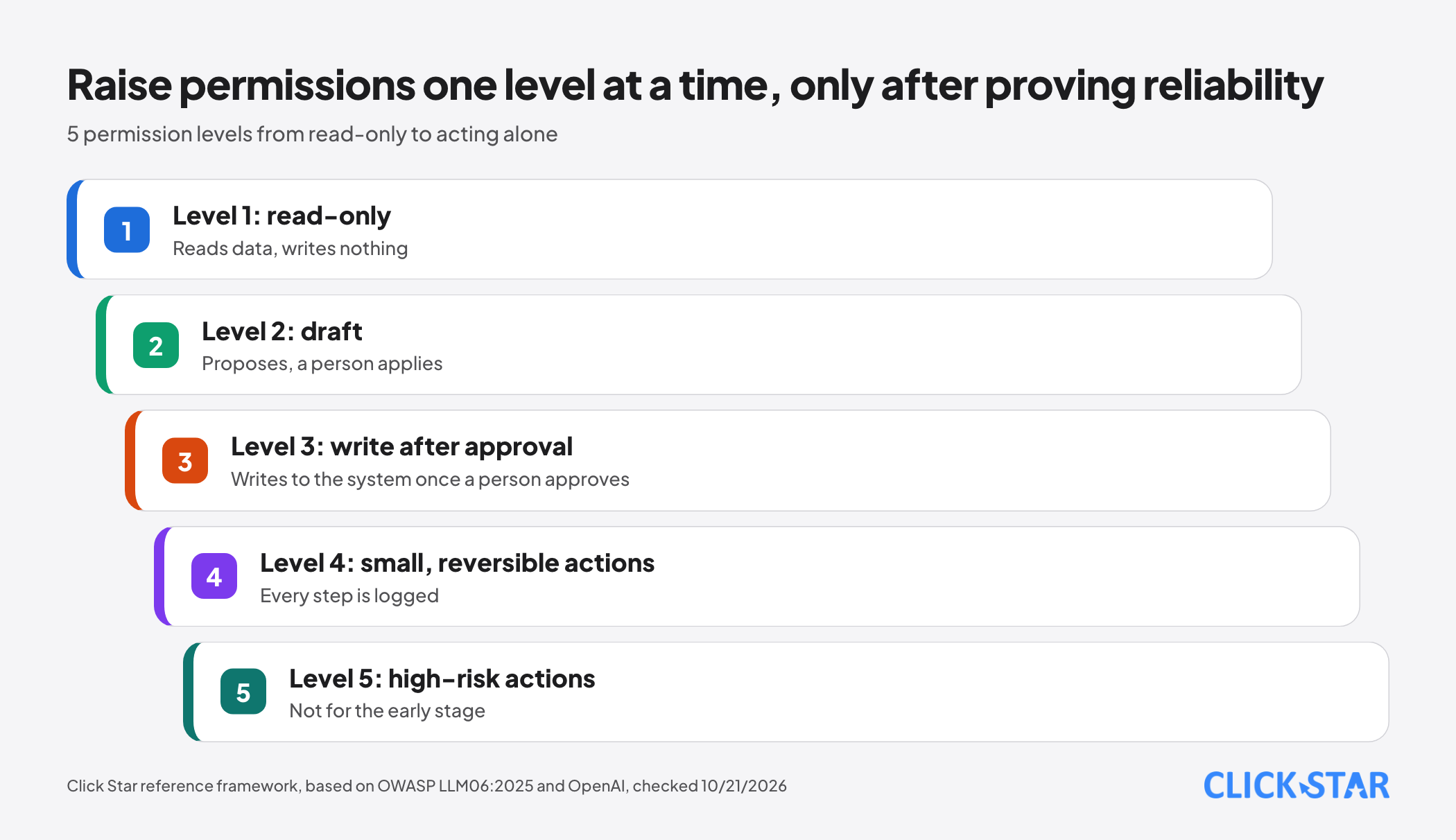
Click Star arranges permissions in 5 levels: read-only; draft; write after human approval; small reversible actions with a log; high-risk autonomous action. The last should not be used early. This is a reference framework drawn from OWASP and OpenAI, not a published standard.
Monitoring and evaluation
Anthropic (January 9, 2026) advises starting with 20 to 50 simple tasks drawn from real failures, not waiting for hundreds. Graders come in 3 kinds: code (fast, cheap, rigid), model (flexible but needs calibration against humans) and human (the standard, but expensive and slow).
It also advises reading transcripts to tell an agent's failure from an over-strict grader, and separating capability evals from regression evals (near 100%).
In live use, step-by-step logs are needed. Anthropic's tools article (September 11, 2025) advises tracking runtime, tool-call counts, tokens and errors.
Examples for small and mid-sized businesses in Vietnam
The 3 examples below are Click Star suggestions, not results measured in Vietnam, all at read-only or draft level.
Triaging support requests. Start with a routing workflow: the model labels a request (delivery, refund, technical, complaint) and suggests priority, and code queues it. Consider an agent only when each request needs several systems. Refunds still need a human.
Cleaning customer data. The agent finds duplicate records, badly formatted phone numbers and missing fields, then proposes merges or fixes with reasons for a person to apply. No direct CRM writes yet. Click Star has articles on protecting data in AI analysis and on unifying customer data.
Building reports. The agent reads figures from a spreadsheet or dashboard and drafts a report flagging doubtful items; figures must trace to a source and the owner approves before sending. If the format and sources never change, a fixed workflow is cheaper and steadier.
What to do: a 30-day plan
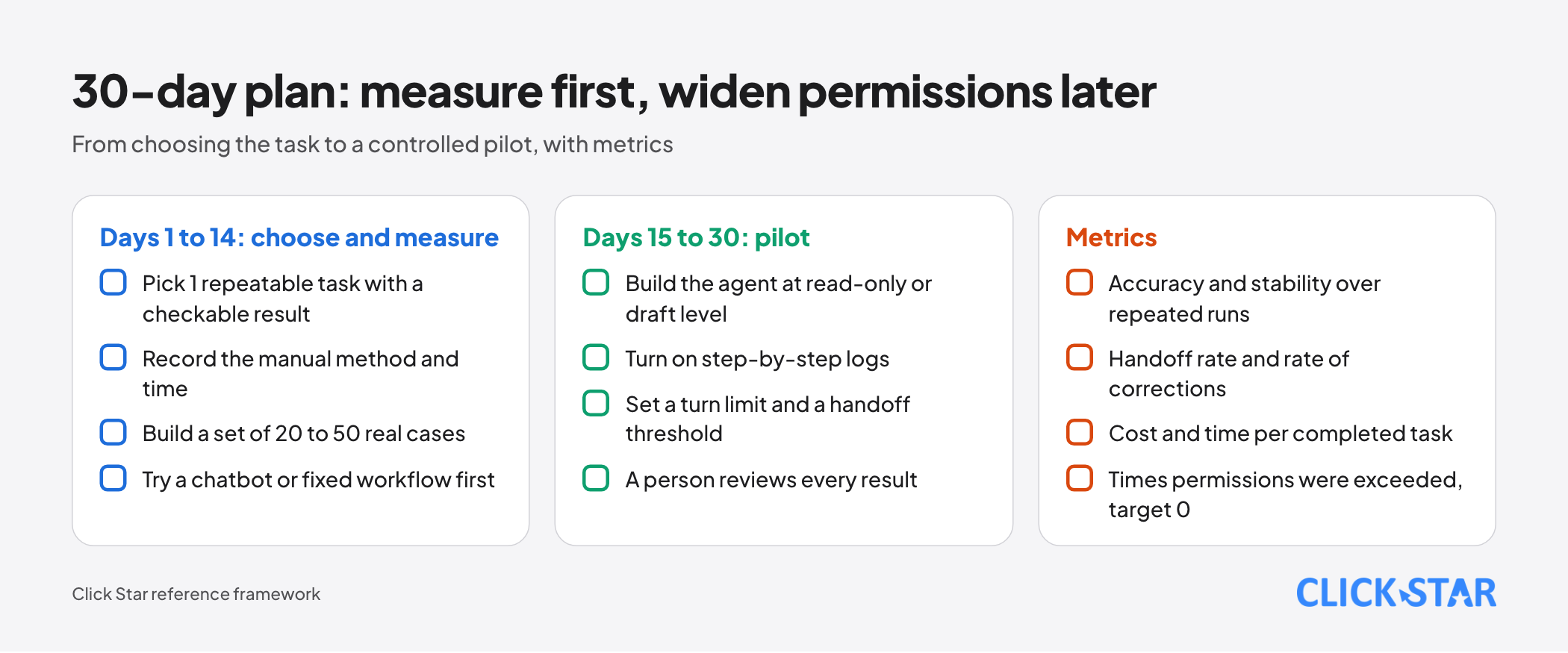
- Days 1 to 14: pick 1 repeatable task with a checkable result, record the manual method and time; build a set of 20 to 50 real cases; try a chatbot or fixed workflow first for a baseline score.
- Days 15 to 30: if the workflow is not enough, build the agent at read-only or draft level, turn on logging, set a maximum number of turns and a handoff threshold, and have a person review every result.
Metrics to track (a Click Star framework):
- Accuracy on the test set and stability over repeated runs (pass^k style).
- Handoff rate and the rate at which people must correct results.
- Cost and time per completed task.
- Number of times the agent exceeds its permissions; the target is 0.
Common mistakes
- Calling every chatbot an agent, then paying agent prices for work a workflow can do.
- Granting write or send permissions on day 1, before there is evidence of reliability.
- Concluding from 1 good run instead of repeating runs on the same case.
- Setting no maximum number of turns, letting the loop run long and burn tokens.
- Letting an agent that can act also read outside content (email, web pages).
- Counting only model cost, not reviewer time, logging and tool upkeep.
What is not known
Click Star has no independent measurement of agent effectiveness or cost in Vietnamese small businesses; every example above is a suggestion.
The documents differ on definitions. Anthropic's 2024 article notes that much tooling has changed since; Click Star has not read the newer material it points to. The τ-bench figures are for 2024 models and the Gartner forecast was read via search results. No prices are given because they change quickly.
Related posts


Need tailored advice for your business?
Click Star helps you build a solution that fits your industry and scale. We answer every question during business hours.