AI invoice data entry: how accurate is reading photos and PDFs?
The article compares 3 ways for AI to read invoices from photos and PDFs, their technical limits, cross-checks and how to measure accuracy, based on official documentation from Anthropic, OpenAI, Google Cloud and Microsoft Azure.
At month end, accountants have to type invoices into the software by hand. Some are PDFs exported from a system, others are phone photos, slightly tilted and slightly blurry.
This article draws on the official documentation of Anthropic, OpenAI, Google Cloud (Document AI) and Microsoft Azure (Document Intelligence), checked up to October 26, 2026. That is vendor documentation, not independent testing.
Key points
- There are 3 approaches: multimodal AI models that read images and PDFs, OCR that only extracts text, and specialized services (Google, Azure) that return named fields such as invoice number and total.
- Anthropic warns against using Claude for work needing perfect precision without human oversight. No document read states a general accuracy rate for invoices.
- Vietnamese needs its own test: Google's Invoice Parser does not list Vietnamese; Azure's language page lists Vietnamese and the dong (VND), but Azure's invoice page says 27 languages, which does not match that list.
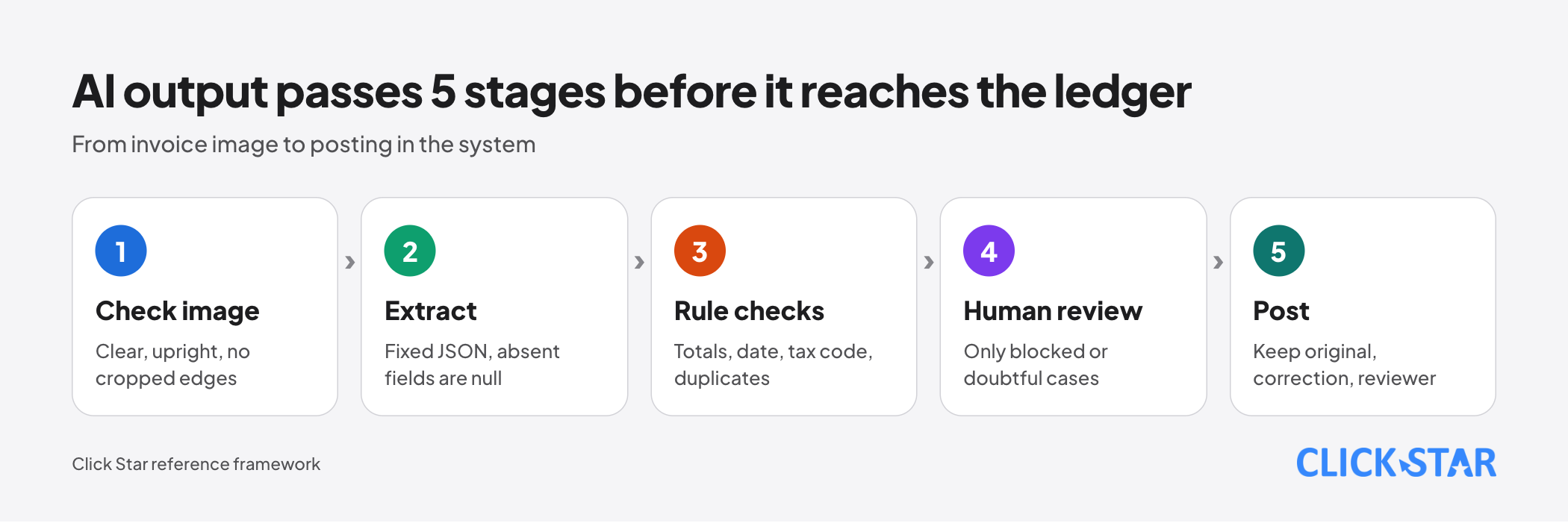
- Run 5 stages: check the image, extract, apply rule checks, have a human review doubtful cases, then post. The total must match the sum of the lines.
- Measure on a real sample set with personal data masked, and read each vendor's data retention policy before sending invoices.
How AI reads invoices: 3 approaches
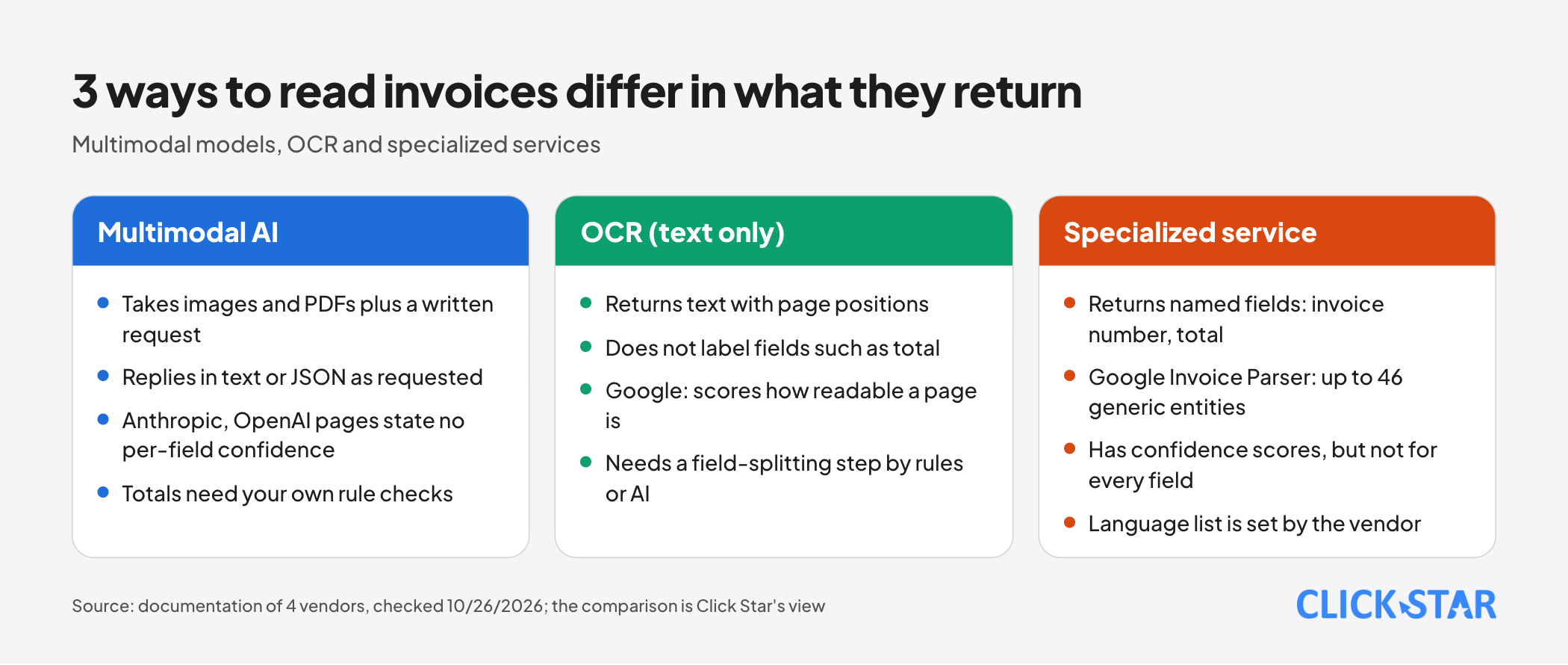
There are 3 approaches, and they differ in what they return, not only in how smart they are.
Approach 1: multimodal AI model
Multimodal means the model receives both text and images. You send an image or PDF with a request such as "get the invoice number, date and total", and it replies in text or JSON.
According to Anthropic's PDF documentation and OpenAI's file inputs documentation (neither shows a date, read October 26, 2026), the system extracts each page's text, turns the page into an image and gives both to the model.
Click Star has a separate article on structured JSON output. Click Star's inference: valid JSON does not mean correct numbers, and "the lines add up to the total" is hard to express in a schema, so check it in your own code.
Approach 2: OCR that only extracts text
OCR (optical character recognition) reads text from images. The result is text with positions on the page, and it does not know which text is the "total".
According to Google Cloud (updated October 20, 2026), Enterprise Document OCR extracts text, including handwriting, in more than 200 languages and scores readability. After OCR you still need to split fields, by rules or AI.
Approach 3: specialized extraction services
These services are prebuilt per document type and return named fields. According to Google Cloud, Invoice Parser reads the header and line items (invoice number, supplier, amounts, tax, date, due date), and its Pretrained overview page (updated October 20, 2026) says up to 46 generic entities.
According to Microsoft (updated August 15, 2026), prebuilt-invoice handles sales invoices, utility bills and purchase orders.
Page, size and resolution limits
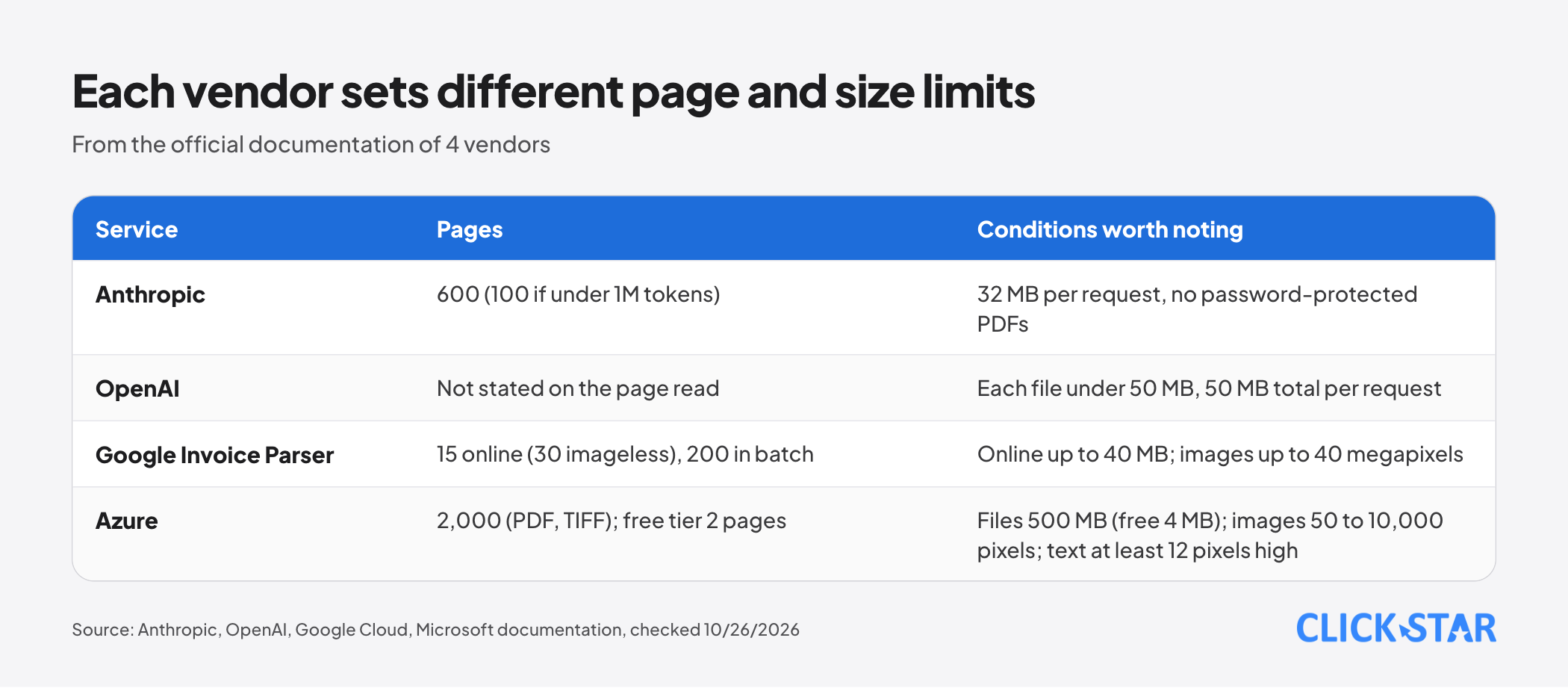
Each vendor sets its own limits; check them before choosing.
Anthropic. Each request is limited to 32 MB and 600 pages (100 pages if the context window is under 1 million tokens), with no password-protected PDFs.
OpenAI. Each file must be under 50 MB, and all files in a request together are also limited to 50 MB. For PDFs in the Responses API (Chat Completions does not support it), detail sets the detail of page images; auto uses high for GPT-5.6 and later and low for earlier models. The page states no page limit.
Google Document AI. Per its Limits page (updated October 22, 2026), Invoice Parser accepts 15 pages online (30 with imageless_mode, contiguous from page 1) and 200 in batch. Online files are limited to 40 MB; images to 40 megapixels, which does not apply to PDFs.
Azure. PDF and TIFF up to 2,000 pages (the free tier processes only the first 2). Files up to 500 MB on the paid tier, 4 MB on the free tier; images from 50 x 50 to 10,000 x 10,000 pixels; text at least 12 pixels high in a 1024 x 768 image (about 8-point at 150 dpi).
Vietnamese and Vietnamese invoices: is there support
The documents read have no accuracy measurements for Vietnamese invoices, so this section covers only language lists.
According to Google Cloud (updated October 20, 2026), Enterprise Document OCR, Form Parser, Layout Parser and Custom Extractor list Vietnamese. Invoice Parser alone lists 12 languages, without Vietnamese, and Custom Extractor with generative AI officially supports only English.
Absence from a list means no vendor commitment, not necessarily that it cannot read the language.
Microsoft's figures do not match. The invoice model page says 27 languages, while the prebuilt-model language page (updated May 5, 2026) has a 40-entry list with Vietnamese and the dong (VND), plus a shorter list without it. Click Star guesses these are different service versions; check yours.
For electronic invoices, Click Star states no regulation. If the invoice comes with structured data, reading the source data is usually more reliable than reading an image (Click Star's view).
Common failures and why they happen
Small, tilted, blurry or heavily compressed images. According to Anthropic's image documentation (no date shown, read October 26, 2026), the model can make mistakes or "hallucinate" on low-quality, rotated or very small images (under 200 pixels), and heavy JPEG compression makes text hard to read. OpenAI also notes small and rotated text.
Misread numbers. No source read measures this rate. Click Star's illustrations, not measurements: the letter O read as the digit 0, or a thousands separator (1,234,567) read as a decimal mark.
Multi-column tables, merged cells, tables split across pages. Microsoft (updated April 8, 2026) expects lower confidence for merged cells; for a row split across 2 pages, row confidence is potentially lower while cell confidence is still expected to be high.
A 5-stage flow from image to ledger
Click Star's framework, not from outside sources. The main idea: AI output never goes straight into the ledger.
- Check the image: enough resolution, right way up, no cropped edges. Google's Enterprise Document OCR has an image quality score from 0 to 1 (enabled with
enableImageQualityScores); the Invoice Parser page lists no such function. - Extract to JSON with a fixed schema, with
nullfor absent fields. - Automatic rule checks, as listed below.
- A human reviews only cases blocked by a rule or showing doubt.
- Post with a trail: original image, AI output, corrected version, reviewer, review time.
Suggested rule checks (ask your accountant for the exact rules):
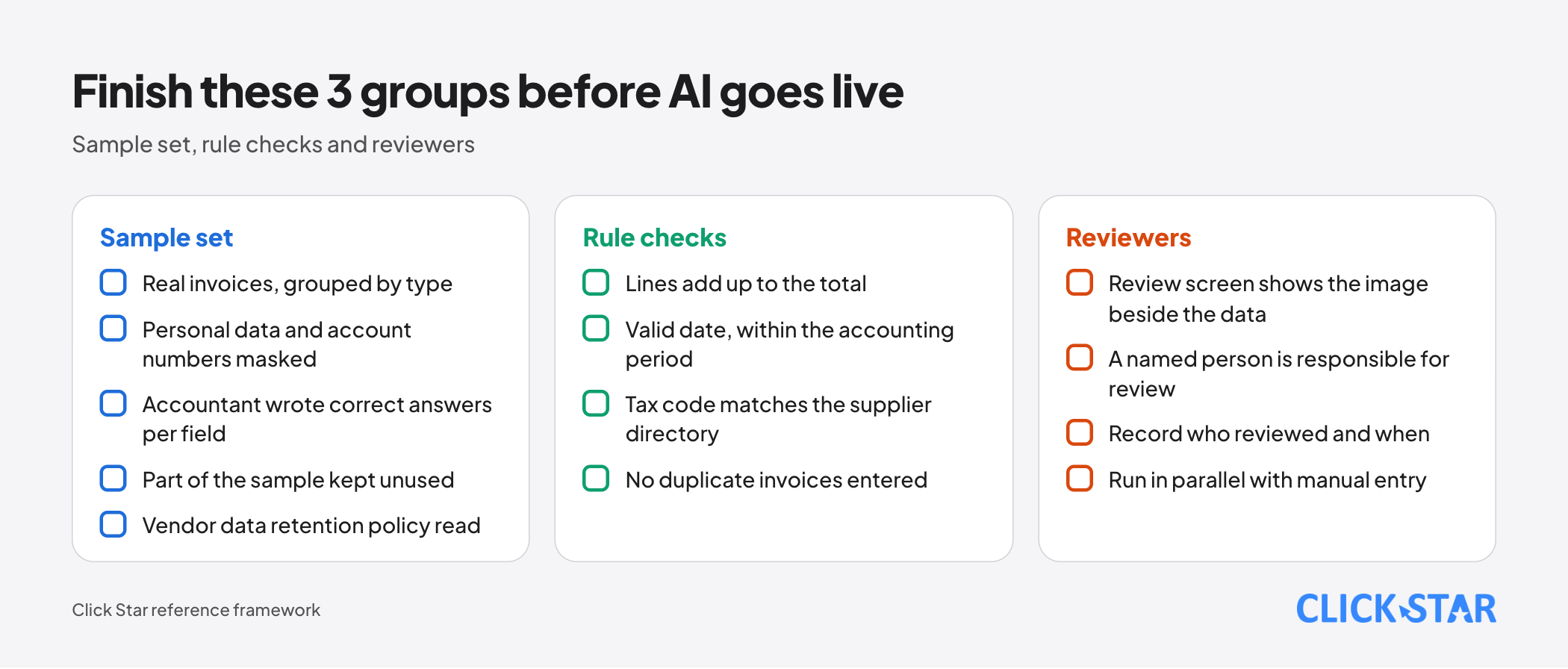
- The lines add up to the pre-tax total, and the pre-tax total plus tax equals the amount payable.
- The date is valid, not in the future and within the accounting period.
- The tax code has the right length and matches the supplier directory.
- The invoice number and supplier pair has not been entered before.
Confidence scores: how to use them and how far to trust them
A confidence score estimates how likely a field was read correctly. Microsoft's example: 0.95 means about 19 out of 20 times it is correct, and the score can decide between automatic acceptance and human review (updated April 8, 2026). Not every field returns a score, Microsoft adds.
In Google Document AI's sample code (updated October 20, 2026), entities have a confidence field. The Anthropic and OpenAI pages read describe no per-field scores.
With a multimodal model, doubt signals should come from rule checks, image quality and 2 independent reads that disagree (Click Star's suggestion, no measurement behind it). Compare scores with the real error rate on your sample set before using them as an automatic threshold.
Measuring accuracy with your own sample set
The number worth trusting is the one measured on your own invoices. The steps below are Click Star's framework.
- Take real invoices from recent months and group them: exported PDFs, scans, phone photos, long tables, foreign invoices.
- Mask personal data and account numbers, then have an accountant write the correct answer for each field.
- Run each approach and compare each field with the correct answer. Record the correct rate per field, correction rate, share blocked by rule checks, error types and review time.
- Keep part of the sample unused while you adjust the request, then measure on that part.
The acceptable error level is the chief accountant's decision; there is no general standard.
Where invoice data goes: storage and privacy
Invoices contain names, addresses, tax codes and sometimes account numbers, so find out how long a vendor keeps data and whether it trains on it.
- Anthropic: per the image FAQ, uploaded images are not stored after processing and not used for training. The PDF page does not mention this separately.
- OpenAI: since March 1, 2023, API data is not used for training unless you opt in. With the Responses API, responses are stored at least 30 days by default (
storeparameter); files uploaded through the Files API stay until you delete them or setexpires_after. Abuse monitoring logs are kept up to 30 days, unless the law requires longer or protecting the service needs it. - Microsoft Azure: files are processed in your resource's region, stored temporarily with encryption and deleted after 24 hours (updated July 28, 2026).
- Google Document AI: Click Star has not read this service's own data policy page.
Click Star has a separate article on data safety and permissions for AI in business. If invoices hold personal information, ask legal counsel; this is not legal advice.
Which approach to choose
Click Star's selection framework, not from outside sources:
- Many invoices, few unusual layouts, language on the vendor's list: try a specialized service first.
- Very varied layouts, arbitrary fields: try a multimodal model with rule checks.
- Only text needed for search: OCR is enough. Source data comes with the invoice: prefer it.
Click Star's view. Click Star provides AI integration and AI automation services, so it has a related interest. This is a technical and governance view, not a measurement.
No approach wins on every kind of invoice. The main value lies in checking and review, because the business bears the cost when AI misreads. Start with "AI suggests, a human confirms", measure the correction rate, and loosen only for fields with a low, stable error rate.
A 4-week pilot plan
This is Click Star's framework, not a milestone from outside sources.
- Week 1: choose the document type, collect and mask the sample set, get the accountant's answers.
- Week 2: run at least 2 approaches on the same sample set, record errors by field.
- Week 3: write the rule checks, build a review screen showing the image beside the data.
- Week 4: run in parallel with manual entry, set the threshold and reviewer.
Common mistakes
- Trusting a general accuracy rate instead of measuring on your own invoices.
- Letting AI output go straight into the ledger, with no rule checks.
- Testing only on clean PDFs, then meeting tilted photos and blurry scans in production.
- Trusting confidence scores before comparing them with the real error rate, or assuming every field has one.
- A review screen without the original image, so reviewers just click through.
- Sending unmasked invoices for testing before reading the data retention policy.
- Rejecting a service only because Vietnamese is missing from its list, or using it without testing samples with diacritics.
What is not known
Click Star has no accuracy measurement of any service on Vietnamese invoices, and the vendors publish none. It is unclear which service reads Vietnamese diacritics, handwriting or multi-column tables on local invoices well.
It is unclear why Microsoft has 2 different language figures. Click Star has not read the Document AI data policy.
Related posts

Need tailored advice for your business?
Click Star helps you build a solution that fits your industry and scale. We answer every question during business hours.