A chatbot that looks up real orders: how AI tool calling works
The model only proposes a tool call; the application runs it. This article explains the loop, how to set permissions so a customer sees only their own orders, and when to ask for confirmation, based on Anthropic, OpenAI and OWASP documentation.
A customer messages at 9 p.m.: "Where is my order?". The chatbot replies with the right status and delivery date. It seems to "know" the data, but the model only writes text; a lookup run by the company's application supplies the data.
This article draws on Anthropic's tool use documentation, OpenAI's function calling and guardrails guides, and 2 OWASP Top 10 lists (LLM 2025, API 2023), checked on October 24, 2026. Most vendor pages show no update date.
It answers 3 questions: what the model and the application each do, how to make sure a customer sees only their own orders, and when to ask the customer to confirm. Click Star already has articles on AI agents, MCP, prompt injection and JSON output; this one covers order lookup.
Key points
- The model does not run functions the company defines. According to Anthropic, it only sends a structured request; the company's code runs it and sends the result back (tools such as web search, run on the vendor's servers, are the exception). OpenAI describes the same flow.
- Set a cap on loop rounds: the tool runner (beta) in Anthropic's SDK limits rounds only if you set
max_iterations. - The customer ID must come from the login session, not from the model; OpenAI advises not making the model fill in what the application knows.
- Check permissions in the back-end system: OWASP API Security calls swapping an object ID widespread and advises checking in every function that receives an ID from the client.
- Cancelling, changing an address and refunding need a confirmation step (OWASP, OpenAI).
- Tool results are untrusted data. Measure by the real state of your system, not only by what the chatbot says.
How an order-lookup chatbot works
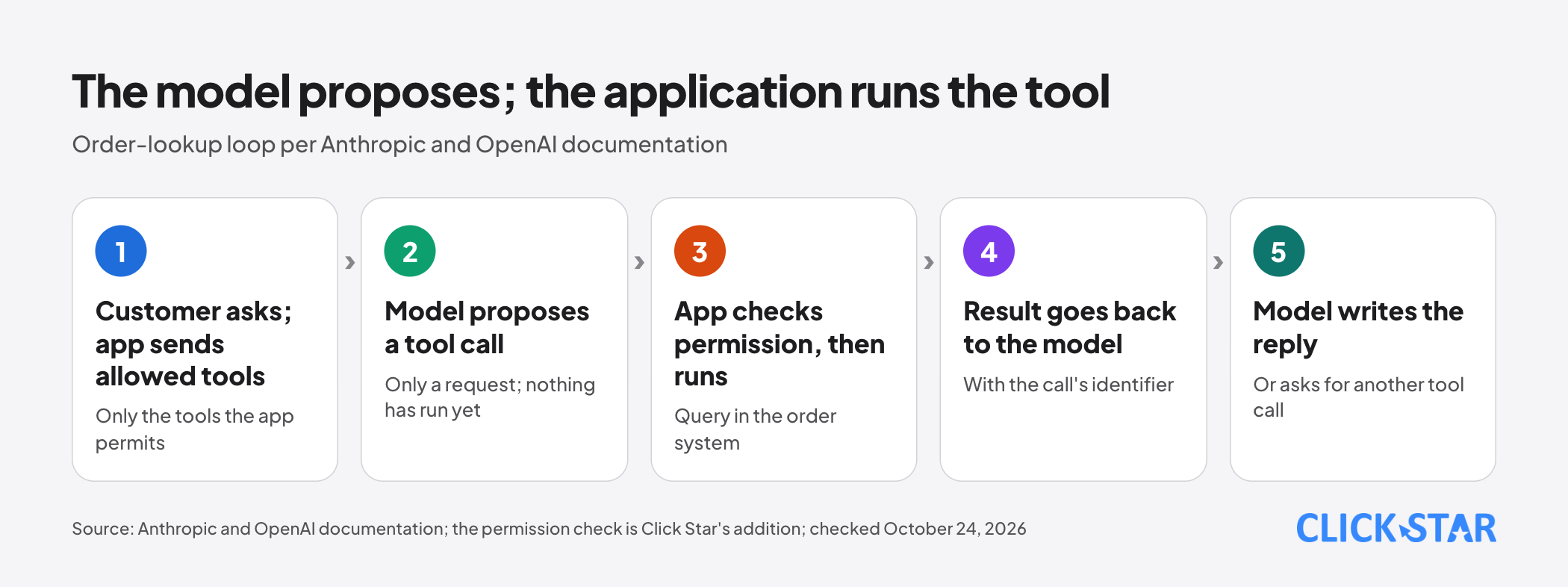
The model only proposes a tool call; the application runs it. Anthropic states in "How tool use works" (no date shown, read October 24, 2026) that the model never runs anything itself: your code (or Anthropic's servers, for tools such as web search) does, and the result flows back.
A tool is a function the company defines, such as order lookup or stock check. The technique is called tool use or function calling. OpenAI describes 5 steps (the permission check in step 3 is Click Star's addition) and Anthropic describes the same rhythm:
- The application sends the customer's question with the list of tools it allows.
- The model returns a request, for example a call to
lookup_orderwith the order code the customer gave. - The application checks permission, then runs the query in the order system.
- The application sends the result back with the call's identifier.
- The model writes the reply to the customer, or asks to call another tool.
With Claude, the application repeats while stop_reason is tool_use and stops on other reasons such as end_turn or max_tokens. Each call adds at least 1 extra round trip (Anthropic), so a question the model can answer alone needs no tool.
Describing tools: write for a new employee
The model picks a tool from its description, so this matters most. Anthropic (Define tools, no date shown) advises stating what the tool does, when to use it or not, what each parameter means and what it does not return, in at least 3 to 4 sentences.
An illustrative example from Click Star, valid in Anthropic's format:
{
  "name": "lookup_order",
  "description": "Look up the status of 1 order that belongs to the customer in this chat. Use it when the customer asks where an order is or when it arrives. Do not use it to cancel or edit orders. Returns only the status, carrier and expected delivery date, never the phone number or address.",
  "input_schema": {
    "type": "object",
    "properties": {
      "order_code": {
        "type": "string",
        "description": "The order code the customer gave. If the customer has not given one, ask again; do not guess."
      }
    },
    "required": ["order_code"],
    "additionalProperties": false
  }
}
This schema (the template of allowed parameters) deliberately has no customer ID parameter. The application knows the customer from the chat session and attaches that ID to the query itself. OpenAI gives a similar refund example: pass a known order ID in code instead of having the model fill it in.
The "do not guess" line has a reason. According to Anthropic (Tool use with Claude), when a required parameter is missing, some models ask again while others may infer a value; this is not guaranteed.
A few more principles from the documentation:
- Tool definitions, call blocks and result blocks all add tokens, the units of text you are billed by (Anthropic). OpenAI names function definitions specifically.
strictmode ensures parameters match the schema (Anthropic, OpenAI). In Click Star's view, it does not ensure the order belongs to the customer.
Permissions: which customer may see which order
Permissions must be decided by the application, not the model. Customer A types "Show me order DH12346", but it is customer B's order. If the tool takes an order code and looks it up directly, the model will make the call and the chatbot will answer.
This flaw is called broken object level authorization (BOLA). According to the OWASP API Security Top 10 2023, attackers exploit it by changing the object ID in the request. OWASP advises checking in every function that uses a client-supplied ID, preferring random IDs, and writing tests.
The OWASP Top 10 for LLM Applications 2025 (item LLM06, Excessive Agency) names 3 root causes: excessive functionality, permissions and autonomy. A permissions example: a read-only tool using a database account that can also edit and delete, or serving a single user from an account that sees everyone's data.
OWASP's measures fit order lookup directly:
- Offer only the minimum tools, and avoid open-ended ones (OWASP gives running shell commands as an example; Click Star puts free-form SQL in the same group).
- Use a read-only account limited to the tables needed.
- Run the tool in the context of that specific user.
- Check authorization in the back-end system instead of relying on the model.
In Click Star's view, sequential codes such as DH0001 and DH0002 are easy to guess, but random codes do not replace the permission check either. A customer who is not logged in needs a separate verification step; Click Star has no source for a standard method, so design and test one.
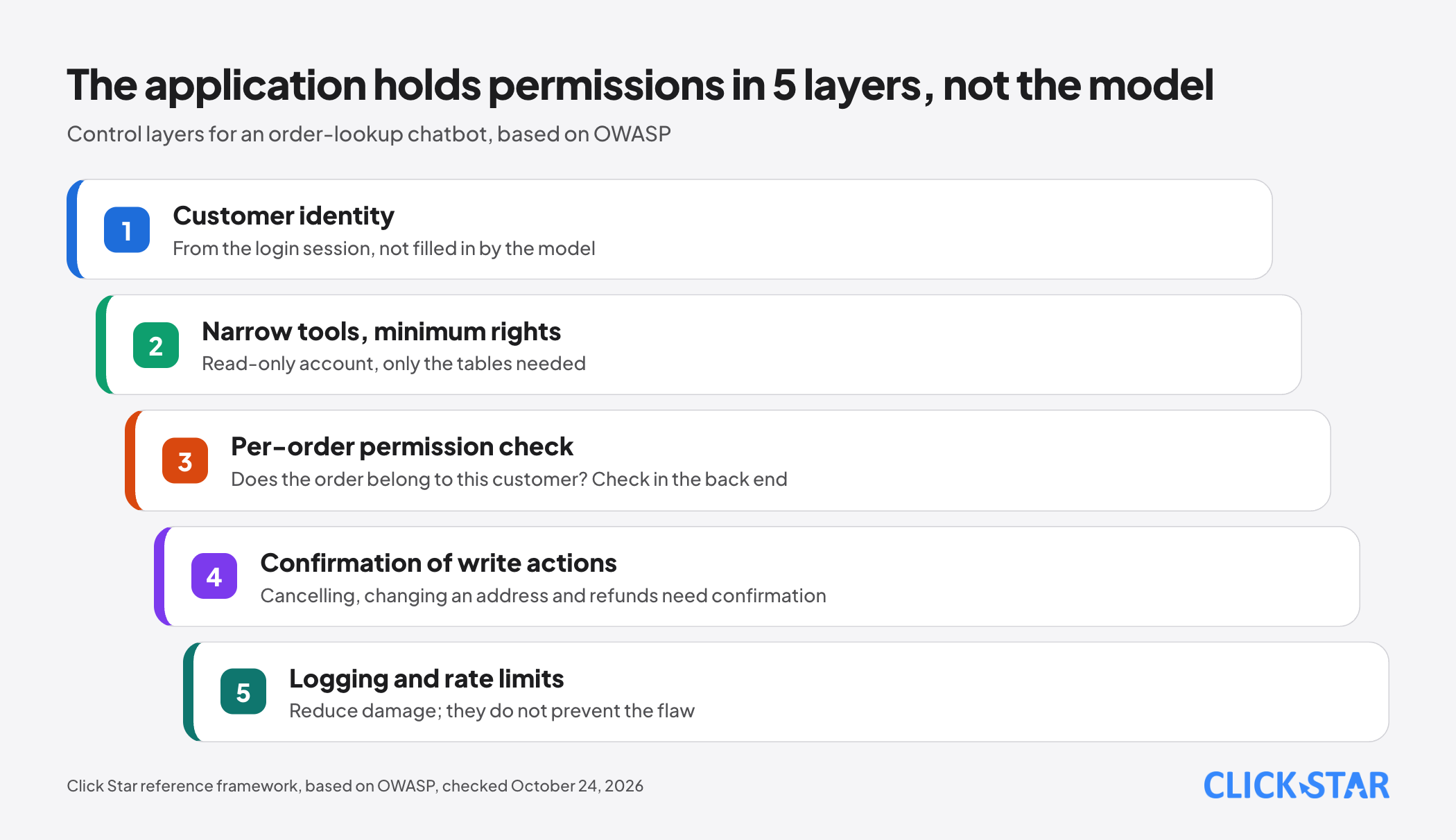
Click Star groups these measures into 5 layers (Click Star's reference framework): customer identity, narrow tools, per-order permission check, confirmation of write actions, logging.
Write actions: ask again before acting
Lookups can run automatically, but cancelling or refunding needs a person to confirm. OWASP calls a missing approval step excessive autonomy: a high-impact action runs unapproved, such as deleting a document without asking the user.
OWASP advises a human in the approval loop for such actions. In its Agents SDK, OpenAI (Guardrails and human review, no date shown) lets you pause before side effects such as cancelling or editing: the model still proposes, but the run waits for your approval.
OpenAI also advises that when you need checks around every tool call (said in a multi-agent context), validation should sit next to the tool that causes the side effect.
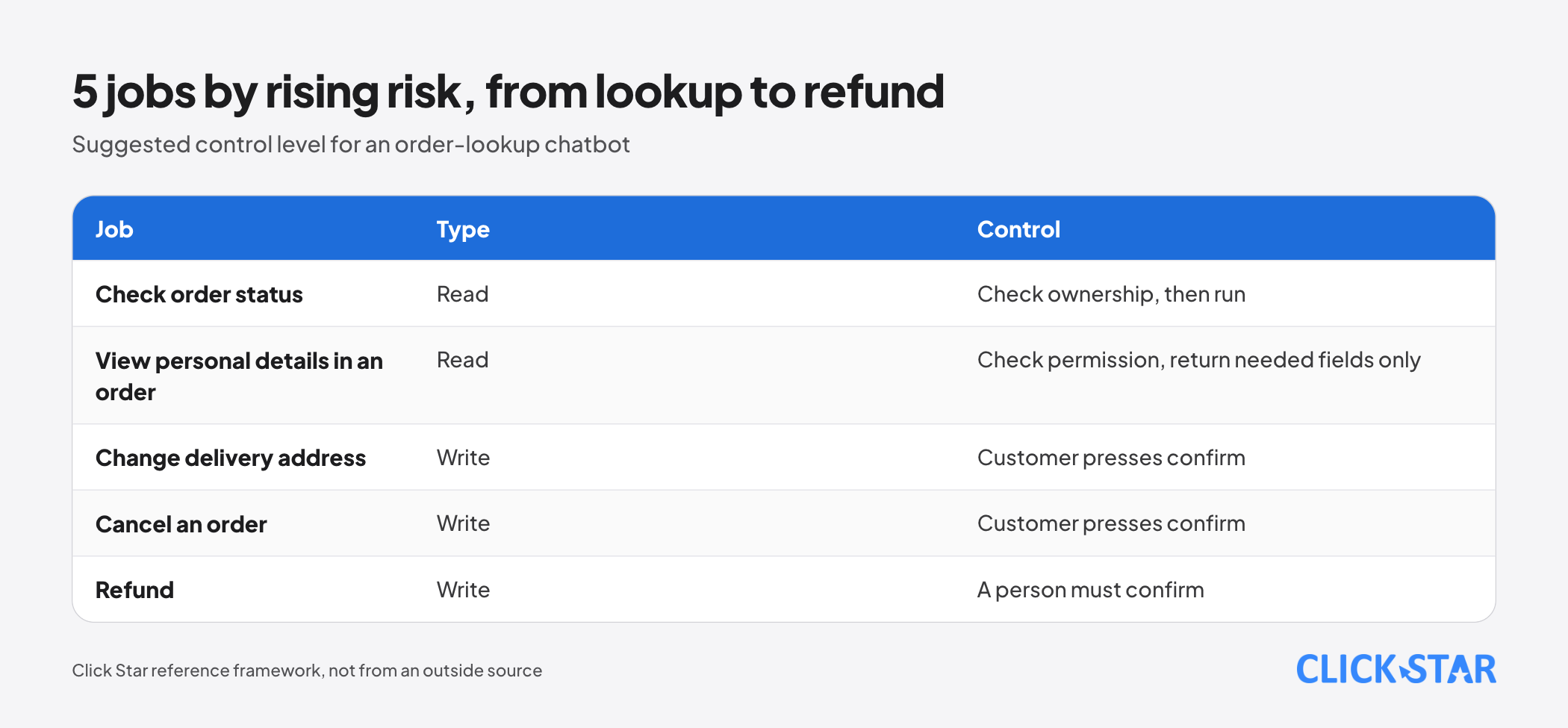
Click Star's reference framework, not from an outside source, ranks 5 jobs by rising risk: checking order status, viewing personal details in an order, changing the delivery address, cancelling, refunding.
The model only drafts the request; the application shows it, and the customer presses a confirm button instead of typing, since the model has to interpret typed words while a button click is unambiguous (Click Star's reasoning).
Tool results, errors, loop limits and logs
A result is data, not a command. Outside content may contain injected instructions, such as a delivery note typed by someone (illustrative example).
Anthropic (Handle tool calls; Mitigate jailbreaks and prompt injections) advises keeping unfamiliar content inside a tool_result block, saying what it is and where it came from, and stating in the system prompt that tool results must not change the goal.
Errors need guidance. When a lookup fails, return is_error: true with the reason and next step; Anthropic advises against generic messages such as "failed". Click Star suggests the same sentence for "no such order" and "someone else's order", so the chatbot never confirms an order exists.
Loop cap. According to Anthropic (Tool runner, in the SDK), the runner loops until the model stops calling tools, or until max_iterations if you set it. A hand-written loop needs its own counter. Click Star found no recommended number; pick a cap, then adjust.
Logs. OWASP advises logging tool and back-end activity and applying rate limits; these reduce damage but do not prevent the flaw. Click Star suggests recording time, customer ID, tool name, parameters, a partly masked result and the confirming person, without full phone numbers or addresses.
What this means for Vietnamese businesses
An order-lookup chatbot touches names, phone numbers and addresses, which are personal data. Click Star has not read any legal text for this article, so it cites no provisions; ask your legal team.
Click Star's view. Treat the model as a new chat agent: quick to understand questions, but not someone to hand the warehouse keys. The hard part is the permission code, the confirmation and the logs, not the model.
Click Star sells AI integration and AI automation, so it has an interest here; the view above is technical and testable with your own test cases.
What to do before opening to customers
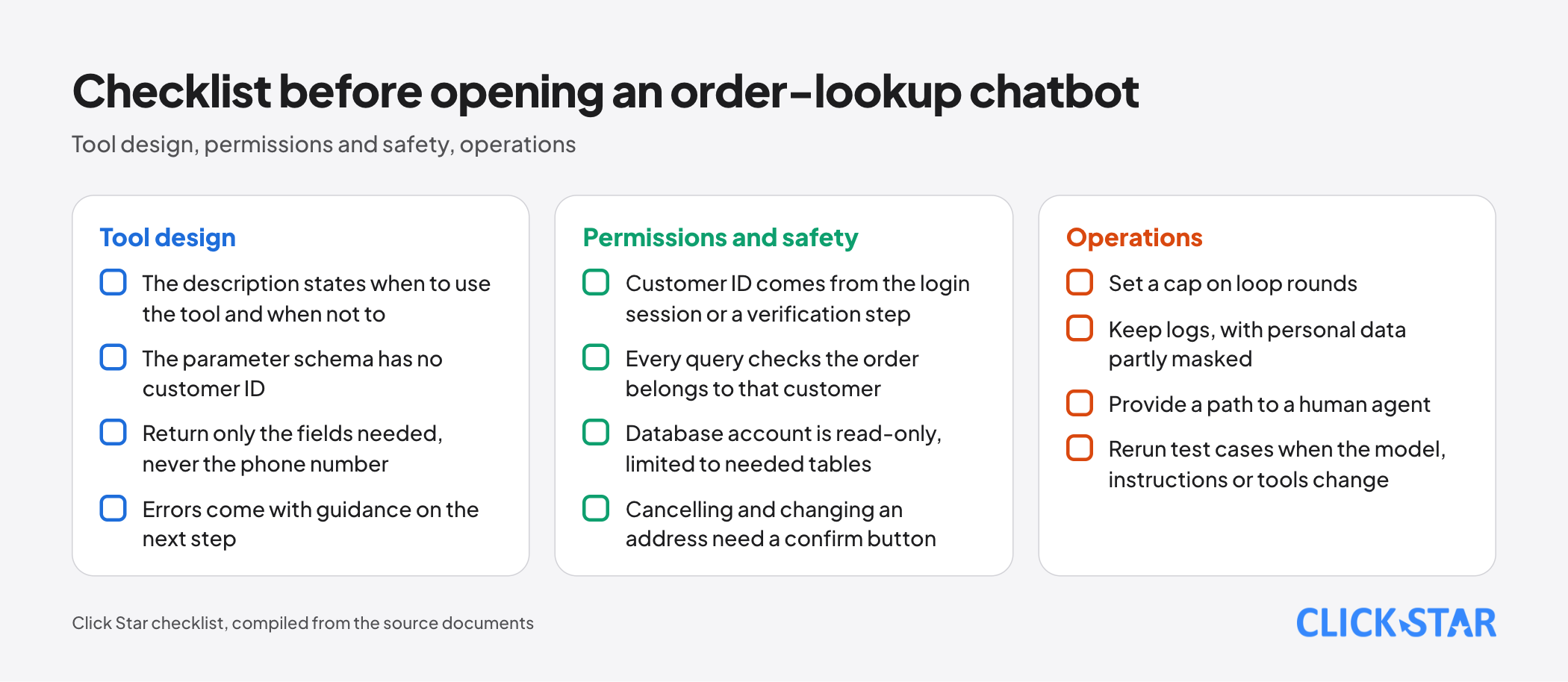
Click Star's checklist, compiled from the sections above. Start with read-only tools.
Tool design
- The description states when to use the tool and when not to.
- The parameter schema has no customer ID.
- Return only the fields needed, never the phone number.
- Errors come with guidance on the next step.
Permissions and safety
- The customer ID comes from the login session or a verification step.
- Every query checks that the order belongs to that customer.
- The database account is read-only and limited to the tables needed.
- Cancelling and changing an address need a confirm button.
Operations
- Set a cap on loop rounds.
- Keep logs, with personal data partly masked.
- Provide a path to a human agent.
- Rerun the test cases when the model, instructions or tools change.
How to measure
- Compare the chatbot's words with the real state. Anthropic (Demystifying evals for AI agents, January 9, 2026) notes that "booked" in a reply differs from a reservation existing in the database.
- Build test cases: normal ones, a missing code, a request for someone else's order, an injected instruction in a note. In Click Star's view, a single case of someone else's order getting through is a defect to fix before launch.
Common mistakes
- Letting the model fill in the customer ID instead of taking it from the session.
- Connecting the tool with an account that can edit and delete, or letting it run free-form queries.
- Believing that
strictor an instruction in the prompt is enough to protect data. - Letting the model cancel or refund without confirmation.
- Logging phone numbers and addresses verbatim.
- Testing only a few easy questions and never the case of someone else's order.
What is not known
Click Star has no public measurements for Vietnam on order-lookup chatbots, or on how often each model picks the wrong tool in Vietnamese. Documentation changes fast; Anthropic's tool runner was labeled beta.
Click Star used OWASP's 2025 PDF as its source. Click Star has not read Zalo or Meta documentation on verifying the person chatting, or any legal text for this article.
Related posts


Need tailored advice for your business?
Click Star helps you build a solution that fits your industry and scale. We answer every question during business hours.