Business website security: a technical checklist from HTTPS and security headers to monitoring
A checklist of 6 groups of website security measures based on OWASP, MDN, Let's Encrypt, CISA and the NCSC: HTTPS, security headers, updates, accounts, rate limiting, backups and monitoring, with 5 response steps.
Most basic website protections are cheap. The hard part is doing all of them repeatedly: one expired certificate or forgotten plugin can undo the rest.
This article gathers a technical checklist from OWASP, MDN Web Docs, Let's Encrypt, npm, CISA, WordPress.org, Google Search Central and the NCSC (UK), checked up to October 22, 2026.
It answers 3 questions: what to configure for HTTPS and security headers, what to maintain after launch, and what to do when a breach is suspected. Click Star gives no attack statistics because it found no open measured source for Vietnam.
Key points
- The current OWASP Top 10 is the 2025 edition with 10 categories. Security Misconfiguration ranks 2nd, and software supply chain failures (an expansion of the outdated-components category) rank 3rd.
- HTTP security headers are the cheapest task: HSTS, CSP, X-Content-Type-Options, Referrer-Policy, Permissions-Policy, X-Frame-Options. Enable them in stages, and run CSP in Report-Only mode before enforcing.
- Permissions-Policy: microphone=() turns the microphone off in every context, including your own page. A page with recording or voice calls needs microphone=(self).
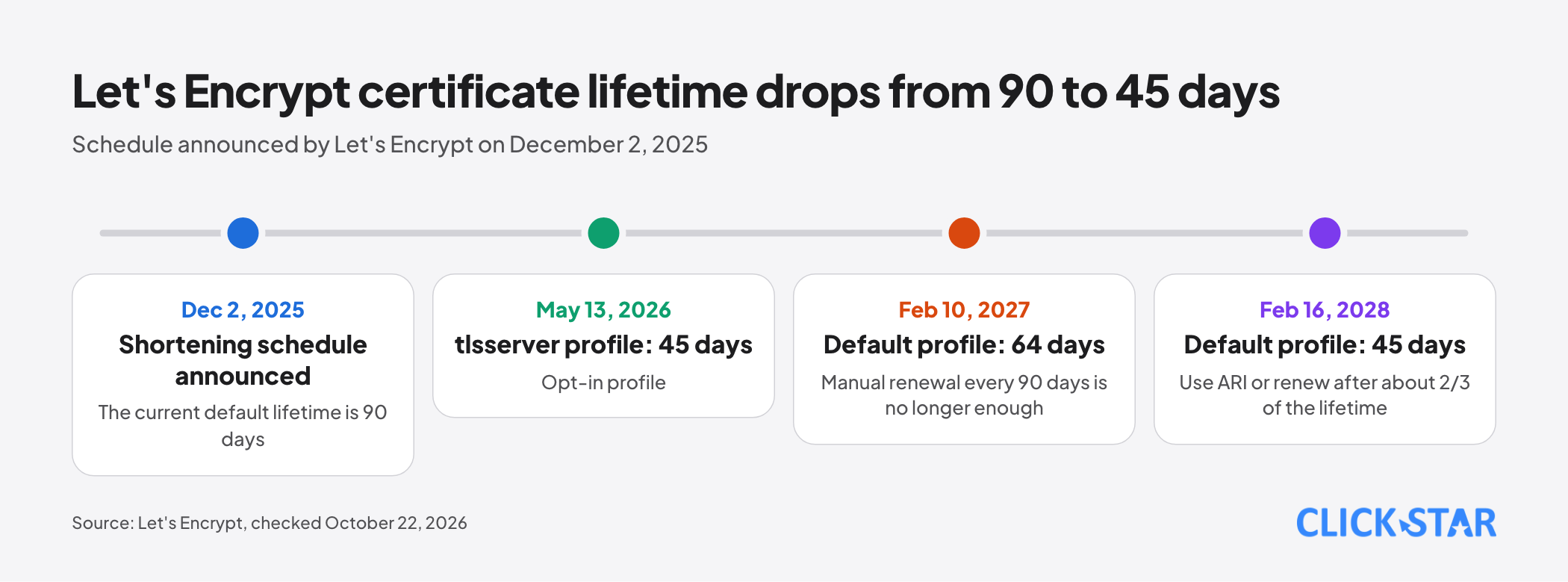
- HTTPS certificates need automatic renewal and alerts. Let's Encrypt has announced that the default lifetime drops from 90 days to 64 days from February 10, 2027, then to 45 days from February 16, 2028.
- Updating is a recurring task. Prioritize vulnerabilities in CISA's KEV catalog, because they are known to be exploited.
What the OWASP Top 10:2025 says
OWASP's page names OWASP Top 10 2025, the 8th edition, as the latest release (no date shown, read October 22, 2026). The list is:
- A01 Broken Access Control
- A02 Security Misconfiguration
- A03 Software Supply Chain Failures
- A04 Cryptographic Failures
- A05 Injection
- A06 Insecure Design
- A07 Authentication Failures
- A08 Software or Data Integrity Failures
- A09 Security Logging and Alerting Failures
- A10 Mishandling of Exceptional Conditions
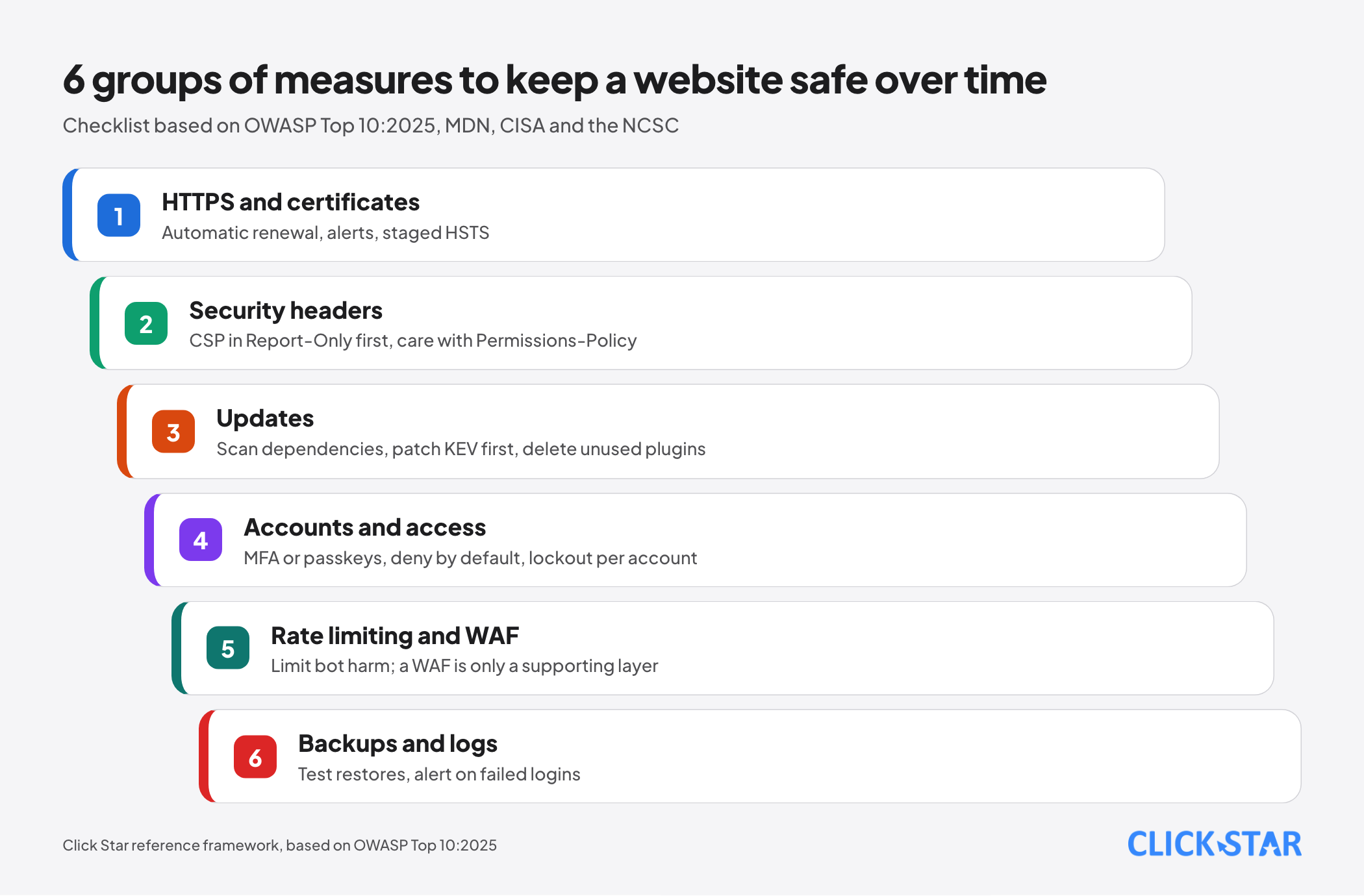
Misconfiguration rose from rank 5 (2021) to rank 2, with signs that include sending no security headers. The checklist below is split into 6 groups that follow these items.
HTTPS and certificates: automatic renewal with alerts
According to MDN (updated August 15, 2026), all traffic should use HTTPS, with HTTP redirected to HTTPS and every resource loaded over HTTPS to avoid mixed-content warnings.
For Let's Encrypt, certificates last 90 days by default and the CA recommends renewing every 60 days (FAQ). Its December 2, 2025 announcement sets a shortening schedule: 45 days for the tlsserver profile (opt-in) from May 13, 2026, 64 days for the default profile from February 10, 2027, and 45 days from February 16, 2028.
So manual renewal every 90 days will no longer be enough. The CA recommends ARI (ACME Renewal Information) or renewing after about 2/3 of the lifetime, plus an alert when a certificate is not renewed on time.
OWASP warns: if HSTS is set for a very long time and the certificate expires, legitimate users may be unable to reach the site until HSTS lapses.
HTTP security headers: 6 headers to configure
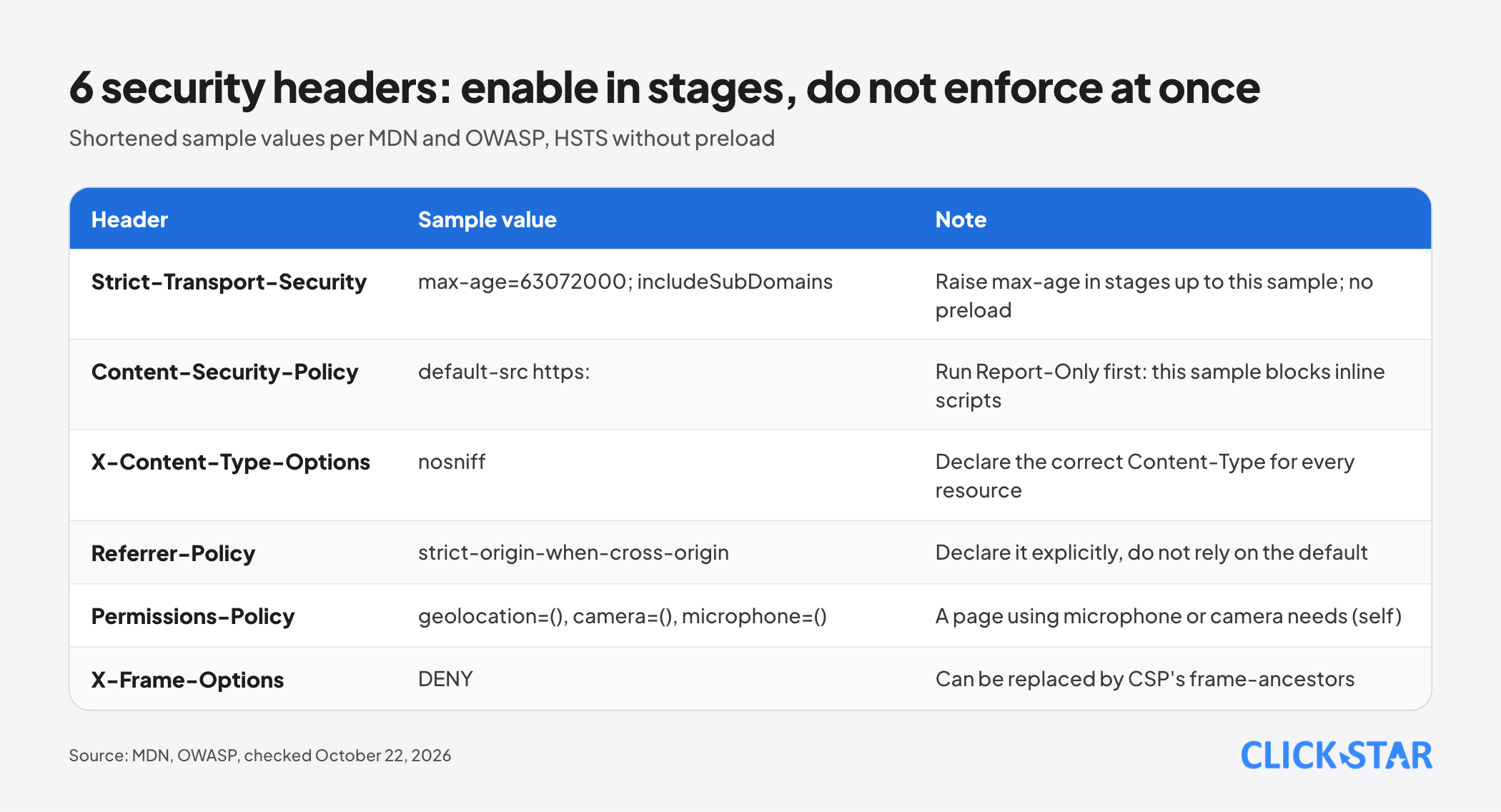
This article uses the OWASP HTTP Headers Cheat Sheet (no date shown) and MDN.
HSTS. According to MDN (updated September 11, 2026), Strict-Transport-Security tells the browser to use only HTTPS for the host and not to allow clicking through certificate errors. It takes effect only after the first HTTPS visit.
hstspreload.org advises raising max-age in stages (5 minutes, 1 week, 1 month) and checking for errors at each step; includeSubDomains requires every subdomain to work over HTTPS.
The two sources differ on preload. OWASP suggests max-age=63072000; includeSubDomains; preload, while hstspreload.org writes that preload adds little over HSTS and is not recommended.
The sample in the image is a shortened version without preload. To submit to the preload list, hstspreload.org requires max-age of at least 31536000 seconds, includeSubDomains and preload, and every subdomain on HTTPS.
CSP. According to MDN (updated March 22, 2026), Content-Security-Policy controls which resources a page may load and helps against XSS; MDN advises avoiding 'unsafe-inline'. OWASP calls CSP complex.
The safe approach is to send Content-Security-Policy-Report-Only to collect violation reports without blocking, fix them, then enforce.
X-Content-Type-Options: nosniff. According to MDN (March 17, 2026), the browser uses the declared Content-Type instead of guessing. The condition (OWASP): declare the correct Content-Type for every resource.
Referrer-Policy. According to MDN (September 4, 2026), the default is strict-origin-when-cross-origin. OWASP advises declaring it explicitly rather than relying on the default.
Permissions-Policy. According to MDN (September 14, 2026), the syntax is Permissions-Policy: feature=allowlist, with features separated by commas. () means off and self means same origin only. MDN marks it experimental.
OWASP's sample is geolocation=(), camera=(), microphone=(). According to MDN, () turns the feature off in every context, iframes included, and getUserMedia() is rejected. So microphone=() blocks the microphone even for your own page. A page with recording or voice calls needs microphone=(self), and the same goes for camera.
X-Frame-Options. OWASP advises X-Frame-Options: DENY to stop the page being shown in a frame. Per OWASP, CSP's frame-ancestors directive obsoletes this header in supporting browsers.
Updating software, plugins and dependencies
OWASP calls this group Software Supply Chain Failures (A03). Signs of exposure: not tracking the versions of all components including transitive dependencies, not scanning for vulnerabilities regularly, and patching on a monthly or quarterly cycle.
- Keep a list of software, plugins and libraries with versions (Google Search Central, December 10, 2025).
- npm audit sends a description of dependencies to the registry and returns a report of known vulnerabilities; it needs a package-lock file, exits with a code other than 0 if vulnerabilities are found, and --audit-level sets the threshold (npm CLI 12.2.0).
- WordPress.org: old versions are not patched, automatic updates exist since version 3.7, delete unused plugins, and take plugins only from the WordPress.org repository or well-known companies.
To choose what to patch first, CISA maintains the KEV catalog of vulnerabilities with a CVE ID, reliable evidence of exploitation in the wild and a clear remediation. CISA recommends every organization use it to prioritize. The KEV file released October 21, 2026 has 1,754 entries (per CISA's JSON file). Click Star's judgment: absence from KEV does not mean safe.
Admin accounts and least privilege
Click Star already has an article on passkeys, MFA and RLS for internal apps. According to the OWASP Authentication Cheat Sheet, MFA is the strongest defense against most password attacks and belongs everywhere possible.
- A password under 8 characters is weak with MFA, and under 15 characters without it (OWASP, citing NIST SP 800-63B). No forced periodic changes; change only after a leak.
- Lockout should count per account, not per IP, and every lockout should be logged.
- Deny access by default (A01:2025); disable directory listing and keep .git or backup files out of the web root.
- Remove default accounts and unused features (A02:2025); use SFTP, not FTP.
Bot defense, rate limiting and WAF
You cannot block every bot, so limit the harm.
OWASP API4:2023 lists limits on call frequency within a time window, stricter policies for some endpoints, and spending limits for third-party services, or billing alerts when limits are impossible. Per the OWASP Authentication Cheat Sheet, CAPTCHA is only a defense-in-depth layer, not a preventative measure.
OWASP describes a WAF as a rule set applied to HTTP traffic, usually covering XSS and SQL injection; tuning can take real effort. A WAF is a supporting layer, not a substitute for patching.
Backups, monitoring and logs
OWASP renamed A09 to Logging and Alerting to stress alerts: logging without alerting has very little value.
The OWASP Logging Cheat Sheet advises recording "when, where, who, what" for logins, authorization failures, admin actions and data exports. Passwords, tokens, session IDs and connection strings should usually not be logged directly (remove, mask or hash them if needed). Keep logs out of web-reachable places.
Checking with public header scanners
HTTP Observatory (MDN, built by Mozilla): a site starts at 100 points, then gains or loses points, up to 145; 100 or more is A+. Its FAQ states plainly that it does not check outdated software, SQL injection or vulnerable CMS plugins.
So a high score shows only that headers are configured, not that the site is patched.
When a breach is suspected: 5 response steps
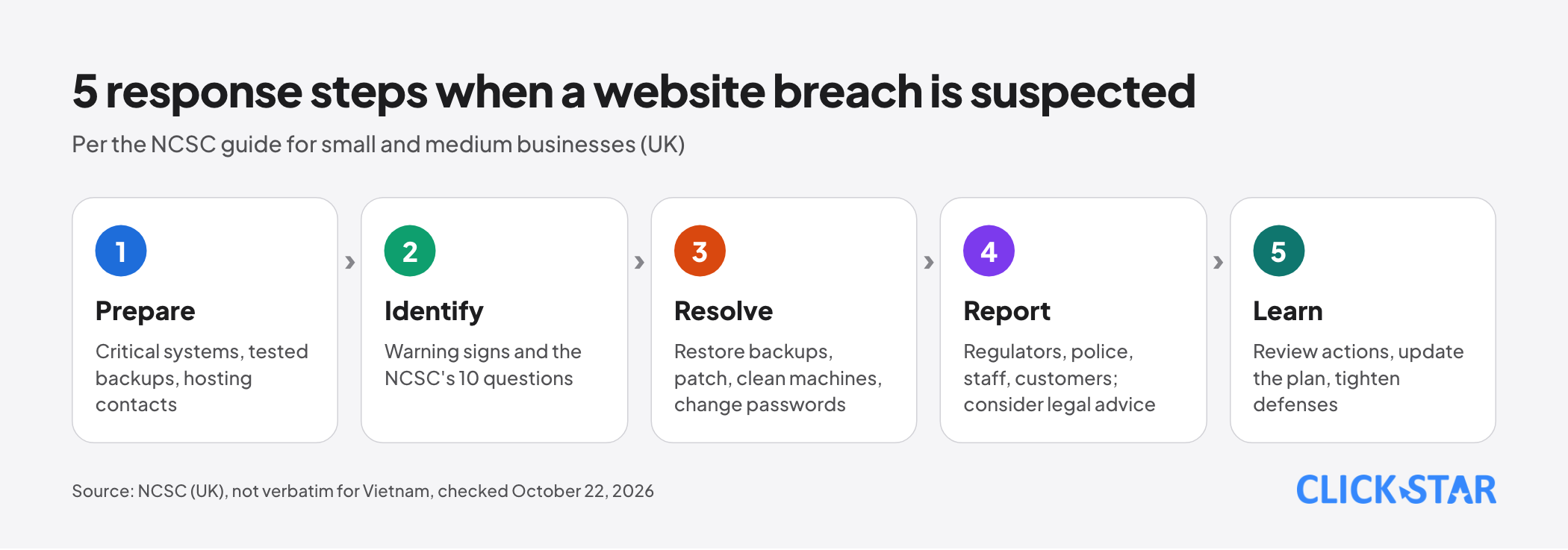
The NCSC guide for small and medium businesses (published 2019, reviewed October 8, 2020, UK context) has 5 steps.
- Prepare: identify critical systems, test backup restores, record owners and contacts for hosting and IT.
- Identify: the NCSC lists signs such as locked accounts, ransom demands, outsiders reporting odd email from your domain; answer the NCSC's 10 questions at once.
- Resolve: restore from backups, patch, clean infected machines, change passwords.
- Report: tell regulators and the police (in the UK, the ICO and Report Fraud), inform staff and affected customers, and consider legal advice. This is UK guidance and does not transfer verbatim to Vietnam.
- Learn: review actions, update the plan, tighten defenses.
What it means for Vietnamese businesses, and Click Star's view
Click Star found no public measurement of how many Vietnamese business websites have full security headers or were breached. It has not read the Law on Cybersecurity or the Law on Network Information Security directly, so it does not analyze them. Click Star already has an article on the personal data protection law.
Disclosure: Click Star offers SEO-ready, fast website design. Use this checklist to question any provider, Click Star included.
Click Star's view. HSTS, nosniff and Referrer-Policy carry little risk. CSP and Permissions-Policy need testing because they can break the microphone, third-party embeds or inline scripts. The real effort is recurring operations: renewals, patching, account reviews, reading alerts. A high scan score does not replace patching.
30-day plan and how to measure
Click Star reference framework, not taken from outside sources:
- Week 1: inventory domains, software, plugins and admin accounts; confirm automatic certificate renewal with alerts.
- Week 2: enable MFA or passkeys, delete unused accounts and plugins, scan dependencies and patch KEV items first.
- Week 3: add nosniff, Referrer-Policy and staged HSTS; send CSP in Report-Only mode; test Permissions-Policy.
- Week 4: rate-limit logins, alert on failed logins, test a backup restore and rehearse the 5 steps.
Measures (reference framework, no industry threshold exists): days left on the soonest-expiring certificate, open high-severity vulnerabilities, admin accounts without MFA, date of the last restore test.
Common mistakes
- Enabling long-lived HSTS while subdomains do not run HTTPS or certificates do not renew automatically.
- Enforcing CSP at once, skipping Report-Only.
- Setting microphone=() or camera=() on a page with recording or calls.
- Treating an A+ scanner score as proof of safety.
- Using a WAF instead of patching.
- Turning on logging but nobody reads alerts, or writing passwords and tokens into logs.
What is not known
Click Star has no public measurements for Vietnam and has not read Vietnamese cybersecurity or incident-reporting rules; ask a lawyer when an incident involves personal data.
Let's Encrypt's Profiles page lists the tlsserver profile at 45 days but gives no date, so the May 13, 2026 milestone rests on the announcement alone. Click Star did not test Permissions-Policy browser by browser.
Related posts

Need tailored advice for your business?
Click Star helps you build a solution that fits your industry and scale. We answer every question during business hours.