Want AI to cite you without showing it all? nosnippet or max-snippet
How nosnippet, max-snippet, data-nosnippet, the Search Console switch and Google-Extended differ, based on Google and Bing documents.
A training company posts its tuition table on its website. A customer asks an AI about tuition and sees the exact figure in the answer, without opening the page. The owner wants to be cited but does not want the price table copied whole. This is an illustrative scenario.
This article draws on Google Search Central, Search Console Help, Google's blog and Bing's blog, checked on November 4, 2026. The scope is Google Search (AI Overviews, AI Mode) and Bing. Bing's help page on robots tags runs on JavaScript, so it could not be opened.
It answers how nosnippet differs from max-snippet, how the new Search Console switch differs from Google-Extended, and which level to choose.
Key points
- To be cited, you need to add almost nothing: Google says there are no additional requirements (page updated December 10, 2025), as long as the site is set to Include in the Search Console switch (guide updated July 10, 2026). The controls below are only for limiting.
nosnippetandmax-snippet:0apply to both AI Overviews and AI Mode, including use of content as direct input.max-snippet:Ncaps the character count;data-nosnippethides single passages.- Search Console has a "Search generative AI" switch for the whole website, and Google notes that as of August 31, 2026 it was rolled out worldwide. Choosing Exclude removes impressions and visits from those AI features.
Google-Extendedis a different matter: it governs training and grounding for Gemini, not inclusion in Google Search.- The stricter rule wins in a conflict; a page blocked by robots.txt means Google cannot read its tags.
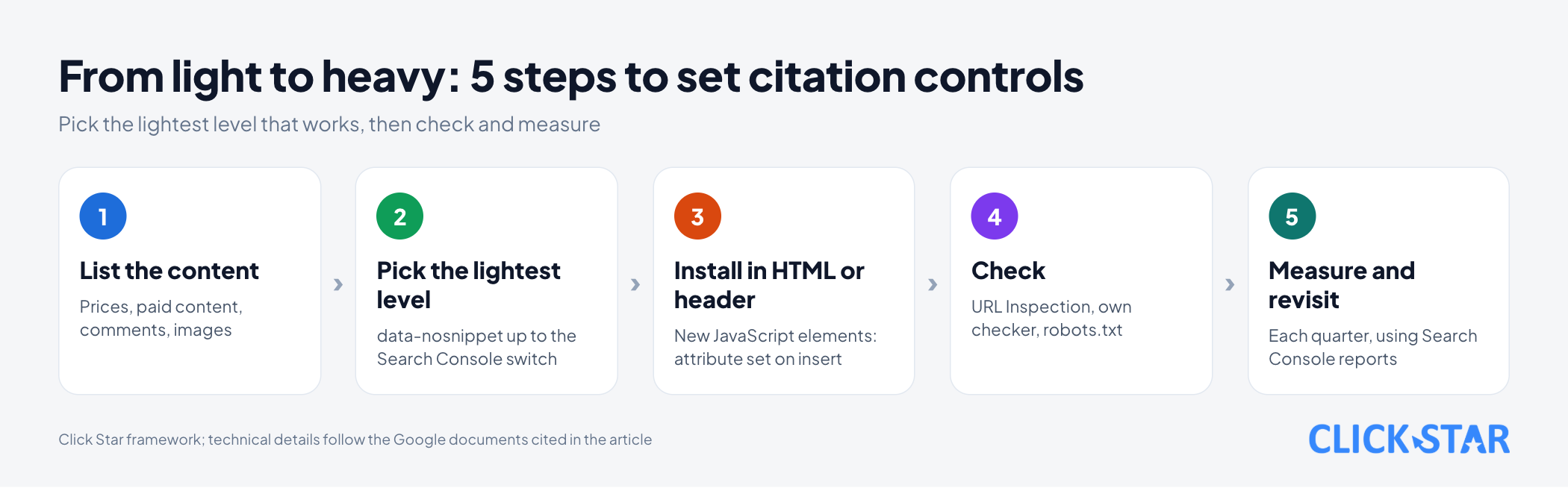
- Click Star's 5-step framework: pick the lightest level that works, then check and measure again.
Which layers of control does Google offer?
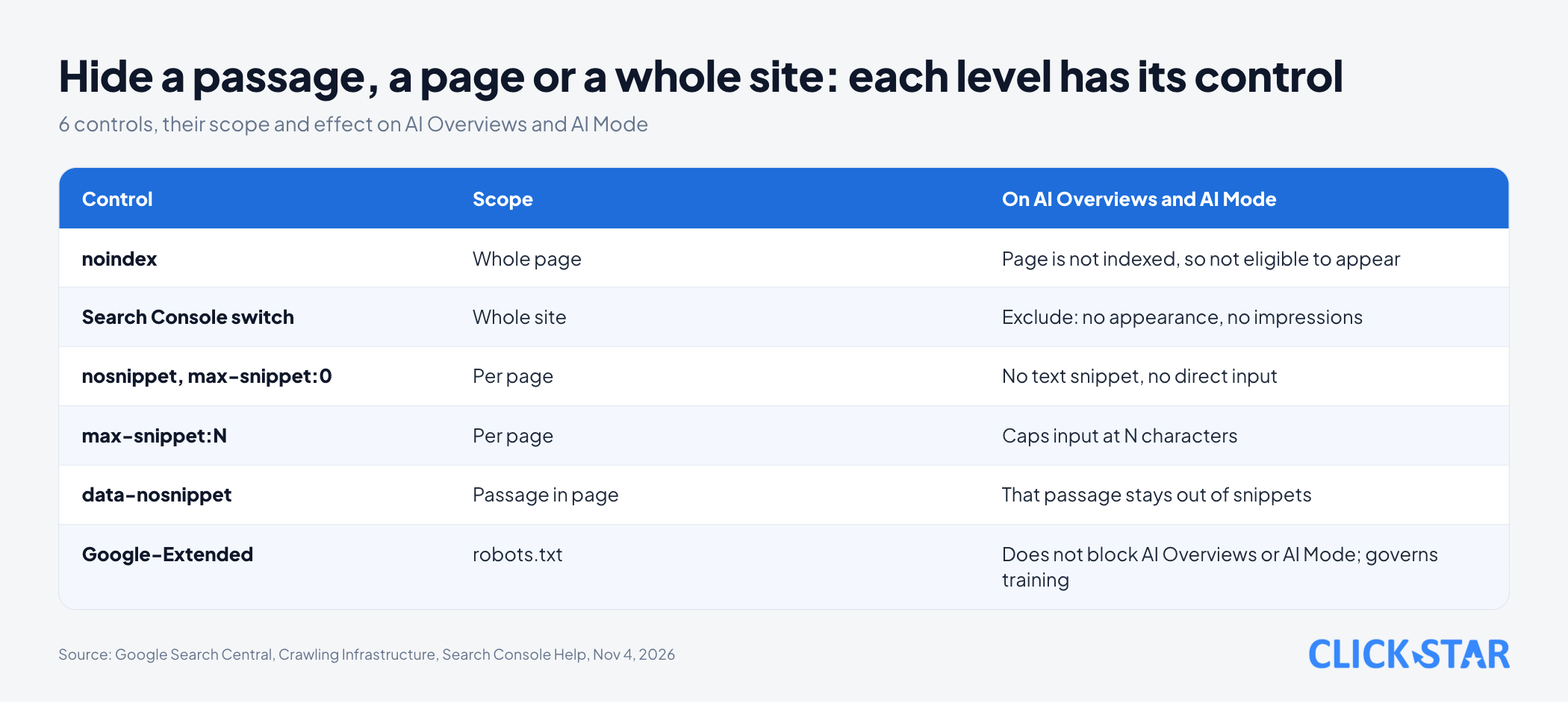
There are layers. Click Star orders them from light to heavy by scope: passage, page, whole site. Google's page "Control what you share with Google Search" (updated October 21, 2026) lists 7 methods, including noindex, the robots meta group with data-nosnippet, and a site-wide Search Console switch.
How do nosnippet and max-snippet differ?
nosnippet turns off the text snippet; max-snippet:N allows at most N characters. Per the Google page "Robots meta tag, data-nosnippet, and X-Robots-Tag specifications" (updated March 24, 2026), nosnippet applies to both AI Overviews and AI Mode and stops content from being used as direct input for them. A static thumbnail may still appear.
max-snippet also applies to AI Overviews and AI Mode and limits how much content is used as input. A value of 0 equals nosnippet, -1 lets Google choose the length, and an unparseable number makes the rule ignored.
One exception: the limit does not apply where the owner has separately granted permission, such as through structured data or a license agreement with Google. Images and videos have their own max-image-preview and max-video-preview.
<meta name="robots" content="max-snippet:160, max-image-preview:large">
How does data-nosnippet hide a single passage?
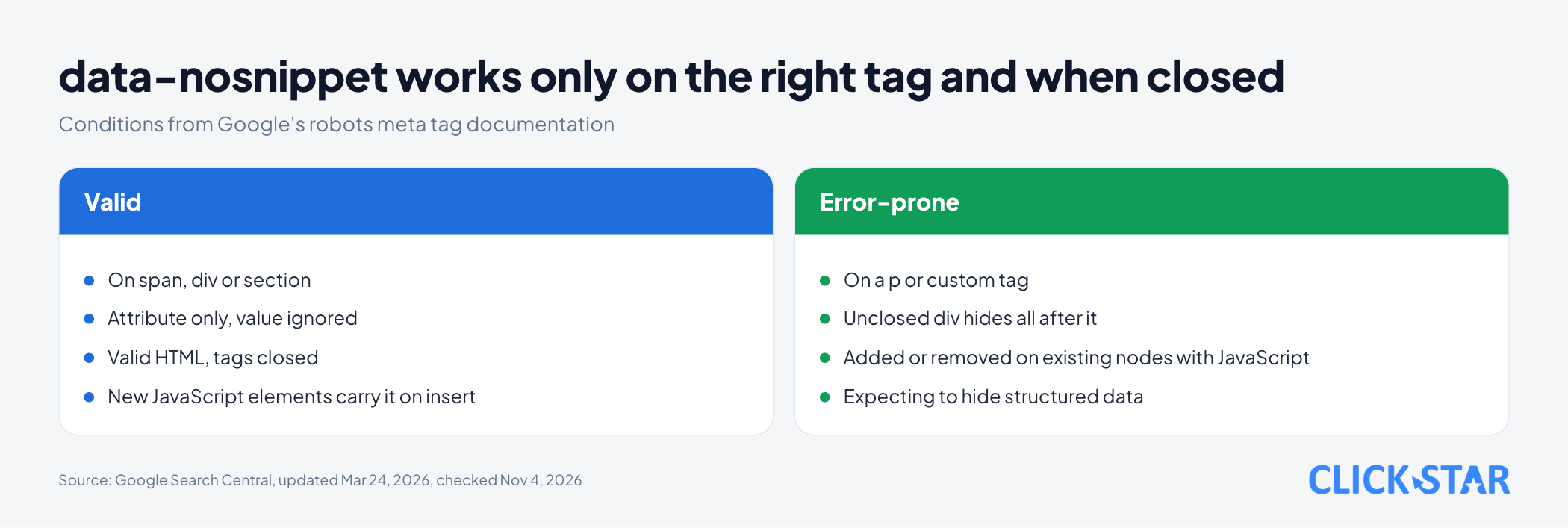
data-nosnippet hides exactly the marked passage, while the rest of the page can still be quoted. On the same Google page, the attribute works on span, div and section, and any value written after it is ignored.
<p>A new class opens every month.</p>
<div data-nosnippet>
  <p>Tuition: VND 5,000,000</p>
</div>
The HTML must be valid and tags closed: an unclosed div hides everything after it. The documentation names only those 3 tags and calls custom tags not valid; p is not on the list, so avoid it.
Google may read the attribute before and after rendering, so do not add or remove it with JavaScript on existing elements; for elements JavaScript creates, include the attribute when inserting them. Structured data inside a data-nosnippet area stays usable for Search; to hide it, edit the data itself.
How does the Search Console switch remove a whole website from AI?
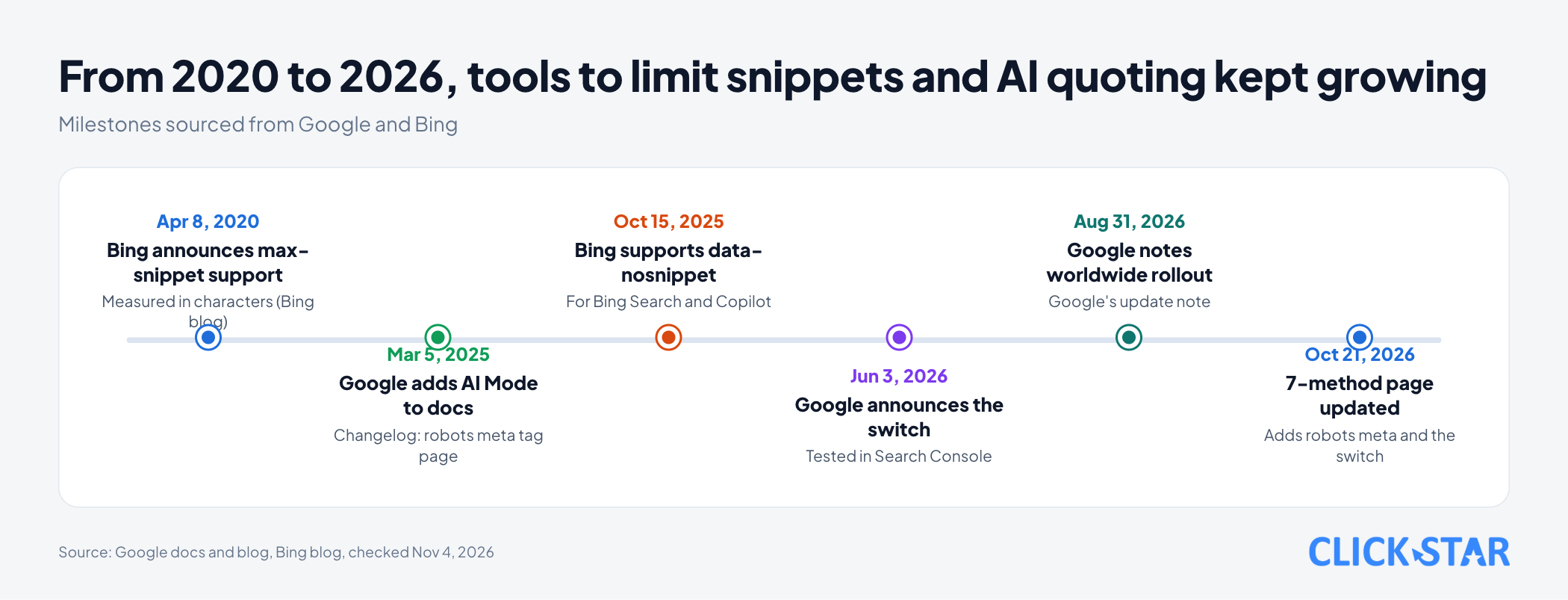
The switch removes a whole website from Search's AI features without noindex. According to the help page "Search generative AI control" (Google, no date shown, read November 4, 2026), open Settings and choose Search generative AI. There are 3 options: Include (the default when there is no parent property), Exclude and Inherit (the default when there is a parent property).
A property inherits from its closest parent by default, so choosing Exclude on a domain property spreads to child properties that are not configured themselves.
The scope covers AI Overviews, AI Mode and AI features in Discover. Exclude means links and content do not appear or feed answers, and the site gets no impressions or visits from them.
It usually takes a few days to take effect. Google's blog post of June 3, 2026 announced a test; its update note of August 31, 2026 says that as of that date it is rolled out worldwide.
The page "Optimizing your website for generative AI features" (Google, updated July 10, 2026) says a site must be set to Include in the Search generative AI control in Search Console to be eligible to appear in these features.
The page "AI Features and Your Website" (Google, updated December 10, 2025) says there are no additional requirements to appear in AI Overviews or AI Mode.
The March 5, 2025 milestone comes from the page "Latest Google Search Documentation Updates" (Google, updated October 26, 2026), which records Google adding AI Mode to the robots meta page.
Does Google-Extended block AI Overviews?
No. According to the page "Google's common crawlers" (Google, updated October 30, 2026), Google-Extended governs whether crawled content may be used to train future Gemini models, or to ground Gemini Apps and Vertex AI. It does not affect inclusion in Google Search and is not a ranking signal.
To limit training, including of models behind Search's AI features (per the switch help page), use Google-Extended; to avoid appearing in AI Overviews or AI Mode, use the Search Console switch or snippet controls.
What happens when several rules conflict?
The stricter rule wins. Per Google's robots meta documentation, a page with both max-snippet:50 and nosnippet gets nosnippet.
Robots.txt can backfire. Google only sees meta tags and headers when it can crawl the URL; for a Disallowed URL all such rules are ignored.
Does Bing or Copilot have equivalent controls?
Yes. Bing's blog post of October 15, 2025 says Bing supports data-nosnippet: marked content stays out of snippets and AI answers in Bing Search and Copilot, while the page is still indexed and ranked.
There are 2 differences from Google: Bing describes nosnippet as blocking both text and image previews, and says data-nosnippet works on any HTML element. Bing's blog post "Announcing new options for webmasters to control their snippets at Bing" (April 8, 2020) announced max-snippet support, measured in characters.
How long does it take, and how do you check?
Tags must be recrawled. The page "AI Features and Your Website" (Google, updated December 10, 2025) says this can take from several days to several months depending on the page; Bing says, for data-nosnippet, from a few seconds to 1 week. Google suggests using URL Inspection to see the HTML Googlebot received.
Click Star wrote an illustrative checker in Python 3.9.6, run on a local server with 5 fake pages. It mimics the documented behavior; it is not Google's parser. Results:
max-snippet:50in meta plus anosnippetheader: no text snippet.data-nosnippetonp, on a custom tag and on an uncloseddiv: 3 errors reported.- Header
otherbot: noindexis ignored, andgooglebot: max-snippet:0is applied.
How should you handle prices, paid content, images and quotable passages?
The choice of level is Click Star's framework; sentences naming a page come from that page.
- Price tables: put them in
div data-nosnippetand keep the page indexable. To remove the whole page, usenoindex. - Paid content: if you still want it indexed, the page "Subscription and Paywalled Content Markup" (Google, updated September 8, 2026) says to mark
isAccessibleForFreeto distinguish it from cloaking, which violates spam policy. Cloaking is showing Googlebot different content than users. - Private content: per "Control what you share", it must be password-protected.
- Copyrighted images:
nosnippetis not enough because a static image may still appear. Usemax-image-preview:noneornoimageindex. - Passages to be quoted: an opening paragraph of 2 to 3 sentences that answers directly, placed outside any
data-nosnippetarea.
Click Star's view
Click Star's view. For most business websites, allowing citation by default is reasonable because Google asks for no extra conditions. Limit only what has a clear reason: changing prices, paid content, copyrighted images. For the tuition table at the top, data-nosnippet fits better than nosnippet: the page keeps a snippet and only the price is hidden.
The Search Console switch is heavy in scope because it covers the whole site: Exclude means losing all display in those AI features, though the page still appears in regular Search. And nosnippet may keep a page from being linked in AI Overviews, since the documentation says a page must be eligible to appear with a snippet. That is Click Star's inference; no document states it.
Click Star sells SEO-ready, fast website design, so it has a related interest.
What to do: a 5-step process
Click Star's reference framework, from light to heavy by scope.
- List the content to limit: prices, paid content, comments, images.
- Pick the lightest level that works:
data-nosnippet,max-snippet:N,nosnippet,noindex, then the Search Console switch. - Install it in the original HTML or the header; if JavaScript creates a new element, include
data-nosnippetwhen inserting it. - Check with URL Inspection and your own checker; confirm robots.txt does not block the page.
- Measure and revisit each quarter because documentation changes.
How to measure results
According to Google, impressions from AI features sit in the Search Console Performance report, search type "Web". The separate "Generative AI performance" report shows impressions by page, country and device (help page, no date shown, read November 4, 2026).
Google says AI Overviews and AI Mode may use different models and so give different results. Click Star infers that 1 change is not enough to conclude causation.
Common mistakes
- Using
Google-Extendedin the hope of leaving AI Overviews. - Blocking a page in robots.txt and expecting
nosnippetto work. - Putting
data-nosnippeton apor custom tag, or leaving adivunclosed. - Adding or removing
data-nosnippeton existing elements with JavaScript. - Treating
nosnippetas security although the content is still reachable. - Choosing Exclude when only 1 price table needed hiding.
- Installing a tag, not checking or waiting for a recrawl, then concluding it does nothing.
What is not known
It is unclear whether a page with a small max-snippet above 0 can still be linked in AI Overviews, or whether nosnippet removes a page from linking entirely. The documentation only says they limit content used as input.
Click Star could not open Bing's help page on robots tags, so other tags with Copilot are unconfirmed. It is unclear whether other companies' AI bots read nosnippet. This is not legal advice.
Related posts


Need tailored advice for your business?
Click Star helps you build a solution that fits your industry and scale. We answer every question during business hours.