What does AI say about your business? How to check and fix it
Where AI answers about a business come from, based on Google, Bing, OpenAI and Claude documentation. Includes a 20-question test set and how to fix the source.
A customer types into a chatbot: "Where is company X, and how much does it cost?". The answer gives an address the company left and a price list from 2 years ago. The business never knows. This is an illustration, not a measurement.
This article draws on documentation from Google, Microsoft Bing, Anthropic and OpenAI, plus 1 study by the Tow Center, checked on November 4, 2026.
It answers 3 questions: where AI answers about a business come from, how to check them with 20 questions, and where to fix a wrong one.
Key points
- Google says a page must be indexed and eligible to show with a snippet to be a supporting link in its AI features. There are no additional technical requirements.
- Google and Claude have feedback channels, but the documents read promise no fix for a specific answer. The surest fix is at the source.
- The Tow Center warns that repeating the same question can give a different result, so test with a sample, not a single ask.
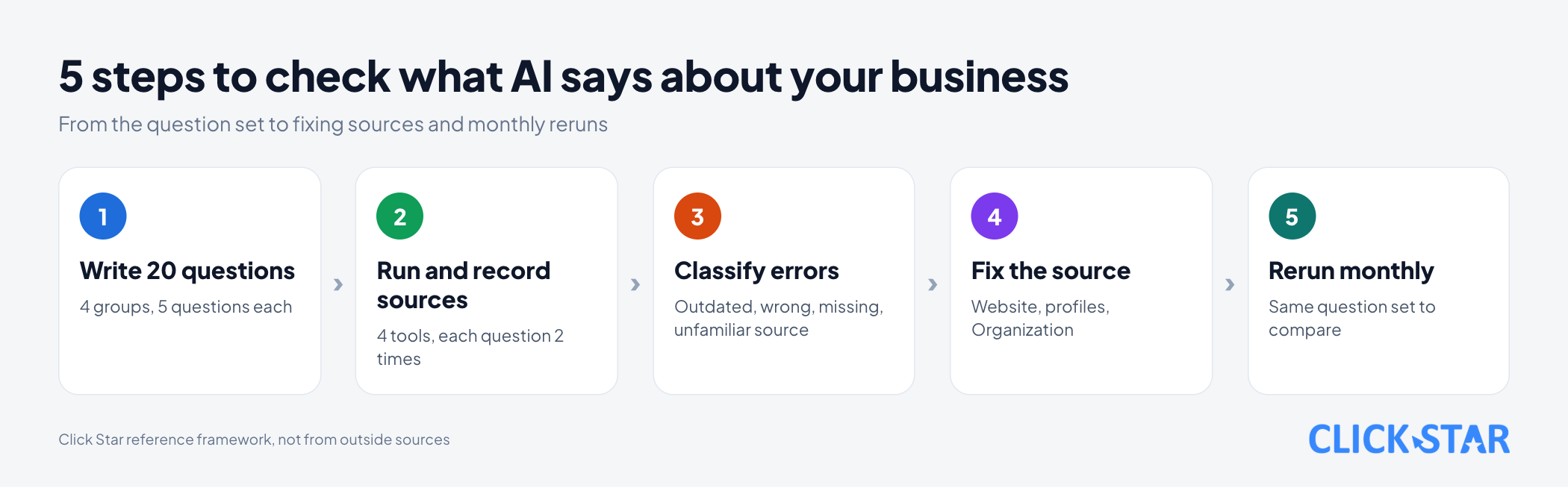
- Click Star's 5-step framework: write 20 questions, run them and record sources, classify errors, fix the sources, rerun monthly.
- Where to fix: the official website, Google Business Profile, and Organization structured data.
- For Google, re-crawling a page can take several days to several months; the documents read give no timing for other tools.
Where AI answers about a business come from
According to the documents read, web-search answers rely on cited pages, and the conditions for being cited differ by tool.
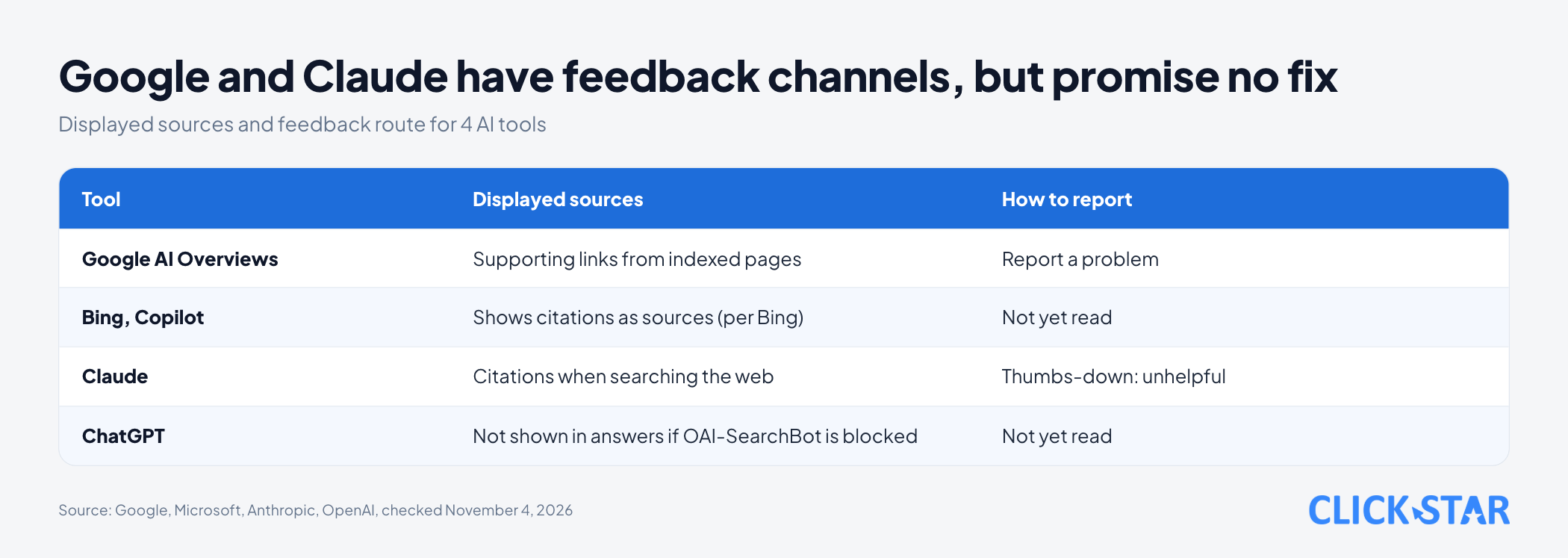
For Google, a page can be a supporting link in AI Overviews or AI Mode only if it is indexed and eligible to show with a snippet ("AI features and your website" on Google Search Central, last updated December 10, 2025, read November 4, 2026).
The same page says no special file or schema.org markup is needed. The basics: allow crawling in robots.txt, keep structured data matching visible text, and keep Merchant Center and Business Profile information current.
For ChatGPT, "Overview of OpenAI Crawlers" (no date shown, read November 4, 2026) says a site that blocks OAI-SearchBot will not appear in ChatGPT search answers, though it can still appear as navigational links.
For Claude, the "Enable and use web search" page (shows "Updated over a month ago", no specific date, read November 4, 2026) says every response includes citations when Claude searches the web.
How each tool lets you report a wrong answer
Google and Claude have feedback channels for poor answers. They are feedback, not a promise to fix.
- Google: "Find information in faster & easier ways with AI Overviews in Google Search" (no date shown, read November 4, 2026) says AI Overviews "can and will make mistakes". Click the thumbs-down icon under the overview (also used when an overview is inaccurate), then choose Report a problem; the feedback includes your latest query.
- Claude: "Claude is providing incorrect or misleading responses. What's going on?" (March 16, 2026) advises reviewing the cited sources; the thumbs-down button reports a response as unhelpful.
- ChatGPT: Click Star has not read OpenAI's documentation on reporting wrong answers.
How reliable are AI answers, and do they repeat
Do not trust them blindly, and do not expect identical results each time.
The Tow Center ("AI Search Has a Citation Problem", March 6, 2025) tested 8 AI search tools with 1,600 queries from news-article excerpts. Together they answered more than 60% of queries incorrectly. It measured finding the right article, not questions about a business's prices or address.
The researchers note a limit: each excerpt was run once, and rerunning would very likely give different outputs. Click Star has not read any vendor document promising the same answer each time, so the framework below tests with a sample.
Click Star's 5-step checking framework
Click Star's own framework, not from outside sources, not yet tested on real data.
Step 1. Write 20 questions in 4 groups. 5 questions per group, phrased as customers type them. Replace [Name] with abbreviations or unaccented spellings customers use.
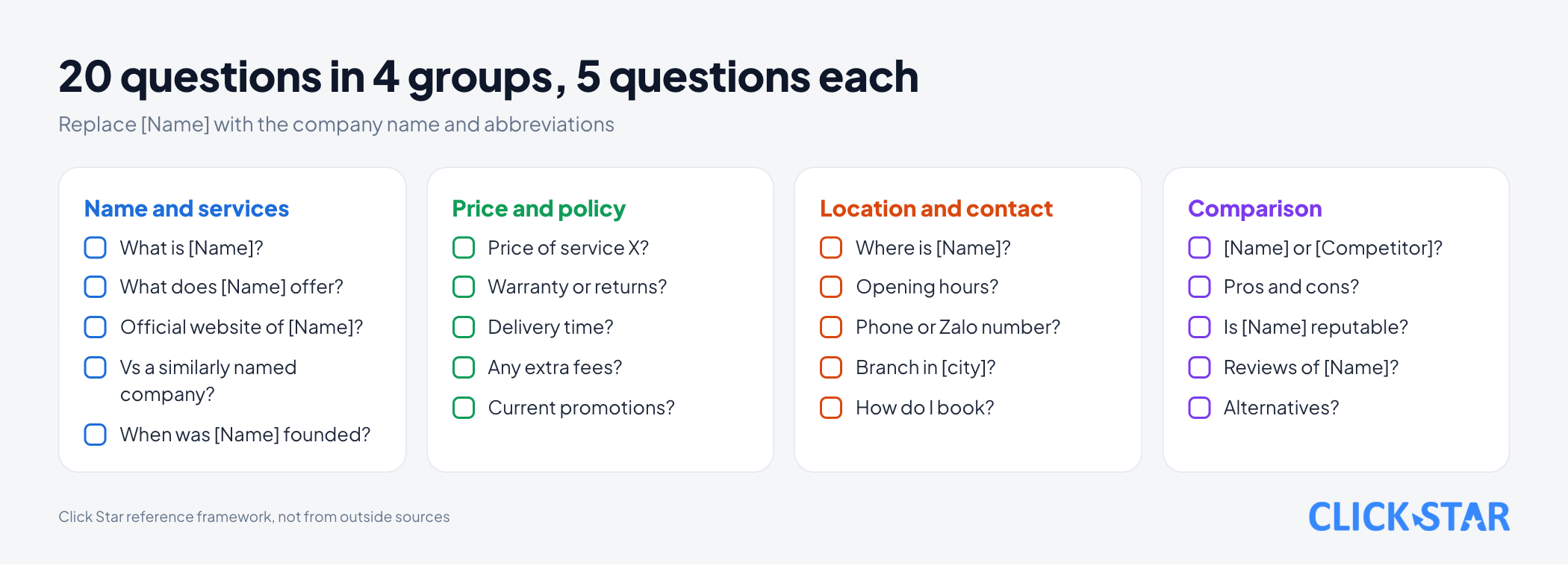
- Name and services:
What is [Name]?,What does [Name] offer?,Official website of [Name]?,[Name] vs a similarly named company?,When was [Name] founded? - Price and policy:
Price of service X from [Name]?,Warranty or return policy?,How long does delivery take?,Any extra fees?,Current promotions? - Location and contact:
Where is [Name]?,Opening hours?,Phone or Zalo number?,Branch in [city]?,How do I book? - Comparison:
[Name] or [Competitor] for need Y?,Pros and cons of [Name]?,Is [Name] reputable?,Reviews of [Name]?,Alternatives to [Name]?
Step 2. Run on 4 tools and record sources. They are Google AI Overviews, Bing or Copilot, Claude and ChatGPT. Run each question 2 times, same day, by hand with a real person's account. Record the full text, cited links and date.
Step 3. Classify errors in 4 groups. Outdated (once true), wrong (never true), missing (the official page has it but AI does not say it), unfamiliar source (cites a page that is not yours). Prioritize repeated errors and errors about money or address.
Step 4. Fix the source. Trace each error to the page or profile that led to it and fix it there.
Step 5. Rerun monthly. Use the same question set to compare; change a question only when the service changes.
The sample log below is an illustrative example with a fictional company, not a measurement.
| Question | Tool | Cited source | Error type | Where to fix |
|---|---|---|---|---|
| Address of Example Co.? | Tool A | Unknown directory page | Unfamiliar source | Contact the directory owner |
| Price of the basic plan? | Tool B | Old price article on website | Outdated | Pricing page |
Fixing the source: where each kind of error is fixed
Fix your own pages first, since you control them. External profiles and report buttons come after.
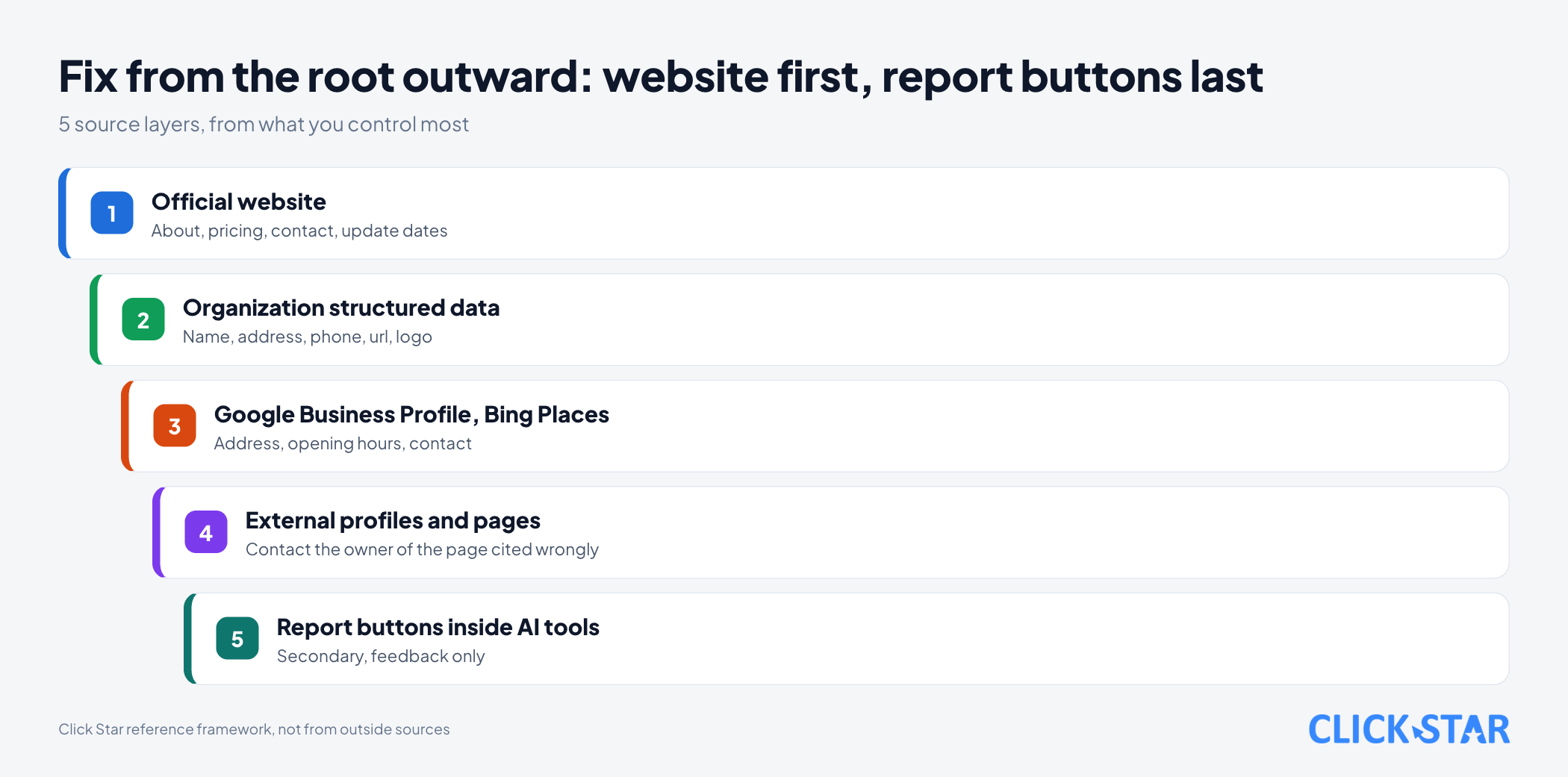
Official website. Outdated and missing errors can start here: an undated price article, a contact page without opening hours, several pages giving different numbers. Keep 1 pricing page and 1 contact page as the reference.
For an unfamiliar source, contact the owner of that page. Click Star found no document promising to stop citing a given page.
Google Business Profile. According to "Edit your Business Profile" (no date shown, read November 4, 2026), a verified owner edits directly on Search or Maps. Google reviews changes before they go live, so edits are not instant.
The name must match real-world signage; the description is limited to 750 characters, no URLs. "Collected info" (only in some regions, languages and categories) shows what Google collected, its source and date, and lets you delete it.
Organization structured data. Google Search Central's "Organization Schema Markup" (last updated September 8, 2026, read November 4, 2026) says it helps Google understand administrative details and tell organizations apart. No property is required; place it on the home page or an about page.
Google recommends focusing on name, address, telephone, url and logo, and says name should match the site name.
Measuring monthly and reading the results
In the documents read, only Bing has a dedicated report on a site being cited. AI Performance in Bing Webmaster Tools (launched in public preview on February 10, 2026) shows total citations and citations per URL.
The post "New AI Visibility Insights in Bing Webmaster Tools: Intents, Topics, Citation Share, Compare" (June 16, 2026) added Citation Share (in preview): the percentage of citations going to your site out of all citations shown for the same grounding query. Microsoft calls it an observational metric, not a ranking.
According to the AI features page, a site shown in Google's AI features counts toward search traffic in the Search Console Performance report, under "Web". The page does not mention a separate report for the AI part.
So most measuring happens in your own question set. 3 monthly numbers (Click Star framework): share of fully correct answers per run, number of repeated errors, number of unfamiliar-source citations.
What this means for Vietnamese businesses
Google's AI Overviews page lists Vietnam among the countries and Vietnamese among the languages for this feature (read November 4, 2026). Click Star found no public measurement of AI error rates for Vietnamese businesses.
Click Star's view. An AI answer mirrors the public sources about you. When it is wrong, the cause is usually an outdated, conflicting or missing source, and the fix is in your hands.
The Bing blog post of February 10, 2026 recommends registering with Bing Places for Business to keep address and opening hours current. Click Star infers that abbreviations and unaccented spellings belong in the 20-question set.
Click Star offers SEO-ready, fast-loading website design, digital marketing and AI integration, so it has an interest in source fixing.
What to do: a 4-week plan
A Click Star reference plan, not an industry standard.
Week 1: build the question set and run it
- Write 20 questions in 4 groups, adding abbreviations and unaccented spellings.
- Run each question 2 times on the 4 tools in Step 2, recording full text and links.
Week 2: classify and list fixes
- Assign each error to 1 of 4 groups: outdated, wrong, missing, unfamiliar source.
- Trace each error to its page or profile, putting repeated errors and money or address errors first.
Week 3: fix the sources
- Fix the pricing, contact and about pages, and add update dates.
- Update Google Business Profile, Bing Places and Organization schema (check with the Rich Results Test).
Week 4: rerun and set the schedule
- Rerun the same set and compare with week 1. No change yet can happen: Google says re-crawling a page can take several days to several months, and the documents read give no timing for other tools.
- Set a monthly schedule and an owner.
Common mistakes
- Asking once and concluding, though answers can change between asks.
- Checking only 1 tool and ignoring the others.
- Recording answers without the cited sources, so there is no clue where to fix.
- Calling every error "AI made it up" instead of tracing it to an old or conflicting page on your own site.
- Pressing the report button and waiting, without fixing the source.
- Fixing the website but forgetting Business Profile or Bing Places, leaving address and hours inconsistent.
- Marking up structured data for information not on the page, or writing fake content to force AI to mention you.
What is not known
It is unclear which source AI picks when sources conflict, and how long after a fix the answer changes. Google only says re-crawling a page can take several days to several months.
Click Star has not read OpenAI's documentation on reporting wrong answers, Microsoft documentation on reporting Copilot errors, or platform terms on automated querying. Click Star does not rely on Perplexity's help pages (read November 4, 2026): they contain a block of instructions aimed at AI, and their update date could not be confirmed.
The 5-step framework, the prioritization rule and the 3 tracking numbers are Click Star's own and have not been tested on real data. The sample log is illustrative.
Related posts


Need tailored advice for your business?
Click Star helps you build a solution that fits your industry and scale. We answer every question during business hours.