How big must a website be to worry about crawl budget?
Google says a site without many fast-changing pages, or whose new pages are usually crawled the same day, does not need its crawl budget guide. This article covers the thresholds Google gives, how to read the Crawl Stats report and a 5-step check, based on 8 Google documentation pages.
The owner of an online shop with 300 product pages hears that Google "does not read the whole website" and worries about the SEO plan (an illustration, not a measurement). Google wrote a dedicated guide for very large or fast-changing sites, for example 10,000 or more URLs changing daily.
This article draws on 8 Google documentation pages (developer guides and Search Console Help), checked on November 4, 2026. All 8 could be opened.
The short answer: Google says a site without many fast-changing pages, or whose new pages are usually crawled the same day, does not need to read its crawl budget guide. The article shows when to worry, how to read the Crawl Stats report and 5 things to do.
Click Star already has articles on Googlebot, robots.txt, product filters that create duplicate URLs, 404/410 and 301/302 redirects.
Key points
- Crawl budget is the set of URLs that Google both can and wants to crawl on 1 hostname. Each hostname has its own budget.
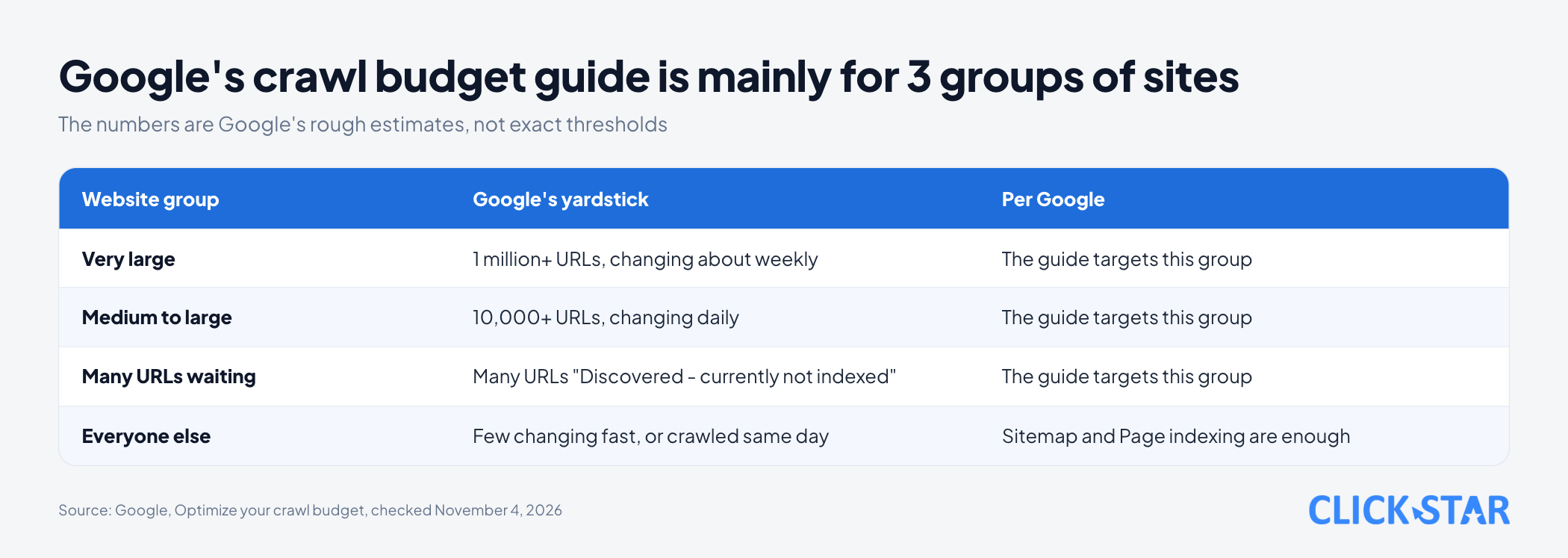
- Google wrote the guide primarily for 3 groups: 1 million or more pages changing about weekly, 10,000 or more pages changing daily, or many URLs labeled "Discovered - currently not indexed" in Search Console. The numbers are rough estimates, not exact thresholds.
- If a site does not have many fast-changing pages, or new pages are usually crawled the same day, Google says the guide is not needed: a current sitemap and regular checks of the Page indexing report are enough.
- The budget has 2 parts: the crawl capacity limit (what the server can take) and crawl demand (what Google wants to read). The part owners influence most is the URL inventory.
- If unimportant pages cannot be consolidated, Google suggests blocking them with robots.txt, but not to temporarily shift budget. The freed share does not move to other pages unless the site hits its capacity limit.
What crawl budget is and which websites need to care
Crawl budget is the number of URLs Google can and wants to crawl on your website. Crawling means Googlebot, Google's automated program, downloads each page to read it. According to the guide "Optimize your crawl budget" (shown as updated July 22, 2026, read November 4, 2026), the web is nearly infinite, so Google cannot read every public URL.
Google treats 1 website as 1 hostname. A blog at blog.example.com and a shop at www.example.com therefore have 2 budgets.
The thresholds Google gives
Google says the guide is primarily for 3 kinds of website. The first has 1 million or more unique URLs changing about weekly. The second has 10,000 or more unique URLs changing daily.
The third has a large portion of URLs classed in Search Console as "Discovered - currently not indexed". According to the "Page indexing report" (no date shown, read November 4, 2026), these are URLs Google knows but has not read, usually because it expected crawling to overload the site and rescheduled.
Other pages use other yardsticks. "Crawl Stats report" (no date shown) says sites under 1,000 pages do not need that report. A January 16, 2017 blog post, which Google flags as possibly outdated, says sites under a few thousand URLs are usually crawled efficiently.
The 2 parts of the budget: capacity and demand
The same guide says 2 factors set the budget: the crawl capacity limit and crawl demand, meaning what the server can handle and what Google wants to read.
The capacity limit, also called hostload, is the total time your server spends holding connections open for Google. Every site starts from the same conservative default. The limit rises when the server responds steadily and fast, and falls when it slows down or returns 5xx errors or signals such as 429.
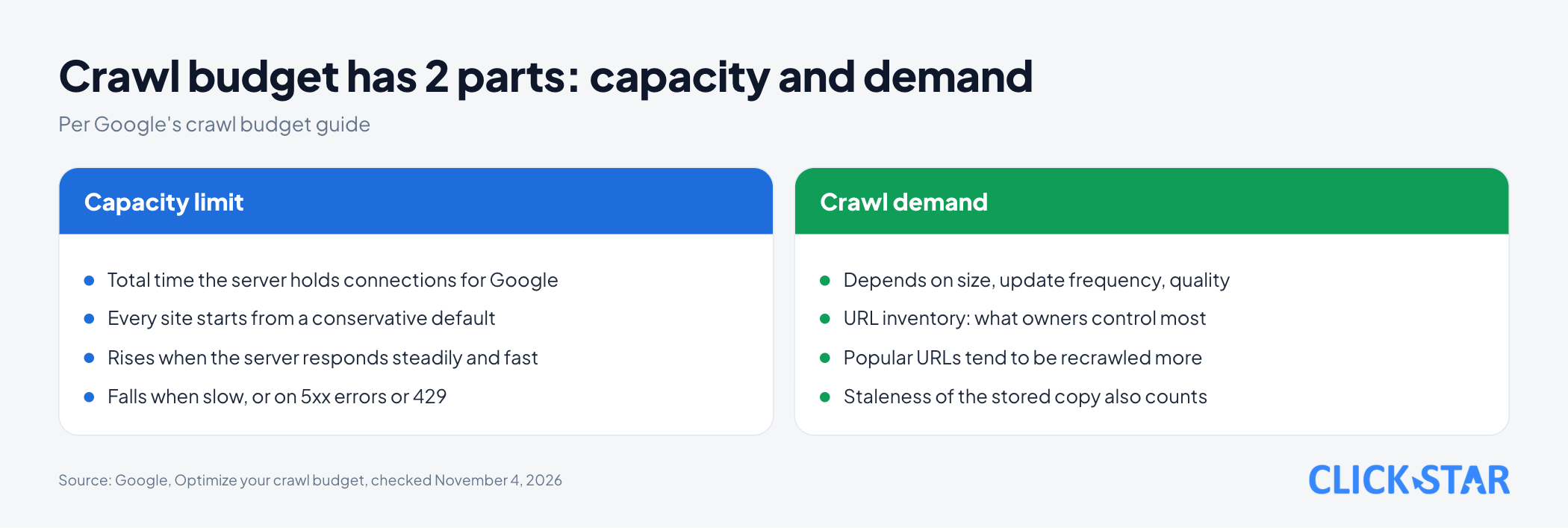
For Googlebot, demand depends on size, update frequency, quality and relevance compared with other sites. Owners can influence 3 factors: the URL inventory Google knows, URL popularity, and how stale the stored copy is.
Google writes that the URL inventory is the factor owners can control most. Without guidance, Google tries to crawl most known URLs, so duplicate or abandoned ones waste time.
What wastes crawl budget
The part with the most impact is cleaning up the URL inventory. If Google spends much time on URLs it should not read, it may not explore the rest of the site. Google recommends:
- Consolidate duplicate content, so Google focuses on unique content rather than unique URLs.
- Return 404 or 410 for permanently removed pages. Google does not forget known URLs, but a 404 is a strong signal not to crawl again. URLs only blocked by robots.txt stay queued longer.
- Eliminate soft 404s: pages showing "not found" but returning status 200. Google says they keep being crawled and waste budget.
- Keep sitemaps current, with
<lastmod>when content changes. - Avoid long redirect chains. The HTTP status code page (updated February 4, 2026) says Googlebot generally follows up to 10 hops.
- Load pages fast and support status 304. For an unchanged page, 304 tells Google to reuse its stored copy and saves bandwidth.
The page "Build and submit a sitemap" (updated July 8, 2026) says Google uses <lastmod> if it is consistently and verifiably accurate. Editing main content, structured data or links is generally considered significant; changing a copyright year is not. A sitemap holds at most 50 MB uncompressed or 50,000 URLs.
To get more crawling, the guide names 2 ways: add server resources when the URL Inspection tool reports "Hostload exceeded", or improve content quality.
robots.txt and noindex: using them for the right job
The guide says that if you cannot consolidate unimportant pages, such as infinite-scroll pages repeating other pages or differently sorted versions of one page, block them with robots.txt. This stops crawling and greatly lowers the chance they get indexed.
Google names 2 things not to do: use noindex for this purpose (Google still requests the page, then drops it when it sees the tag), and use robots.txt to temporarily shift budget to other pages.
The page "Introduction to robots.txt" (updated December 10, 2025) adds that robots.txt does not keep a page out of search results. A blocked URL can still appear, without a description.
Reading the Crawl Stats report
The report is in Search Console, under property settings, then Crawl stats. It is available only for root-level properties (Domain, or URL-prefix such as https://example.com).
The report has 8 sections: total requests, download size, response time, host status, responses, file types, purpose and Googlebot type. It does not count every request, so it can differ slightly from server logs.
Host status and robots.txt
Host status checks 3 areas: robots.txt fetching, DNS resolution and server connectivity.
The robots.txt part is easy to miss. Google treats 200 (even an empty file), 403, 404 and 410 as successful; 429 and 5xx are unsuccessful.
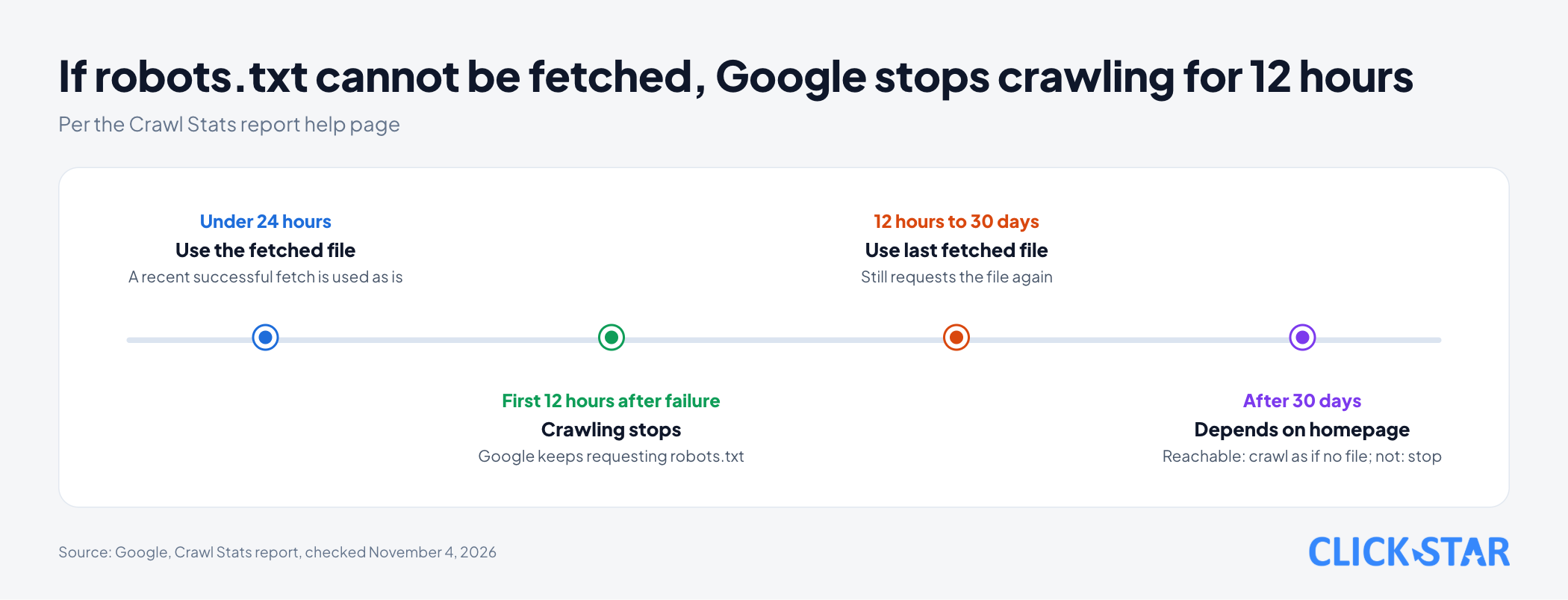
If the latest fetch failed or is older than 24 hours, Google requests the file again. For the first 12 hours it stops crawling; from 12 hours to 30 days it uses the last file it fetched; after 30 days, if the homepage is reachable it crawls as if there were no robots.txt, otherwise it stops.
Reading the responses table
In the responses table, most should be 200 or other "good" types. Google writes that 404 is often the correct response, so not every 404 needs fixing; 5xx errors should be fixed.
When Google crawls so much that the server struggles
There is also the opposite case. Per "Reduce the Google crawl rate" (updated October 6, 2026), common causes are filters or sorting, calendars with huge numbers of date URLs, or dynamic search ad targets. Google advises checking server access logs first.
Only in an emergency should you return 500, 503 or 429 instead of 200, for a few hours up to 1-2 days. If it lasts for days, URLs may be dropped from the index.
Per "How HTTP status codes affect Google's crawlers" (updated February 4, 2026), do not use 401 and 403 to limit the rate: 4xx codes except 429 do not affect it.
What this means for Vietnamese businesses
Click Star found no public data on how many Vietnamese websites reach Google's thresholds. What follows is Click Star's own assessment, not from outside sources.
For a company site of a few dozen to a few hundred pages, crawl budget is rarely the task. Effort belongs in content, internal links and the sitemap.
Sites that could reach the thresholds are online shops with many filters, news sites with tens of thousands of articles, and listing portals changing daily. There, a bloated URL inventory is usually the cause, not weak servers.
Click Star's view. Treat crawl budget as a diagnostic tool, not a goal. With a concrete sign, such as new pages read slowly or rising 5xx errors, read Crawl Stats and fix the URL inventory first.
Click Star offers SEO-ready, fast website design, so it has an interest in this topic.
What to do: a 5-step check
A reference framework from Click Star, not taken from outside sources and not yet tested on real data.
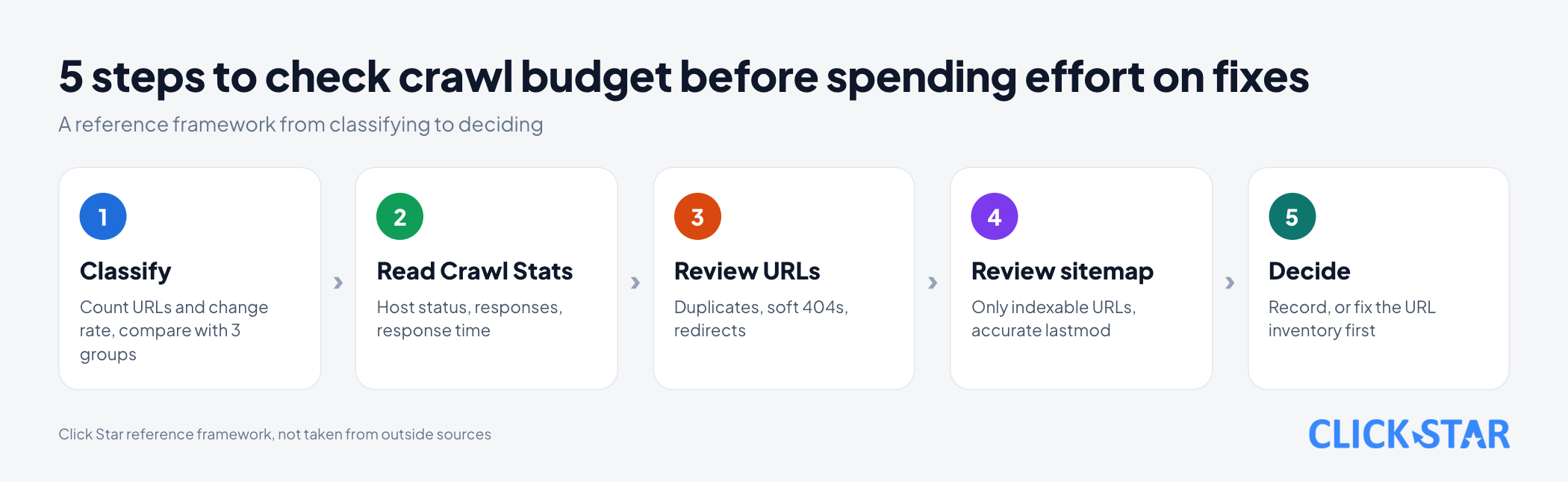
Step 1. Classify the website. Count unique URLs you want indexed, note how often they change and how many are "Discovered - currently not indexed", then compare with Google's 3 groups.
Step 2. Open Crawl Stats if you have a root-level property. Look at host status, the share of 200, 301, 404 and 5xx responses, and response time.
Step 3. Review the URL inventory. Look for duplicates from filter or sort parameters, soft 404 pages and redirect chains.
Step 4. Review the sitemap. List only URLs you want indexed, keep each file within 50,000 URLs, and set <lastmod> to the last significant change.
Step 5. Decide. If the site is in no group and new pages are still crawled the same day, record that and recheck periodically. If it is in one, fix the URL inventory and server speed before adding resources.
How to measure
After each change, track 2 things in Search Console.
- The number of "Discovered - currently not indexed" URLs in the Page indexing report.
- Response shares and average response time in Crawl Stats.
Common mistakes
- Worrying about crawl budget for a site of a few dozen pages when content and internal links are the real issue (Click Star's assessment).
- Blocking a whole folder with robots.txt and expecting important pages to be crawled more.
- Using
noindexto save crawl budget. - Leaving a deleted page showing "not found" while still returning status 200.
- Setting
<lastmod>to today for every URL at each sitemap export, even when pages did not change (Click Star's inference from the requirement that<lastmod>be accurate). - Returning 503 or 429 for days to "protect the server".
What is not known
The real threshold is unclear: Google says the numbers are rough estimates, and its pages use different yardsticks (1,000 pages, a few thousand URLs, 10,000, hundreds of thousands and 1 million pages).
The Crawl Stats page calls a site of hundreds of thousands of pages large. For small and medium sites that see Google not crawling everything, it advises updating sitemaps and checking that no pages are blocked by mistake.
Google's pages disagree on 2 points. First, the crawl budget guide says Google still requests pages with noindex. In its Q&A on removed pages (returning 4xx), the "Page indexing report" says the only case where a URL is not crawled is when it returns noindex. Click Star found no source explaining this.
Second, the Crawl Stats page advises not returning 503 or 429 for more than 2-3 days, while "Reduce the Google crawl rate" gives 1-2 days.
There is no measurement for Vietnamese websites, and the 5-step framework is untested. The Crawl Stats and Page indexing pages show no update date.
Related posts



Need tailored advice for your business?
Click Star helps you build a solution that fits your industry and scale. We answer every question during business hours.