Website forms: design, data validation and spam protection
How to design a contact form, validate data on the server and layer spam protection, based on MDN, web.dev, OWASP, W3C, Cloudflare Turnstile and Google reCAPTCHA.
A form is where a visitor leaves contact details, so every extra field, confusing error and junk submission that slips through has a cost. Most failures sit in small details: missing labels, checks only in the browser, a CAPTCHA with no server-side verification.
This article covers contact form design, validation in the browser and on the server, layers of spam protection, and connecting the form to a CRM. All sources were checked as of October 23, 2026.
Sources: MDN, web.dev, OWASP, W3C, Cloudflare Turnstile, Google reCAPTCHA (now Google Cloud Fraud Defense), NN/g and Baymard.
Key points
- Ask for less: per Baymard (June 26, 2024), the average checkout has 11.3 fields while most websites need only 8 for checkout. That is e-commerce data, not contact forms.
- Use real labels, the right input types and autocomplete. A pattern accepting only basic Latin letters rejects Vietnamese names with diacritics.
- Browser checks are only a convenience. MDN and OWASP both say the server must validate again.
- Layer spam protection from light to heavy: a honeypot, rate limiting, then non-interactive verification. A 2021 W3C draft says: if a honeypot suffices, use it until there is evidence of attack.
- Turnstile and reCAPTCHA tokens work only if the server verifies them. Each is single-use: 300 seconds for Turnstile, 2 minutes for reCAPTCHA.
- Measure the accepted-submission rate, spam-flag rate and real visitors blocked by mistake, not only GA4's form_submit.
How many fields should a form ask for
Ask only for what you will use right away. web.dev (written for payment and address forms; updated October 22, 2026) advises against requesting unneeded data: fewer fields cut complexity and the cost and liability of storing data. MDN likewise advises requiring only what is needed.
Baymard (June 26, 2024) reports the average 2024 checkout has 5.1 steps and 11.3 fields. It argues most websites need only 8 fields for checkout, and that field count affects the experience more than step count.
The limit: this is payment data from online stores.
web.dev recommends a single name field. Click Star's reference framework, not from an outside source: start a contact form with 3 required fields (full name, phone or email, need) and make the rest optional.
Labels, input types and autocomplete
Every field needs 1 visible label. web.dev warns against a placeholder in place of a label because the text vanishes once typing starts. NN/g (published May 11, 2014) gives 7 reasons, such as memory load and being unable to re-check answers.
WCAG 2.2 criterion 3.3.2 (level A) requires labels or instructions for input fields.
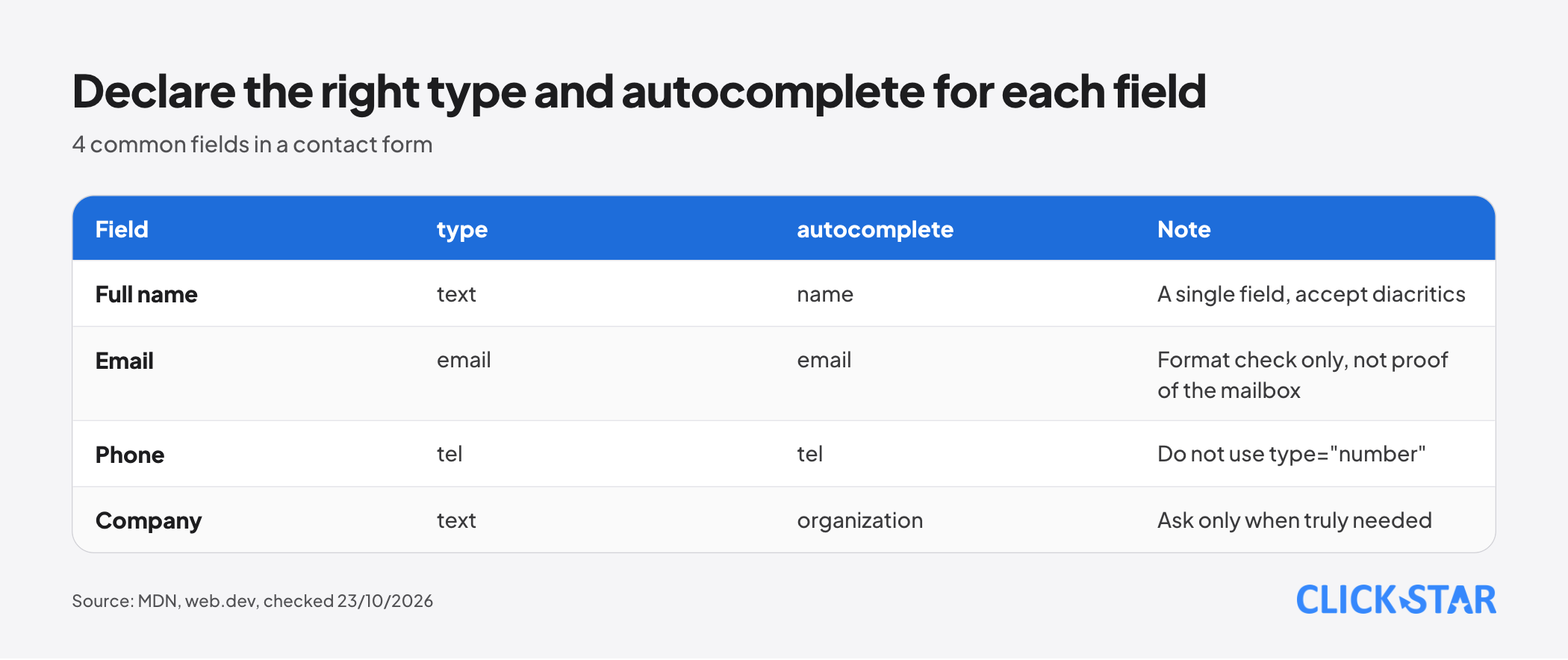
The input type decides the phone keyboard. web.dev recommends type="email" and type="tel", and advises against type="number" for phone numbers because it adds meaningless arrows. MDN notes browsers do not enforce a phone number format, since no single check suits every country.
The autocomplete attribute tells the browser what data a field takes; MDN lists values such as name, email, tel and organization. WCAG 1.3.5 (level AA) requires the purpose of fields collecting user data to be programmatically determinable. web.dev adds: keep name and id stable.
For names, web.dev advises against forcing Latin letters: use a pattern accepting any Unicode letter (for example \p{L}). A pattern limited to basic Latin letters would reject "Nguyễn" or "Đặng", a direct consequence of how patterns work.
Error messages: in the right place at the right time
NN/g (published February 3, 2019, updated December 12, 2024) gives 10 guidelines for reporting errors. The core: report once the visitor finishes the field, put the message next to it, never report before typing ends, do not rely on a top summary alone, and do not use tooltips for errors.
WCAG 3.3.1 (level A) requires errors to be identified in text and the field in error named. web.dev advises against disabling the submit button just because data is invalid, since visitors may think it is broken, but suggests disabling it right after a click to prevent duplicates.
Server-side validation is mandatory
MDN states it plainly: browser validation cannot be treated as a complete security measure, because an attacker can alter the network request; another MDN page adds that they can bypass the HTML and post straight to the server. OWASP agrees: browser checks give quick feedback, but the server must validate again.
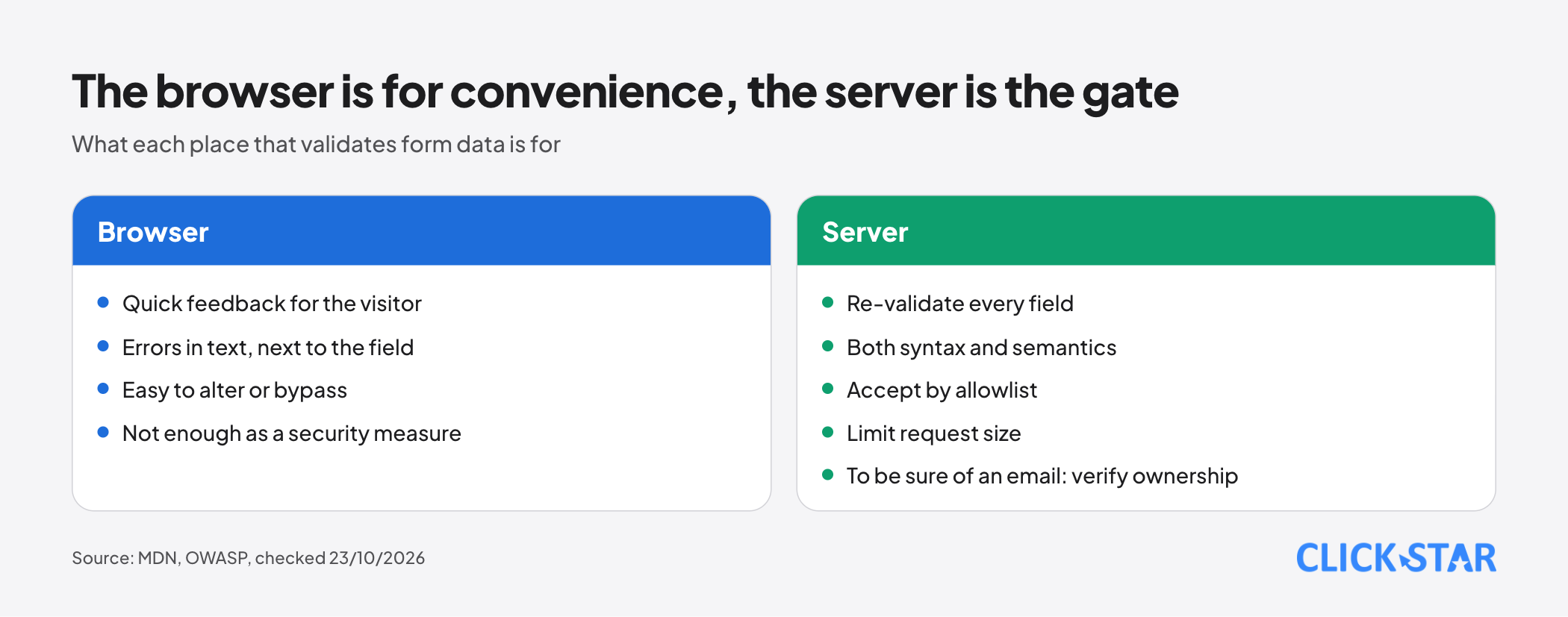
OWASP says to validate both syntax (type, format) and semantics (for example an end date after the start date), with rules per field.
OWASP advises defining what is accepted rather than recognizing every malicious string; blocking apostrophes, for instance, rejects real names without making a query safer. Set request size limits before parsing content.
On email, OWASP says format validation does not prove the sender controls the mailbox; OWASP points to its email ownership verification guide. Click Star's reasoning: to be sure an address works, send a confirmation message.
Spam protection: 4 layers from light to heavy
OWASP defines "spamming" (OAT-017) as adding malicious or questionable information to content or messages, with form spam among examples. It excludes abuse of a broken form-to-email or form-to-SMS function, treating that as an implementation flaw.
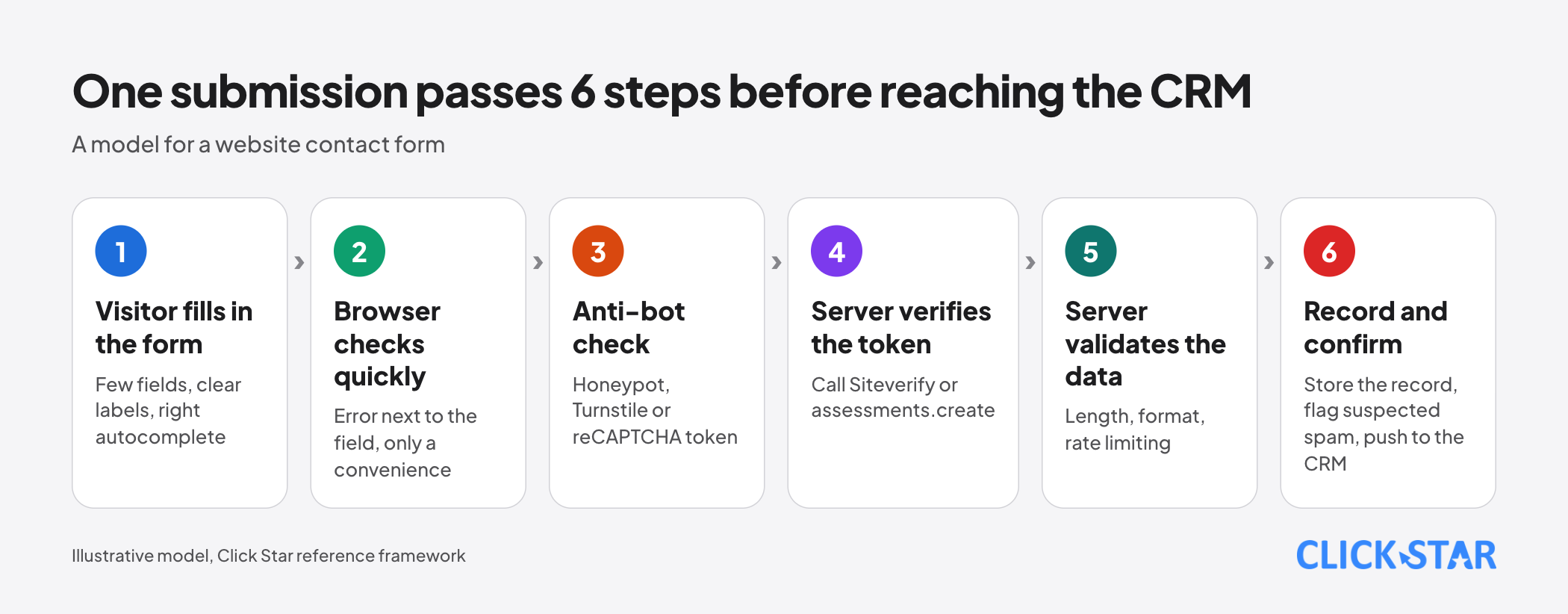
Click Star's reference framework, not OWASP's words: before looking for a bot-blocking tool, make sure the form cannot send to recipients strangers choose. The 4-layer order is also Click Star's framework (W3C and vendor documentation).
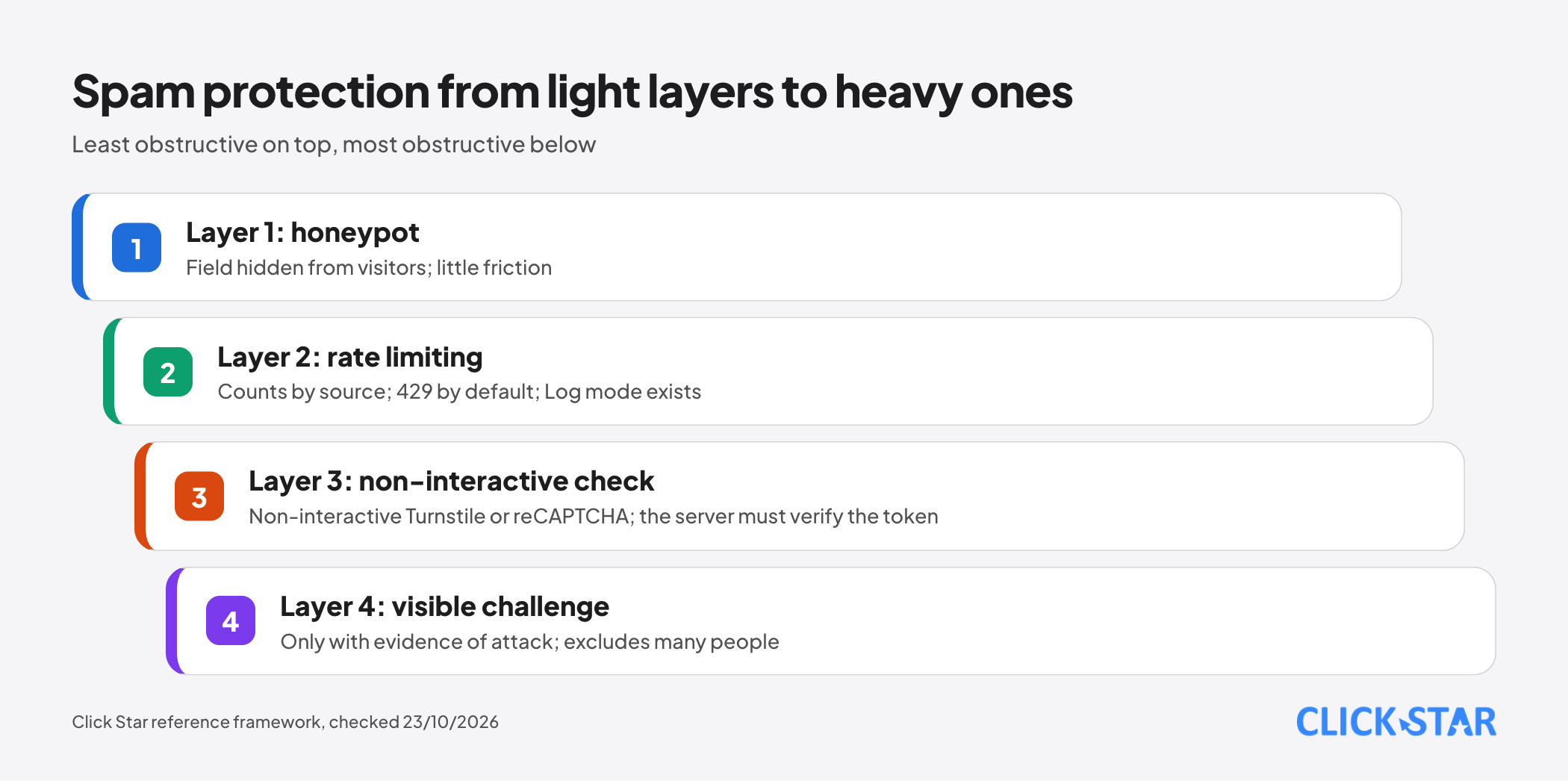
Layer 1, honeypot. The W3C draft note "Inaccessibility of CAPTCHA" (December 16, 2021) describes a honeypot as a field that attracts robots and is hidden from users, easy even in hand-written HTML. It concludes: if a honeypot suffices, use it until there is evidence of attack.
Click Star's reasoning: name the field unlike a real one, hide it from screen reader users and test with password managers, since a browser might autofill a hidden field.
Layer 2, rate limiting. Vercel documentation (updated August 28, 2026) says WAF Rate Limiting is on all plans, counts requests from the same source in a time window, returns 429 by default, and has a "Log" action to observe before blocking.
Layer 3, non-interactive verification. Cloudflare Turnstile (documentation updated August 14, 2026) runs small background challenges in 3 modes: Managed, Non-interactive and Invisible. The Free plan allows up to 20 widgets and unlimited challenges.
Per the Widget page (April 16, 2026), Managed (recommended by Cloudflare) may show a checkbox depending on risk; only Non-interactive and Invisible never ask the visitor to act. Invisible mode requires your privacy policy to reference Cloudflare's Turnstile Privacy Addendum.
Turnstile documentation (October 22, 2026): the widget alone is not enough; call the Siteverify API on the server because tokens can be forged. A token lasts 300 seconds and is single-use; timeout-or-duplicate means it expired or was already used.
reCAPTCHA has moved: old pages on Google for Developers are marked "deprecated" and point to Google Cloud Fraud Defense (read October 23, 2026). The migration page (updated October 13, 2026) says existing v2 and v3 keys keep working without code changes once moved to a Google Cloud project.
New flow: the server calls assessments.create and gets a risk score from 0.0 to 1.0; the token is single-use, expires after 2 minutes, and the returned action must match expectedAction.
Per the Fraud Defense billing page (October 13, 2026), Essentials is free up to 10,000 assessments per calendar month (per organization, for projects without billing); beyond that, requests return a 429 error. Premium applies once billing is on: 10,001 to 100,000 assessments cost a flat $8 per month (currency not named).
Layer 4, visible challenges. W3C notes that interactive CAPTCHAs exclude many people with disabilities, are increasingly insecure, and recommends limiting how often visitors are challenged.
From form to CRM: do not lose real customers
These points are Click Star's reference framework unless a source is named. First, store a raw record of every syntactically valid submission before calling an outside service, so a third-party failure loses no lead.
Second, flag instead of deleting: send suspected spam to a review queue and sample it weekly.
Third, deduplicate by phone or email when records enter the CRM. Fourth, Cloudflare's sample code returns failure when Siteverify is unreachable; whether to fail closed or open is a business decision, so choose in advance.
How to measure a form
Google Analytics' Enhanced measurement events page describes form_start, recorded the first time a visitor interacts with a form in a session, and form_submit, recorded on submit.
The page does not say whether form_submit means the server accepted the submission. Click Star's reasoning: it is a browser event, so reconcile it with real server records. Reference metrics from Click Star, not an industry standard (no openly readable benchmark threshold was found, so compare against your own site week by week):
- Start rate: form_start divided by views of pages with the form.
- Accepted-submission rate: submissions the server accepted divided by clicks on send.
- Spam-flag rate: flagged submissions divided by all submissions received.
- Real visitors blocked by mistake: real submissions in a weekly manual sample.
What this means for Vietnamese business websites
Click Star's reasoning from the sources above, 3 points apply now: accept names with diacritics, normalize phone numbers on the server, and disclose third-party bot protection in the privacy policy (Turnstile Invisible requires it).
A form collects personal data, so check the relevant rules. Click Star already has articles on the personal data protection law and cookie banners; this one cites no provision, so check the original text or ask a lawyer.
Click Star's view. A sensible order is to cut fields and fix labels first, validate on the server second, and only then layer spam protection. Spam is often a symptom of weak validation, not only a tooling problem.
Click Star provides website design and CRM integration services, so it has an interest in this topic.
A 14-day plan (Click Star reference framework)
- Days 1 to 2: remove fields nobody uses, add labels, the right type and autocomplete.
- Days 3 to 4: re-validate every field on the server, set length and request size limits.
- Days 5 to 7: add a honeypot and rate limiting, in log mode before blocking.
- Days 8 to 10: if spam still gets through, enable Turnstile or reCAPTCHA and verify tokens on the server.
- Days 11 to 14: turn on the 4 metrics, review a sample of flagged submissions, adjust thresholds.
Common mistakes
- Validating only with HTML and JavaScript while the server accepts anything.
- Adding a CAPTCHA widget but never calling token verification on the server.
- Using a placeholder instead of a label, or type="number" for phone numbers.
- A name pattern limited to basic Latin letters, rejecting visitors with diacritics.
- Silently deleting every suspected spam submission without sampling, and losing real customers.
- Treating GA4's form_submit as the real lead count, without reconciling server records.
- A visible challenge for every visitor from the start, without evidence of attack.
What is not known
No Vietnam measurements exist for form abandonment, spam or CAPTCHA's effect on conversion. Baymard's figures come from e-commerce, unchecked for short contact forms.
No primary source covers honeypot effectiveness against current bots or conflicts with password managers. The readable source is a 2021 W3C draft, which itself warns that anti-bot effectiveness can change over time.
reCAPTCHA documentation is moving platforms, so tiers, prices and features may change. Turnstile's overview states WCAG 2.2 AA while its plans table states AAA; Click Star has not checked which is right.
Related posts



Need tailored advice for your business?
Click Star helps you build a solution that fits your industry and scale. We answer every question during business hours.