HTTP Caching, Cache-Control and CDNs: How to Speed Up a Website Without Serving Stale Content


How to set Cache-Control for each content type, what a CDN changes, how to refresh caches and test with curl. Based on MDN, RFCs, and the Vercel and Cloudflare documentation.
A website can get faster through header configuration alone, if browsers and CDNs may reuse what they already downloaded. A wrong configuration, though, shows customers old prices after an update, or worse, someone else's content.
This article covers the Cache-Control directives, choosing values by content type, the role of a CDN, refreshing caches and testing. The main sources are MDN, RFCs, and the Vercel and Cloudflare documentation, checked on October 23, 2026.
Click Star already has articles on Core Web Vitals, image optimization and INP.
Key points
- HTTP caches come in 2 kinds: private (usually the browser) and shared (proxies, CDNs). Per-user content must be marked
private, because a cookie alone does not make a response private. - A missing Cache-Control does not mean no caching, because caches may estimate a lifetime. Set it explicitly.
- Files with a hash in the name get
public, max-age=31536000, immutable. HTML getsno-cachewith an ETag, or a separate CDN lifetime through s-maxage or CDN-Cache-Control. no-cachemeans store it but revalidate before use, whileno-storemeans do not store it. The 2 are easy to confuse.- A server cannot delete a copy held by an intermediate cache; Clear-Site-Data: cache clears only the browser cache. A CDN is refreshed with purge or invalidate, and static files get a new URL.
- Test with curl: read Cache-Control, Age and the CDN status flag, then retry with a cookie.
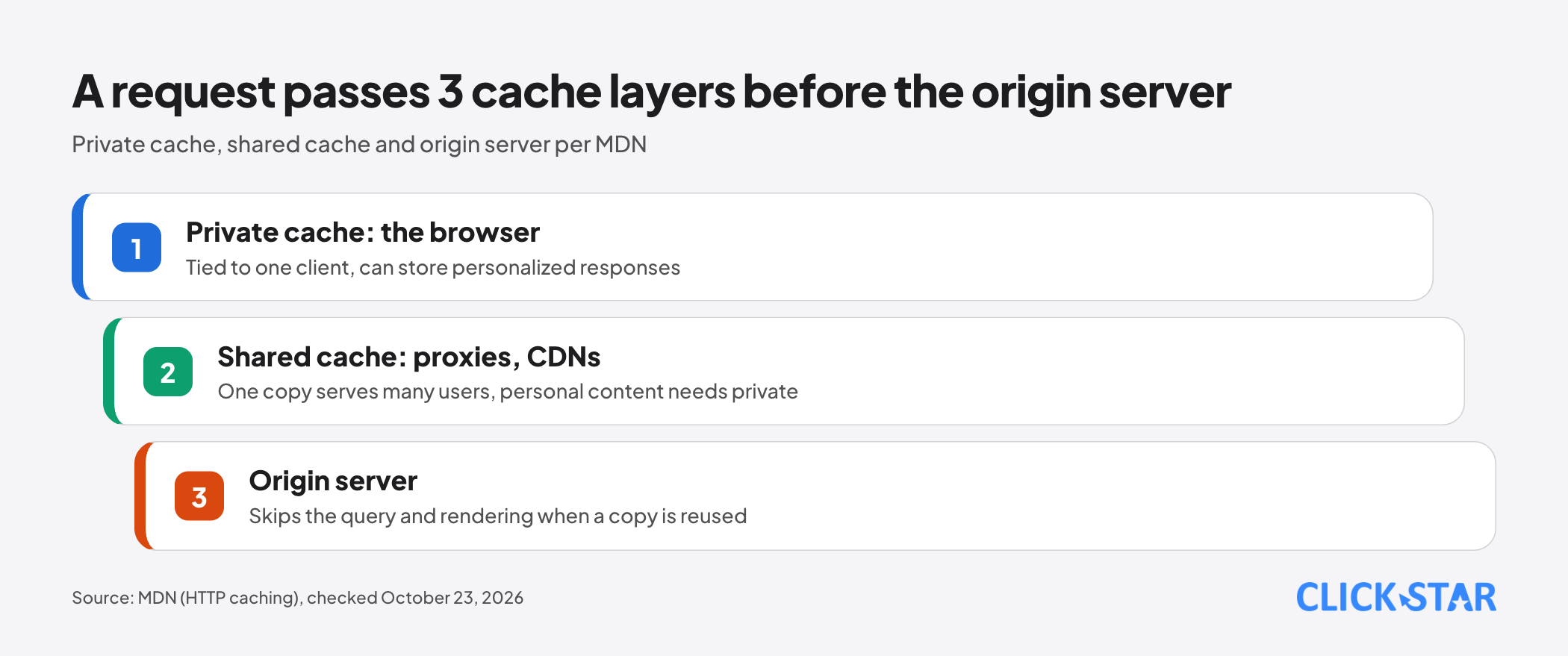
What an HTTP cache is and where it sits
According to MDN (last modified August 14, 2026), an HTTP cache stores a response and reuses it for later requests. The response comes from closer to the customer, and the origin server skips the database query and rendering.
MDN separates private from shared caches. A private cache belongs to one client, typically the browser, so it can store personalized responses. A shared cache sits between customer and server and serves many users, such as proxies and CDNs.
How a response goes fresh, stale and revalidated
According to MDN, a stored response is fresh (reusable) or stale (expired), judged by its age since the origin generated it. With Cache-Control: max-age=604800 (1 week) it is fresh for 7 days. If a shared cache has held it for 1 day, it sends Age: 86400, leaving the browser 518400 seconds.
Once stale, the cache asks the server with a conditional request (If-None-Match with an ETag, If-Modified-Since with Last-Modified). If nothing changed, the server returns 304 Not Modified with no body and the copy counts as fresh again.
Without Cache-Control, RFC 9111 (IETF, June 2022) still lets a cache estimate a lifetime, with a typical value of 10% of the time since Last-Modified. web.dev (updated November 5, 2018) also says that omitting Cache-Control does not turn caching off.
Cache-Control directives and where they get confused
According to MDN (last modified September 17, 2026), max-age=N means the response is fresh for N seconds after the origin generated it. s-maxage applies only to shared caches, is ignored by browsers and overrides max-age there.
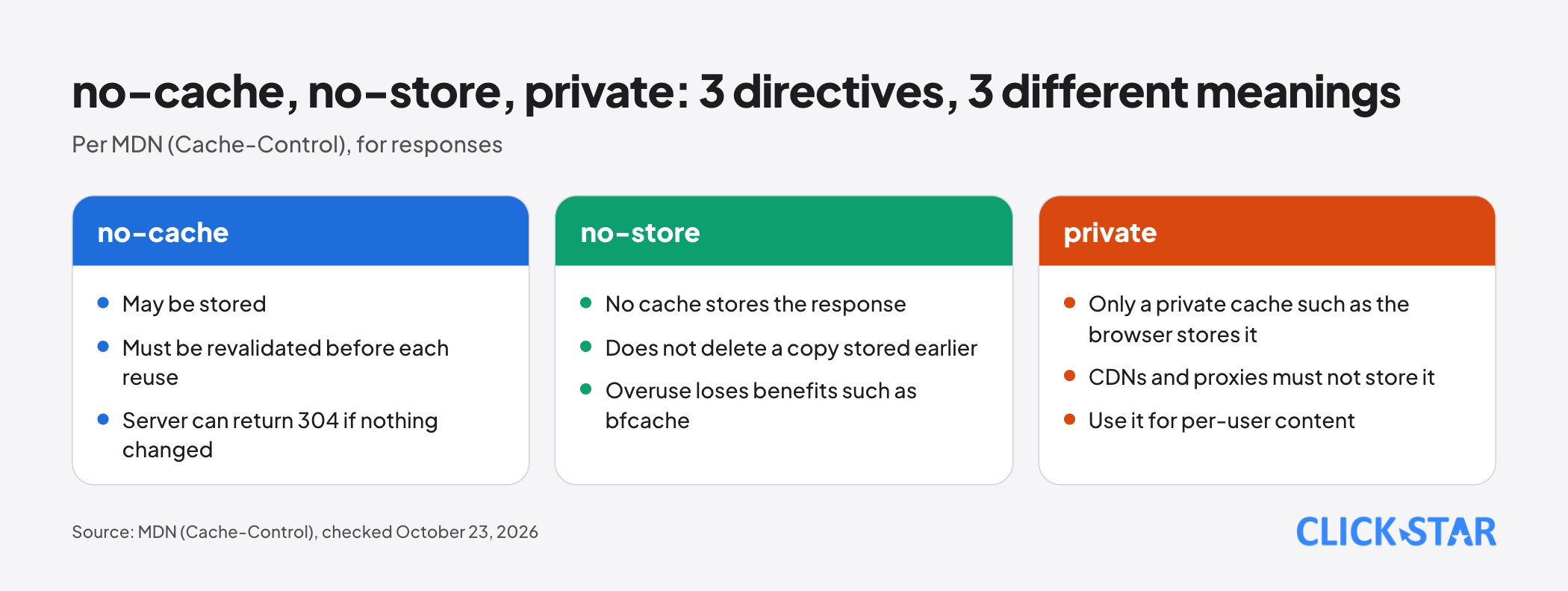
no-cache allows storing but requires revalidation before each reuse. no-store asks every cache not to store. private allows storing only in a private cache such as the browser.
MDN notes that no-store does not delete a copy already stored, and that overusing it loses browser benefits such as the back/forward cache (bfcache). MDN recommends no-cache with private.
immutable (RFC 8246, IETF, September 2017) says the content will not change while it is fresh, so a client does not need to revalidate when the user reloads the page.
stale-while-revalidate (RFC 5861, independent submission, May 2010, informational, not an Internet standard) lets a cache return a stale copy at once for a stated number of seconds while revalidating in the background.
According to web.dev (updated July 18, 2019), Chrome 75 and Firefox 68 support this directive, and browsers that do not support it ignore it.
Choosing values by content type
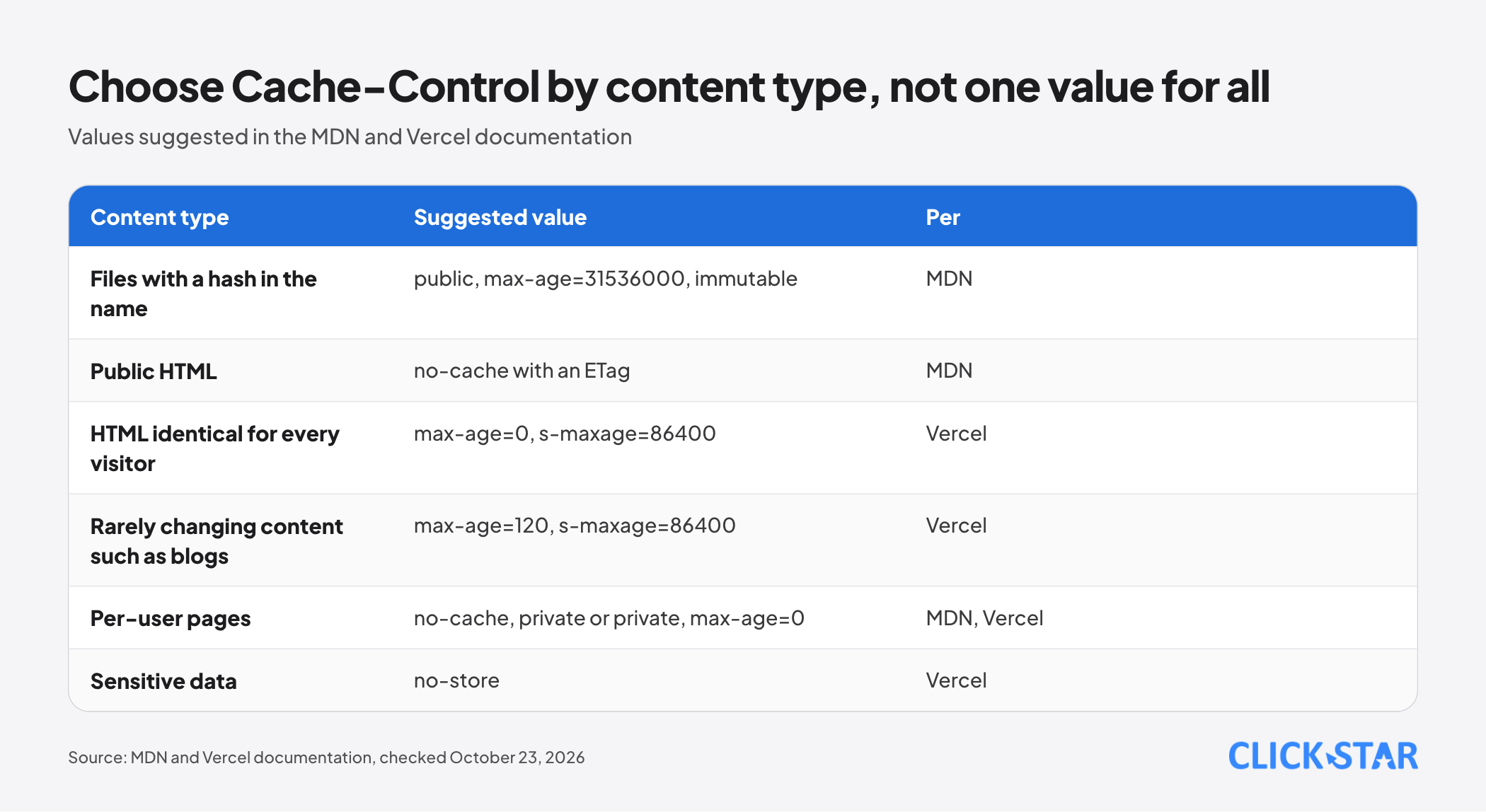
Files with a hash or version in the name (JS, CSS, images). MDN calls this cache busting: the URL changes whenever the content does, so public, max-age=31536000, immutable with an ETag fits. public is only needed for requests with Authorization.
Public HTML, the same for everyone. A page address cannot carry a hash, so MDN suggests no-cache with an ETag or Last-Modified: the browser always asks and usually gets a small 304.
On Vercel, the documentation (September 14, 2026) suggests max-age=0, s-maxage=86400 for pages identical for every visitor, and max-age=120, s-maxage=86400 for rarely changing content such as blogs. With the latter, returning visitors can see content up to 120 seconds old.
Per-user pages and sensitive data. MDN uses no-cache, private and Vercel suggests private, max-age=0: CDNs and proxies must not store them. For sensitive or second-by-second data, Vercel recommends no-store.
In Click Star's reading, the MDN and Vercel values sit on 2 levels rather than conflict: when Cache-Control is the only cache header, Vercel reads s-maxage and strips it from the response sent to the browser.
What a CDN changes
RFC 9213 (IETF, June 2022) defines CDN-Cache-Control, a header aimed only at CDN caches. In its example, Cache-Control: max-age=60, s-maxage=120 with CDN-Cache-Control: max-age=600 makes the CDN treat the response as fresh for 600 seconds, other shared caches 120 seconds and the rest 60 seconds.
Vercel supports Vercel-CDN-Cache-Control (Vercel only) and CDN-Cache-Control, in that priority order and then Cache-Control. By default a Function response is public, max-age=0, must-revalidate: the CDN does not cache and the browser must revalidate.
Vercel does not store responses with set-cookie, requests with Authorization, or responses with private, no-cache, no-store or Vary naming Cookie (documentation, September 14, 2026).
Cloudflare's defaults differ. According to its documentation (September 14, 2026), the CDN by default caches by file extension rather than MIME type, and does not cache HTML or JSON.
The same header can behave differently
The Cloudflare revalidation documentation (September 29, 2026) says that with Origin Cache Control enabled, s-maxage carries proxy-revalidate semantics under RFC 9111, so with stale-while-revalidate Cloudflare does not serve stale copies. It proposes max-age with stale-while-revalidate and a separate Edge Cache TTL.
The Vercel documentation, by contrast, uses s-maxage=1, stale-while-revalidate=59 as an example of serving stale content while refreshing in the background. Test on the CDN you actually use.
Clearing and refreshing caches
According to MDN, a copy on an intermediate server with a long max-age cannot be deleted, because later requests no longer reach the server. Clear-Site-Data: cache clears only the browser cache.
CDNs have active tools. The Vercel purge documentation (September 3, 2026) describes cache tags. Invalidate marks copies stale: the next request gets the stale copy at once while the refresh runs in the background. Delete makes the next request wait for the origin and can cause a cache stampede, with many requests hitting the origin at once.
Cloudflare offers purge by URL (its recommended method), tag, prefix, hostname or everything. Its documentation (September 29, 2026) says a 200 response only confirms the command was received. To verify, request the resource again and check CF-Cache-Status is no longer HIT.
2 serious failures: stale content and private data
Stale content arises, by the mechanism MDN describes, when HTML or unhashed files get a long lifetime, or a CDN keeps an old copy nobody refreshed.
Private data is the riskier failure. MDN warns that forgetting private on a personalized response can let a shared cache store it and reuse it for many people.
Cloudflare describes Web Cache Deception (documentation, May 6, 2026): a URL looks like a static file (for example ending in .jpg) but returns a personalized page, and the stored copy can be retrieved. Its Cache Deception Armor, when enabled, checks that the extension matches the Content-Type.
Click Star's inference, not a test: because Cloudflare caches by file extension, including CSV, a per-person data export should return private or no-store.
How to test with curl
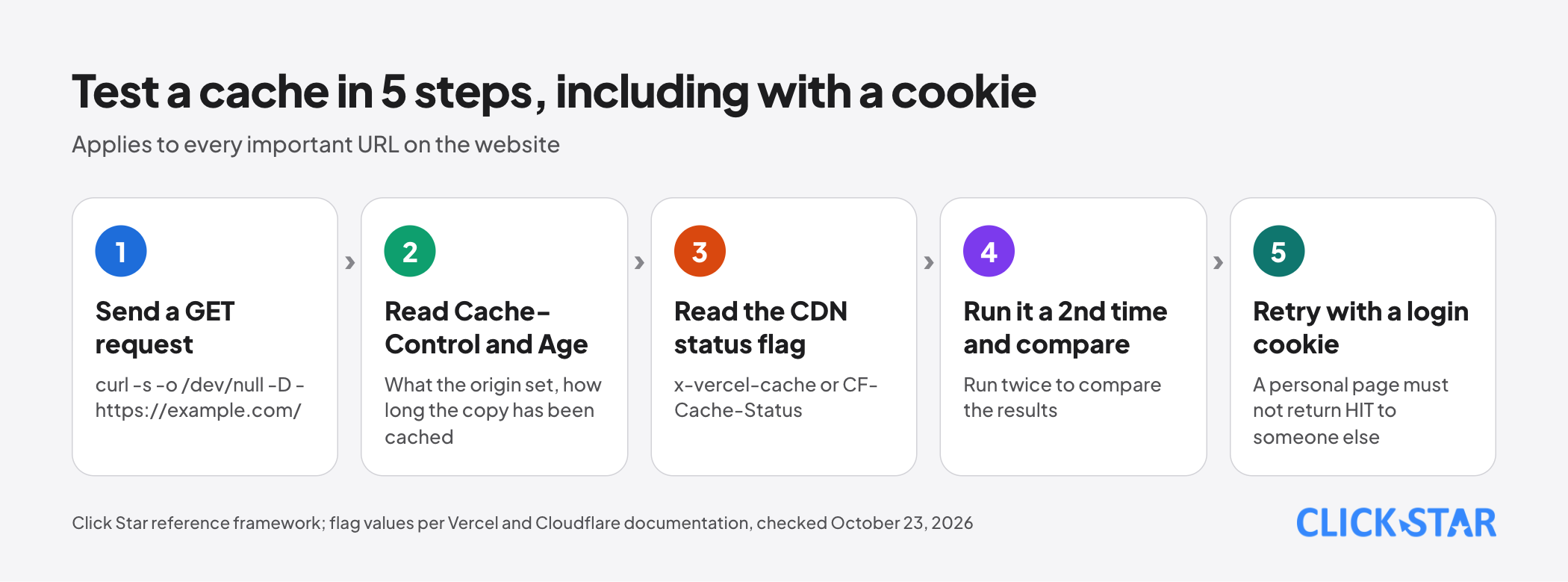
The command below sends a GET request, discards the body and prints the headers. Run it twice to compare.
curl -s -o /dev/null -D - https://example.com/
Read Cache-Control, Age and the CDN flag. Vercel uses x-vercel-cache with the values HIT, MISS, STALE, PRERENDER, REVALIDATED and BYPASS (documentation, August 11, 2026). Cloudflare uses CF-Cache-Status with values such as HIT, MISS, EXPIRED, STALE, BYPASS, REVALIDATED, UPDATING and DYNAMIC (September 4, 2026).
The step people skip: retry with a login cookie, since a personal page must not return HIT to someone else. Click Star proposes this test.
What this means for Vietnamese businesses
Click Star has no measurements for Vietnamese websites on this topic; what follows is inference from the mechanisms above.
On ad landing pages, prices and promotions change often: HTML with no-cache and an ETag updates at once, while hashed static files can be cached long. For customer portals or admin pages, the main risk is data exposure, not speed, so default to private or no-store.
Click Star's view. Caching reduces origin load and shortens the data path, but failures are often silent: customers see old content with no error message. Default to caution, widen each content type only with evidence, and measure before and after.
On the interest involved: Click Star provides SEO-standard, fast-loading website design services. The view above rests only on the cited documents.
A 14-day plan and how to measure (Click Star reference framework)
Click Star proposes this framework; it is not from an outside source and carries no standard thresholds.
- Days 1 to 2: list about 10 representative URLs (home page, articles, JS and CSS, images, API, login page) and record each one's Cache-Control, Age and CDN flag.
- Days 3 to 5: make sure static files have a hash in the name, then set
public, max-age=31536000, immutable. - Days 6 to 10: set HTML and API policy using the table above, check Vary and Set-Cookie, then test personal pages with a cookie.
- Days 11 to 14: write a purge procedure for prices and promotions, then track the HIT and MISS ratio, requests reaching the origin and reports of old content, against the pre-change baseline.
Common mistakes
- Not setting Cache-Control and letting browsers and CDNs guess the lifetime.
- Confusing
no-cachewithno-store, or usingno-storeon ordinary pages and losing bfcache. - Giving a long max-age to files with fixed names, then having no way to force a new version.
- Forgetting
privateon personalized pages, or believing a cookie keeps shared caches from storing them. - Copying a stale-while-revalidate setup between CDNs untested, though the same header can behave differently.
- Varying on User-Agent or Cookie: MDN says User-Agent sharply cuts reuse, and Vercel does not store responses varying on Cookie.
- Treating a 200 from a purge command as done, instead of checking the CDN status flag again.
What is not known
Click Star has no measurements of how many Vietnamese websites configure Cache-Control correctly, or of the speed gain from caching. The guidance rests on vendor documentation, not Click Star tests.
Some sources are old: web.dev on HTTP Cache was updated November 5, 2018, and on stale-while-revalidate July 18, 2019. Click Star has not read current browser compatibility tables for immutable and stale-while-revalidate.
Two Cloudflare pages differ on no-cache and max-age=0: Default cache behavior lists them as not cached; Cache responses says that with Origin Cache Control on (default on Free, Pro and Business) Cloudflare stores and revalidates, and off (Enterprise default) it bypasses. Click Star has not tested this or looked at any other CDN.
Related posts



Need tailored advice for your business?
Click Star helps you build a solution that fits your industry and scale. We answer every question during business hours.