How to use GPT well: choosing a model, writing prompts, verifying output and using the API properly
The GPT-6 family has 3 models for 3 kinds of work. This article shows how to choose a model, write prompts with a 5-part template, verify results and set up the API for engineering teams, based on OpenAI's official documentation.
GPT is not a single tool but a family of models, each suited to a different kind of work, and the same model gives very different results depending on how you ask.
This article is for 2 groups: people who use ChatGPT daily and engineering teams that integrate through the API. The parts about models, parameters and the API rest on OpenAI's official documentation for the GPT-6 family, checked on October 19, 2026. The parts about writing requests, verifying and process are Click Star's experience.
Model names and options change quickly, so reopen the documentation before you deploy.
Key points
- According to OpenAI's documentation, the GPT-6 family has 3 models: Astra (highest intelligence), 6.1 Sol (balanced) and Luna (fastest, lowest cost). Choose by type of task rather than always picking the strongest model.
- A good prompt describes the outcome, the success criteria and the constraints instead of listing every step. Old prompts should be trimmed rather than copied to a new model.
- Reasoning effort is the dial between quality, latency and cost. Raise it only when your own tests show a clear gain.
- For the API: use the Responses API, Structured Outputs for fixed output, put reusable content at the start of the prompt to benefit from caching, pin the model version and measure with your own test set.
- Always verify important output, and do not put sensitive data in before you have reviewed the service's data policy.
Pick the right model before writing the prompt
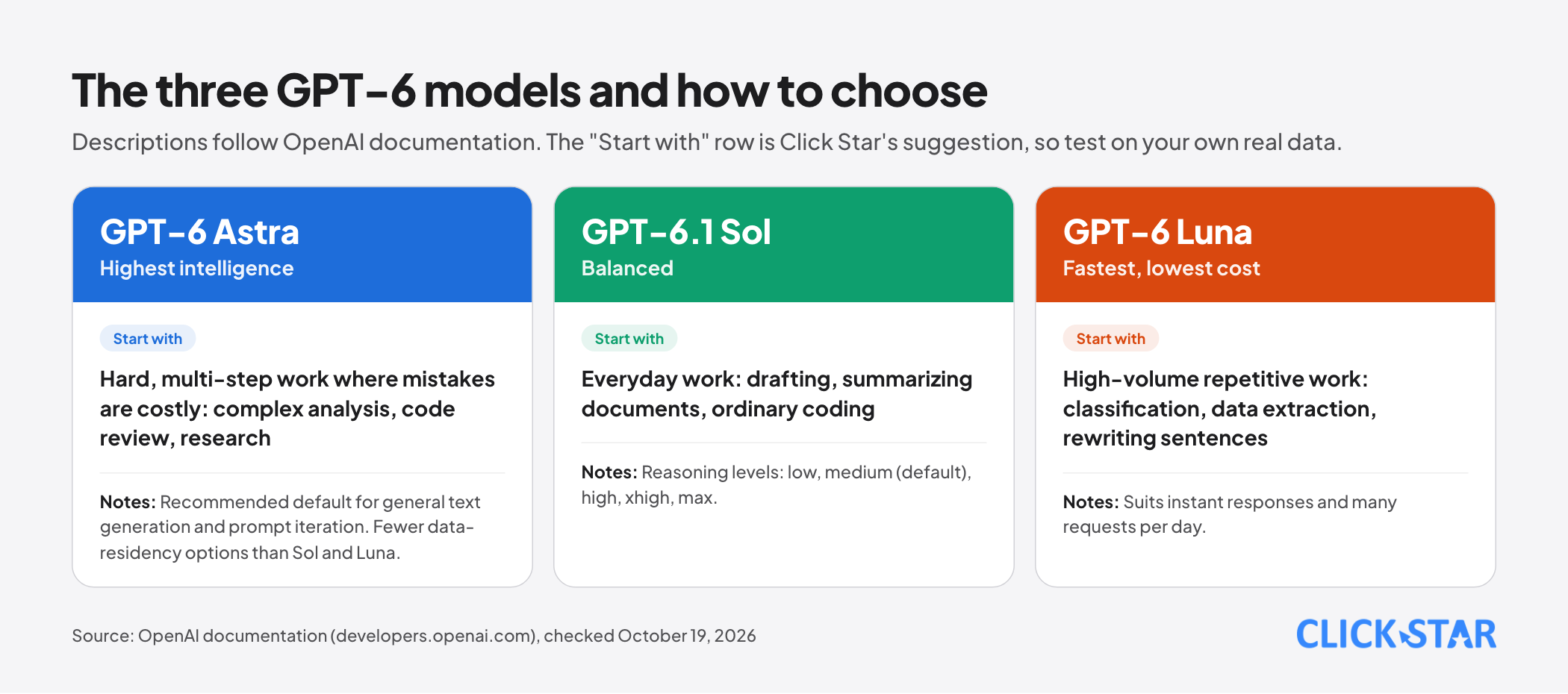
OpenAI's documentation describes 3 models in the GPT-6 family. GPT-6 Astra is the highest-intelligence model and the recommended default for general text generation and prompt iteration. GPT-6.1 Sol balances quality and speed. GPT-6 Luna is the fastest and cheapest.
The documentation also draws a more general line: reasoning models suit complex multi-step tasks and respond well to high-level goals, while standard GPT models are fast and cost-efficient and benefit from explicit instructions.
Click Star's practical way to choose:
- Repetitive, high-volume, simple work such as classification, extracting data fields or rewriting sentences: start with Luna.
- Everyday work that needs balance, such as drafting, summarizing documents or ordinary coding: Sol is a reasonable starting point.
- Hard, multi-step work where mistakes are costly, such as complex analysis, code review or research: try Astra, or Sol at a high reasoning level.
More important than any table: OpenAI advises you to test and compare models, for example Astra against Sol, on your own tasks. Take 20 real examples, run them on 2 models, score them against the same criteria, and only then decide.
For businesses with data location requirements, note that Astra has narrower Fast and Ultrafast regional data residency options than Sol and Luna, so check eligibility before you deploy.
Write the prompt around the outcome
OpenAI's guidance for this model family stresses stating the destination clearly and giving the model initiative, rather than steering step by step. A few points worth applying:
- State initiative: let the model finish authorized work, and ask for approval only after it has prepared a concrete result for you to review.
- State priority: the user's instructions win over guidance in skill files.
- State format and length, because the model leans toward long, heavily formatted answers if you do not limit it.
- State a level of checking proportional to the change, avoiding the full test suite for a small edit.
- Review context files such as AGENTS.md or skills for sentences that could accidentally make the model stop and ask, or change its behavior.
Simon Willison, summarizing the guidance for GPT-5.5, describes the same spirit: start from the smallest prompt that still preserves the product's contract, then tune reasoning effort, verbosity, tool descriptions and output format, instead of carrying the whole old instruction set to the new model.
The 5-part template
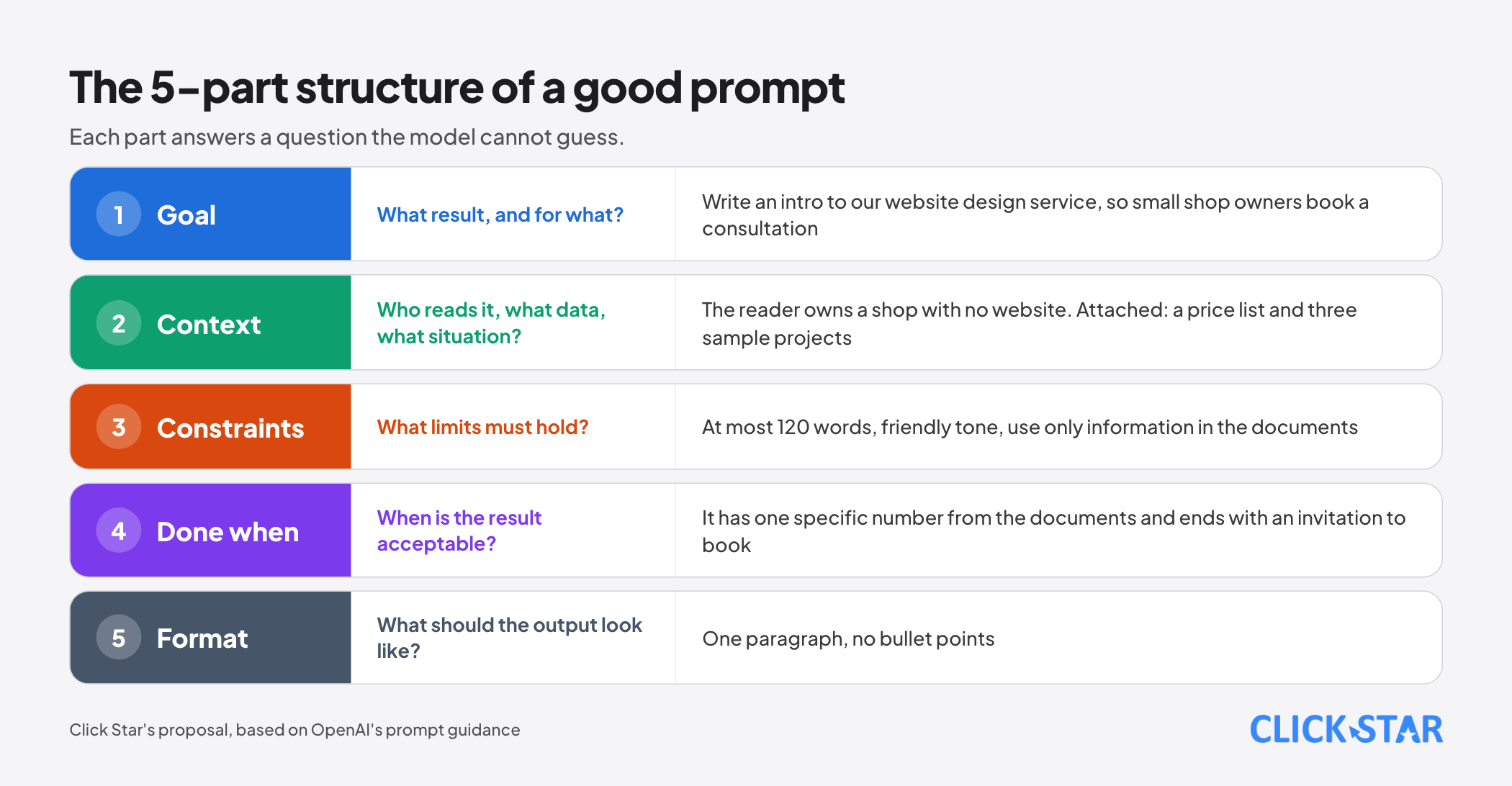
This template is how Click Star writes most work requests, from drafting an email to analyzing figures:
GOAL: I need [specific result], so that [purpose].
CONTEXT: The reader is [who]. Attached data: [description]. Situation: [summary].
CONSTRAINTS: At most [n] words. Tone [polite, direct]. Do not use [prohibitions]. Use only information in the document.
DONE WHEN: The result is acceptable when [a checkable condition].
FORMAT: [5-item list | 3-paragraph email | JSON per the sample].
Compare 2 requests. "Write me an intro for our service" produces something generic. "Write an introduction to our website design service for small shop owners, at most 120 words, in a friendly tone, with one specific number from the attached document and ending with an invitation to book a consultation" produces something you can use immediately and check easily.
When you want the model to imitate an output pattern, give 2 or 3 varied input and output examples (few-shot) instead of describing it in words. With the API, OpenAI suggests putting these examples in the developer message.
Reasoning effort, length and parameters
According to the documentation, Sol offers the reasoning levels low, medium (the default), high, xhigh and max. Astra and 6.1 Sol do not support none, so if you used none or minimal before, start with low and compare results.
When the reasoning level is anything other than none, drop the temperature, top_p and top_logprobs parameters, because they no longer apply.
To change the reasoning level between turns of a conversation, add a configuration_update item to the input and leave reasoning.effort at the request level unchanged so you do not lose the prompt cache.
Click Star's general rule: keep reasoning low or medium for everyday work, and raise it only when your tests show the quality gain justifies the extra wait and cost. The highest level does not always give a better result, but it is always slower and more expensive.
Context: the right information in the right place
The model knows only what you give it. 3 principles:
- Provide the real document instead of describing it again: paste the content or attach the file, and say "use only information in this document". Ask the model to point to the passage that supports each conclusion so you can check quickly.
- Put the stable part first and the changing part after. OpenAI advises placing reusable content at the start of the prompt to cut cost and latency through caching.
- Do not stuff everything in. Long context is no substitute for the right context: choose the most relevant passages and label each source clearly.
Verification: a 4-step loop
Fluent output does not mean correct output. The process Click Star uses for work with consequences:
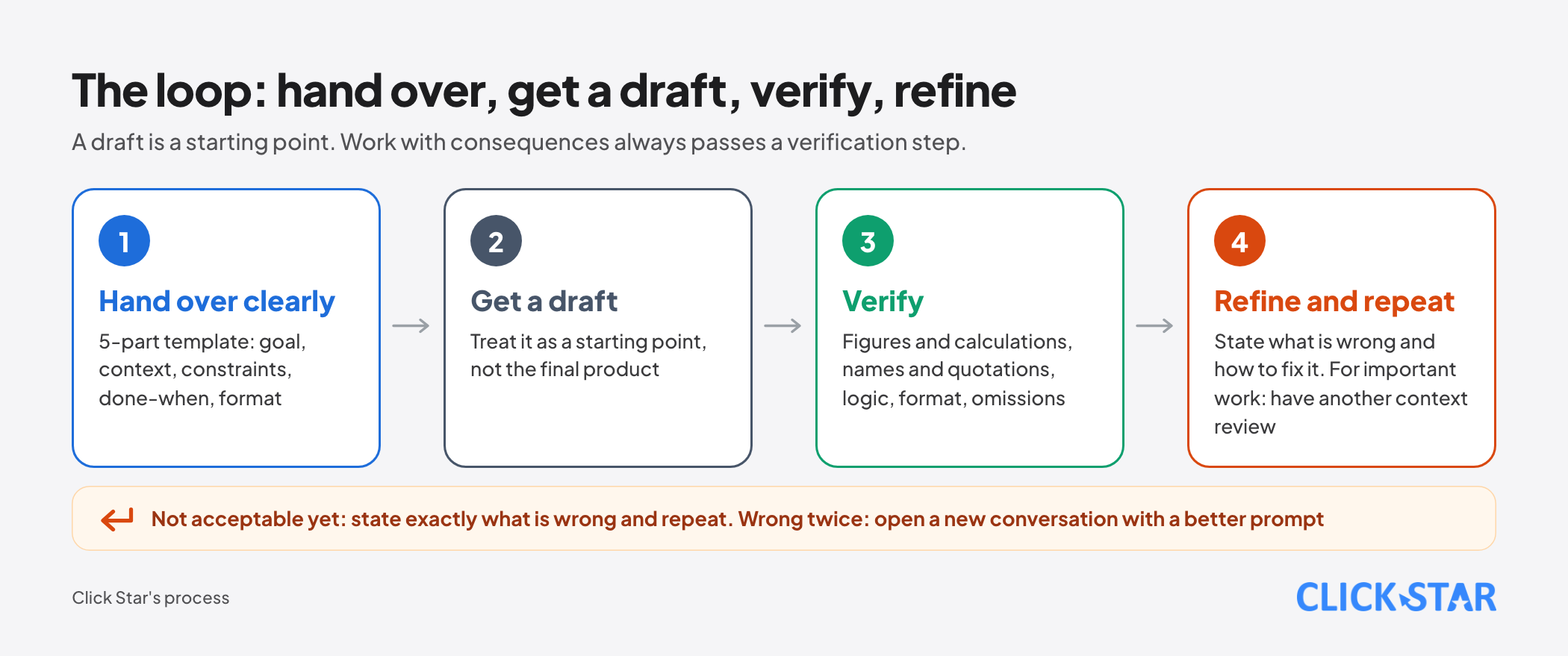
- Hand over the task clearly, using the 5-part template above.
- Receive a draft and treat it as a starting point, not the final product.
- Verify: figures and calculations (use a calculator tool, do not trust mental arithmetic), proper names and quotations (check the source), logic, format, and anything omitted. You can ask the model to list its assumptions and where it is unsure.
- Refine and repeat: state exactly what is wrong and how to fix it. If you have corrected twice and it is still off, open a new conversation with a better prompt instead of fixing further inside a cluttered context.
For important results, ask another model or another person to read it again: the writer and the reviewer should be separate contexts.
Using the API: settings worth doing right away
Engineering teams can apply the following list immediately, all taken from the current documentation:
- Use the Responses API. According to the documentation, Astra and 6.1 Sol require this API for tool calling.
- Separate message roles: developer messages set rules and business logic, user messages carry inputs. The
instructionsparameter applies only to that request and is not carried over when you chain turns withprevious_response_id. - Use Structured Outputs when you need fixed output: constrain the response to a JSON schema so machines can read it.
- Use prompt caching: put reusable content first. If you migrate from GPT-5.5 or earlier, replace
prompt_cache_retentionwithprompt_cache_options.ttlset to"30m". - Pin the model snapshot in production so behavior does not change unexpectedly on upgrade.
- Build evals before and after every prompt or model change.
- Keep prompts in source code. OpenAI is phasing out reusable prompt objects: creating them was de-emphasized from June 3, 2026 and
v1/promptsshuts down on November 30, 2026. If you use them, move the prompts into source code, with typed inputs, code review and deployment like any other change.
A minimal call with the JavaScript SDK:
import OpenAI from 'openai'
const client = new OpenAI()

const response = await client.responses.create({
  model: 'gpt-6-astra',          // switch to Sol or Luna for lighter work
  reasoning: { effort: 'low' },  // raise when your tests show it is worth it
  instructions:
    'You are a shop customer support assistant. Answer in at most 120 words, politely, using only information in the provided documents.',
  input: 'Customer asks: does the shop deliver outside the city?',
})

console.log(response.output_text)
Model names and field names can change with SDK versions, so check OpenAI's documentation when you run it for real.
Using it in a business: data and process
- Classify data before use: public, internal, sensitive. Sensitive data such as customer records, contracts, medical or personal financial information should not go in until you have reviewed the service's storage and data-use terms.
- For the personal data of people in Vietnam, check the Law on Personal Data Protection (Law No. 91/2025/QH15, effective January 1, 2026) and its implementing decrees.
- Content sent outside to customers should be reviewed by a person first.
- Record the prompt and model version used for repeated processes, so you can reproduce and debug when results change.
- Set a monthly budget and track cost per process, not only the total.
7 common mistakes
- Copying the old model's long prompt to the new model, including contradictory or repeated rules.
- Choosing the strongest model for everything, then complaining about cost and speed.
- Not stating when the work is done, so no one knows when the result is acceptable.
- Trusting a result because it sounds plausible, without checking figures and sources.
- Keeping
temperatureandtop_ponce reasoning is on, or using an old reasoning level that is no longer supported. - Keeping prompts only in a dashboard, with no change history and no review.
- Having no test set, so every prompt or model change is a gamble.
A 7-day plan to use it better
- Day 1: list the 5 tasks you use GPT for most and assign each task's data to a classification level.
- Day 2: rewrite one real prompt with the 5-part template and compare it with the old one.
- Day 3: pick 20 real examples, run them on 2 models and score them against the same criteria.
- Day 4: try lowering the reasoning level one step and record quality, time and cost.
- Day 5: add a verification step and a checklist for your most important task.
- Day 6: if you use the API, move prompts into source code, pin the version and add a test set.
- Day 7: write down what you learned as a shared one-page convention for the team.
Related posts

Need tailored advice for your business?
Click Star helps you build a solution that fits your industry and scale. We answer every question during business hours.