How to update software libraries and patch flaws with less breakage?
This article explains how to update software libraries to patch vulnerabilities with less risk of breaking the system, based on GitHub, npm, OWASP and semver.org documentation plus Click Star's own trials.
A company runs an online shop built with Next.js. On Monday morning, its code repository flags a library with a high-severity vulnerability: fixing it risks breaking checkout, leaving it risks exposure. This is an illustrative scenario, not a real case.
This article draws on GitHub, npm, pnpm, OWASP, semver.org and Vercel documentation, plus Click Star's own trials, checked on November 4, 2026. Click Star's tools could not read cve.org and NVD, which rely on JavaScript, so the article does not use them.
Click Star's short conclusion: small, regular updates that pass tests and a preview are usually safer than a single big batch, but an automatic patch is no substitute for testing.
Key points
- In a Click Star trial project, 9 declared libraries pulled in 397 packages (self-measured).
- Per GitHub, Dependabot has 3 parts: alerts flag vulnerabilities, security updates open fixes, version updates keep libraries current.
- A lockfile records the exact versions installed. Per npm,
npm cifails when the lockfile disagrees withpackage.json. - MAJOR.MINOR.PATCH is a promise from the library author, not a guarantee. Test PATCH releases too.
npm auditis useful but noisy: in the trial, 1 advisory became 16 entries, while--omit=devreported 0.- Click Star's 5 steps: separate branch, read notes, test, preview, merge and monitor.
- MAJOR versions need their own schedule, and updating too fast has supply chain risk.
Why one website pulls in hundreds of libraries
A library (dependency) is ready-made code from someone else. Each library uses others in turn, called transitive dependencies.
Click Star measured this on November 4, 2026 with npm 11.12.1: for 3 libraries (next, react, react-dom), npm install --package-lock-only recorded 54 packages. Adding 6 development tools such as TypeScript and ESLint brought the total to 397, a count that shifts with the day versions are resolved. This is a single trial project, not representative.
How known vulnerabilities reach your system
According to OWASP Top 10:2025, item A03 (undated, read November 4, 2026), components run with the application's privileges, so a flawed component can do serious harm. Patching only monthly or quarterly can leave a system needlessly exposed for days to months before it is fixed.
Per GitHub's "GitHub Advisory database" page (undated, read November 4, 2026), the database holds reviewed vulnerability advisories (from many sources, including the National Vulnerability Database, NVD), unreviewed ones (imported automatically from NVD) and malware advisories.
Dependabot raises no vulnerability alerts from unreviewed advisories. Malware alerts are a separate feature that only runs when enabled.
What a lockfile does and why it belongs in the repository
A lockfile records the exact version of every installed package, so every machine builds the same libraries.
Per npm's package-lock.json page (version 12.2.1, last edited October 4, 2025, read November 4, 2026), commit the file so everyone, CI included, installs the same packages. Its npm ci page says it fails when the lockfile and package.json disagree.
Click Star tried this on November 4, 2026: after adding left-pad to package.json without updating the lockfile, npm ci stopped with "Missing: [email protected] from lock file".
For pnpm, per the "pnpm install" page (undated, read November 4, 2026), --frozen-lockfile is on by default in CI when a lockfile exists. A lockfile also freezes vulnerabilities: it never raises versions by itself.
What MAJOR.MINOR.PATCH means
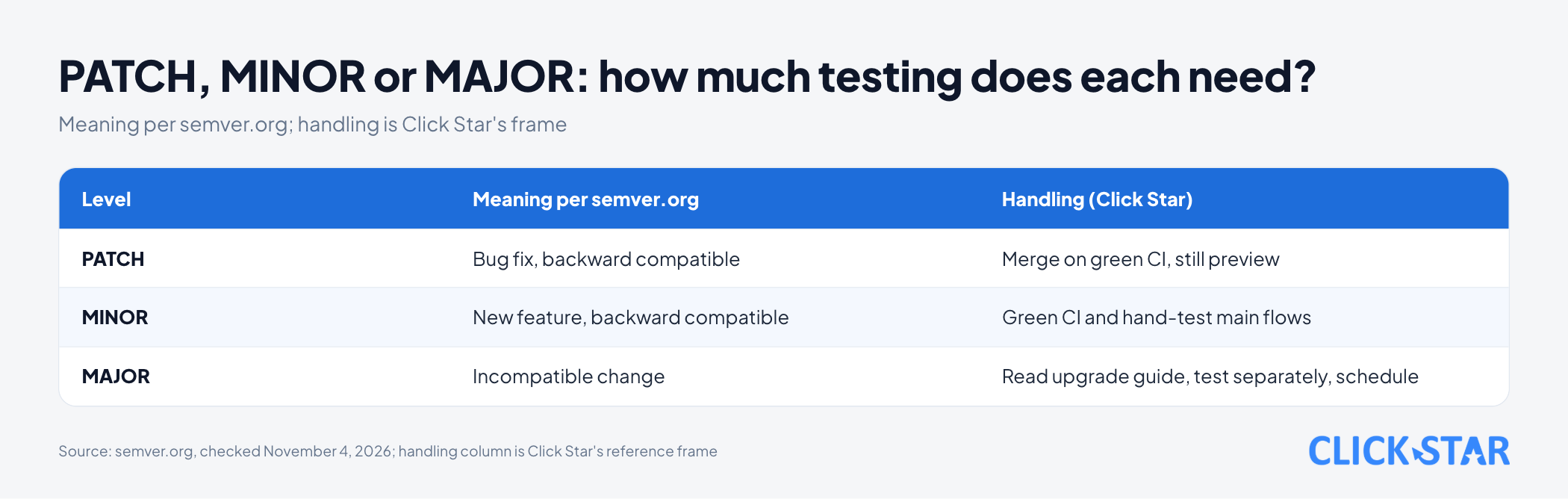
Per semver.org (Semantic Versioning 2.0.0, undated, read November 4, 2026), MAJOR rises for incompatible changes, MINOR for backward-compatible features, and PATCH for backward-compatible bug fixes.
In package.json, per npm's "About semantic versioning" page (last edited October 23, 2023), ~1.0.4 accepts PATCH releases only, while ^1.0.4 also accepts MINOR.
Click Star's view: SemVer is the author's promise, not a guarantee, so even PATCH releases need testing.
Dependabot: 3 different features
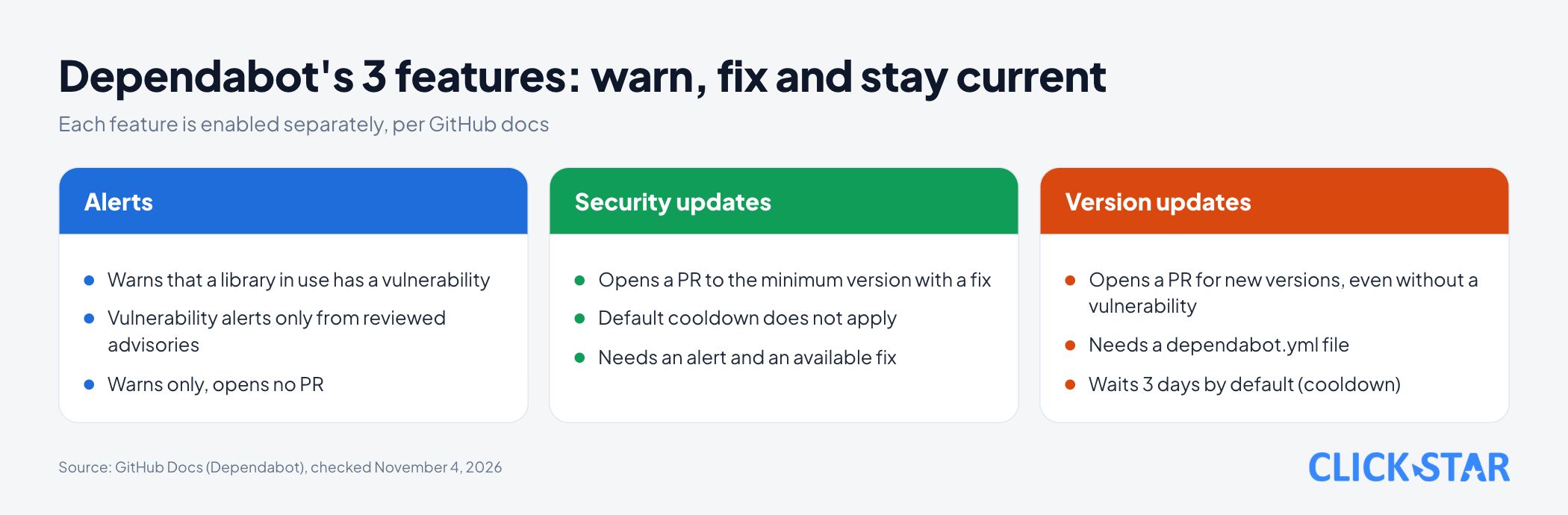
Per the "Dependabot quickstart guide" (undated, read November 4, 2026), GitHub's Dependabot has 3 features, each enabled separately.
- Alerts warn that a library you use has a vulnerability, per GitHub's "Dependabot alerts" page (undated, read November 4, 2026).
- Security updates open a pull request (PR, a proposed change) raising the library to the minimum version with a fix, per "Dependabot security updates".
- Version updates open a PR for any new version, even without a vulnerability, and need a
dependabot.ymlfile.
The sample .github/dependabot.yml below validates against the dependabot-2.0 JSON Schema from SchemaStore (community-maintained, read November 4, 2026). It has not run on a real GitHub repository.
version: 2
updates:
  - package-ecosystem: "npm"
    directory: "/"
    schedule:
      interval: "weekly"
    cooldown:
      semver-major-days: 30
      semver-minor-days: 7
      semver-patch-days: 3
    groups:
      patch-only:
        update-types:
          - "patch"
Per the "Dependabot options reference" (undated, read November 4, 2026), cooldown is a wait after a new release: 3 days by default for version updates, none for security updates. The values 30, 7 and 3 are only an illustration, not a recommendation.
Per the same page, each dependency gets its own PR by default, and groups merges updates into one. The sample groups only PATCH releases; MINOR and MAJOR stay one package per PR, so a break has a clear cause.
Per GitHub's "Dependabot version updates" page (undated, read November 4, 2026), if nobody interacts with Dependabot PRs, GitHub temporarily pauses the updates.
What npm audit does and why its reports are noisy
npm audit sends the dependency list to the registry and returns known vulnerabilities. Per npm's npm audit page (version 12.2.1, last edited March 18, 2026, read November 4, 2026), it exits non-zero when it finds one, and --audit-level only changes the failure threshold, not the report.
Per npm's "About audit reports" page (last edited April 17, 2024), critical needs immediate action, high as soon as possible, moderate as time allows, low at your discretion. Per the npm audit page above, npm audit fix --force can install SemVer-major versions of top-level dependencies.
Trial 1 (a dummy project with only lodash pinned to 4.17.15, npm 11.12.1, November 4, 2026): npm audit reported high severity with 5 advisories, exited with code 1, and suggested --force. With ^4.17.15, npm audit fix raised it to 4.18.1 without --force, then reported 0.
Trial 2, on the 397-package project: npm audit reported 16 moderate entries, yet the root was 1 advisory about minimatch. Per npm, a package depending on a vulnerable package is also a "meta-vulnerability", so a flaw spreads along a chain.
npm audit --omit=dev reported 0.
Click Star's view: read the report by root cause and group (runtime or development only), not by line count.
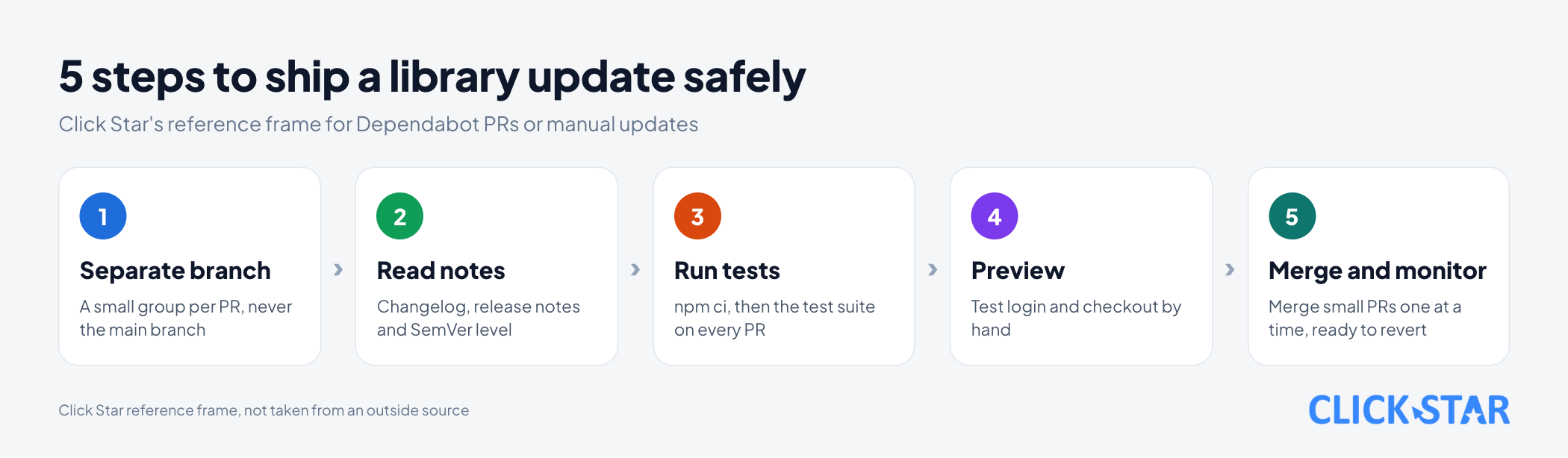
A safe update process: 5 steps
Click Star's frame, not taken from an outside source.
- Receive the update on a separate branch. Never edit the main branch directly; a small group per PR shows what broke.
- Read the release notes and the SemVer level. Per the Dependabot version updates page, review the changelog and release notes in the PR summary.
- Run automated tests. Use
npm ci, then run the test suite on every PR, including Dependabot's. - Preview. Per Vercel's "Environments" page (undated, read November 4, 2026), a preview is created when you push to a non-production branch or open a PR.
- Merge, monitor and keep a way back. Merge small PRs one at a time, watch for errors, and be ready to revert that PR.
MAJOR updates and abandoned libraries
For MAJOR versions, per GitHub's "Configuring Dependabot version updates" page (undated, read November 4, 2026), ignore blocks a library's updates while you fix code for a breaking change, yet you still get security fixes for your version.
But the "Dependabot options reference" says ignore also changes how Dependabot opens PRs for security updates. The pages do not fully agree. Click Star advises blocking MAJOR only, via update-types, so PATCH and MINOR releases that may carry a fix still arrive.
But if the only fix sits in a MAJOR version, blocking MAJOR can block the fix PR too, so check that fix PRs still appear. A postponement needs a deadline.
Abandoned libraries are another risk. OWASP says to watch for unmaintained components and, if patching is impossible, consider an alternative.
Supply chain risk: updating too fast is also dangerous
Per OWASP, a supply chain failure is a breakdown in building, distributing or updating software, often from malicious changes to third-party code. An OWASP example is Shai-Hulud in 2025, the first successful self-propagating npm worm, which reached over 500 package versions before npm stopped it.
Click Star only repeats OWASP's description and has not read the original reports. Per the OWASP NPM Security Cheat Sheet (undated, read November 4, 2026), wait a while for new versions to circulate and consider ignore-scripts=true in .npmrc.
This waiting matches Dependabot's cooldown and npm's min-release-age. Click Star's view: security fixes should arrive at once, routine updates can wait a few days, so make exceptions deliberately.
Per npm's "Config" page (version 12.2.1, last edited February 11, 2026, read November 4, 2026), if min-release-age blocks a fix that npm audit fix wants, npm keeps the vulnerable version, warns and exits non-zero.
What this means for Vietnamese businesses
For businesses that outsource, Click Star thinks governance matters more: who receives alerts, who reviews PRs weekly, does the maintenance contract cover updates, and does the repository sit in the company's account.
Click Star's view. Updating libraries is routine maintenance, not a one-off project. Both extremes are risky: never updating, or auto-merging everything without enough tests. Click Star favors small PRs merged after green CI and a preview, with MAJOR updates on their own schedule.
Click Star offers website design and custom software, so it has a related interest.
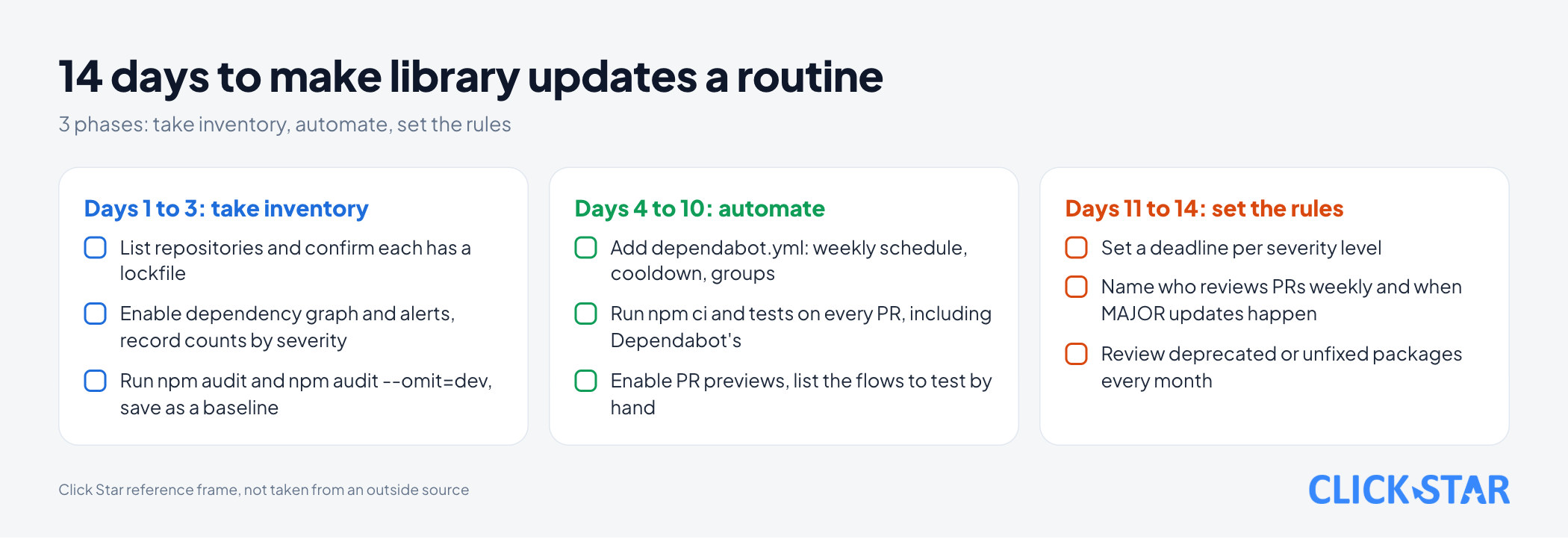
What to do: a 14-day plan
This is a reference plan from Click Star, not taken from an outside source.
Days 1 to 3: take inventory
- List your repositories and confirm each has a lockfile.
- Enable the dependency graph and Dependabot alerts, and record alert counts by severity.
- Run
npm auditandnpm audit --omit=dev, and save the results as a baseline.
Days 4 to 10: automate
- Add
dependabot.ymlwith a weekly schedule,cooldownandgroups. - Run
npm ciand tests on every PR, including Dependabot's. - Enable previews for PRs and list the flows to test by hand.
Days 11 to 14: set the rules
- Set a deadline per severity level, using npm's recommendation column.
- Name who reviews PRs each week and when MAJOR updates happen.
- Review packages marked deprecated or without a fix every month.
How to measure
Reference metrics from Click Star, not taken from an outside source:
- Open Dependabot alerts, split by severity.
- Time from alert to merged fix.
- Number of waiting PRs and the age of the oldest.
Common mistakes
- Not committing the lockfile, or using
npm installinstead ofnpm ciin CI. - Running
npm audit fix --forceand deploying at once, though it can install MAJOR versions. - Auto-merging every PR without enough tests.
- Letting Dependabot PRs pile up until Dependabot pauses.
- Reading an
npm auditreport by line count, not root cause and group. - Pinning every version and forgetting, so fixes never arrive.
- Bundling several MAJOR upgrades into a single PR, so a break has no clear cause.
What is not known
Click Star has no public measurement of how outdated Vietnamese business software is, nor of how closely real packages follow SemVer.
The trials ran on npm 11.12.1 while the documentation read is 12.2.1, and npm audit results and package counts change daily. The sample dependabot.yml has not run on a real repository. Click Star also has not checked how ignore treats security-fix PRs.
Related posts


Need tailored advice for your business?
Click Star helps you build a solution that fits your industry and scale. We answer every question during business hours.