CI/CD and preview environments for software projects: from development branch to production
This article explains CI/CD, preview deployments, protecting the main branch, environment variables, database changes and rollback, based on GitHub, Vercel and DORA documentation read on October 23, 2026.
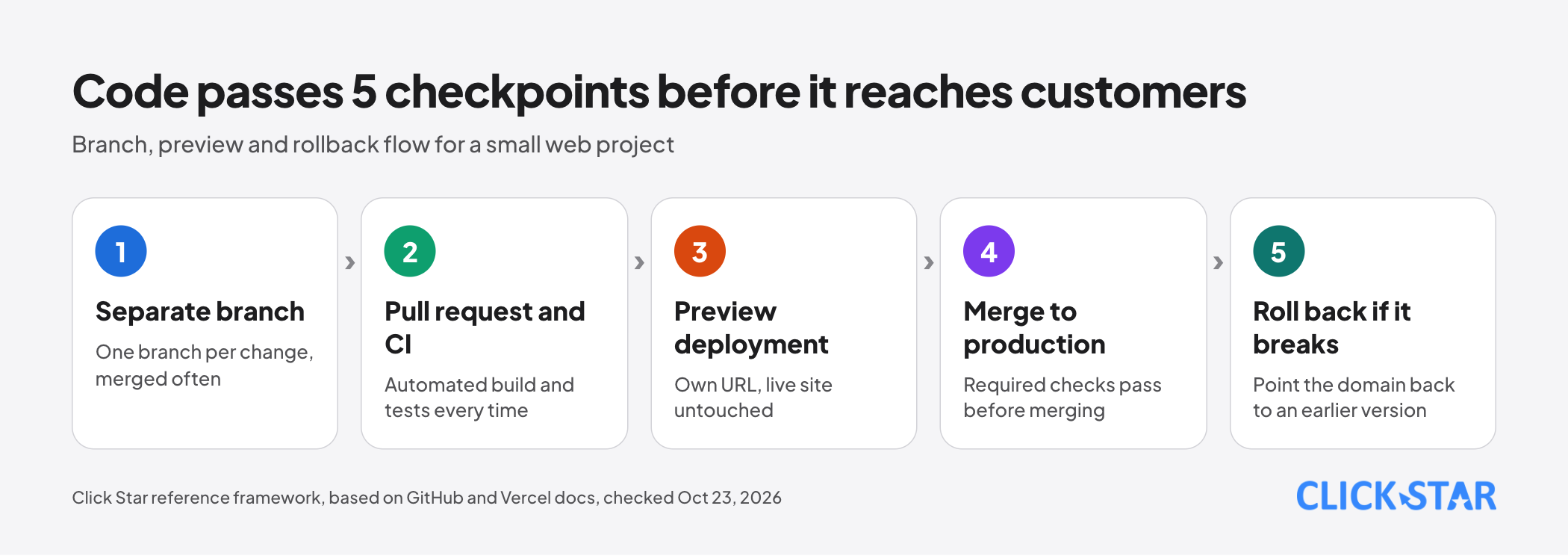
When a change goes straight from a developer's machine to the live system, bugs only surface after customers have used it. CI/CD and preview environments let a team check changes beforehand and return to the previous version when something breaks.
This article covers CI/CD, preview deployments, protecting the main branch, environment variables, database changes, rollback and measurement. Main sources: GitHub, Vercel, Supabase and DORA documentation and a Martin Fowler article, checked on October 23, 2026.
Click Star already has articles on custom software with cost control and on backup and recovery (RPO, RTO). GitHub and Vercel are examples because their documentation could be opened. Click Star builds custom software, so it has an interest.
Key points
- CI (continuous integration) means merging changes into a shared repository often, with an automated build and tests each time. CD (continuous deployment) means using automation to release updates, according to GitHub Docs.
- On Vercel, pushing code to a branch other than the production branch, or opening a pull request, creates a preview deployment with its own URL.
- The main branch needs protection. A skipped job reports success, while a workflow skipped by a path filter stays Pending and blocks merging, so test with a pull request that deliberately fails.
- Environment variables are split into Production, Preview and Development, and a change applies only to later deployments.
- Rolling back code does not roll back the database. For schema changes, Martin Fowler's expand, migrate, contract pattern lets each phase ship safely.
- Measure with the 5 DORA metrics, and do not turn a metric into a target.
What CI/CD is and why it matters
According to GitHub Docs (no date shown, read on October 23, 2026), continuous integration means committing code to a shared repository often, with a build and tests each time, so errors are found while the code to debug is still small.
Continuous deployment uses automation to publish updates, typically after a build and tests. GitHub Actions runs workflows, written as YAML files in the repository, when an event such as opening a pull request occurs.
DORA's CI page (no date shown, read on October 23, 2026) describes the practice: merge into the main branch often, run automated tests before and after, and fix failures right away.
DORA cites the 2015 State of DevOps Report, which found teams perform better when they merge at least daily. Tests should give feedback within a few minutes, with an upper limit of about 10 minutes.
The mechanism is change size: when tests run rarely, a failure can come from many changes. DORA states a limit: small steps are a change of habit, and when teams switch to small steps, large features can take longer to complete.
Branches and preview deployments
Vercel's Environments documentation (updated September 17, 2026) lists 3 default environments: Local (the development machine), Preview (testing without affecting the live site) and Production (what end users see). Pro and Enterprise plans can add custom environments such as staging or QA.
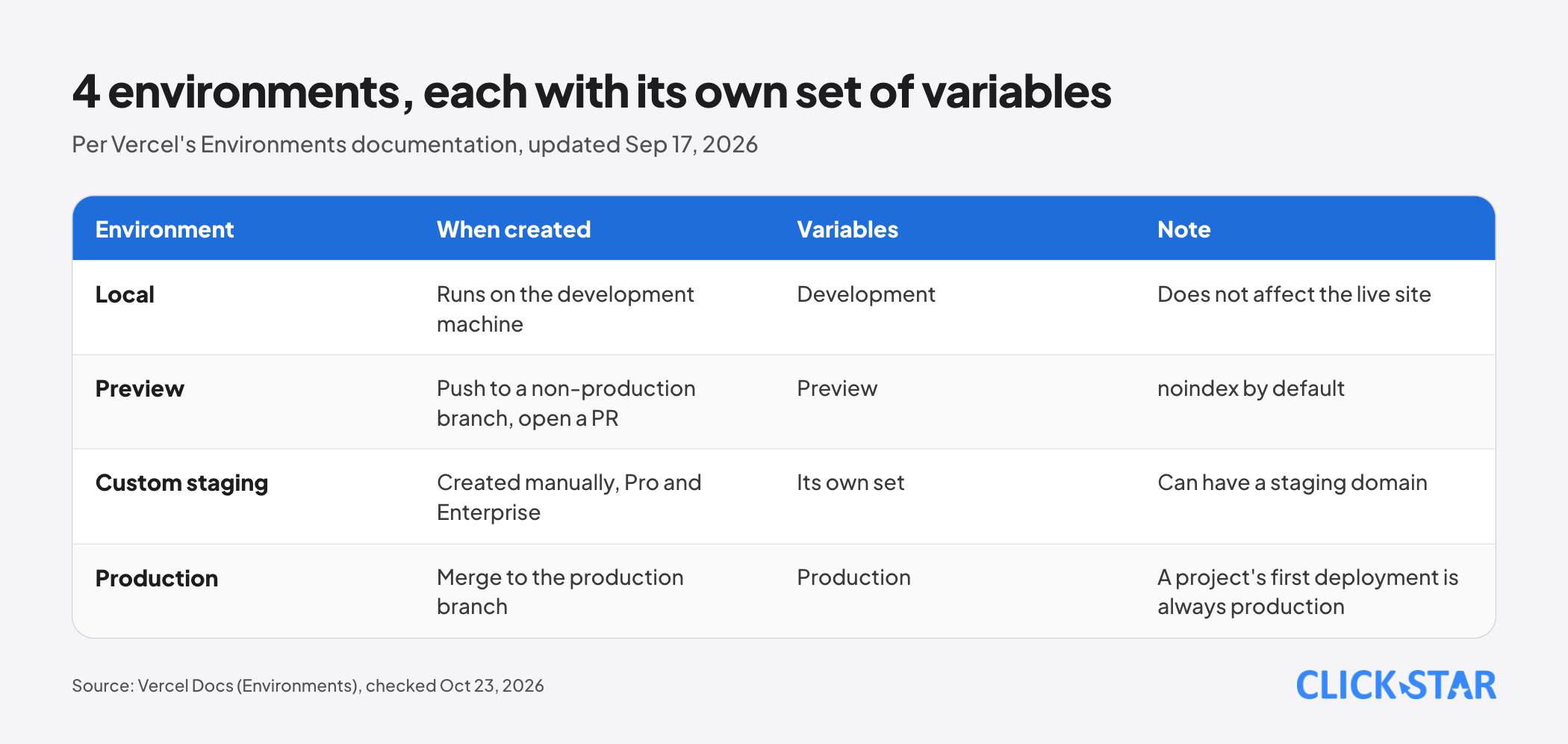
Vercel creates a preview deployment when a commit is pushed to a branch other than the production branch, when a pull request is opened, or when a deploy runs without the --prod flag.
A surprising detail: the first deployment of a new project is always production, even from another branch. It builds with Production variables, so variables scoped only to Preview are missing.
For staging, Vercel describes 3 approaches: a custom environment (Pro and Enterprise), a fixed preview branch with a domain such as staging.example.com (all plans), or a held production deployment promoted later. The third uses Production variables, so it can reach real services and data.
A Vercel guide (updated October 2, 2026) says previews carry an X-Robots-Tag: noindex header by default, except when a custom domain is assigned to a non-production branch; then the owner must add it.
Automated tests and protecting the main branch
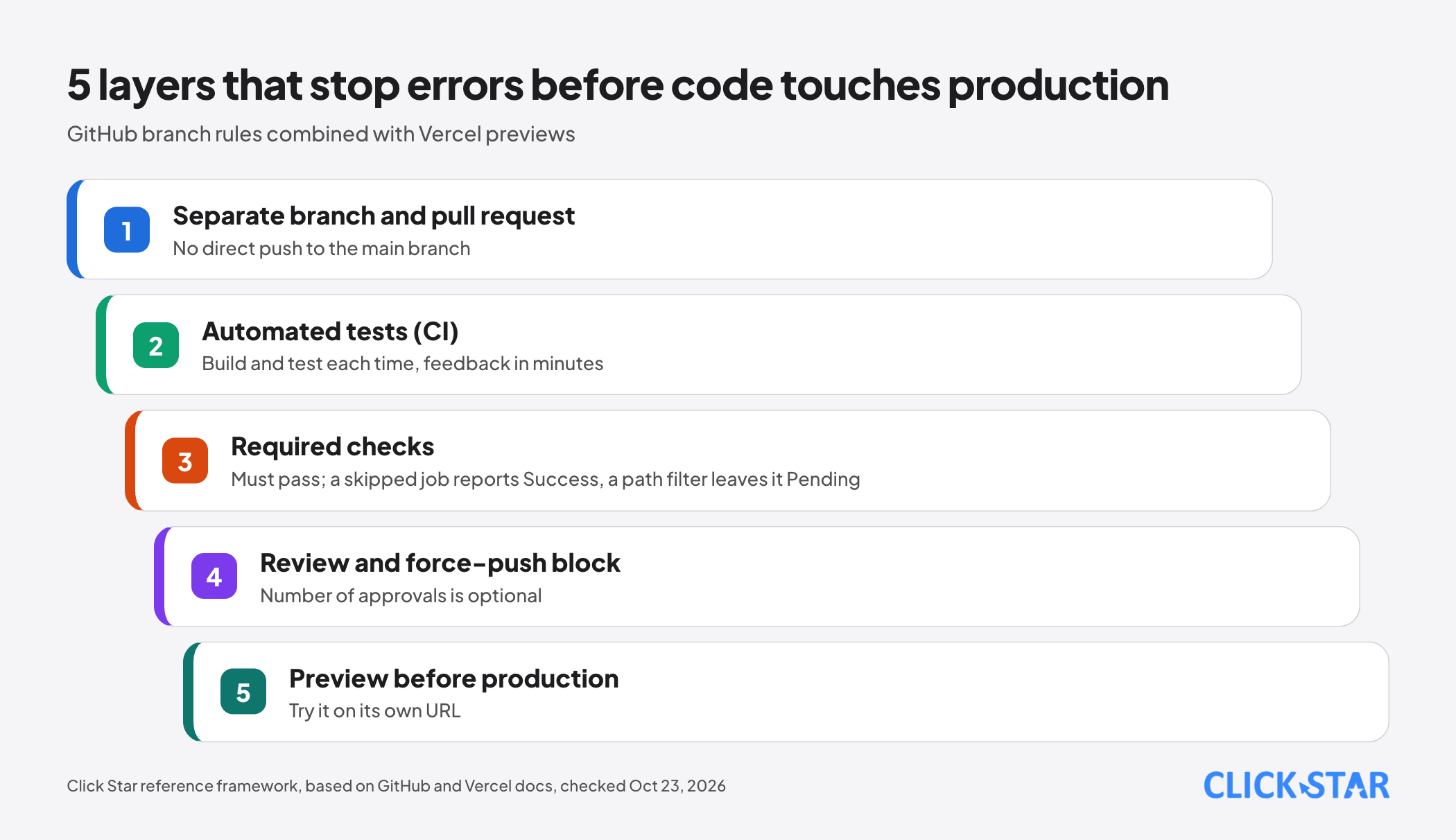
GitHub Docs offers rulesets and branch protection for this. According to the Available rules for rulesets page (read on October 23, 2026), the relevant rules include:
- Require a pull request before merging; it does not have to be approved, only opened, and the number of approvals is optional.
- Require status checks to pass; strict mode needs the branch up to date with the base branch and costs extra builds, while loose mode needs fewer builds but a check can fail after the merge.
- Block force pushes (on by default), because they can remove commits others have built on.
- Restrict branch deletion, and optionally require a successful deployment to an environment such as staging before merging.
Rulesets are available in public repositories on the Free plan, and in private repositories on Pro, Team and Enterprise Cloud.
A trap deserves a test. The About protected branches page says a required check must be successful, skipped or neutral. The status checks documentation says a skipped job reports success and does not block merging, even if required.
The Troubleshooting required status checks page separates 2 cases. A job skipped by an if condition reports Success. A workflow skipped by a path, branch or commit-message filter leaves the check Pending and blocks merging.
Click Star has not tested this. To verify, open a pull request that deliberately breaks a test and see whether it is blocked.
Environment variables and secrets per environment
Vercel's Environment variables documentation (updated September 17, 2026) defines them as key-value pairs set outside the source code so values change per environment. Each variable is assigned to Production, Preview, Development or a custom environment.
Values are encrypted at rest; a Secret variable cannot be read back after saving. A change to a variable applies only to new deployments.
In GitHub Actions, the Secrets documentation (no date shown) says a secret is read only when a workflow includes it explicitly, logs redact secret values without a guarantee, and credentials should have minimum permissions. Environment secrets can require reviewer approval, depending on plan and repository type.
Database changes need their own process
Code can be rolled back by repointing a domain, but a database keeps its state. Vercel's rollback confirmation reminds you that external APIs, databases or CMSes may behave differently from the earlier version (Instant Rollback documentation, updated July 7, 2026).
Click Star's inference: if the schema has changed, the old code must still run against the new schema for a rollback to be safe, so schema changes need their own release order.
Martin Fowler's site (Parallel Change, Danilo Sato, May 13, 2014) describes the expand, migrate, contract pattern: support both old and new, move users to the new version gradually, then remove the old one. It allows release at any phase, and most database refactorings follow it.
Click Star's own illustration (not from an outside source) for renaming a column: release 1 adds the new column and writes to both, release 2 moves reads to the new column, release 3 drops the old one.
On tooling, Supabase's Database Migrations documentation (no date shown) describes schema changes written as SQL files; editing the remote database directly bypasses migration history and makes the db push command report sync errors.
Click Star's reference framework for data changes: ship the migration in the same pull request as the code, test it on a preview or staging database, back up before production, and write code that works with both old and new schemas for 1 release cycle.
Rollback: fast but limited
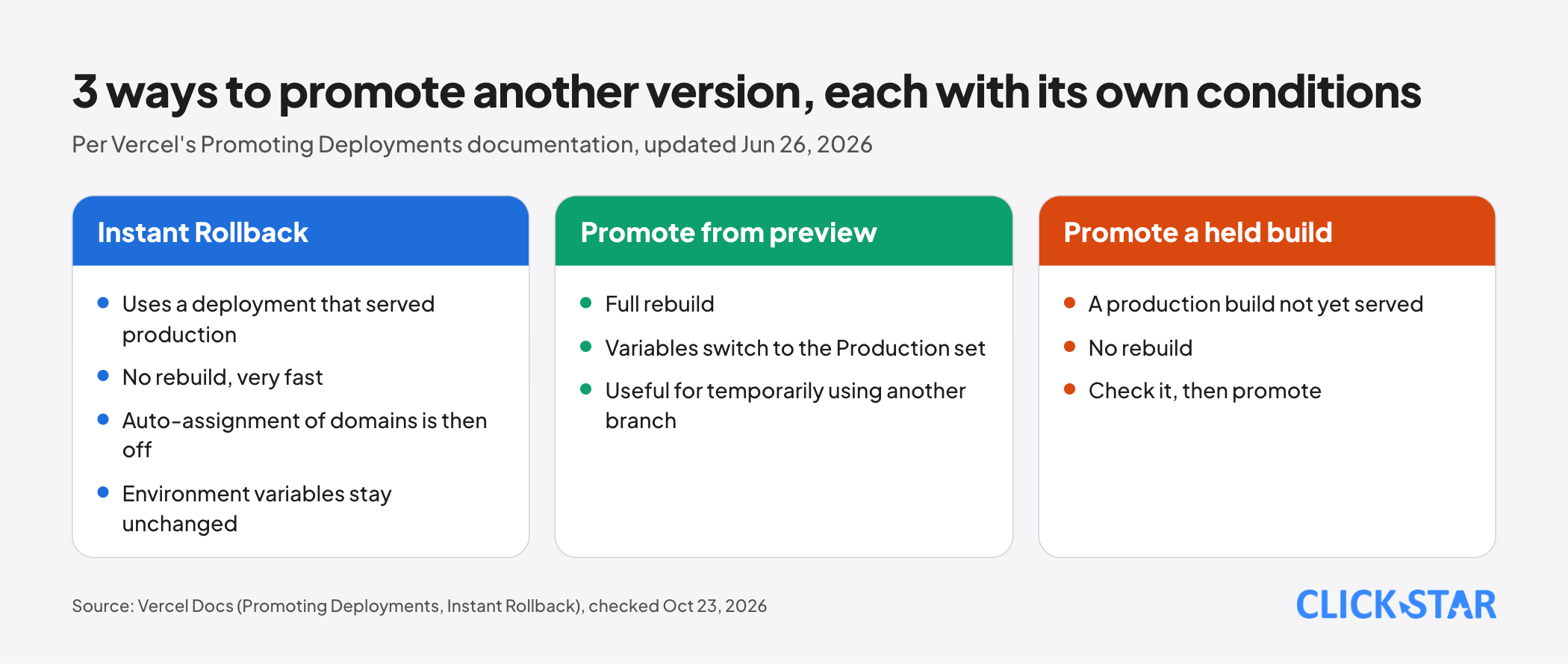
Per Vercel's Instant Rollback documentation, a rollback reassigns production domains to a deployment that has served production before, without rebuilding, so it is fast. The Hobby plan can only go back to the immediately previous deployment; Pro and Enterprise can go to any eligible deployment.
Know 3 things first. First: after a rollback Vercel turns off auto-assignment of production domains, so a fix pushed to main does not go live until you use Undo Rollback or run vercel promote.
Second: environment variables do not change and the old deployment reuses its old build, so its configuration may be stale. Third: a project cannot run 2 rollbacks in parallel.
The Promoting Deployments documentation (updated June 26, 2026) lists 3 ways: Instant Rollback, promoting a preview (a full rebuild, with Production variables, useful for temporarily using another branch), and promoting a held production build (not yet served, no rebuild).
How to measure: the 5 DORA metrics
According to DORA's software delivery performance metrics page (updated January 5, 2026), there are 5 metrics. The throughput group is change lead time, deployment frequency and failed deployment recovery time.
The instability group is change fail rate (deployments needing immediate intervention) and deployment rework rate (unplanned deployments caused by a production incident).
DORA says its research shows speed and stability are not trade-offs, and that the metrics suit a single application at a time. Common traps: turning a metric into a target so teams game the number, and comparing very different applications. Click Star gives no "good" or "poor" thresholds because the page gives none.
What this means for Vietnamese businesses
Click Star found no measurement of CI/CD adoption among Vietnamese businesses; this is inference.
Click Star's view. For a small website or internal application, 3 things are worth doing first: every change goes through a pull request, a preview lets non-developers review the work, and a rollback path has been tested before it is needed.
Automated tests can start small, with a few scenarios guarding a key function such as the contact form. A preview lets a reviewer open a link instead of receiving files, but needs access protection and its own keys and data.
30-day plan (Click Star reference framework)
A plan proposed by Click Star, not taken from an outside source.
- Week 1: separate the Production, Preview and Development environments; move every key into environment variables; rotate any key that was ever in code.
- Week 2: require pull requests into the main branch, enable a build and test workflow, set required checks and test them with a deliberately failing pull request.
- Week 3: protect preview access, check the noindex header, and try the 3-phase migration process on a preview database.
- Week 4: rehearse a rollback, record the recovery time, and pick 2 DORA metrics to track monthly.
Common mistakes
- Enabling required checks and trusting the green mark without a deliberately failing pull request, while a job skipped by a condition still reports success.
- Assigning a custom domain to a staging branch and forgetting the noindex header.
- Letting a preview or a held production build use production keys and data.
- Renaming or dropping a column in 1 release, then finding the old code still needs it during a rollback.
- Rolling back and forgetting that auto-assignment is off, so the fix does not go live.
- Changing an environment variable and expecting the running version to update.
- Turning a DORA metric into a target, or comparing very different systems.
What is not known
Click Star has no independent measurement of CI/CD adoption among Vietnamese businesses. The GitHub Docs pages, DORA's CI page and Supabase Docs showed no update date when read.
Click Star has not tested a required check with a skipped job or workflow; the behavior above comes from GitHub documentation.
Click Star has not read GitLab, Bitbucket or Azure DevOps documentation or how Supabase rolls back migrations, and gives no prices or plan limits.
Related posts


Need tailored advice for your business?
Click Star helps you build a solution that fits your industry and scale. We answer every question during business hours.