Changing a live database: how to lower the risk of a frozen app


Why a fast table-change command can still freeze a PostgreSQL application, and how to lower the risk with lock_timeout and small steps, based on PostgreSQL, Supabase and Martin Fowler documentation.
Picture an online shop adding a "delivery note" column to its orders table. A developer runs a 1-line command at peak hour, and the checkout page freezes while that command waits. This is an illustrative scenario, not an incident from any client.
This article covers changing table structure (a migration) on PostgreSQL while the system serves customers. The main sources are the PostgreSQL 18 documentation, Supabase documentation and the parallel change article on martinfowler.com, checked on October 26, 2026.
It answers 3 questions: why a fast command can still freeze an application, which commands take time, and how to split a large change into steps. It does not promise to remove the risk entirely, only to reduce it.
Key points
- Per the PostgreSQL 18 documentation,
ALTER TABLEtakes the strongest lock (ACCESS EXCLUSIVE) unless noted otherwise. A command waiting for a lock also makes later queries queue, so even a fast command can freeze an application. - Set
lock_timeoutfor the migration session so the command cancels itself instead of waiting forever, then retry later. The default is 0, which means off. - Adding a column with a non-volatile default does not rewrite the table. Changing a column type usually rewrites the table and indexes, needing up to double the disk space.
- Build indexes with
CONCURRENTLYso writes are not blocked, at the cost of a slower build and a possibleINVALIDindex. - Incompatible changes should follow expand and contract: add the new thing, move data in batches, switch the code, then remove the old thing.
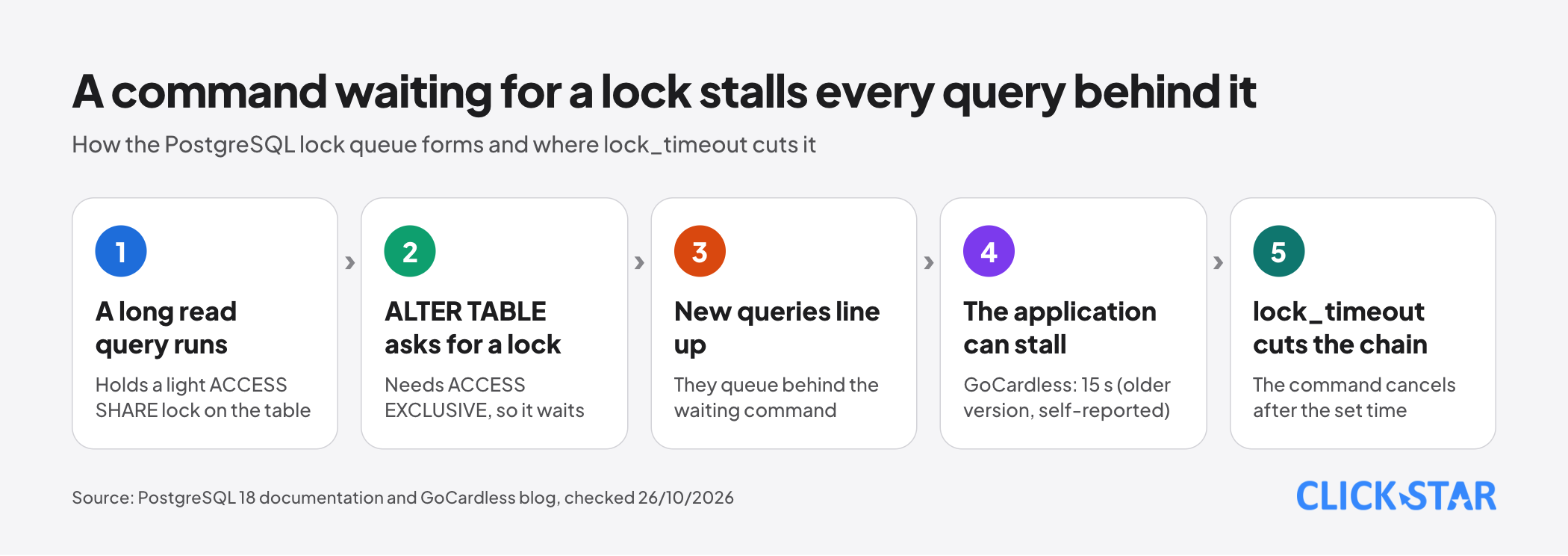
Why can one short command freeze the whole system
Because the command must wait for a lock, and while it waits it blocks everyone who arrives after it. A lock is how PostgreSQL stops 2 jobs from stepping on each other on the same table.
According to the Explicit Locking page of the PostgreSQL 18 documentation (no date shown), a plain SELECT takes only the lightest lock, ACCESS SHARE, which conflicts only with ACCESS EXCLUSIVE. The ALTER TABLE page says that command takes ACCESS EXCLUSIVE unless noted otherwise.
This is the lock queue. The PostgreSQL documentation describes it for pg_blocking_pids: a session can be "hard" blocked by a session holding a conflicting lock, or "soft" blocked by a session that is waiting for a conflicting lock and is ahead of it in the queue.
GoCardless, a payments company, wrote on its blog (last edited June 2024) that it had about 15 seconds of unresponsive API when it dropped and recreated foreign key constraints. It says a long read query collided with a command waiting for an ACCESS EXCLUSIVE lock; on a backup copy the command took a few hundred milliseconds. This is the company's own account.
Its footnotes mention PostgreSQL 9.4, and version 18 takes a lighter lock for foreign keys (see below), so the case shows the queue mechanism, not version 18 behavior.
Set lock_timeout before you run
According to the Client Connection Defaults page, lock_timeout cancels a statement that waits for a lock longer than the set time. The default is 0, which means off.
Per the SET page, SET LOCAL lasts only until the end of the current transaction, so it suits a migration transaction.
BEGIN;
SET LOCAL lock_timeout = '3s';
ALTER TABLE customers ADD COLUMN phone_number text;
COMMIT;
The 3 seconds is only an example. Xata, maker of the pgroll migration tool (secondary source, updated May 2, 2025), says values under 2 seconds are common and that PostgreSQL does not retry a cancelled statement.
A cancelled statement means the migration did not run. Click Star's suggestion, following Xata's backoff and retry section: wait a few seconds, retry a limited number of times, and look for long-open transactions in pg_stat_activity.
Which commands are fast and which rewrite the whole table
Ask whether the command reads or rewrites the whole table, because then the lock is held longer as the table grows.
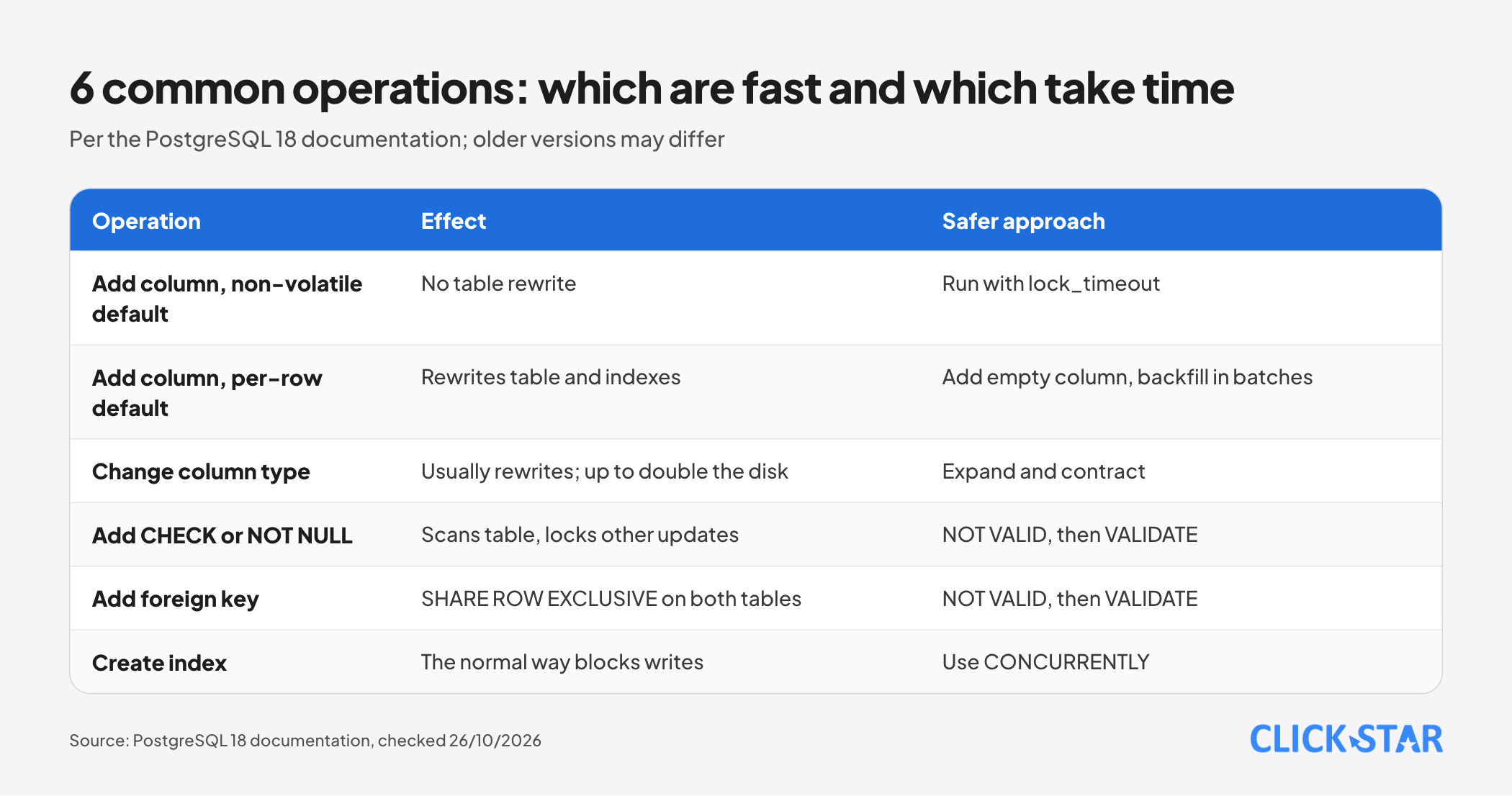
Adding a column. According to the ALTER TABLE page, adding a column with no default, or with a non-volatile default (evaluated once when the command runs), does not rewrite the table, so it stays fast on a large table. The PostgreSQL 11 release notes (October 18, 2018) say this started in version 11, so the old advice "never add a column with a default" may be out of date.
By contrast, a volatile default such as clock_timestamp(), a stored generated column, an identity column or a domain type with constraints rewrites the whole table and its indexes.
Changing a column type. It usually rewrites the table and indexes. The exception is when the old type is binary coercible to the new one and USING does not change the contents: then no table rewrite is needed.
Indexes are still rebuilt unless the system can verify the new index is equivalent; the documentation says changing text to varchar needs no index rebuild. On a large table the rebuild takes significant time and temporarily needs up to double the disk space.
Adding a constraint. A CHECK or NOT NULL needs a table scan but no rewrite, and other updates wait until it finishes. With NOT VALID the command skips the scan; the constraint still applies to new rows. Then VALIDATE CONSTRAINT scans the old rows and takes only a SHARE UPDATE EXCLUSIVE lock.
But adding the constraint still takes a lock briefly, even with NOT VALID: per the ALTER TABLE page most forms of ADD constraint need ACCESS EXCLUSIVE, and GoCardless notes the same. So this step needs lock_timeout too.
SET NOT NULL also scans the whole table, unless a valid CHECK already proves there are no NULLs. Adding a foreign key takes a SHARE ROW EXCLUSIVE lock on the table being changed and on the referenced table as well, which still blocks writes.
Creating an index. Per the CREATE INDEX page, the normal way blocks writes (not reads) until it finishes. CONCURRENTLY does not block writes but scans the table twice and waits for older transactions, so it takes noticeably longer.
Remember 3 things: it cannot run inside a transaction block; only 1 such build runs per table at a time; a failure midway leaves an INVALID index that still costs update work, which the documentation advises dropping and retrying.
Expand and contract: change structure over several deployments
Renaming a column with 1 command breaks any code still using the old name. Split such a change into 3 phases: expand, migrate, contract. The pattern is called parallel change.
According to Danilo Sato on martinfowler.com (May 13, 2014), expand supports both old and new versions, migrate moves every user to the new one, and contract removes the old one. The article says most database refactorings follow this pattern.
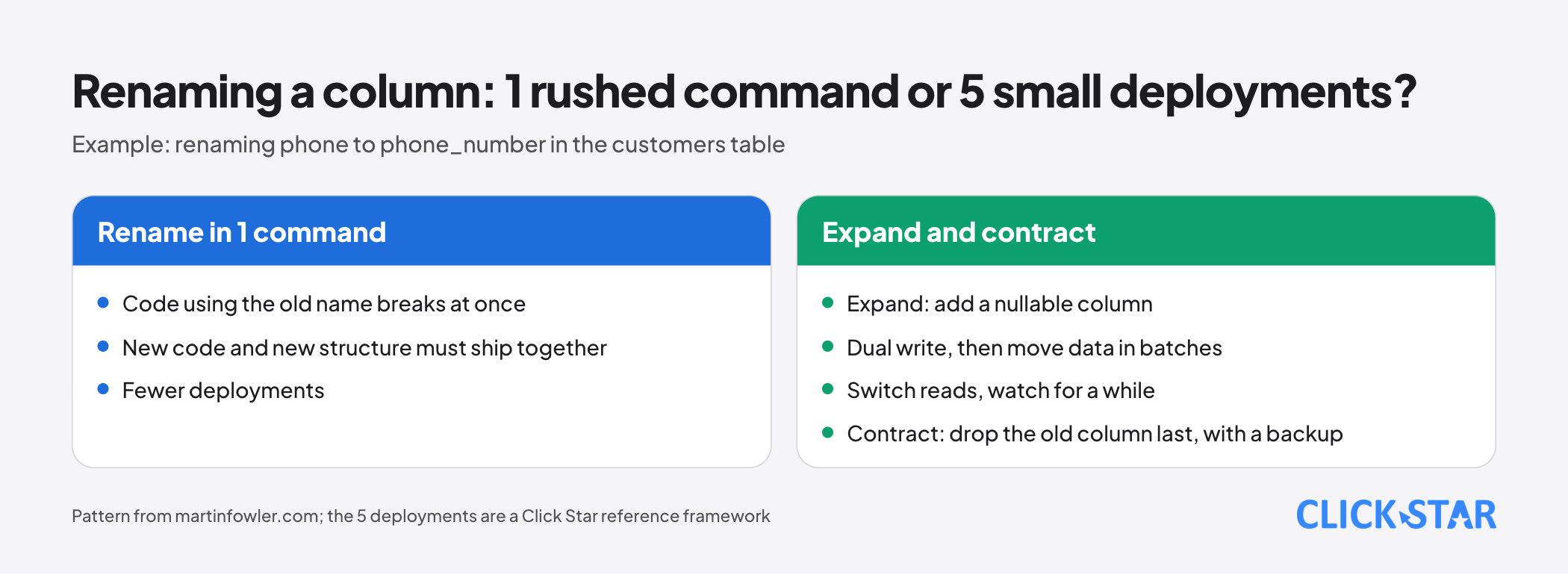
Example: renaming the column phone to phone_number in the customers table, split into 5 deployments (a Click Star reference framework).
- Expand: add a nullable
phone_numbercolumn, withlock_timeout. - Dual write: change the code to write to both columns; reads still use the old column.
- Move the old data to the new column in batches.
- Switch reads to the new column, watch for a while, then add a
NOT VALIDconstraint (withlock_timeout) andVALIDATEit. - Contract: once no code uses the old column and a backup exists, drop the
phonecolumn.
Changing a column type follows the same steps, with more deployments.
Move data in batches
Do not update the whole table with 1 UPDATE. It is 1 long transaction, row locks last until it ends (Explicit Locking page), so anyone editing the same rows must wait. Per the Routine Vacuuming page, UPDATE keeps old row versions until cleanup, so a bulk update leaves many dead rows.
A tidy approach is to update small batches, commit each on its own, and repeat until no rows are left. The example uses fake data.
UPDATE customers SET phone_number = phone
WHERE id IN (
  SELECT id FROM customers
  WHERE phone_number IS NULL
    AND phone IS NOT NULL
  ORDER BY id
  LIMIT 1000
);
Run this statement repeatedly from a small script until it reports 0 rows. The phone IS NOT NULL condition is required: without it, a row with NULL phone matches again every round and the count never reaches 0.
Click Star checked this on PostgreSQL 18 (PGlite) with 5,000 fake rows: without the condition it reported 1000 rows every round; with it, 1000, 750, then 0. The 1000 is only an example.
Test on a copy, deployment order and the way back
With Supabase, the Database Migrations documentation (no date shown) describes the flow: each change is 1 migration file, checked locally with supabase db reset, then sent with supabase db push. Do not edit the live database directly, because the history will drift.
The deployment order is Click Star's suggestion, not from an outside source. Adding a column: migration first, then the code that uses it. Removing a column: code that no longer uses it first, then drop it. The code must work with both structures in between.
For the way back, the Supabase Database Backups page (no date shown) says that during a restore the project is not accessible, and downtime grows with data size. So every step needs a ready undo command. Expand is undone by dropping the new column; dropping the old column cannot be, without a backup, so it comes last (Click Star framework).
For Vietnamese businesses: what this means
Click Star's view. Some small and mid-sized systems share 1 database among the website, the CRM and the admin site, so 1 bad migration hurts several places. Quiet hours lower the risk but do not remove it, because a lock queue can form whenever a long query runs. So lock_timeout, small steps and backups matter more than the hour.
Click Star provides custom software, CRM and CDP services, so this view carries a conflict of interest.
What to do before running a migration
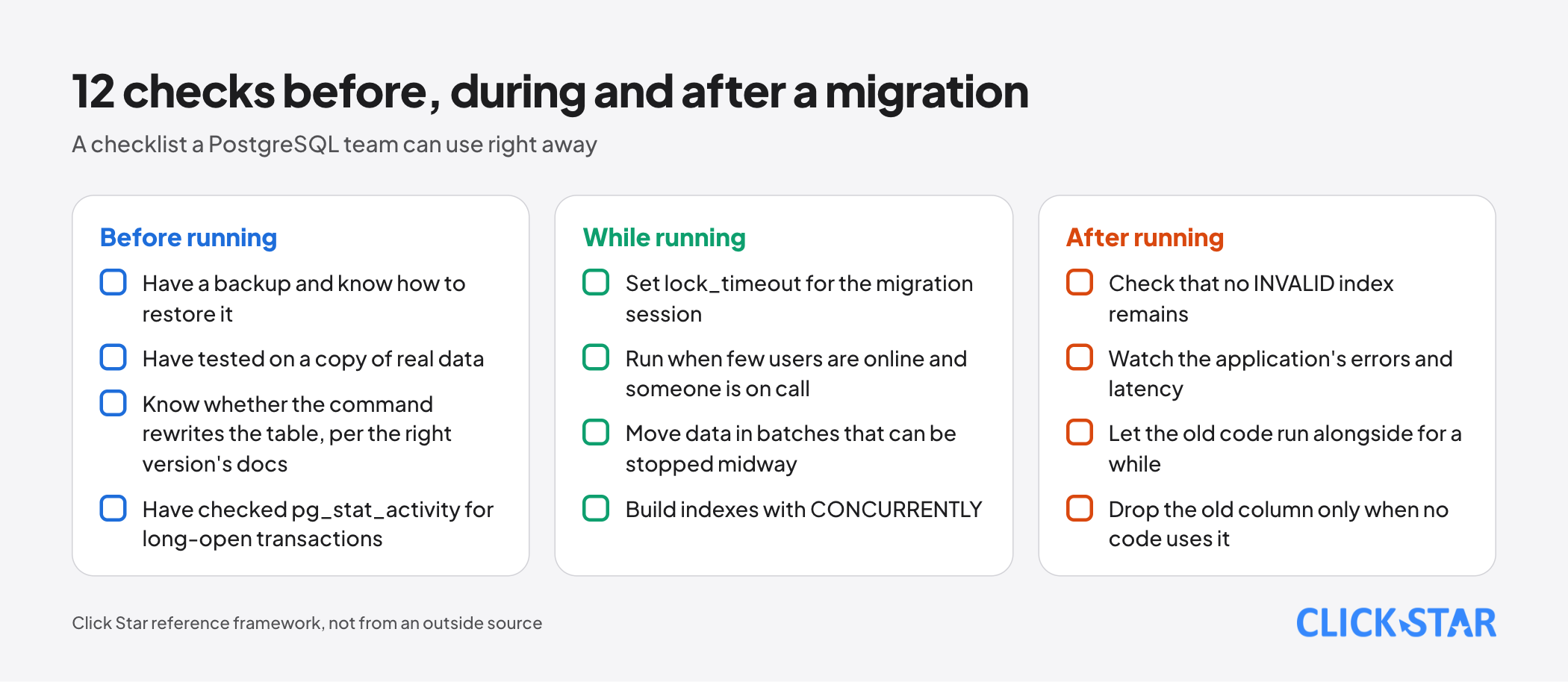
The lists below are a Click Star reference framework.
Before running
- Have a backup and know how to restore it.
- Have tested on a copy of real data.
- Know whether the command rewrites the table, per the right version's docs.
- Have checked
pg_stat_activityfor long-open transactions.
While running
- Set
lock_timeoutfor the migration session. - Run when few users are online and someone is on call.
- Move data in batches that can be stopped midway.
- Build indexes with
CONCURRENTLY.
After running
- Check that no
INVALIDindex remains. - Watch the application's errors and latency.
- Let the old code run alongside for a while.
- Drop the old column only when no code uses it.
How to measure (Click Star framework)
Count how often a command is cancelled by lock_timeout (from the migration tool's error log), compare application errors during the run with a normal day, and track the rows still waiting to move after each batch.
Common mistakes
- Running
ALTER TABLEat peak hour withoutlock_timeout, so the command waits and every later query queues behind it. - Assuming a command that is fast on a small table stays fast on a large one.
- Renaming or dropping a column in one deployment while old code still uses it.
- Updating a whole table with 1
UPDATE, or batching with a loop that never reaches 0 rows. - Dropping the old column before a backup exists or while code still uses it.
What is not known
Click Star has no measurement for Vietnam on how often migrations cause incidents or what they cost. The article gives no run times or "large table" thresholds because they depend on hardware and load.
In this article, real-world consequences of the lock queue come only from Xata and GoCardless, which are secondary or self-reported.
The GoCardless article also says adding a foreign key takes AccessExclusive on both tables, while the PostgreSQL 18 documentation says SHARE ROW EXCLUSIVE.
The difference may come from versions: the GoCardless footnote mentions PostgreSQL 9.4, and the 9.5 release notes list reduced lock levels for some trigger and foreign key commands. Click Star has not checked each change, so it is not sure; it follows the version 18 documentation.
PostgreSQL 19 RC 1 was released on October 15, 2026 per the documentation banner; Click Star has not read the version 19 notes or compared versions 14 to 17. It also has not checked how Supabase's tooling handles CREATE INDEX CONCURRENTLY.
Related posts



Need tailored advice for your business?
Click Star helps you build a solution that fits your industry and scale. We answer every question during business hours.