Should you export GA4 to BigQuery, and what does it cost?
When to export GA4 to BigQuery, what it costs on the Google Cloud price list and what to do in the first 14 days.
An online shop owner wants to know which campaign brings the most repeat buyers. GA4 shows part of the answer but does not connect to the orders in the sales software. This is an illustrative scenario, not a measurement.
This article draws on Google Analytics, Google Cloud and Google for Developers documentation, checked on November 3, 2026.
It answers 3 questions: when to export GA4 to BigQuery, what it costs and what to do in the first 14 days.
Key points
- BigQuery export copies every raw GA4 event into your own data warehouse. Data flows only from the moment of linking. Google says exported data cannot be re-exported; a Google developer forum post (community source) says GA4 has no native option to backfill older data.
- A standard property can export up to 1 million events per day. Streaming export adds 0.05 USD per GB.
- BigQuery bills by the data a query reads: the first 1 TiB each month is free, then 6.25 USD per TiB (price list read November 3, 2026).
- 4 layers keep cost in check: a size preview, a byte cap per query, a daily quota and a budget alert. Alerts do not stop spending.
- By Click Star's framework: you may not need BigQuery if you only use standard reports and nobody writes SQL; if you plan to, link early.
- BigQuery numbers do not always match the GA4 interface. Record your own gap instead of seeking 1 standard figure.
What is GA4 BigQuery export and why are GA4 reports not enough?
BigQuery is a data warehouse on Google Cloud that runs SQL-style queries on very large tables. GA4 BigQuery export copies every raw event from GA4 into it, per the Google Analytics help page "BigQuery Export" (undated, read November 3, 2026).
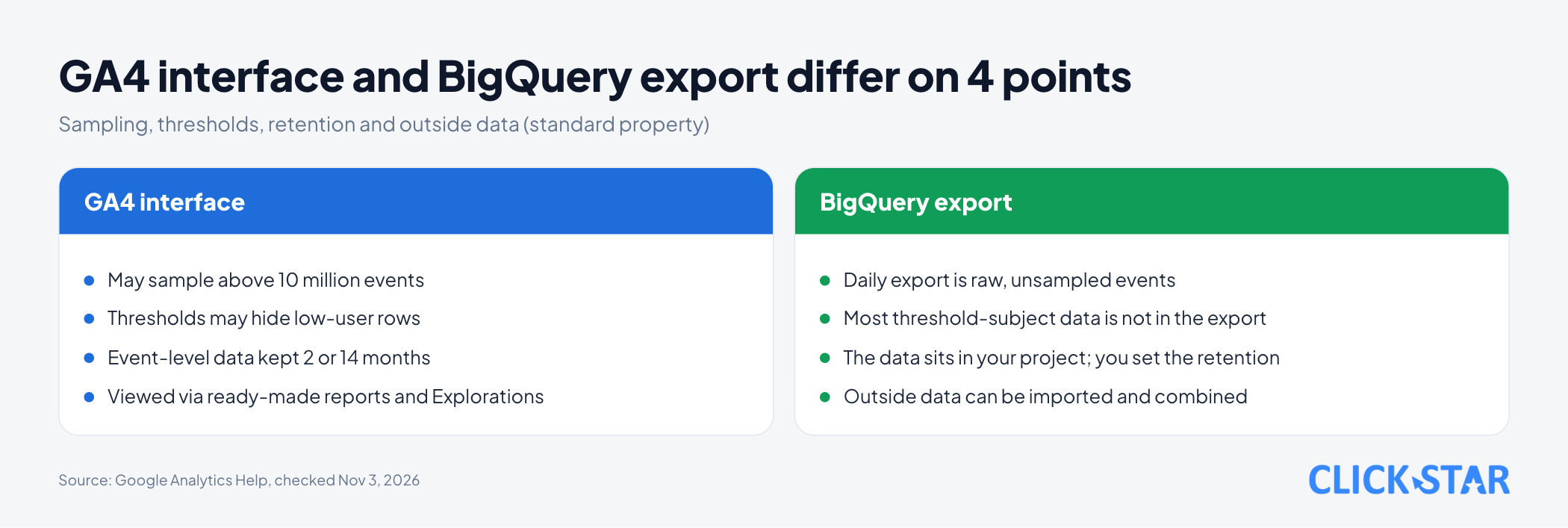
By Click Star's reasoning, for your own questions the GA4 interface has 4 limits; BigQuery helps with 3 (sampling, retention, outside data), but not thresholds.
- Sampling. Per the page "About data sampling" (undated, read November 3, 2026), GA4 may use part of the data when a query exceeds the 10 million event quota of a standard property. The numbers are then estimates.
- Data thresholds. Per the page "About data thresholds" (undated, read November 3, 2026), GA4 may withhold demographic data or search queries when too few users are involved. You cannot adjust the threshold.
- Retention. Per the page "Data retention" (undated, read November 3, 2026), event-level data of a standard property is kept for only 2 or 14 months (360 offers longer options). The setting affects Explorations and funnel reports, not standard aggregated reports.
- Outside data. Per the BigQuery export overview from Google for Developers (updated October 21, 2026), you can import outside data into BigQuery and combine it with Analytics data, for example an order table from a CRM.
How is the data exported?
On linking, GA4 creates 1 dataset named analytics_<property ID> in your BigQuery project, per the page "BigQuery Export schema" (undated, read November 3, 2026). Each day gets 1 table named events_YYYYMMDD if you turn on the daily export.
There are 2 export modes, and you can turn on both.
- Daily export. Sends the previous day's data, usually mid-afternoon in the property time zone, sometimes the next day.
- Streaming export. Pushes the current day's data into an
events_intraday_YYYYMMDDtable within minutes with no completeness guarantee, so gaps are possible. It omits the traffic source of new users and new sessions, and costs an extra 0.05 USD per GB.
The intraday table is deleted when that day's table is complete, so Google advises querying events_YYYYMMDD. Late events are still written to the daily table for up to 72 hours, per the Google Analytics team's article.
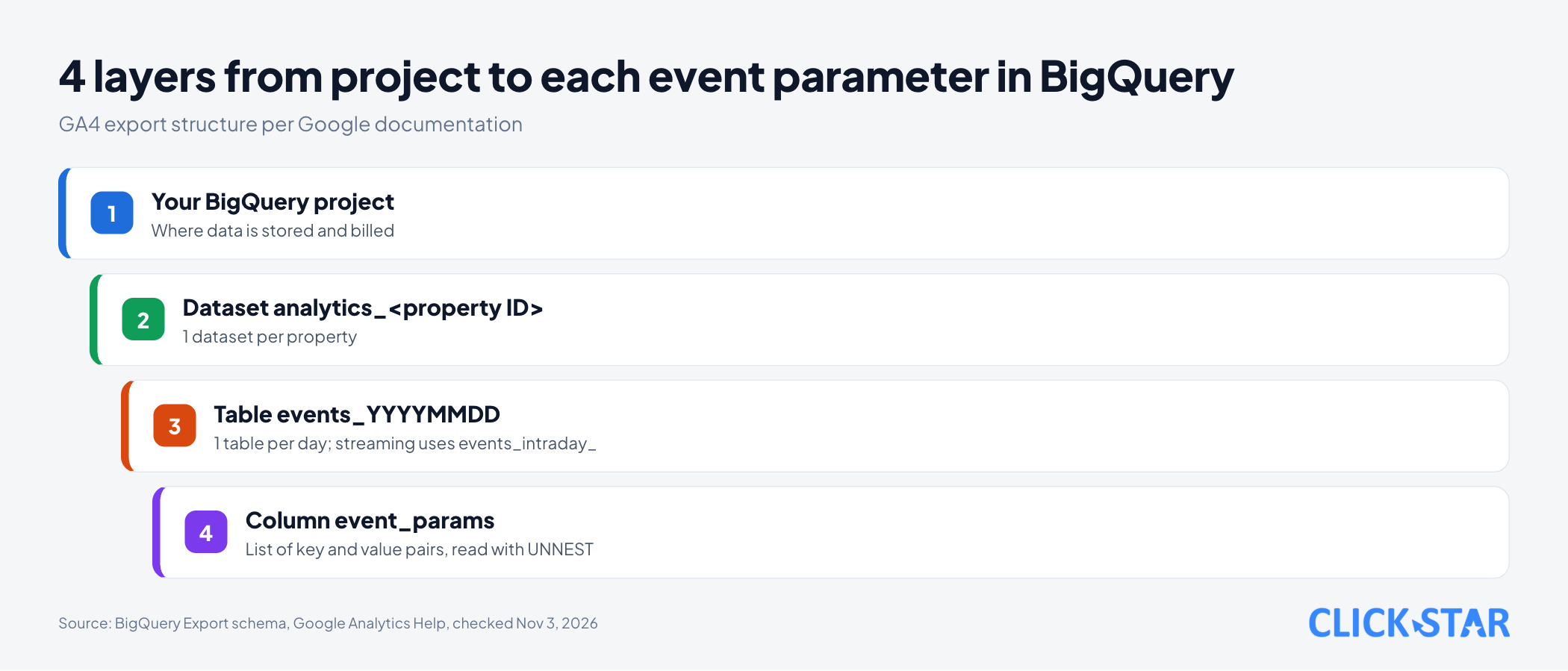
Each event has an event_params column, a list of key and value pairs. The value sits in string_value, int_value, float_value or double_value depending on type, so you must open the list with UNNEST to read it.
Your first query on the public sample dataset
Per the Google for Developers sample page (updated August 19, 2026), the ga4_obfuscated_sample_ecommerce dataset holds 3 months of Google Merchandise Store data, from November 1, 2020 to January 31, 2021.
This query lists the 10 most viewed pages in 7 days, reading page_location with UNNEST:
SELECT
  (SELECT value.string_value
   FROM UNNEST(event_params)
   WHERE key = 'page_location') AS page_location,
  COUNT(*) AS page_views
FROM `bigquery-public-data.ga4_obfuscated_sample_ecommerce.events_*`
WHERE event_name = 'page_view'
  AND _TABLE_SUFFIX BETWEEN '20201201' AND '20201207'
GROUP BY page_location
ORDER BY page_views DESC
LIMIT 10;
It follows the page "Basic queries for Google Analytics event data export" (updated June 15, 2026).
Per the page "Query multiple tables using a wildcard table" (updated October 30, 2026), filtering on _TABLE_SUFFIX to select tables by date can greatly reduce the bytes read.
How does BigQuery charge, and how do you set a ceiling?
Prices below were read on November 3, 2026 from the page "BigQuery pricing" (undated), in USD. The page's storage example uses us-central1; Singapore or Jakarta may differ.
- Queries. The first 1 TiB each month is free, then 6.25 USD per TiB.
- Storage. The first 10 GiB each month is free. The page's example: 1 TiB for a full month costs 23.552 USD (active logical storage).
- GA4 streaming export. Adds 0.05 USD per GB; 1 GB is roughly 600,000 events (varies with event size), per the page "BigQuery Export".
Illustrative arithmetic by Click Star, not a measurement: 1 million events per day is about 1.67 GB, so 30 days is about 50 GB, or about 2.50 USD of streaming surcharge, excluding storage and queries.
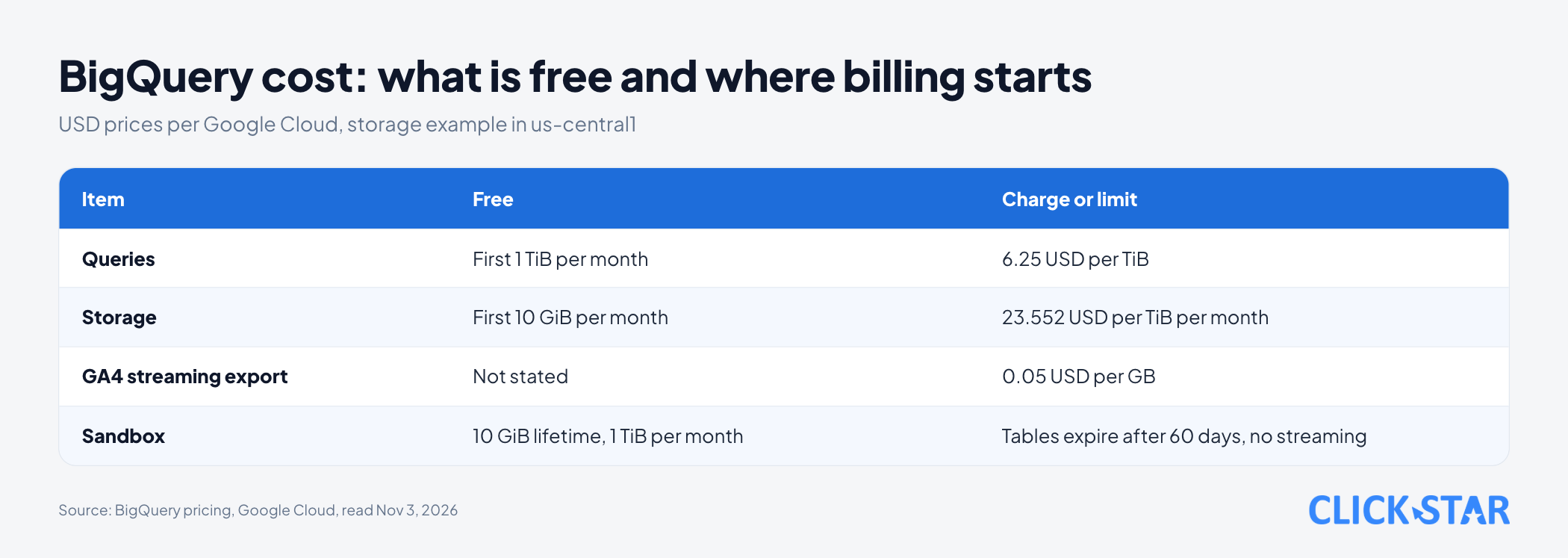
The sandbox is for trying only. Per the page "Try BigQuery using the sandbox" (updated November 3, 2026), the sandbox needs no card, offers 10 GiB of lifetime storage and 1 TiB of queries per month, and every table expires after 60 days. The sandbox does not support streaming data. Click Star's inference: for streaming or long-term data, use a billed project.
Per the page "Estimate and control costs" (updated October 27, 2026), there are 4 layers of cost control.
- Preview. The query validator shows how much data a query will process before it runs; the figure is an upper bound.
- Byte cap per query. Set
maximum bytes billed; if the estimate exceeds the cap, the query fails and is not charged. - Daily quota. The page "Create custom query quotas" (updated October 27, 2026) says the default is 200 TiB per day per project; you can set it lower with the Quota Administrator role, but quotas are approximate.
- Budget alert. The page "Create, edit, or delete budgets and budget alerts" (updated October 26, 2026) says an alerts-only budget does not cut spending.
Why do BigQuery numbers differ from the GA4 interface?
Per the Google Analytics team's article "Bridge the gap between the Google Analytics UI and BigQuery export" (published April 2023, page updated June 15, 2026), the interface adds Google signals, modeling and attribution. BigQuery holds only raw collected data, so the 2 do not match exactly.
- The interface uses Active Users as its standard, while counting distinct
user_pseudo_idvalues in BigQuery gives Total Users. - Per the page "About data thresholds", GA4 does not export Google signals data to BigQuery.
- Per the Google Analytics team's article, most information subject to thresholding is usually not in the export.
The article says each place only needs to be internally consistent and match what you collect. To narrow the gap, use User-ID and compare data older than 72 hours.
When is it not needed yet, and when should you link now?
This is a Click Star reference framework, not from outside sources. You may not need it yet when standard reports are enough, nobody can maintain SQL and there is no plan to join CRM data.
Link early, even before querying, when:
- You will soon need to join data with real orders in a CRM.
- You want to keep event data longer than the 14 months of the interface.
- Reports are often sampled.
What this means for Vietnamese businesses
- Data region. Per the page "BigQuery locations" (updated October 27, 2026), regions in Southeast Asia include Singapore (
asia-southeast1), Jakarta (asia-southeast2) and Bangkok (asia-southeast3). The page "Set up BigQuery Export" says changing region by deleting and recreating the link can leave a data gap. - Access. Per the page "BigQuery IAM roles and permissions" (updated October 28, 2026),
bigquery.dataViewerat dataset level decides which tables someone can read, while running queries also needsbigquery.jobUser, a role grantable only at project level or above. - Personal data. Per the page "Best practices to avoid sending Personally Identifiable Information (PII)" (undated, read November 3, 2026), Google policy forbids sending personal identifiers such as emails or phone numbers. Click Star already has a separate article on personal data protection law; check the original text, as this is not legal advice.
Risks to control
- Export paused. If a standard property keeps exceeding 1 million events per day, the daily export is paused and earlier days are not reprocessed.
- Payment failure. An invalid payment method that interrupts the export means that period cannot be re-exported.
Click Star's view. BigQuery is infrastructure, not a report. Value appears only when someone asks questions and maintains repeatable queries.
On governance, link early, set a cost ceiling at once and name 1 person responsible for the data. Click Star offers data dashboard, CRM and CDP services, so it has a related interest.
A 14-day plan
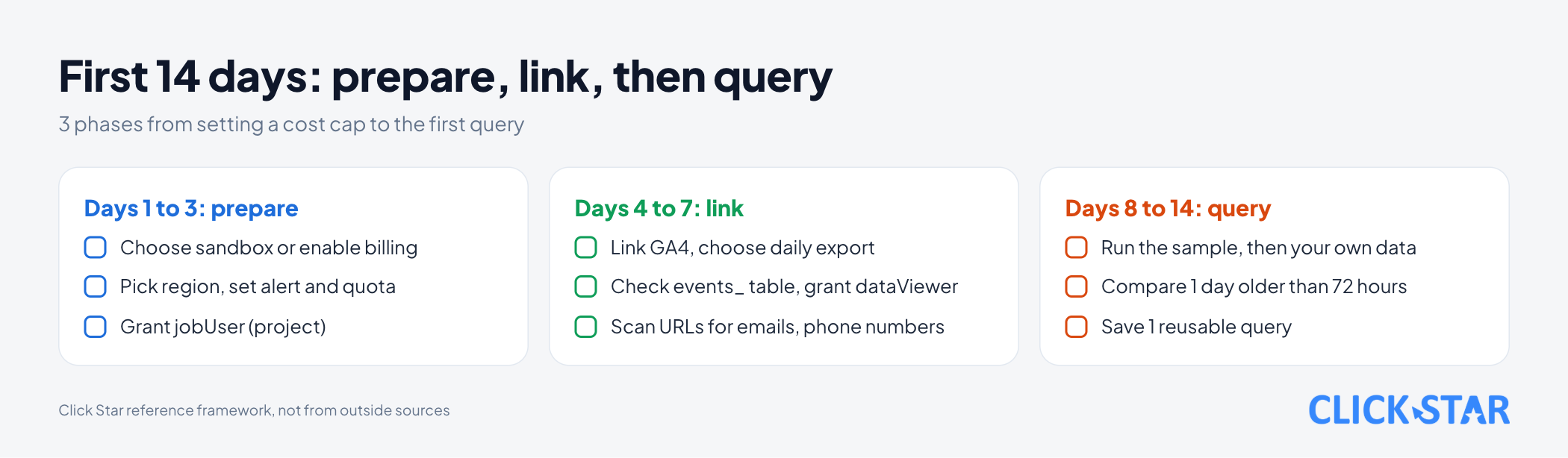
This is a Click Star reference plan, not an industry standard.
Days 1 to 3: prepare and set a ceiling
- Create a Google Cloud project; choose the sandbox to try or enable billing to store real data.
- Choose the data region, then set a budget alert and a daily query quota.
- Decide who may run queries: grant
bigquery.jobUserat project level.
Days 4 to 7: link and check
- Link the GA4 property and choose the daily export; turn on streaming only if truly needed.
- After 24 hours, check that the
events_YYYYMMDDtable exists, then grantbigquery.dataVieweron theanalytics_dataset. - Scan URLs and parameters for emails or phone numbers.
Days 8 to 14: query and conclude
- Run the sample query, then try it on your own data.
- Compare the event count of 1 day older than 72 hours between GA4 and BigQuery, and record the gap.
- Save 1 reusable query.
How to measure whether BigQuery is worth the cost
These metrics are Click Star's proposal, not an industry standard.
- Actual monthly cost against the budget you set.
- The daily event-count gap between GA4 and BigQuery.
Common mistakes
- Waiting until you "need" it, then learning older data cannot return.
- Using the sandbox for real data and losing tables after 60 days.
- Querying
events_*without filtering on_TABLE_SUFFIX. - Using
LIMITto cut cost on a non-clustered table (it does not reduce read cost). - Believing a budget alert stops spending.
- Granting
bigquery.dataViewerat project level instead of dataset level.
What is not known
The official documents Click Star opened say exported data cannot be re-exported, but none says outright "no retroactive export". That rests on the post "GA4 Bigquery All Data" on the Google developer forum (reply dated January 19, 2025, community source, read November 3, 2026).
The downloaded "BigQuery pricing" page shows only 1 price table, so regional prices were not cross-checked. There is no measurement of event volume or BigQuery cost for Vietnamese businesses.
The documents do not state a separate BigQuery threshold. Google has spend-cap budgets for some services; whether BigQuery is supported was not checked. The sample query has not been run.
Related posts


Need tailored advice for your business?
Click Star helps you build a solution that fits your industry and scale. We answer every question during business hours.