Surprise cloud bill? Set spending limits on Vercel and Supabase
The article covers which tools set a spending limit on Vercel, Supabase and AWS, what the limit does when reached and which layers to add. It relies on the 3 vendors' official documentation.
A company's online store runs smoothly for months, then the company card is charged more than expected. The cause is 1 scraping bot that ran all weekend (a hypothetical scenario, not a real company's incident).
This article covers spending limits on Vercel (where the website runs) and Supabase (where the database lives), plus AWS Budgets. The sources are the 3 vendors' official documentation, checked on November 2, 2026.
It answers: which tools set a limit, what the limit does when reached, and which other layers to add. Click Star already has separate articles on website monitoring and AI API rate limits, so this one does not repeat them.
Key points
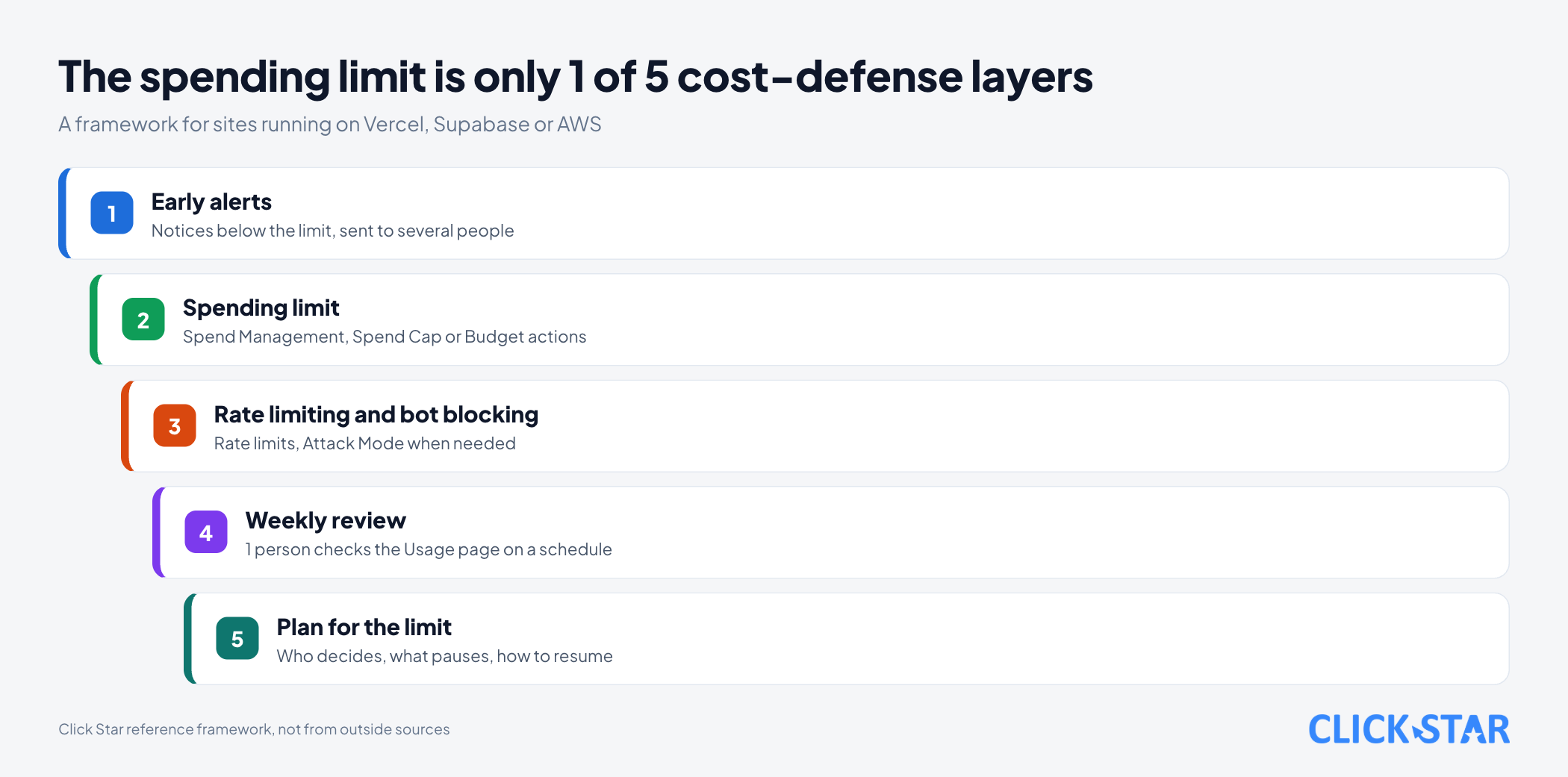
- Cloud bills follow usage, so bots, loop bugs or sudden traffic can inflate them. A spending limit is only 1 of 5 defense layers.
- Vercel Spend Management is available on Pro and Enterprise Flexible Commitment, not on Hobby. It alerts at 50%, 75% and 100%. The documentation updated September 18, 2026 says pausing projects needs a separate switch, and the current default is unconfirmed.
- Vercel checks spend every few minutes, so actions can lag. A paused project returns 503 and must be resumed one by one.
- Supabase Spend Cap exists only on the Pro plan and does not cover compute, IPv4 or custom domains.
- AWS Budgets only alerts unless you configure Budget actions, and its data refreshes at most 3 times a day.
- The Click Star framework has 5 layers: early alerts, a limit, rate limiting, a weekly review and a plan for hitting the limit.
Why cloud bills can exceed the plan
A bill grows because you pay for usage, not a fixed fee. According to the Pricing on Vercel page (updated September 14, 2026), Vercel bills by data transferred, number of requests and compute duration.
Supabase works the same way. Its Your monthly invoice page (no date shown) gives 3 reasons an invoice exceeds the 25 USD plan fee: several projects, usage beyond quota while Spend Cap is off, or items Spend Cap does not cover.
Vercel's DDoS Mitigation page (updated August 11, 2026) says blocked traffic is not billed, but traffic not recognized as an attack, which may include bots and crawlers, is.
Vercel Spend Management: alerts, pause and webhook
According to the Spend Management page (updated September 18, 2026), setting a spend amount and choosing what happens when it is reached is available on Pro and Enterprise Flexible Commitment, for the Owner or Billing role only. Hobby does not have it (Vercel Hobby Plan page, updated September 14, 2026).
The amount appears as On-Demand Budget, in USD per billing cycle. On the Pro plan it measures usage beyond the monthly credit of 20 USD (Vercel Pro Plan page, updated September 15, 2026). It does not include user seats, Marketplace integrations or add-ons.
Once you set an amount, Vercel turns on web and email notifications at 50%, 75% and 100%, and SMS only at 100%. You can also register a webhook (an address that receives automatic messages); for budgets created before September 2025 it is sent only at 100%.
Most important: according to the Spend Management page, setting an amount does not stop anything by itself. To stop incurring cost you must turn on the Pause Production Deployments switch.
Click Star has not confirmed each team's current default. The Vercel Pro Plan page (updated September 15, 2026) says new customers get spend notifications at 200 USD per billing cycle by default.
When Vercel hits the limit: what visitors see and how to resume
When paused, the live (production) version of every project in the team stops serving, websites and APIs alike. The Spend Management page says visitors see a 503 error, code DEPLOYMENT_PAUSED.
The stop is not instant: Vercel checks every few minutes, so cost can still accrue. The page advises setting the limit below the maximum you will accept.
A pause also does not stop every charge: AI Gateway and v0 usage still count, and stored data such as Vercel Blob is not deleted, so its charges continue.
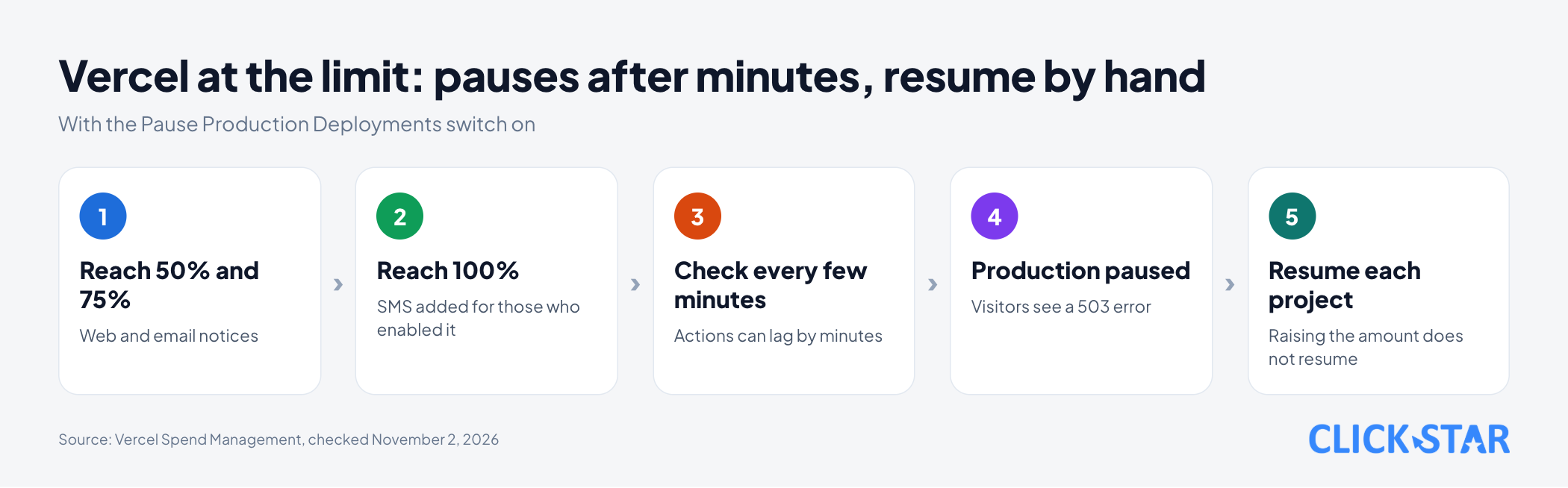
Resuming is manual: each project is resumed separately in the dashboard or REST API, and raising the amount does not resume them (page Why has my account or deployment been paused?, updated October 2, 2026).
Supabase Spend Cap: what it blocks and what it does not
Spend Cap is a switch that decides whether you may exceed the plan quota. According to the Control your costs page (no date shown), it exists only on the Pro plan, and the Pricing & Fees page (no date shown) says the Pro plan has it on by default.
When on, an item that exceeds its quota is blocked until the next cycle and you are not charged for overage. When off, the project keeps running and extra usage is billed at the unit price.
Covered items include disk size, egress (data sent out of Supabase), Edge Function calls, logs, monthly active users, Realtime and Storage. Items not covered include compute (the server that runs the database), IPv4 (a dedicated IP address), custom domains, Log Drains and Point-in-Time Recovery.
The page states: Spend Cap does not allow a separate budget per item and does not notify you when a certain cost is reached.
Hitting the cap can bring restrictions. According to the Billing FAQ (no date shown), Supabase notifies you when you exceed the Pro quota. If you keep exceeding it with Spend Cap on, the Fair Use Policy can pause projects, make the database read-only or return a 402 code for all API requests.
The page says you get a notice and a grace period first, unless abuse is suspected. Restrictions lift next cycle or when you turn Spend Cap off.
AWS Budgets: an option if you use AWS
AWS Budgets tracks cost and usage and sends alerts by email or Amazon SNS (AWS's notification service). According to the Managing your costs with AWS Budgets page (no date shown), you are notified when actual or forecast cost crosses a threshold.
Mind the delay: data refreshes at most 3 times a day, usually 8 to 12 hours apart, so cost can pass the threshold before you are told.
To act automatically you configure Budget actions. According to the Configuring budget actions page (no date shown), an action can apply an IAM policy or an SCP (a policy that limits permission to create resources), or target specific EC2 and RDS instances.
Comparing the 3 tools by criteria
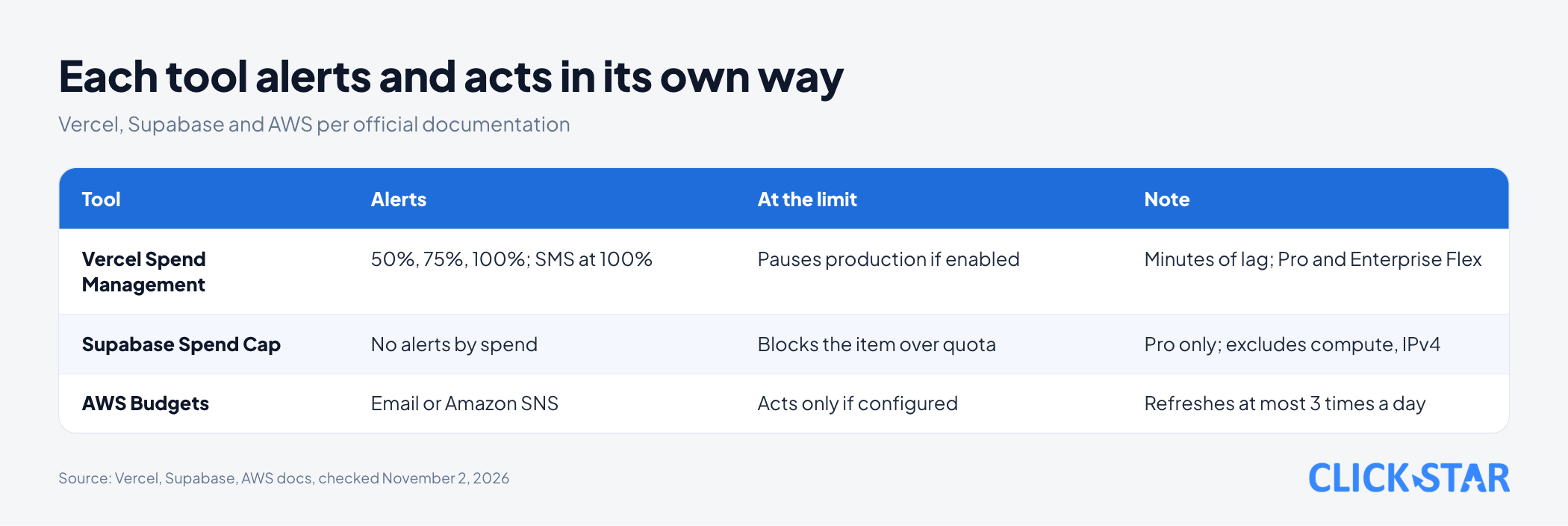
- Alerts: Vercel alerts at 50%, 75% and 100%. Supabase Spend Cap does not alert by spend. AWS alerts by email or SNS.
- At the limit: Vercel pauses production if you enable it. Supabase blocks the item that went over. AWS acts only if you configure it.
- Delay: Vercel a few minutes. AWS at most 3 refreshes a day. The Supabase pages read do not state one.
Reading price pages without estimating the bill
Vercel lists prices in USD, excluding taxes, and many resources are priced by region (Pricing on Vercel page, updated September 14, 2026). Supabase lists the Pro plan at 25 USD a month with 10 USD of compute credit (Pricing & Fees page, no date shown) and applies quotas per organization (About billing on Supabase page, no date shown).
Rate limiting and bot blocking: reducing what costs money
A limit only caps the damage, while rate limiting stops bad traffic from generating cost at all. Vercel offers WAF Rate Limiting on all plans (WAF Rate Limiting page, updated August 28, 2026), counting 100 requests per 60 seconds by default.
The default action returns a 429, and the page suggests choosing Log first to see the effect before blocking.
It is billed by requests allowed through: the page lists 0.50 USD per 1 million requests, with price varying by region. Hobby gets 1 rule per project and 1 million requests included.
During an unexpected spike, Attack Mode is a temporary option. The Attack Mode page (updated August 11, 2026) says it is free on all plans, blocked requests do not count toward usage, and verified bots such as search engines still pass.
The 5-layer cost defense (Click Star framework)
This section is Click Star's reference framework, not taken from outside sources.
- Early alerts: notifications below the limit, sent to several people, such as Vercel's 50% and 75% marks.
- Spending limit: set Spend Management, Spend Cap or Budget actions, and know which items are not covered.
- Rate limiting and bot blocking: rate limits and Attack Mode when needed. Click Star already has a separate article on caching and CDN, which reduces compute.
- Weekly review: 1 person checks the Usage page on a schedule, not waiting for email.
- Plan for the limit: write down what gets paused, who decides and the resume order.
The trade-off: a tight limit can stop service
A tighter limit protects the wallet but cuts off real customers more easily. On Vercel a pause applies to every project in the team, so 1 legitimate surge can take down the store and the internal app together. On Supabase, if you keep exceeding quota with Spend Cap on, an order-taking app may get a 402 code or a read-only database.
Click Star infers 2 ways to reduce the impact. The first is to put critical and test environments in different teams or organizations (Supabase bills each organization on its own plan). The second is to pick a limit high enough to absorb a legitimate surge, using recent invoices as the baseline.
Vietnam context
Click Star found no measurements of how often Vietnamese businesses exceed cloud bills. What follows is Click Star's opinion.
Invoices are in USD, so the amount in dong depends on the exchange rate and the card issuer's fees. Alerts arrive when spend crosses a threshold, so they may land after hours; this is Click Star's inference, so send them to several people. Tax and invoices for foreign services are a legal topic, so ask an accountant or lawyer.
Click Star's view. The limit tools are uneven: Vercel can act automatically, Supabase blocks by item but does not alert by money, and AWS mostly alerts. So do not pick 1 tool and relax.
Click Star offers fast website design, custom software and data dashboards, so it has a related interest. The steps below are not entirely free: Spend Management needs the Pro plan, and WAF Rate Limiting is billed by requests allowed through.
What to do: a 14-day plan
This is Click Star's reference framework, not taken from outside sources.
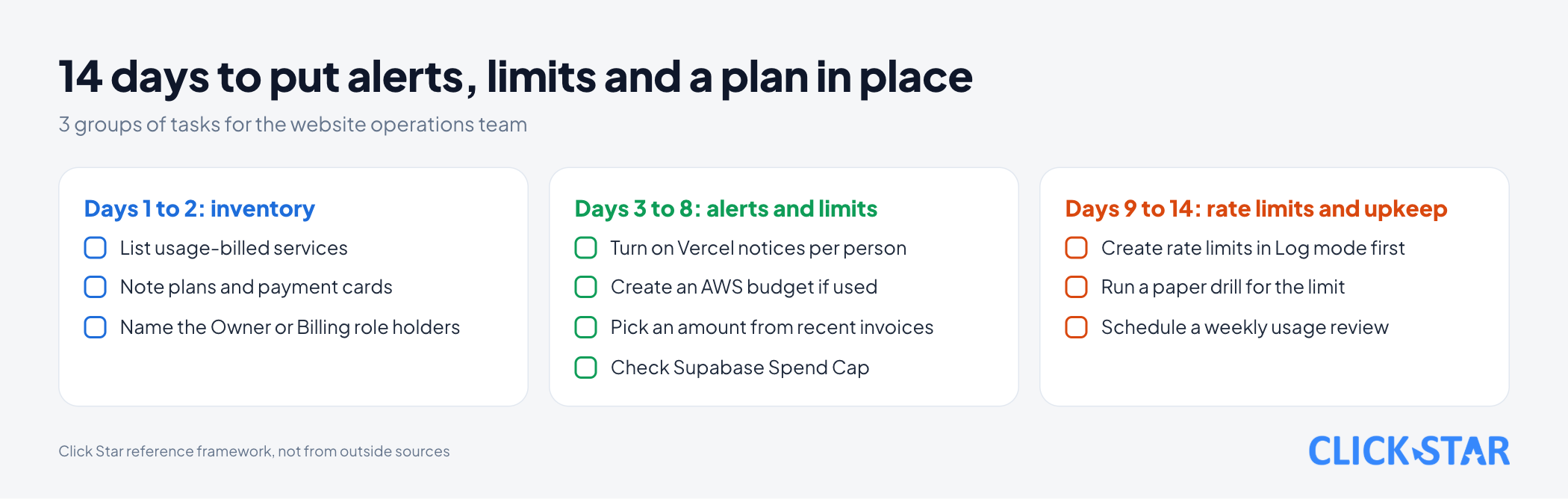
- Days 1 to 2, inventory: list usage-billed services, plans, cards and Owner or Billing role holders.
- Days 3 to 5, alerts: turn on Vercel notifications for each person and create an AWS budget if you use AWS.
- Days 6 to 8, limit: pick an amount from the latest invoices, decide whether to enable pausing, and check Supabase Spend Cap.
- Days 9 to 11, rate limiting: create rate limits for forms, login and AI APIs in Log mode, then switch to blocking.
- Days 12 to 14, paper drill: who decides, what is paused, in what order to resume. Do not test a real pause on production.
Weekly check: 5 numbers to watch
Each week, 1 person checks the Usage page or runs vercel usage --since 30d --group-by project (Manage and optimize usage page, updated September 18, 2026). The frequency and these 5 numbers are Click Star's suggestion.
- Percent of the spend amount used in this cycle.
- The biggest consuming item by project.
- The ratio of cached to uncached requests on Vercel.
- Supabase egress by service.
- Requests that were rate limited, and whether any real customer was blocked by mistake.
Common mistakes
- Not checking the Pause Production Deployments switch in team settings, then assuming Vercel will (or will not) stop by itself.
- Forgetting uncovered items: Supabase excludes compute and IPv4, and Vercel leaves seats and add-ons out of the amount.
- Only 1 person receiving alerts, or turning notifications off despite Vercel's warning of unexpected costs.
- Setting the limit right at normal usage, so real customers hit 503.
- Treating the limit as a substitute for rate limiting, when bad traffic still generates cost before the pause.
What is not known
Click Star has no measurements of how far Vietnamese businesses exceed their infrastructure bills, no sourced "standard" limit value, and has not tested pausing or resuming on a real account.
2 Vercel sources appear to differ on the default. The post Spend Management now pauses production deployments by default (June 27, 2024) says pausing is the default, while the current documentation says setting an amount does not stop anything. Click Star does not know the default for each team.
Related posts


Need tailored advice for your business?
Click Star helps you build a solution that fits your industry and scale. We answer every question during business hours.