Heatmap: visitors click and nothing happens, read 4 fault signals
What do rage clicks, dead clicks, excessive scrolling and quick backs say about page faults? Based on Microsoft Clarity documentation, with a 5-step path from observation to a fix and re-measurement.
An online shop runs ads that send visitors to a product page. On a phone, a floating chat box covers half of the "Add to cart" button; the visitor taps 4 to 5 times, then leaves. This is an illustrative scenario, not a real measurement.
This article draws on Microsoft Clarity documentation (a free heatmap tool), 3 Contentsquare pages (vendor source; its September 1, 2021 release "Contentsquare acquires Hotjar" says it bought Hotjar), 2 Google web.dev pages and 1 Google Analytics page, checked on November 3, 2026.
Hotjar's help center blocks Click Star's tools, so it was not cross-checked.
The article covers the 4 error signals, what each points to, how much data is enough, and the path from observation to a fix and re-measurement.
Key points
- Clarity's Insights group has 4 behavior signals: rage click, dead click, excessive scrolling and quick back. JavaScript errors are a separate signal type that goes with them.
- A rage click is a burst of clicks in 1 small area. A dead click is a click the page does not respond to. Both have their own click map. Excessive scrolling is counted per session; quick back is counted from a click that leads to another page; both are found through Insights filters.
- A heatmap shows where visitors interact, not always why; session recordings help find the cause.
- Clarity sets no minimum traffic to build a heatmap and does not say how many page views are enough to conclude. Contentsquare's guide says at least 2,000 to 3,000 page views but gives no method.
- Clarity keeps session recordings for 30 days (labeled or favorited ones for 9 months) and heatmap data for 9 months.
- Click Star's 5-step frame: pick a page, filter signals, watch recordings, make 1 small fix, re-measure.
What does a heatmap show, and what does it not?
A heatmap is a combined picture of many visitors' behavior on 1 page: the hotter the spot, the more clicks or attention. According to Clarity's Heatmaps overview (updated September 15, 2025, read November 3, 2026), a heatmap is built from data already collected and aggregated by the filters you choose.
A heatmap shows where, for example a dense cluster of clicks on a button, not always why. Contentsquare's guide "What Are Heatmaps? A Guide to Heat Maps & How to Use Them" (updated April 26, 2026) says the same: a heatmap shows patterns, not causes.
The 4 error signals in Clarity's documentation
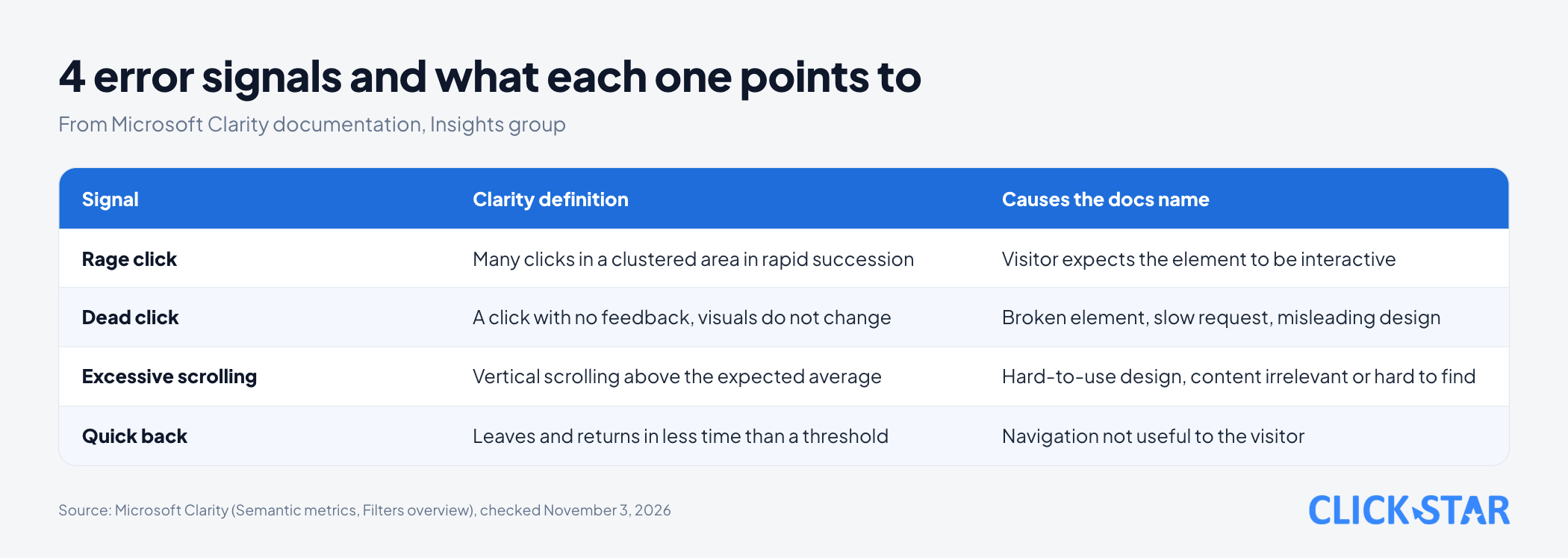
Clarity's documentation places these 4 signals in the Insights group of its filters (Filters overview, updated May 21, 2026, read November 3, 2026). Detailed definitions are on the Semantic metrics page (updated December 1, 2025, read November 3, 2026).
Rage click
The visitor clicks again and again because the spot should work. According to Semantic metrics, a session is flagged when a visitor clicks many times in a clustered area in rapid succession. The page says this can signal frustration when visitors expect an element to be interactive. Click Star's illustrative example: a product photo that looks like a button.
Contentsquare's article "Rage clicks: what are they and how to avoid them" (updated November 9, 2025) notes that visitors sometimes click repeatedly out of habit, so check the recording.
Dead click
The visitor clicks and nothing seems to happen. According to Semantic metrics, a click is marked as a dead click when the visitor clicks an element and gets no feedback in a reasonable time: the visuals do not change and there is no navigation away.
The page names 3 possible causes: a broken element, a slow network request or misleading design. The "reasonable time" has no number.
A slow page also causes repeated clicks. According to web.dev's INP guide (updated September 2, 2025, read November 3, 2026), when heavy tasks block the page, visitors click several times because they think it is broken.
Excessive scrolling
The visitor scrolls up and down as if looking for something they cannot find. According to Semantic metrics, a session is flagged when vertical scrolling exceeds the expected average; that level has no number. Causes can be hard-to-use design, or content that is irrelevant or hard to find.
Quick back
The visitor clicks away and returns almost at once. According to Semantic metrics, it is a click that leads the visitor to another page; Clarity flags it when the visitor returns in less time than a threshold, the dwell time of that page. No number is published; the page says it will adapt to each site later.
A companion signal: JavaScript errors
Semantic metrics also names click errors, meaning JavaScript errors that occur right after a click; Clarity tags those sessions so you can filter them. The Click maps page (updated October 6, 2026, read November 3, 2026) lists 6 click map types, including dead click, rage click and error click. In the pages Click Star read, excessive scrolling and quick back appear only as filters, with no click map type.
How do click, scroll and move maps differ?
Click maps show where visitors click, scroll maps show how far they go down, and move maps show where the cursor passes.
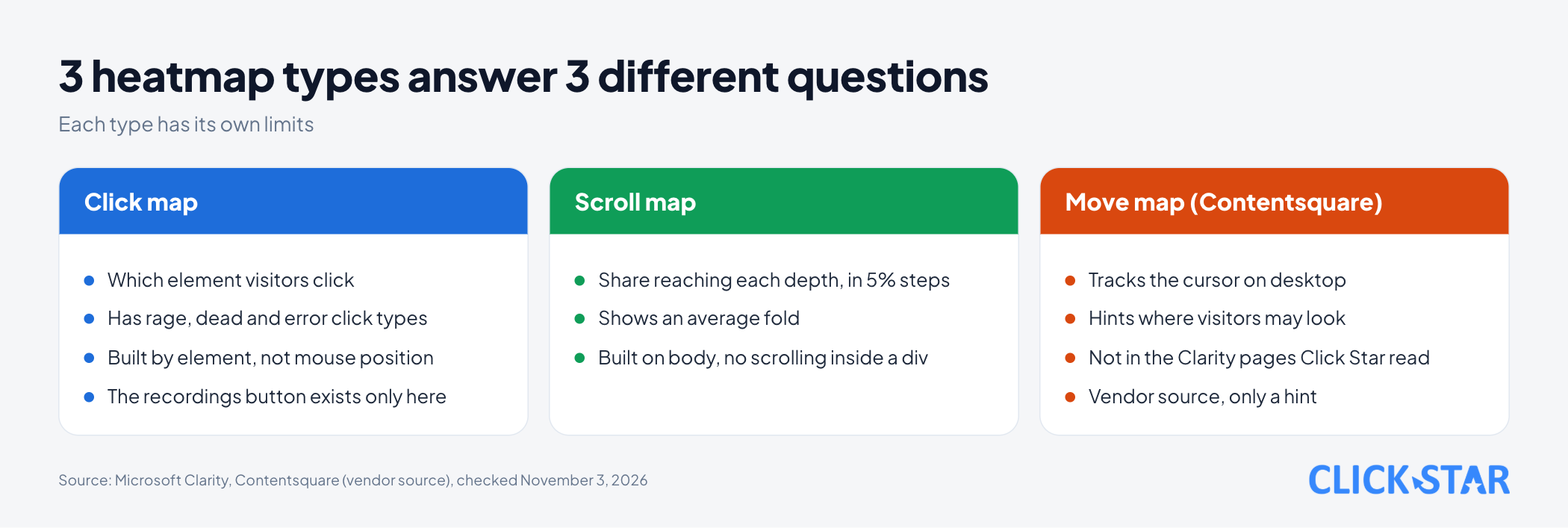
Click map. According to the Heatmaps overview, Clarity builds the map by clicked element, not by absolute mouse position.
Scroll map. According to the Scroll maps page (updated October 6, 2026, read November 3, 2026), it shows the share of visitors reaching each depth, in 5% steps, plus an "average fold". The Heatmaps features page (updated June 30, 2026, read November 3, 2026) says scroll maps are built on the <body> tag and cannot show scrolling inside a <div> container.
Move map. The Clarity pages Click Star read have no such type. Contentsquare's guide describes a move map as tracking the cursor of desktop visitors, hinting at where they may be looking.
Limits to keep in mind
According to the Heatmaps features page, each heatmap holds at most 100,000 page views, and Clarity picks 1 recording at random to overlay the heatmap on.
Which faults are common on Vietnamese business websites?
Click Star has found no Vietnam measurement of how often each fault occurs. The examples below are illustrative, not measurements.
- Buttons too small or too close on phones. According to web.dev's "Accessible tap targets" (updated March 31, 2020, so an old page, read November 3, 2026), the recommended touch size is about 48 px, with about 8 px between items.
- A floating element covers a button. A Zalo button, call button or chat box sits on top of the "Submit" button on a small screen (illustrative).
- Images or text that look like buttons. An image, icon or text that looks like a link but cannot be clicked; Contentsquare's guide describes this kind.
How much data is needed, and how long is it kept?
The Heatmaps overview says there is no minimum traffic limit to build a heatmap; the Troubleshooting Heatmaps page (updated May 21, 2026) says to wait 30 minutes after installing the code.
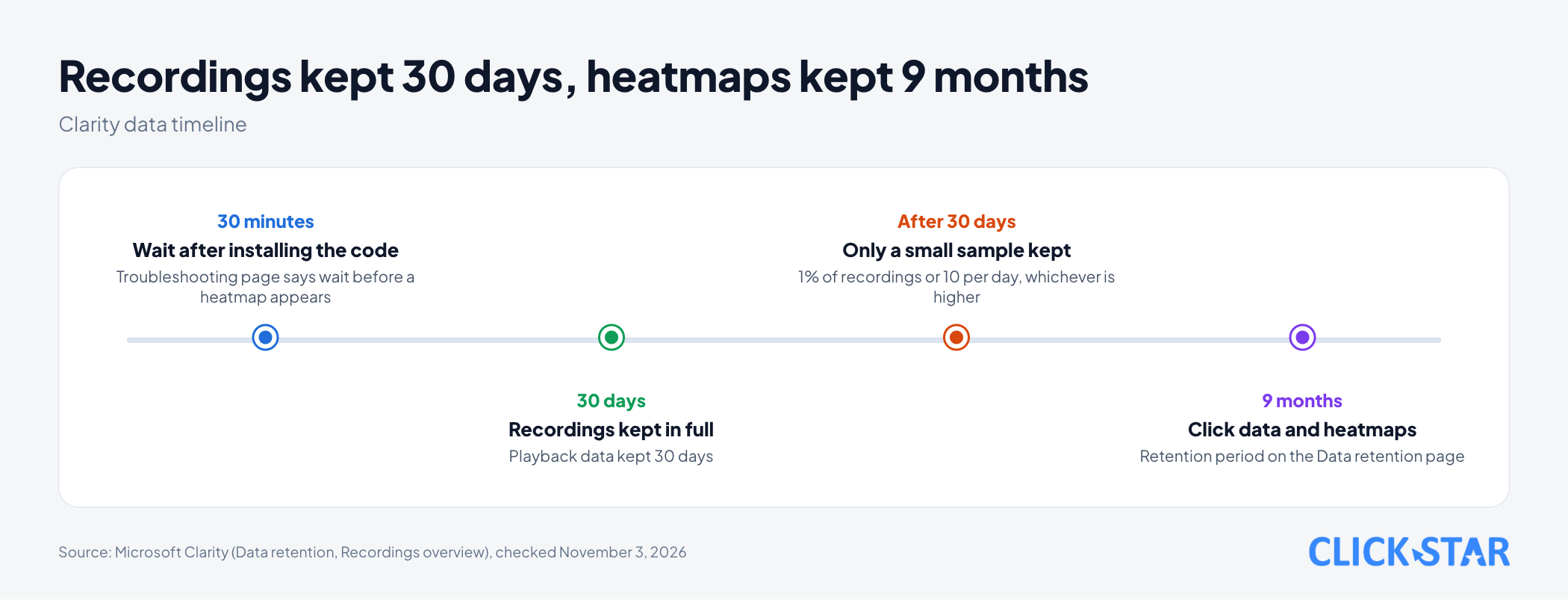
Contentsquare's guide says to collect at least 2,000 to 3,000 page views. This is vendor advice with no method.
On retention, according to the Data retention page (updated June 30, 2026, read November 3, 2026), playback data is kept 30 days, and click data and heatmaps 9 months. The Recordings overview page (updated May 21, 2026) adds that after 30 days Clarity keeps 1% of recordings or 10 per day (whichever is higher) for up to 9 months.
Click Star's reference frame, not taken from an outside source: collect at least 14 days to cover weekdays and weekends; watch at least 10 recordings containing the suspect element; fix only if the element shows up in both weeks.
The 5 steps from observation to a fix
This is Click Star's reference frame, not taken from an outside source. Handle only 1 element per round so you know which change worked.
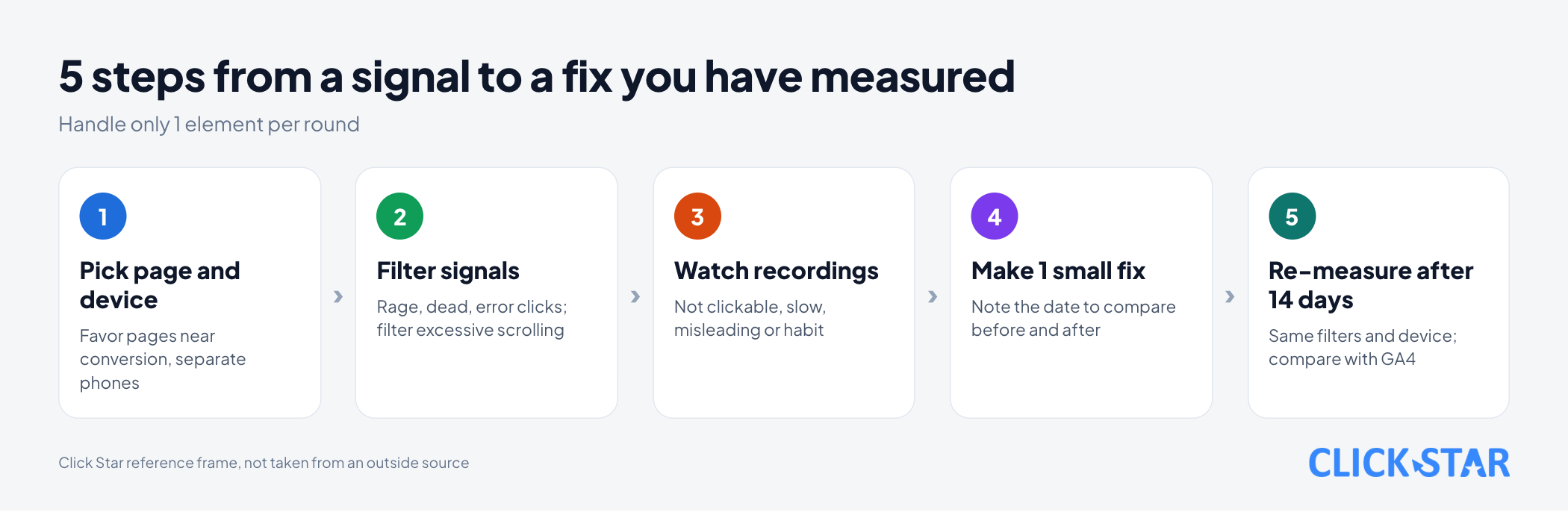
Step 1. Pick the page and device. Favor pages near a conversion: cart, contact form, pricing. Separate phone from desktop.
Step 2. Filter signals. Open the rage click, dead click and error click maps; for excessive scrolling and quick back, filter recordings. Note the top 3 elements.
Step 3. Watch recordings. From a click map, use the view-recordings button to open the exact sessions that clicked that element (per the Heatmaps features page, this button exists only on click maps). Classify the cause: not clickable, slow, misleading or habit.
Step 4. Make 1 small fix and note the date.
Step 5. Re-measure after at least 14 days. Use the same filters, device and time length. According to Google Analytics' "About key events" page (no date shown, read November 3, 2026), the Landing pages report has a Key events column, and Explorations offers a Session key event rate metric.
Before and after is not a controlled test: season, campaigns and traffic sources can change. For more certainty, use an A/B test.
Click Star's view. Behavior signals are where an investigation starts, not a conclusion. Repeated clicks can come from a fault or from habit; only the session recording and a retry on a real device can tell them apart.
Click Star offers website design and data dashboard services, so it has an interest when you decide to fix a page.
Masking personal data and visitor consent
According to Clarity's Masking content page (updated November 15, 2024, read November 3, 2026), the default mode is Balanced: it masks sensitive content such as numbers and email addresses. Input boxes are masked in every mode. Changes apply only to new recordings, so mask before collecting.
On consent, the Consent Management page (updated May 21, 2026, read November 3, 2026) says that since October 31, 2025 Clarity requires a consent signal for visits from the European Economic Area, the UK and Switzerland. The page does not mention Vietnam.
Click Star did not read Vietnamese law for this article and gives no legal advice. Check current personal data and cookie rules with your own legal owner.
What to do this week
- Check the data masking mode (default Balanced masks numbers and emails; pick Strict for sensitive pages), then pick the 1 page nearest a conversion and record its signal level as a baseline.
- Open the error, rage and dead click maps on phones first, then desktop.
- Watch at least 10 recordings for the top element.
- Make exactly 1 change, note the date, schedule a re-check in 14 days.
- Check that the main button's touch area is about 48 px on a phone.
Common mistakes
- Treating every cluster of clicks as a fault, though visitors may click repeatedly out of habit.
- Concluding from a heatmap with too few page views and fixing for a few people's "hot spot".
- Looking only at desktop and ignoring phones, where small buttons and floating elements may cause trouble (Click Star's view).
- Changing many things at once, so no one knows which change worked.
- Not watching recordings within 30 days, so detailed data is deleted (except labeled or favorited sessions).
- Comparing before and after across different devices, time lengths or traffic sources.
- Turning on session recording before setting up masking and checking consent.
What is not known
Clarity does not publish time thresholds for dead click and quick back, nor what level of scrolling counts as "excessive".
No source Click Star could read gives how many page views are enough to conclude for Clarity. Contentsquare's 2,000 to 3,000 is vendor advice with no method.
Hotjar's help-center definitions of rage click and move map were not cross-checked. The Heatmaps overview says heatmaps return within seconds while Troubleshooting says wait 30 minutes; Clarity does not explain it. The web.dev tap target page dates from 2020, so check for a newer version.
Related posts



Need tailored advice for your business?
Click Star helps you build a solution that fits your industry and scale. We answer every question during business hours.