A guide to effective vibe coding: from idea to a working product without trading away quality
Choose a review level by risk, work with a coding agent in a 6-step loop, write specific requests, keep context lean and pass a minimum security checklist before AI-written code touches real data.
Vibe coding has gone from a joke on social media to a real way of working for many people, from business owners building their own internal tools to developers handing tedious work to AI agents.
The practical question is no longer "should we use it" but "how far is it safe to go, and how do we stay fast without creating a pile of code no one dares to touch".
This article gathers the definitions, how to choose a review level by risk, a 6-step working loop, how to write requests, how to keep context lean, a security checklist and the common mistakes.
The how-to parts rest on the official best-practices documentation for Claude Code (Anthropic) and the writing of Simon Willison; the specific tool may differ, but the principles apply to Cursor, Copilot, Codex or any coding agent.
Key points
- In the narrow sense, vibe coding is building software with AI without reading the code it writes. When you read, test and understand the code, it is AI-assisted software engineering. The two differ in review level, and risk decides which level fits.
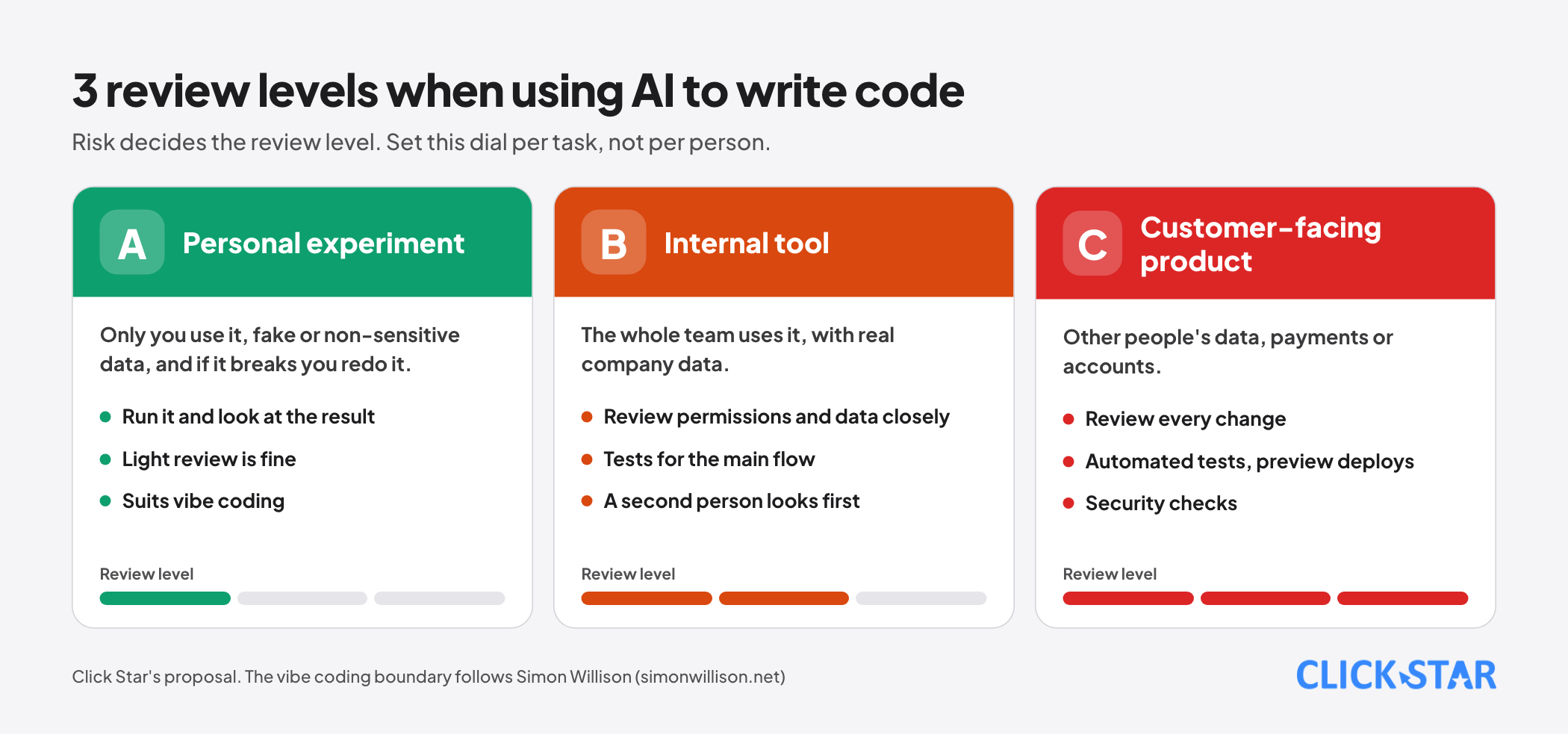
- Personal experiments can take light review. Internal tools need review of permissions and data. Customer-facing products need review of every change, automated tests and security checks.
- The most important tip: give the agent a way to check itself (tests, a build command, a screenshot). Without an automatic check, you become the only verification loop.
- An agent's context fills very fast and quality drops as it fills. Work in small tasks, clear context between them, and if 2 corrections still fail, start over with a better request.
- Secrets, authentication, authorization and personal data are places not to leave to "feel". Review them with people and tools.
What vibe coding is, and how it differs from agentic engineering
Andrej Karpathy coined the term in February 2025, describing a way of coding where you "fully give in to the vibes, embrace exponentials, and forget that the code even exists", including accepting every change the AI offers without reading the diff. The Collins Dictionary later named "vibe coding" its word of the year for 2025.
Simon Willison draws a tighter line: vibe coding is building software with a language model without reviewing the code it writes. If you read, test and understand all of the code, you are using the AI as a typing assistant.
He proposed the name "vibe engineering" on October 7, 2025 for how professional engineers use agents to move faster while staying accountable for the software, and then leaned toward "agentic engineering", the name he noted as winning out by February 23, 2026.
His May 6, 2026 post shows the line blurring even for working professionals. He admits he no longer reads every line of agent output, for example trusting a simple JSON endpoint without reading it, and he worries about "normalization of deviance": each time skipping review works out, we trust it at exactly the wrong moment.
He compares an agent to another team's internal service: read the docs, use it, and dig into the code only when there is a problem. And he makes an important point: test suites, READMEs and commit history are no longer signs of care, because agents produce them quickly; stronger evidence is software that has been used for real, daily.
Choose the review level by risk
Instead of arguing whether vibe coding is good or bad, treat it as a dial you set per task:
- Level A, personal experiment: a tool only you use, with fake or non-sensitive data, and if it breaks you redo it. Light review is fine: run it and look at the result. Willison also says vibe coding suits this kind of work.
- Level B, internal tool: the whole team uses it, with real company data. Review access permissions and data closely, have tests for the main flow, and have a second person look before it goes into use.
- Level C, customer-facing product: other people's data, payments or accounts. Review every change, run automated tests, deploy with preview environments and run security checks. Willison says plainly that pure vibe coding for software that serves other people is irresponsible because it is their information.
Work that suits broad delegation to an agent: prototypes, scripts, landing pages, internal dashboards with sample data, data transformations, writing tests, code migrations with a clear way to verify. Work not to delegate without review: authentication and authorization, payments, personal data, security boundaries and anything you have no way to verify.
The 6-step loop
The process below combines Anthropic's guidance (explore, plan, build, then save) with what Click Star finds effective when working with agents.
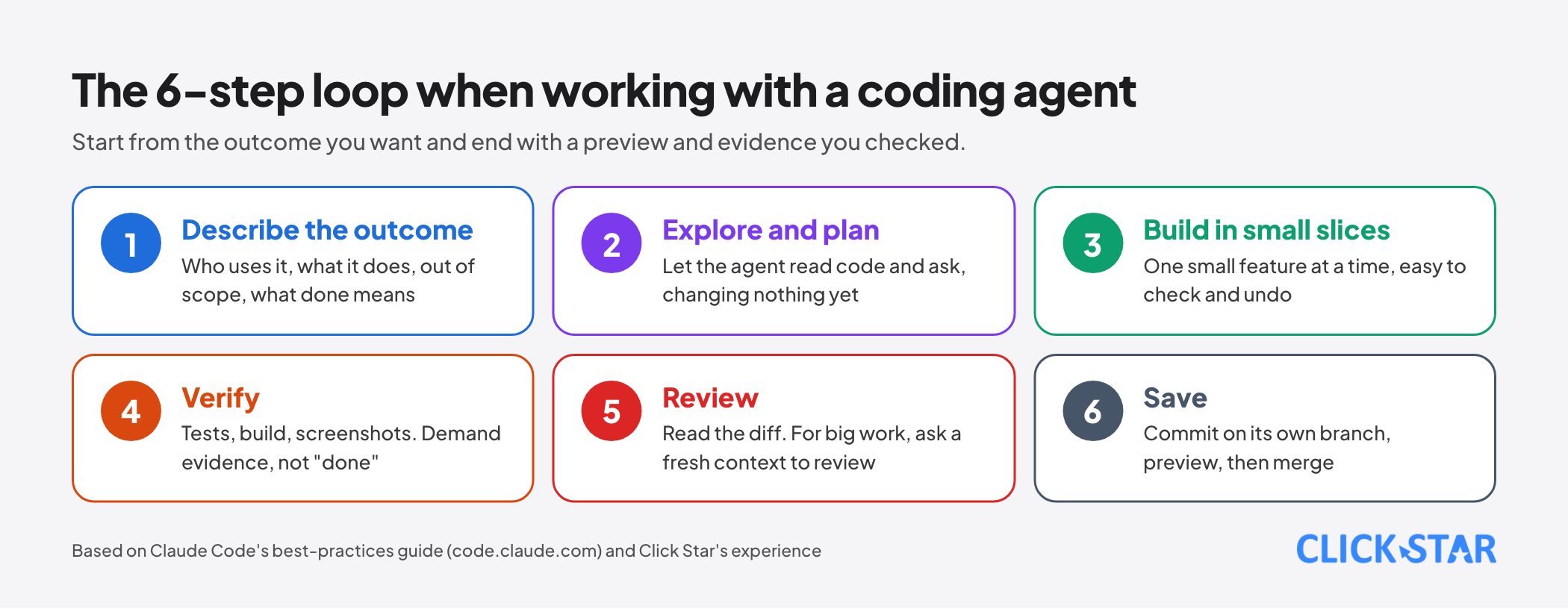
- Describe the outcome. A short paragraph: who uses it, what it can do, what is out of scope, what done means. For a larger feature, have the agent interview you first and write the result into a SPEC.md file.
- Explore and plan. Let the agent read code and ask questions without changing anything (plan mode). Anthropic notes this step helps when scope is unclear, several files change or the code is unfamiliar; if you could describe the change in one sentence, skip it.
- Build in small slices. One small feature, one small change at a time. Small slices are easy to check, easy to undo and keep context lean.
- Verify. Run tests, the build and the linter; for interfaces, compare a screenshot with the design. Make the agent show evidence (test results, commands run) instead of saying "done".
- Review. Read the diff. For large or risky changes, ask a fresh context (another agent or another person) to review, because a writer rarely sees their own mistakes.
- Save. Commit on its own branch, open a preview, check it on the real environment, then merge into the main branch.
How to write requests for an agent
The more specific the request, the fewer corrections. According to Anthropic's guidance, 4 ways to make a request more specific:
- Scope it: say which file, which scenario, what testing preference. Instead of "add tests for foo.py", write "write a test for foo.py covering the case where the user is logged out, avoid mocks".
- Point to sources: instead of asking why an API is strange, say "look through ExecutionFactory's git history and summarize how its API came to be".
- Point to existing patterns: "look at how the existing widgets on the home page are implemented, follow the HotDogWidget pattern to make a new calendar widget, and add no libraries beyond what the project already uses".
- Describe the symptom: "users report login fails after the session times out, check the token refresh flow in src/auth, write a test that reproduces the bug and then fix it".
A request template Click Star uses often:
Task: [one sentence].
Scope: only edit inside [folder]. Do not touch [other parts].
Follow the existing pattern in: [example file].
How to check: run [test command] and [build command]; describe what you see.
When done: list the files changed and the assumptions you made.
Keep context lean
Anthropic's guidance revolves around one constraint: the context window fills very fast, and quality drops as it fills. Every file the agent reads and every command result sits in it. Practical consequences:
- Clear context between unrelated tasks; do not let one session do everything.
- If you have corrected the agent twice for the same problem and it is still wrong, the context is full of failed attempts. Open a new session with a better request, which is usually faster than correcting further.
- For work that needs reading many files to investigate, hand it to a sub-agent in its own context and take only the summary.
- The project instruction file (such as CLAUDE.md) must be short: write commands the agent cannot guess, conventions that differ from defaults, how to run tests and known traps. Leave out what the agent knows by reading the code. A file that is too long makes the agent ignore half the rules. Anything that must happen every time (for example running the linter after every file edit) should be a hook that runs automatically, because a hook is certain, while an instruction in the file is only advisory.
Verification and review
Anthropic calls one familiar failure the "trust-then-verify gap": the agent produces an implementation that looks plausible but misses edge cases. Their fix is blunt: if you cannot verify it, do not ship it.
The Stanford AI Index 2026 hints at why to be careful: results on the SWE-bench Verified benchmark rose from about 60% to nearly 100% in a single year, yet on structured computer-use tasks (OSWorld) agents succeed about 66% of the time and still fail about one in 3 attempts. Fast-rising capability does not mean the checking step can go away.
A few concrete practices:
- Provide tests first and let the agent write code to pass them, or the reverse, but always have a runnable way to know right from wrong.
- For interfaces, paste the design image, ask for a screenshot of the result, compare and list the differences.
- For bugs, give the specific error message and ask for a fix to the root cause, not just hiding the error.
- Use a second model as reviewer with fresh context, but tell it to report only gaps that affect correctness or the stated requirements. A reviewer told to find problems will almost always find some, and chasing every comment leads to over-engineering.
Security: a minimum checklist
This is the part where "feel" is not enough. Before anything written by AI touches real data:
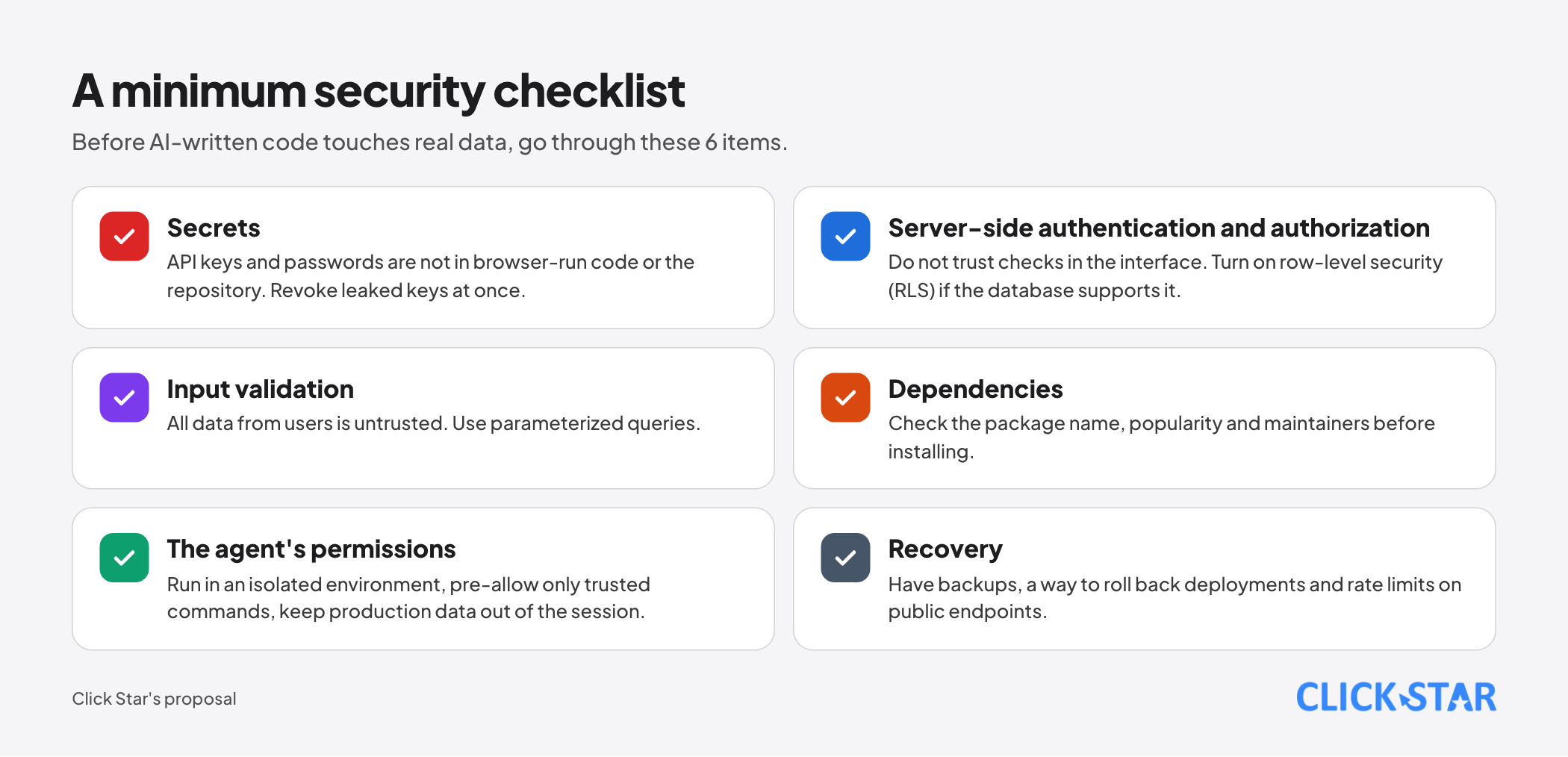
- Secrets: API keys and database passwords are never in code that runs in the browser or in the repository. Use environment variables, scan the repository for keys committed by accident, and revoke leaked keys at once.
- Authentication and authorization on the server side: do not trust checks in the interface. For databases that support it (such as Supabase or PostgreSQL), turn on row-level security (RLS) and test with a low-privilege account.
- Input validation: all data from users is untrusted. Use parameterized queries and sanitize output to prevent injection.
- Dependencies: agents sometimes suggest libraries that do not exist or that few people use. Check the package name, popularity and maintainers before installing.
- The agent's own permissions: run in an isolated environment (sandbox) when possible, pre-allow only the commands you trust, and do not bring production data into the session.
- Recovery: have backups, a way to roll back deployments, and rate limits on public endpoints.
Working as a team
- Every change an agent writes goes through branches, preview environments and review like a person's code, with no shortcuts.
- The description of each merge request should carry the evidence you checked: test results, screenshots, assumptions.
- Keep the project instruction file in the repository so the whole team improves it. When the agent repeats a mistake, add exactly one line to it, and trim it periodically.
- Agree on the review level (A, B or C) for each type of project so you do not argue every time.
7 common mistakes
- The "everything in one" session: working on one thing, asking about another, then coming back, with context full of unrelated information.
- Correcting the same bug again and again in the same context instead of starting over with a better request.
- A project instruction file that is too long, so the important rules sink.
- Trusting a result that looks plausible with no tests or way to verify.
- Unbounded investigation: telling the agent to "look into it" without scope, so it reads hundreds of files and fills the context.
- Accepting every change unread for software that serves customers.
- Not using version control, so when the agent breaks something there is no way back.
A 7-day practice plan
- Day 1: pick a small internal tool (level A or B) and write a one-paragraph outcome description.
- Day 2: let the agent explore and plan, you read the plan and edit it.
- Day 3: build the first slice with a way to self-check, and commit.
- Day 4: add two more slices, clearing context between slices.
- Day 5: run the security checklist across the whole tool.
- Day 6: ask another person or a fresh context to review the diff.
- Day 7: write a short project instruction file from what the agent got wrong, and set the review level for your next type of project.
Related posts


Need tailored advice for your business?
Click Star helps you build a solution that fits your industry and scale. We answer every question during business hours.