Website Accessibility under WCAG 2.2: A Checklist for Businesses
Which WCAG 2.2 level to aim for, the 7 groups of criteria to check first and a 30-minute manual review, based on W3C, MDN and WebAIM Million 2026.
When you review a site with a mouse on a large screen, it is easy to miss what others meet. Keyboard users, screen reader users, people with low vision or hand tremors meet a different site: faint text, buttons with no name, fields that do not say what to enter.
It draws on WCAG 2.2 (W3C Recommendation, December 12, 2024), the W3C Understanding and WAI pages, MDN, axe-core, Lighthouse and WebAIM Million 2026, checked up to October 22, 2026.
It answers 3 questions: which level to aim for, which criteria to check first, and how to run a manual review in 30 minutes. Click Star sells website design, so it has a related interest; this is not legal advice.
Key points
- WCAG 2.2 has 13 guidelines under 4 principles (perceivable, operable, understandable, robust) and 3 levels: A, AA, AAA. Click Star recommends aiming for AA, because W3C does not recommend requiring AAA for entire sites.
- Normal text needs a contrast ratio of at least 4.5:1, and large text at least 3:1 (criterion 1.4.3). For brand reasons, only text in logos is exempt; brand colors are not.
- WCAG 2.2 adds 9 criteria and removes 4.1.1 Parsing. 2 new AA criteria to check: 2.4.11 (focus not obscured) and 2.5.8 (targets of at least 24x24 CSS pixels).
- In WebAIM Million 2026, 95.9% of home pages in a sample of 1,000,000 had WCAG failures that tools could detect; low-contrast text led (83.9%).
- axe-core itself claims to find 57% of WCAG issues on average, and W3C says tools cannot determine accessibility on their own.
- A 30-minute manual review (keyboard, 200% zoom, forms, a basic screen reader pass) catches what machines miss; it is a Click Star reference framework.
What WCAG 2.2 is and which level to aim for
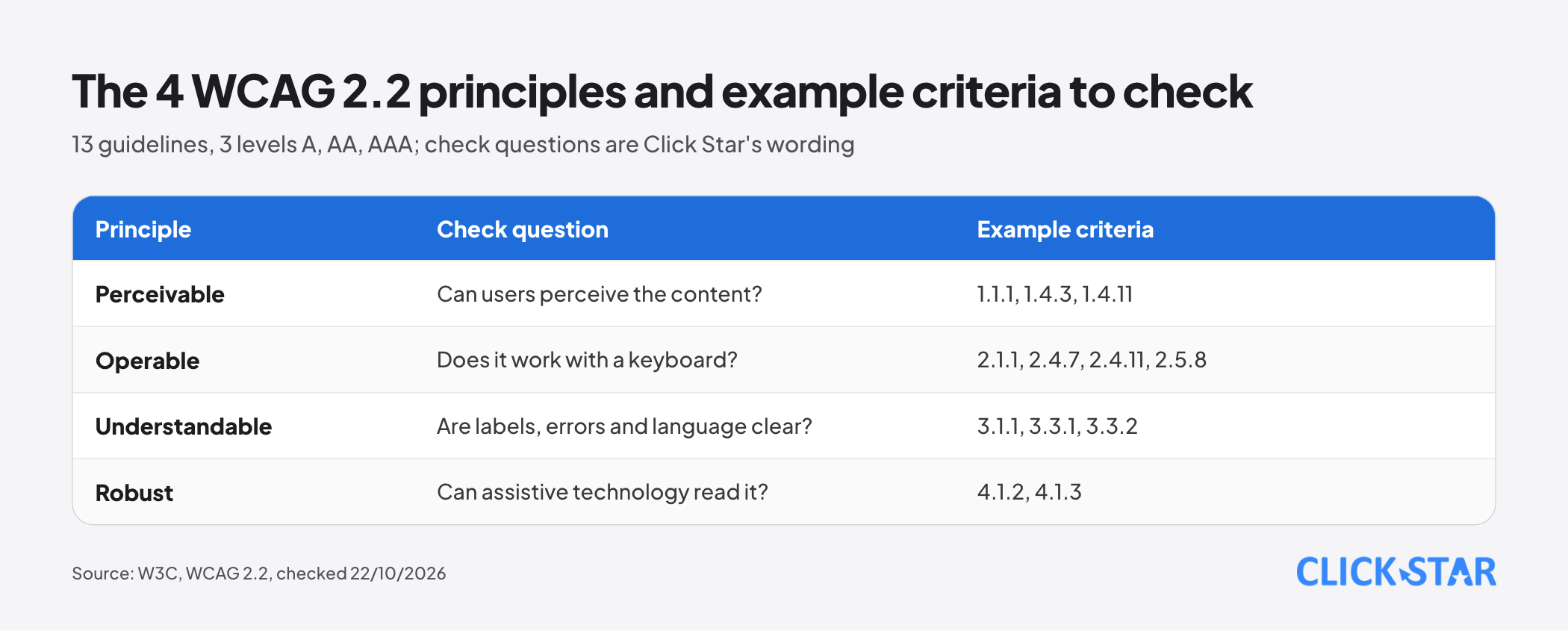
According to the W3C WCAG overview page (updated September 17, 2026), WCAG 2.2 has 13 guidelines under 4 principles: Perceivable, Operable, Understandable, Robust, each with testable criteria at level A, AA or AAA.
Per the Conformance section of WCAG 2.2, level A is the minimum, AA requires all A and AA criteria, and AAA requires all 3 groups. W3C does not recommend requiring AAA as a general policy for entire sites, because some content cannot meet every AAA criterion. Aiming for AA is Click Star's own recommendation, not a W3C requirement.
Where real websites fail: measurements from WebAIM Million 2026
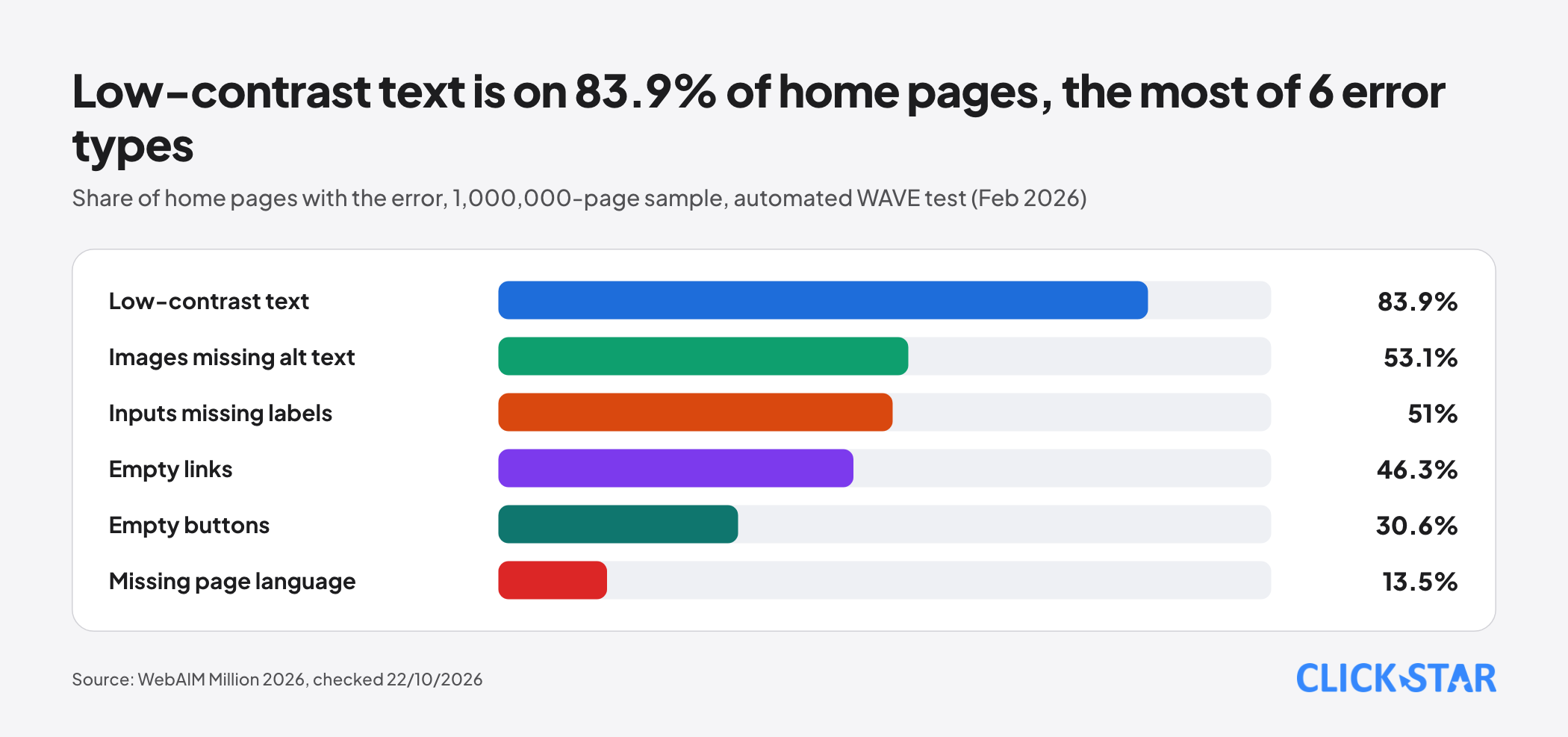
WebAIM Million is an annual automated test of the home pages of 1,000,000 websites from the Tranco ranking, using the WAVE tool. The 2026 edition ran in February 2026.
Home pages averaged 56.1 detectable errors, and 95.9% had WCAG 2 failures. Share of pages with each error type: low-contrast text 83.9%, images missing alternative text 53.1%, form inputs missing labels 51%, empty links 46.3%, empty buttons 30.6%, missing page language 13.5%. These 6 types make up 96% of all errors.
For Vietnam, the report lists 10,847 pages declaring Vietnamese with an average of 74.5 errors (32.8% above the overall average) and 4,845 pages on the .vn domain with an average of 78.6 errors (40.0% above). This sample does not represent every Vietnamese website.
Limit: WebAIM says finding no errors does not mean a page is conformant, so 95.9% is a floor for the share of pages that fail.
7 groups of criteria to check first
The grouping into 7 is a Click Star reference framework, based on common WebAIM errors and 4 user groups: keyboard, screen reader, low vision, motor. Criteria and levels come from WCAG 2.2.
1. Text and interface contrast
Criterion 1.4.3 (AA): text contrast of at least 4.5:1, and 3:1 for large text. Per the Understanding page (updated September 6, 2026), large text is 18 point or 14 point bold, ratios are not rounded, and placeholder text counts too.
Criterion 1.4.11 (AA): visual information needed to identify a component and its states (for example an input border when the border is the only cue) and graphics needed to understand content need at least 3:1 against adjacent colors. Per Understanding, not every control needs a border: a borderless button with clear text passes.
2. Text alternatives for images and buttons
Criterion 1.1.1 (A): non-text content needs a text alternative serving the same purpose; a control needs a name describing its purpose; purely decorative images must be ignorable by assistive technology.
3. Keyboard, order and no traps
Criterion 2.1.1 (A): all functionality works from a keyboard. Criterion 2.4.3 (A): focus order preserves meaning. Criterion 2.1.2 (A): if focus can enter a component, it must be able to leave using only the keyboard.
Per Understanding 2.1.2 (updated May 18, 2026), a modal dialog may hold focus if users know how to leave it.
4. Visible focus that is not hidden
Criterion 2.4.7 (AA): focus is clearly visible. Criterion 2.4.11 (AA, new): a component receiving focus is not entirely hidden by author-created content.
Understanding 2.4.11 (updated June 15, 2026) names sticky footers, sticky headers and non-modal dialogs. A sticky banner such as a cookie banner fails if it entirely hides the focused component; ways to pass include making the banner modal, using scroll padding, or closing it when focus leaves (for notifications that need no user action).
5. Size of clickable targets
Criterion 2.5.8 (AA, new): pointer targets of at least 24x24 CSS pixels, with 5 exceptions: spacing, equivalent control, inline in a sentence, user agent control, and essential.
Per the Understanding page (updated May 11, 2026), a smaller target still passes if a 24-pixel circle centered on it does not touch another target or the circle of another undersized target: 20x20 pixel buttons 4 pixels apart pass; adjacent ones do not.
6. Forms: labels and error messages
Criterion 3.3.2 (A): labels or instructions where input is needed. Criterion 3.3.1 (A): input errors are identified and described in text. Criterion 3.3.3 (AA): correction suggestions where known. Criterion 4.1.3 (AA): status messages such as "sent" reach assistive technology without moving focus.
MDN (ARIA basics, updated October 7, 2026) says to always use a label element, because most screen readers do not announce placeholder text.
7. Language, page titles and landmarks
Criterion 3.1.1 (A): the page language can be determined by software. Criterion 2.4.2 (A): the page has a title describing its topic. Criterion 2.4.1 (A): a way to bypass repeated blocks. Criterion 1.3.1 (A): structure such as headings, lists, tables and regions can be determined by software.
What WCAG 2.2 adds and removes
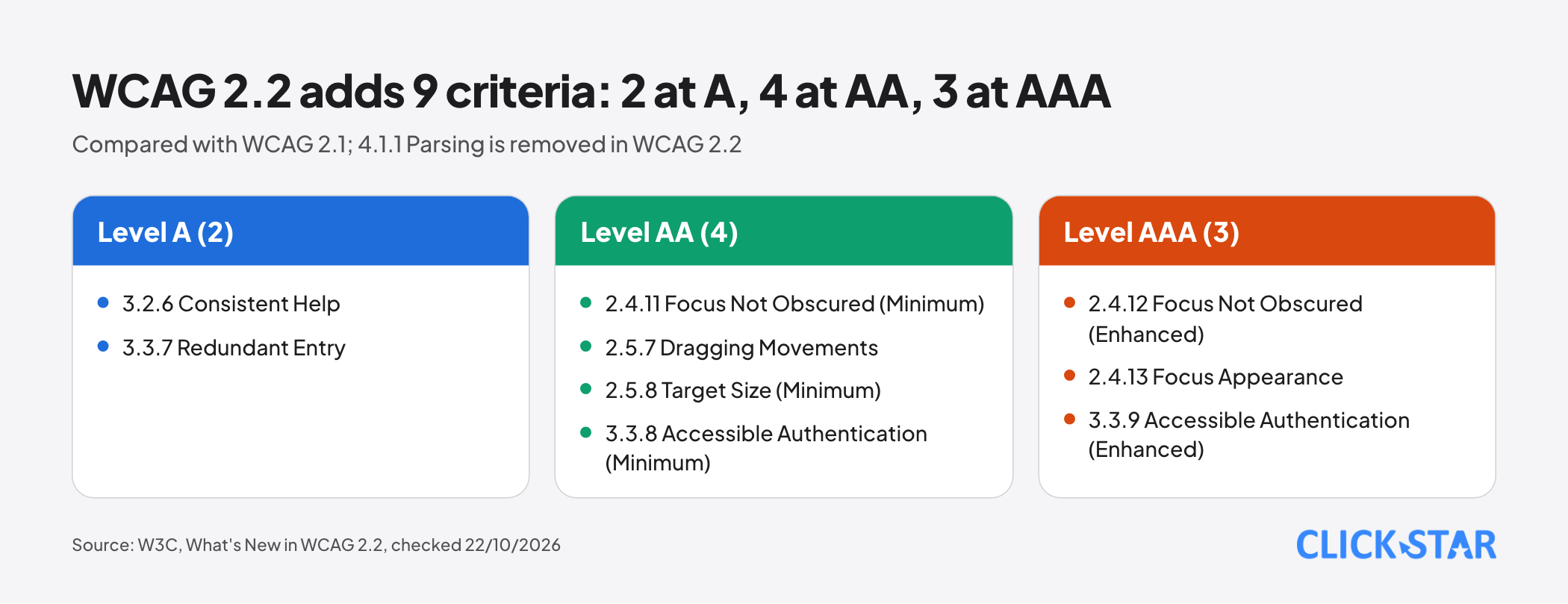
Per the W3C page What's New in WCAG 2.2, WCAG 2.2 adds 9 criteria. Level A has 2: 3.2.6 Consistent Help and 3.3.7 Redundant Entry.
Level AA has 4: 2.4.11 Focus Not Obscured (Minimum), 2.5.7 Dragging Movements, 2.5.8 Target Size (Minimum) and 3.3.8 Accessible Authentication (Minimum). Level AAA has 3: 2.4.12, 2.4.13 and 3.3.9.
Criterion 3.3.8 says login must not require a cognitive test unless there is an alternative, an assistance mechanism, or the test is object recognition or personal content.
What was removed: 4.1.1 Parsing is marked "Obsolete and removed" in WCAG 2.2. Per the W3C FAQ, problems that once failed 4.1.1 now fail other criteria such as 1.3.1 or 4.1.2.
How much automated tools catch
The axe-core README (no date shown, read October 22, 2026) says it finds 57% of WCAG issues automatically on average and returns "incomplete" items when a human must look. This is the developer's own figure; Click Star has not seen the method.
Per the Lighthouse documentation (Chrome for Developers, updated October 22, 2025), the Accessibility score is a weighted average and each audit is pass or fail, with no partial credit. Manual checks do not count toward the score.
W3C (page on selecting evaluation tools, updated May 13, 2024) says tools cannot check every aspect, human judgment is needed, results can be wrong, and tools only assist, not determine accessibility. Click Star's inference: a Lighthouse score of 100 does not mean WCAG conformance.
A 30-minute manual check
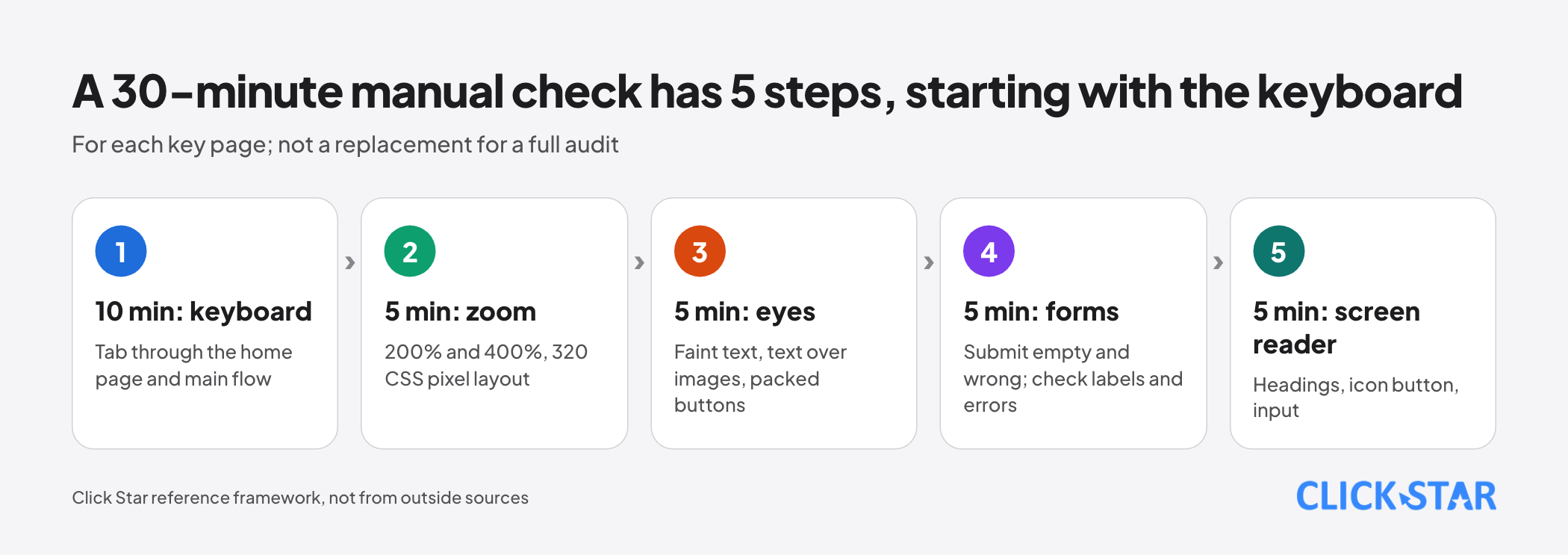
This is a Click Star reference framework, not from outside sources, and no replacement for a full audit.
- 10 minutes, keyboard: put the mouse away and Tab through the home page and the contact or purchase flow.
- 5 minutes, zoom: set the browser to 200%, then 400%. Under 1.4.4, text must resize to 200% without loss of content or function; under 1.4.10, at 320 CSS pixels wide there is no scrolling in 2 directions (except data tables, maps).
- 5 minutes, eyes: look for faint text, text over images, small buttons packed together.
- 5 minutes, forms: submit empty and with wrong input. Check that the error names the field, in text, and that every field has a visible label.
- 5 minutes, basic screen reader: per MDN (updated February 19, 2026), NVDA is free on Windows, VoiceOver is built into macOS and iOS, and TalkBack is on Android. Listen to the heading list, an icon button and an input.
Record each failure with page, criterion and priority. A quick review does not certify AA.
Common failures on business websites
This list is Click Star's inference from the criteria above, not a measurement.
- A floating chat box hides content and buttons while tabbing (2.4.11), has a tiny close button (2.5.8) or holds focus with no exit (2.1.2).
- A cookie banner that keyboards cannot operate, or that sticks and hides the focused component. Click Star already has a separate article on cookie consent banners; this one is about operability.
- Icon-only buttons with no name (1.1.1, 4.1.2). WebAIM found empty buttons on 30.6% of home pages.
- Inputs with only a placeholder (3.3.2), and errors shown only by changing a border color (1.4.1 requires not relying on color alone).
Click Star's view. Accessibility is a quality of the product, not a coat of paint at the end. The cheapest work happens at design time: enough contrast, semantic HTML, large enough buttons.
On the related interest: Click Star sells website design, so read this article's advice alongside an independent third-party check.
30-day plan and how to measure
This is a Click Star reference plan, not taken from outside sources.
- Week 1: pick 5 key pages (home, services, contact, order or sign-up, news), run the 30-minute check on each, add an automated tool and log failures.
- Week 2: fix the quick wins: names for icon buttons, input labels, page language, low-contrast text.
- Week 3: fix what must be rebuilt: chat box, cookie banner, menus, components hand-built from divs; re-test the main flow with the keyboard only.
- Week 4: re-check the 5 pages against week 1, then add the 7 groups of criteria to the acceptance checklist for new pages.
How to measure: open failures per criterion, key pages manually reviewed, recurring failures on new pages. Click Star proposes no general threshold because there is no outside source for one. If possible, invite real users to try the main flow; MDN says not to rely on automated tools alone.
Common mistakes
- Treating a Lighthouse score or a single automated tool's result as proof of WCAG conformance.
- Using div or span as buttons and links instead of the right HTML elements.
- Using only placeholders instead of labels, and showing form errors only by changing color.
- Adding a chat box, cookie banner or popup after testing without re-testing keyboard and focus.
- Checking only the home page and inferring the whole site, skipping multi-step flows such as checkout.
- Doing it once before launch and not re-checking when the design changes.
What is not known
Click Star has not checked Vietnamese regulations on accessibility, so this article states no legal obligation. The W3C WCAG overview mentions the European Accessibility Act (EAA) and EN 301 549 (2026 version uses WCAG 2.2); Click Star could not open the EAA text on EUR-Lex and does not interpret it.
There is no independent measurement of the cost of reaching AA or its effect on revenue in Vietnam. WebAIM only tests home pages automatically in a Tranco sample. Click Star has not tried screen readers with Vietnamese voices.
Related posts

Need tailored advice for your business?
Click Star helps you build a solution that fits your industry and scale. We answer every question during business hours.