n8n, Make and Zapier: choosing a workflow automation tool for your business
Compares Zapier, Make and n8n by billing unit, n8n license, self-hosting or cloud, error handling, webhooks and permissions, based on official pricing pages and documentation read on October 22, 2026.
Small businesses often automate with drag-and-drop tools, then meet a bill that grows with every run or a workflow that broke unnoticed. Zapier, Make and n8n differ in billing unit, data location and error handling.
This article uses the official pricing pages and documentation of the 3 vendors and n8n's license file on GitHub, checked on October 22, 2026. Click Star has not run performance tests and does not add up total costs.
Click Star sells AI automation, so it has a related interest, stated in the assessment.
Key points
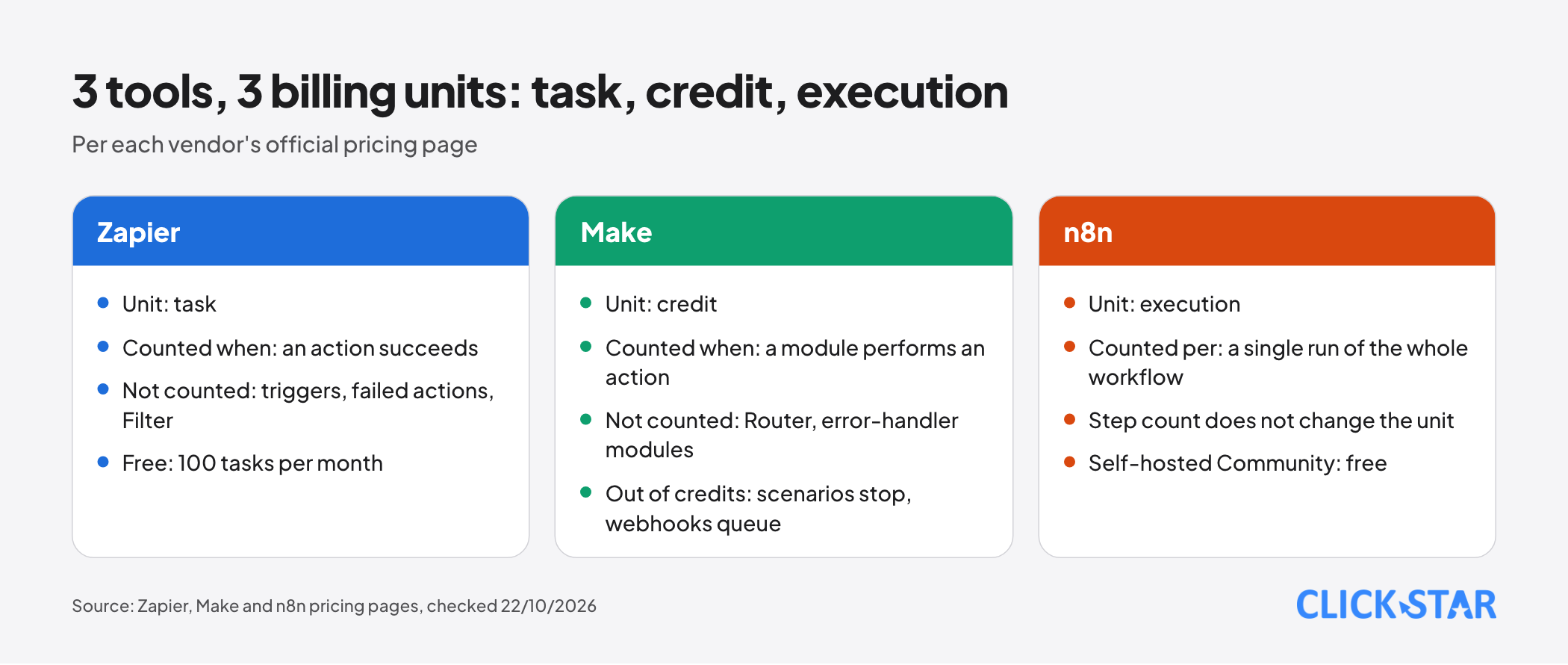
- Zapier bills per task (a successful action), Make per credit (a module action), n8n per execution (a whole run, regardless of step count). The 3 units do not convert directly into one another.
- Self-hosted n8n runs under the Sustainable Use License: internal use is allowed, but distributing to others only free of charge and non-commercially.
- Self-hosting n8n trades a subscription fee for operating duties: updates, backups, the key, cleaning and deleting data.
- Zapier states AWS in the United States, Make AWS (EU or North America), and n8n Cloud processes in the EU; no page names a server in Vietnam.
- All 3 have retries and logs, but differ in how they retry, when they report errors and how long they keep logs.
What unit do Zapier, Make and n8n bill by
The 3 units differ in nature, so Click Star builds no single price table. Count the runs and steps of 3 real workflows, then calculate on each pricing page.
Zapier. According to its pricing page (read October 22, 2026, in USD), a task is deducted when a Zap successfully completes an action. Triggers, failed actions and tools such as Filter, Formatter, Paths, Delay, Tables and Forms are not counted.
The Free plan has 100 tasks per month. Professional says "starting from $19.99 per month", Team "starting from $69 per month" with 25 users, and Enterprise is by contact. The page defaults to yearly payment ("Pay yearly"), so these are yearly-billing prices; monthly-billing prices are unconfirmed.
Some steps count more than 1 task: an AI step is 1, 3 or 5 tasks depending on the model, and each MCP tool call is 2 tasks (Task usage rates page).
Make. According to its pricing page (read October 22, 2026, in USD), most module actions use 1 credit, and some AI features may use more. Router and error-handler modules use none.
The Free plan has 1,000 credits per month. At the 10,000-credit tier the page shows Core $9, Pro $16 and Teams $29 per month, with Enterprise by contact. The page defaults to Annual billing (label Save 15%), so these are yearly-billing prices; monthly-billing prices are unconfirmed.
When credits run out, scenarios stop and webhooks are queued. Credits expire at the end of the term.
n8n. According to its pricing page (read October 22, 2026, in euros), an execution is a single run of the whole workflow, regardless of steps or data volume. Every plan has unlimited users and workflows.
Starter is 20 euros per month billed annually with 2,500 executions. Pro is 50 euros with 10,000. Business is 667 euros with 40,000, self-hosted only. Enterprise is by contact. The self-hosted Community edition is free.
The n8n license: the terms Click Star read
Self-hosted n8n runs under the Sustainable Use License version 1.0, per LICENSE.md in n8n's GitHub repository (master branch, read October 22, 2026, no date shown).
- You may use and modify the software royalty-free, but only for your own internal business purposes or for non-commercial, personal use.
- You may distribute it or provide it to others only free of charge and for non-commercial purposes.
- A violation ends the license automatically. If you stop within 30 days of a notice it is reinstated, and a repeat violation ends it permanently.
- Code files with ".ee." in the file name or ".ee" in the folder name are not under this license and need an Enterprise License.
Ask a lawyer or n8n: does running n8n for your customers, or embedding it in a product you sell, count as "internal business purposes"? Click Star cannot say.
Self-hosted or cloud: operations, security, backups and data location
If no one owns infrastructure, use the cloud edition; self-host only to choose where data sits and accept the operating duty.
According to "Choose how to use n8n" (no date shown, read October 22, 2026), n8n hosts and updates n8n Cloud, while for self-hosting you provide infrastructure and maintenance.
According to "Compare editions", the Community edition lacks SSO, projects, credential sharing and Git integration; these are on self-hosted Business and Enterprise plans. Projects: see What is not known.
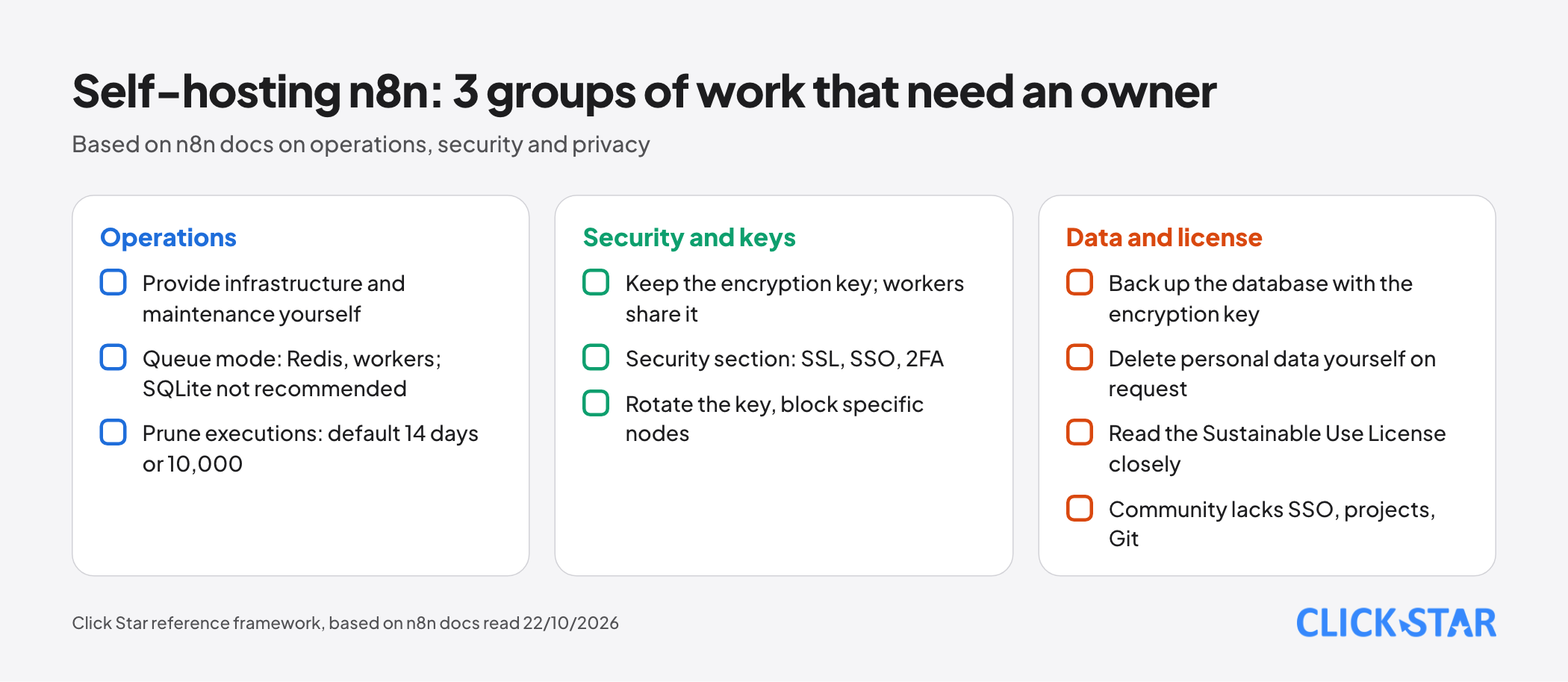
Operations. The queue mode documentation describes 1 main instance, Redis and workers, and does not recommend SQLite. Per "Manage execution data", n8n prunes executions by default after 14 days or above 10,000.
Security and keys. n8n generates an encryption key on first start, and workers must share it to read credentials. The Security section lists SSL, SSO, 2FA, key rotation and node blocking.
Backups. Click Star found no official n8n backup page. Its own inference, not from outside sources: back up the database together with the encryption key, since credentials are unusable without it.
Personal data. Per the Privacy page in n8n's documentation, for data flowing through workflows on a self-hosted instance n8n is neither controller nor processor, so deleting personal data is your job. For telemetry, n8n is the controller; self-hosted paid plans also send run counts to the license server daily (pricing page).
Data location. Zapier states data sits on AWS in the United States (Data Privacy Overview). Make states "AWS (EU/North America)" for every plan and does not say whether you can choose.
For n8n Cloud, the pricing page puts data in Frankfurt, Germany; the sub-processor page lists Microsoft Azure processing in the EU, plus some AI providers processing outside the EU (United States, Singapore). In the pages read, no tool names a server in Vietnam.
Consequence: data through any cloud edition leaves the country, while self-hosting n8n lets you choose the server. Click Star already has an article on personal data law; ask a lawyer before putting personal data in.
Errors, retries, logs and rate limits
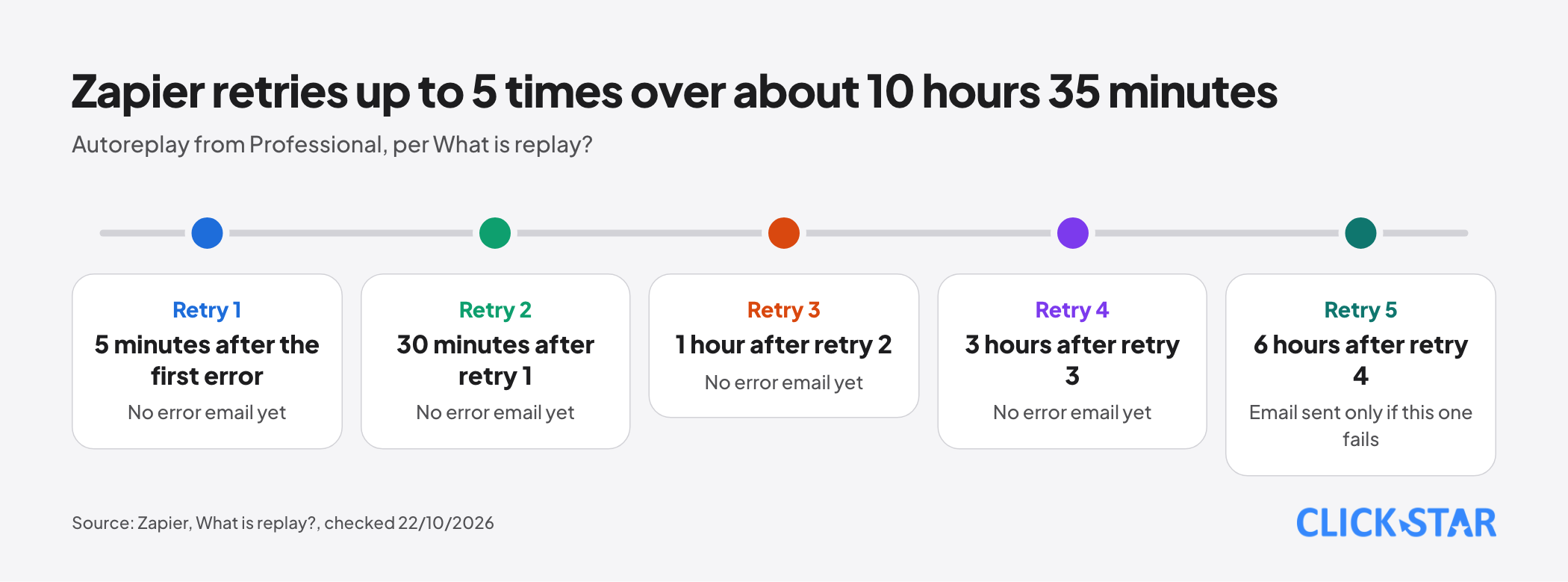
Zapier. Per "What is replay?" (read October 22, 2026), autoreplay retries a failed step up to 5 times, at 5 minutes, 30 minutes, 1 hour, 3 hours and 6 hours after the previous attempt. The last attempt comes about 10 hours 35 minutes after the first error.
Autoreplay is on Professional, Team and Enterprise; the Free plan does not have it. Error emails go out only after the final attempt.
When replaying from Zap history, Filter and Paths are never replayed, and replay works only within 60 days of the trigger.
Make. Per "Overview of error handling" (updated October 21, 2026), there are 5 error handlers: Skip, Retry, Resume, Commit and Rollback.
Detailed logs are kept 7 days on Free, 30 on Core, Pro and Teams, and 60 on Enterprise (pricing page).
n8n. Per n8n's documentation, an "error workflow" starting with an Error Trigger can send alerts by email or Slack. Each node has "Retry On Fail". On Cloud, execution logs are kept 7 days on Starter and 30 on Pro (pricing page).
Rate limits. For 429 errors, n8n's documentation suggests Retry On Fail with a wait longer than the limit, or Loop Over Items with Wait.
Webhooks: receiving signals from outside
Webhooks let Zalo, Facebook or a form notify a workflow at once. Click Star already has an article on webhooks (signatures, duplicate checks) and another on the 6 sales and care workflows to automate first.
n8n. Per the Webhook node documentation, there are 2 URLs for testing and production, with a 16 MB maximum payload. Authentication covers Basic, Header and JWT, plus an IP allowlist.
Zapier. Per "Trigger Zap workflows from webhooks", the maximum payload is 10 MB for triggers and 2 MB for Catch Raw Hook, with rate limits. Webhook triggers are not on the Free plan.
Make. Per the pricing page, the webhook queue holds 667 items per 10,000 credits, up to 10,000.
Permissions and API key management
n8n. The credential store is encrypted on every Cloud plan. Per the RBAC page, instance roles are Owner, Admin and Member, plus project roles; custom roles exist only on Enterprise. On the Community edition only the instance owner and the creator can access workflows and credentials (Compare editions page).
Zapier. The Team plan has shared app connections and SAML SSO for 25 users.
Make. Team roles start at the Teams plan. Custom roles, audit logs, enforced 2FA and SSO exist only on Enterprise (pricing page).
Click Star's reference framework, not from outside sources: a separate service account per workflow with minimal rights; no API keys pasted into code steps; a named owner per key; keys rotated when staff leave; test keys apart from production keys.
When to use drag-and-drop, and when to write code or use an AI agent
Use drag-and-drop when the flow has clear rules: receiving a form, writing to a CRM, appointment reminders. When code is needed: n8n has JavaScript and Python steps on Cloud plans, Zapier has Code by Zapier (30 seconds per step on Professional), and Make has the Make Code App (JavaScript or Python from Core, 2 credits per second), with custom functions only on Enterprise.
Write custom software when the logic is large, needs automated testing or strict version control (n8n has Git integration on self-hosted Business and on Enterprise, not on Cloud Starter or Pro).
An AI agent fits when the task needs judgment on unstructured data, such as classifying customer messages. Per the pricing pages, Zapier has Agents and MCP, Make has AI Agents (beta), and n8n has the AI Agent node and a human approval step for tool calls.
Click Star already has an article on AI agents, MCP and prompt injection. Let the agent propose, and have a person approve consequential actions (deleting data, mass sending).
A decision table by criteria
The table is a Click Star reference framework: billing unit and data location cells come from official pages, the rest is Click Star's judgment.
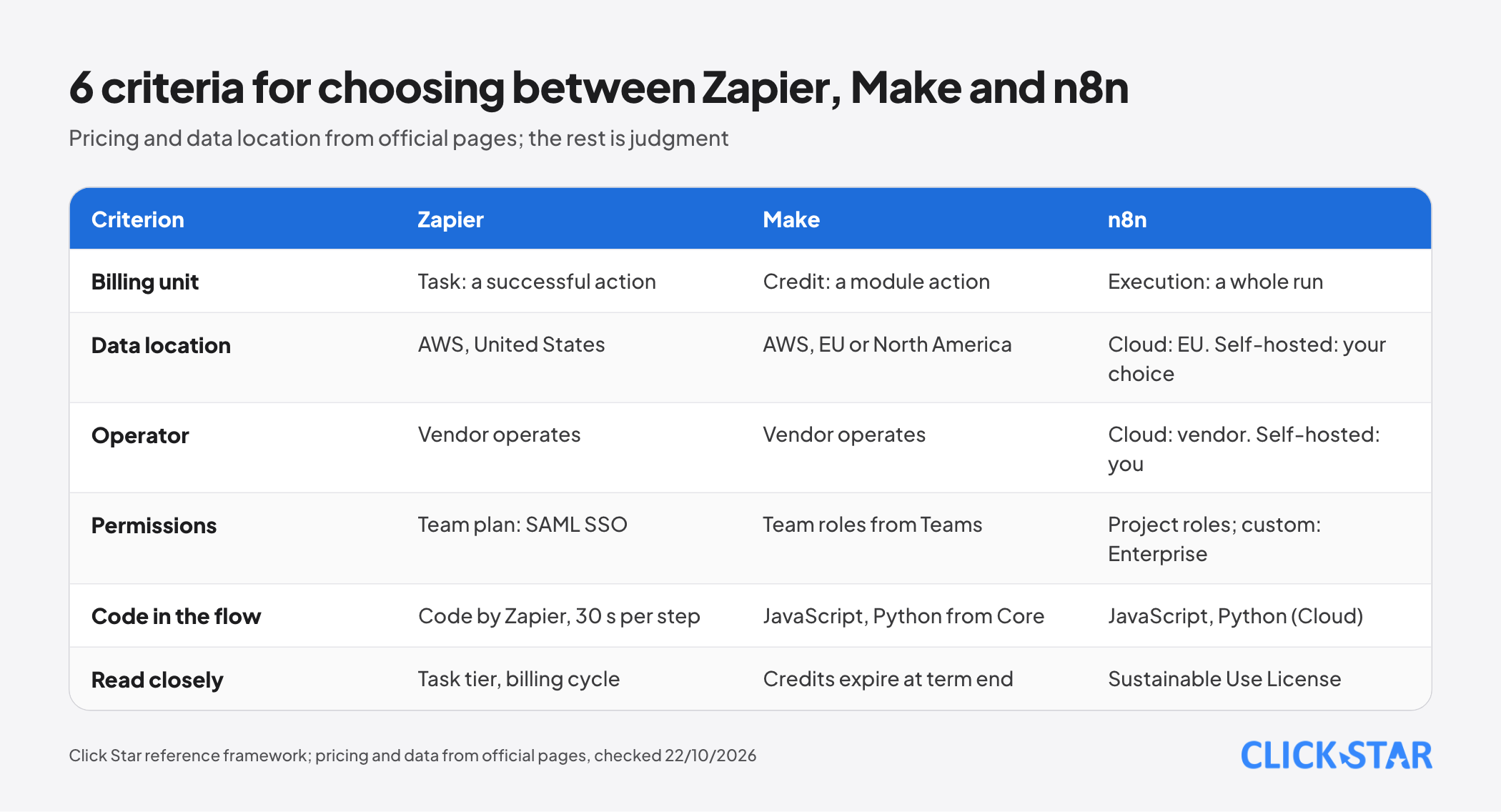
- Zapier fits teams with few technical staff that need many ready-made apps (over 9,000 per its pricing page) and accept data in the United States.
- Make fits visual branching and per-module error handling, if EU or North American infrastructure is acceptable.
- n8n Cloud fits many-step workflows billed per run.
- Self-hosted n8n fits when you have an operator, must choose the server and have read the license.
Click Star's view. Click Star sells AI integration and AI automation services, so it has a related interest in your choice: check this article against an independent quote.
Technical judgment: the risk usually lies in missing workflow owners, missing error alerts and unmanaged API keys, not in the vendor.
What to do: a 14-day plan
- Days 1 to 2: pick 3 real workflows, count monthly runs and steps.
- Days 3 to 4: calculate cost on each pricing page, noting billing cycle and currency.
- Days 5 to 7: identify the personal data in the workflows and ask a lawyer about sending it abroad.
- Days 8 to 10: build 1 trial workflow, turn on error alerts and cause a deliberate failure.
- Days 11 to 14: assign owners, roles and a key rotation rule, and settle the tool.
What is not known
Click Star has no independent comparison of real costs, no latency or reliability measurements, and no measurements for Vietnamese businesses. Click Star has not read Zapier and Make prices for monthly billing.
Click Star has not read the vendors' terms of service, Zapier's and Make's rate-limit documentation, or n8n's backup documentation.
n8n's RBAC page says project roles exist on the registered Community edition, while Compare editions lists projects among features Community lacks; Click Star has not resolved this. The license's legal meaning for your case needs a lawyer.
Common mistakes
- Comparing the 3 vendors' prices as if task, credit and execution were the same unit.
- Reading a price without the billing cycle and currency.
- Self-hosting n8n to save money without counting operations and backups.
- Offering n8n-based services to customers without asking about the license.
- Setting no error alerts, so a broken workflow goes unnoticed for days.
Related posts


Need tailored advice for your business?
Click Star helps you build a solution that fits your industry and scale. We answer every question during business hours.