Next.js or WordPress for a business website: comparing cost, SEO, speed, security and operations
A comparison of Next.js and WordPress on 7 checkable criteria, based on the Web Almanac 2025, Patchstack's report and official documentation, with a decision matrix and migration plan.
Choosing a platform for a business website often becomes a technology debate, but the real decision rests on running costs, who edits content and the risks of the next 3 years. WordPress is a content management system (CMS) and Next.js is a front-end framework, so they are not the same kind of product.
This article compares them on checkable criteria, using the HTTP Archive Web Almanac 2025, Patchstack's report, and documentation from WordPress.org, Next.js, Vercel and Google Search Central, checked on October 21, 2026.
Click Star builds websites with Next.js, so it has an interest here, and the article declares no winner. Click Star already has articles on website speed and Core Web Vitals and on what a converting website looks like, so those are not repeated.
Key points
- WordPress is a complete CMS; Next.js needs a CMS or a development team added. The fair comparison is "WordPress as a package" against "Next.js plus a CMS".
- WordPress runs about 64% of websites that use a CMS (Web Almanac 2025) and 86.2% of .vn websites whose CMS is known (W3Techs, October 21, 2026). Popularity eases hiring but does not make it right for a project.
- On mobile, 45% of WordPress sites pass all 3 Core Web Vitals against 48% overall; the Web Almanac says WordPress performance variance comes from configuration more than from core. No comparable Next.js figure could be opened.
- Patchstack, a vendor that sells WordPress protection, reports that 91% of new 2025 vulnerabilities were in plugins. Next.js has also had a CVSS 10.0 vulnerability. Both need someone accountable for patching.
- Licenses do not decide cost, because WordPress (GPL) and Next.js (MIT) are both free; the difference lies in labor, hosting and maintenance.
- The hybrid model (WordPress as CMS, Next.js as front end) keeps a familiar editing experience but means running 2 systems.
How WordPress and Next.js differ
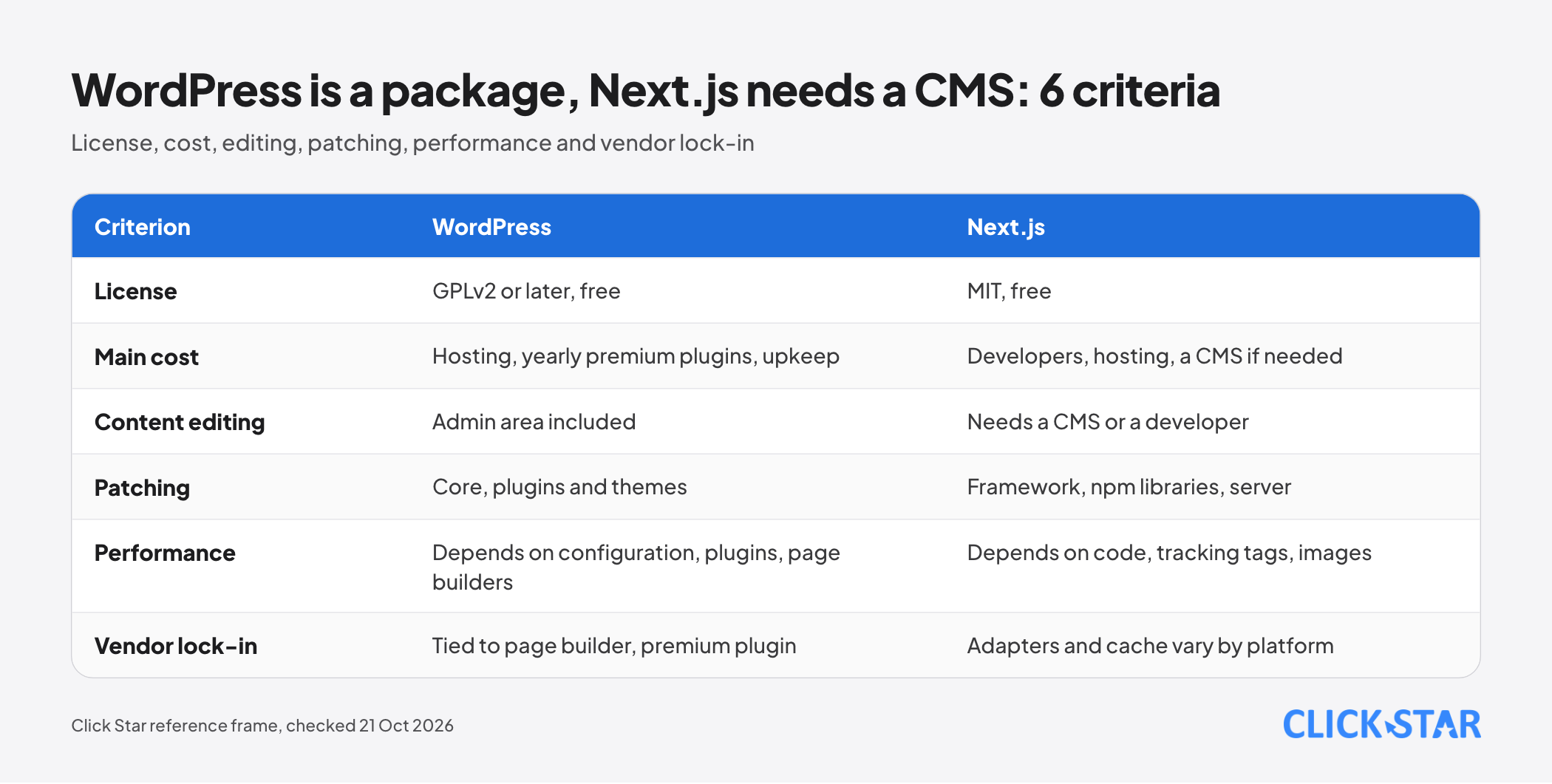
WordPress is CMS software that runs on PHP and a database under the GPLv2 or later license; the WordPress.org license page says plugins and themes inherit the GPL too. The requirements page (modified May 7, 2026) recommends PHP 8.3, and MariaDB 10.11 or MySQL 8.0 or newer. The releases page says only the newest release of the current branch (7.1.3, October 6, 2026) is maintained.
Next.js uses the MIT license, with copyright held by Vercel Inc. According to its documentation (updated October 5, 2026), pages are Server Components by default and are rendered to HTML on the server, while JavaScript is needed only for interactive parts. It can run on Node.js, Docker, as a static export (with limited features) or through an adapter.
For a business: WordPress is usually run by the content team and a host, while Next.js belongs to developers. Without a stable development team, it is a burden.
Cost: licenses, hosting, development and maintenance
Licenses rarely decide the outcome; labor and operations are most of the cost. Click Star does not quote development prices because they depend on templates, integrations, languages and performance targets.
Licenses. Premium plugins and page builders are usually billed yearly: the Elementor pricing page (read October 21, 2026) shows annual plans that renew at list price.
Hosting. On the Vercel pricing page (read October 21, 2026), the Hobby plan is USD 0 and only for personal, non-commercial use; the Pro plan is USD 20 per month per developer seat, with a USD 20 usage credit and pay-as-you-go beyond it, excluding tax. Click Star does not quote WordPress hosting prices because each provider packages plans differently.
Maintenance. Both involve recurring work: updates, backups, monitoring.
Performance and Core Web Vitals
No public result shows any platform to be always faster. The Web Almanac 2025 CMS chapter (January 15, 2026) says it does not aim to name a fastest CMS; results depend on platform defaults, hosting, themes, plugins and page builders.
For WordPress, the chapter reports that 45% of sites pass all 3 metrics on mobile, 53% have good LCP and about 84% have good CLS. The Performance chapter gives the overall web figure as 48% on mobile and 56% on desktop.
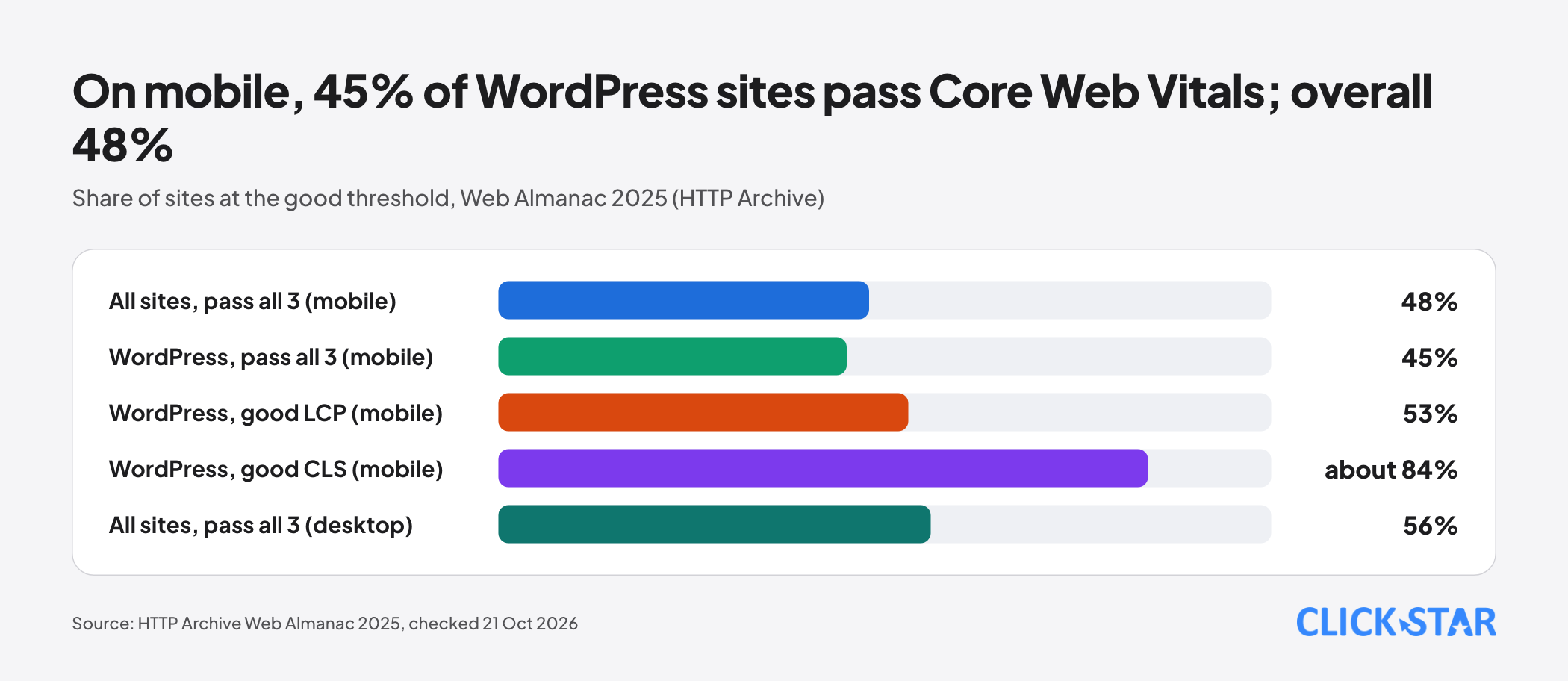
About 60% of WordPress sites use a page builder (an estimate), which the report calls a major source of performance variation.
The limit: the CMS chapter has no Next.js figure, and Click Star could not open the HTTP Archive Tech Report. So no Next.js pass rate from a primary source is given.
One secondary source is the State of Web Vitals table from the consultancy CoreDash (October 2026, phone data, 193,102 websites). It lists Next.js (1,656 sites) at LCP 83.2%, INP 60% and CLS 65%, and WordPress (59,983 sites) at 70%, 97% and 90%. Its WordPress LCP differs sharply from the Web Almanac (53%), and Click Star has not read its sampling method in full.
The table is only a reminder: the Next.js label does not guarantee passing, because INP and CLS depend on code, tracking tags and images. Measure with the site's own field data (CrUX, Search Console).
SEO: both can do it, the difference is how pages are built
The Web Almanac 2025 reports a median Lighthouse SEO score of 92 for WordPress, in line with many CMSs. The difference lies in where SEO elements come from: WordPress core has included an XML sitemap since version 5.5, while titles, descriptions and structured data usually come from plugins. In Next.js, a developer declares these in code.
Google Search Central (updated March 4, 2026) says Googlebot runs JavaScript with Chromium, every page returning status 200 enters the rendering queue, and server-side or pre-rendering "is still a great idea". Next.js renders HTML on the server by default, so content reaches crawlers early.
On either platform, content that loads late through JavaScript is a risk; check with the URL Inspection tool.
Security and patching
Both have vulnerabilities; the difference is where they sit. WordPress's exposure is third-party plugins and themes, Next.js's is the framework, npm libraries and server configuration.
Patchstack's State of WordPress Security in 2026 (February 25, 2026) reports 11,334 new vulnerabilities in the WordPress ecosystem in 2025, up 42%. Of these, 91% were in plugins, 9% in themes and only 6 in core (low priority). 46% had no fix at disclosure, and the weighted median time to mass exploitation was 5 hours.
Read selectively: Patchstack sells WordPress protection, and the figures count disclosed vulnerabilities, not compromised sites. Click Star found no comparable Next.js report.
On the Next.js side, CVE-2025-29927 (public March 21, 2025) allowed middleware to be bypassed in self-hosted apps, while apps on Vercel and static exports were not (Vercel postmortem). CVE-2025-66478 (December 3, 2025) concerns the React Server Components protocol, rated CVSS 10.0, with possible remote code execution; Next.js says there is no workaround other than upgrading.
The shared lesson: any platform needs someone who tracks advisories and patches within days. Ask the provider in writing who monitors and how fast they patch.
Editing, ecosystem and lock-in
WordPress is strong in a familiar editing experience. The Web Almanac notes that loosely constrained editing tools lead to inconsistent layouts and heavy pages, so limit templates and set permissions early. For Next.js, the documentation offers Draft Mode (updated June 2, 2026) so editors can preview drafts from a CMS; without a CMS, every text change goes through a developer.
Both are open source; lock-in sits in the layer around the software. With WordPress (Click Star's view), it is content tied to a page builder or premium plugin. With Next.js, the documentation lists Vercel and Bun as the verified adapters, with Cloudflare and Netlify working on theirs; self-hosting several instances means configuring a shared cache yourself.
The hybrid model: WordPress as CMS, Next.js as front end
The WordPress REST API serves content as JSON to outside applications, and the WPGraphQL plugin (GPL-3) separates the CMS from presentation. Next.js refreshes static pages with Incremental Static Regeneration (ISR), on a timer or when revalidatePath or revalidateTag is called; ISR needs a Node.js runtime and does not work with static export (documentation updated October 15, 2026).
Gain: a custom front end while editors keep their tools. Cost: running and patching 2 systems. Click Star sees it as worth weighing when the content team is attached to WordPress but the front end must exceed what a theme can do; for a small site, usually not.
Choosing by situation
The panel below is a Click Star reference frame, not a measurement.
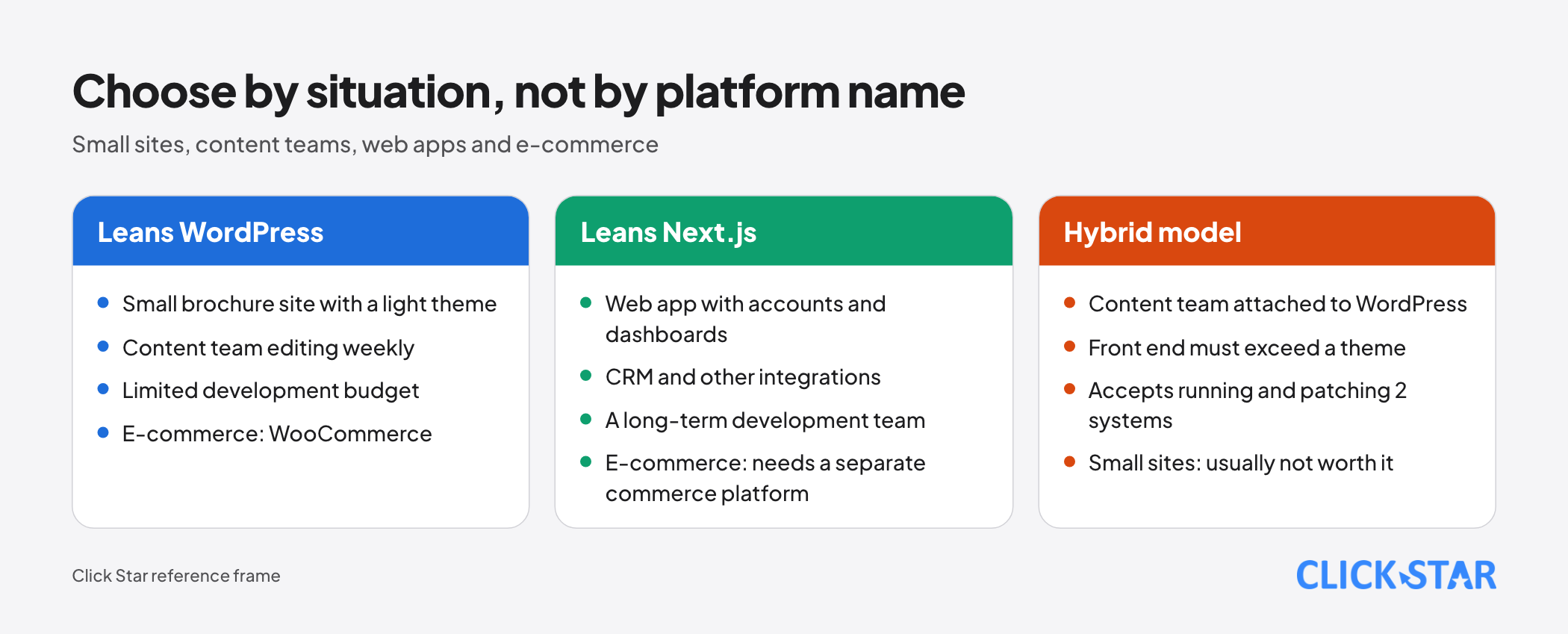
A small brochure site. WordPress with a light theme is usually enough; Next.js fits if a development partner is already in place.
A team editing weekly. It needs an admin area, preview and permissions: WordPress, or Next.js with a CMS.
A complex web application (accounts, dashboards, CRM integration). Next.js fits better because it is an application framework; WordPress can keep the brochure pages and blog.
E-commerce. WooCommerce describes itself as an open-source commerce platform for WordPress. Next.js needs a separate commerce platform; Click Star has no comparative measurements, so pilot first.
Click Star's view. The key question is not "which framework" but who edits the content, who patches and who is accountable when something fails. Click Star designs SEO-ready, fast websites with Next.js, yet accepts that WordPress is a reasonable choice when the content team needs autonomy and the development budget is limited.
Migration plan from WordPress
Google's site move guide (updated August 20, 2026) advises mapping old URLs to new ones, using 301 or 308 redirects, avoiding long chains and not sending many URLs to the homepage. Keep redirects at least about 1 year and expect temporary ranking fluctuation.
Reference timeline from Click Star:
- Week 1: inventory URLs, forms and integrations; record Core Web Vitals, rankings and traffic for 20 key pages.
- Weeks 2 to 3: choose the CMS; build templates and the redirect map.
- Weeks 4 to 5: build the front end, move content, check titles and descriptions in staging.
- Week 6: run in parallel, test redirects, then switch DNS at low traffic.
- Weeks 7 to 10: monitor Search Console and 404 errors; retire the old WordPress when numbers are stable.
10 questions to answer before choosing
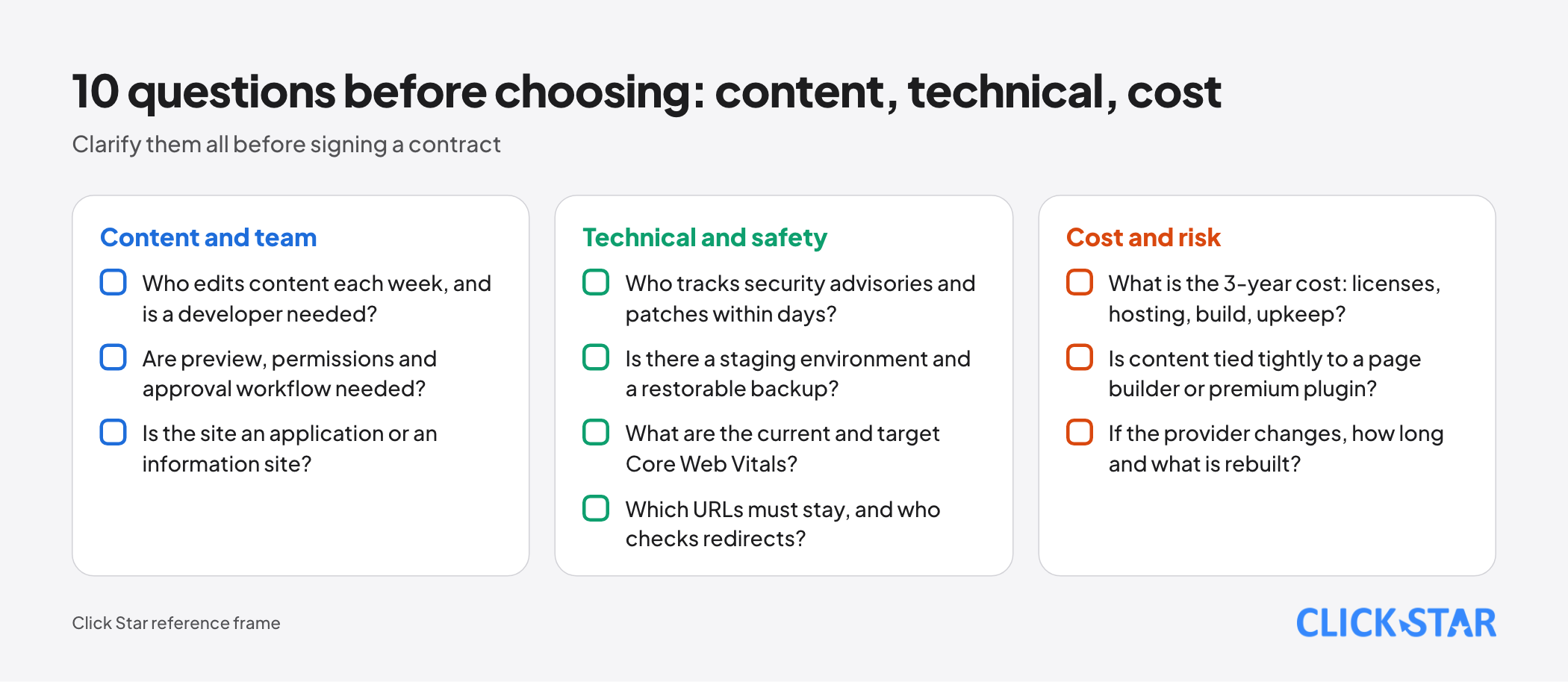
- Who edits content each week, and is a developer needed?
- Are preview, permissions and approval workflow needed?
- Is the site an application or an information site?
- Who tracks security advisories and patches within days?
- Is there a staging environment and a restorable backup?
- What are the current and target Core Web Vitals?
- Which URLs must stay, and who checks redirects?
- What is the 3-year cost: licenses, hosting, build, upkeep?
- Is content tied tightly to a page builder or premium plugin?
- If the provider changes, how long and what is rebuilt?
Common mistakes
- Treating WordPress and Next.js as 2 products of the same kind and ignoring that Next.js needs a CMS or a development team.
- Choosing by popularity instead of the business's own ability to operate.
- Believing a framework name guarantees speed, when real metrics depend on configuration, tracking tags and images.
- Installing many plugins or libraries with nobody tracking updates and advisories.
- Counting only the initial build cost and ignoring maintenance, upgrades and yearly license renewals.
- Changing platforms without a URL map, losing rankings already earned.
What is not known
Click Star has no documented Core Web Vitals pass rate for Next.js, because it could not open the HTTP Archive Tech Report; the CoreDash figures are secondary and differ from the Web Almanac. There is no data on Next.js versus WordPress share in Vietnam or on real project costs here.
Click Star found no independent report equivalent to Patchstack's for Next.js, and Patchstack has a commercial interest.
Related posts



Need tailored advice for your business?
Click Star helps you build a solution that fits your industry and scale. We answer every question during business hours.