Passkeys, MFA and Row Level Security (RLS): protecting accounts and data in internal applications
How OTP and SMS fall short against phishing, how passkeys work, and how RLS in PostgreSQL and Supabase keeps each person's data separate, based on NIST, W3C, FIDO and official documentation.
Internal applications such as a CRM, a reporting tool or an admin page often hold customer data, yet rely on 2 thin protections: 1 password at the front door and a few lines of configuration at the data door.
This article is checked against sources up to October 21, 2026: NIST SP 800-63B-4, the W3C WebAuthn Level 3 specification, the FIDO Alliance passkey page, the PostgreSQL 18 documentation and Supabase. The Vietnamese law was read through 1 copy on a third-party news site.
It answers 3 questions: which sign-in methods resist phishing, what Row Level Security (RLS) does and where it goes wrong, and what to do in 4 weeks. Click Star already has articles on AI data analysis, personal data law, operational databases and Supabase Select; this one does not repeat them.
Key points
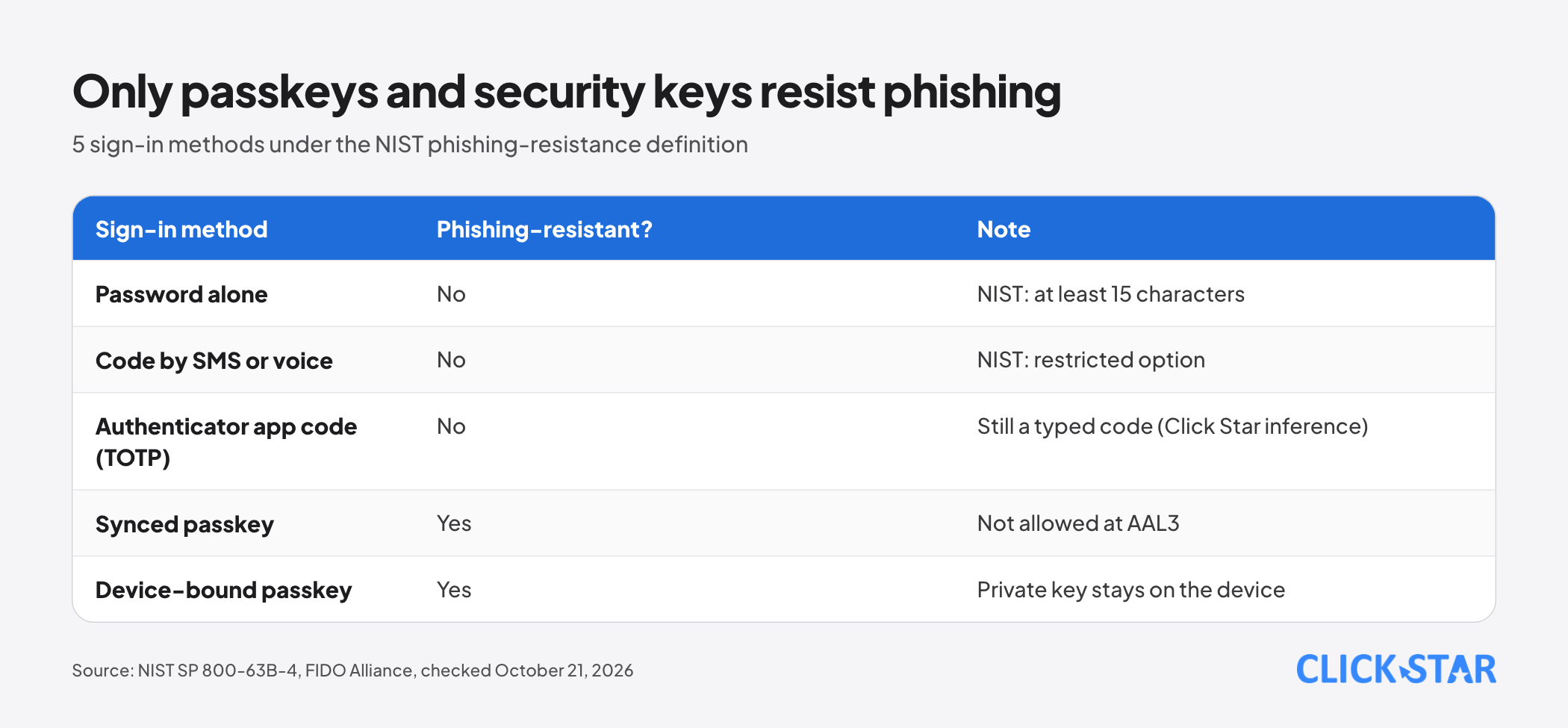
- NIST SP 800-63B-4 (final, July 2025) says codes the user types in, including OTPs, are not phishing-resistant. Codes sent by SMS or voice are a restricted option, and an alternative must be offered.
- A passkey is a cryptographic key pair bound to the exact domain of the service, so a fake site cannot reuse it. WebAuthn Level 3 became a W3C Recommendation on August 25, 2026.
- According to the Supabase documentation read on October 21, 2026, passkey support is still experimental. Add passkeys in stages and keep existing sign-in methods.
- In PostgreSQL, a table with RLS enabled and no policy shows or changes no rows (except for the owner and roles that bypass RLS). The Supabase secret key bypasses RLS, so it belongs on the server only.
- 3 common mistakes: forgetting to enable RLS, policies that rely on user-editable data, and a service key in browser code.
- Policies need automated tests and access logs. The 4-week plan at the end orders work by risk.
Why an internal application needs both layers
The sign-in layer decides who gets in, and the data layer decides what a person who is in can see. Without RLS, 1 valid account or 1 bug can read other people's data. With weak sign-in, a stolen password inherits the victim's permissions.
Passwords, MFA and SMS OTP: where they are weak
Passwords are still needed, but the rules have changed. According to NIST SP 800-63B-4 (section 3.1.1, read October 21, 2026), a password used alone needs at least 15 characters, and at least 8 inside multi-factor authentication. NIST forbids mandatory special characters or periodic changes, and requires blocking leaked passwords.
MFA adds 1 piece of evidence beyond the password, but not every MFA resists phishing. NIST defines phishing resistance as keeping authentication secrets from an impostor without relying on the user's vigilance, and says manually entered codes such as OTPs do not qualify.
The reason: a code typed into a fake site reaches the attacker at once and works while it is still valid.
SMS adds a weakness of its own. NIST (sections 3.1.3.3 and 3.2.9) treats codes sent over the telephone network as a restricted option: the organization must offer at least 1 unrestricted alternative, warn users of the risk and plan a migration. Supabase also warns that phone MFA is vulnerable to SIM swap attacks (read October 21, 2026).
Authenticator app codes (TOTP) beat SMS because they skip the phone network, but they are typed codes and so not phishing-resistant under that definition (Click Star's inference).
What a passkey is and how it works
According to the FIDO Alliance, a passkey is a cryptographic key pair tied to an account on a website or app, built on the FIDO2 standards (WebAuthn and CTAP). The user confirms with the device's fingerprint, face or PIN, and biometric data stays on the device.
At registration, the device keeps the private key and sends the public key to the server. At sign-in, the server sends a random challenge, the device signs it after the user approves with fingerprint or PIN, and the server checks the signature.
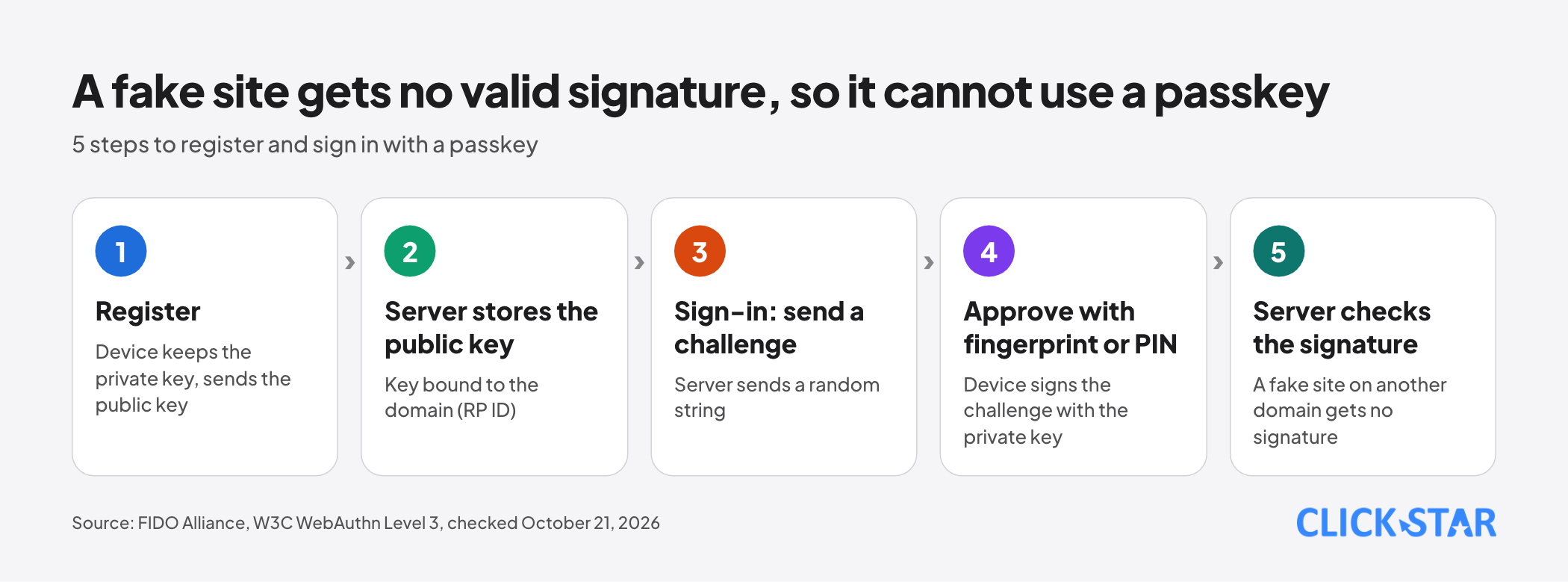
The phishing resistance comes from the key's scope. The W3C WebAuthn Level 3 specification (Recommendation of August 25, 2026, read October 21, 2026) says each credential is bound to 1 relying party, identified by an RP ID, and works only with the entity it was registered with.
A fake site on another domain gets no valid signature, and the user does not have to spot it.
Passkeys come in 2 kinds: synced (backed up through a provider such as the OS password manager) and device-bound (kept on 1 security key).
NIST does not allow synced passkeys at AAL3 because the key can be exported. Click Star judges the synced kind practical for ordinary internal applications.
From AAL2 (of the 3 NIST levels), the verifier must offer at least 1 phishing-resistant option. NIST is a standard for US government systems; Click Star uses it as a technical reference, not a legal obligation.
Deploying passkeys and recovering accounts
Supabase offers a passkey API in supabase-js from version 2.105.0, but the documentation (read October 21, 2026) says the feature is experimental and may change without notice.
Decide before users register: the RP ID must be stable because changing it breaks every existing passkey, there are at most 5 origins, and SSO and anonymous users cannot register yet.
The Supabase documentation does not say whether a passkey session counts as aal1 or aal2; read the aal claim yourself before relying on it.
Recovery decides success or failure. NIST (section 4.2) names 4 groups: saved codes, issued codes, recovery contacts and repeated identity proofing. Saved codes need at least 64 random bits, are stored hashed and retired after use; issued codes last 10 minutes by text or voice and 24 hours by email.
Click Star suggests: at least 2 passkeys per person (for example a phone and a security key), and recovery that needs a manager's confirmation and leaves a log entry.
What Row Level Security (RLS) is
RLS is a PostgreSQL mechanism that limits which rows a user can read or change. According to the PostgreSQL 18 documentation (section 5.9, read October 21, 2026), RLS takes effect only after ALTER TABLE enables it, and with no policy no row is visible or modifiable.
Each policy has 2 expressions: USING decides which existing rows are visible or affected, and WITH CHECK decides which rows may be created or written. Roles with BYPASSRLS always skip RLS; the table owner skips it unless FORCE ROW LEVEL SECURITY is used.
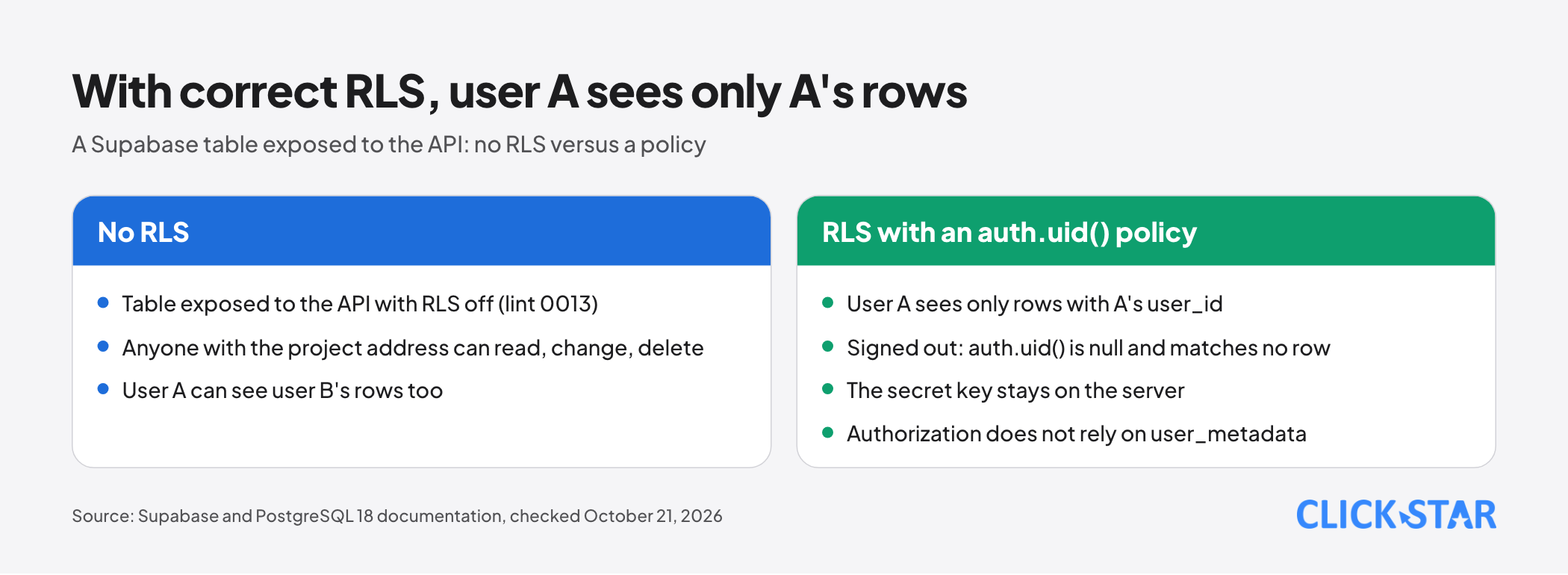
On Supabase, browser requests run as the anon role (not signed in) or authenticated. The auth.uid() function returns the caller's ID, and null when signed out, so a policy of "user ID equals the user_id column" excludes signed-out visitors by itself (Supabase documentation, read October 21, 2026).
Common RLS and Supabase mistakes
Forgetting to enable RLS. The Supabase checker (read October 21, 2026) has lint 0013, "Table publicly accessible", at ERROR level: for a table in the public schema with RLS off, anyone with the project address can read, change and delete rows.
A public consequence is CVE-2025-48757. According to Tenable (published May 30, 2025, CVSS 9.3), insufficient RLS policies in Lovable-generated sites let unauthenticated attackers read or write arbitrary tables; the supplier disputes this because each customer owns its own data.
Using the service key in the browser. According to the Supabase API keys documentation (read October 21, 2026), the secret key runs as service_role, which has BYPASSRLS and skips every policy. The documentation forbids placing it in a browser or public code, or in variables with prefixes such as NEXT_PUBLIC_, because bundlers ship them to the client.
Policies based on data the user can edit. Supabase lint 0015 (ERROR level) warns about policies that read user_metadata, because users can change that field. Authorization data must live in app_metadata or a separate roles table.
How to test policies and log access
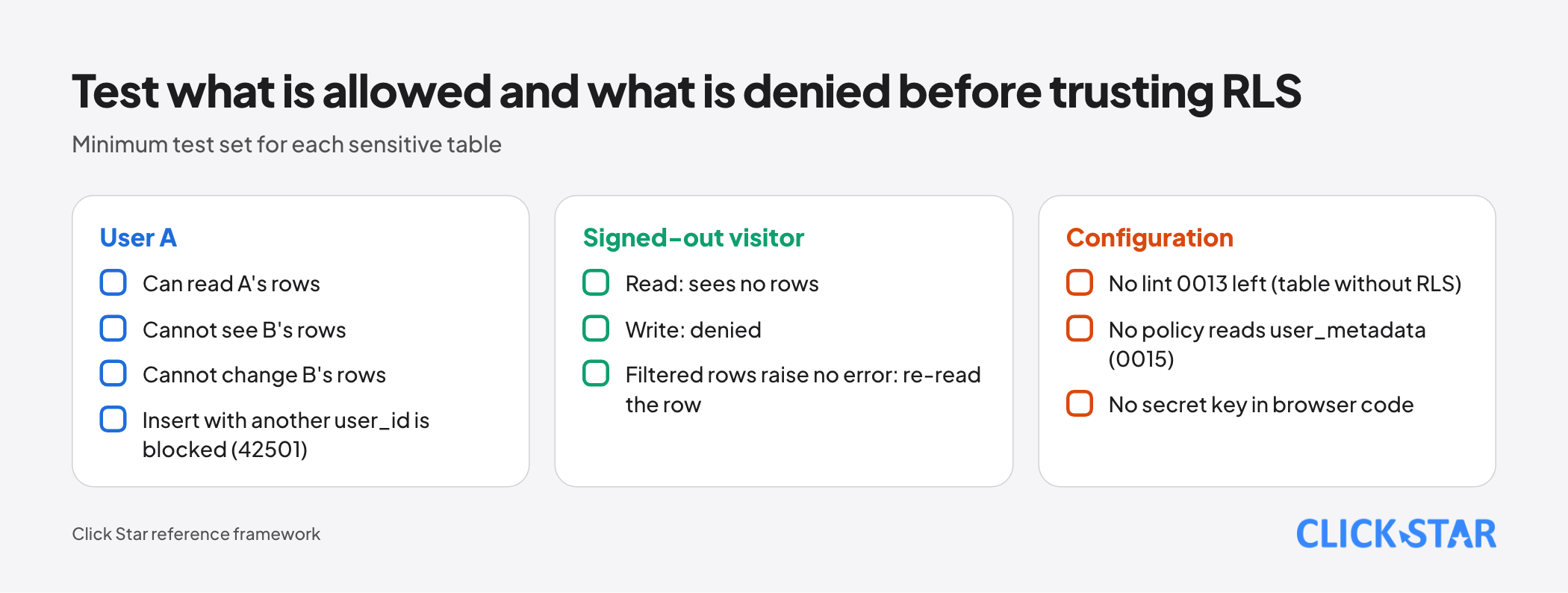
RLS tests must check both what is allowed and what is denied. According to the Supabase documentation (read October 21, 2026), tests are written in pgTAP and run with supabase test db.
Assertions have traps. A missing grant or WITH CHECK violation raises error 42501. A write whose rows USING filters out returns empty instead of an error, so read the original row back. Do not use lives_ok for allowed writes, because it still passes when no row matches.
For logs, Supabase Auth records sign-ins, password changes and MFA verification with the time, user ID and IP address. To query them with SQL you must enable writing to the database, and the documentation does not state a retention period.
For data, the pgaudit extension logs activity by session or by object. The documentation warns that broad logging buries key events and that logging returned rows can expose sensitive values.
Linking to the information-security duties in the personal data law
Click Star read Law No. 91/2025/QH15 (passed June 26, 2025, effective January 1, 2026) through 1 copy on ketoananpha.vn, not an official portal. Check the original text; this is not legal advice.
According to that copy, point c of clause 1 of Article 37 requires the data controller to apply suitable management and technical measures and review them when needed.
Clause 3 of Article 30 requires systems that use AI, big data or cloud computing to use suitable authentication, identification and access authorization when processing personal data. The law does not name passkeys or RLS.
Whether strong sign-in and RLS count as "suitable measures" depends on risk and detailed guidance. Click Star has not read the technical articles of Decree 356/2025/NĐ-CP (December 31, 2025) and draws no conclusion on them.
Click Star's view. For an internal application with customer data, a sensible order is correct RLS first, MFA for admin accounts second, then passkeys. An RLS mistake exposes data in bulk without taking over any account, whereas a passkey protects 1 account at a time.
Passkeys should be added, not swapped in at once, because the Supabase feature is experimental and the recovery process needs proving.
On interests: Click Star builds custom software and integrations, so it has a commercial interest; every item here can be done from the official documentation.
The 4-week plan
- Week 1, inventory: list every table exposed to the API, enable RLS, run the Supabase checker to clear lints 0013 and 0015, and look for secret keys in browser code.
- Week 2, policies and tests: write a policy per operation, index the filtered columns and add pgTAP tests for the 3 most sensitive tables.
- Week 3, sign-in: require MFA for admins, add a restrictive policy requiring aal2 on sensitive tables, trial passkeys with a small group and check the aal claim.
- Week 4, recovery and logs: write the recovery process, give each person at least 2 ways to sign in, enable Auth logs and pgaudit on sensitive tables, and set a monthly review.
How to measure (Click Star's framework): API-exposed tables without RLS (target 0), admin accounts without phishing-resistant sign-in, RLS tests running, and time to recover an account.
Common mistakes
- Enabling RLS without writing policies, then patching with the service key.
- Placing the secret key in the browser or in a variable with a public prefix.
- Basing authorization on user_metadata, which users can edit.
- Treating an SMS code or an app code as phishing-resistant even though both are typed codes.
- Deploying passkeys with no recovery path, or letting recovery take only 1 step.
- Testing only what is allowed, not signed-out visitors or users on other rows.
What is not known
Click Star has no measurement of how many internal applications in Vietnam lack RLS or rely on a single password, and no source on passkey acceptance there.
It is unclear whether a Supabase passkey session counts as aal1 or aal2, or when the feature leaves experimental status. Click Star has not read NIST Appendix B on synced passkeys.
Related posts


Need tailored advice for your business?
Click Star helps you build a solution that fits your industry and scale. We answer every question during business hours.