How to stream AI responses in a chat interface without dropped streams
Streaming shows AI text as it is written, but brings buffering, cancellation and dropped-stream problems. Based on Anthropic, OpenAI, WHATWG, Next.js and Vercel documentation.
An AI chat interface that leaves users staring at a blank screen for tens of seconds before the whole answer appears feels slow, even when the model is not slower. Streaming shows text as it is written, but it adds failure modes that a plain request does not have.
This article was checked on October 23, 2026, against documentation from Anthropic, OpenAI, WHATWG, MDN, Next.js, Vercel, the AI SDK, nginx, Cloudflare and Nielsen Norman Group. Most AI vendor pages show no update date, so Click Star records the date it read them.
It covers how streaming works, what the interface must handle, and how the delivery path breaks it. Click Star already has a separate article on 429 errors and retries, so this one goes deeper on the interface and transport.
Key points
- Streaming does not make the model write faster. It puts the first words in front of the user sooner, so the response feels better.
- Anthropic and OpenAI both return the stream as server-sent events (SSE), but the event names differ; map both to a single internal format.
- Chat sends a POST with the history, so it usually reads the stream with fetch, since EventSource accepts only a URL and withCredentials.
- A Stop button in the browser only closes HTTP; the server must turn that into a cancel signal for the model call.
- Proxies, CDNs, compression and the time limit of a serverless function can all buffer or cut a stream.
- An error can arrive after a 200 status. Treat an answer as finished only when the end event arrives: message_stop (Anthropic) or response.completed (OpenAI).
What streaming changes about waiting
According to Nielsen Norman Group (a 1993 book excerpt, updated for the web), 0.1 second feels instantaneous, 1.0 second keeps the user's flow of thought unbroken, and 10 seconds is the limit for keeping attention. A long model answer often exceeds these limits if the user waits for all of it.
Anthropic's documentation on reducing latency (read on October 23, 2026) separates time to first token (TTFT) from total time and says streaming improves perceived responsiveness. Click Star's view: total time may not change; what changes is when the user has something to read.
How it works: the server sends events one by one
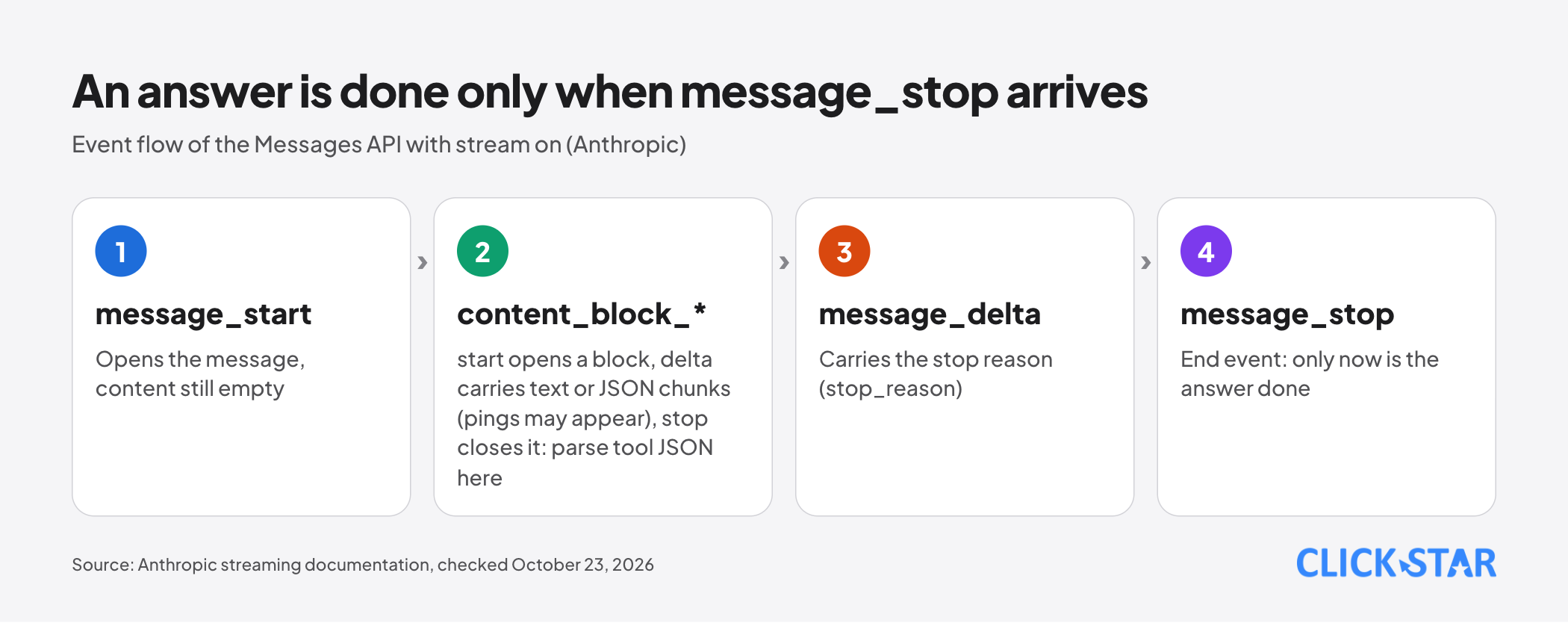
According to Anthropic's documentation (read on October 23, 2026), "stream": true makes the Messages API return server-sent events. The order is message_start, content blocks (each with content_block_start, 1 or more content_block_delta events and content_block_stop), 1 or more message_delta events, then message_stop. Pings may appear in between.
Text arrives in text_delta and can be cut in the middle of a word:
event: content_block_delta
data: {"type": "content_block_delta","index": 0,"delta": {"type": "text_delta", "text": "ello frien"}}
Tool parameters arrive as partial JSON (input_json_delta), to be parsed only after content_block_stop. The stop reason appears only in message_delta. Code should ignore unknown event types because Anthropic may add new ones.
OpenAI (read on October 23, 2026) sets stream=true on the Responses endpoint, and each event has a type property. For text, the common events are response.created, response.output_text.delta, response.completed and error; the reference page also lists response.failed and response.incomplete.
Click Star's recommendation: write an adapter layer that maps each vendor's events to an internal format with 4 kinds (start, text chunk, end with reason, error).
EventSource or fetch: how the browser reads the stream
According to the WHATWG HTML specification (updated October 22, 2026), each SSE event ends with a blank line; data without the final blank line is discarded, a line starting with a colon is a comment, and content is always UTF-8. EventSource reconnects after a drop, sending Last-Event-ID; a 204 response stops it.
MDN (modified September 3, 2026) says HTTP/1.1 limits SSE to 6 connections per browser and domain, while HTTP/2 negotiates 100 streams by default. EventSource in the specification accepts only a URL and withCredentials. Click Star infers: no request body or custom headers, so POST-based chat usually reads with fetch.
For fetch, MDN (modified September 1, 2026) describes response.body.getReader() and read(), which returns done and value. Chunks do not align with event or character boundaries: Vietnamese letters with diacritics take 2 to 3 bytes in UTF-8 ("ế" takes 3, which Click Star checked in Python).
The stream option of TextDecoder.decode signals that more data follows (MDN). Click Star infers: turn it on so a character split across 2 chunks does not become a replacement character, assemble by blank line before parsing JSON, or use the vendor SDK.
Showing partial output in a chat interface
The AI SDK documentation (read on October 23, 2026) defines 4 useChat states: submitted, streaming, ready and error, used for the Stop button, the Send lock and a waiting indicator. The throttle option batches interface updates (the example uses 50 milliseconds).
For safety, OWASP (read on October 23, 2026) advises assigning untrusted text through textContent, avoiding innerHTML, and using DOMPurify when HTML must be shown. Model output is untrusted; Click Star already has an article on prompt injection.
For accessibility, MDN (modified September 23, 2025) says live scores and tickers usually should not be announced each time, and aria-busy suppresses announcements during an update. Click Star infers: do not let a screen reader read every chunk, announce briefly when done, and test it. Click Star advises disabling typing effects under prefers-reduced-motion.
The Stop button and cancelling on the server
According to MDN, AbortController can cancel both a fetch request and the reading of its body. But the AI SDK (Stopping Streams) stresses this only closes HTTP: the server must turn the disconnect into an AbortSignal and pass it to the model call, or the call may keep running.
On Vercel, cancellation is opt-in. The Functions API Reference (updated August 11, 2026) says to add "supportsCancellation": true per path in vercel.json, on the Node.js runtime only. When the client disconnects, request.signal fires and the function is terminated, so work that must finish (such as a database write) needs waitUntil or after.
The delivery path: where text gets held back
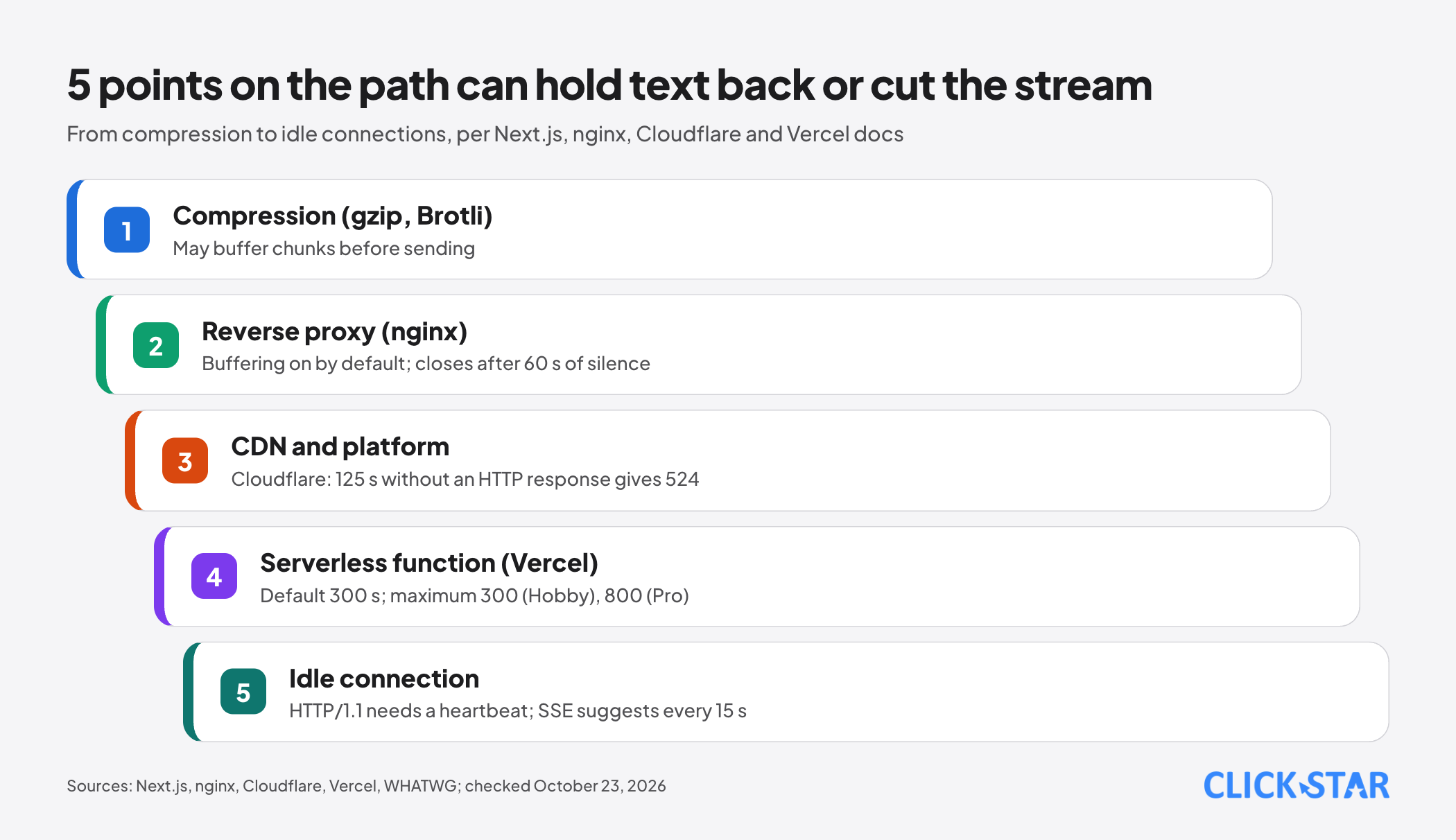
Reverse proxy. The nginx documentation (read on October 23, 2026) says proxy_buffering is on by default; turn it off with the response header X-Accel-Buffering: no. proxy_read_timeout defaults to 60 seconds between 2 successive reads: if the origin stays silent longer, the connection closes.
CDN, platform and compression. Next.js (updated October 15, 2026) says a CDN may buffer a whole response, gzip or Brotli may buffer chunks, and AWS Lambda needs response streaming mode enabled (it is not the default). Cloudflare's error 524 page (updated July 23, 2026) gives 125 seconds by default without an HTTP response; Enterprise plans can raise it.
Serverless function. Per Vercel's Maximum Duration page (updated August 24, 2026), with fluid compute the default duration is 300 seconds; the maximum is 300 on Hobby and 800 on Pro and Enterprise. A function past its limit is terminated, so a long stream is cut. Next.js needs an App Router Route Handler, as Pages-style API routes do not support streaming.
Idle connections. For long-running requests over HTTP/2, Vercel sends PING frames while idle (same page); HTTP/1.1 has no equivalent and should get heartbeat data. The SSE specification suggests a comment line about every 15 seconds.
When the stream stops midway
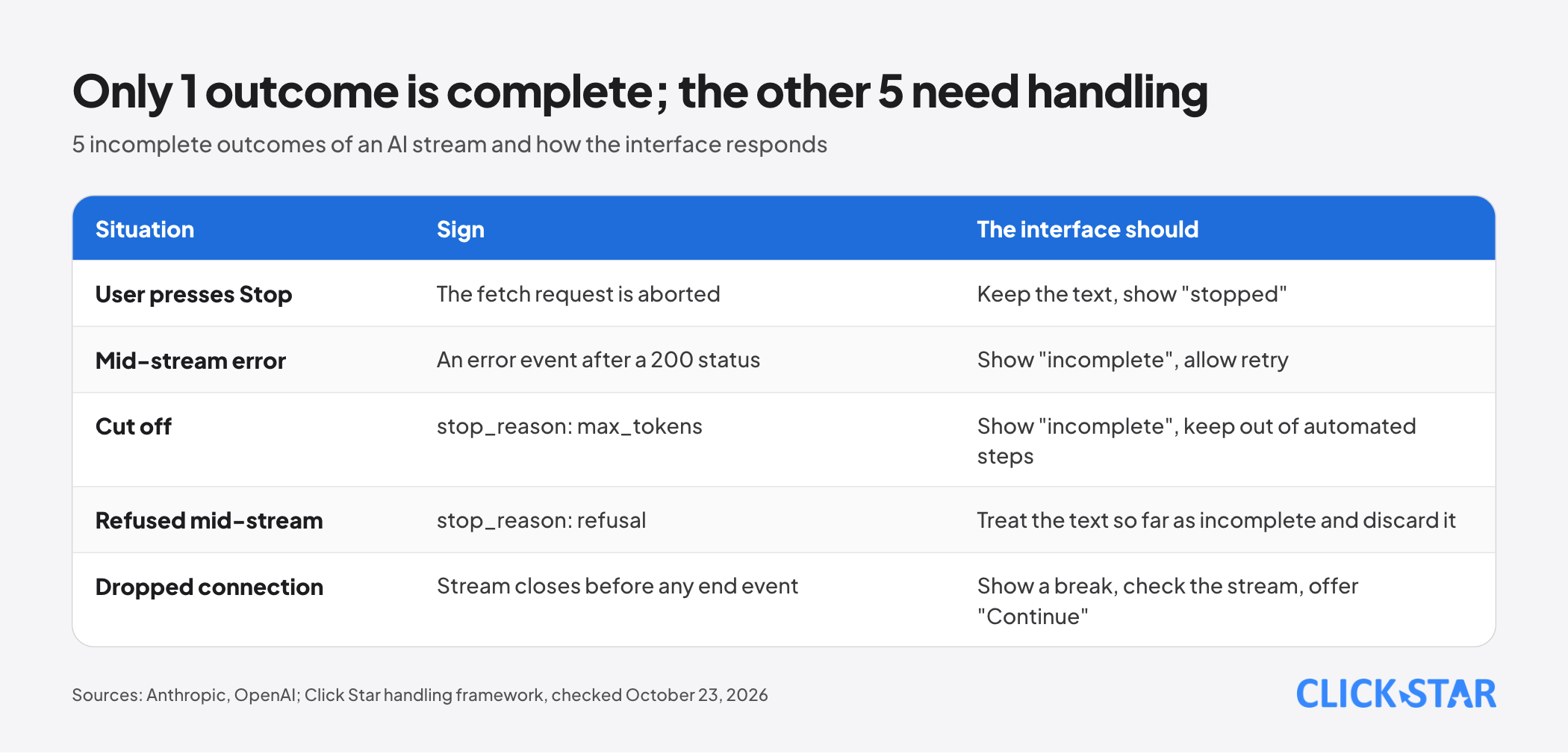
A stream has at least 5 outcomes besides a normal ending. Click Star's rule, derived from the event sequence: define "done" by the end event, not by the connection closing. Errors can follow a 200 status, as Click Star's 429 article noted.
Anthropic sends a mid-stream error as an error event (for example overloaded_error). The stop reasons max_tokens and model_context_window_exceeded both mean the answer was cut: show "incomplete".
Anthropic's Refusals and fallback page (read on October 23, 2026) says a refusal (stop_reason refusal) can arrive mid-stream; treat what exists as incomplete and discard it, though streamed output is still billed.
OpenAI warns streaming makes moderation harder because partial output is harder to judge. If text must be filtered before customers see it, Click Star believes buffering by sentence is needed.
Resuming: with Claude 4.5 and earlier, send the received part as the start of an assistant message; with Claude 4.6 and later, put it in a user message asking to continue. OpenAI's background mode with streaming resumes from a sequence_number cursor via starting_after, with a slower first token.
Chrome's Page Lifecycle API documentation (updated October 16, 2026) says that in the frozen state timers and fetch callbacks do not run. Click Star infers: when the user returns, check whether the stream is alive and show a "Continue" button.
Logging and measurement
Click Star's reference framework (not an industry standard): per run, record TTFT (defined by Anthropic as the time from sending the prompt to the first token), total time, token count and outcome. Outcomes fall into 6 groups: completed, stopped by user, mid-stream error, cut off, refused, disconnected.
The AI SDK offers onAbort and onEnd for recording outcomes on the server. Record outcomes and measurements only, not conversation text, which may hold personal data.
Which option to choose (Click Star's judgment)
- No streaming: short answers, background jobs, or content that must be reviewed in full; for long requests Anthropic advises streaming, as networks may cut idle connections.
- Streaming with fetch (POST): ordinary chat, with cancellation and error handling.
- Background run with resume: jobs lasting minutes, at the price of a slower first token.
What this means for Vietnamese businesses
For a website chatbot or an internal tool, the risk lies in the delivery path and interface more than in the model. Users often switch between Zalo, the browser and other apps, so hidden tabs and dropped streams are not rare (inference; no measurement for Vietnam).
Click Star's view. Streaming is a cheap interface improvement, but the hard part is a stream that does not end properly. Treat the 5 incomplete outcomes as part of the design from the start, and wire the Stop button through to the model call. Disclosure: Click Star sells AI integration and website services, so it has a commercial interest in this topic.
What to do: a 4-week plan (Click Star reference framework)
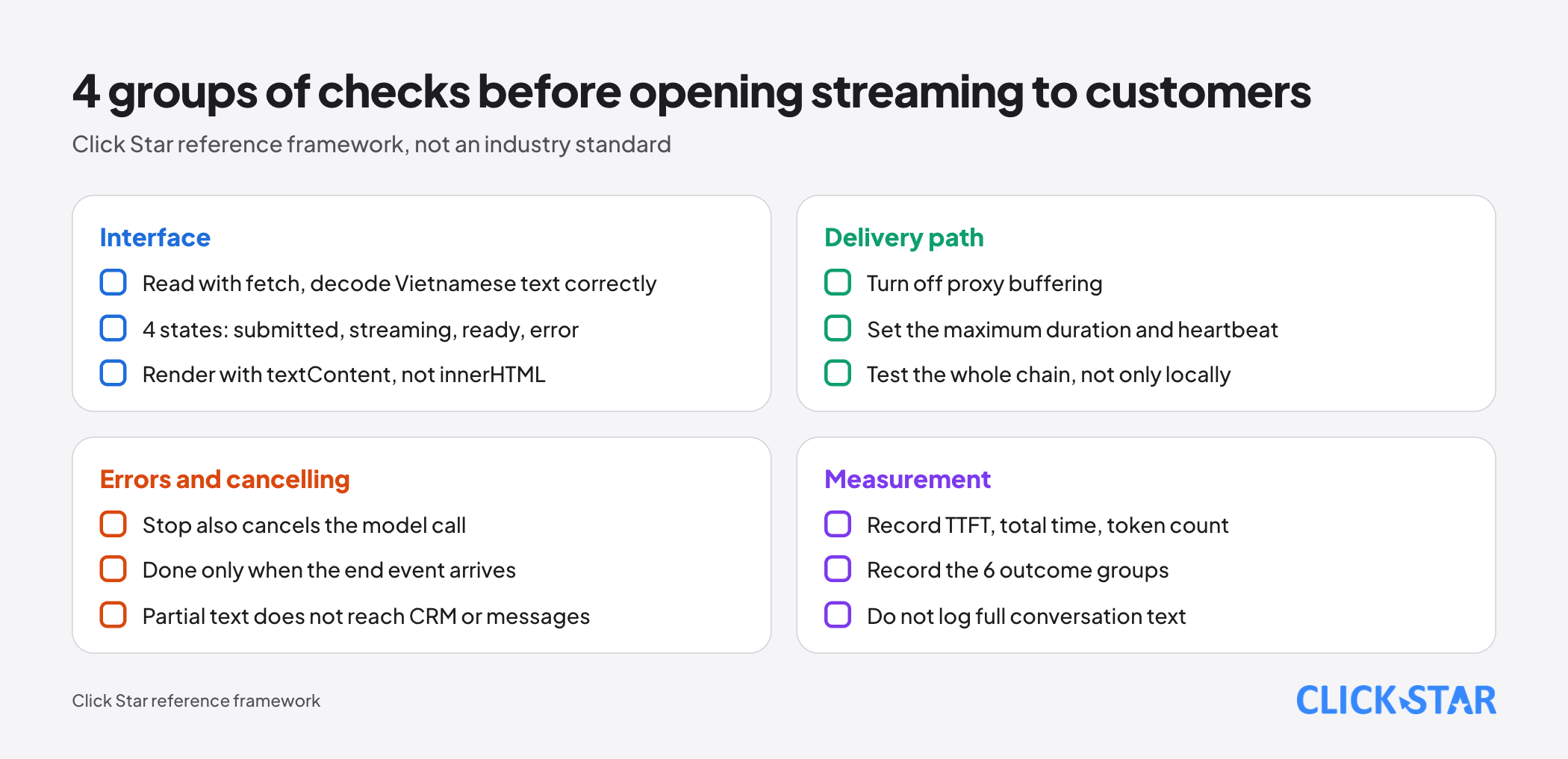
- Week 1: map events to the internal format, read with fetch and TextDecoder with the stream flag on, render with textContent.
- Week 2: add the 4 interface states, wire the Stop button to the server, save partial output to history.
- Week 3: turn off proxy buffering, set the maximum duration and heartbeat, test the whole chain with a script and a real phone.
- Week 4: turn on TTFT and outcome logging, pilot with a small group, then open to all customers.
Common mistakes
- Treating a closed connection as a finished answer.
- Testing only locally, not through real proxies, CDNs and serverless functions.
- A Stop button that only halts the interface while the model call may keep running.
- Putting model text into innerHTML.
- Forgetting the maximum duration and heartbeat.
- Letting partial output of a cut or refused answer flow into automated steps such as CRM or messages.
- Logging the full conversation when only outcomes are needed.
What is not known
Click Star has no measurements in Vietnam of dropped-stream rates or carrier buffering, and found no Cloudflare page saying whether a flowing stream counts toward the 125 seconds (the 524 page is silent). Cloudflare's Rules docs do cover Response Body Buffering, and Tunnel needs Content-Type: text/event-stream to avoid buffering.
Billing for a mid-stream cancel is not stated. No readable official guidance covers streaming chat with screen readers.
Related posts


Need tailored advice for your business?
Click Star helps you build a solution that fits your industry and scale. We answer every question during business hours.