Managing API keys and secrets in software projects: where to keep them, when to rotate, what to do after a leak
How to classify API keys, store secrets, grant least privilege, block leaks at push time, rotate keys and respond to a leak, based on OWASP, GitHub, Vercel, Next.js, Supabase, Stripe and Anthropic documentation and GitGuardian's report.
API keys, database passwords and access tokens are as valuable as the key to a safe. When they sit in source code, a repository or a JavaScript bundle sent to the browser, anyone who reads them can use them.
This article covers how to manage API keys and secrets in a software project: classifying keys, where to keep them, granting access, blocking them at push time, rotating them and what to do when one leaks. Sources are documentation from OWASP, GitHub, Vercel, Next.js, Supabase, Stripe and Anthropic, plus GitGuardian's report, checked on October 23, 2026.
Click Star already has articles on APIs, a website security checklist and passkeys, MFA and RLS; this one covers the life cycle of a key. There are no measurements of key leak incidents at Vietnamese businesses.
Key points
- API keys, tokens and database passwords are all "secrets": whoever holds the string can act as the account owner.
- GitGuardian, a vendor of secret-detection tools, reports 28,649,024 new secrets in public GitHub commits in 2025. This is a vendor figure, not an independent survey.
- Each kind of key has its own place: Supabase and Stripe publishable keys may be in the browser, secret keys stay on the server. Next.js NEXT_PUBLIC_ variables are embedded in the JavaScript sent to every visitor.
- Defense has 4 layers (Click Star's framework): keep secrets out of code, block them at push time, detect them early, and limit damage with least privilege, spending limits and rotation.
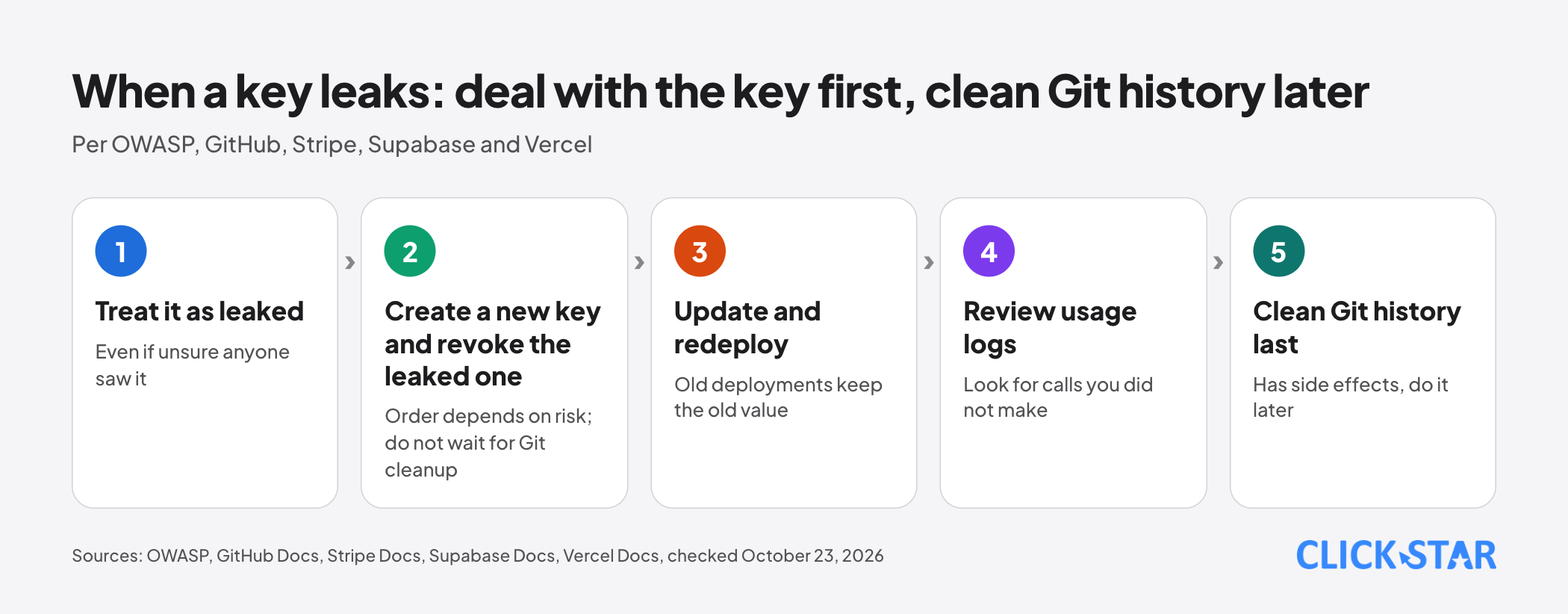
- When a key has leaked, revoke or rotate it first. GitHub says that is the first step and can solve the problem without rewriting Git history.
- Before an incident: keep a key inventory, enable push protection, use separate keys per environment and rehearse rotating 1 real key.
What API keys and secrets are, and why they leak
An API key is a string that proves a request to a service comes from an authorized party. The "secret" family also includes tokens, database passwords, SSH keys and certificates (OWASP, no date shown, read on October 23, 2026).
OWASP observes that secrets are often hardcoded in plain text in source code. Stripe writes that bad actors continuously scan public repositories for keys, and that private repositories can still be exposed through development environments.
On scale, GitGuardian's "State of Secrets Sprawl 2026" report (no publication date shown, read on October 23, 2026) reports 28,649,024 new secrets in public commits in 2025. It also reports that 5.6% of public repositories and 32.2% of internal repositories contain at least 1 secret.
Of secrets detected in 2022, the report says 64% were still valid four years later, and that the problem lies in remediation, not detection. Limits: vendor data, no full definition of how it counts, and no figure for Vietnam.
Which keys may be in the browser and which stay on the server
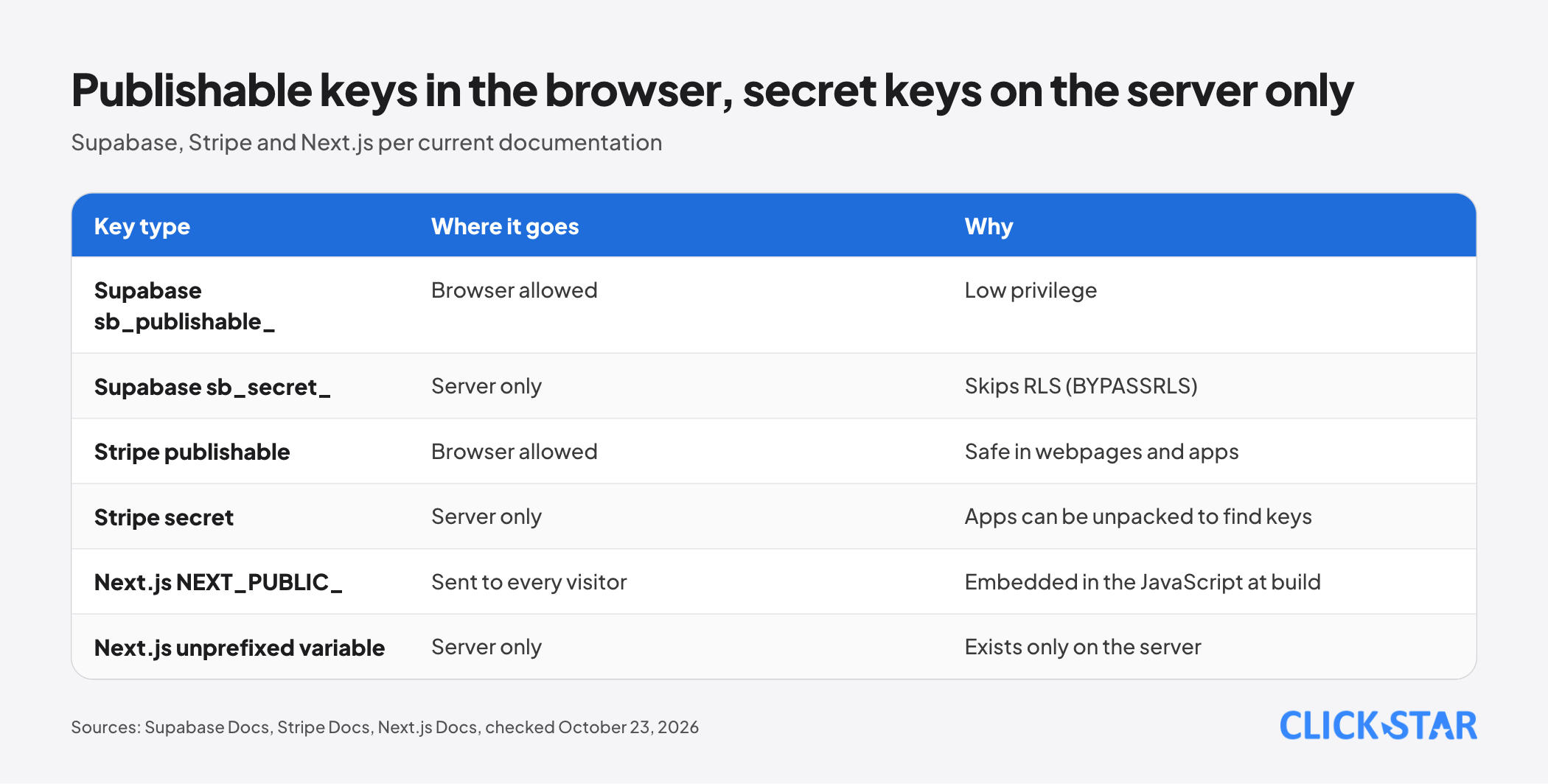
The same provider often issues both a browser-safe key and a server-only key, so identify the key type first.
According to Supabase's API keys documentation, a publishable key (sb_publishable_) has low privilege and may be used in a browser or app. A secret key (sb_secret_) has the BYPASSRLS attribute, so it skips RLS policies, and it must never be placed in a browser, even on localhost.
Stripe states the same principle: publishable keys are safe in webpages and apps, while secret keys stay on the server because outsiders can unpack an application to find embedded keys.
For Next.js, the documentation (updated August 25, 2026) says variables without the NEXT_PUBLIC_ prefix exist only on the server. Variables with the prefix are embedded in the JavaScript bundle when next build runs, so they must not hold secret keys.
Where to keep secrets and how to separate environments
According to the 12-factor app methodology (last updated 2017), config includes credentials for external services and must be separate from code; the test is whether the codebase could be open-sourced at any moment without exposing credentials.
OWASP proposes centralizing where secrets are stored and considering separate stores for production and development.
Stripe advises using the platform's secrets vault if one exists, and environment variables if not. On Vercel, the documentation (updated August 28, 2026) splits variables into Config and Secret; a Secret is write-only after saving, meant for passwords, API keys and tokens.
Vercel has an optional policy that forces each Production Secret to differ from its Preview and Development values.
The Next.js documentation warns that you almost never want to commit .env files. The Git documentation (read on October 23, 2026) says .gitignore does not affect files already tracked; use git rm --cached.
Least privilege and separate keys per job
A narrowly scoped key limits the damage when it leaks. OWASP recommends least privilege for who can read the secrets store, with fine-grained control per object.
Stripe gives an example: a restricted key for an invoicing system that can only manage invoices; if a restricted key is stolen, the attacker is limited to its granted calls.
GitHub (personal access token documentation, read on October 23, 2026) recommends fine-grained tokens over classic ones and setting an expiration.
Anthropic advises separate keys per environment so 1 leaked key can be disabled without affecting others and, for organizations with custom limits, setting spend limits.
Block at the door: secret scanning and push protection
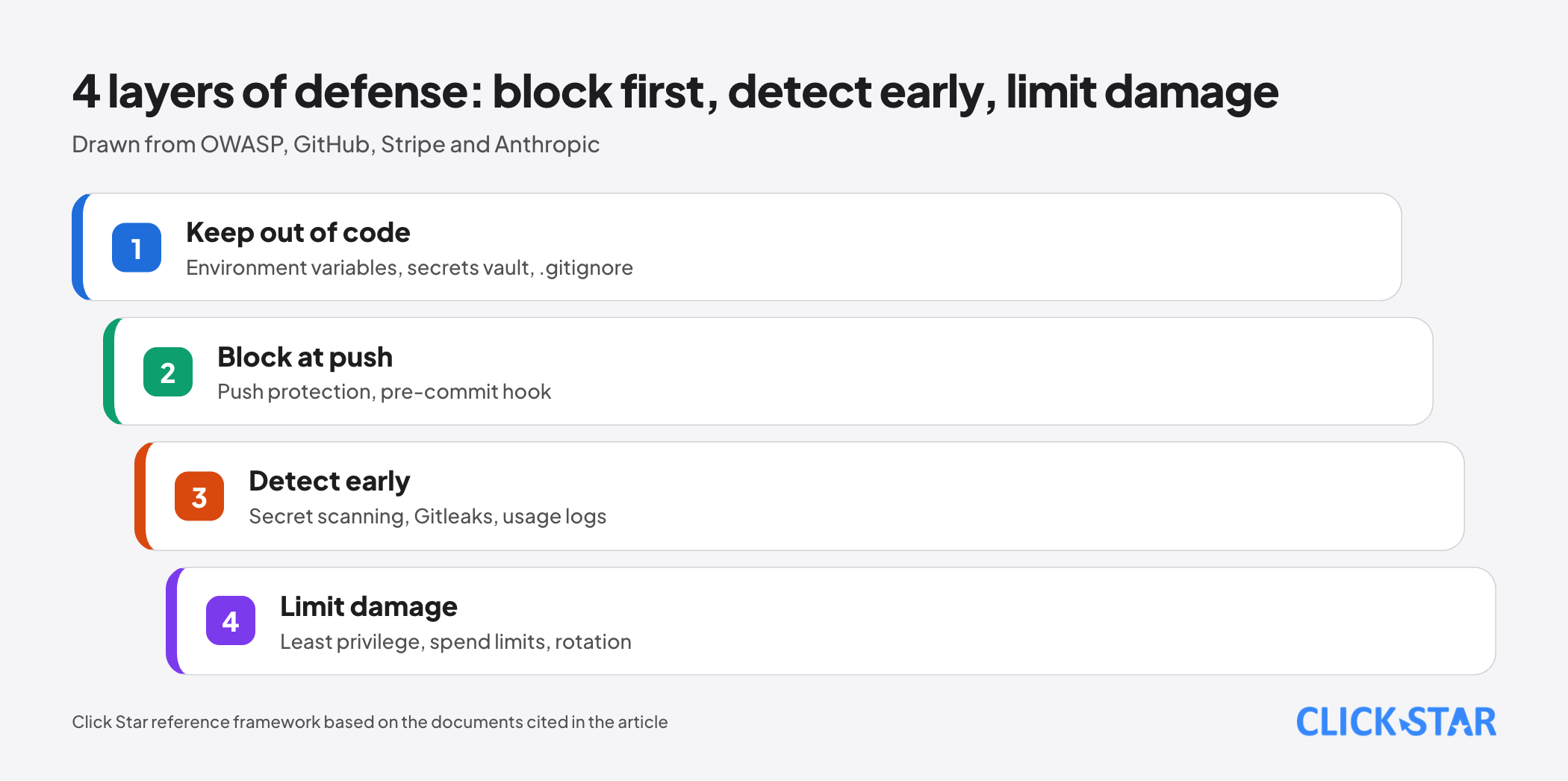
Detecting secrets already in a repository and blocking them before they enter are 2 different jobs. GitHub does both with secret scanning and push protection (GitHub Docs).
Secret scanning scans the full Git history on all branches. Public repositories are scanned free; private organization repositories need GitHub Secret Protection on the Team or Enterprise Cloud plan.
Push protection blocks secrets on push, on commits in the web interface, on file uploads and on REST API requests. For repositories it is off by default and needs Secret Protection; the user version is on by default on GitHub.com but applies only to public repositories.
By default, anyone with write access can bypass a block by choosing a reason; each bypass creates an alert, and "I'll fix it later" leaves it open.
Gitleaks (MIT license) scans Git repositories and can run as a pre-commit hook; its page says the tool receives only security patches and its maintainer is shifting focus to Betterleaks.
Rotating keys: on a schedule and on events
OWASP says regular rotation limits what a stolen credential can do and gives no interval. Anthropic gives 90 days as an example, not a standard.
Vercel lists when to rotate: a member with access leaves, a key may be exposed, a policy requires it, or an external service forces it (updated July 15, 2026). The order: create the new key, update the variable, redeploy, confirm it works, and only then disable the old key.
Per Vercel (updated September 17, 2026), variable changes apply only to new deployments. Its rotation page (updated July 15, 2026) adds that old ones keep the old value and fail once the old key is disabled, and a team-level variable requires redeploying every project that uses it.
When a key has leaked: what to do, in what order
Treat a key as leaked once it appears where it should not. Stripe says to rotate even if you are unsure anyone saw it; GitHub advises rotating a credential at once when an alert arrives.
Revoke first, clean up later. OWASP lists the order: revoke the key immediately, rotate quickly, remove it from code and logs (rewriting history has side effects), and record when it was used. GitHub says revoking or rotating is the first step, while cleaning Git history is time-consuming and often unnecessary once the key is revoked.
The sources do not fully agree on order. Anthropic says to revoke immediately; Supabase lists create, replace, confirm, delete, yet also says to delete a leaked key at once; Vercel creates the new key first even when a leak is only suspected.
Click Star's judgment: if the key can reach money or personal data, revoke first and accept a short outage; if its scope is narrow, create the new key before revoking the old one.
Then review usage logs for the exposure period to find calls you did not make. If the key was used, that is a real incident; in Click Star's judgment, tell whoever is responsible for the data and check current rules.
Cleaning Git history comes later and has a cost. GitHub describes git-filter-repo followed by push --force --mirror. Commit hashes change, signatures are lost, and commits may stay reachable through cached views, pull requests or forks; GitHub Support helps only when revoking cannot reduce the risk.
What this means for Vietnamese businesses, and how to measure
This part is inference. The first thing to check is ownership: GitHub, Vercel, database, payment and AI provider accounts should be registered to the business. When staff or contractors leave, rotate the keys they could read.
The metrics below are Click Star's reference framework, not from outside sources, and carry no benchmark thresholds.
- Share of keys in the inventory versus keys found by scanning.
- Age of the oldest key and number of keys never rotated.
- Number of open secret alerts.
- Time from detection to revocation in the latest drill or incident.
Click Star's view. The failures the documents describe, such as keys pasted into code for speed, 1 key shared across all environments or nobody knowing where a key is used, are process failures more than technical ones. An inventory and a rotation drill often deliver more value than extra tools.
Click Star builds custom software and integrates AI, so it has a related interest and relies here on third-party documentation. The first layer worth funding is blocking at push time plus least privilege, because they reduce both likelihood and damage.
A 30-day plan (Click Star reference framework)
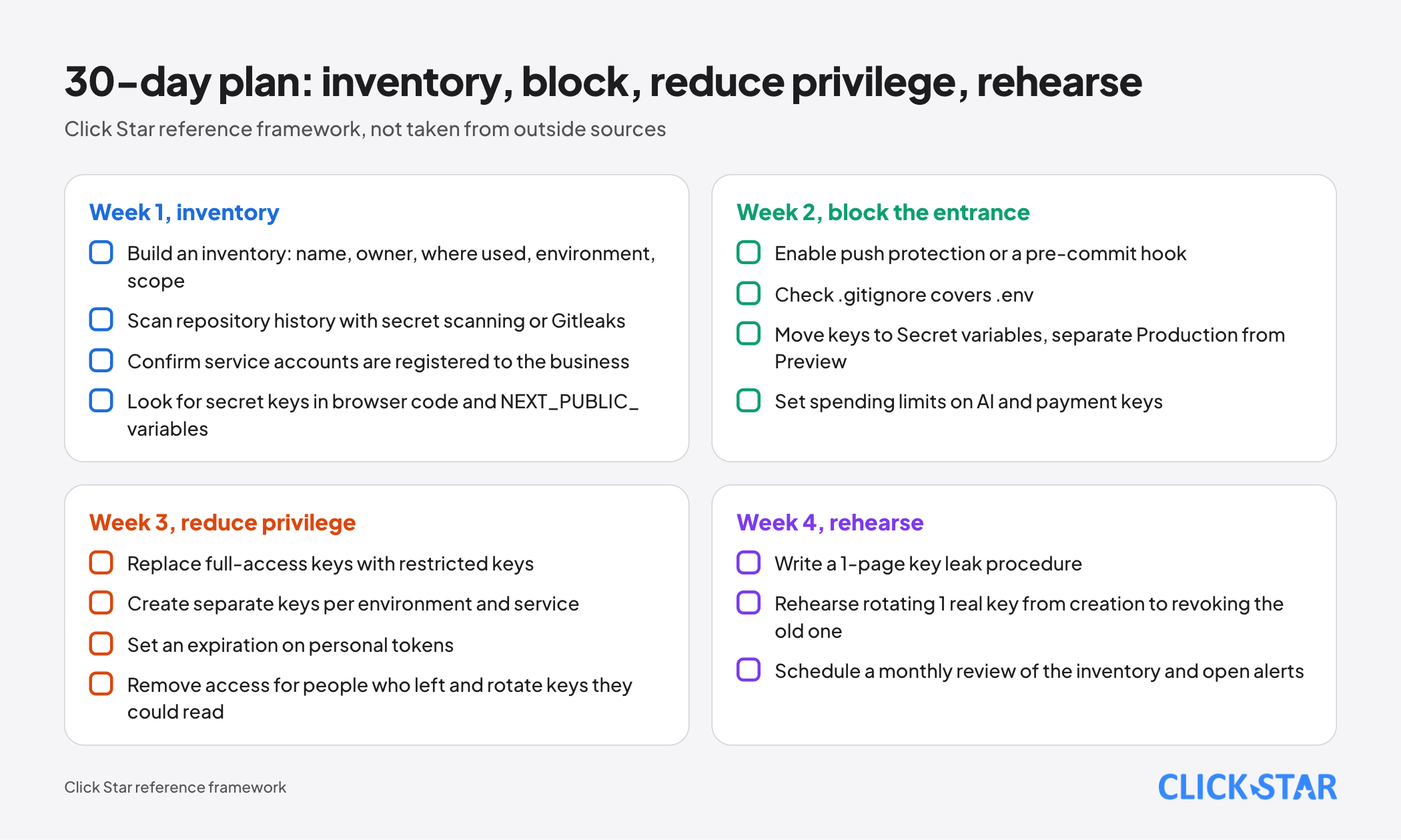
This plan is proposed by Click Star, not taken from outside sources.
Week 1, inventory
- Build an inventory: name, owner, where used, environment, scope
- Scan repository history with secret scanning or Gitleaks
- Confirm service accounts are registered to the business
- Look for secret keys in browser code and NEXT_PUBLIC_ variables
Week 2, block the entrance
- Enable push protection or a pre-commit hook
- Check .gitignore covers .env
- Move keys to Secret variables, separate Production from Preview
- Set spending limits on AI and payment keys
Week 3, reduce privilege
- Replace full-access keys with restricted keys
- Create separate keys per environment and service
- Set an expiration on personal tokens
- Remove access for people who left and rotate keys they could read
Week 4, rehearse
- Write a 1-page key leak procedure
- Rehearse rotating 1 real key from creation to revoking the old one
- Schedule a monthly review of the inventory and open alerts
Common mistakes
- Pasting a key into code "temporarily" and forgetting it, while Git history keeps it.
- Assuming a private repository is safe enough to hold keys.
- Putting a secret key in a NEXT_PUBLIC_ variable or in browser code.
- Using 1 broad key for every environment and service.
- Deleting the commit that contains a key without revoking the key.
- In a planned rotation, revoking the old key before redeploying every project and Preview build that uses it.
- Ignoring old secret alerts, or choosing "I'll fix it later" and never returning.
What is not known
Click Star has no measurements of how often keys leak, how fast they are detected or what incidents cost at Vietnamese businesses. The GitGuardian figures come from a tool vendor and are not independently verified.
In the documents read, OWASP gives no rotation interval and Anthropic gives only a 90-day example. Click Star could not open OpenAI's page on API key safety (blocked to tools) and does not rely on it.
Related posts


Need tailored advice for your business?
Click Star helps you build a solution that fits your industry and scale. We answer every question during business hours.