Why businesses should use a database in online operations

When spreadsheets stop being enough, what a database does better, the link to personal data protection law and a 4-step plan for businesses that operate online.
When a business starts selling, running ads and serving customers online, data arrives from every direction: orders on the website and on marketplaces, contact details left in forms, Zalo messages, advertising campaign results, the follow-up history of each salesperson.
Most small businesses begin with spreadsheets and scattered tools, and that is perfectly normal in the early stage. The problem appears when the data grows, several people work on it at once, and business decisions and legal duties begin to depend on whether the data is correct, complete and findable.
This article explains what a database is in the most practical terms, why it becomes the foundation of online operations, when spreadsheets stop being enough and a 4-step plan for a business that wants to move.
The figures come from Microsoft and PostgreSQL documentation, research on spreadsheet errors, the e-Conomy SEA 2025 report and Vietnam's personal data protection instruments, each named in the sentence that uses it and checked as of October 20, 2026.
Key points
- A database stores structured data and lets many people and applications read, write and search it safely, with access control, logs and backups. Spreadsheets were not designed to do this at operating scale.
- An Excel worksheet holds at most 1,048,576 rows, according to Microsoft's documentation, and multi-user sharing has its own limits. Smaller limits usually arrive first: manual entry errors, duplicates and not knowing which version is right.
- Raymond Panko's research on spreadsheet errors shows a very high share of spreadsheets with errors in real audits. The exact figure depends on how it is measured, but the overall conclusion is that the error risk in complex spreadsheets is not small.
- A relational database keeps transactions intact: according to PostgreSQL's documentation, a series of operations either completes fully or does nothing, so orders and stock do not drift apart.
- The Law on Personal Data Protection and its decrees set deadlines for deleting and correcting data and require consent logs. Meeting them almost requires data to sit somewhere it can be searched and controlled.
- Moving to a database is best done in stages: inventory the data sources, standardize customer identifiers, build the database and load clean data, and only then connect applications and reports.
What a database is, in simple terms
A database is a system that stores data in a defined structure, with mechanisms that let many people and applications access it without corrupting each other's work.
Data is organized into tables (for example customers, orders, products, campaigns) and the relationships between them (a customer has many orders, an order has many products). Users and applications do not open a file and edit it directly.
They send read or write requests to a database management system such as PostgreSQL or MySQL, and that system is responsible for checking permissions, keeping data consistent, logging and backing up.
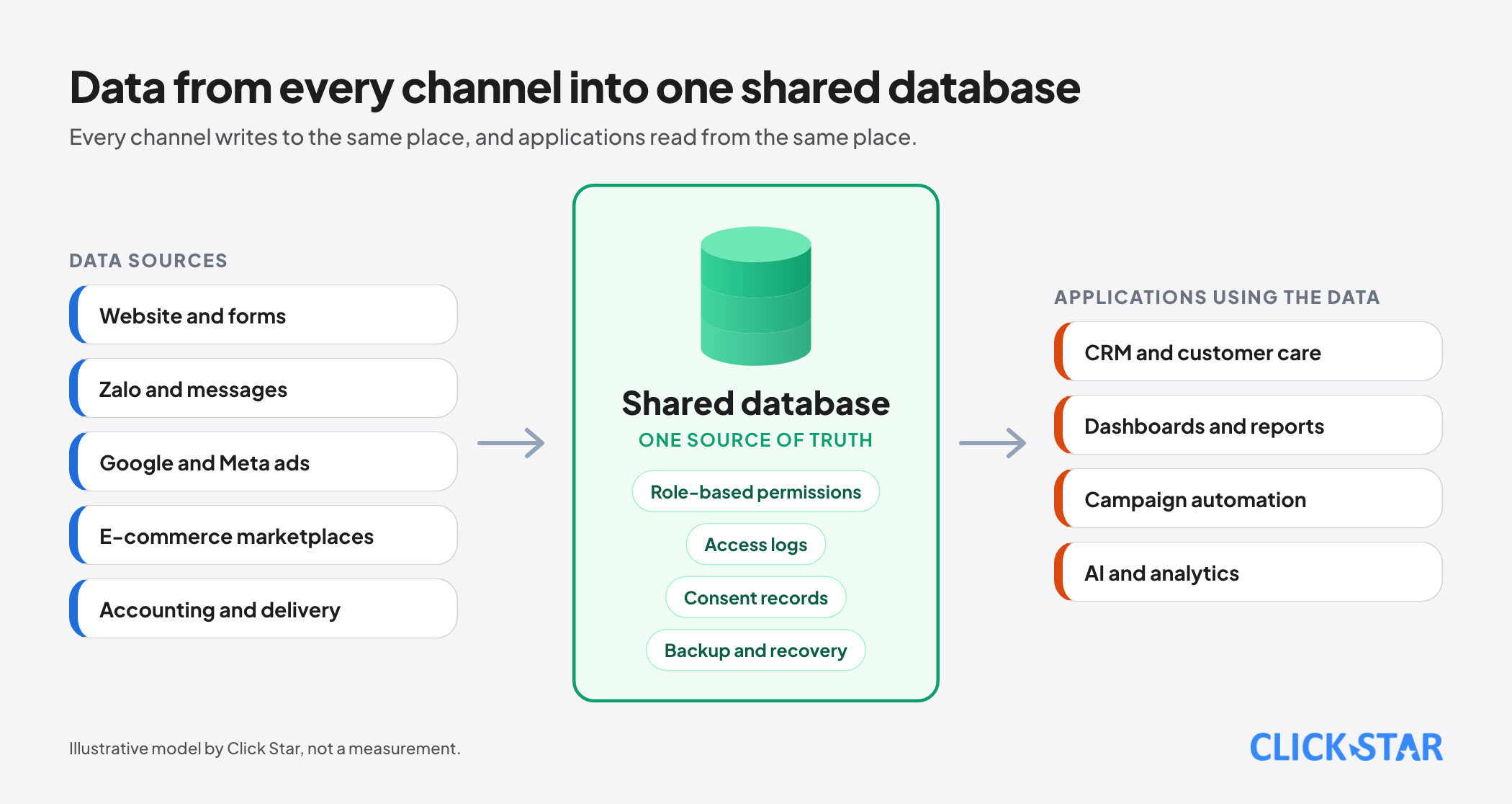
The core difference from a spreadsheet is that a spreadsheet is a tool for one person or a small group working on one set of data, while a database is infrastructure that many systems rely on together. The website, the customer care tool, reports, automation and AI models can all read the same source, instead of each keeping its own copy.
Why online operating data keeps growing
The e-Conomy SEA 2025 report by Google, Temasek and Bain, cited by the Vietnamese trade news outlet Cong Thuong, estimates Vietnam's digital economy at about USD 39 billion in gross merchandise value in 2025, up 17% on the year before, with e-commerce making up about two thirds.
According to figures published by the Ministry of Industry and Trade through Xinhua and Vietnam News, Vietnam's e-commerce reached about USD 31 to 32 billion in 2025, growing about 25% and making up about 10% of total retail sales.
The 2 sources differ in scope and method, so they cannot be compared directly, but they point the same way: online transactions are growing fast, and each one leaves data about the customer, product, payment, delivery and behavior.
Click Star's view. For a business that sells online, data is more than orders. It includes which advertisement a customer came from, what they asked on Zalo, which purchase this is and why an item was returned. The value of the data appears only when these pieces can be joined for the same customer, and that joining is the job of a database, not of a spreadsheet.
When spreadsheets stop being enough
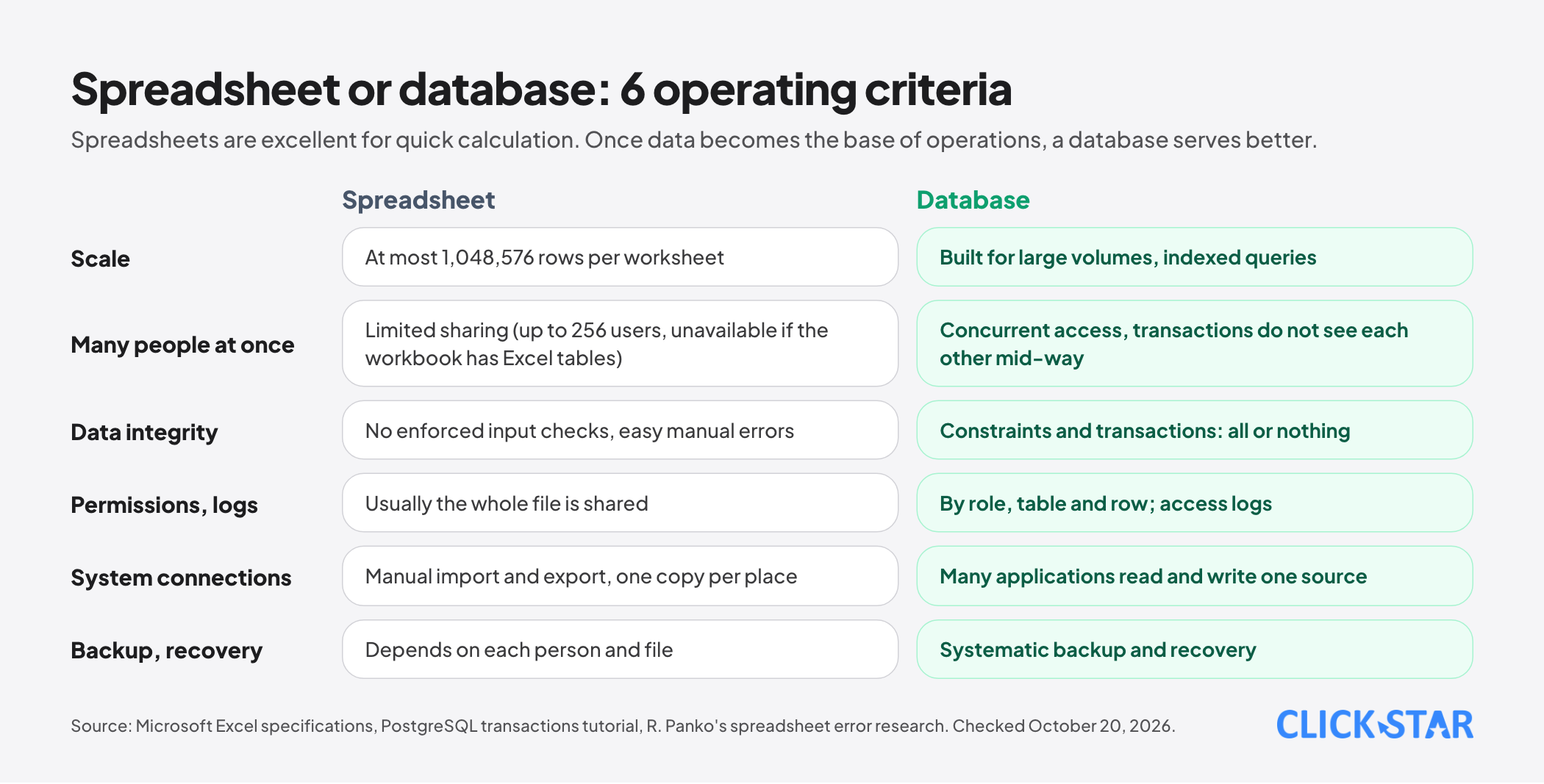
Spreadsheets are excellent for quick calculation, planning and one-off analysis. They start to carry risk when they become the place where operating data is stored. There are 4 common limits:
Limits on size and concurrency. According to Microsoft's specifications page, an Excel worksheet holds at most 1,048,576 rows and 16,384 columns.
For the mode that lets several people edit a shared workbook, Microsoft records a maximum of 256 people opening it at once, and the mode cannot be turned on if the workbook contains Excel tables.
Even though the number is enough for many small teams, when one employee is editing and another is exporting a report from the same file, version conflicts are almost unavoidable.
Entry and formula errors. Raymond Panko's studies, collected on the arXiv preprint server, record that in real audits the share of spreadsheets containing errors is very high: one compilation reports 94% across 88 audited spreadsheets with an average error rate of about 5.2% of cells containing formulas, while a separate audit found errors in 49 of 54 spreadsheets.
These figures come from different study designs and should not be treated as one rate, and many audited spreadsheets were complex financial models. What is worth taking from them is that human error in entry and calculation is common, even among experienced people, and a spreadsheet has no mechanism that forces input to be checked.
No fine-grained permissions or logs. A spreadsheet file is usually shared as a whole. Letting an employee see customer names but not phone numbers, or recording who changed which row and when, is hard to do reliably in a spreadsheet.
Scattered and duplicated data. Each person keeps a copy and each department has a file. The same customer appears under 3 names, and nobody is sure which file's figures are right.
6 things a database does better
1. One shared source of data. Every system reads and writes the same place. When an employee updates a customer's phone number, reports, email campaigns and the care tool all see the new value.
2. Intact transactions. According to PostgreSQL's tutorial on transactions, a transaction bundles several steps into one all-or-nothing operation: if something fails midway, no step takes effect. The documentation illustrates this with a money transfer, in which one account is never debited without the other being credited.
In online operations the parallel is that placing an order, deducting stock and recording payment must succeed together or not happen at all, to avoid a customer who has paid but whose order is not recorded, or selling more than is in stock.
3. Many people and applications working at once. A database manages concurrent access: according to the same PostgreSQL documentation, other transactions cannot see the intermediate results of a transaction until it completes. Salespeople, accountants and the website system can work at the same time without overwriting one another.
4. Permissions and access logs. Permissions are assigned by role and by table or row: a care agent sees only their own customers, an accountant sees only the payment part, a manager sees everything. Every important action can be recorded for tracing.
5. Fast queries and reports that connect to many tools. A question such as "which customers bought for the first time from a Facebook ad this month and have not bought a second time" can be answered in seconds with a query, and the result can go straight into a dashboard or a marketing tool instead of being filtered by hand.
6. Backup and recovery. Databases are run with scheduled backups and recovery after an incident. With a spreadsheet kept on a personal computer, a failed disk or an accidental deletion can mean permanent loss.
The link to personal data protection law
Since January 1, 2026, the Law on Personal Data Protection No. 91/2025/QH15 and Decree 356/2025/ND-CP have set very specific duties. According to Luat Viet An's summary, a business must respond to a request to withdraw consent within 2 working days, provide or correct data within 10 days and delete data within 20 days.
According to Tilleke & Gibbins, a data breach must be reported within 72 hours of discovery. And according to the summaries of Decree 330/2026/ND-CP by Luat Viet An and Bao Lao Cai, failing to keep consent logs is a violation punishable by a fine of VND 30 to 50 million.
These requirements assume the business can find all of one person's data, know who consented to what and when, and delete it everywhere. If the data sits in many spreadsheets, chat groups and tools, this is extremely hard and easy to miss. A central database with a consent table and access logs is the most practical way to meet them.
Click Star has a separate article updating this law for 2027, and a database is one of the technical conditions for carrying out those recommendations.
The cost of poor data quality
Many publications quote USD 12.9 million a year as the average cost that poor data quality imposes on an organization, attributed to Gartner.
According to Reliable's analysis of where the figure comes from, it traces to a 2020 Gartner survey of 154 organizations that were reference customers of data quality software vendors, and the cost is their self-reported estimate rather than a direct measurement.
So the figure should be used as an indicator of scale, not as a forecast for your business.
What a business can measure directly is more concrete: the number of duplicate customers, orders that disagree with stock, hours staff spend reconciling files and the times 2 departments' reports give different results. Those are the real costs of scattered data, and the basis for calculating the return on moving to a database.
Which type of database to choose
Click Star's view. For most businesses that operate online, starting with a relational database such as PostgreSQL or MySQL is the safe choice: customer, order, product and payment data is naturally structured with clear relationships, and these systems come with a tooling ecosystem, available engineers and operating services. Other types serve specialized needs:
- Document or key-value databases, suited to loosely structured data such as behavior logs, content or configuration.
- Analytical data warehouses, suited to aggregating large volumes of historical data for reports and models, usually kept separate from the operating database.
- Managed database services on a cloud platform, which spare the business from running servers but need a review of where the data is hosted and of cross-border transfer duties.
More important than the technology name is the design: consistent customer identifiers, naming rules, role-based permissions and a backup plan that is actually tested.
A 4-step plan for a business
- Inventory: list every place that holds data (website, forms, Zalo, marketplaces, advertising, accounting, spreadsheets), who owns it, how often it is updated and what it is used for.
- Standardize: choose a shared customer identifier (usually a normalized phone number or email), agree on field names, remove duplicates and decide which data to keep and which to drop.
- Build and load: design the database schema around the business process, set up permissions and backups, load the cleaned data and run in parallel with the spreadsheets for a while to compare.
- Connect: link the website, the customer care tool, reports and automation to the database; gradually move processes to read and write directly and stop updating the old spreadsheets.
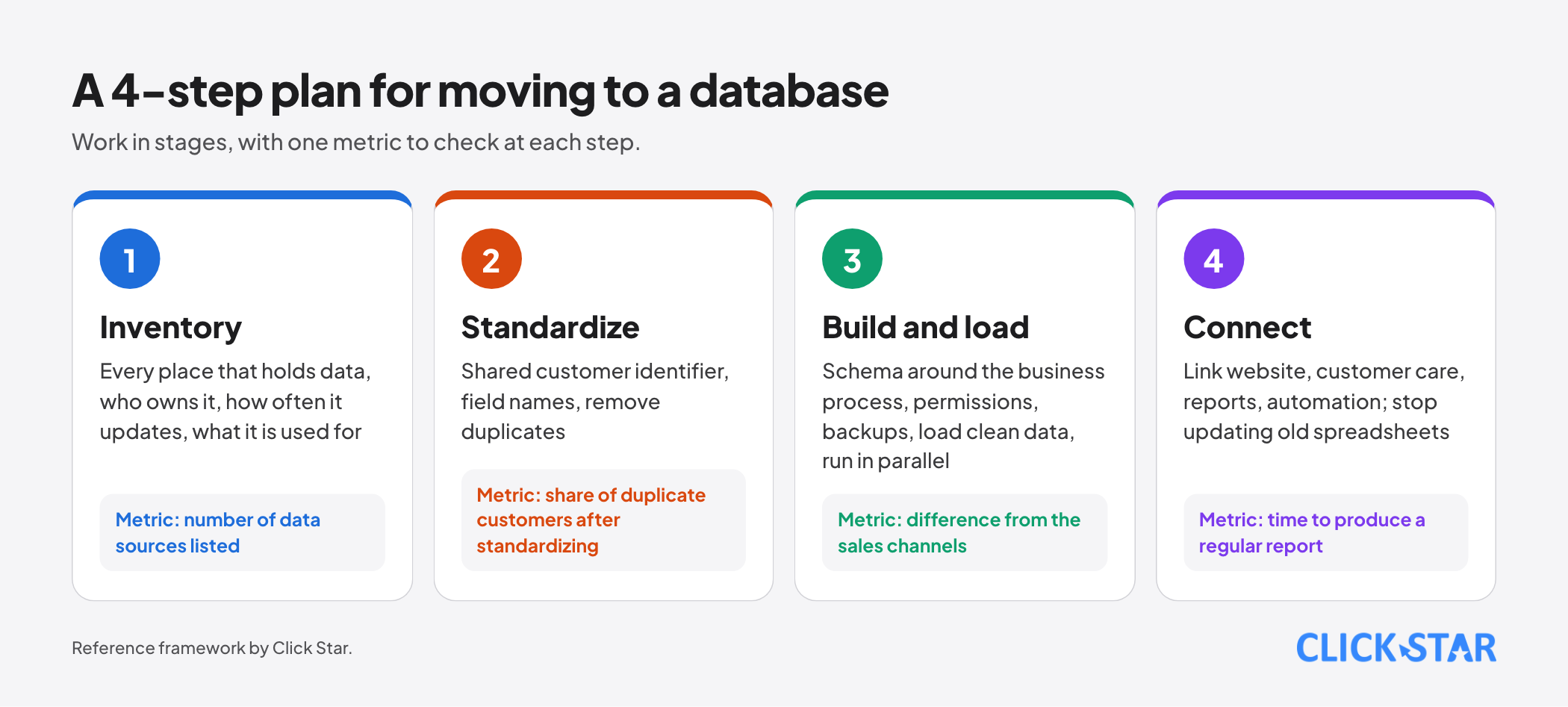
Each step should have a check metric, such as the share of duplicate customers after standardizing, the difference between orders in the database and orders from the sales channels, and the time to produce a regular report.
Common mistakes
- Loading messy spreadsheet data into the database without cleaning it, so the new database inherits every old problem.
- Having no owner for the data: who may edit, who approves and who handles it when data is wrong.
- No permissions, with everyone sharing a single administrator account.
- Having backups but never testing a restore, and finding out the backups are broken only after data is lost.
- Over-designing from the start, or the reverse, failing to plan for basics such as customer consent and an action log.
- Ignoring personal data duties when choosing where the database and its provider are located.
- Dropping spreadsheets entirely. Spreadsheets remain very useful for quick analysis, as long as the source data lives in the database.
Related posts



Need tailored advice for your business?
Click Star helps you build a solution that fits your industry and scale. We answer every question during business hours.