Zapier, n8n and Make changed rules: which automations to review first
This article reads the official release notes and help pages of n8n, Zapier and Make, plus a Power Automate notice, to show which November changes force a review of running automations.
An online shop runs 3 automations: a form feeding the CRM, order alerts in Slack, and 1 AI step that sorts emails. All 3 ran fine until 1 vendor changed how it counts usage and another removed an AI model. This scenario is illustrative, not a real client.
This article reads the official release notes and help pages of n8n, Zapier and Make, plus an archived Microsoft notice about Power Automate. Everything was checked on November 24, 2026, prioritizing changes since about November 3.
It answers 1 question: which November 2026 changes force you to review automations that are already running, and in what order. Click Star already has a separate article on choosing between n8n, Make and Zapier. Click Star sells AI automation services, so it has a related interest.
Key points
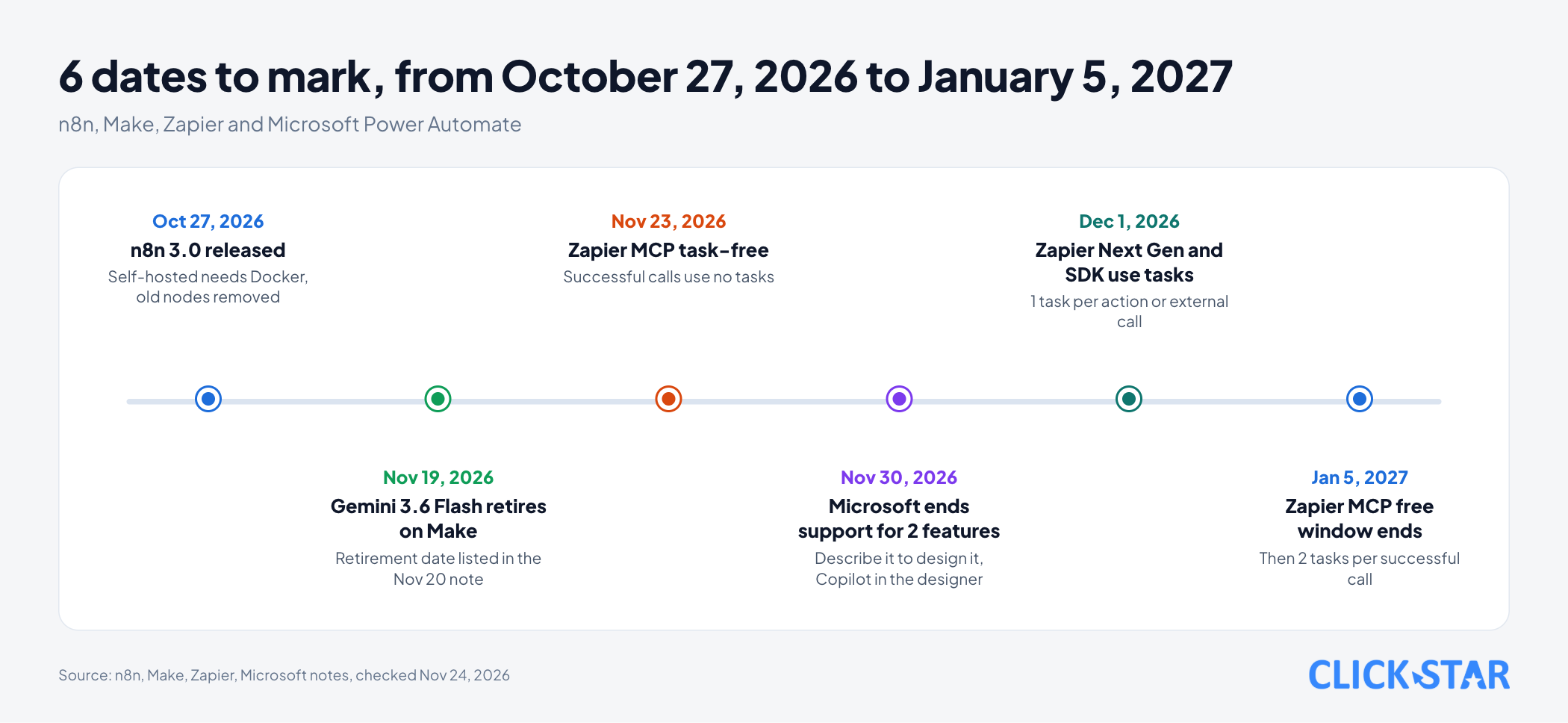
- n8n 3.0 shipped on October 27, 2026: self-hosted installs must run on Docker, many old nodes (such as Function, Cron, Interval) are removed, and workflows with a Slack Trigger need a signing secret or they will not activate.
- The n8n changelog page still lists the current stable version as 2.48.8, while the 3.0 breaking-changes page calls 3.0.0 an early access release.
- n8n no longer counts runs of an attached error workflow against the execution quota (changelog of September 1, 2026: Cloud from version 2.38, self-hosted Business and Enterprise from 2.28.0), and Schedule Trigger runs on a durable scheduler from version 2.45 (October 20, 2026).
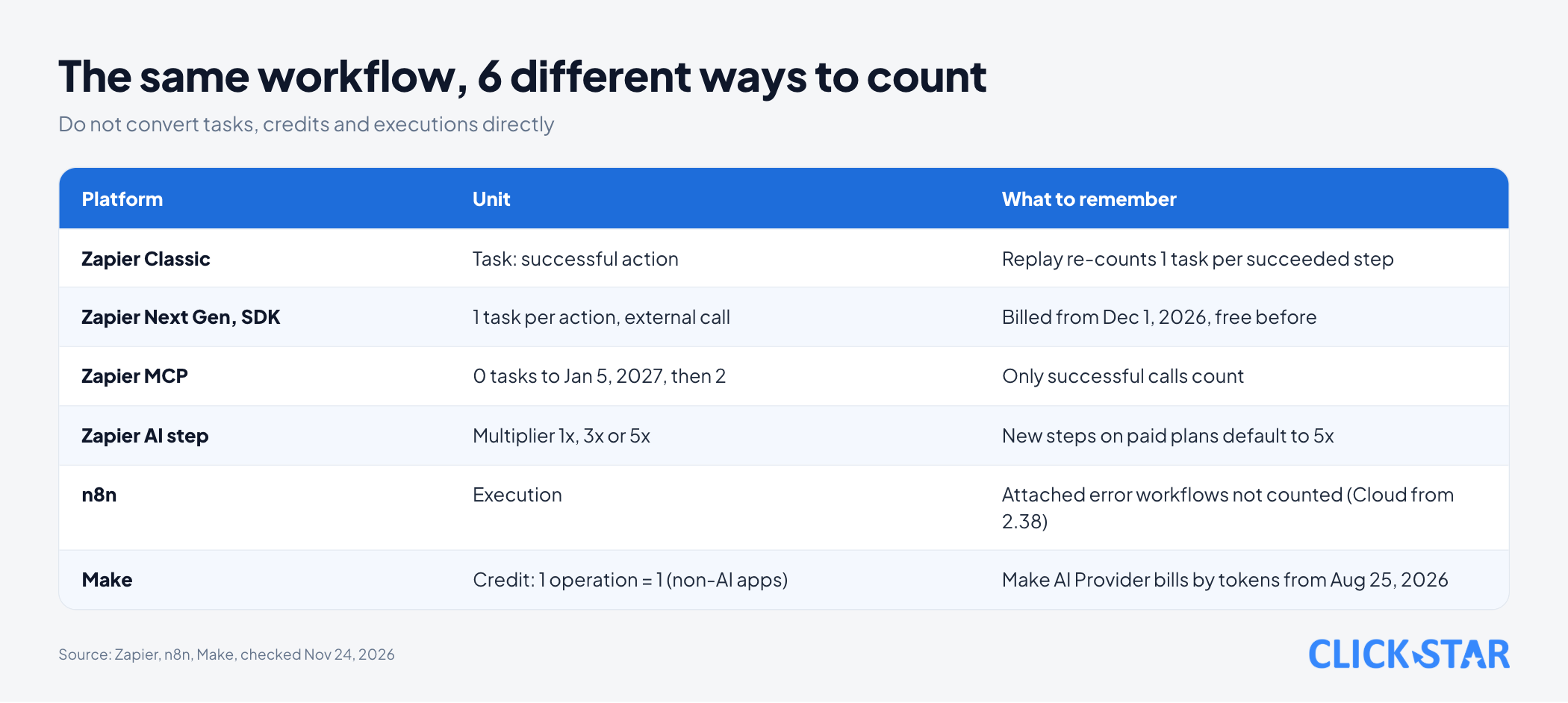
- Zapier: from December 1, 2026, Next Gen Zaps and the Zapier SDK start using tasks (1 task per action or successful external call; free By Zapier apps are not counted). Zapier MCP uses no tasks from November 23, 2026 to January 5, 2027, then 2 tasks per successful call.
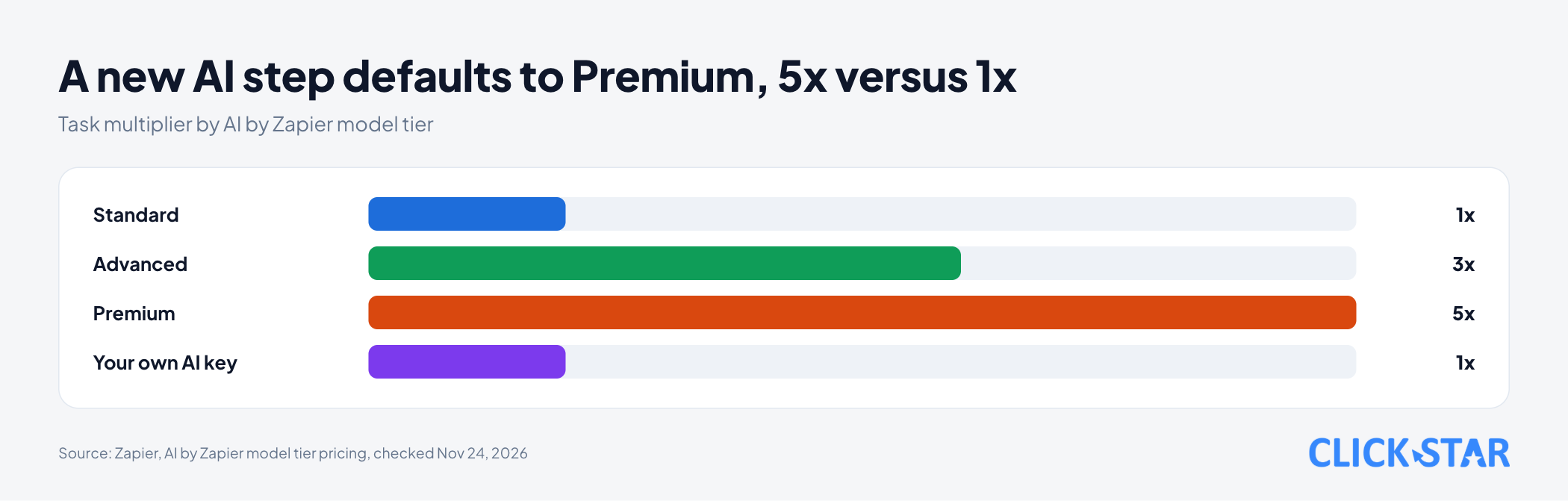
- A Zapier AI step uses a 1x, 3x or 5x multiplier, and new steps on paid plans default to Premium (5x). By Zapier's formula, 1 Premium step with 2 tool calls costs 15 tasks.
- Make removed 3 Gemini 2.5 models from its Google Vertex AI app (scenarios using them now fail), and Microsoft ends support for 2 AI flow-building features in Power Automate on November 30, 2026.
n8n: version 3.0, the durable scheduler and error workflows
For companies that self-host n8n, the heaviest job is upgrading to 3.0: it changes the install method and removes old nodes.
According to the n8n release notes (read November 24, 2026), n8n 3.0 shipped on October 27, 2026, followed by 3.1, 3.2 and 3.3 on November 3, 10 and 17, 2026. The 3.0 breaking-changes page (no date shown) says self-hosted n8n must use Docker, and installs with npm or npx n8n are no longer supported.
The same page lists changes that can stop a workflow:
- Old nodes are removed, including Function, Function Item, Item Lists, Cron, Interval and HTML Extract. Published workflows that use them will not activate when n8n 3.0 starts.
- The Slack API credential requires a signing secret; a Slack Trigger workflow without it will not activate.
- The maximum run time of Code tasks (
N8N_RUNNERS_TASK_TIMEOUT) drops from 300 to 60 seconds.
n8n provides a Migration Report tool (Settings > Migration Report) that lists the workflows and settings to fix before upgrading. Click Star suggests running it on a copy, after a database backup.
There is 1 mismatch: the changelog page lists the current stable version as 2.48.8 and beta as 2.49.5, while the release notes go up to 3.3.
According to the n8n changelog (September 1, 2026), runs of an error workflow attached to a workflow no longer count toward the execution quota on any plan: from version 2.38 on Cloud, and from 2.28.0 on self-hosted Business and Enterprise.
From version 2.45 (October 20, 2026), Schedule Trigger runs on a durable scheduler: each run is stored in the database before it is due, so a restart no longer drops runs.
"Every N minutes" schedules now run a steady N apart, counted from when you published, no longer aligned to the clock. If a report needs exact clock times, use an hourly, daily or cron schedule.
Zapier: Next Gen Zaps and the SDK use tasks from December 1, 2026
If you use Next Gen Zaps or the Zapier SDK, estimate your task use before December 1, 2026, when the free period ends. The SDK lets developers run app actions from code.
According to the help page "How Next Gen Zaps and the Zapier SDK are billed" (updated November 18, 2026), from 12 pm US Eastern time on December 1, 2026, each app action and each successful external call (a request your code sends to an API through Zapier) uses 1 task.
Specialized actions such as Lead Router and AI by Zapier have their own rates. The trigger that starts a Next Gen Zap stays free.
The same page says free By Zapier apps such as Tables use no tasks, and neither do filters, formatting, loops or branching. Most Classic Zaps (the older kind) are unaffected, except a Classic Zap with SDK calls inside a Code by Zapier step.
The help page "How is task usage measured in Zapier?" (updated November 23, 2026) adds 2 easy-to-miss points.
Replaying a whole Zap run uses 1 task again for each step that had already succeeded. Past the plan limit, pay-per-task accounts are charged per task up to 3 times the plan limit, then runs are held until the cycle ends.
Zapier AI steps and Zapier MCP: the 5x multiplier and the task-free window
Zapier MCP lets AI assistants such as Claude or ChatGPT run actions in your apps. According to the task usage page (updated November 23, 2026), from 12 pm ET on November 23, 2026 to 12 pm ET on January 5, 2027, successful tool calls use no tasks; after that it is 2 tasks per successful call, and failed calls do not count.
So task counts from the free window do not show the cost after January 5, 2027. Illustrative, not measured: 1,000 successful calls a month to ordinary apps become 2,000 tasks. From December 1, 2026, calls to free By Zapier apps (Tables, Forms) do not count, and AI by Zapier calls are billed at their own price.
The page "AI by Zapier model tier pricing" (updated November 19, 2026) splits models into 3 tiers: Standard at 1x with no tool support, Advanced at 3x, and Premium at 5x. Using your own AI key gives 1x, with Advanced or Premium models only.
Zapier's formula: tasks per run = (1 × multiplier) + (tool calls × multiplier). A new AI step on a paid plan defaults to Premium.
Click Star's own calculation from the formula: Premium with 2 tool calls costs 5 + 10 = 15 tasks, and Advanced with 3 tool calls costs 3 + 9 = 12 tasks.
Make: removed AI models and token-based AI pricing
Make's pricing page returned error 403, so this article gives no Make plan prices. The details below come from Make's help articles, read on November 24, 2026.
Make's Vertex AI article (updated November 20, 2026) says the Google Vertex AI app removed gemini-2.5-pro, gemini-2.5-flash and gemini-2.5-flash-lite. Scenarios using them now fail.
It also adds retirement dates for gemini-3.6-flash (November 19, 2026) and gemini-3.7-flash (January 28, 2027).
Make's Credits page (updated November 23, 2026) says non-AI apps use 1 credit per operation; with your own AI connection you pay the AI vendor for tokens, while Make's AI Provider is billed by tokens and operations.
According to Make's article "More value for your credits" (posted August 24, 2026), from August 25, 2026 Make's AI Provider bills input and output tokens at separate rates. The Medium tier was 3,500 tokens per credit; it is now 18,080 input tokens or 2,260 output tokens per credit.
Make's example: an extraction step with 2,000 input and 100 output tokens drops from about 0.6 to about 0.16 credits.
Power Automate: 2 AI flow-building features end support on November 30, 2026
This section relies on the Microsoft 365 Message Center Archive, a site that copies Microsoft's notices, so it is a secondary source. Click Star has not read the originals.
Notice MC1537406 (posted November 3, 2026): "Describe it to design it" reaches end of support on November 30, 2026, so users can no longer create new cloud flows by describing them. Notice MC1540258 (posted November 5, 2026): Copilot in the designer for cloud flows and agent flows reaches end of support the same day.
MC1537406 says existing flows are not deleted or moved, and flows can still be created and edited in the visual designer; Microsoft suggests the Power Automate plugin in an organization-approved coding assistant, such as GitHub Copilot CLI.
MC1540258 says flows are not deleted, moved or changed, and can still be created, edited, tested and run in the designer; it suggests the plugin in a supported AI assistant, or connecting to Copilot Studio through MCP.
The same workflow, counted in different ways
Do not convert tasks, credits and executions directly. Note what each platform counts, then calculate on your real workflows.
What this means for Vietnamese businesses
Click Star found no Vietnam measurement of platform usage or change costs. Prices and limits here are the vendors' own and exclude tax; Click Star has not checked tax for Vietnamese customers.
Click Star's view. This is a technical and governance opinion, not based on a specific project. Most of this month's changes do not break a workflow at once; they break it at upgrade time, when a model expires, or when the invoice arrives.
Each workflow should have an owner, a review date and a copy to test upgrades on.
What to do: a 5-step plan to January 5, 2027
This is Click Star's reference plan, not from an outside source.
Step 1. Today: take inventory. List workflows, platforms, owners and AI models.
Step 2. Before November 30, 2026: Power Automate and n8n. Find who still uses Copilot in the designer. For n8n, run the Migration Report on a copy and add the Slack signing secret.
Step 3. Before December 1, 2026: Zapier. Estimate tasks for Next Gen Zaps and the SDK, then choose a model tier for each AI step.
Step 4. First week of December 2026: Make. Find scenarios that use retired Gemini models and switch to another model.
Step 5. Before January 5, 2027: MCP. Estimate your monthly successful MCP calls, subtract calls to free By Zapier apps, count AI by Zapier calls separately, then multiply the rest by 2.
A monthly review and how to measure
This framework is Click Star's own, not from an outside source. Each month, spend 1 short session on the 3 groups and record the date you read each page.
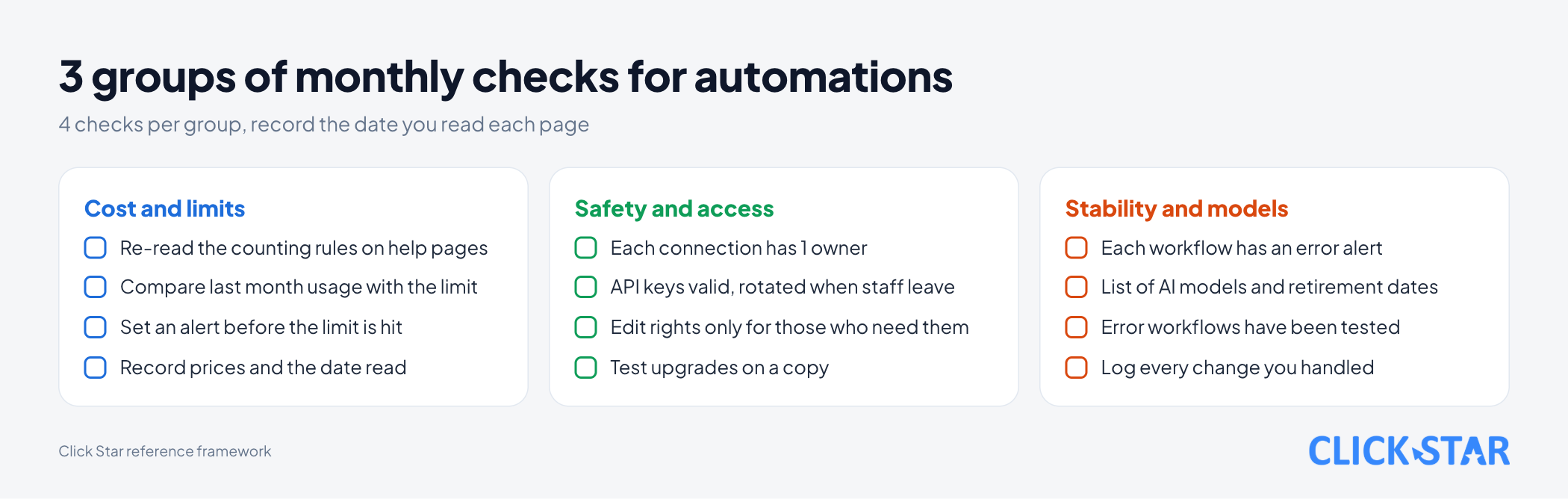
5 metrics to track, all proposed by Click Star, with no industry benchmark:
- Share of runs that fail.
- Cost per successful run (tasks, credits or executions in money).
- Hours saved, from an internal survey, not run counts.
- Workflows with no owner or no error alert.
- Days from a vendor announcing a change to your fix.
Common mistakes
- Reading only the changelog and skipping help pages, so missing task-counting changes.
- Measuring MCP cost in the free window and treating it as the long-term cost.
- Upgrading a running n8n to 3.0 without running the Migration Report or taking a backup.
- Leaving an AI step on the default Premium tier when a simple job needs only Standard.
- Dropping error workflows to save quota, when n8n no longer counts them.
- Using an AI model without noting its retirement date, and learning of it only when the scenario fails.
What is not known
Click Star does not know when n8n 3.x becomes stable: the changelog lists stable as 2.48.8 while the release notes reach 3.3. It did not read Make's pricing page (error 403), and has not confirmed that gemini-3.6-flash was truly removed, since its retirement date of November 19, 2026 is before the note's date.
It found no Zapier page saying where to see MCP call counts during the free window. It has not read the original Microsoft notices or Power Automate pricing.
Related posts
Need tailored advice for your business?
Click Star helps you build a solution that fits your industry and scale. We answer every question during business hours.