AI agents may fill in forms on your website: measure and block what?
4 groups of AI bots, how to spot a real agent and a 3-level framework for allowing or blocking, based on OpenAI, Anthropic, Google and Cloudflare documentation.
A small dental clinic has a booking page. A customer asks an AI assistant to book a Saturday-morning filling, but the firewall blocks the assistant's browser because it comes from a cloud server, so the appointment is never created. This is an illustrative scenario, not a real customer.
This article reads documentation from OpenAI, Anthropic, Perplexity, Google and Cloudflare, RFC 9309 and the IETF Web Bot Auth draft, checked on November 16, 2026.
Key points
- Click Star sorts AI bots into 4 groups: training crawlers, AI search, fetches triggered by a user, and agent browsers. Each group needs its own policy.
- OpenAI says robots.txt rules may not apply to
ChatGPT-User; Perplexity saysPerplexity-Usergenerally ignores robots.txt. - For OpenAI's cloud browser and Anthropic's hosted browser, the vendors' guidance covers firewalls, CDNs or IP ranges, not robots.txt.
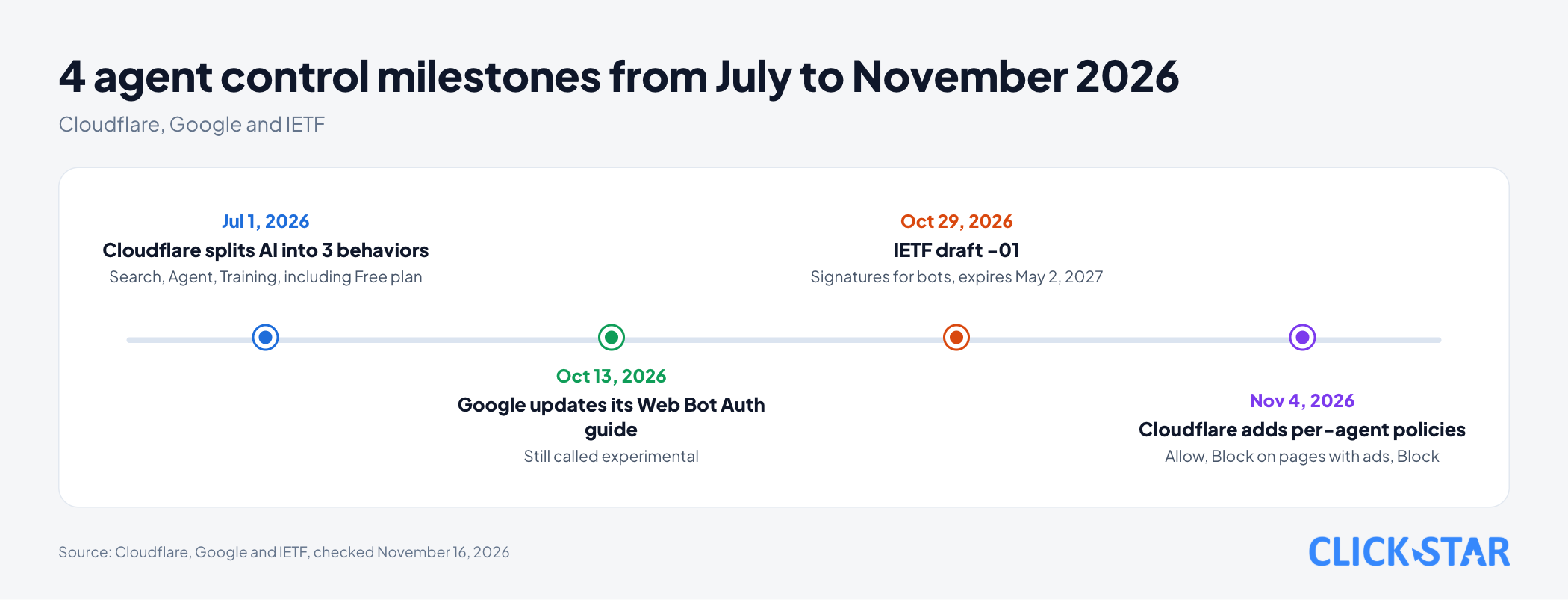
User-Agentcan be faked. Web Bot Auth signatures are still an IETF draft (October 29, 2026); Google calls its use experimental.- On November 4, 2026, Cloudflare added "Personal Assistants" analytics and per-agent access policies.
- Click Star proposes 3 risk levels by page type (read, light write, hard to undo) and measuring with server logs before changing settings.
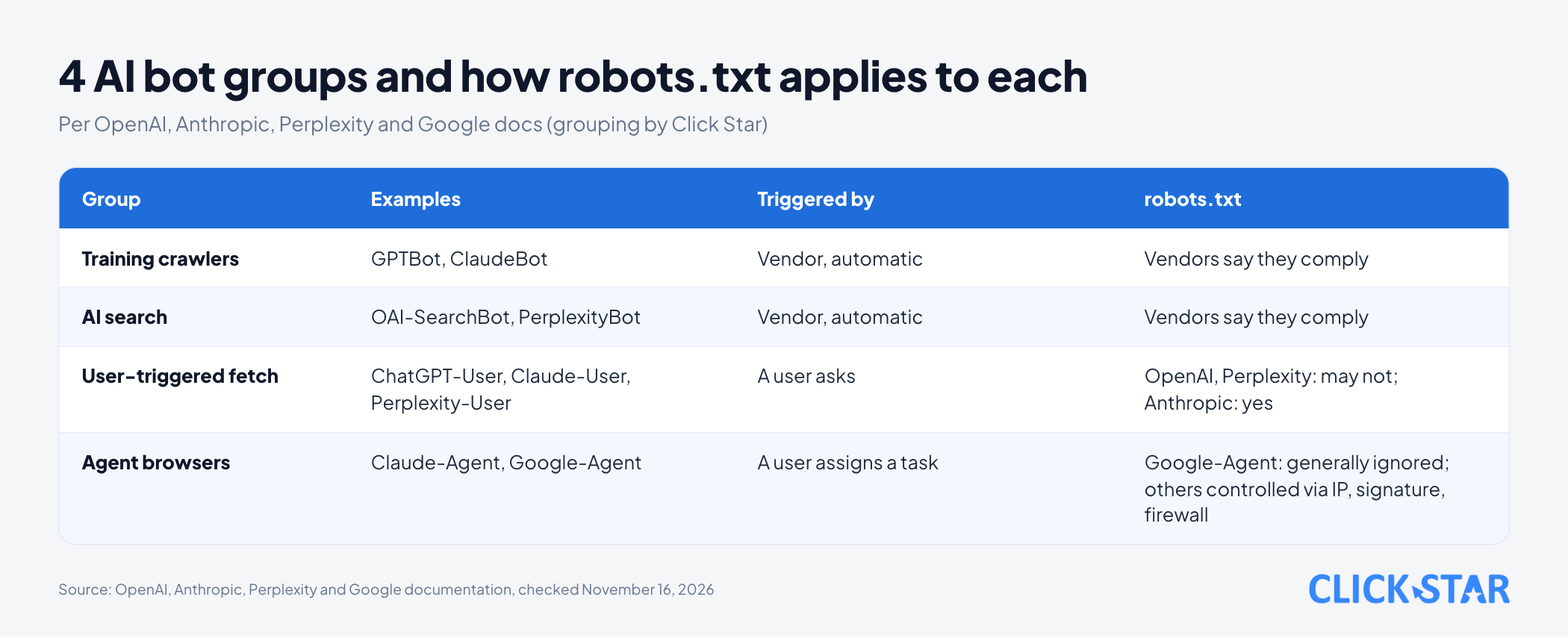
4 groups of AI bots: who presses the button and who decides
Separate AI bots by who triggers the visit, not just by name. The 4 groups are Click Star's split (Cloudflare uses 3 behaviors: Search, Agent, Training).
Group 1, training crawlers: GPTBot, ClaudeBot. According to "Overview of OpenAI Crawlers" (undated, read November 16, 2026), disallowing GPTBot signals that content should not be used to train models.
Group 2, AI search: OAI-SearchBot, Claude-SearchBot, PerplexityBot. They index pages so a site can appear in chatbot results.
Group 3, fetches triggered by a user: ChatGPT-User, Claude-User, Perplexity-User. A person asks a question and the bot opens a page to answer it.
Group 4, agent browsers: a real browser that reads pages, clicks buttons and fills forms for a person. Examples are ChatGPT's cloud browser, Claude-Agent and Google-Agent.
How agent browsers work
Per OpenAI's "Help ensure cloud browser access to your site" (undated, read November 16, 2026), for some tasks ChatGPT uses a browser in the cloud to read pages, click buttons and fill out forms.
The page says owners need not allowlist that browser, but security settings may block it by accident. Some requests are signed with Web Bot Auth, using 3 headers: Signature, Signature-Input and Signature-Agent. Per OpenAI, Akamai, Cloudflare, HUMAN and Vercel verify them automatically.
In its article on how Anthropic-hosted browsers identify themselves (Claude Help Center, marked "updated over a week ago"), requests carry the browser's User-Agent plus a Claude-Agent token. The IPs sit at claude.com/.well-known/sail, which listed 9 IPv4 addresses on November 16, 2026.
Google uses Google-Agent. According to "Google User-Triggered Fetchers" (updated August 19, 2026), it is an agent hosted on Google infrastructure that browses and acts at a user's request.
What robots.txt can control
robots.txt is a request, not a lock. RFC 9309 (September 2022) states plainly that its rules are not a form of access authorization and not a substitute for valid content security measures.
For groups 1 and 2, vendors say they comply. Anthropic's crawler article (Claude Help Center, "updated over a week ago") says its bots honor "do not crawl" signals in robots.txt. For groups 3 and 4, each vendor says something different:
- OpenAI:
ChatGPT-Useris user-initiated, so robots.txt rules may not apply. - Perplexity:
Perplexity-Usergenerally ignores robots.txt because a user requested the fetch ("Perplexity Crawlers", undated). - Google: user-triggered fetchers generally ignore robots.txt.
- Anthropic:
Claude-Userfollows robots.txt, and disabling it there stops retrieval when a user asks;Claude-Agentis a separate browser, controlled by allowing or blocking its traffic.
To decide who may book or pay, do not rely on robots.txt alone. Control sits in the firewall, the CDN and the application itself (login, email or one-time-code confirmation).
How to tell a real agent from a fake one
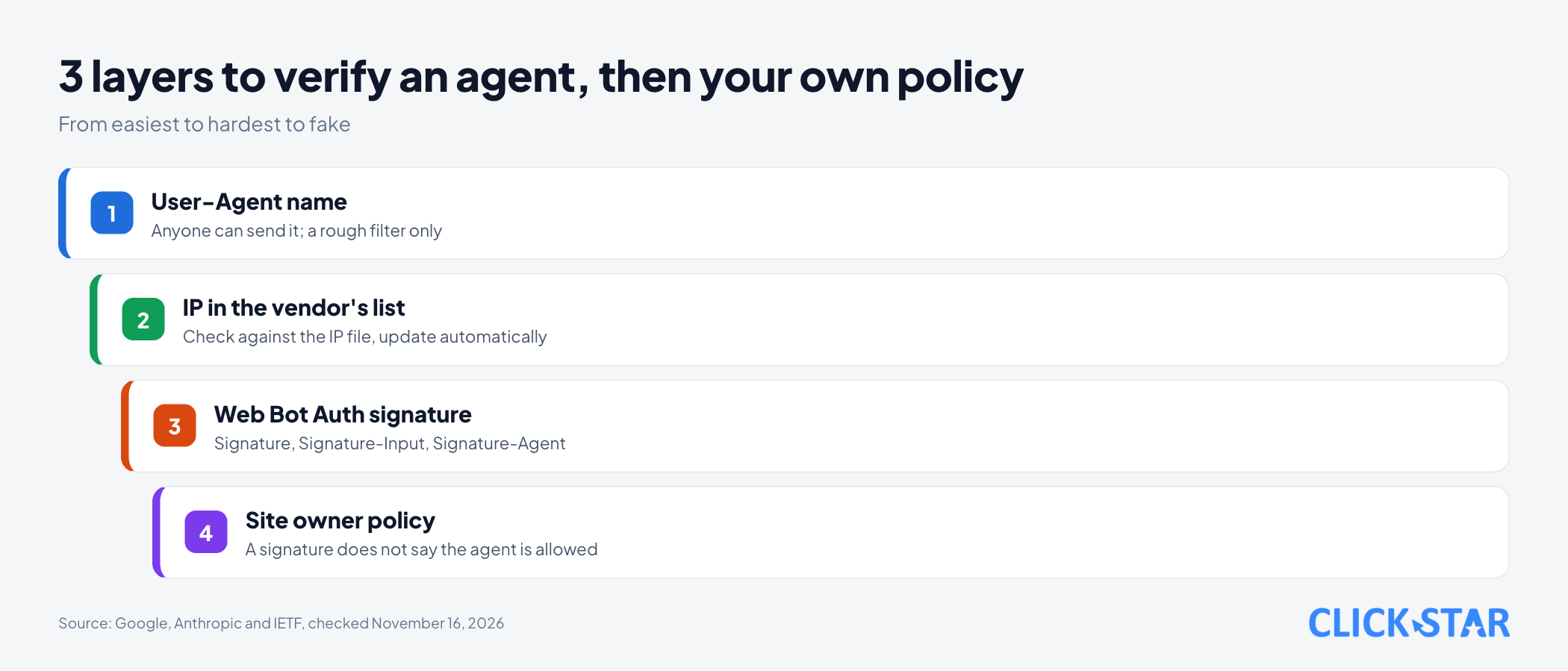
There are 3 checks, from easiest to hardest to fake. Layer 1 is the User-Agent name: Google and Anthropic both warn that it can be spoofed, so use it as a rough filter only.
Layer 2 is the IP address. OpenAI, Perplexity and Anthropic publish IP ranges; Anthropic and Perplexity advise automatic updates. On November 16, 2026, OpenAI's chatgpt-user.json held 237 ranges (created November 6, 2026).
Layer 3 is a Web Bot Auth signature: the agent signs requests with a private key and the CDN checks them with the vendor's public key. The draft draft-ietf-webbotauth-httpsig-protocol-01 (October 29, 2026, expires May 2, 2027) states the limit: a valid signature only proves the key holder signed, not that the agent is benign or allowed.
Google signs only some Google-Agent requests (identity https://agent.bot.goog), so IP and reverse DNS checks still run alongside (Google's Web Bot Auth guide, updated October 13, 2026).
The script counts one bot's hits in an nginx or Apache "combined" log and checks IPs against a vendor JSON file (download first with curl -sL https://openai.com/chatgpt-user.json -o chatgpt-user.json).
import ipaddress, json, re, sys
from collections import Counter
log, ranges, token = sys.argv[1:4]  # access.log chatgpt-user.json ChatGPT-User
nets = [ipaddress.ip_network(p.get("ipv4Prefix") or p["ipv6Prefix"])
        for p in json.load(open(ranges))["prefixes"]]
rx = re.compile(r'^(\S+) .*?"[A-Z]+ (\S+) [^"]*" (\d{3}) \S+ "[^"]*" "([^"]*)"')
n = Counter()
for line in open(log, encoding="utf-8", errors="replace"):
    m = rx.match(line)
    if m and token in m[4]:
        try:
            ip = ipaddress.ip_address(m[1])
        except ValueError:
            continue  # first field is not an IP (hostname or "-")
        n[(any(ip in x for x in nets), m[2].split("?")[0], m[3])] += 1
for (ok, path, st), c in n.most_common():
    print(c, "IP khớp" if ok else "IP lạ", path, st)
Click Star reran it with Python 3.9 on a fake log with broken and valid lines: IPs in OpenAI's ranges print "IP khớp" (matching IP), 203.0.113.9 prints "IP lạ" (unknown IP), and lines whose first field is not an IP are skipped. It takes one JSON IP file per run, does not verify signatures and cannot read Anthropic's TOML file.
Warning: if your site sits behind a CDN such as Cloudflare, the log IP is the CDN's, so every line will show "unknown IP". Log the real visitor IP from the header the CDN adds (such as CF-Connecting-IP or X-Forwarded-For) before running it.
What Cloudflare and other platforms give site owners
According to the Cloudflare Blog post of November 4, 2026, the Bot Analysis chart in Security Analytics gained a "Personal Assistants" category. A new widget lists visiting agents and their request counts.
On policy, the setting was renamed "AI Crawler and Agent access policies" (Security, Settings). Owners set an overall Agents policy, then choose per supported personal agent: Allow, Block on pages with ads, or Block.
A mismatch: the July 1, 2026 changelog says that from September 15, 2026 new domains block Training and Agent bots on pages with ads by default, while the documentation updated November 2, 2026 says new domains default to Allow for all 3 behaviors. Click Star cannot tell which is right; open your own site's settings.
Allow or block: a 3-level framework by page type
Cloudflare and OpenAI both warn about blocking everything: Cloudflare writes that it can lose customers, OpenAI that it may push users elsewhere. Both sell related products, so this is opinion, not measurement.
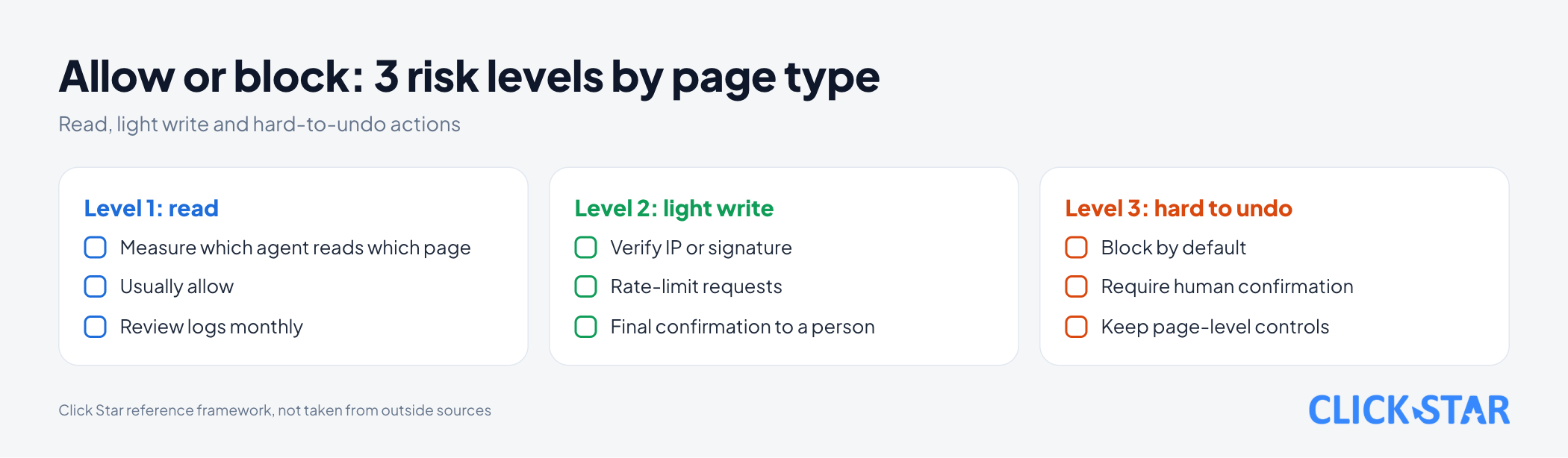
So Click Star proposes deciding by page type, not one global switch. The 3 levels below are a Click Star reference framework, not taken from outside sources.
Level 1, read (articles, prices, opening hours). Usually allow.
Level 2, light write (contact forms, booking, cart). Allow with conditions: verify IP or signature, rate-limit, and add a final confirmation to a real person by email or message.
Level 3, hard to undo (payment, password change, order cancellation). Block by default or require direct human confirmation. OpenAI says it requires human review before consequential actions; that is the vendor's word, not independently verified.
OpenAI also says it has no feature yet for site owners to control user actions, and its cloud-browser exception applies site-wide, so keep page-level controls. The final confirmation step must live on your own site; allowing at the CDN does not replace it (Click Star's inference).
Click Star's view. For small and mid-sized businesses, the practical default is to let agents read, be careful with forms and open up gradually once measured.
OpenAI uses Web Bot Auth on some cloud browser requests, Google signs some Google-Agent requests, and Anthropic uses a User-Agent token and IP ranges. Google still calls User-Agent and IP checks the de facto standard, while signatures are experimental and draft, so review settings regularly.
Click Star offers SEO-standard website design and AI integration, so it has a related interest; this view rests on the documents read.
OpenAI writes that customers are responsible for their own actions, so businesses still need cancellation and rescheduling for wrong or duplicate bookings.
How to measure agents on your website
Server logs are the most direct source. JavaScript tools may count agents as normal sessions (Click Star's inference).
4 reference metrics (a Click Star framework): hits per day by bot group; the ratio of "matching IP" to "unknown IP"; the 10 paths agents call most; and the count of 403 or 429 responses on those paths.
What to do: a 5-step plan
This is a Click Star reference plan, not an industry standard.
Step 1. Count before deciding. Run the script on 30 days of logs, one token at a time with that vendor's JSON IP file (ChatGPT-User, Perplexity-User, Google-Agent). For Claude-Agent, count by token only, with no IP check yet.
Step 2. Place pages in 3 levels. Mark booking, form, payment and login pages as level 2 or 3.
Step 3. Ask your provider. Ask whoever runs your CDN or firewall whether it recognizes agents and verifies Web Bot Auth.
Step 4. Set a policy per level. Record who approved it and when.
Step 5. Review monthly. Bot names and IP ranges change fast.
Common mistakes
- Using robots.txt to stop agents from booking or paying, though OpenAI, Perplexity and Google say user-triggered requests may not follow it.
- Letting traffic through by
User-Agentname without checking IP or signature. - Blocking all automated traffic, then wondering why customers using AI cannot book.
- Opening a CDN-wide exception and forgetting separate controls on the payment page.
- Measuring agents with JavaScript reports instead of server logs.
- Setting the configuration once and never reviewing it.
What is not known
There is no measurement of agent volume on Vietnamese websites. It is unclear whether an assistant in the customer's browser (which looks like the customer) identifies itself.
It is unclear whether Cloudflare defaults new domains to Allow or to blocking on pages with ads, because the 2 pages read disagree.
Cloudflare's Nov 4, 2026 blog says onboarding asks if you monetize pages with ads; it does not say this explains the mismatch. Web Bot Auth is still a draft. The script has only run on a fake log.
Related posts
Need tailored advice for your business?
Click Star helps you build a solution that fits your industry and scale. We answer every question during business hours.