Meta Conversions API: how server-side conversion tracking works and how to set it up
Meta recommends sending events through both the Pixel and the Conversions API. This article explains deduplication with event_id, SHA-256 hashing, delay, deployment options and consent, based on Meta's documentation.
Many businesses advertising on Meta still measure conversions with the Meta Pixel alone, a script in the customer's browser. If the browser blocks it or the connection drops, the event never reaches Meta, and conversions after the customer leaves the website, such as a lead the CRM confirms as qualified, are invisible to it.
This article is checked up to October 22, 2026, using Meta for Developers documentation, the Meta Business Help Center and a transcribed copy of Vietnam's Law No. 91/2025/QH15 on personal data protection.
It answers how the Pixel and the Conversions API (CAPI) differ, how deduplication and hashing work, which setup to choose and how to check it. Click Star already has articles on Meta's 2026 updates and unifying customer data.
Key points
- The Pixel sends events from the browser, CAPI from the server. Meta recommends using both for the same events, because the server can send events the browser misses.
- When the same event goes through both sources it must be deduplicated: same event_name and same event_id, within 48 hours. If either is missing, reports can count it twice.
- Email, phone number and names must be normalized and then hashed with SHA-256 exactly 1 time. IP address, user agent, fbc and fbp are not hashed.
- Event Match Quality (EMQ) measures how well a customer matches a Meta account. Meta recommends aiming for 6.0 or higher and sending events within 1 hour for Sales and Leads ads.
- There are 5 ways to deploy, from 1 click to writing code. Choose by resources and event type.
- Sending customer data to Meta is processing personal data. Meta requires that you not share events of people who have not consented, where the law demands it. Click Star gives no legal advice.
The Pixel, the Conversions API and how to combine them
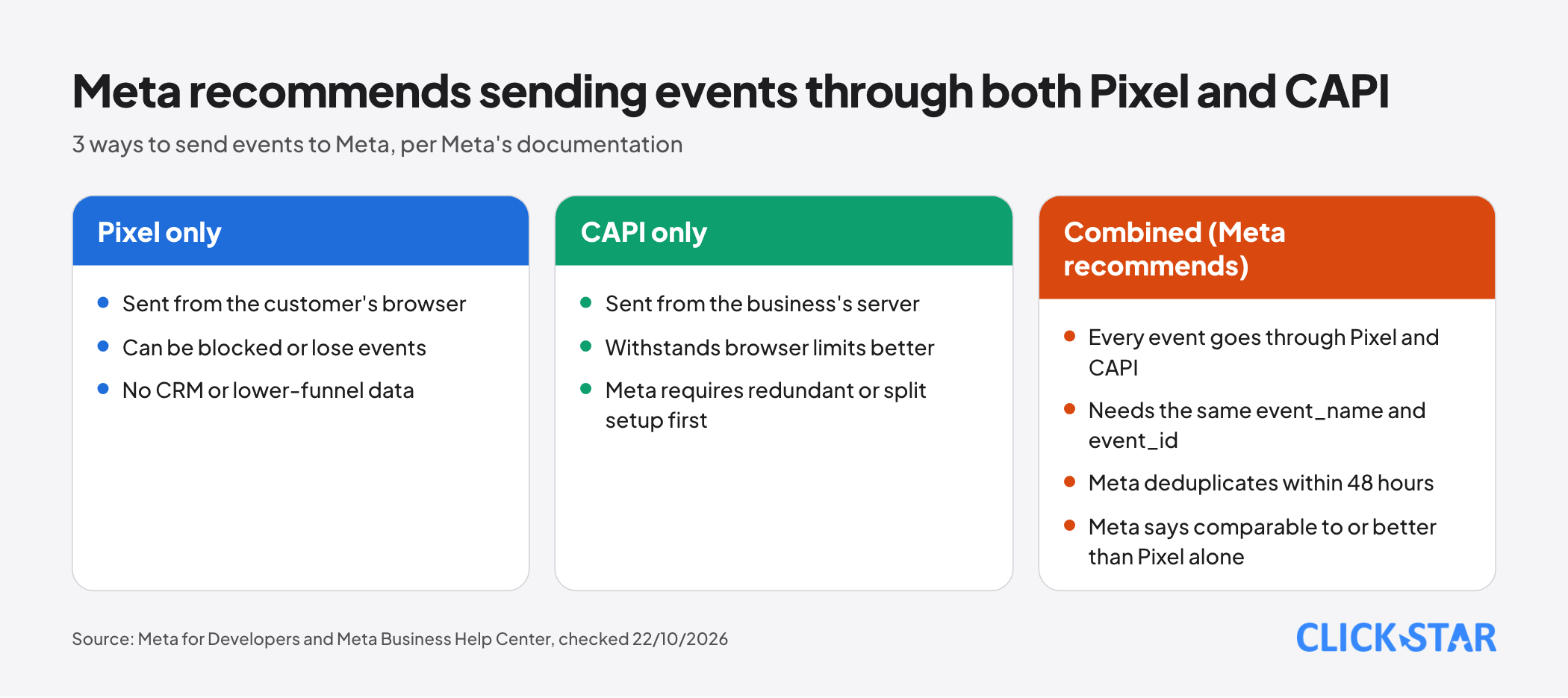
According to the Meta Business Help Center article "About Deduplication for Meta Pixel and Conversions API Events" (undated, read October 22, 2026), the Pixel can be blocked or lose events through browser settings or connectivity, while CAPI, sent from the server, withstands browser limits and ad blockers better.
Meta for Developers' "Conversions API End-to-End Implementation" (undated, read October 22, 2026) describes 3 setups:
- Redundant (Meta recommends): every event goes through both the Pixel and CAPI. Meta says performance is comparable to or better than the Pixel alone.
- Split: the Pixel sends PageView and ViewContent; CAPI sends Lead or Purchase. Meta calls it less optimal.
- Server-only: CAPI alone, and Meta requires the redundant or split setup first.
The same document adds that CAPI can send data the Pixel lacks, such as CRM data and lower-funnel events.
On evidence: every performance claim here is Meta's own, often phrased with "may", with no measurement method in the pages read. Click Star gives no improvement percentage; "Best Practices - Conversions API" suggests a Conversion Lift Study or split testing.
Deduplication: event_id and event_name
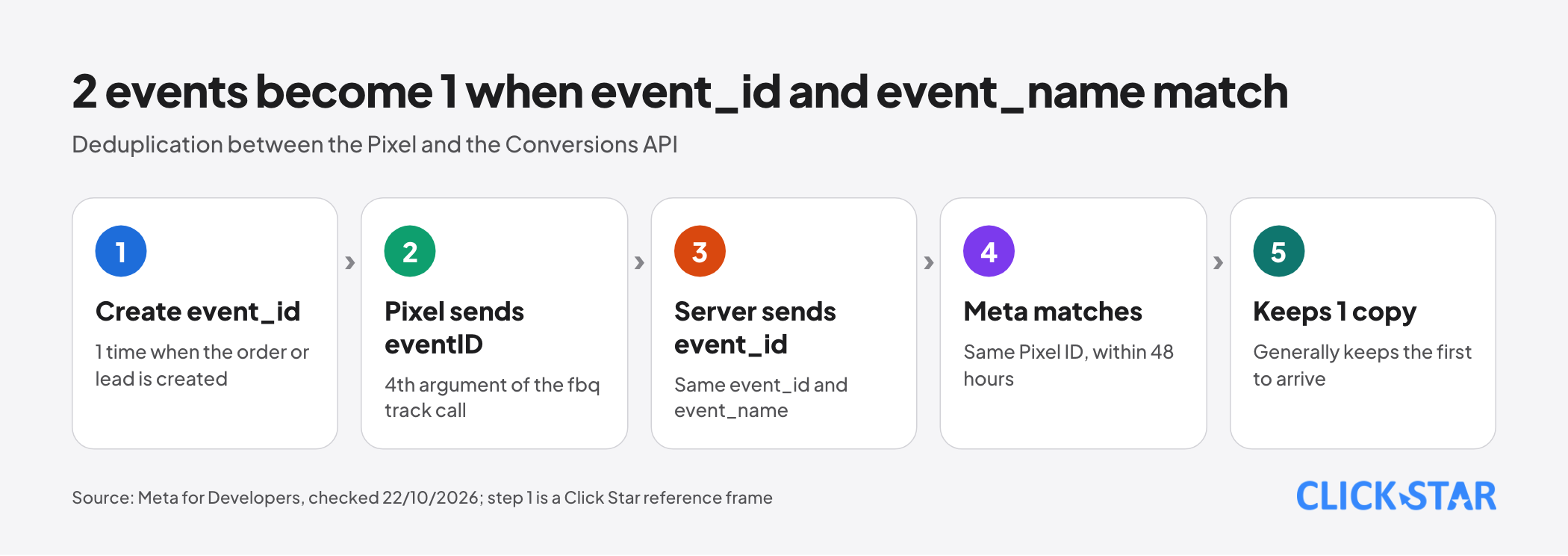
Meta treats 2 events as 1 when event_name and event_id match and both reach the same Pixel ID within 48 hours, and it generally counts only the copy that arrives first. According to "Handling Duplicate Pixel and Conversions API Events" (undated, read October 22, 2026), the Pixel's eventID must match CAPI's event_id; in the Pixel it is the 4th argument of the fbq track call.
Per "Server Event Parameters", event_id can be an order number. A customer placing orders 123 and 456 needs a separate event_id for each in both sources, so Meta sees 2 orders, not 4.
The same page gives an exception: if the server copy and the browser copy arrive within 5 minutes of each other, Meta favors the browser event.
Click Star reference frame, not from an outside source: generate the event_id 1 time on the server when the order or lead is created and give that value to both the Pixel and CAPI. Separate random numbers will not match.
No deduplication is needed when each source sends a different event. Duplicates without it, per the Help Center, inflate conversions, ROAS and attribution.
Customer data, SHA-256 hashing and Event Match Quality
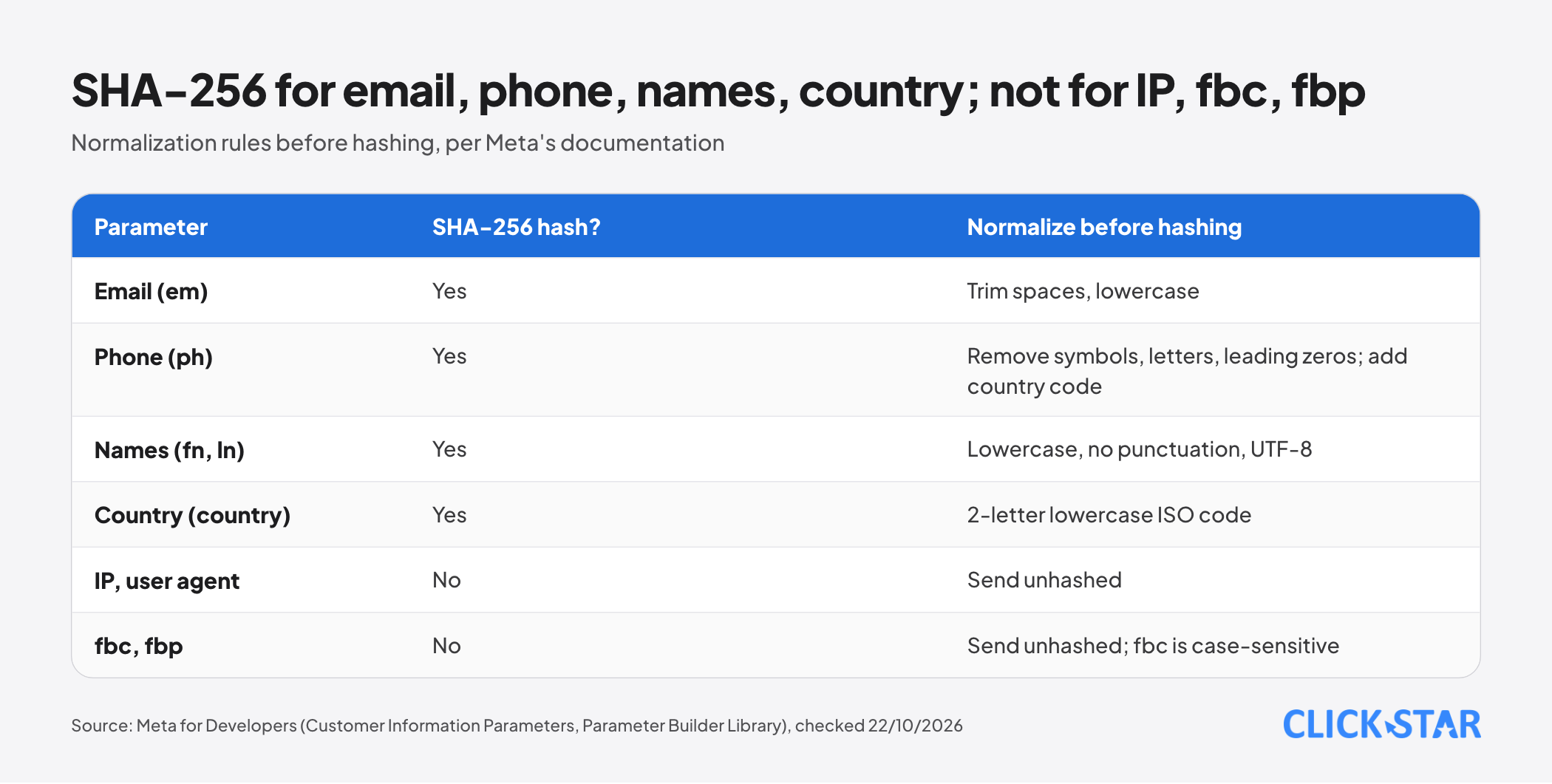
According to "Customer Information Parameters" (undated, read October 22, 2026), Meta's systems are designed not to accept unhashed contact information, and the Meta Business SDK hashes automatically. Normalization before SHA-256 hashing:
- Email (em): trim leading and trailing spaces, lowercase.
- Phone number (ph): remove symbols, letters and leading zeros; a country code is required, even if all your data comes from 1 country.
- Names (fn, ln): lowercase, no punctuation, Roman a-z recommended; special characters must be UTF-8.
- Country (country): the 2-letter lowercase ISO 3166-1 alpha-2 code.
- Not hashed: client_ip_address, client_user_agent, fbc, fbp.
Applied to a Vietnamese number (Click Star's inference): 0912 345 678 becomes 84912345678 before hashing. The Parameter Builder Library says to normalize and hash only 1 time.
"Best Practices" lists the required fields: action_source for every event, plus event_source_url and client_user_agent for website events. According to the Parameter Builder Library documentation, the fbc value is case-sensitive; do not lowercase it.
EMQ, per the Help Center article "About Event Match Quality" (undated, read October 22, 2026), is a 0 to 10 score from information quality and the share of events matched, over the last 48 hours, for website events only. It ranks email and Click ID high, phone and external_id medium, names low.
"Verifying Your Setup" gives a scale of 1 to 10 and recommends 6.0 or higher.
Delay: how fast to send
Meta's target is real time or within 1 hour. The Help Center table "Recommended and maximum delay times" (undated, read October 22, 2026) recommends 1 hour and allows 7 days for Sales, Leads and Engagement ads.
The End-to-End document is stricter: over 2 hours can significantly reduce performance.
Per "Using the API", event_time is when the event actually happened, in Unix seconds; past 7 days the whole request errors. For a CRM status, set event_time to when staff change it and send at once (Click Star's inference).
Ways to deploy and when to choose each
The Help Center article "Compare Conversions API Setup Options" (undated, read October 22, 2026) and Meta's Gateway and GTM documents give 5 ways:
- Conversions API with Meta: web only, 1 click in Events Manager, free, needs the Pixel; same parameters as the Pixel.
- Partners and commerce platforms: Shopify, WooCommerce, Wix and BigCommerce take a few clicks at no additional cost per Meta.
- Conversions API Gateway: no code, runs in the business's own cloud (AWS or GCP) and generates event_id automatically; Meta says the only cost is cloud resources or partner fees.
- Server-side GTM: a GA4 tag sends to the server container, and a Conversions API tag maintained by Meta sends on to Meta; event_id must be mapped.
- Direct integration in code: 2 to 4 weeks for a new integration per Meta; needs a developer; the only option for app and physical-store events when that page was written.
Click Star reference frame, not from an outside source: on a commerce platform, use the partner; with only a website and the Pixel, use Meta's option; for CRM events or control over parameters, use direct integration, a CRM partner or GTM.
Checking with Test Events and Events Manager
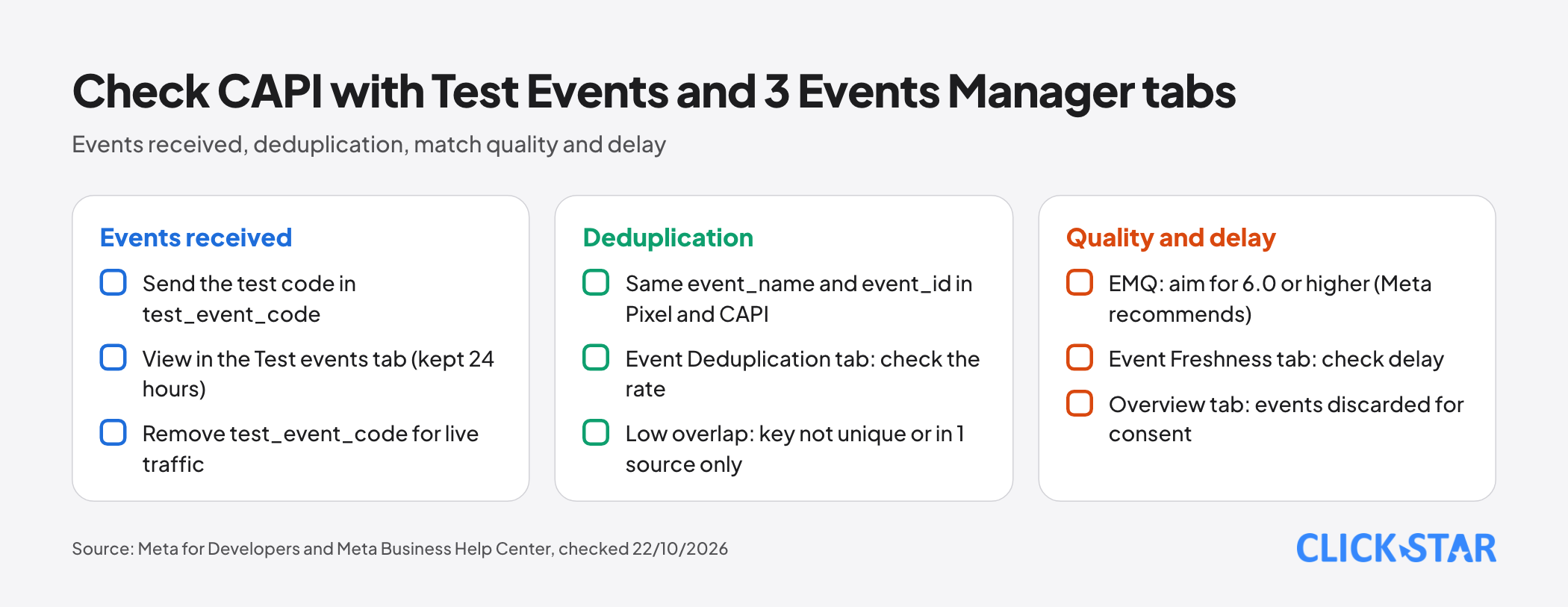
According to "Test Your Server Events Using the Test Events Tool" (undated, read October 22, 2026), go to Events Manager, Data sources, the dataset, then Test events. Send the code in test_event_code and remove it for live traffic; per "Using the API", events with a test code still enter Events Manager and are still used for measurement.
Per "Verifying Your Setup", the Overview tab shows events received, events discarded because of consent, and the sending channel. The Event Deduplication tab shows the deduplication rate; low overlap means the key is not unique or exists in 1 source only.
Personal data and consent
The Help Center page "Privacy and data use requirements for Meta Business Tools" (undated, read October 22, 2026) says, for CAPI: do not share event data about people who have not consented, where the law requires it; do not send health or financial information; Meta's systems do not replace your own compliance controls.
Law 91/2025/QH15 took effect on January 1, 2026 (Article 38, clause 1). Click Star read a copy on ketoananpha.vn on October 22, 2026, so check the original text.
Article 9: consent is valid only when voluntary and informed about the data type, purpose, controller and rights; given per purpose; silence is not consent.
Article 10, clause 1: people may request to withdraw consent and to restrict processing when they doubt the scope, purpose or accuracy of the data, except cases under Article 19 or other laws. Clause 2: the request is in writing, including electronic form. So you need a way to receive requests and stop sending that person's events.
Article 20, clause 1, point c treats using a platform outside Vietnam to process data collected in Vietnam as a cross-border transfer. Click Star does not conclude whether sending events to Meta falls under it.
Click Star's view, not a legal opinion: Article 2, clause 1 defines personal data as data that identifies or helps identify a person; SHA-256 hashing lets Meta match accounts, so it is hard to call de-identification. Treat hashed data as personal data until a lawyer concludes otherwise.
What this means for Vietnamese businesses
Many service businesses get leads through forms and phone calls, then handle them in a CRM. The Pixel sees the form submission, not which lead qualified or bought; CAPI can send those CRM statuses to Meta.
Click Star's view. The 2 easiest mistakes to make and hardest to spot are a mismatched event_id and a consent status that does not travel with the event; fix them before raising the EMQ score. Without a developer, start with Meta's built-in option or a partner; go direct only when CRM events are worth sending.
On interest: Click Star sells digital marketing, CRM and CDP services and custom software, so it has a commercial interest in implementation. The view rests on Meta's documentation.
14-day plan
Click Star reference frame, not taken from an outside source:
- Days 1 to 3: inventory Pixel events, lead sources and where consent is stored; check EMQ, delay and deduplication; choose a setup.
- Days 4 to 7: generate event_id 1 time for the Pixel and CAPI; normalize and hash; send tests with test_event_code.
- Days 8 to 10: turn on Lead or Purchase; check the 3 Events Manager tabs.
- Days 11 to 14: remove test_event_code, switch on the consent gate, document the setup, set a weekly review.
Common mistakes
- Sending duplicate events through the Pixel and CAPI with no event_id, or with different names (Purchase and CustomPurchase).
- Each side generating its own random number instead of sharing 1 event_id.
- Hashing 2 times, or hashing before normalizing (uppercase, spaces, numbers missing the country code).
- Hashing the IP, user agent, fbc or fbp, or lowercasing fbc.
- Batching at the end of the day, far beyond the 1-hour target.
- The Pixel is off because the customer declined, but the server still sends that person's events.
What is not known
There is no independent measurement of CAPI's improvement, and no Vietnam figures. developers.facebook.com opened through the Markdown version of its pages, Help Center articles through the ?locale=en_US parameter; most show no date. EMQ is 0 to 10 in the Help Center but 1 to 10 in the developer documentation.
Meta does not say whether to keep or strip Vietnamese diacritics in names; its examples keep UTF-8 characters. Click Star has not concluded whether hashed data is personal data, nor read Decree 356/2025/NĐ-CP or Meta's Business Tools Terms.
Related posts

Need tailored advice for your business?
Click Star helps you build a solution that fits your industry and scale. We answer every question during business hours.