Running AI locally (local LLM) or in the cloud: cost, security, quality and operating effort compared
What open-weight models are, how much memory local running needs, how to cost it against API prices, the security risks and when a hybrid fits, based on official documentation.
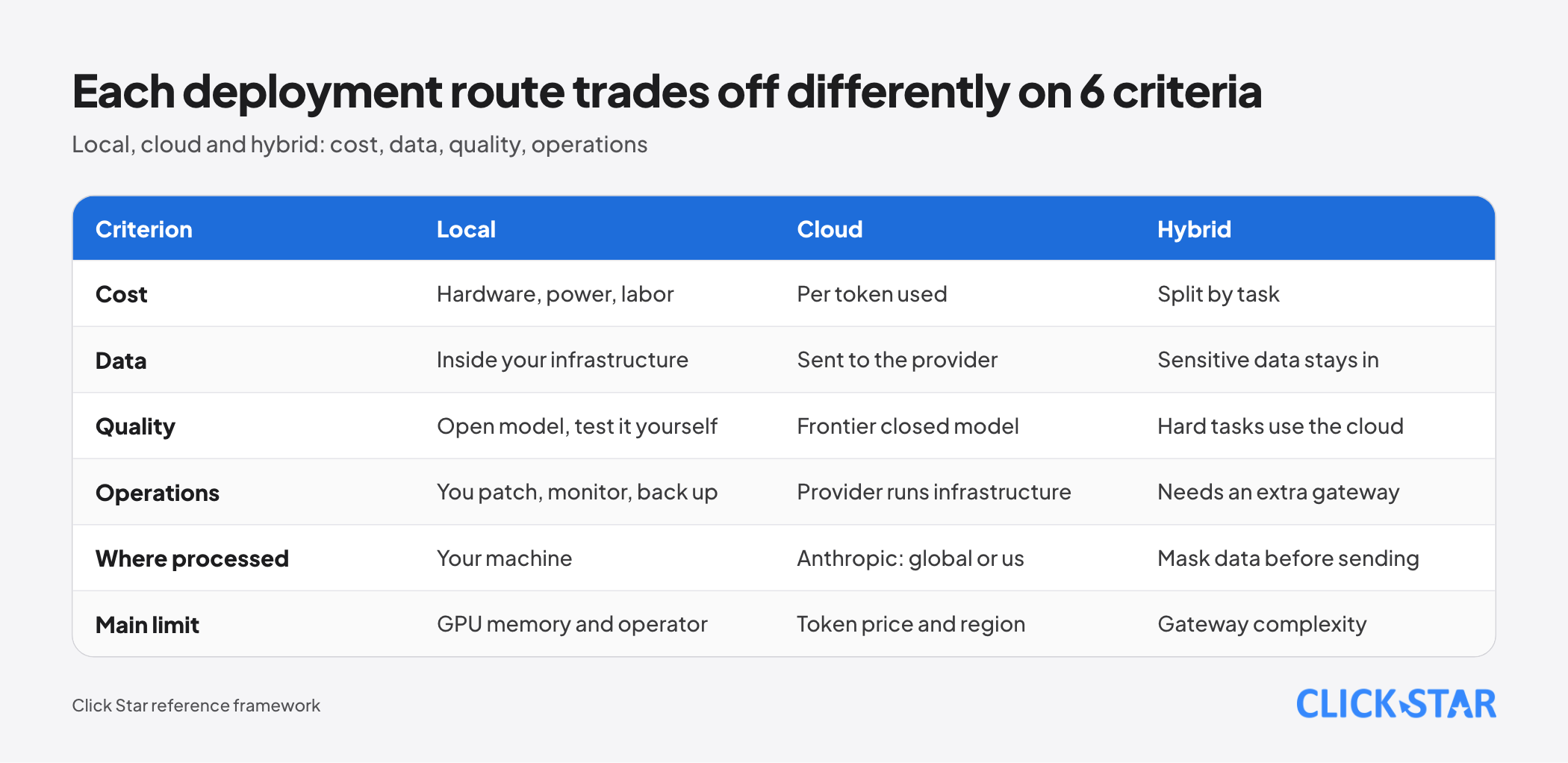
Many businesses ask whether to run AI models on their own machines so data never leaves the company, or keep calling cloud APIs. The answer depends on 4 things: real cost, data risk, quality on the specific job, and who operates the system.
This article draws on Hugging Face model pages, Ollama, llama.cpp and vLLM documentation, the pricing pages of Anthropic, OpenAI and Google, Epoch AI analyses and a Cisco study, checked to October 21, 2026.
It answers when to run locally, use the cloud or combine them. Click Star already has articles on token optimization, choosing Claude models, AI chatbots and protecting customer data, so it does not repeat them. Click Star sells AI integration services, so it has an interest here; the article also covers cases where self-hosting is the wrong choice.
Key points
- An "open-weight" model lets you download weights and run them, but is not necessarily open source: the OSI definition also requires training data information and training code. The license decides what you may do.
- As of October 2026, gpt-oss, Gemma 4 and Qwen3.5 use Apache 2.0, DeepSeek V4.1 Flash uses MIT, and Llama 4 uses Meta's own license with attribution and naming conditions.
- Memory is the first limit: weights take roughly parameters times bits divided by 8, plus a KV cache that grows with context length and users.
- Cost is not just the GPU: add power, labor and redundancy, then compare with official API prices, which include a model at 0.10 USD per 1 million input tokens.
- Running locally keeps data in your infrastructure but shifts security to you: Cisco found 1,139 Ollama servers exposed to the internet, 214 answering without authentication.
- Epoch AI estimates open models trail frontier closed models by about 4 months (since January 2026). Vietnamese quality must be measured on your own samples.
What an open-weight model is, and how it differs from open source
An open-weight model is one whose publisher releases the weight files (the trained parameters) so others can download and run them. What you may do with them is set by the license, not by the fact they can be downloaded.
According to the Open Source Initiative (Open Source AI Definition 1.0), open source AI must allow 4 freedoms: use, study, modify and share. That requires 3 parts: information about the training data, the code used to train and run the system, and the parameters.
A model that releases only parameters, without data information and training code, is open-weight but does not meet the OSI definition. Click Star has not checked each model against this definition.
For a business, the practical question is what the license allows commercially. According to the Apache 2.0 text on Google's page, it sets no field-of-use limits; the conditions are to include the license, keep notices and not use trademarks.
Llama 4 is different. Under Meta's Llama 4 Community License, a product with over 700 million monthly active users needs a separate license, "Built with Llama" must be displayed, and a distributed model improved with Llama must have a name beginning with "Llama". Have legal counsel read the original.
Open model families available (October 2026)
Click Star lists only what the publisher's page or model card confirms, and does not rank quality.
- gpt-oss from OpenAI: gpt-oss-20b has 21B parameters (3.6B active) and runs within 16 GB of memory thanks to MXFP4 quantization; gpt-oss-120b has 117B (5.1B active) and fits on 1 GPU of 80 GB. License: Apache 2.0.
- Gemma 4 from Google DeepMind: the model card lists Apache 2.0; the 31B version has 30.7B parameters and a 256K-token context. According to tech press (secondary source), Gemma 4 launched on April 2, 2026 and moved to Apache 2.0.
- Qwen3.5 from Alibaba: the Qwen3.5-9B card lists Apache 2.0, 201 languages and dialects, and a 262,144-token context.
- DeepSeek V4.1 Flash: the card lists the MIT license, 552B backbone parameters and context up to 1 million tokens, and states no GPU requirement.
Language counts are publisher claims, not measurements of Vietnamese; the Gemma 4 card lists both "over 140 languages" and "35+ languages" out of the box.
Tools for running locally: Ollama, llama.cpp, vLLM
Ollama suits quick trials on 1 machine. According to GitHub, Ollama uses the MIT license, runs on macOS, Windows, Linux and Docker, and uses llama.cpp as its backend. According to its FAQ, Ollama listens only on 127.0.0.1 by default; exposing it to the network requires setting OLLAMA_HOST.
llama.cpp suits varied hardware: MIT license, Apple silicon, CUDA and Vulkan, work split between CPU and GPU, and an OpenAI-compatible llama-server. vLLM suits many users: Apache 2.0 license, PagedAttention and continuous batching; the Qwen3.5 card recommends vLLM or SGLang for production.
One small trap: the Ollama library has ":cloud" tags (for example gemma4:cloud). Per Ollama's documentation they run on Ollama's servers, not your machine, so check the tag if data must not leave your infrastructure.
How much memory you need
Weights take roughly parameters times bits per parameter divided by 8. Hugging Face's table for Llama 3.1 shows an 8B model needing 16 GB at FP16, 8 GB at FP8 and 4 GB at INT4; a 70B model needs 140, 70 and 35 GB, excluding memory reserved for kernels.
Real files exceed the nominal bit count: per the llama.cpp README, Llama-3.1-8B at Q4_K_M uses 4.89 bits per weight (4.58 GiB).
The KV cache is the second part. Also according to Hugging Face, an 8B model at FP16 needs 0.125 GB for 1,000 tokens of context and 15.62 GB for 128,000 tokens. Each concurrent user needs a cache of their own.
For a mixture-of-experts (MoE) model such as gpt-oss, the model card shows all 117B parameters must still fit on 1 GPU of 80 GB. Click Star infers: memory follows total parameters, speed follows active parameters.
On hardware, Epoch AI estimates that at 4 bits, a 24 GB card runs models up to about 27B and a 32 GB card up to about 40B (8K context).
Cost: a framework instead of one number
There is no single right number, because local cost depends on volume and who operates it. The framework below adds 5 layers, then compares with API prices for the same volume.
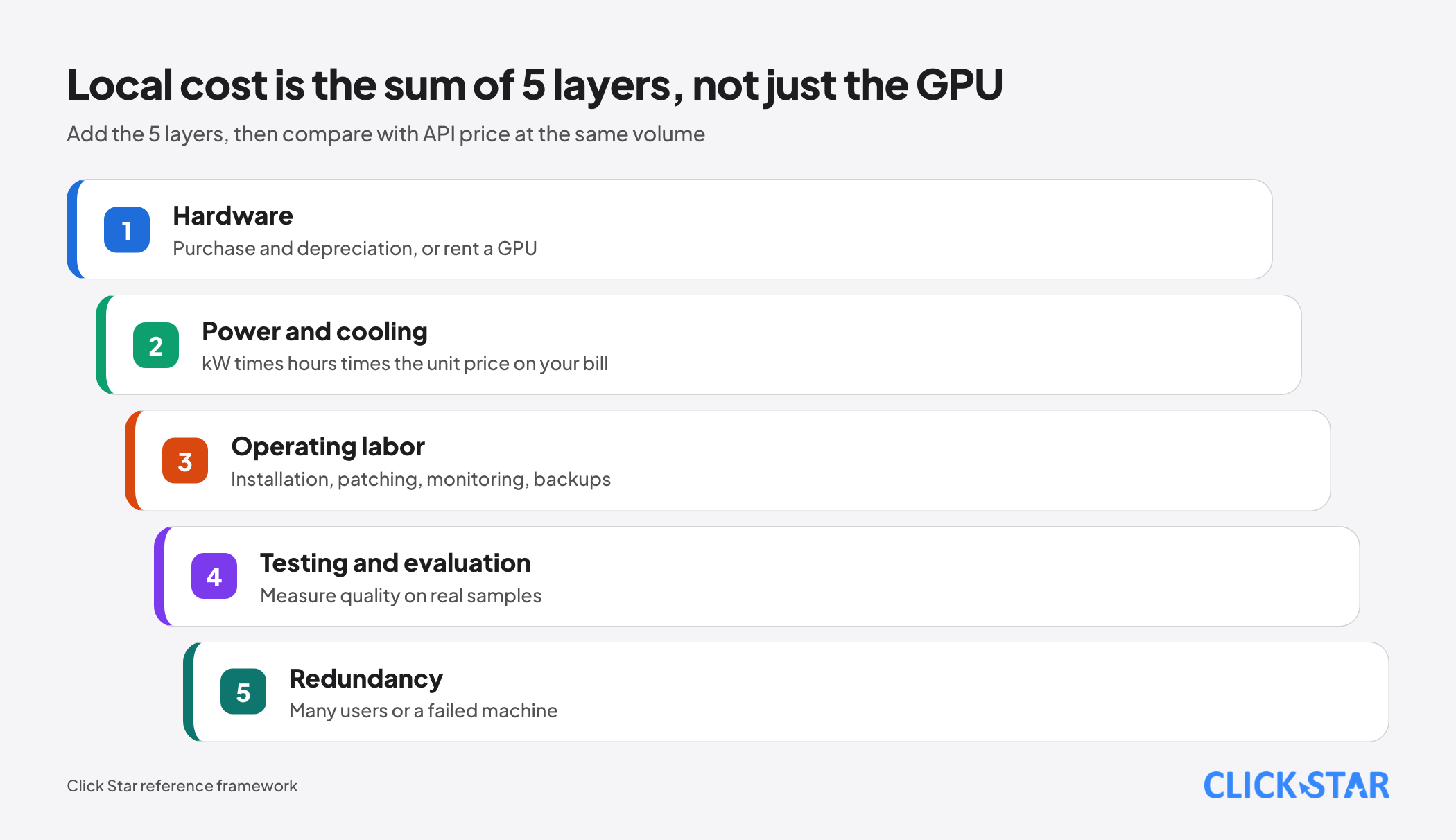
Layer 1, hardware: purchase and depreciation, or renting a GPU. Layer 2, power and cooling: kW times hours times the unit price on your bill. Layer 3, labor: installation, patching, monitoring, backups. Layer 4, testing and quality evaluation. Layer 5, redundancy for many users or a failed machine.
According to Anthropic, Claude Haiku 5.5 costs 0.10 USD for input and 0.50 USD for output per 1 million tokens (prompts up to 100,000 tokens), Sonnet 5.5 costs 2 and 10 USD, Opus 5.5 costs 4 and 20 USD; the Batch API gives a 50% discount. According to OpenAI, gpt-6-luna is 0.10 and 0.50 USD; according to Google, Gemini 2.5 Flash-Lite is 0.10 and 0.40 USD.
An illustrative calculation on an assumed volume, not a measurement: 100 million input tokens and 20 million output tokens per month at 0.10 and 0.50 USD is 10 + 10 = 20 USD. Break-even: the monthly fixed cost of the local machine divided by the average API price per token.
Consequence: at low or moderate volume, an API is usually cheaper than a GPU machine plus an operator. Local pays off when volume is large and steady and the machine runs near capacity.
Security and compliance: the data stays, and so does the responsibility
Running locally keeps data away from outside providers, but you become responsible for patching, access control, logging and backups.
The biggest risk is exposing the service to the internet by mistake. According to Cisco (published September 1, 2025), a Shodan search found 1,139 publicly exposed Ollama servers; 214 (about 18.8%) were running models and answering without authentication. Cisco recommends authentication, placing servers behind a firewall or VPN, and rate limiting.
The vLLM security documentation notes that --api-key protects only some paths, so a reverse proxy should allow only needed endpoints.
On the cloud side, Anthropic states that inputs and outputs of its commercial products (including the API) are not used for training unless you send feedback or opt in. OpenAI states API data is not used for training by default and abuse-monitoring logs are kept up to 30 days.
On processing location, Anthropic offers only 2 inference_geo values, "global" and "us", while OpenAI lists regions such as the US, Europe, Singapore and Japan, with no Vietnam. If data must be processed in-country, this is the main reason to consider running locally.
Click Star already has an article on the Law on Personal Data Protection No. 91/2025/QH15 and does not analyze it here. Running locally does not automatically satisfy the law; check the original text and ask a lawyer.
Quality: how far behind are open models
Open models are close but not level at the frontier. According to Epoch AI (published May 29, 2026), since January 2026 the strongest open models have trailed frontier closed models by about 4 months on average on its ECI index, an average gap of 8 points (90% confidence interval: 7 to 11).
Requiring open models to score clearly higher gives 6 months, and the earlier analysis (October 30, 2025) gave about 3 months. For small models that run on 1 consumer card, Epoch (August 15, 2025) estimates a lag of 6 to 12 months depending on the benchmark.
For Vietnamese, public benchmarks exist but no standard measure for your work. VMLU (ACL 2025) is a Vietnamese benchmark, and its authors note that prompt wording changes results. SEA-HELM (arXiv, February 2025) includes Vietnamese; its leaderboard is dated September 18, 2026.
Click Star could not read the Vietnamese-only scores there, so no ranking is given. A general score cannot replace a test on your own contracts, emails and customer conversations.
Hybrid: sensitive data stays inside, hard work goes outside
A hybrid splits work by sensitivity and difficulty. Tasks touching sensitive data (classification, masking identifiers, internal summaries) use a small local model. Hard tasks needing strong reasoning call a cloud API, with masked data only.
Conditions: clear classification rules, a gateway that routes each request, logs of what leaves, and a check on masking accuracy. Missed masking leaks data; wrong masking corrupts figures.
When running locally makes sense, and when it does not
Local usually makes sense when data must stay in your infrastructure, volume is large and steady, a mid-size model suffices, and someone can operate it. Click Star considers the operator the most overlooked condition.
It is premature when volume is low or irregular, frontier quality is needed, nobody owns security, or the goal is savings without counting labor.
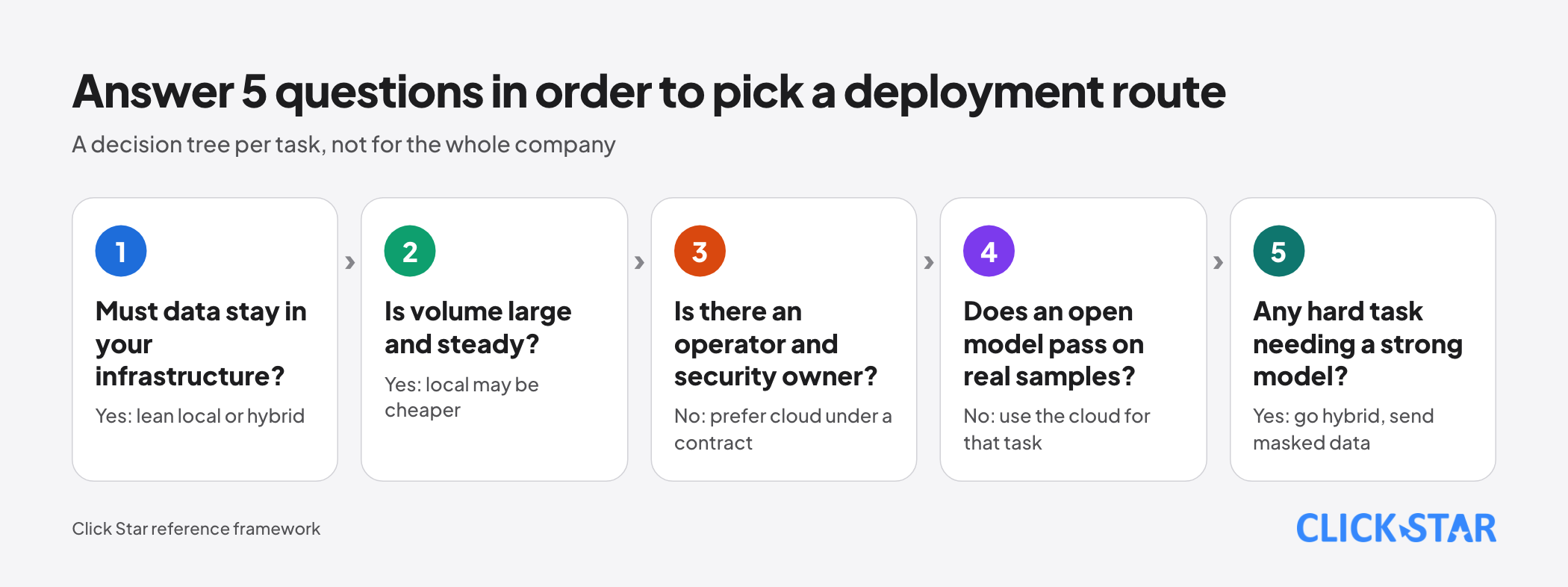
Click Star's view. The question to ask is "which job runs where", not "local or cloud" for the whole company. Each task has its own sensitivity, volume and quality requirement, so the result is often a hybrid.
On governance, running locally turns AI into a system that needs an owner, patching, access control and backups. Without those, the risk can exceed that of a cloud provider under a clear contract.
A 2-week trial plan
The goal is to decide on your own measurements. Pick 1 task, for example classifying support emails.
Measure 5 indicators on the same samples and prompt for both options: quality on a fixed rubric, latency, token speed, memory under concurrent users, and real cost per 1 million tokens (including power and labor).
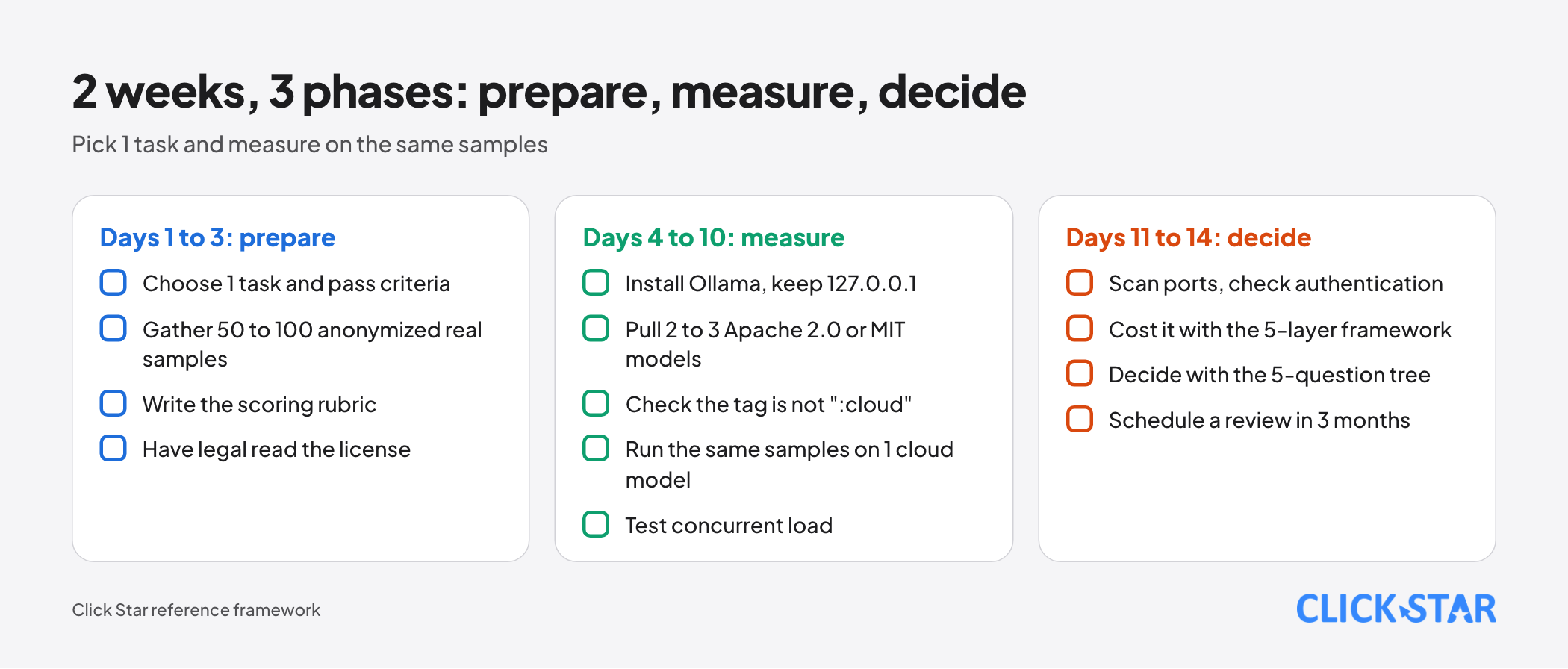
- Days 1 to 3 (prepare): choose the task and pass criteria; collect 50 to 100 real, anonymized samples; write the scoring rubric; have legal review the model license.
- Days 4 to 10 (measure): install Ollama on 1 machine, keep it on 127.0.0.1, pull 2 to 3 Apache 2.0 or MIT models and check the tag is not ":cloud"; run the samples, then run the same samples on 1 cloud model; test concurrent load.
- Days 11 to 14 (decide): scan ports and check authentication through a reverse proxy; compute cost with the 5-layer framework; decide with the 5-question tree; schedule a review in 3 months.
Common mistakes
- Assuming "downloadable weights" means "open source" and using them commercially without reading the license.
- Counting only the GPU, ignoring power, labor, patching and redundancy.
- Choosing a model from a general leaderboard without testing it on your own Vietnamese documents.
- Exposing Ollama or vLLM to the network without authentication and a firewall.
- Forgetting the KV cache when context or user count grows, which exhausts memory.
- Running a ":cloud" tag while believing the data stays on your machine.
What is not known
Click Star has no independent measurement of Vietnamese quality for each open model on business tasks, and could not read Vietnamese-only SEA-HELM scores. No electricity or GPU prices for Vietnam are given because no verified official source was available.
The Gemma 4 launch date comes from a secondary source, and Epoch AI's analyses have wide confidence intervals.
Related posts


Need tailored advice for your business?
Click Star helps you build a solution that fits your industry and scale. We answer every question during business hours.