Visitors reject cookies: what can Google Ads still measure?
When a visitor rejects cookies, Google Ads may still receive cookieless pings, modeled conversions and hashed data. This article sets out the conditions for each, based on Google documentation.
A shop runs Google ads to collect consultation sign-ups. A visitor clicks the ad, lands on the page, taps Reject on the cookie banner and still fills in the form. Does the Google Ads report count that sign-up?
Short answer: usually not counted directly, but Google may estimate part of it.
How much depends on 3 things: how Consent Mode (the mechanism that tells Google whether the visitor agreed or refused) is set up, whether Google has enough data to estimate, and whether hashed customer data is sent. Checked up to October 24, 2026.
The sources are Google for Developers documentation, Google Ads Help and Google's advertising policies. Click Star already has separate articles on cookie banners, Google Tag Manager, GA4 and Meta's Conversions API. This is not legal advice.
Key points
- Rejecting cookies does not necessarily leave Google with no signal. Advanced mode still sends "cookieless pings"; basic mode sends nothing.
- Consent Mode v2 needs 4 signals:
ad_storage,analytics_storage,ad_user_dataandad_personalization; Google says the last 2 came in November 2023. - Modeled conversions are estimates, not counts, and they only run when there is enough data: Google Ads names a threshold of 700 ad clicks over 7 days for each domain and country pair.
- Enhanced conversions sends an email or phone number hashed with SHA256. It does not replace asking for consent: when
ad_user_dataisdenied, the hashed data is not used. - Check with Tag Assistant and the Diagnostics tab, then compare Google Ads numbers with real customers in the CRM.
What does Google receive when a visitor rejects cookies
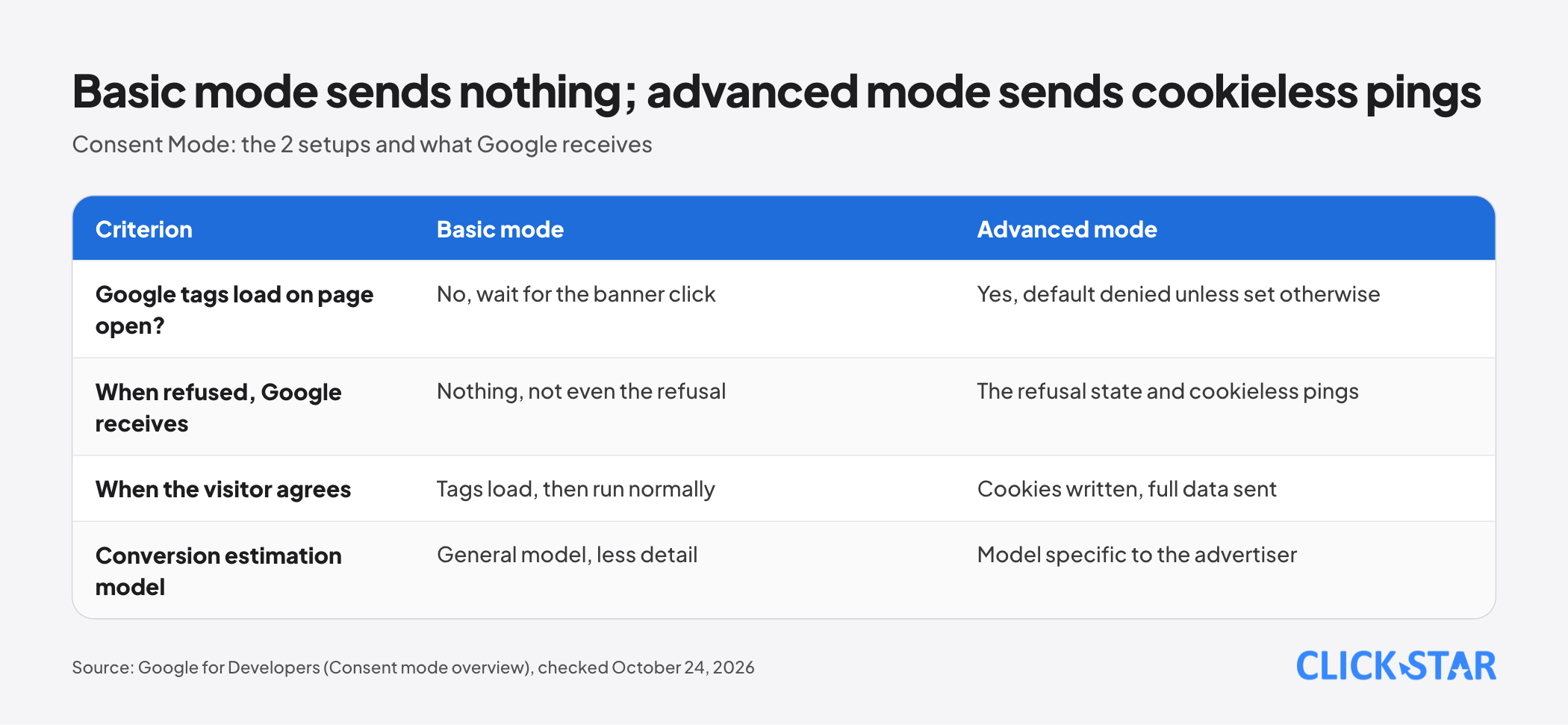
It depends on the mode you set up. The Consent mode overview from Google for Developers (updated July 30, 2026, as shown on the page) describes 2 modes: basic and advanced.
Basic mode is like "keep the door shut until the visitor agrees". Google tags load only after the visitor interacts with the banner. If the visitor refuses, no data reaches Google, not even the refusal, and Google Ads uses a general model.
Advanced mode is like "open the door but hand out no cookies". Tags load as soon as the page opens, with a default of denied unless you set otherwise. When the visitor refuses, the tag writes no cookie but still sends a cookieless ping, a small signal that carries no cookie.
Per Google Ads Help (About consent mode, no date shown, read October 24, 2026), a ping can include technical data, whether the page carries an ad click ID (GCLID) and the consent state. Google says this mode allows a model specific to each advertiser.
The documentation is inconsistent: on the About consent mode page, a line says advanced mode defaults to consented, while the comparison table says denied. The setup guide also says no consent mode values are set by default. Set a value for each signal yourself.
The 4 consent signals and how to set them in the right order
Each signal has a value of granted (allowed) or denied (refused), according to the Consent mode overview:
ad_storage: storing cookies or device IDs for advertising.analytics_storage: storing cookies for analytics, such as visit duration.ad_user_data: sending user data to Google for advertising.ad_personalization: personalized advertising, such as remarketing.
When ad_user_data is denied, collecting personal data for advertising is off, including user_id and the hashed data of enhanced conversions. When ad_storage is denied, tags neither write nor read advertising cookies, but the full URL, including the GCLID, is still collected unless you turn on ads_data_redaction.
Code order matters. Per the guide "Set up consent mode on websites" (updated October 13, 2026), the gtag('consent', 'default', ...) command must run on every page, before any command that sends measurement such as config or event. In the wrong order, defaults have no effect.
With Google Tag Manager, Google recommends setDefaultConsentState and updateConsentState, because gtag commands are queued behind other messages and may not be processed before the next event. If the banner loads slowly, use wait_for_update (Google's example: 500 milliseconds).
Consent Mode does not save the visitor's choice: the website must store it and send the update command on the page where the visitor clicks. Defaults can be set by region with the region parameter.
Modeled conversions: an estimate, not a measurement
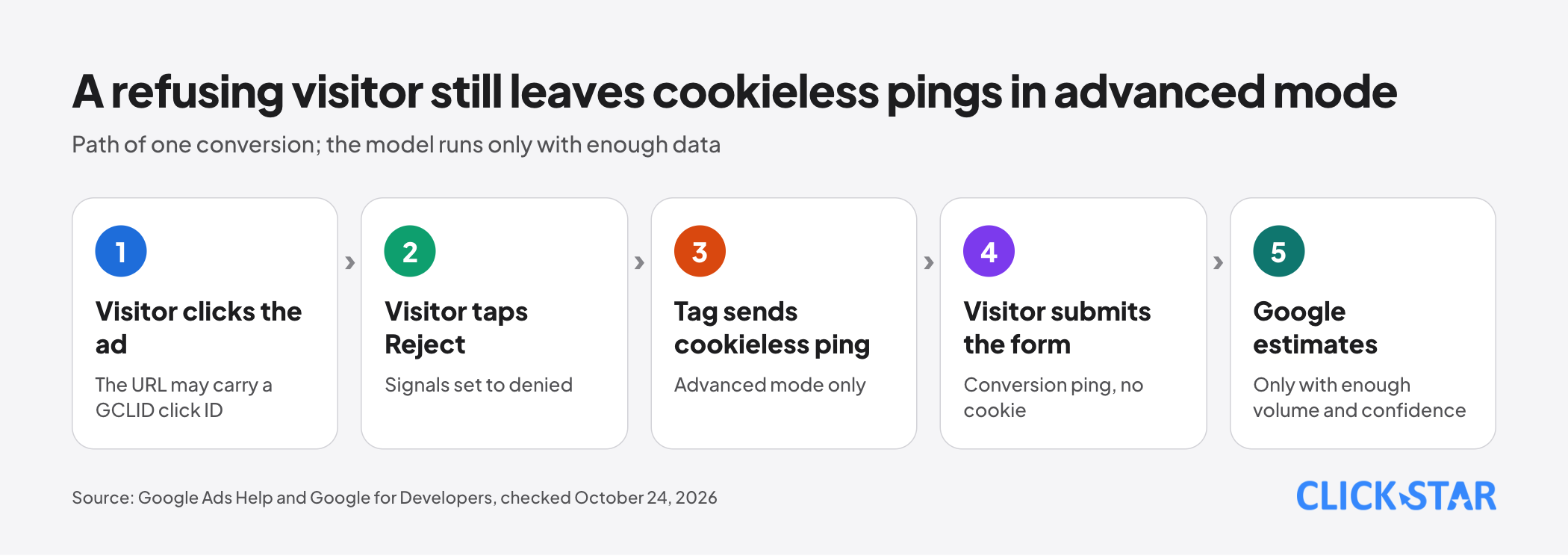
A modeled conversion is a number Google estimates for the part it cannot observe, shown in the Conversions column alongside observed conversions.
Per Google Ads Help (About modeled online conversions, no date shown), Google usually has both click data and conversion data but lacks the link between them. The model decides whether a click led to a conversion, not whether a conversion happened.
The model does not run for every account. The "Verify consent mode implementation" page names a threshold of 700 ad clicks over 7 days for each domain and country pair.
Click Star's inference: a small ad budget may take long to reach the threshold, leaving the report without the visitors who refused. Google also says it includes modeled conversions only when confidence is high, so some real conversions go uncounted.
Modeled conversions can take up to 5 days to settle, and their value can be revised upward over several days. Do not cut budget based on yesterday's number.
Enhanced conversions: what the hashed customer data adds
Enhanced conversions adds information the customer typed in (email, phone number, name, address), hashed with SHA256, to the conversion tag. Hashing turns text into a one-way code. Google matches it with the Google account the customer was signed in to when interacting with the ad (About enhanced conversions).
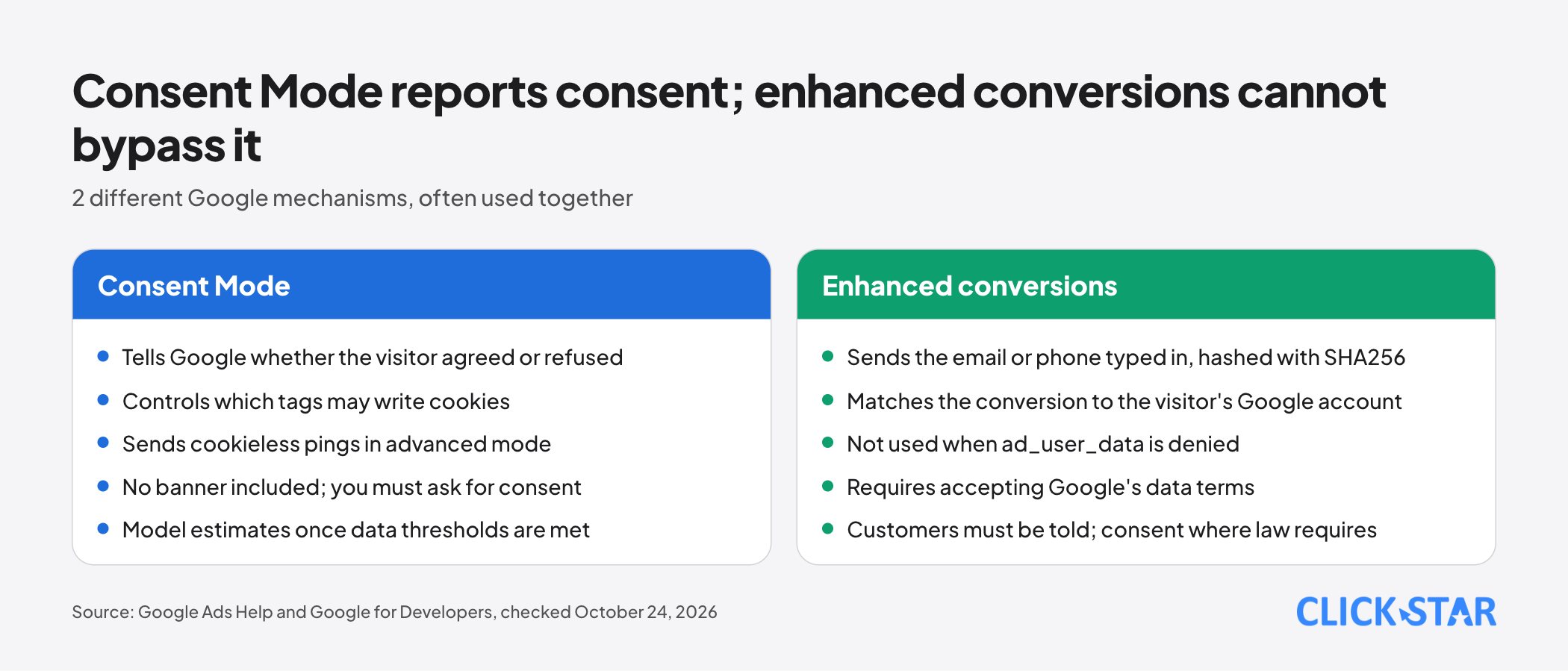
2 things are often mixed up. Consent Mode reports the consent state and controls cookies. Enhanced conversions sends customer-typed data to match a conversion with a click, and does not override Consent Mode.
As covered above, a denied value for ad_user_data switches the hashed data off. The Google tag setup page adds: the tag collects data only after you accept the data terms and, where applicable, the required consent signals are granted.
Technical requirements, according to "Set up enhanced conversions for web using the Google tag":
- At least an email, or first name, last name, postal code and country. A phone number must accompany an email or a full name and address.
- Normalize before hashing: trim spaces, lowercase, phone numbers in E.164 format (with + and country code). Hash with SHA256 in hex, or send unhashed data and let Google process it.
- The data must be available when the conversion tag fires. Conversions imported from Google Analytics goals are not supported.
Per the Google Ads Customer data policies (no date shown), advertisers must tell customers their information is shared with third parties for ad measurement, and ask for consent where the law requires it.
According to the setup page, the impact appears after about 30 days. The diagnostics report appears after about 72 hours (Google tag page) or 48 hours (Tag Manager guide); these 2 pages disagree.
Per the page "Updates to your enhanced conversions settings", from June 2026 the web and leads versions merge into a single switch. That page says "soon" while the setup pages say "now combined", so check your account.
The same page says that from June 15, 2026, offline conversion imports move to the Data Manager API and are blocked in the Google Ads API. Check this if your CRM pushes leads via the API.
What this means for Vietnamese businesses
Click Star found no measurement of how many Vietnamese visitors click Reject, or how much modeling recovers for Vietnamese sites, so no impact figure is given.
Google's EU user consent policy (no date shown) applies to end users in the European Economic Area, the UK and Switzerland. Vietnamese law is outside this article's scope.
Ask your legal team 3 questions: when a banner is needed, what the default should be in each region, and under which conditions hashed data may be sent.
Options (a Click Star reference framework, not taken from outside sources):
- Option 1, basic mode: the least data, suited to legal requiring nothing be sent before consent. The report misses visitors who refused.
- Option 2, advanced mode: cookieless pings and an advertiser-specific model. Needs legal approval and enough clicks.
- Option 3, add enhanced conversions: send hashed data of visitors who agreed. Needs a form collecting an email or phone number and a clear privacy policy.
Click Star's view. Google Ads numbers after installing Consent Mode include estimates, so they should not be the source of truth for revenue reports. CRM leads and orders are; Google Ads is for optimizing ads and cross-checking.
The easiest mistakes are code order, missing the 2 newer signals, and sending hashed data when the privacy policy does not say so. Click Star works in digital marketing, CRM and CDP, so it has a related interest.
How to check with Tag Assistant and Google Ads
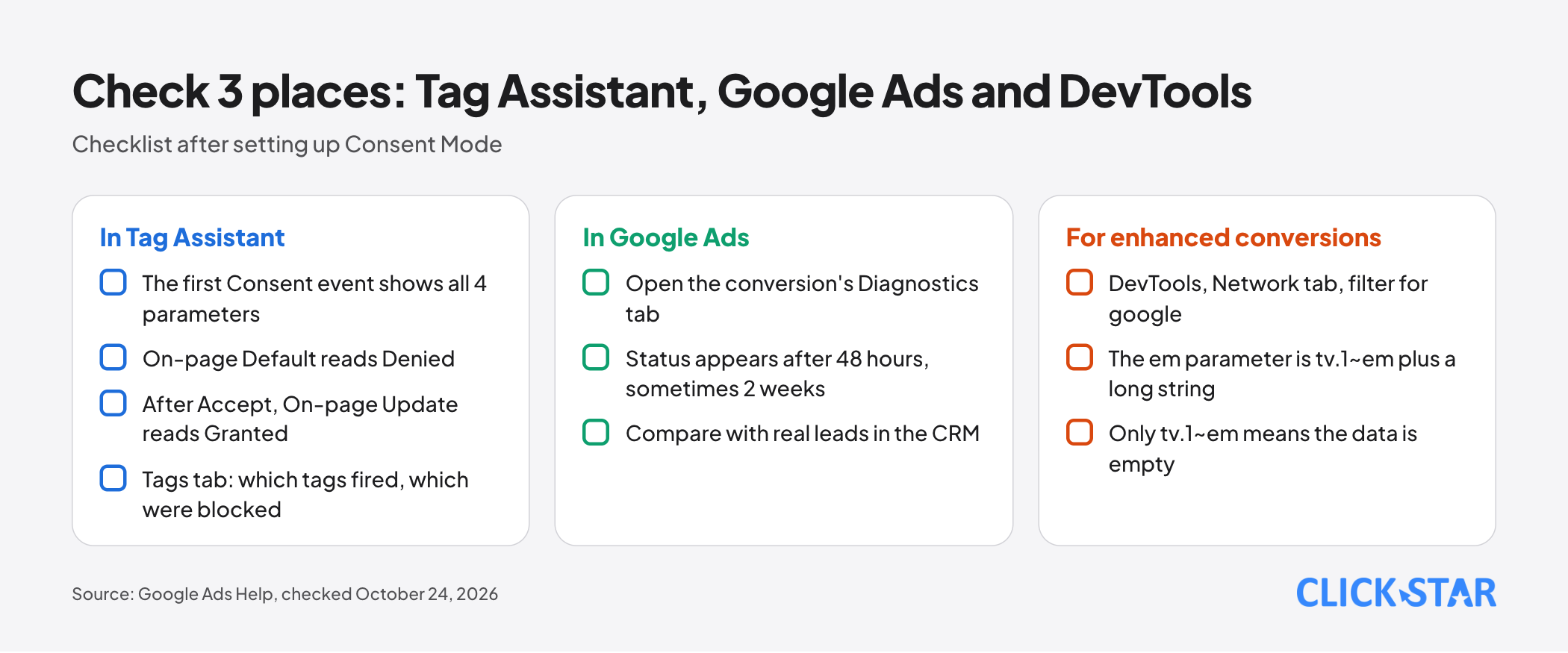
Per the page "Verify consent mode implementation" (Google Ads Help, no date shown), Google recommends Tag Assistant. In Summary, open the first Consent event and check that all 4 parameters appear under API Call, with On-page Default set to Denied.
After clicking Accept, On-page Update must be Granted. The Tags tab shows which tags fired or were blocked. Try both Reject and Accept with a test form submission, and log the test runs to exclude them from reports.
In Google Ads, open Goals, Conversions, Summary, the website conversion, then the Diagnostics tab. The status can take 48 hours to appear, sometimes up to 2 weeks.
For enhanced conversions, open DevTools, the Network tab, filter for "google" and find the request to googleadservices.com/pagead/conversion/. The em parameter in Payload must be tv.1~em followed by a long string; if it is only tv.1~em, the data is empty. For a phone number, the parameter shows tv.1~pn.
What to do: a 14-day plan
A Click Star reference framework, not from outside sources, with 5 stages.
- Days 1 to 2: ask legal the 3 questions, choose option 1, 2 or 3 and record the decision.
- Days 3 to 5: set defaults for all 4 signals, send the update on click, store the visitor's choice, check with Tag Assistant.
- Days 6 to 7: record the baseline: banner consent rate, Google Ads conversions and real CRM leads for the same period.
- Days 8 to 10: for option 3, normalize emails and phone numbers, turn on enhanced conversions, check the
emparameter. - Days 11 to 14: read Diagnostics, compare with the CRM again, calculate cost per lead from the CRM and schedule a review after 28 days.
Common mistakes
- Assuming that installing Consent Mode settles the legal side, when Google says it provides no banner.
- Placing the default command after the Google tags have already run.
- Sending only the 2 older signals and omitting
ad_user_dataandad_personalization. - Reading modeled conversions as counts, or adjusting budget on the first days' numbers.
- Installing basic mode and expecting the results of advanced mode.
- Sending hashed data of visitors who refused, or when the privacy policy says nothing about it.
- Not storing the visitor's choice, so each page falls back to
denied.
What is not known
- Click Star has no measurement of how many Vietnamese visitors reject cookies, or how much the model recovers for small Vietnamese businesses. The pages read do not state model accuracy for individual accounts.
- Google's pages disagree on 3 points: the default of advanced mode, 48 or 72 hours for the diagnostics report, and "soon merged" or "already merged" for enhanced conversions.
- Most Google Ads Help pages show no update date. Click Star has not tested on a real ad account; behavior here follows the documentation.
Related posts

Need tailored advice for your business?
Click Star helps you build a solution that fits your industry and scale. We answer every question during business hours.