Reading Meta ads reports: the metrics to track and the signs of a troubled campaign
The article explains each Meta Ads Manager metric by Meta's own definitions, the 2025 to 2026 counting changes, and a 5-step process for telling pretty numbers from business results.
A Meta Ads Manager report often feels clear: impressions are up, cost per click is down, results match the plan. Yet a campaign with "pretty numbers" can still bring in no customers, because each number measures a different stage of the journey.
This article draws on Meta documentation, checked on October 21, 2026. Meta's Business Help Center blocks Click Star's tools (only page titles open), so the definitions are confirmed through search results from that same site.
It answers: what each metric measures, when it misleads, and in what order to read the report so it connects to business results. Meta publishes no good or bad thresholds, so the article gives none.
Key points
- Each metric in Ads Manager measures one stage: spend, display, click, result. Whether the customer bought is only clear when you check against the CRM.
- Per Meta: link CTR is link clicks divided by impressions, CPM is spend divided by impressions times 1,000, and frequency is impressions divided by reach.
- Counting rules change: from January 12, 2026 the API drops the 7-day and 28-day view windows, and on March 3, 2026 Meta announced that clicks credited to web conversions include link clicks only.
- Ads Manager numbers often differ from the CRM, GA4 and Events Manager because each counts by its own rules. A gap is not necessarily an error.
- The warning signs in this article are Click Star's reasoning framework, not a Meta standard.
- A 5-step process: fix the comparison period, check the data, read along the chain, split by dimension, check the CRM.
Where pretty numbers and business results part ways
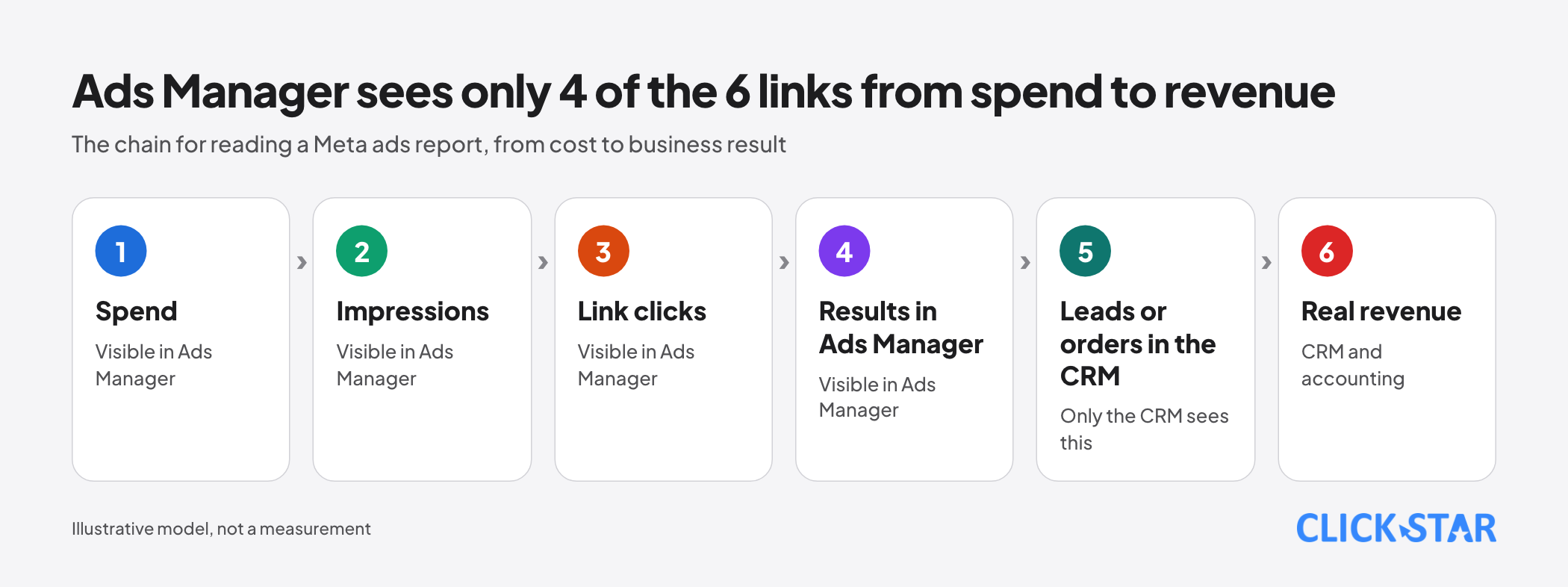
Click Star pictures a chain of 6 links: spend, impressions, link clicks, results in Ads Manager, leads or orders in the CRM, real revenue. Ads Manager sees the first 4 links; the last 2 live in the CRM and in accounting.
This is an illustrative model, not a measurement. A "pretty number" is arithmetically correct, such as a high CTR, yet a later link can still be broken.
The core metrics: Meta's actual definitions
Definitions come from Meta's Business Help Center, confirmed through search results and read on October 21, 2026.
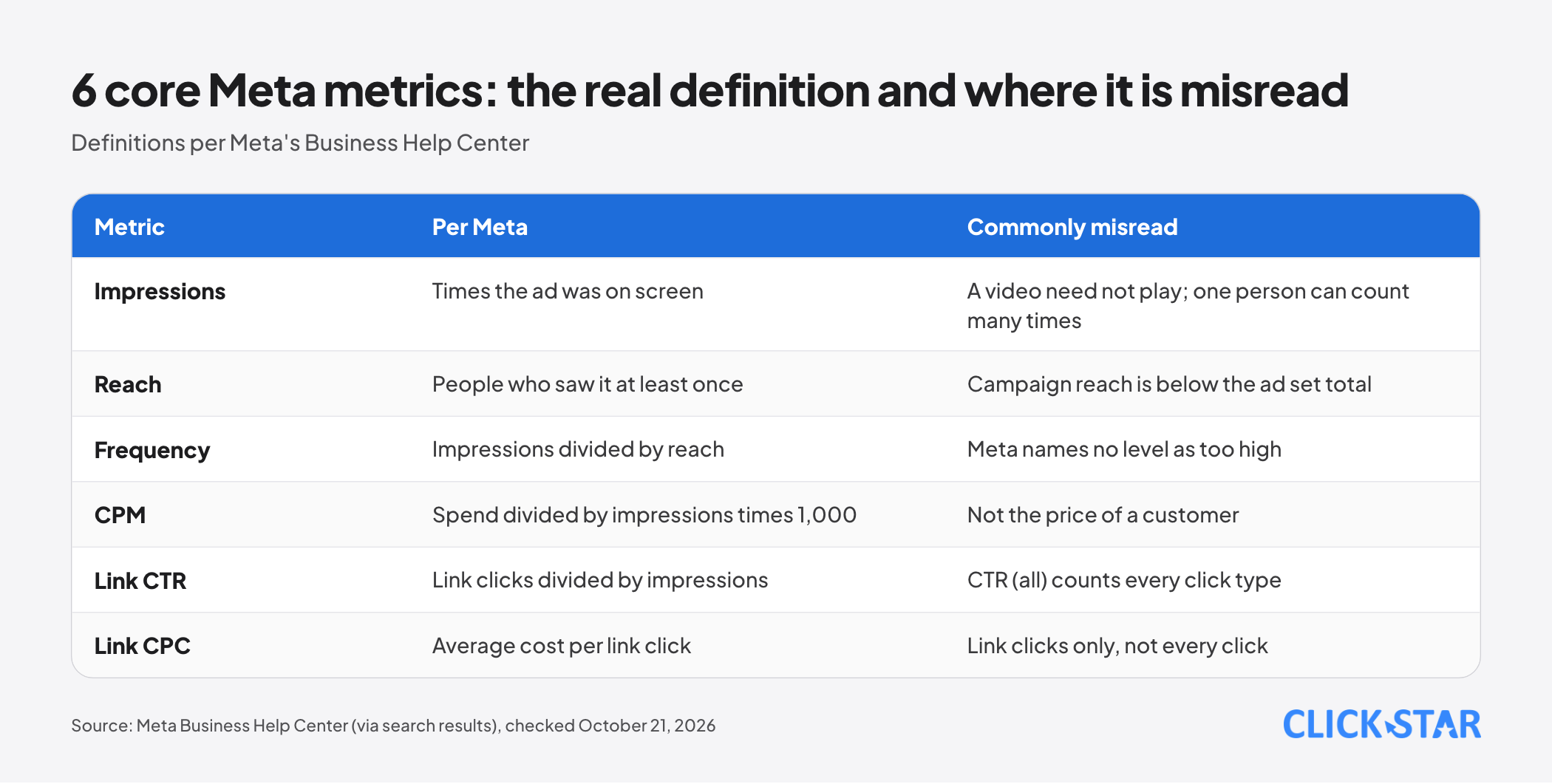
Impressions. The number of times an ad was on screen. One person seeing it twice counts as 2 impressions, and a video need not start playing.
Meta's Instagram methodology page counts an impression as soon as any part of the ad appears. The Media Rating Council standard (release of August 18, 2015, for desktop) is stricter: 50% of pixels in view for 1 continuous second.
Reach. The number of people who saw the ad at least once; campaign-level reach can be lower than the sum of its ad sets.
Frequency. Impressions divided by reach. Meta names no level as too high; its guidance only says that if results fall as frequency rises, the audience may be tiring of the ad.
CPM. Spend divided by impressions times 1,000: the price of 1,000 impressions, not the price of a customer. According to Meta for Business, the auction weighs ad quality as well as the bid.
Link CTR and link CPC. CTR is link clicks divided by impressions; CPC is the average cost per link click. The "CTR (all)" column counts every type of click, including page likes and comments, so it cannot be lower than link CTR.
Results, cost per result, ROAS and leads
Results. Per Meta, the number of times an ad achieved its goal, based on the campaign objective and chosen settings; it may not match billing. Cost per result is spend divided by results and is sometimes an estimate.
Purchase ROAS. Per Meta, purchase conversion value divided by spend, and it may be an estimate. The Marketing API documentation says ROAS depends on the attribution window and that the most recent days are immature, so choose a period that excludes today.
Leads. The number of forms or events recorded, not yet qualified customers. For instant forms, Meta names 2 goals: maximize the number of leads, and maximize the number of conversion leads (quality, used with the Conversions API for CRM). A low cost per lead speaks only about volume.
The learning phase and "Learning limited"
Per Meta (through search results), an ad set becomes "Learning limited" when it is unlikely to reach about 50 optimization events in the week after the last significant edit. Meta says this signals budget not being spent effectively, not a penalty.
Significant edits include pausing, or changing the optimization event, audience or creative. Cost per result swinging widely during learning is not yet a conclusion; log the date of every major edit.
Attribution windows and the 2025 to 2026 changes
Per Meta (through search results), the attribution setting is the finite period in which conversions can be credited to ads, set at ad set level; the default is 7-day click or 1-day view.
According to Meta's developer changelog, from June 10, 2025 the API returns numbers that match Ads Manager settings. Also per Meta, from January 12, 2026 the 7-day view and 28-day view windows stop returning data; 1-day click, 7-day click, 28-day click, 1-day engaged view and 1-day view remain.
On March 3, 2026, Meta for Business announced that for campaigns optimizing for website or in-store conversions, a "click" includes link clicks only. Conversions from shares, saves and other non-link-click actions move to engage-through attribution (the new name for engaged-view), and the video threshold drops from 10 seconds to 5.
Meta says the change rolls out gradually from late March 2026 and does not change billing. According to ppc.land (secondary source, March 4, 2026), reported click conversions may fall.
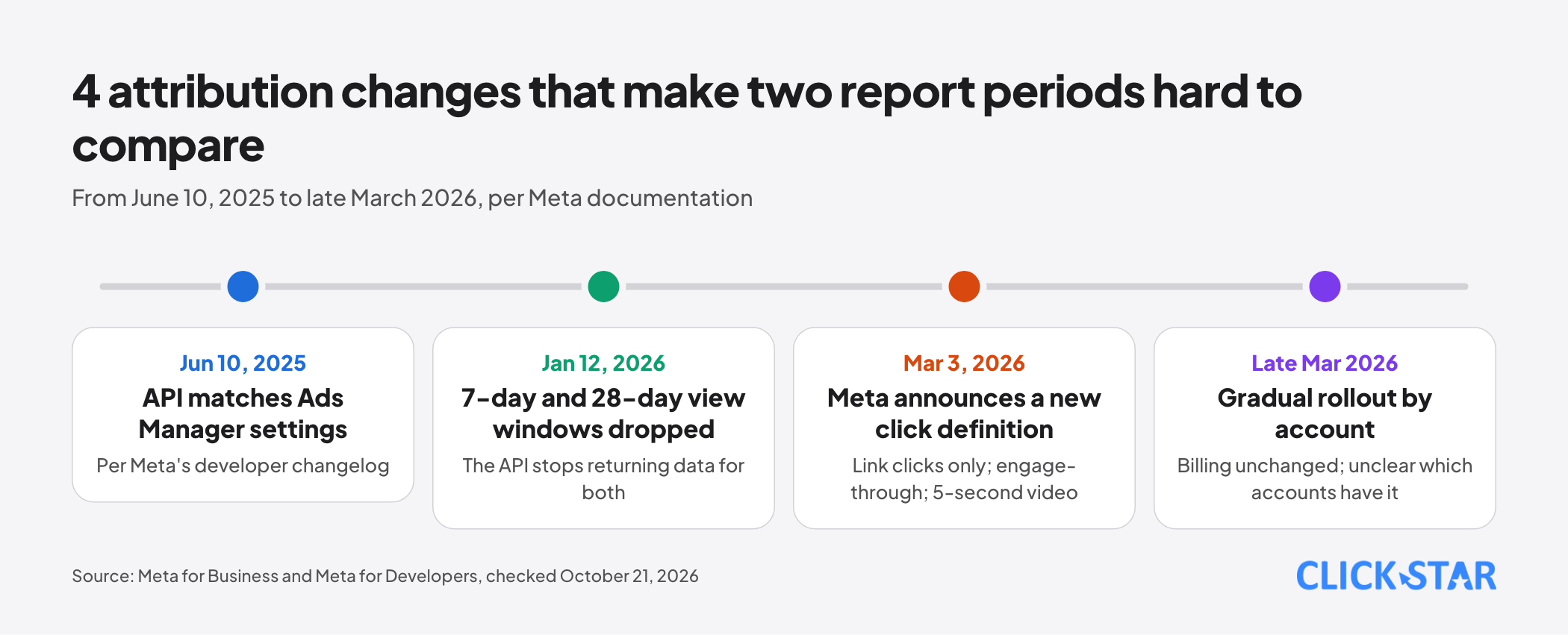
Two periods before and after the change may follow different definitions under the same column name. Click Star already has a post summarizing Meta's 2026 updates.
Breakdowns by placement and age, and quality diagnostics
Meta's Marketing API documentation says breakdown values are estimated, and some breakdowns must be enabled per account. The help pages (through search results) say breakdown rows can differ from the total because of sampling, and recommend automatic placements because the system allocates budget across placements.
Click Star's view: a placement table shows where the system chose to spend, so a low-CPM placement does not necessarily deserve more money.
Ad relevance diagnostics. In 2019 Meta replaced the relevance score with 3 rankings: quality, engagement rate and conversion rate (through search results). The explainer page still appeared on October 21, 2026, but Click Star could not open its content or confirm the columns still show in every account; check in Ads Manager.
6 common mistakes when reading the report
- Comparing Meta totals with the CRM without knowing the counting rules. Ads Manager counts only events credited to people who saw the ad, deduplicated; Events Manager counts before deduplication.
- Concluding on immature data: modeled conversions can arrive up to 3 days late (Meta's iOS 14 page, 2021).
- Changing the attribution window, or hitting a definition change, between two compared periods.
- Comparing campaigns with different objectives: results and cost per result are not the same unit.
- Looking at one metric alone. Meta advises reading frequency next to results.
- Adding numbers that do not add up: reach counts unique people, and breakdown rows can differ from the total because of sampling.
Signs of a troubled campaign: Click Star's reasoning framework
This is a Click Star reference framework, not drawn from outside sources and not a Meta threshold. Each line is a hypothesis to test; compare a campaign with itself over time, under the same settings.
- CPM up, link CTR down, frequency up: suggests ad fatigue or a narrow audience. Check the age of the creative and the audience size.
- CPM steady, link CTR down: suggests the message or image is less engaging. Check each ad.
- CTR and CPC steady but results down: suggests a problem after the click, such as a slow landing page or broken tracking. Compare link clicks with GA4 sessions.
- Cost per lead down but the qualified rate in the CRM down: suggests cheap but weak leads. Split by ad set and form.
- Long "Learning limited" with swinging cost per result: suggests too few optimization events. Check budget and audience size.
- Results in Ads Manager up but orders in the CRM flat: suggests tracking drift or double attribution. Check Pixel and Conversions API deduplication.
Pair each hypothesis with one small change and a review date, because changing many things at once hides what worked.
A 5-step process for reading the report
Click Star's process for weekly reporting.
- Fix the comparison period: same objective, same attribution setting, same period length, and drop the most recent immature days.
- Check the data: learning status, date of significant edits, and whether Pixel and Conversions API events are deduplicated with the same event_name and event_id.
- Read along the chain: spend and CPM, reach and frequency, CTR and CPC, then results. Stop at the first abnormal link.
- Split by ad, placement and age to find hypotheses, and write each hypothesis as one testable sentence.
- Check the CRM before deciding, then record the decision, the owner and the review date.
Connecting ad reports to the CRM to measure lead quality
The foundation is storing the lead ID with the source, campaign and ad set in the CRM. From there you can compute spend divided by qualified leads, a calculation Click Star proposes, not a Meta definition.
For instant forms, Meta offers the Conversions API for CRM to send bottom-of-funnel outcomes back to Meta. Per the developer documentation (read October 21, 2026), requirements include a 15 to 17 digit Meta lead ID, at least 200 leads a month, data uploaded at least daily, and the target stage occurring within 28 days of the lead.
Businesses under 200 leads a month can still measure with manual CRM reports.
Sending customer data to an overseas ad platform needs a check of consent duties under Vietnamese law; this is not legal advice.
Click Star's view. The ad report shows what Meta's system did; the CRM shows whether it mattered for revenue. When the two disagree, look for differing counting rules before deciding which is wrong.
Click Star provides digital marketing, CRM and CDP services, so it has an interest in this topic; the steps work equally with an in-house team or another provider.
Weekly report template and what to do
This template is a Click Star reference framework, not a Meta template and not taken from outside sources.
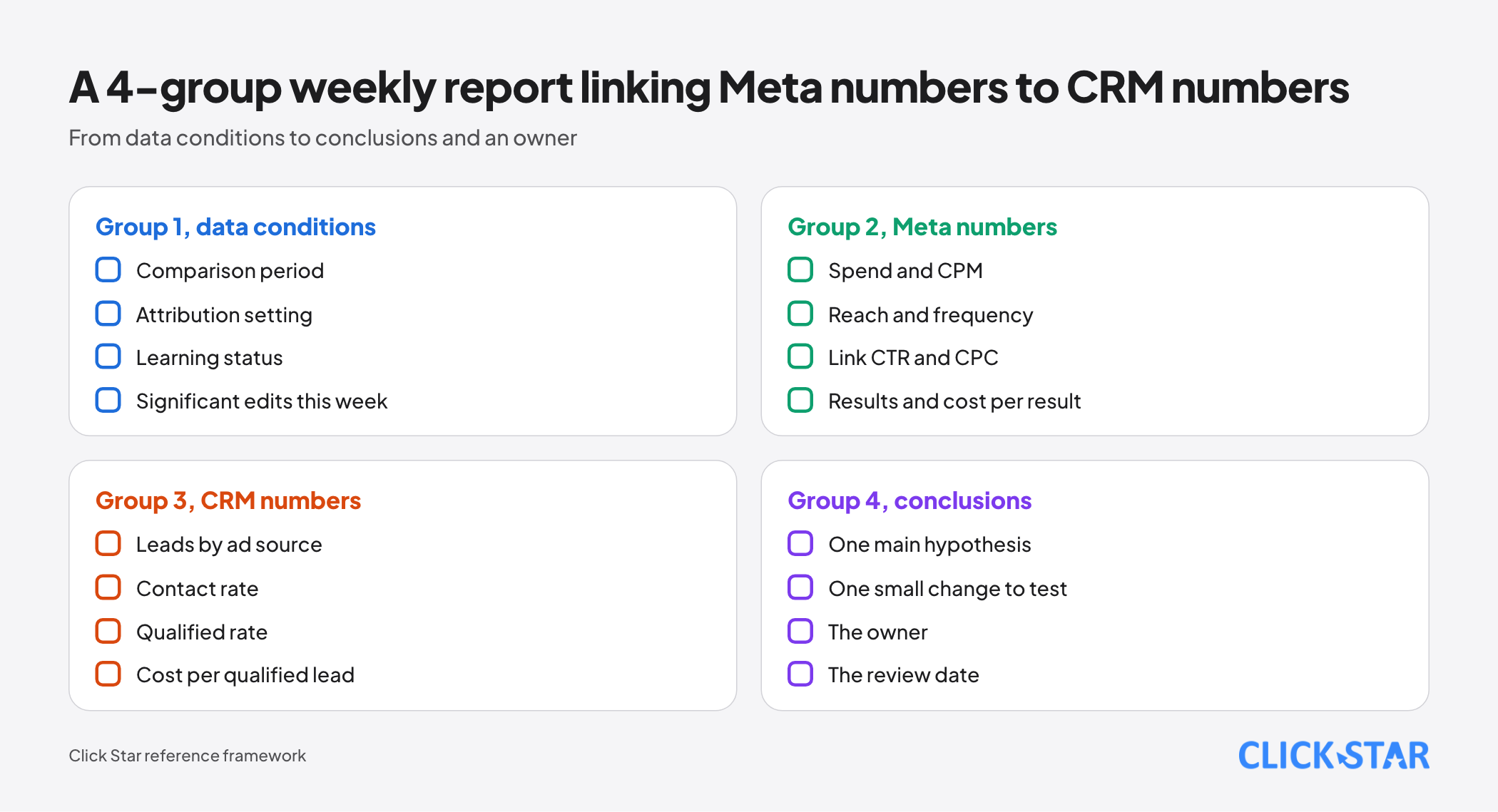
- Group 1, data conditions: comparison period, attribution setting, learning status, significant edits this week.
- Group 2, Meta numbers: spend and CPM, reach and frequency, link CTR and CPC, results and cost per result.
- Group 3, CRM numbers: leads by ad source, contact rate, qualified rate, cost per qualified lead.
- Group 4, conclusions: one main hypothesis, one small change to test, the owner, the review date.
Common mistakes
- Switching off an ad on the first 1 to 2 days alone, while the ad set is still learning.
- Making large edits continuously, so the ad set never leaves the learning phase.
- Setting targets from a "standard" threshold found on a blog when Meta publishes none.
- Reporting Meta numbers to leadership without the attribution setting and comparison period.
- Cutting or concentrating budget by placement or age only because CPM is low.
- Optimizing for cost per lead without measuring lead quality in the CRM.
- Not logging the dates of campaign changes, so a jump in the numbers cannot be explained.
What is not known
Meta publishes no good or bad thresholds for CTR, CPM, CPC or frequency, so Click Star gives none. Click Star also found no industry benchmark for Vietnam from sources it could open.
Meta's Help Center blocks tools, so definitions follow search results and need checking against the original pages. It is not confirmed whether the diagnostic columns still show in every account, or which accounts have received the March 3, 2026 change.
Related posts

Need tailored advice for your business?
Click Star helps you build a solution that fits your industry and scale. We answer every question during business hours.