Facebook Says 100 Orders, GA4 Shows 40: Why Do the Numbers Differ?
Why ad reports and GA4 disagree: attribution rules, conversion windows, ad views, dating and missing data, plus a way to reconcile with real CRM orders. Based on Google and WebKit documentation and a secondary source on Meta.
An online shop runs Facebook ads for an end-of-month sale. Ads Manager reports 100 orders, GA4 records only 40, and the order table in the sales software counts 55. This is an illustrative example, not a real measurement, but advertisers can meet this situation.
This article draws on Google Analytics and Google Ads help pages, WebKit documentation (the team behind Safari) and one independent guide to Meta Ads, checked on October 26, 2026. Meta's help pages block Click Star's tools, so the Meta part rests on a secondary source.
The short answer: usually no number is "wrong", because each place counts by its own rules. The article lays out those rules and a way to reconcile them with real orders in the CRM (customer relationship management software). Click Star already has articles on Meta CAPI, UTM and Consent Mode.
Key points
- Attribution is the rule that decides which ad or channel gets credit for an order. Each system has its own rules, so the same order can be credited in one place and not in another.
- Conversion windows differ: Google Ads defaults to 30 days for clicks, GA4 to 90 days for most key events, and Meta to 7 days after a link click, 1 day after other engagement and 1 day after a view (secondary source: Jon Loomer, March 10, 2026).
- An ad view without a click can count as an order in the ad platform, but GA4 has no visit to which it can give credit.
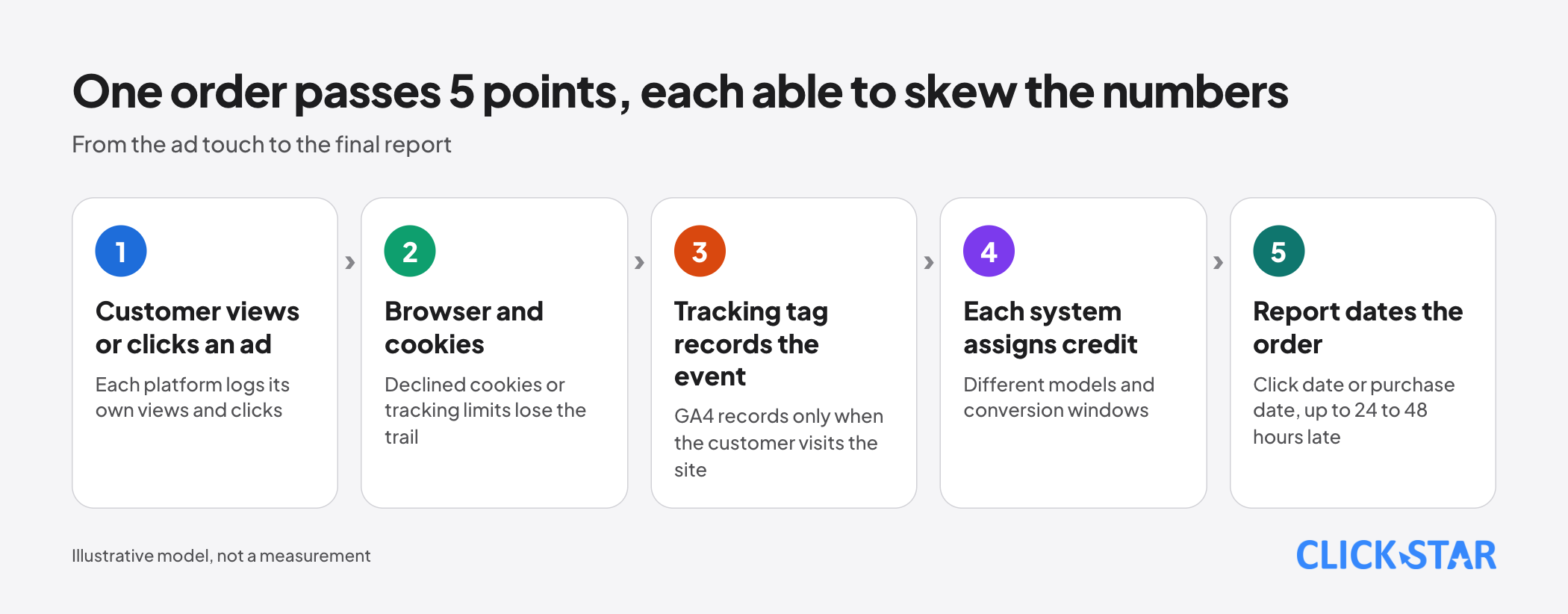
- The main Google Ads columns date an order to the day the customer clicked the ad, not the day of purchase, and reports can lag by 24 to 48 hours.
- Declined cookies, browsers that limit tracking and orders closed by message leave GA4 short of data. No standard measurement exists for Vietnam.
- Simple approach: treat real CRM orders as the source of truth, compare by sale date and record each place's settings. Google says a gap "often up to 20%" between Google Ads and Analytics is expected, but gives no method, and no standard exists for Meta versus GA4.
2 reports, 2 different questions
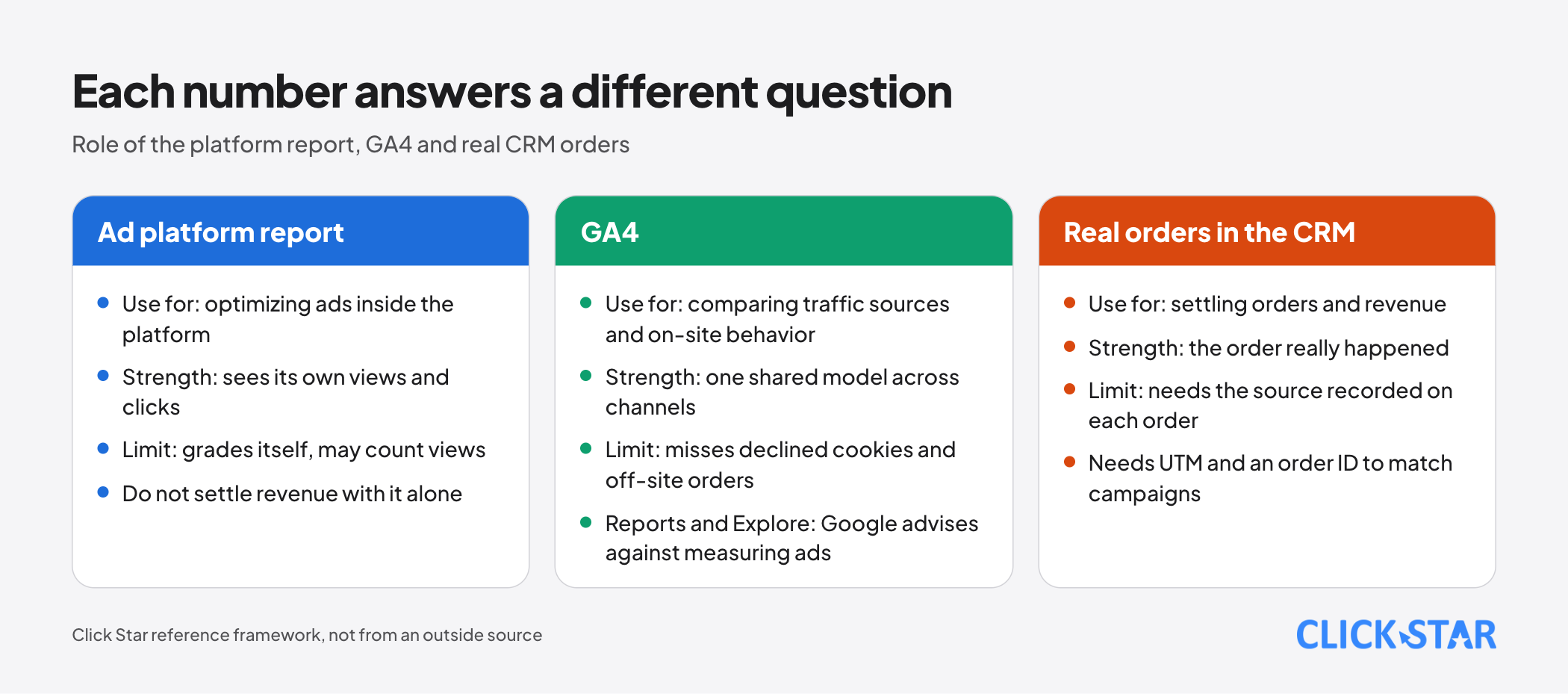
Meta's report answers "how many results were credited to Meta ads". GA4 answers "how many times important events happened on the website". The CRM answers "how many real orders were closed".
Google itself separates 2 concepts. According to "Conversions vs. key events" (no date shown, read October 26, 2026), a GA4 key event analyzes traffic sources and behavior on the website, while a conversion measures ad campaign performance.
That page advises against using the GA4 Reports or Explore sections to measure ad performance.
Attribution: one order, several claimants
A customer sees a Facebook ad in the morning, clicks a Google ad in the evening and buys (illustrative). Meta may claim the order through the view, Google Ads through the click, and GA4 assigns it by the model you chose.
According to the GA4 page "Get started with attribution" (no date shown, read October 26, 2026), attribution reports offer 3 models: data-driven, paid and organic last click, and Google paid channels last click. No model credits direct visits, unless the whole journey is direct.
The data-driven model uses machine learning to split credit across touchpoints. The page says an order can be re-attributed up to 7 days later, so yesterday's number can change.
Google Ads also has last click and data-driven models, and data-driven is the default for most conversion actions (page "About attribution models", read October 26, 2026).
For Meta, according to Jon Loomer's article "How Meta Ads Attribution Works in 2026" (published March 10, 2026, secondary source, not a Meta page), an order is reported to Meta if it happens within the set window after a click, an engagement or a view.
Click Star's inference, not quoted from a source: each platform sees only its own ads, so one order can be claimed by several platforms, and their combined orders can exceed the real number.
GA4 itself has a trap. According to "Select attribution settings" (no date shown, read October 26, 2026), changing the attribution model affects only reports using event-scoped dimensions, such as Source or Campaign. Session-scoped dimensions, such as Session source, do not change.
Conversion windows and ad views
A conversion window is the period after an ad touch during which an order still counts.
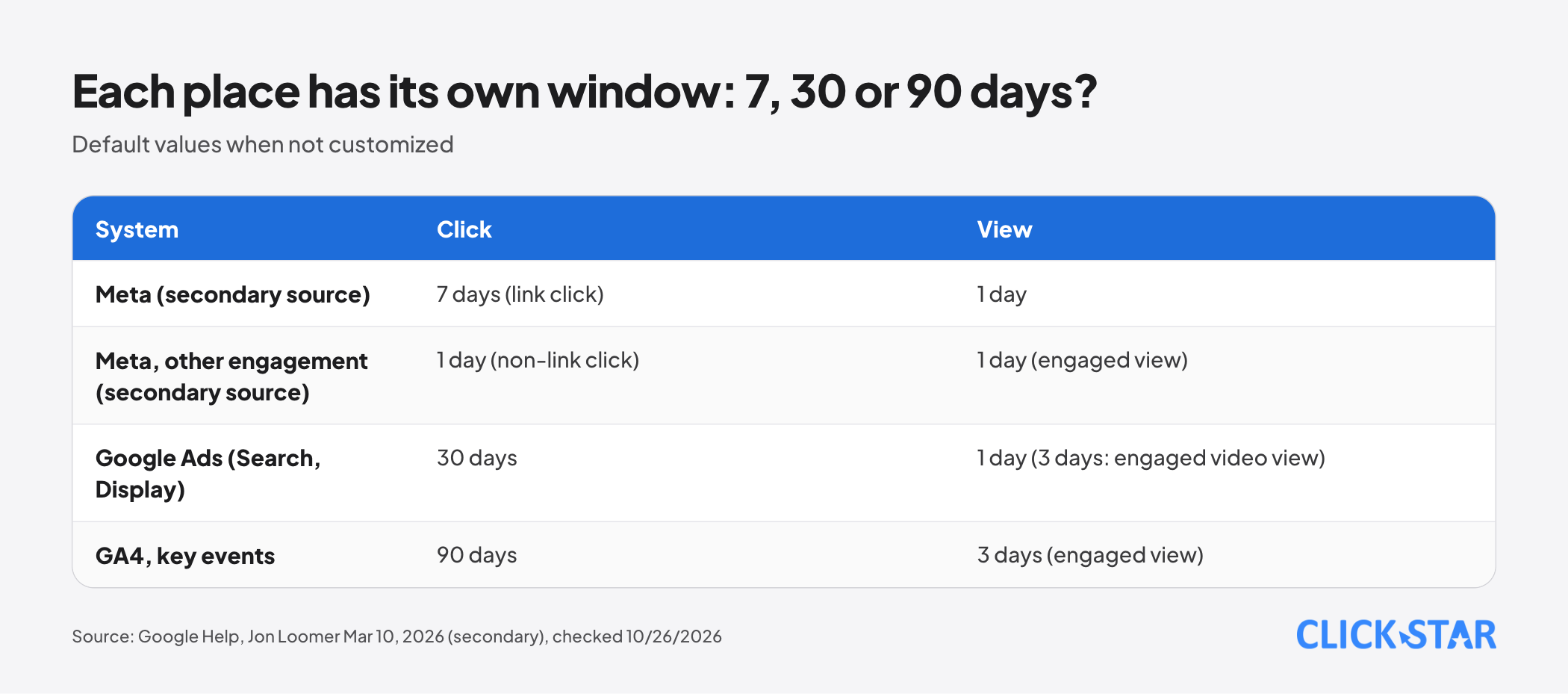
According to the Google Ads page "About conversion windows" (no date shown, read October 26, 2026), the click window defaults to 30 days for Search and Display campaigns if not customized. The engaged-view window defaults to 3 days and the view-through window to 1 day.
The GA4 page "Change the key event lookback window" (no date shown, read October 26, 2026) sets the default at 90 days, with 30 or 60 days as options. Acquisition events (first_open, first_visit) default to 30 days, and engaged-view key events to 3 days.
For Meta, Jon Loomer's March 10, 2026 article (secondary source) gives the default as 7 days after a link click, 1 day after other engagement and 1 day after a view. Since March 2026, "click" counts only link clicks; other clicks moved to engagement.
Views: where gaps appear
According to the Google Ads page "Understand your conversion tracking data" (no date shown, read October 26, 2026), a view-through conversion happens when a customer sees an ad, does not interact, and later converts on the website.
These are not in the "Conversions" column, only in their own column and in "All conversions"; browsers that block cross-site cookies cannot report them.
GA4 records only when a customer visits the website. Click Star's inference: a customer who sees an ad and arrives by another route is credited to that route.
Counting and dating
According to the Google Ads page "About conversion counting options" (no date shown, read October 26, 2026), you can count every conversion after an interaction, or only 1 per interaction. Website actions and Analytics transactions default to every conversion, calls from ads to 1.
Dating also differs. According to that page, the main Google Ads conversion columns follow the time of the ad click, not of the conversion.
To compare with other tools, Google suggests the All conv. (by conv. time) column, which uses the conversion date. The page also says reports can lag by 24 to 48 hours, and the GA4 page "Confirm that you're collecting data" (read October 26, 2026) says the same of many GA4 reports.
The Google Ads page "Understand your conversion tracking data" (section Time of conversion) calls gaps "often up to 20%" between Google Ads and tools such as Google Analytics expected, due to different attribution models. It advises setting reports to Event-scoped and checking that the GCLID click ID persists.
The page gives no measurement method, so Click Star does not treat it as a threshold, nor as one for Meta.
Time zone matters too. According to "Set up Analytics for a website and/or app" (read October 26, 2026), GA4 assigns a visit to a day by the property's time zone. Check the ad account's time zone yourself; Meta's page was unreadable.
People and orders that GA4 does not see
Declined cookies. According to the GA4 page "Behavioral modeling for consent mode" (no date shown, read October 26, 2026), when a customer declines, GA4 lacks that customer's data. GA4 can use machine learning to estimate it from similar customers who consented, called modeled data.
To be modeled, a property needs advanced Consent Mode and enough traffic: at least 1,000 events per day in the denied state for 7 days, and at least 1,000 users per day in the granted state on at least 7 of the previous 28 days. Meeting the thresholds does not guarantee eligibility. Without enough traffic, events from people who declined are not reported.
Browsers that limit tracking. According to "Tracking Prevention in WebKit" (no date shown, read October 26, 2026), Safari's ITP caps JavaScript-set cookies on the landing page at 24 hours when it detects click IDs added to links. It also deletes script-written storage after 7 days without user interaction.
Click Star's inference: a Safari user returning after a few days may count as a new visitor. WebKit's document does not mention GA4 or Meta, so the real effect needs testing.
Orders that never touch the website. Click Star's inference: orders closed by message, a Facebook form or phone do not pass through the website, so GA4 cannot see them.
Jon Loomer's article "Meta Ads Attribution Setting: A Complete Guide" (updated March 1, 2025, secondary source) says Meta's attribution setting does not apply to Messenger or instant forms. His March 10, 2026 article counts message clicks and forms as link clicks, so how Meta records them now is unclear.
Click Star has no measurement of this share in Vietnam; count it in your own CRM.
A method for reconciling the numbers
This is a Click Star reference framework, not from an outside source. The goal is to ask "which number answers which question", not "who is right".
Step 1. Pick a source of truth for each question. Orders and revenue: closed orders in the CRM. Comparing traffic sources: GA4 with a single model. Optimizing ads: the platform's own report.
Step 2. Record each place's settings: attribution model, windows, counting method, time zone, currency, and the date of any change.
Step 3. Compare by sale date, not by ad click date.
Step 4. Tag the source onto each order with UTM (labels on ad links) and an order ID, to match CRM orders to campaigns.
Step 5. Read the weekly trend, not a single day.
Click Star's view. The right question is not "which number is correct" but "which number suits this decision". The platform report helps optimize inside the platform, GA4 compares sources on the website, and only the CRM settles revenue.
Click Star offers digital marketing and data dashboard services, so it has an interest here. On governance: if the source is not recorded on each CRM order, arguments about the numbers lack an anchor.
A 14-day plan
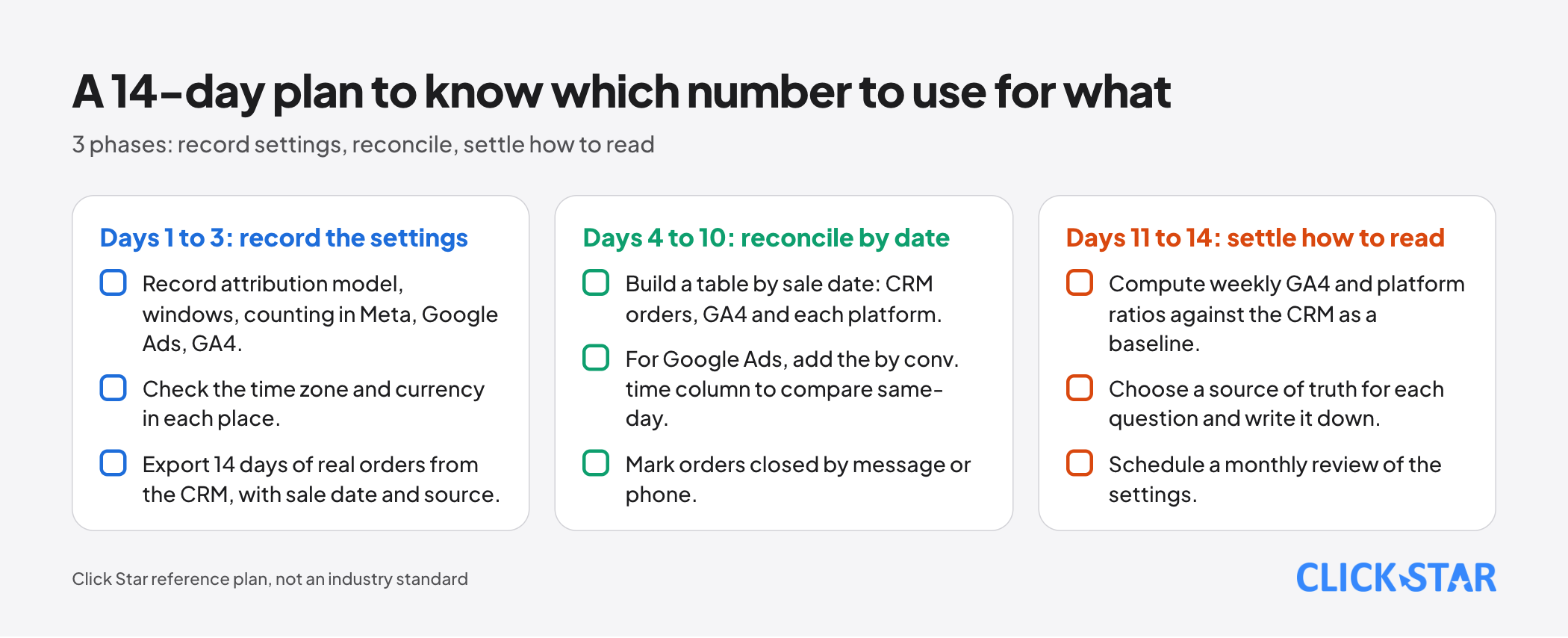
A Click Star reference plan, not an industry standard.
Days 1 to 3: record the settings
- Record attribution model, windows, counting in Meta, Google Ads, GA4.
- Check the time zone and currency in each place.
- Export 14 days of real orders from the CRM, with sale date and source.
Days 4 to 10: reconcile by date
- Build a table by sale date: CRM orders, GA4 and each platform.
- For Google Ads, add the
by conv. timecolumn to compare same-day. - Mark orders closed by message or phone.
Days 11 to 14: settle how to read it
- Compute weekly GA4 and platform ratios against the CRM as a baseline.
- Choose a source of truth for each question and write it down.
- Schedule a monthly review of the settings.
What is not known
Click Star could not read Meta's help page. The Meta defaults here come from Jon Loomer's article of March 10, 2026 (secondary source), so his 2025 version is outdated in places. That Meta changed its click definition in March 2026 is not confirmed by a Meta source; check it in Ads Manager.
No source says what percentage gap between Meta and GA4 is normal. Google's 20% concerns only Google Ads versus Analytics. There is no official measurement of the share of traffic blocked from tracking, or of orders closed by message in Vietnam.
Google's pages show no revision date. How GA4 records a visit after a customer only viewed a Meta ad has no dedicated documentation, so it is an inference.
Common mistakes
- Treating the ad platform's number as real revenue and subtracting cost directly.
- Adding up orders from several platforms, even though one order can be claimed in several places.
- Comparing 2 reports without recording the attribution model and conversion window.
- Comparing the ad click date on one side with the purchase date on the other.
- Changing attribution settings midway and comparing with last week.
- Settling today's number although reports can lag by 24 to 48 hours.
- Copying a "normal" gap ratio from a blog as a threshold for every business.
Related posts

Need tailored advice for your business?
Click Star helps you build a solution that fits your industry and scale. We answer every question during business hours.