Why a post can hit Google Discover and then vanish
The article explains what makes content eligible for Google Discover, why views swing and how to measure them, based on Google's official documentation, plus Click Star's measuring framework.
A how-to article on a company website suddenly gets a surge of visits from Discover, then falls close to 0 a few days later. This is an illustrative scenario, not a measurement.
This article is based on Google Search Central and Search Console Help documentation about Discover, Google's blog post on the February 2026 Discover core update, and the Google Search Status Dashboard, checked on November 4, 2026.
The short answer: a page that is indexed and follows the policies is automatically eligible, but that is not a guarantee. The article covers images, the report and a 30-day plan. Click Star already has separate articles on helpful content planning and on Google rewriting page titles.
Key points
- Discover is a part of Google Search that suggests content based on each person's interests and their Web and App Activity. Users do not type a query.
- According to Google, content is automatically eligible if it is indexed and meets the Discover content policies. No special tags or structured data are required, and being eligible is not a guarantee.
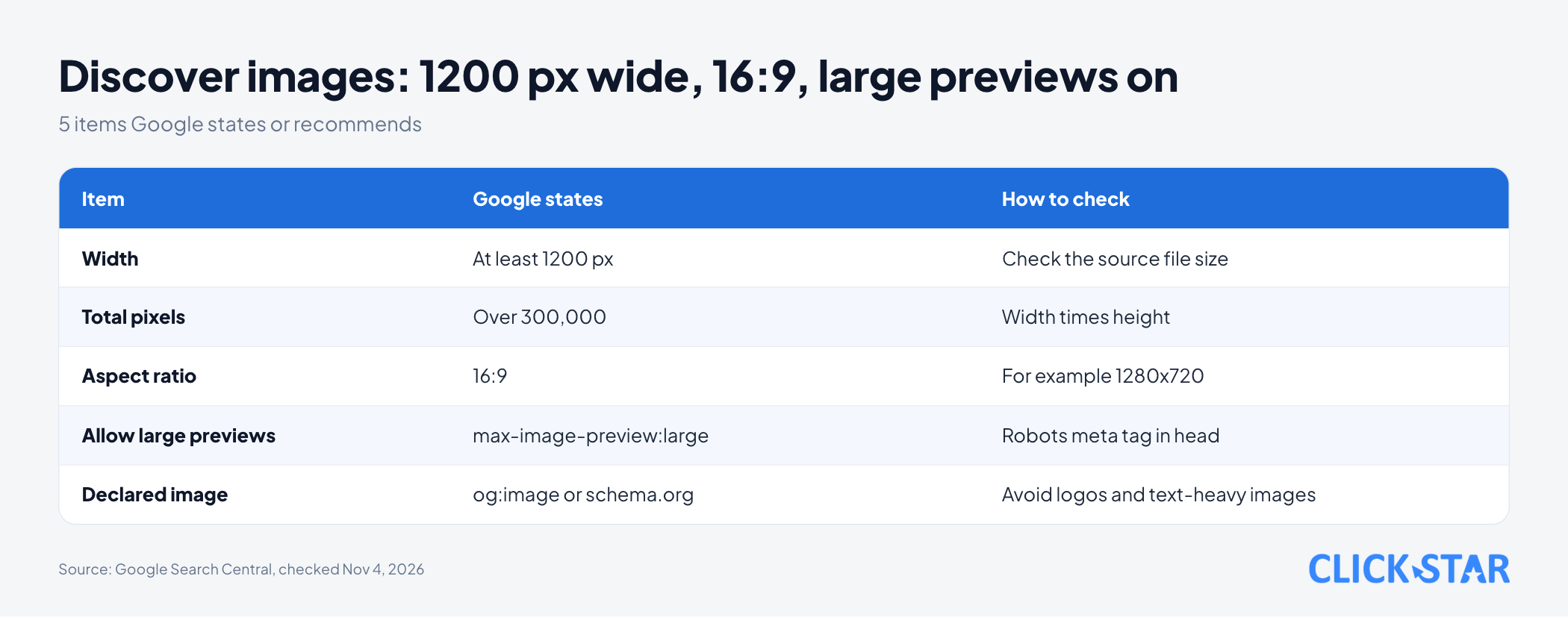
- Google recommends images at least 1200 px wide, over 300,000 pixels, in 16:9, enabled through
max-image-preview:largeor AMP, and not a logo as the main image. - Google treats Discover traffic as supplemental because it is less predictable than keyword traffic.
- In February 2026 Google released a Discover-specific core update, first for English-language users in the US. Click Star has not seen an announcement of expansion to Vietnam.
- The Discover report in Search Console appears only above an impression threshold, and its numbers are assigned to the canonical URL.
How Google Discover differs from regular Search
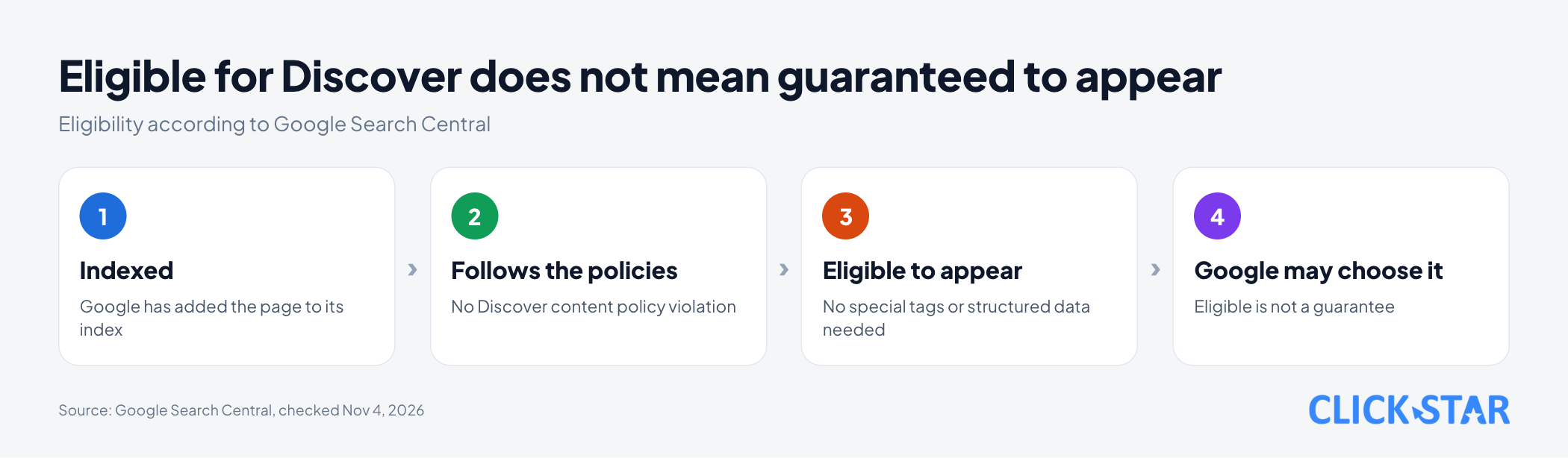
Discover suggests content before the user asks anything. According to "Get on Discover" (updated March 9, 2026, read November 4, 2026), it is part of Google Search and shows content related to a person's interests, based on their Web and App Activity.
Click Star's comparison: Search is like asking a shop assistant for the exact item you need. Discover is like a newspaper that lays out stories to match your habits.
The Discover report help page (no date shown, read November 4, 2026) says Discover is served proactively by Google rather than depending on user queries. That is why traffic from it can vary more than traffic from Search.
What makes a post eligible for Discover
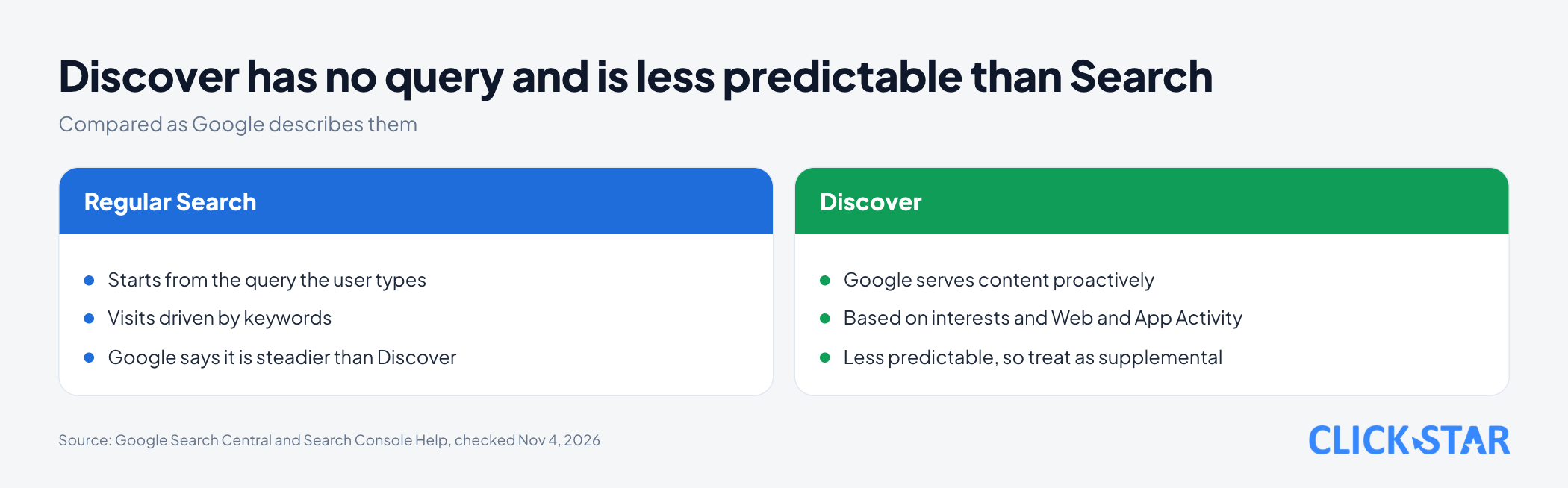
Google states that content is automatically eligible if Google has indexed it and it meets the Discover content policies ("Get on Discover").
Google says no special tags or structured data are needed, and being eligible is not a guarantee of appearing. max-image-preview:large only allows a large preview image; it is not a requirement for Discover. Older content can still appear if it is helpful and relevant.
Discover also filters by content type: it might not recommend job applications, petitions, forms, code repositories or satire without context.
Discover content policies: what is easy to break
Content must not violate Google Search's general and spam policies. The "Discover content policies" page (no date shown, read November 4, 2026) also lists 10 Search feature policies, such as dangerous content, deceptive practices and medical content.
Discover adds 3 policies of its own. Click Star's judgment is that brand websites often touch them:
- Ads and sponsored content: ads should not exceed the content. Sponsored content must not pose as independent editorial, and sponsorship, including ownership, affiliate interest, payment or material support, must be clearly disclosed.
- Misleading content: previews must not promise details the content does not contain.
- Transparency: Google says news sources should show dates, bylines, information about the publisher, the company behind it and contact details. The policy is written for news sources; applying it to business websites is Click Star's cautious practice.
Violations can be removed from Discover. If repeated or egregious, the whole site may lose eligibility for Discover and surfaces such as "Articles for you" in Chrome.
According to "Get on Discover", Discover manual actions can appear in Search Console under "Security & Manual actions". The "Manual actions report" page (no date shown, read November 4, 2026) has a "News and Discover policy violations" group; for misleading content, Google asks for the content to be removed and then a review request.
Large images and headlines: what Google recommends
"Get on Discover" advises avoiding sensationalism and exaggeration. Page titles and headlines should capture the essence of the content and not hide information needed to understand it.
For images, the page recommends high-quality, relevant images with 3 specifications:
- At least 1200 px wide.
- Over 300,000 total pixels (for example, a 16:9 image at 1280x720 has 921,600 pixels).
- A 16:9 aspect ratio.
Large images are enabled by max-image-preview:large or AMP. According to "Robots Meta Tags Specifications" (updated March 24, 2026, read November 4, 2026), large allows a preview up to the width of the viewport, and if the rule is omitted Google may use the default size.
According to "Robots Meta Tags Specifications", the robots meta tag goes in the <head> section of the page, for example:
<meta name="robots" content="max-image-preview:large">
To specify the main image, Google suggests schema.org markup or an og:image tag pointing to a large, relevant image. It advises avoiding generic images such as logos and text-heavy images.
Google published 2 publisher-reported examples. According to "Large Images in Google Search Case Study" (published August 11, 2021, read November 4, 2026), the food blog Kirbie's Cravings reported a 79% CTR increase, and the magazine Istoé reported a 30% CTR increase and 332% more clicks over 6 months.
The page gives no method or Vietnamese data, so treat them as examples, not expectations.
Why Discover traffic goes up and down
Google says traffic from Discover is less predictable and dependable than keyword visits, so treat it as supplemental ("Get on Discover"). The page gives 3 reasons for swings.
- Changing interests: if a user loses interest in a topic, the feed shows other content.
- Changing content types: Discover adjusts which content types appear.
- Google Search updates: Discover is an extension of Search, so updates can sometimes change traffic. Google adds that traffic can change for reasons unrelated to quality or publishing frequency.
In February 2026 Google released a core update specific to Discover. According to John Mueller's blog post (February 5, 2026, read November 4, 2026), the goals include more locally relevant content from websites based in the user's country, less sensational content, and more in-depth, original, timely content from sites with expertise.
The post says systems identify expertise topic by topic. Google's example: a local news site with a dedicated gardening section could have expertise in gardening, while a movie review site with a single gardening article likely would not.
The update was released to English-language users in the US, and Google said it would expand to all countries and languages in the months ahead. The Search Status Dashboard (read November 4, 2026) records the rollout as complete on February 27, 2026. Click Star has not seen an expansion announcement, including for Vietnam, on these 2 pages.
Click Star's inference, not Google's words: a post that "rose and vanished" is often a mix of changing reader interests, lost timeliness and system changes. Google does not publish reasons for individual posts.
Reading the Discover report in Search Console
The Discover report appears only if the property reaches a minimum number of Discover impressions ("Performance report (Discover)", no date shown, read November 4, 2026). The page gives no threshold figure.
The report has 3 metrics: impressions (an item scrolled into view, at most 1 per result per session), clicks (not counted if the user shares the item) and average CTR. Details that are often misread:
- Row threshold: a data row shows only above the threshold, but data below it still counts toward the totals.
- Canonical URL: numbers are assigned to the canonical URL, not the page the visitor lands on. Duplicate pages show 0.
- Time and limits: days follow Pacific Time (PT), today's data can still change, the table holds at most 1,000 rows, and the default view is 3 months.
What this means for Vietnamese business websites
Click Star has found no public measurement of how many Vietnamese websites receive Discover traffic.
Click Star's view. Discover is better seen as a side reward for good content, not a channel to plan like advertising. What a business controls is indexed pages, images that match the guidance, honest headlines and consistent expertise on each topic.
Click Star offers SEO-ready, fast website design and digital marketing, so it has a related interest.
What to do: a 30-day plan
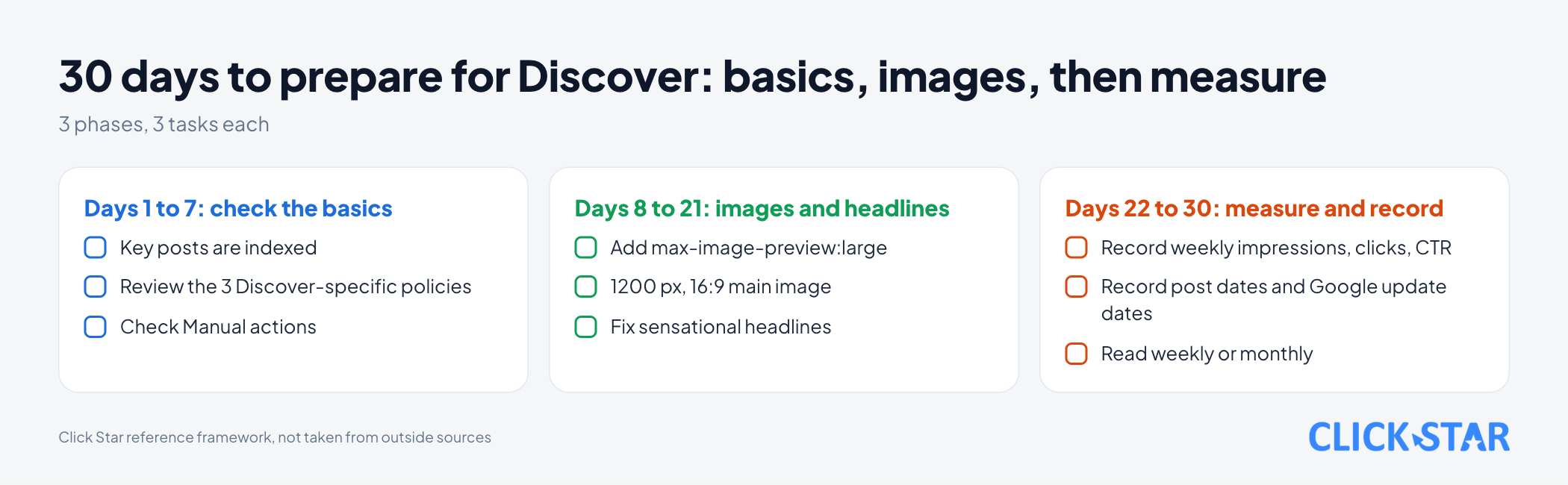
This is a Click Star reference framework, not from outside sources and not yet tested on a real website. Each phase has 3 tasks.
Days 1 to 7: check the basics
- Check in Search Console that key posts are indexed.
- Review each post against the 3 special policies: sponsorship disclosed, date and author visible, headline matches the content.
- Open "Security & Manual actions" and look for Discover warnings.
Days 8 to 21: images and headlines
- Add
max-image-preview:largeto the robots meta tag in<head>. - Give each post 1 main image at least 1200 px wide in 16:9, declared with
og:image, not a logo. - Rewrite headlines that are sensational or over-promise.
Days 22 to 30: measure and record
- Open the Discover report if available and record weekly impressions, clicks and CTR as a baseline.
- Record publishing dates and the dates of Google updates for comparison.
- Read weekly or monthly, and do not draw conclusions from a single day.
How to measure without fooling yourself
Click Star's reading framework: keep a weekly table and place Discover traffic next to keyword traffic for the same post. If Discover drops while keyword traffic holds, the post is probably not broken, since Google says Discover is less stable by nature.
Common mistakes
- Setting a target of "must reach Discover", although Google says eligible is not a guarantee.
- Hunting for a special tag or structured data to switch Discover on, although Google says none is required.
- Using a logo or a text-heavy image as the main image, against Google's recommendation.
- Writing sensational headlines or withholding information to win clicks, which can run into the misleading content policy and goes against Google's advice.
- Publishing sponsored content without disclosing the sponsorship.
- Rewriting content in bulk after a few days of lower views, instead of reading weekly.
- Reading the report by landing URL instead of canonical URL and assuming duplicate pages lost traffic.
What is not known
Google does not publish the impression threshold for the Discover report to appear, how long a post stays in Discover, or the reason for any individual post. Click Star also has no measurements for Vietnamese websites.
It is unclear when the February 2026 Discover core update expands to Vietnamese. The blog post only says "in the months ahead", and the dashboard records only the first rollout, complete on February 27, 2026.
The CTR figures are publishers' own reports. The 30-day plan and measuring framework are Click Star's and untested.
Related posts



Need tailored advice for your business?
Click Star helps you build a solution that fits your industry and scale. We answer every question during business hours.