Why Google rewrites your page title in results, and what to fix
This article explains which sources Google uses for titles and snippets, why it changes them, and how much you can control. It is based on Google Search Central and Search Console Help documentation.
A furniture workshop sets the title tag of its first page to "Home". When the owner searches for the workshop's name on Google, the headline shown in the result is a different phrase altogether (a hypothetical scenario).
This article explains why Google changes page titles (the title link, the clickable headline in search results) and why the description below it (the snippet) can differ from what you wrote. The main sources are Google Search Central and Search Console Help, checked on November 2, 2026.
It answers 3 questions: where Google gets titles and descriptions, how much you can influence them, and how to audit 10 key pages.
Key points
- Google builds the headline automatically from several sources, not only the
<title>tag. It says it cannot manually change titles for individual websites. - In a post dated September 17, 2021, Google said the title element was used about 87% of the time, up from about 80% before Google adjusted its system. That is a 2021 figure; no newer one was found.
- Google may change a title when it detects a problem. The documentation lists 7 situations, such as half-empty, obsolete, duplicated and wrong-language titles.
- The snippet mostly comes from page content. The
meta descriptionis only sometimes used, when Google finds it more accurate. - Google says there is no length limit for titles and descriptions, only truncation to fit the display width. This article therefore gives no "standard" character count.
- You control snippets with
nosnippet,max-snippetanddata-nosnippet. The documentation names no attribute or setting that forces Google to keep your title.
Where the headline in results comes from
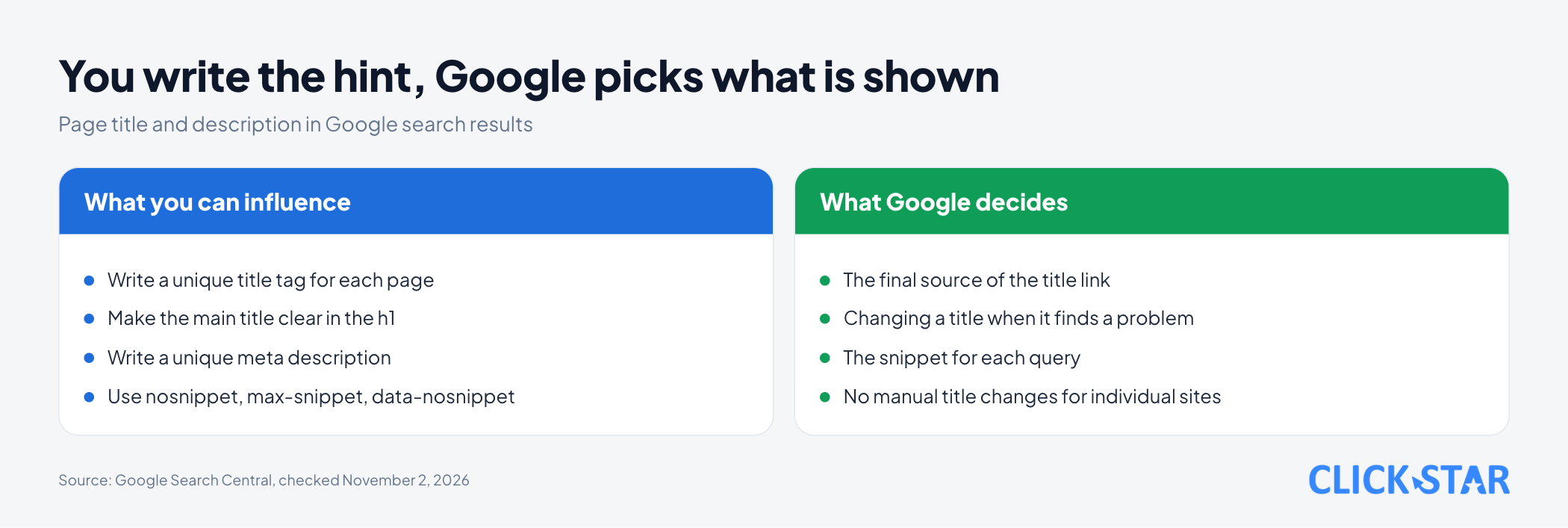
Google assembles the headline from several sources. According to the page "Influencing your title links in search results" (Google Search Central, shown as updated December 10, 2025, read on November 2, 2026), the sources are:
- The content of the
<title>element. - The main visual title shown on the page.
- Heading elements such as
<h1>. - The
og:titlemeta tag. - Other text that is large and prominent through style treatments.
- Other text on the page.
- Anchor text (the clickable words of a link) on the page.
- Text in links from other places that point to the page.
WebSitestructured data.
The documentation gives no order of priority, so Click Star does not infer which source "wins".
If robots.txt blocks Google from reading a page that is still indexed through links from other websites, Google relies on off-page content, such as anchor text, to build the title.
Why Google changes your title
Google changes a title when it judges that the title tag does not describe the page well. In its post of September 17, 2021 on the Google Search Central Blog, Google wrote that since 2012 it has used text beyond the title tag when needed, and that after its adjustment the title tag is used about 87% of the time.
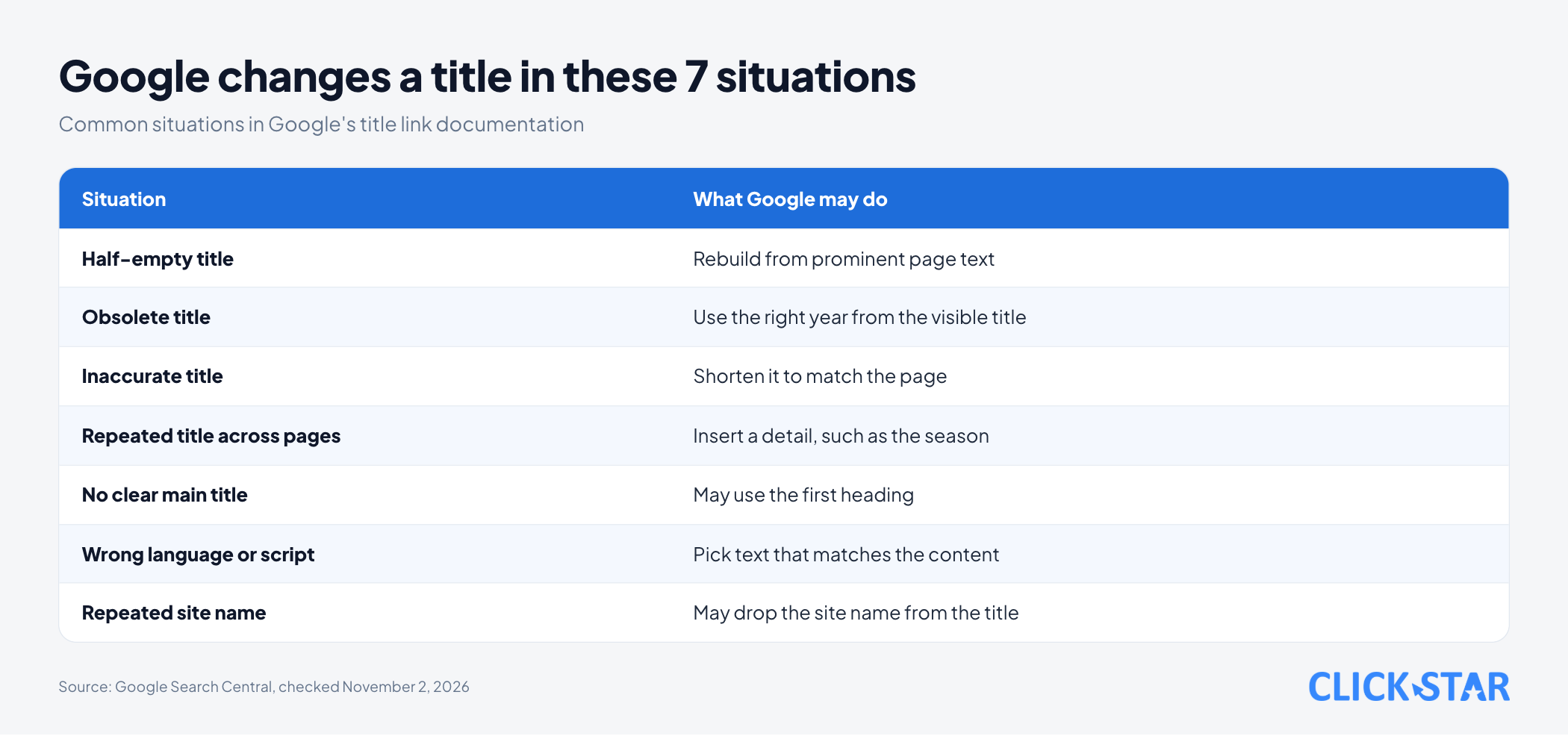
The 87% figure is from 2021. The page "Influencing your title links in search results" lists 7 common situations:
- Half-empty title: the tag is left as "| Site Name" because a template lost its first part. Google rebuilds it from prominent page text.
- Obsolete title: the title says 2020 while the visible heading says 2021. Google may use the correct year.
- Inaccurate title: it lists many kinds of stuffed animals but the page content changes dynamically, so those products are sometimes absent. Google may shorten it.
- Repeated title across pages: many pages share a title that omits the TV season number. Google may insert it.
- No clear main title: several headings share the same size and level. Google may use the first heading.
- Wrong language or writing system: a Hindi page with a title in Latin letters. Google may choose text that matches the content.
- Repeated site name: for domain-level site names, Google may drop the site name from the title.
Google also says that if a title changed and the page has none of these issues, consider whether Google's choice fits the query better. The documentation names no way to force Google to keep a title; Google only says you can indicate preferences by following its recommended practices, and suggests asking in the Google Search Central Help Community.
Who chooses the snippet
The snippet is mostly chosen by Google from page content. According to the page "Control your snippets in search results" (shown as updated April 20, 2026, read on November 2, 2026), Google highlights the part most relevant to the searcher's query, so a page can show different snippets for different queries.
Google only sometimes uses the meta description tag, when it thinks the tag describes the page more accurately than text taken directly from the page. The SEO Starter Guide (shown as updated December 10, 2025) adds that because the snippet comes from page content, you have full control over the words Google can use.
How to write title and description tags, according to Google
Google gives no standard length for a title or description. The title link page and the snippet page both say there is no limit, and results are truncated as needed, typically to fit the device width.
For the title tag, Google recommends:
- Give every page its own
<title>, short, accurate, and not vague like "Home". - Avoid keyword stuffing, because repeating a phrase makes results look spammy.
- Avoid titles repeated across pages.
- Add a concise brand name at the start or end, separated by a hyphen, colon or pipe.
- Make the main title clear, for example larger than other text and placed in the first visible
<h1>. - Write the title in the same language and writing system as the page's main content.
For the meta description tag, Google recommends a unique description for each page that truly describes it, rather than a string of keywords. Hypothetical example: instead of "Home", the title could be "Custom wooden furniture in Hanoi - Workshop name".
Controlling snippets: nosnippet, max-snippet, data-nosnippet
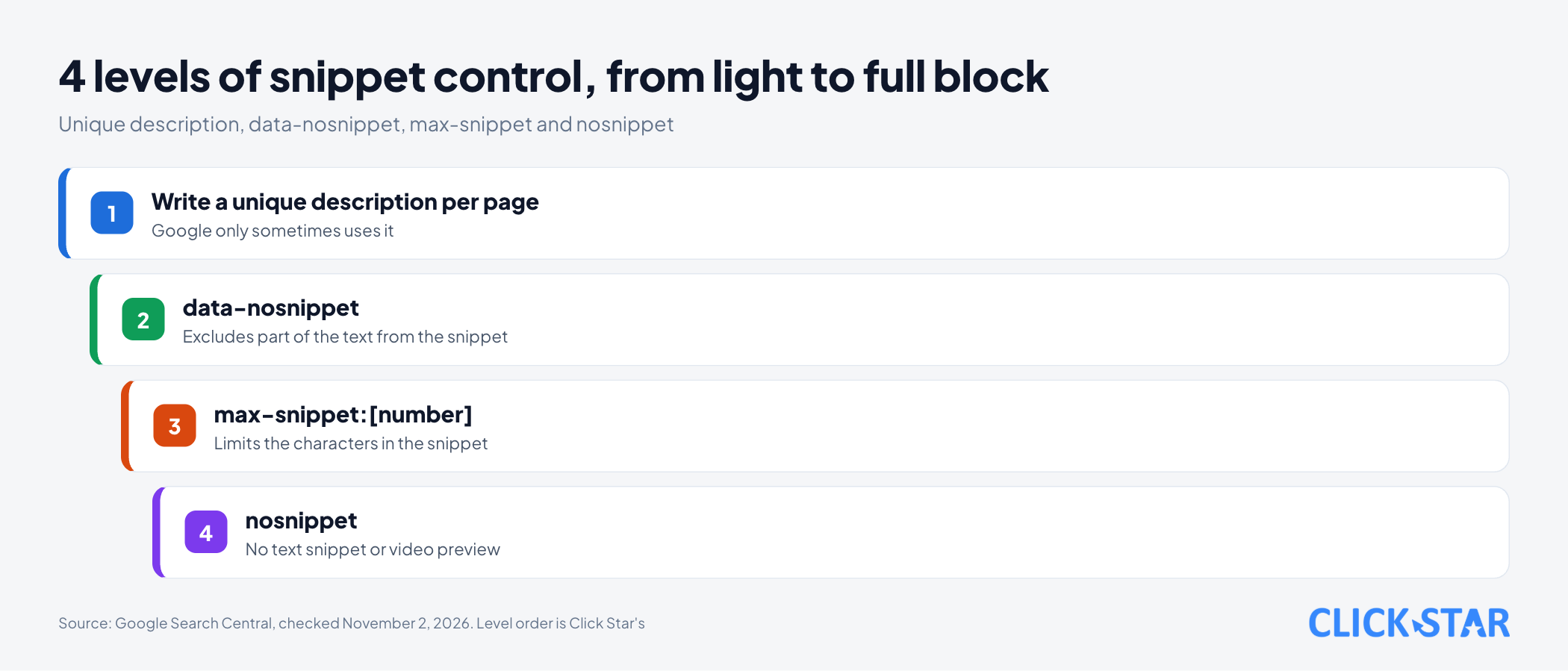
You have 3 tools to block or limit the snippet. According to the page "Robots meta tag, data-nosnippet, and X-Robots-Tag specifications" (shown as updated March 24, 2026, read on November 2, 2026), each does a different job.
nosnippet: shows no text snippet or video preview. A static thumbnail image may still appear.max-snippet:[number], for example<meta name="robots" content="max-snippet:20">: uses at most that many characters. The value 0 equalsnosnippet, and -1 lets Google choose the length.data-nosnippet: excludes part of the text from the snippet, applied tospan,divorsectionelements.
The page gives 3 technical notes:
- When two rules conflict, the more restrictive one applies. A page with both
max-snippet:50andnosnippetfollowsnosnippet. - Rules only work if Google is allowed to access the page that carries them.
- HTML containing
data-nosnippetmust be valid and properly closed. Do not add or remove the attribute with JavaScript on existing elements.
On the same page, nosnippet applies to all forms of results, including web search, Google Images, Discover, AI Overviews and AI Mode. It also prevents the content from being used as a direct input for AI Overviews and AI Mode.
What this means for Vietnamese business websites
For Vietnamese websites, 3 points are worth checking. Point 1 is language and writing system. The documentation uses a Hindi example and does not discuss Vietnamese without diacritics, so writing titles with diacritics is a cautious inference by Click Star.
Point 2 is bilingual sites: each language version should have a title and description in that page's language.
Point 3 is the automatic templates of a content management system (CMS). In Click Star's view, templates easily create duplicate, half-empty or outdated-year titles, the very situations Google adjusts. Click Star found no measurement for Vietnam on how often titles are changed by Google.
Click Star's view. Treat the title and description as suggestions to Google, not commands. Writing them uniquely per page and consistently with the <h1> lowers the chance of a change, but nothing is guaranteed.
Fix the cause in the website template first, rather than editing pages by hand. Click Star offers SEO-ready, fast-loading website design, so it has a related interest.
Checking with Search Console and the URL Inspection tool
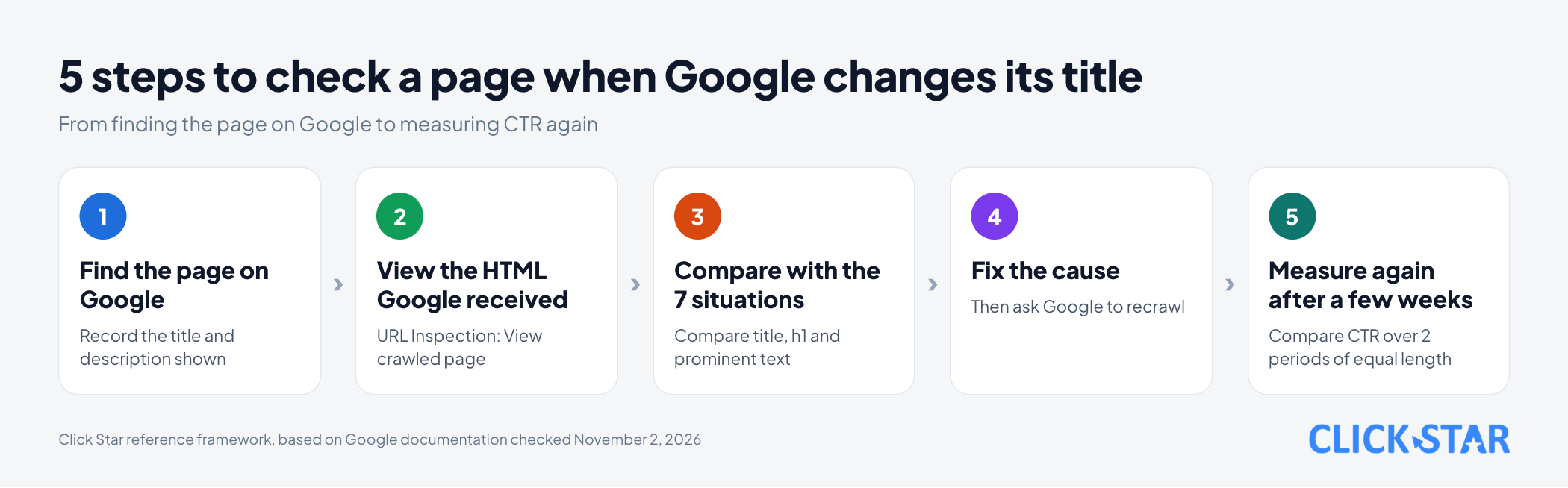
First search for the page on Google and record what appears. According to the Performance report page of Search Console Help (no update date shown, read on November 2, 2026), results depend on the time, place, device and history of the searcher, so your screen may differ from someone else's.
The URL Inspection tool shows which version of a page Google has indexed. According to the Search Console Help page on this tool (no update date shown, read on November 2, 2026), "View crawled page" shows the HTML Google received. Use it to check that the <title> tag is in that HTML.
The first result is the indexed version, not a live one. To test the current version use "Test live URL"; after a fix, click "Request indexing".
According to the page "Ask Google to recrawl your URLs" (shown as updated December 10, 2025), a recrawl can take a few days to a few weeks. There is a quota for submitting individual URLs, and repeated requests for the same URL do not make Google crawl faster.
The Search Console Help page on URL Inspection says indexing requests have a daily limit, and for many pages suggests a sitemap with <lastmod>.
To measure impact, the Performance report shows clicks, impressions and CTR (click-through rate, clicks divided by impressions) per page. Compare 2 periods of equal length, before and after the fix.
10-page audit (Click Star reference framework, not taken from outside sources)
- Step 1: choose 10 pages: the home page, 3 service or product pages, 3 blog posts, the contact page, 1 category page and 1 English-version page if you have one.
- Step 2: build a table with 6 columns: URL, title tag,
<h1>,meta description, title Google currently shows, snippet Google currently shows. - Step 3: compare each row with the 7 situations above and mark the problems.
- Step 4: fix the cause in the template or page, then request a recrawl with URL Inspection or a sitemap.
- Step 5: after a few weeks, record the title now shown and compare CTR over equal periods. Conclude only after several weeks, because ranking also changes CTR.
Common mistakes
- Using the same title for many pages, or leaving the title as "Home".
- Editing the title but forgetting the
<h1>and prominent text, so the sources contradict each other. - Stuffing keywords into the title and description.
- Writing a
meta descriptionand assuming Google will show exactly that text. - Blocking snippets with
nosnippetwithout knowing it also affects AI Overviews and AI Mode. - Adding or removing
data-nosnippetwith JavaScript on existing elements. - Concluding after a few days, when a recrawl can take a few days to a few weeks.
What is not known
Click Star has no measurement for Vietnam on how often Google changes titles, and the 87% figure is Google's 2021 number, with the current rate unknown. It is also unclear how Google treats Vietnamese titles written without diacritics, because the documentation does not cover it.
The documentation gives no order of priority among the sources used to build titles, no specific display width, and only a "few days to a few weeks" window for updates.
It is also unclear which Search Console report directly shows the title Google currently displays, because the pages read do not mention one.
Related posts



Need tailored advice for your business?
Click Star helps you build a solution that fits your industry and scale. We answer every question during business hours.