How to read the Performance and Page indexing reports in Google Search Console and turn them into tasks
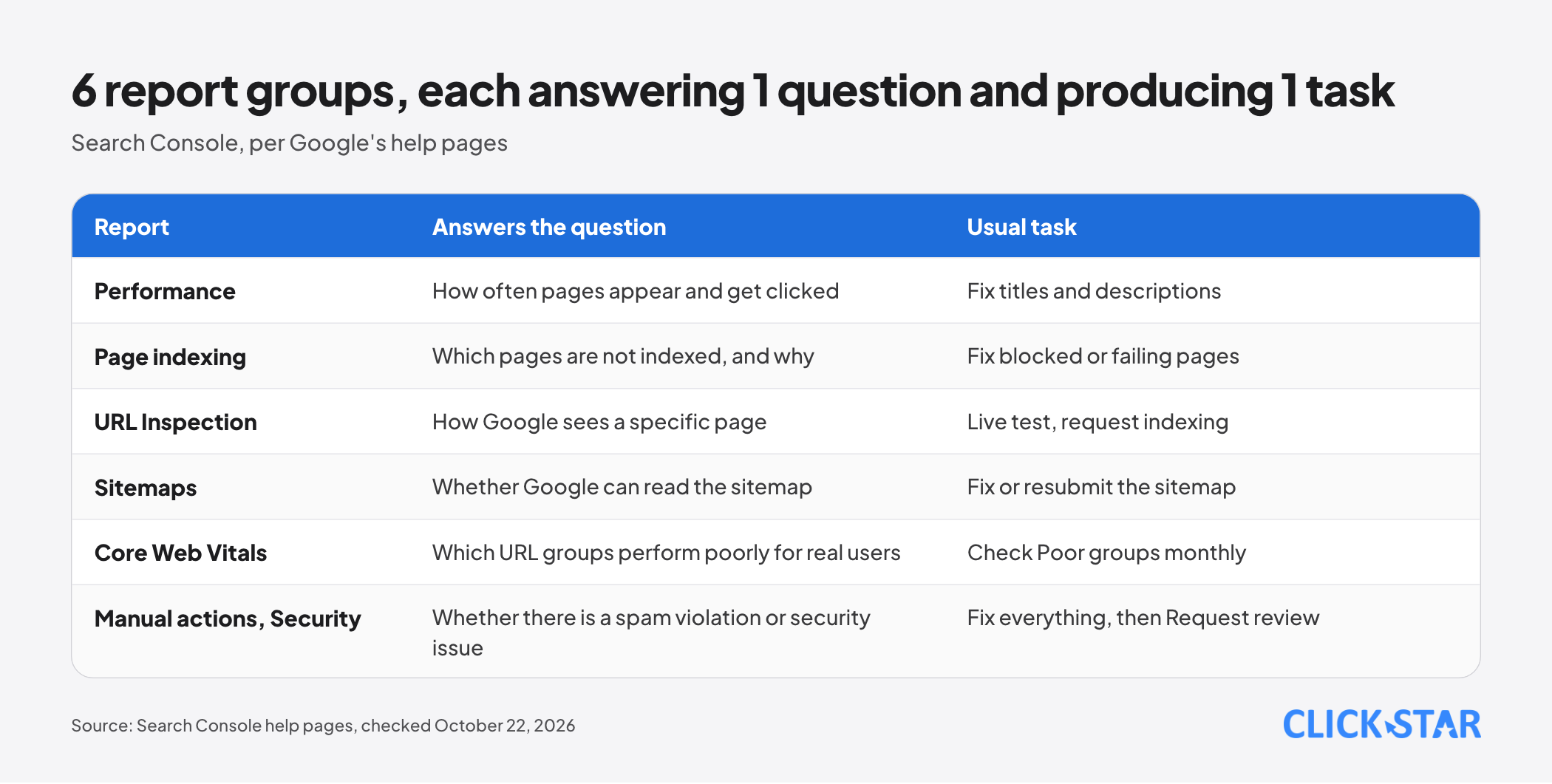
How to read the Performance, Page indexing, Sitemaps and Core Web Vitals reports in Search Console and turn them into concrete tasks, based on Google's official help pages.
Many websites have Google Search Console but mostly use it to glance at clicks. This free tool answers 3 questions: whether Google indexes your pages, how often they appear and get clicked, and which problems Google has recorded.
This article explains how to read the Performance and Page indexing reports, then the companion reports and a weekly review rhythm. Main sources: Search Console help pages and Google Search Central documentation, checked up to October 22, 2026.
Key points
- Per the About Search Console page, it is a free service and a site can appear in results without signing up, but the tool shows how Google sees it.
- A Domain property covers every protocol and subdomain and requires DNS verification. A URL-prefix property covers only the exact prefix.
- Performance has 4 metrics: clicks, impressions, CTR and average position. Chart and table numbers can differ because they are grouped differently, and average position is not a fixed ranking.
- "Not indexed" is not always an error. Read the reason and the Source column, fix only pages that matter, and expect fix validation to take up to about 2 weeks, possibly much longer.
- A live test does not guarantee indexing. Requesting indexing has a daily quota, and the help page gives no number.
- Data is kept 16 months and counted differently from GA4. The weekly, monthly and on-notice rhythm is a Click Star reference framework, not from an outside source.
Domain or URL-prefix property, and how to verify
Per the Add a website or platform property page (undated, read October 22, 2026), a property is the unit Search Console tracks, and ownership must be proven first. A Domain property (example.com) covers every subdomain, both http and https, and requires DNS record verification (unless the site is on a Google product such as Blogger).
A URL-prefix property covers only URLs starting with the exact prefix, protocol included: http://example.com/ excludes https://example.com/.
Per the Verify your site ownership page (undated, read October 22, 2026), a manually added DNS record can take 2 to 3 days to work, and must be kept because Search Console checks it periodically.
The Performance report: 4 metrics and how they are counted
Per the Performance report: Overview and basic setup page (undated, read October 22, 2026), the default view is the last 3 months, with 4 metrics:
- Clicks: times users clicked through to the site from Google Search results.
- Impressions: times the site appeared in Search results.
- CTR: clicks divided by impressions.
- Average position: the average position of the topmost result from your site.
Why chart and table numbers differ
Per the About the data page (undated, read October 22, 2026), the chart always groups by property: all results from the same site for the same query count once, at the topmost position. The table groups by page for the Pages and Search appearance dimensions, so each URL counts separately.
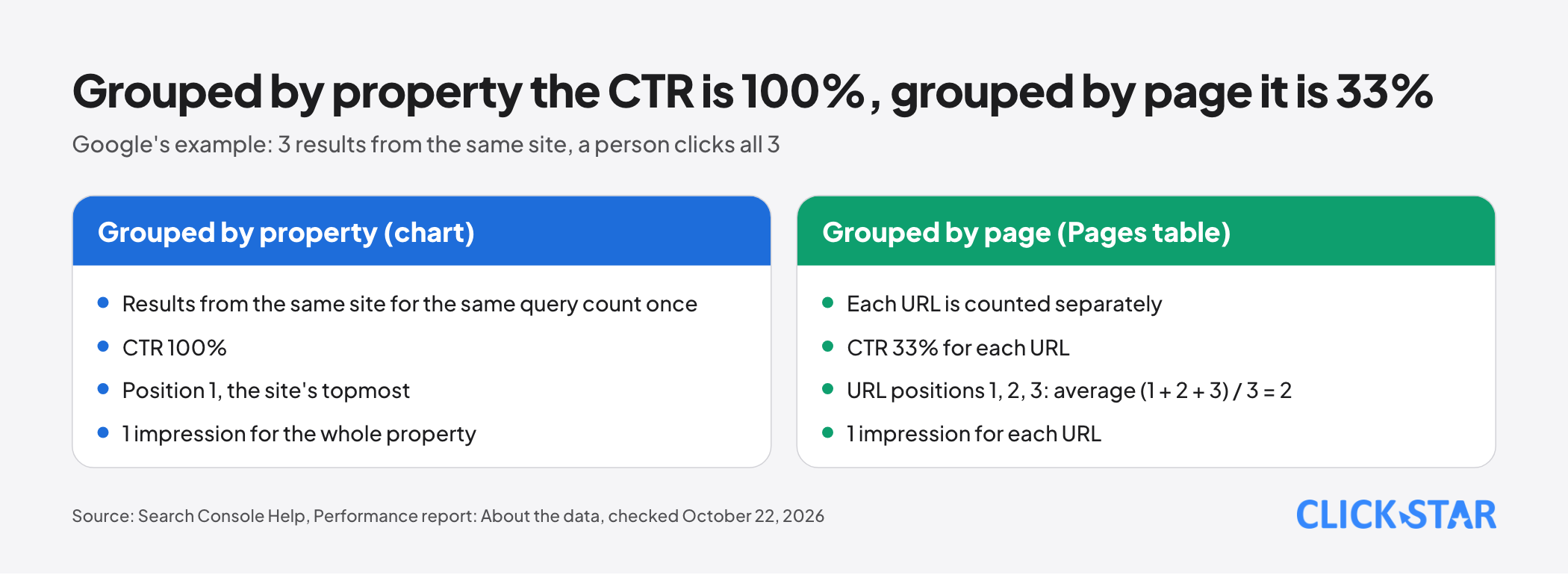
Google's example: a query returns only 3 results from the same site and a person clicks all 3. Grouping by property gives a CTR of 100% and position 1; grouping by page gives a CTR of 33% per URL, with URL positions of 1, 2 and 3 averaging (1 + 2 + 3) / 3 = 2. So CTR and position are generally higher grouped by property.
Limits of the data
Per the Dimensions and data groupings and Troubleshooting data discrepancies pages (undated, read October 22, 2026), keep 4 limits in mind:
- Anonymized queries (rare, omitted for privacy) are missing from the table but included in chart totals, unless you filter by query.
- The table shows at most 1,000 rows; the most complete query list comes from a bulk data export.
- Dates follow Pacific Time (PT) in every view except the 24-hour view, and data usually arrives after 2 to 3 days. Click Star infers that a report day may not match a Vietnam day.
- Data is kept 16 months per Analytics Help (undated, read October 22, 2026). The Debug Google Search Traffic Drops document (updated December 10, 2025) suggests the API or bulk export to keep it longer.
Reading it for action
Average position blends many impressions, because results differ by time, place, device and searcher history. The Debug document advises against focusing on absolute position, since impressions and clicks are the ultimate measure.
- Many impressions but low CTR: revisit the page's title and description.
- Impressions steady but clicks falling: per the Debug document, the title and snippet may be unconvincing, or competitors may have richer results.
- Both falling: check technical issues, security, spam and algorithm updates, then compare with the same period last year to rule out seasonality.
The Page indexing report: read the reason to know what to fix
Per the Page indexing report page (undated, read October 22, 2026), each URL Google knows is either Indexed or Not indexed. The goal is that the canonical version of every important page is indexed. Do not expect 100% of URLs to be indexed.
Not being indexed can be reasonable: a page deliberately blocked, noindex, a duplicate or a removed page. For sites under 500 pages, Google says you may not need this report and can check with a site: query.
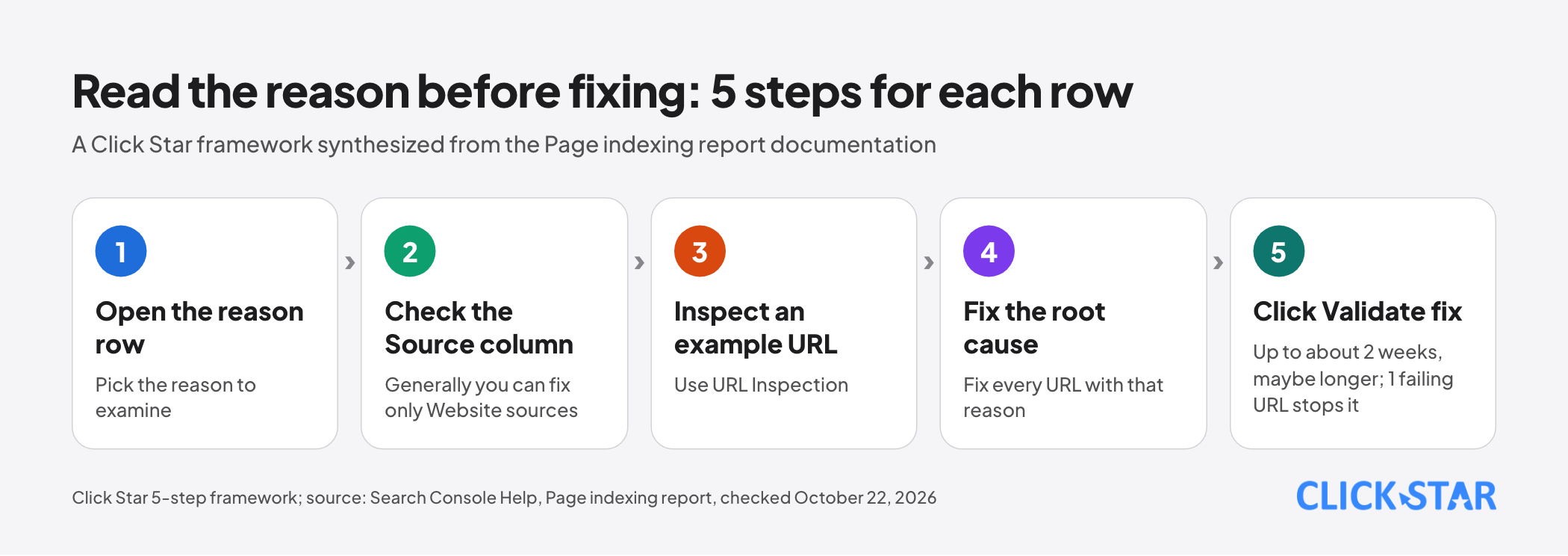
The Why pages aren't indexed table has a Source column (Website or Google; you can generally fix only issues sourced to Website) and a Validation column.
A Click Star 5-step framework, synthesized from the documentation: open the reason row, check Source, inspect an example URL, fix the root cause, then click Validate fix. Common reasons:
- Server error (5xx): check the server, the firewall and the Crawl stats report.
- Soft 404: the page says "not found" but does not return a 404 code. Return the correct code.
- 401 or 403: Googlebot cannot log in. Remove the login requirement if you want the page indexed.
- Blocked by robots.txt or noindex: check no important page is blocked by mistake. Google says robots.txt should not hide a page, because then Google cannot see the noindex.
- Crawled, currently not indexed: Google read the page but has not indexed it; the URL may or may not be indexed later, and there is no need to resubmit it.
- Discovered, currently not indexed: Google knows the URL but has not crawled it.
- Duplicates, alternates with a proper canonical, redirecting pages and 404s of deleted pages: usually normal. If Google picks the wrong canonical, declare it explicitly.
After fixing every affected URL, click Validate fix. The documentation says this usually takes up to about 2 weeks but can take much longer, and even 1 remaining failing URL stops validation.
A drop in indexed pages with no matching errors may mean robots.txt, noindex or a login blocks pages. Click Star infers: compare a spike's date with the release calendar.
URL Inspection and requesting indexing
Per the URL Inspection tool page (undated, read October 22, 2026), the tool shows the page version Google has indexed and offers a live test of whether a URL can be indexed. "URL is on Google" means eligible to appear, not guaranteed to appear.
The live test does not check duplicates, manual actions, security or quality; the page also says page quality must be high enough to warrant indexing.
Requesting indexing does not guarantee the page enters the index. The page itself gives two figures: one place says indexing can take up to a week or two, another says typically a day or so but possibly much longer, so do not treat 1 day as a promise. A daily quota exists but no number is given.
The Sitemaps report
Per the Sitemaps report page (undated, read October 22, 2026), submitting a sitemap means telling Google where the file is, and needs owner permission. Discovered pages are not guaranteed to be crawled or indexed.
A Google Search Central document (updated December 10, 2025) says a site of about 500 pages or fewer, with full internal links and not many videos, images or news items to show in results, may not need one.
Core Web Vitals
Per the Core Web Vitals report page (undated, read October 22, 2026), the report uses real-user data (CrUX) over 28 days, split by mobile and desktop. A URL group takes the status of its worst metric.
Good thresholds: LCP up to 2.5 seconds, INP up to 200 milliseconds, CLS up to 0.1. The report covers only a sample of indexed URLs and is not for looking up a specific URL.
Manual actions and security issues
Per the Manual actions report (undated, read October 22, 2026), a Google reviewer applies a manual action when a page violates spam policies, so part or all of the site may rank lower or not appear.
Per the Security issues report (same read date), security issues fall into 3 groups: hacked content, malware or unwanted software, and social engineering.
The remedy is the same: fix all affected pages, then click Request review. Google says review usually takes several days to several weeks; do not resubmit before a decision.
Linking to GA4 and why the numbers do not match
Per the Connect Search Console to Google Analytics page (Analytics Help, undated, read October 22, 2026), the link creates 2 reports in Analytics and needs the Editor role plus verified ownership. Data arrives after 48 hours, up to 16 months, and the report collection is unpublished by default.
The Troubleshooting data discrepancies page lists 5 reasons numbers differ: privacy, processing, time lag, time zones (PT) and JavaScript. Per the About the data page, if a user clicks one link, backs up and clicks a second link from the same property for the same query, it counts as 1 click.
Click Star infers that Search Console counts clicks by that grouping rule while GA4 counts sessions after the page loads, so the 2 numbers need not match.
Click Star's view. Search Console shows whether a site is indexed and displayed, but not revenue, so do not use it in place of GA4 or a CRM. Create the Domain property first, review on a fixed rhythm, and fix only pages that matter.
Click Star designs fast-loading, SEO-standard websites and so has a related interest in recommending Search Console. The reading method above comes from Google's documentation.
What to do: a weekly review rhythm
This is the review rhythm Click Star proposes (a Click Star reference framework, not taken from an outside source).
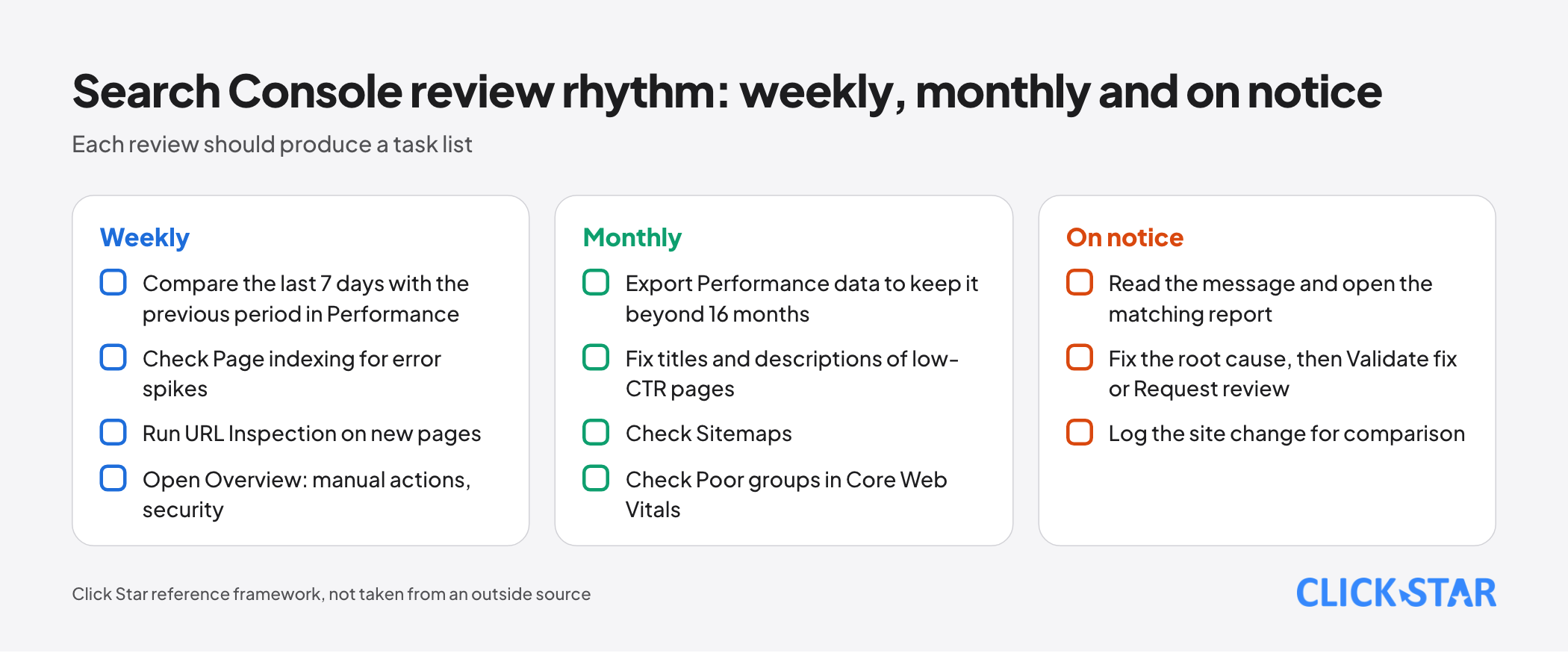
- Weekly: compare the last 7 days with the previous period in Performance, check Page indexing for error spikes, use URL Inspection on new pages, and open Overview for any manual action or security issue.
- Monthly: export Performance data to keep it beyond 16 months, fix titles and descriptions of low-CTR pages, and check Sitemaps and the Poor groups in Core Web Vitals.
- On notice: read the message, open the matching report, fix the root cause, then Validate fix or Request review, and log the site change for comparison.
Common mistakes
- Treating average position as the true ranking of a keyword.
- Comparing Search Console clicks with GA4 sessions and concluding one is wrong.
- Fixing every "Not indexed" URL without reading the reason.
- Blocking a page with robots.txt and expecting noindex to work.
- Pressing Request indexing repeatedly instead of finding the root cause or submitting a sitemap.
- Looking only at Performance and never opening Overview for manual actions and security.
What is not known
The help page gives no number for the Request indexing button's daily quota. The Performance report pages give only a definition of average position (Overview page) and the 3-page example (About the data page), with no full formula.
Google also gives no exact number for when a query counts as anonymized. The October 2022 Search Central blog post (A deep dive into Search Console performance data filtering and limits) only describes them as queries not issued by more than a few dozen users over a two-to-three month period.
Click Star has no measurement of anonymized-query share or of the gap between Search Console and GA4 for Vietnamese websites.
Related posts



Need tailored advice for your business?
Click Star helps you build a solution that fits your industry and scale. We answer every question during business hours.