Heatmaps and Session Recordings: Read the Data Correctly and Mask Personal Data
How to read heatmaps and session recordings correctly, their sampling limits and how to mask personal data, based on Microsoft Clarity and Hotjar documentation.
Heatmaps and session recordings show where visitors click, scroll and pause. But the tools also collect page content and keystrokes, so a misconfiguration can leave names or addresses on a third party's servers.
The article draws on Microsoft Clarity documentation, the Hotjar help center, a 2017 Princeton study, web.dev and Nielsen Norman Group, checked on October 23, 2026. Prices are not compared.
It answers 3 questions: how to read the numbers, how to mask personal data, and what to tell users. Click Star already has articles on cookie consent banners, GA4, Core Web Vitals and website forms.
Key points
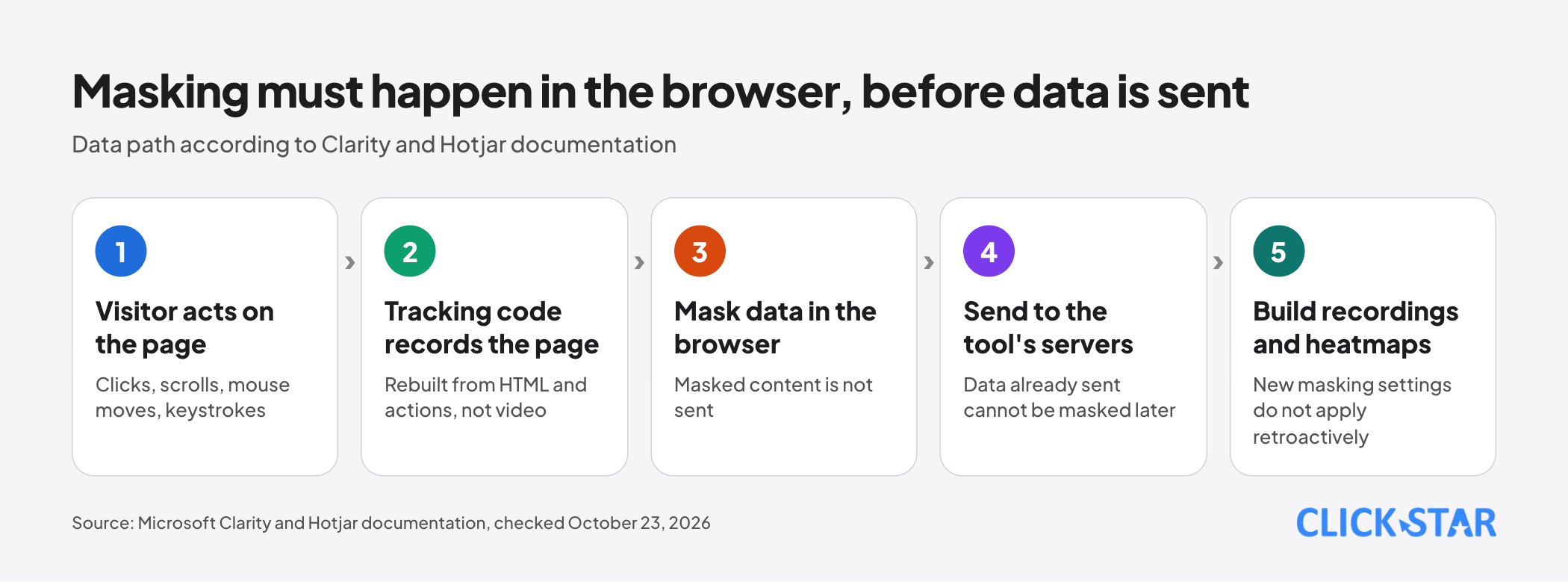
- A session recording is not a video: masking happens in the browser before data is sent, and a new masking setting does not apply to data already sent.
- Per Clarity's masking page and Hotjar's guide, default masking mainly covers input fields, numbers and email; other visible text needs extra configuration.
- The numbers are a capped sample: Clarity keeps at most 100,000 recordings per project per day; Hotjar samples above its limit and skips sessions under 30 seconds.
- A heatmap shows what visitors do and where, not why; pair it with recordings and GA4 before changing a design.
- From October 31, 2025, Clarity requires a consent signal for visitors from Europe, the UK and Switzerland; for Vietnam, ask your legal team, as this is not legal advice.
What heatmaps and session recordings are
A heatmap pools many visits into one colored map of a page. According to Clarity's documentation (read on October 23, 2026), its click maps count clicks by element rather than absolute mouse position. Per the Hotjar help center (same day), Hotjar offers click and tap, move, scroll, engagement and rage-click maps.
A session recording replays one visitor. Both vendors say it is not a screen recording: Clarity rebuilds it from the page's HTML and the visitor's actions; Hotjar captures changes to the page structure (DOM). A session ends after 30 minutes of inactivity.
The 2 types answer different questions: a heatmap answers "where, and how many visitors"; a recording answers "what did one visitor do, in what order". The Nielsen Norman Group course page (no date shown) advises checking heatmaps against recordings, funnels and form analytics.
How to read heatmaps and behavior signals
Treat each signal as a hypothesis: the map shows where visitors interact; the cause lies in recordings or GA4.
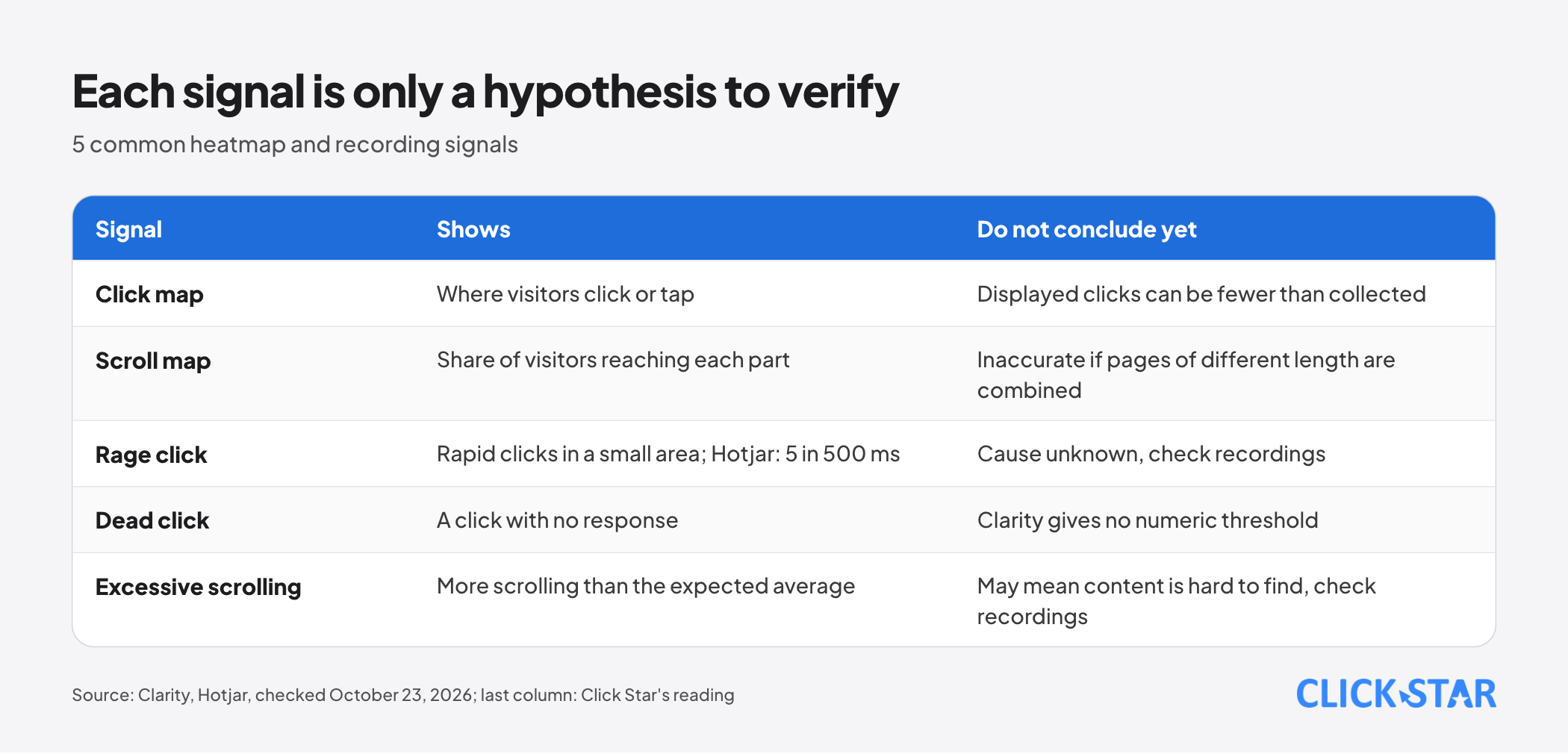
Click map. Hotjar says it may collect more clicks than it shows, because the map only displays elements visible in the page screenshot. Clarity likewise says what is displayed depends on the sample of page views used to build the map.
Scroll map. Hotjar calculates the share of visitors reaching each part of the page and warns the result is inaccurate when pages of different lengths are combined. Both vendors draw an "average fold" (the lowest point seen before scrolling).
Rage clicks, dead clicks, excessive scrolling. According to Clarity, a rage click is repeated rapid clicking in a small area; a dead click is a click with no response within a reasonable time; excessive scrolling is more vertical scrolling than the expected average. Clarity gives no numeric thresholds.
Hotjar defines a rage click as 5 clicks on one element within 500 ms, so the tools may flag a page differently.
Data limits: samples, caps and visitors who go unmeasured
Heatmaps and recordings are a capped sample, not every visit.
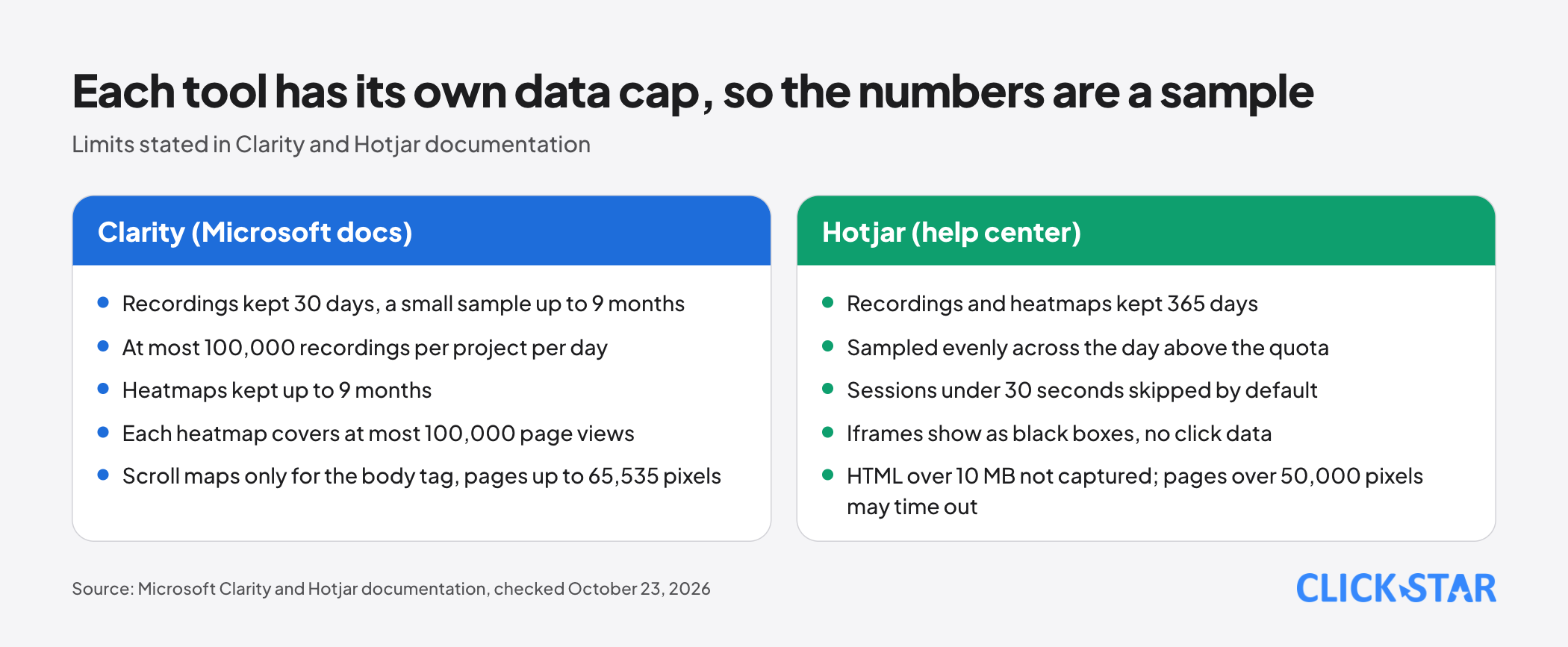
Volume cap. According to Clarity's documentation, each project keeps at most 100,000 recordings per day, and Clarity samples beyond that. Each heatmap covers at most 100,000 page views. Clarity's FAQ says "no sampling", so its pages are inconsistent.
Retention. Clarity keeps recordings for 30 days, then a small sample for up to 9 months; heatmaps are kept for up to 9 months. Hotjar keeps recordings and heatmaps for 365 days.
Quota and dropped sessions. Hotjar has a daily session quota; beyond it, traffic is sampled evenly across the day, and sessions under 30 seconds are skipped by default, so counts can be lower than GA4. Hotjar also misses visitors who disable cookies, enable Do Not Track, browse privately or block scripts.
Rebuilding the page. Clarity does not capture dynamic areas such as hover menus; its scroll maps work only for the body tag, on pages up to 65,535 pixels tall. Hotjar shows iframes as black boxes with no click data and skips HTML pages over 10 MB, and pages taller than 50,000 pixels may time out.
Masking personal data: what tools can and cannot do
Both tools mask in the browser. Clarity says masked content is never uploaded; Hotjar says suppressed data does not reach its servers. So data already sent cannot be masked afterwards.
Click Star arranges the measures in 5 layers (a reference framework, not from outside sources).
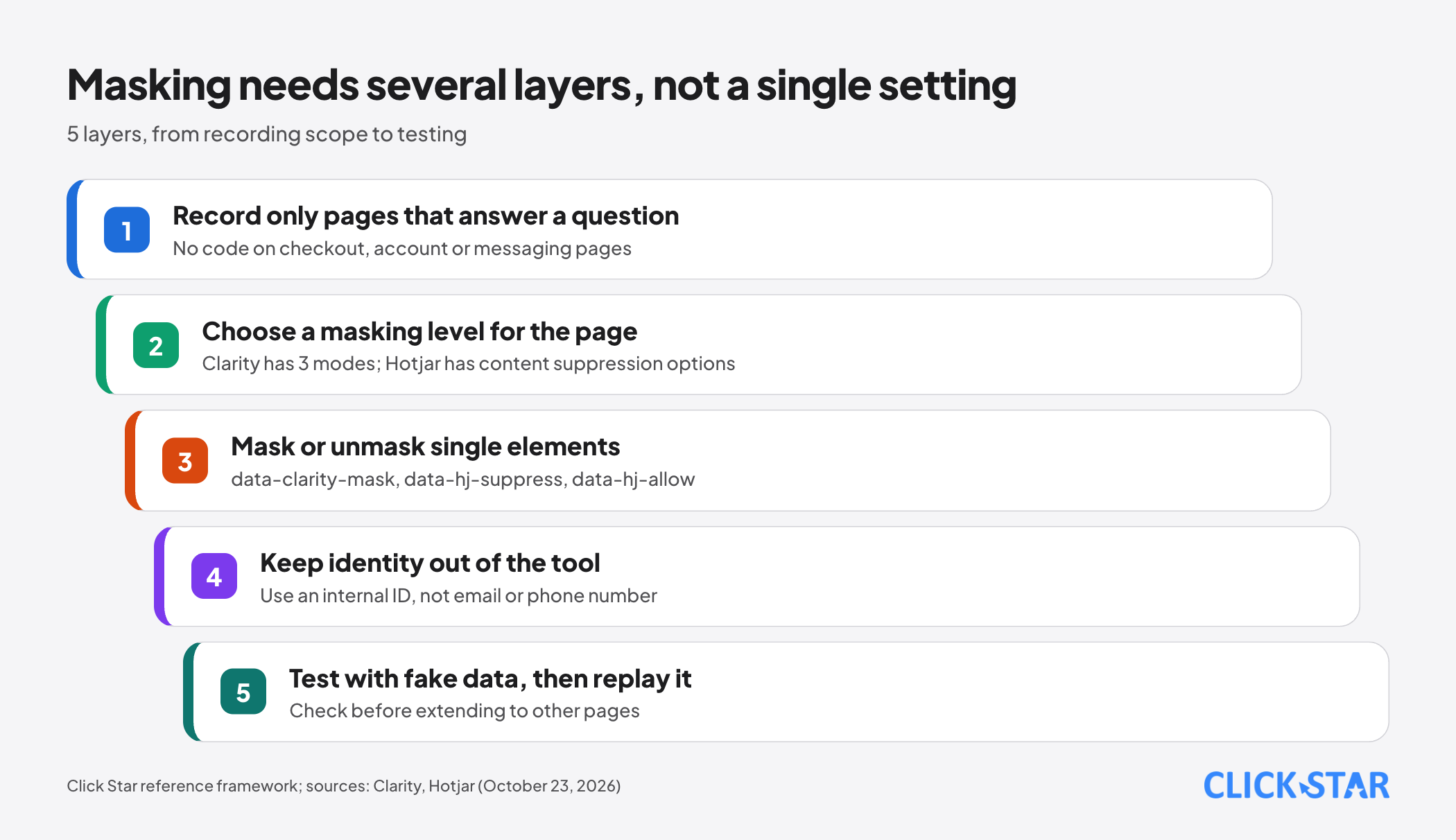
Clarity. It has 3 modes: Strict masks all content, Balanced masks sensitive content (numbers and email addresses), and Relaxed masks nothing except input boxes and dropdowns. Balanced is the default, and input boxes are masked in every mode. Clarity's FAQ, however, says Clarity suppresses all visitor content by default; the pages disagree, so test it.
Mask or unmask by element with a CSS selector in settings, or the data-clarity-mask and data-clarity-unmask attributes. Changes apply only to new recordings and can take up to 1 hour.
Hotjar. Per Hotjar's guide, it suppresses text typed into input fields by default and always suppresses runs of 9 or more digits. Most content suppression options are off by default; suppression of numbers and email addresses is on.
Suppress an element with the data-hj-suppress attribute or class. An input can be allowed with data-hj-allow, but password and email fields and field names such as phone and address stay suppressed.
What masking cannot fix. A Princeton study (published November 15, 2017) found session-replay services, Hotjar among them, on 482 sites in the Alexa top 50,000, and none of those tested masked displayed content by default. The data is old, but the lesson holds: with manual masking, one missed element leaks.
Deleting data. Hotjar can look up and delete users, but only people who left an email in a survey. Clarity says individual recordings cannot be deleted; deleting data means deleting the whole project, which matters when a customer requests deletion.
Identifiers. Clarity hashes a custom user ID in the browser, but its documentation example uses an email address as the ID. Click Star recommends an internal ID that cannot identify a person (a technical opinion).
Click Star recommends putting no code on login, checkout and messaging pages (a technical opinion); Clarity explains how to remove it from URLs you do not want recorded.
Notice, consent and cookies
Both vendors say to tell users: Clarity's FAQ answers "Yes" to whether you need to inform users about its cookie, and Hotjar recommends that your privacy policy state that you use behavior tracking.
According to Clarity's Consent Mode page, from October 31, 2025 Clarity requires a consent signal for visits from the European Economic Area, the UK and Switzerland. Without it, per Clarity's FAQ, sessions are fragmented and some features such as full replay are limited. Site owners pass the signal through the Consent API or a supported platform.
Clarity lists 2 first-party and 5 third-party cookies, so declare them all. Hotjar honors Do Not Track; Clarity does not respond to it but supports Global Privacy Control.
That Clarity names only Europe, the UK and Switzerland is how the vendor enforces it, not a sign that visitors in Vietnam need no consent under the law. The article cites no provisions because it has not read the original text; ask your legal team to check it.
Impact on page speed
Both vendors say their code loads asynchronously. Clarity says visitors see no speed difference, a vendor claim, not an independent measurement. Hotjar is more careful: added JavaScript can have an effect, so it cannot guarantee none; it suggests delaying the load.
A web.dev article on third-party scripts ("last updated August 14, 2019", fairly old) recommends async or defer and removing unnecessary scripts. The reliable way is to measure field LCP and INP before and after adding the code. Delayed loading may miss very short sessions (inference).
Connecting heatmaps to GA4 and forms
GA4 counts conversion events; a heatmap explains behavior around them. According to Clarity's GA4 integration page (its FAQ says otherwise), it does not send the playback URL to GA4 or support segments in GA4. For forms, send tags and events instead of field content; a page can have at most 128 tags.
if (window.clarity) {
  window.clarity("set", "form_status", "validation_error");
  window.clarity("event", "lead_form_submit");
}
The names above are placeholders; never put names, phone numbers or message text in a tag.
What this means for Vietnamese businesses, and Click Star's view
Vietnamese business websites often have consultation forms, Zalo chat and pricing pages, so personal data flows through many pages (a Click Star observation, not a measurement). Click Star found no public measurement of heatmap effectiveness in Vietnam.
Click Star's view. What matters is the question asked and how data is masked, not the tool. For a website with forms, start with strong masking and open one area at a time, not the reverse. Record sessions only on a page with a specific question. This is a technical opinion, not a measured result.
Disclosure of interest: Click Star has its own product, Clickstar Heatmap. Its public login page (read on October 23, 2026) describes heatmaps, rage click, dead click, JS error and 404 detection, and AI reports. This article does not evaluate it.
14-day plan
This is a Click Star reference framework, not from outside sources.
- Days 1 to 2: write 1 question for 1 page (for example why visitors abandon a form) and list the pages that must not be recorded: checkout, accounts, messages.
- Days 3 to 4: update the privacy policy, check the consent signal and ask your legal team to check the source text.
- Days 5 to 6: turn on strong masking, add mask attributes to areas showing personal data, and load the code after the page is interactive.
- Days 7 to 8: enter fake data into a form, open that very recording and check that nothing leaks.
- Days 9 to 14: review the map and a sample of recordings, propose 1 change, then compare before and after in GA4.
How to measure: successful form submission rate (a GA4 event), rage clicks on the element just changed, field LCP and INP, and masking test results.
Common mistakes
- Assuming the defaults mask enough, without entering fake data and replaying it.
- Recording checkout, account or messaging pages.
- Changing a masking setting and assuming old recordings are re-masked; both vendors say it does not apply retroactively.
- Using email or phone number as an identifier inside the tool.
- Reading the red on a click map as "attractive" without opening recordings of that element.
- Seeing a session count that differs from GA4 and calling the tool wrong, when sampling and script blockers make the 2 differ.
- Adding the code without updating the privacy policy or re-measuring speed.
What is not known
Click Star has no independent measurement of each tool's speed cost and found no minimum traffic for a reliable heatmap. Clarity's documentation is inconsistent on default masking and sampling and gives no numeric thresholds for rage or dead clicks.
Click Star has not read the original Vietnamese personal data law, so it cites no provisions. Hotjar's help pages block automated page loads; the content was read through that help center's public data interface, so open the original pages. The Princeton study is 9 years old, with no independent version for current releases.
Related posts

Need tailored advice for your business?
Click Star helps you build a solution that fits your industry and scale. We answer every question during business hours.