Bugs found after launch? Where to start with automated testing
This article explains the 3 test levels, choosing tests by risk, running them in CI and handling flaky tests, based on Martin Fowler, the Google Testing Blog and Playwright documentation.
A company receives a website update from its software vendor. 2 weeks later, sales notices the contact form no longer saves phone numbers. This is a hypothetical case, but the bug is familiar: nobody touched the form, and the fault came from a change elsewhere.
Automated testing means pre-written checks that a machine reruns whenever code changes, reporting pass or fail. This article covers the 3 test levels, what to test first, and how to run tests automatically. Sources are Playwright, Vitest and GitHub documentation plus Martin Fowler and the Google Testing Blog, checked on October 24, 2026.
Click Star already has articles on CI/CD, previews and custom software; this one covers testing.
Key points
- According to Fowler, automated testing is most valuable for catching regressions: bugs that break something that used to work.
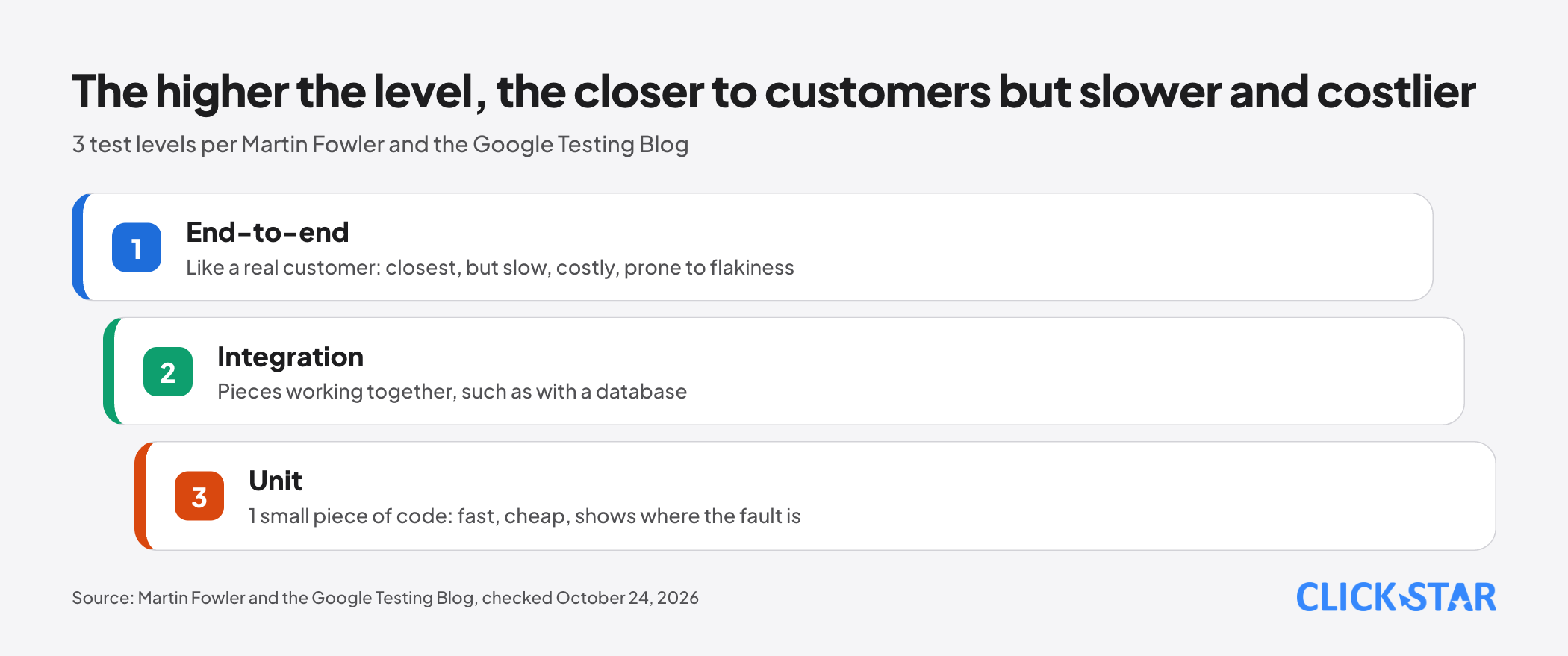
- There are 3 levels: unit (a small piece of code), integration (pieces working together) and end-to-end (the whole system as a customer uses it). The higher the level, the closer to reality but the slower, costlier and flakier.
- The 70/20/10 ratio is only a first guess Google mentioned in 2015, not a standard. Choose by risk: login, payment, lead forms first.
- Run the suite in CI (a system that runs automatically when code changes): fast tests first, with a time limit.
- Flaky tests (sometimes pass, sometimes fail) destroy trust in the whole suite. Isolate and fix them within a deadline instead of just rerunning.
- Use test data, never real customer data. Code coverage helps find untested spots; it is not a score to hit.
How is automated testing different from clicking through by hand?
Instead of 1 person clicking through every screen after each update, a machine does it. According to "The Practical Test Pyramid" by Ham Vocke on Martin Fowler's site (Feb 26, 2018), a team then learns in seconds or minutes whether the software is broken, not days or weeks.
Martin Fowler (Apr 14, 2011) sees regression testing as the biggest value and calls such a suite a "bug detector": when it goes red, the bug came with fresh changes and is easier to find, and the team dares to make bigger changes.
How do the 3 test levels differ?
Picture inspecting a car: the brake alone is a unit test, brake plus wheels is integration, driving the whole route is end-to-end.
Unit tests check 1 small piece of code in isolation, such as a discount calculation. Martin Fowler (May 5, 2014) writes that "unit" has no strict definition, but 3 traits are common: small, written by programmers, and much faster than other kinds.
Integration tests check that the software works with things outside it, such as a database. According to Vocke, testing database reads and writes means running a real database.
End-to-end tests drive a browser like a customer: open a page, click, type, check the result. Per Vocke, this level gives the most confidence but is notoriously flaky because of browsers, timing and unexpected dialogs.
Are many unit tests and few end-to-end tests always right?
Mostly yes, with conditions. Mike Wacker (Google Testing Blog, Apr 22, 2015) argues a good feedback loop is fast, reliable and shows where the fault is. Unit tests meet all 3; end-to-end tests wait for the whole system to be built and make faults hard to locate.
Wacker writes that Google often suggests 70% unit, 20% integration and 10% end-to-end as a first guess; each team's mix differs.
Fowler (published May 1, 2012, revised later) adds an exception: the pyramid assumes high-level tests are slow, costly and brittle. If they are fast, reliable and cheap, many low-level tests may be unnecessary.
What should you test first?
Start where a bug costs money or customers fastest, not where tests are easiest to write. The Google Testing Blog (Aug 7, 2020) says the testing code needs depends on its business impact, change frequency and lifespan.
Vocke advises few end-to-end tests, for core journeys. Below is Click Star's reference framework, not from outside sources.
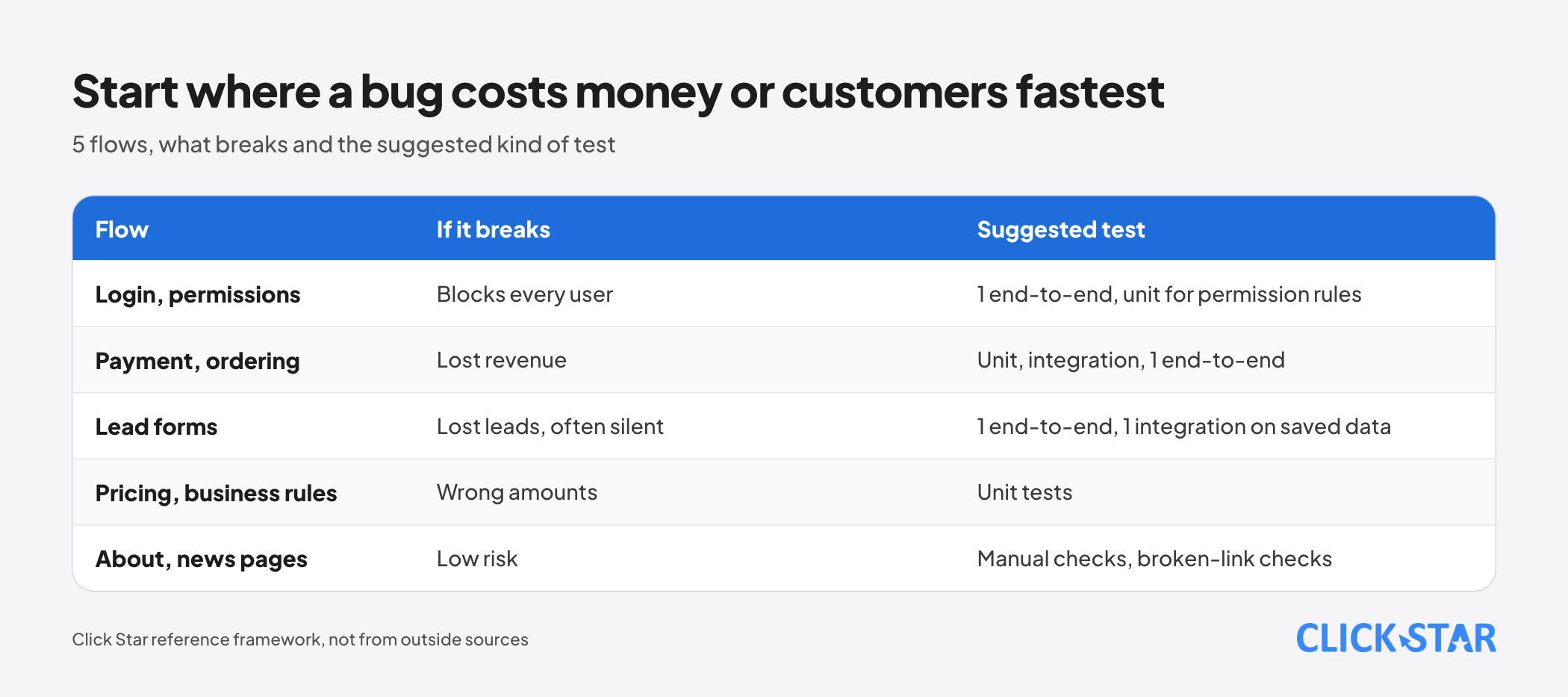
- Login and permissions: a bug blocks every user. Suggested: 1 end-to-end test for the main path, unit tests for permission rules.
- Payment and ordering: a bug loses revenue. Suggested: unit tests for pricing, an integration test against the gateway's test environment, 1 end-to-end test.
- Lead forms: bugs are often silent; the customer thinks it was sent and the business gets nothing. Suggested: 1 end-to-end test, 1 integration test checking saved data.
- Pricing, discounts and business rules: a bug gives wrong amounts. Suggested: unit tests.
- About and news pages: low risk. Suggested: manual checks after big edits, broken-link checks.
What does a first test look like?
Playwright's guidelines page (Playwright drives a browser; no date shown, read on October 24, 2026) says to test behavior users can see, not internals such as function names, and keep each test independent. Below is an end-to-end test for a contact form with fake data.
import { test, expect } from '@playwright/test';
test('visitor submits the contact form', async ({ page }) => {
  await page.goto('http://localhost:3000/contact');
  await page.getByLabel('Full name').fill('Test Visitor');
  await page.getByLabel('Phone number').fill('0900000000');
  await page.getByRole('button', { name: 'Send' }).click();
  await expect(page.getByText('Thank you')).toBeVisible();
});
The labels, button and address are assumptions and Click Star has not run this; adapt it to your page. Run it on a test copy, not the live site: it creates 1 lead. This test only checks that the thank-you message appears, not that the phone number was saved; that takes an integration test.
Where and when should automated tests run?
Run them whenever code changes, in CI (continuous integration): a system that builds and tests automatically when someone pushes code to the repository.
According to GitHub Docs ("Understanding GitHub Actions", no date shown, read on October 24, 2026), a workflow is an automated process described in a YAML file that can build and test every pull request (a request to merge a change into the main branch).
The same guidelines say ideally tests run on every commit (saved change) and pull request, on Linux because it is cheaper. Playwright's "Continuous Integration" page advises setting workers to 1 for stability and always setting globalTimeout, since a run has no upper limit by default.
Vocke writes that pipeline stages (the automated chain from code to product) should be split by speed and scope, not test type, so fast tests run first.
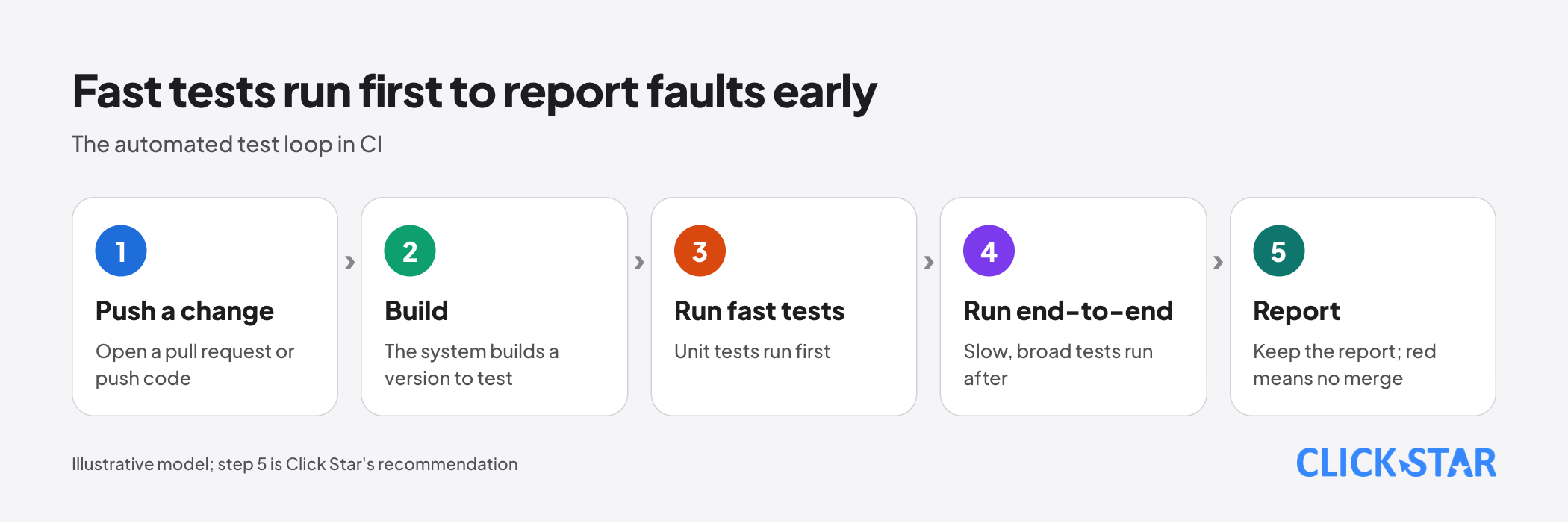
Click Star's recommendation (opinion, not a source): configure the repository so a change that turns a test red cannot be merged into the main branch.
How to handle flaky tests
Isolate them and fix them by a deadline. Fowler (Apr 14, 2011) defines a non-deterministic test as one that sometimes passes and sometimes fails with no change in code, tests or environment. He calls such tests useless and contagious: with 10 in a suite of 100, the suite often fails and the team learns to ignore red, even when it is a real bug.
He proposes a separate suite (quarantine) while still fixing them fast, for example a cap of 8 tests or 1 week so they are not forgotten. He lists 5 common causes: lack of isolation, asynchronous behavior, remote services, time, and resource leaks.
By default Playwright does not retry failed tests. With retries on, a test that fails first and passes on retry is reported as "flaky". Click Star's view: retries help spot flaky tests, but if the goal is only green, the cause remains; treat each as 1 task with an owner.
Test data and test accounts
Do not use real customer data in tests. Use fake names, phones and emails in a test environment whose data you control. Playwright's guidelines also advise against testing third-party services you do not control; simulate their responses instead.
Playwright's "Authentication" page (no date shown, read on October 24, 2026) says to save the signed-in state to a file and add its folder to .gitignore. The file may hold sensitive cookies that could impersonate the test account, so the page strongly discourages committing it.
Click Star already has an article on managing API keys and secrets. If you need real data to reproduce a bug, ask your legal team first; this is not legal advice.
Code coverage: a gap finder, not a score
Code coverage is the share of code lines or branches that tests have executed. The Google Testing Blog (Aug 7, 2020) calls it a "lossy and indirect" measure: it squeezes much information into 1 number, so it should not be the only source of truth.
According to that post, high coverage does not guarantee good tests: it shows code was executed, not checked correctly, and no ideal number applies universally. Much of its value is in showing what is not covered.
Google gives general guidelines: 60% acceptable, 75% commendable, 90% exemplary, while avoiding top-down mandates. Fowler (Apr 17, 2012) expects coverage near 90% or higher from thoughtful testing and would be suspicious of 100%; below half, in his view, signals trouble.
Both are one company's or one person's guidance, not standards. The Vitest tool has a --coverage flag and needs the @vitest/coverage-v8 package, installed when prompted or by hand with npm i -D (Vitest Getting Started and Coverage pages, no date shown, read on October 24, 2026).
How to tell whether a test suite is trustworthy
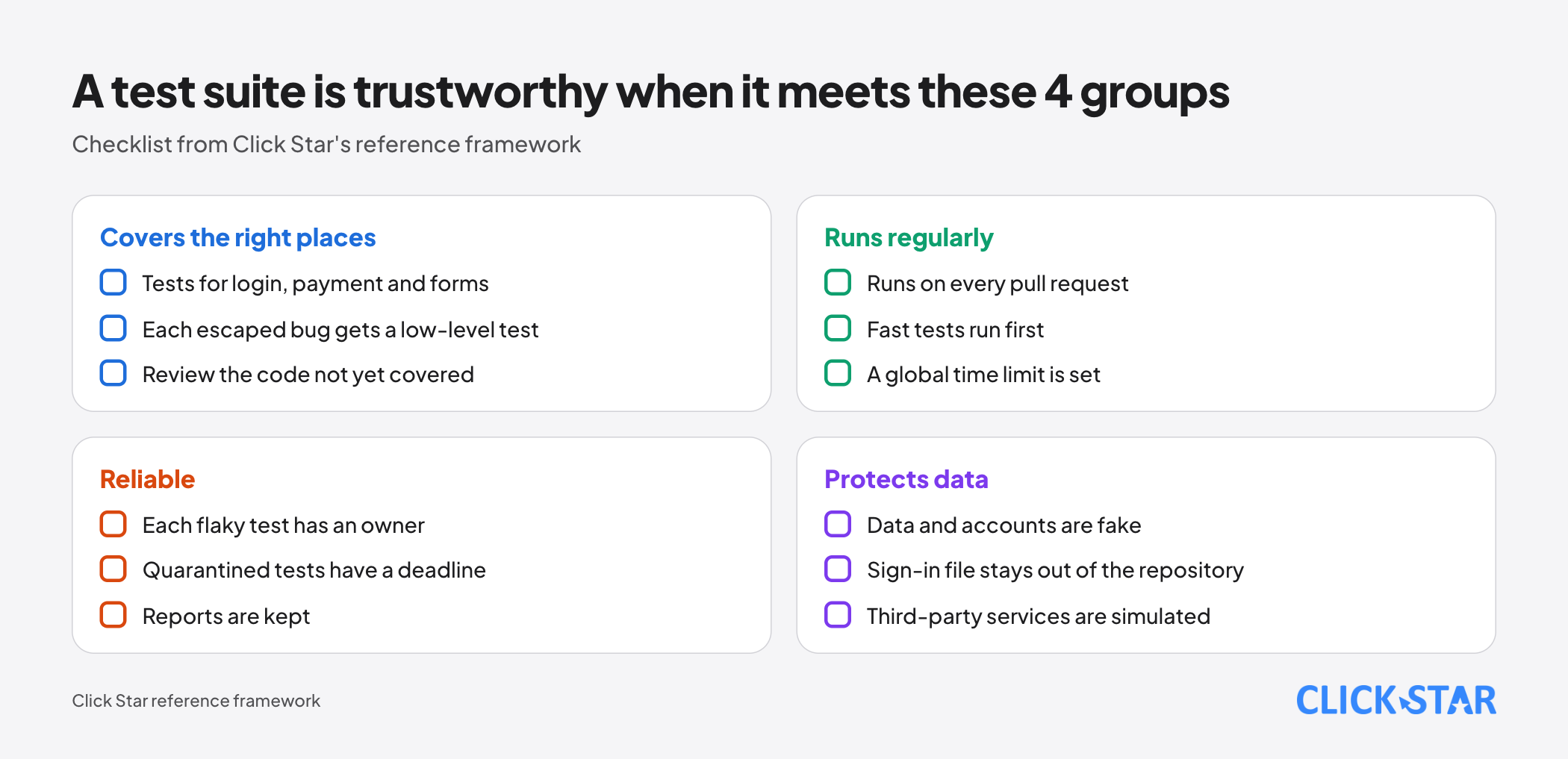
Do not rely on coverage alone. Fowler (Apr 17, 2012) names 2 signs of enough testing: bugs rarely reach production, and people rarely hesitate to change code for fear of bugs. Click Star adds 2 indicators (its own reference framework, not from outside sources).
- Number of flaky tests and quarantined tests: Playwright's HTML report can filter the flaky group.
- Coverage of frequently changed code: Google says frequently changing code should be covered.
Accepting tests from a software vendor
Click Star's view. This is a technical and management opinion, not based on Click Star's own measurements. Click Star builds custom software and websites, so it has an interest here.
For software without tests, a reasonable start is a few end-to-end tests for the money-making flows, then, whenever a high-level test catches a bug, a unit test reproducing it before the fix, as Fowler advises in his Test Pyramid post.
When accepting vendor software, ask 4 things: which flows have tests, where and when they run, who fixes a red test, and what the latest report shows. A fixed coverage figure in the contract invites tests written just to reach it.
What to do in the first 30 days (Click Star reference framework)
- Week 1: list 3 to 5 money-making or lead-generating flows; set up a test environment with fake data.
- Week 2: write 1 end-to-end test for each flow.
- Week 3: put the suite into CI, run it on every pull request, set
globalTimeout, keep the reports. - Week 4: review flaky tests, give each an owner; add unit tests for price calculation; settle the indicators to track.
Common mistakes
- Putting everything into end-to-end tests because they "look like a customer", then living with a slow suite that randomly goes red.
- Treating 70/20/10 or 60%, 75%, 90% coverage as standards, when the sources call them a first guess or guidance each team adjusts.
- Setting a high coverage target, then writing tests with no assertions to reach the number.
- Running end-to-end tests on the live site or with real customer data.
- Turning on retries to make flaky tests green without finding the cause.
- Committing the signed-in state file or test-account passwords to the repository.
What is not known
Click Star has no independent Vietnamese data on how much testing reduces bugs or costs small businesses. The sources are expert and company experience, many from 2011 to 2020: principles, not measurements.
The Google Testing Blog (Aug 7, 2020) itself says it is an open research question whether coverage alone reduces defects. It is unclear whether Google still uses the 70/20/10 ratio and the 60%, 75%, 90% levels today.
Related posts


Need tailored advice for your business?
Click Star helps you build a solution that fits your industry and scale. We answer every question during business hours.