An orphan page has no links to it, so will Google find it?
This article explains what an orphan page is, which links Google can read, and how to find and handle such pages, based on Google Search Central, Search Console Help and MDN documentation.
A company publishes a new blog post every week. Each post has its own address and sits in the sitemap, but no menu, category page or other post links to it. Months later, many posts still get no visitors from Google (an illustrative scenario, not a measurement).
This article explains why a page that no other page links to, called an orphan page, is easy to miss. It also covers which links Google can read, and how to find and handle such pages.
The main sources are Google Search Central, Search Console Help (Google's free tool for site owners), MDN and Next.js documentation, checked on October 24, 2026. Click Star already has separate articles on Googlebot, robots.txt and sitemaps, and mobile-first indexing.
Key points
- An orphan page is a page that no internal link points to. Google says every page you care about should have a link from at least 1 other page on your site.
- According to the SEO Starter Guide, most new pages Google finds each day come through links.
- Google reliably reads only links written as an
<a>element with anhrefattribute (the part that holds the target address). Buttons, an<a>withonclickbut nohref, and addresses that differ only after the # sign are generally not read reliably. - Link text (anchor text) should describe the target page. Avoid repeating "read more" and "click here".
- To find orphan pages, compare the pages listed in the sitemap with the pages a crawler reaches starting from the home page.
What an orphan page is
An orphan page is a page that no other page on the same website links to. An internal link is a path from one page to another page on the same website.
Picture a room with no door. Anyone who knows the room number can get in, but no one walking the corridor meets it. Google is in the same position: with no corridor, it needs another way in.
Click Star found no word "orphan" in the Google documents it read. Screaming Frog, a crawler-software vendor (a secondary source, used only for the definition), describes it as a page with no linking path from the start of a crawl, usually the home page. By that measure, a page linked only from another orphan page is still an orphan.
How Google finds a new page
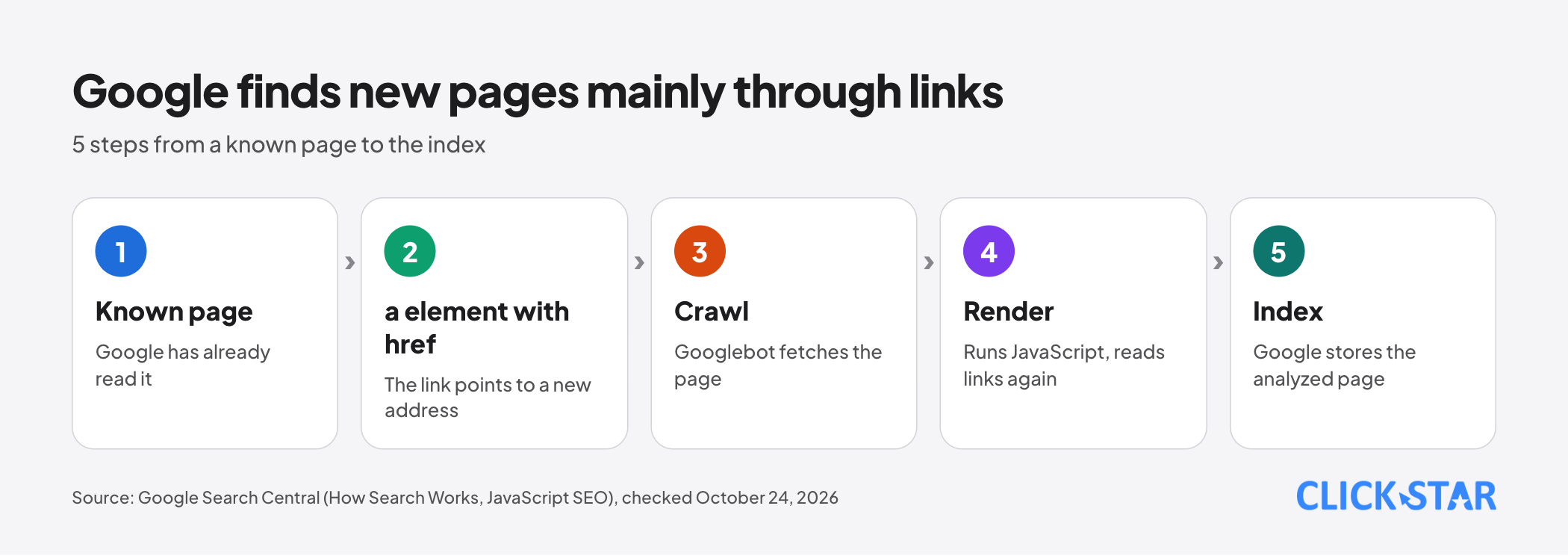
Google finds new pages mainly through links from pages it already knows. The SEO Starter Guide (updated December 10, 2025) says the vast majority of new pages it finds each day come through links.
According to "In-Depth Guide to How Google Search Works" (updated December 18, 2025), there is no central registry of web pages, so Google keeps adding new ones to its list of known pages.
The document names 3 routes into that list: pages Google has already visited, pages linked from a known page (for example a category page linking to a new blog post), and pages submitted through a sitemap, a file that lists page addresses. Googlebot, Google's program that reads web pages, does not crawl every page it discovers.
For pages that use JavaScript, "Understand JavaScript SEO Basics" (updated March 4, 2026) describes 2 passes over links: on the raw HTML, then again after the page is rendered.
So what route is left for an orphan page? A sitemap, or a link from another website. A 2008 post on the Google Search Central blog warns that a sitemap should not replace a link structure Google can read.
Which links Google can read
Google reads links reliably when they are an <a> element with an href attribute. According to "SEO Link Best Practices for Google" (updated December 10, 2025), Google can generally crawl only links in this form, and most other formats will not be parsed.
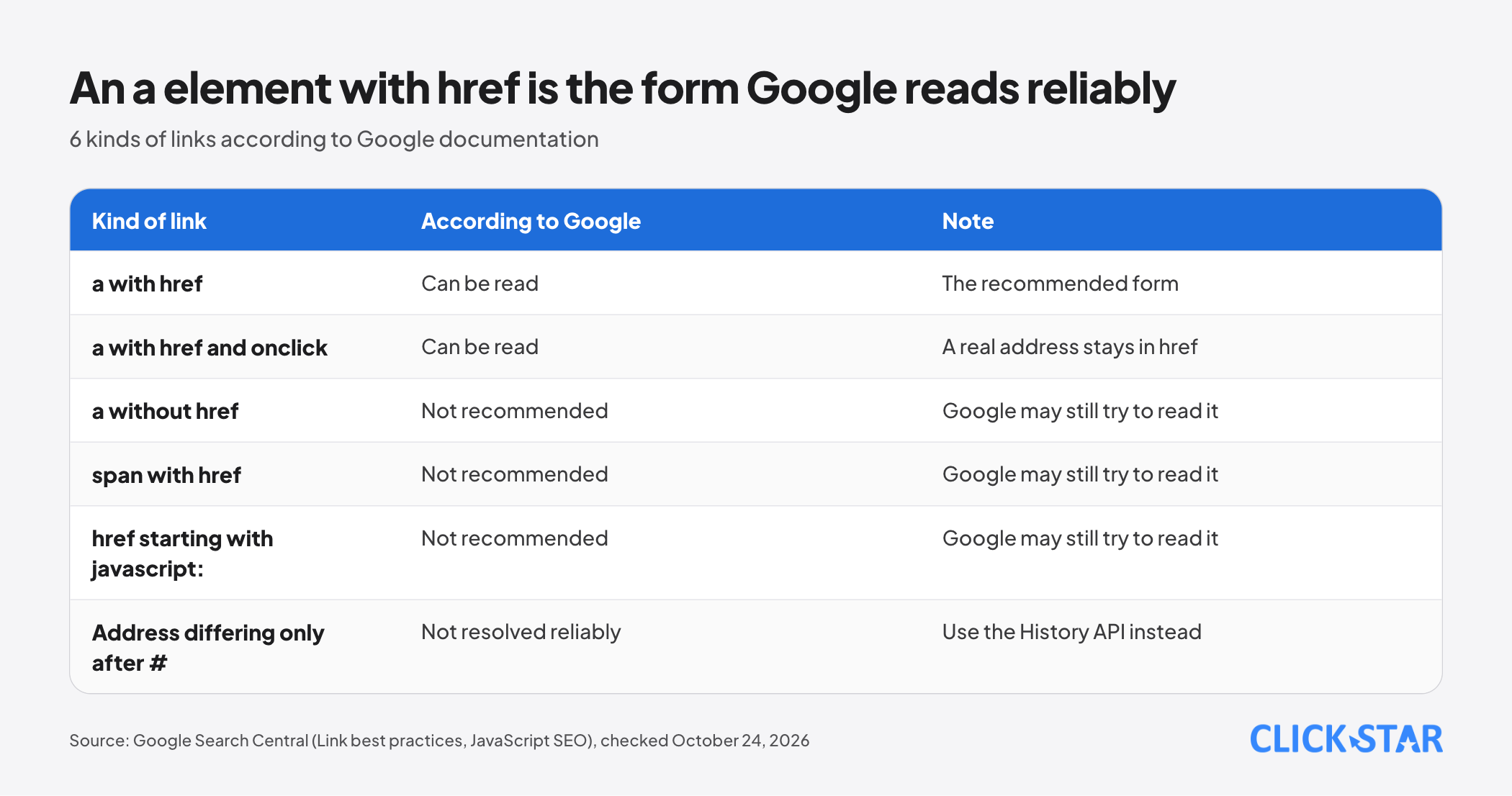
An <a> element with href, even with an extra onclick or class, is one Google can read. An <a> without href, a <span> with href, or an href starting with javascript: is not recommended, although Google may still try to read it.
For single-page apps, the JavaScript SEO documentation recommends the History API (a browser feature that changes the address without reloading) instead of the part after the # sign, because Googlebot cannot reliably resolve addresses of that kind.
Anchor text: how to write a link
Anchor text is the visible text of a link. According to Google, good anchor text is descriptive, reasonably concise and relevant both to the page it sits on and to the page it points to. "Details here" says nothing about the target page, while "How to read the performance report in Search Console" does.
Google also advises against chaining links together or stuffing keywords into anchor text.
Lighthouse, the page-audit tool in Chrome, flags generic phrases such as "click here". MDN says link content should indicate where it goes, because screen readers can list every link.
JavaScript links, pagination and "Load more" buttons
In Next.js, the <Link> component renders an <a> element with href, according to the Next.js documentation (updated August 25, 2026). Click Star's general understanding, not stated on this page: the router.push() call navigates through code when the user clicks and creates no link element.
Google says it cannot reliably extract URLs from tags that act as links through script events. Click Star infers that a path existing only in router.push() risks not being read; check with URL Inspection.
Article lists are the easiest place to create orphan pages. "Pagination Best Practices for Google" (updated December 10, 2025) says Google's crawlers do not click buttons and generally do not trigger functions that need a user action.
The document recommends linking paginated pages in sequence with <a href>, each at its own address. Click Star's inference: if a list shows more posts only when someone presses "Load more", older posts may have no link left in the HTML.
Menus, category pages, breadcrumbs and related posts
There are 4 common places for internal links.
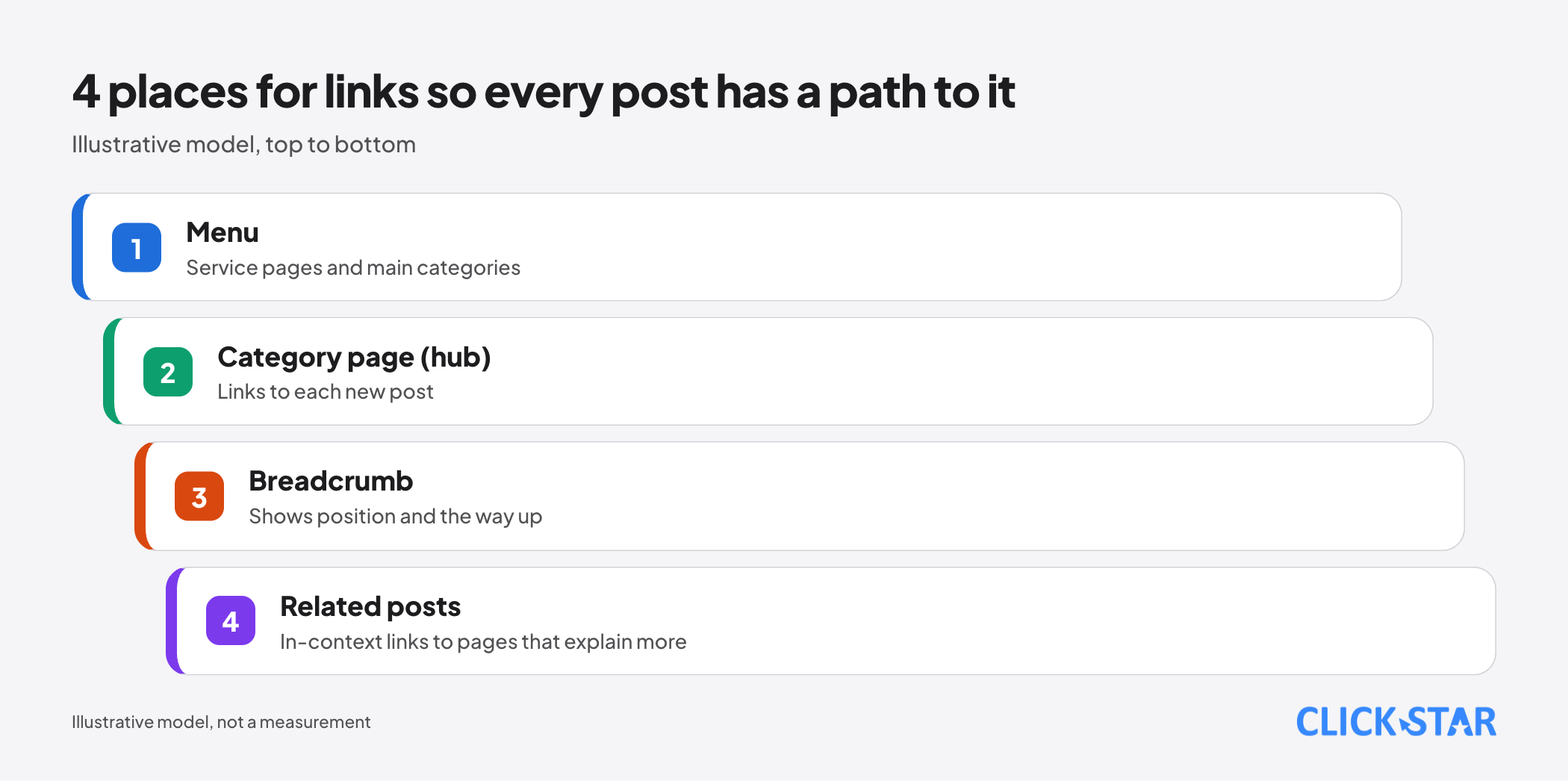
Menu: "What Is a Sitemap" (updated December 10, 2025) says important pages should be reachable through some form of navigation, whether a menu or links placed on pages. Category page (hub): "How Google Search Works" gives the example of a category page linking to a new blog post.
A breadcrumb is a path line such as "Home > Blog > Post title". According to Google's BreadcrumbList documentation (updated September 8, 2026), it shows the page's position in the site hierarchy. Click Star's inference: structured data only describes it, so the real path still needs to be an <a href> element.
Related posts: Google advises linking, in context, to pages that help readers understand more.
Depth and internal nofollow
How many clicks is too deep? The current Google documentation Click Star read gives no number. The 2008 post only advises keeping important pages within several clicks of the home page. A simple Click Star rule: a page that brings in customers needs a link from the home page, the menu or a main category page.
Should internal links use nofollow (an attribute telling Google not to follow a link)? Generally no, if you want the target page to be found. "Qualify Outbound Links for SEO" (updated December 10, 2025) says to use nofollow when you would rather Google not associate your site with the linked page, or crawl it from your site.
For links within your own site, that document points to a disallow rule in robots.txt. Click Star's inference: a page connected only by nofollow links is close to an orphan.
How to find orphan pages
Click Star found no Google report that lists orphan pages directly. The practical method is to compare 2 lists, then check each suspect.
Links report. According to the Links report page in Search Console Help, the internal links section shows the most-linked pages and lets you pick one to see which pages link to it. Google notes it is only a sample, with tables limited to 1,000 rows, so a link missing from the report is not proof that none exists.
URL Inspection. According to the URL Inspection tool page, the Discovery section shows the sitemap containing the address and a "Referring page", which Google may have used to find it. A missing value does not mean no page links to it.
Comparing the sitemap with crawl results. Screaming Frog describes the method: crawl from the home page, then load extra addresses from the sitemap, Google Analytics and Search Console. An address found elsewhere but not on a path from the home page is an orphan candidate.
If you have 2 text files, one address per line, normalized the same way (same http or https, same trailing slash), these commands print the addresses found only in the sitemap. The file sitemap-urls.txt comes from sitemap.xml, and crawl-urls.txt is exported from a crawler that starts at the home page:
sort -u sitemap-urls.txt > a.txt
sort -u crawl-urls.txt > b.txt
comm -23 a.txt b.txt
What this means for Vietnamese business websites
Google's sitemap documentation calls a site of about 500 pages or fewer "small"; it also says that on large sites it is harder to make sure every page has a link from another page. Click Star's inference: the risk grows when a site publishes regularly without a template that links automatically.
Click Star's view. Internal linking is a matter of content structure, not a ranking trick. The most durable approach is to let page templates generate breadcrumbs, related posts and category pages with real paginated addresses, rather than adding links by hand after each post.
Click Star provides SEO-ready, fast-loading website design, so it may lean toward structure.
A 30-day plan
Click Star's reference framework, not taken from an outside source.
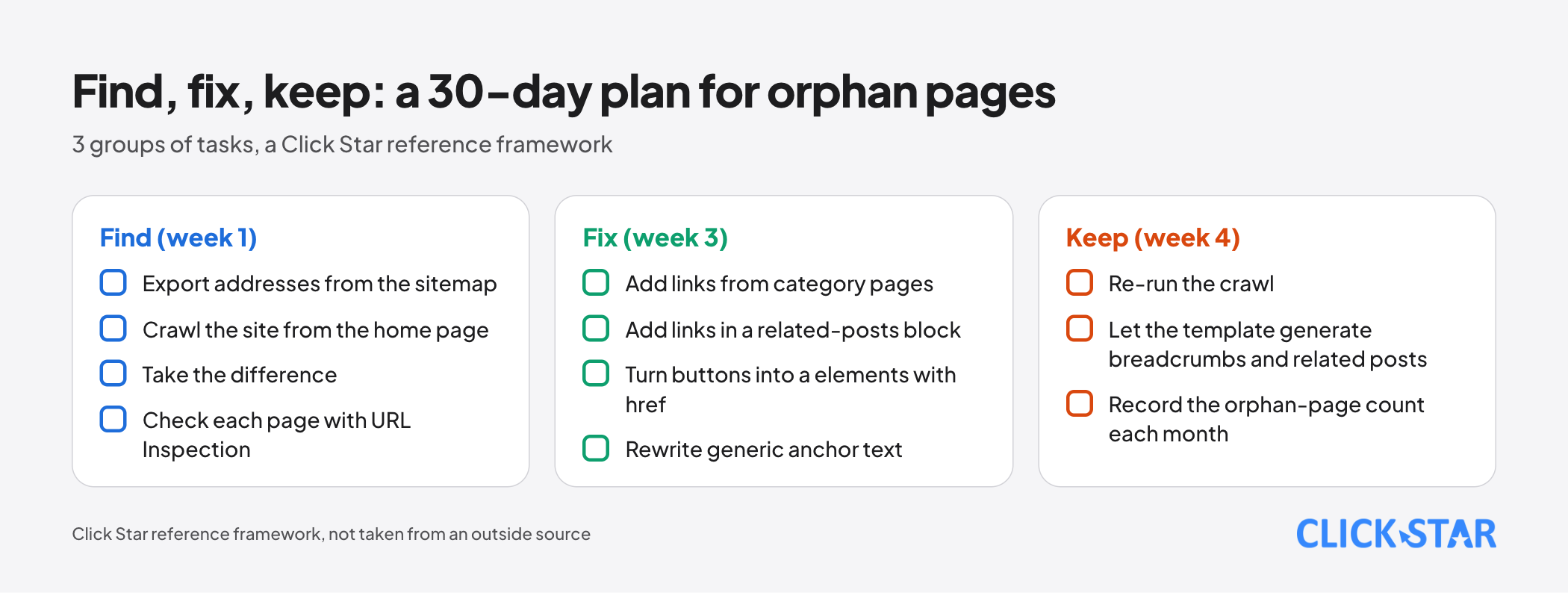
- Week 1, Find: export addresses from the sitemap, crawl the site from the home page, take the difference, check each page with URL Inspection.
- Week 2: sort into 3 groups: pages to connect (articles, service pages), pages hidden on purpose (thank-you pages, drafts), and pages to remove or redirect.
- Week 3, Fix: add links from category pages, add links in a related-posts block, turn buttons into a elements with href, rewrite generic anchor text.
- Week 4, Keep: re-run the crawl, let the post template generate breadcrumbs and related posts, then record the number of orphan pages each month.
How to measure results
The first measure is the number of orphan pages after each audit crawl. Click Star has no pass threshold from an outside source; the goal is a falling number.
The second is the Links report: if a fixed page appears in the internal links table, its count should be above 0; if it does not appear, conclude nothing, because the report is only a sample. The third is the performance report: compare each page's impressions and clicks before and after the fix.
The Page indexing report describes the status "Crawled - currently not indexed" as a page that was crawled but not indexed. Links help Google find a page; they do not guarantee indexing or ranking.
Common mistakes
- Assuming that having a sitemap means internal links are not needed.
- Using buttons, an a element with only
onclick, orhref="#"for navigation instead of an a element with a real address. - Using generic anchor text such as "read more" and "click here" for every link.
- Building article lists that show more posts only through a "Load more" button, with no paginated pages at their own addresses.
- Adding
nofollowto internal links to "save" strength without understanding the consequences. - Expecting rankings to rise right after linking, without measuring again or checking indexing status.
What is not known
Click Star has no measurement of the share of orphan pages on Vietnamese business websites and has run no before-and-after experiment on adding links. The Google documents read state no maximum number of links per page.
Google does not quantify the effect of internal links on ranking, and the Link best practices document says "generally", so exceptions may exist. The 2008 Google blog post (its page says the content is still relevant) and the 2019 Lighthouse page are old, and the orphan-page definition rests on a software vendor's documentation (secondary).
Related posts



Need tailored advice for your business?
Click Star helps you build a solution that fits your industry and scale. We answer every question during business hours.