What is MCP (Model Context Protocol): connecting AI to business data and tools, the risks and how to control them
What MCP consists of, how it differs from an API and function calling, which risks the official documents name and how a Vietnamese business should start, based on specification 2026-07-28.
An AI assistant can answer fluently and still know nothing about a company's documents, customers or internal systems. The Model Context Protocol (MCP) is an open protocol, supported by many AI vendors, for connecting assistants to those things, and security teams are wary of it.
This article draws on MCP specification revision 2026-07-28 (current per the project's Versioning page), the project's security documents, the documentation of Anthropic, OpenAI, Google and Microsoft, and a Linux Foundation announcement, checked October 21, 2026.
It covers what MCP consists of, how it differs from an API and function calling, which risks the official documents name, when MCP is not needed, and how a Vietnamese business should start. Click Star already has an API article.
Key points
- MCP is an open protocol for connecting AI applications to outside systems. A server offers 3 kinds of things: tools (functions the model calls), resources (context data) and prompts (templates the user picks).
- There are 3 roles: host (the AI application), client (connected to exactly 1 server) and server. The 2 standard transports are stdio for local servers and Streamable HTTP for remote ones.
- Revision 2026-07-28 makes MCP stateless: the initialize handshake and the session ID are gone.
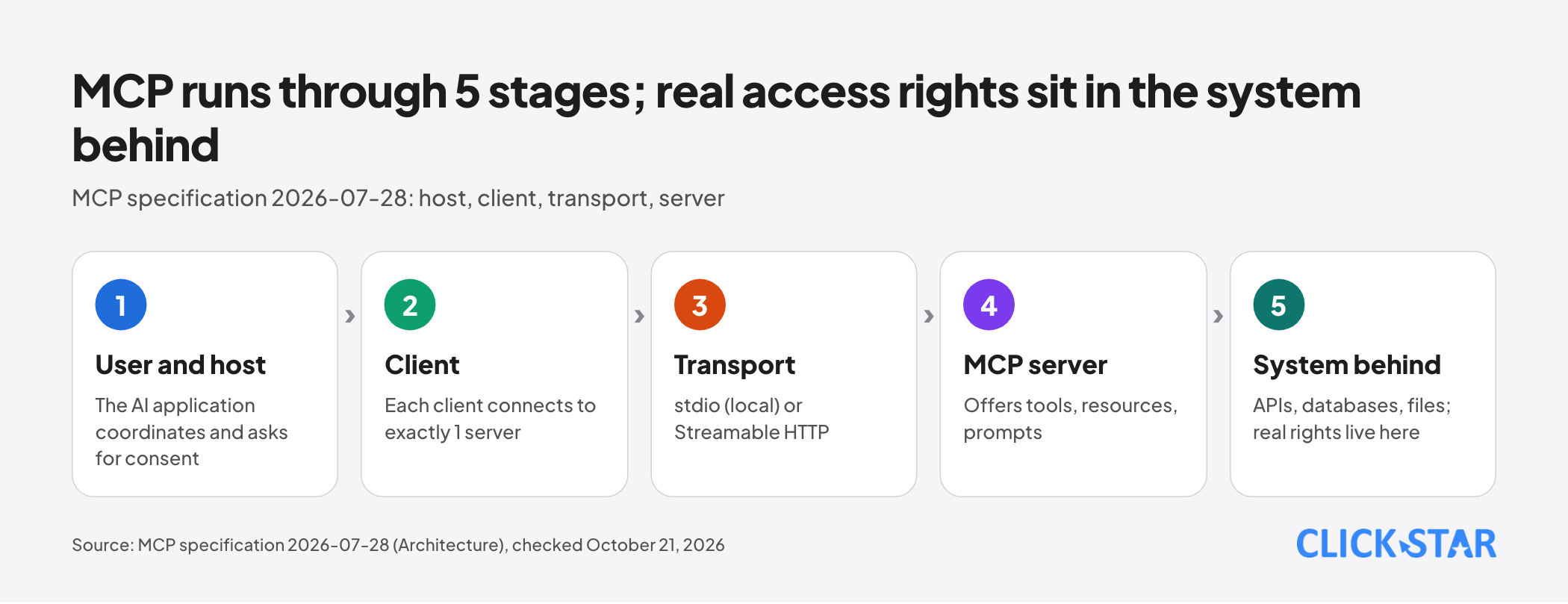
- MCP does not replace APIs. An MCP server usually still calls an API behind it; the real access rights sit in the system behind.
- Main risks: over-broad permissions, token passthrough, malicious local servers, hidden instructions in tool descriptions, and prompt injection. Controls: least privilege, isolation, human approval, logs.
- How to start: 1 read-only server for 1 data source, a small pilot, logging on. If 1 simple API is enough, skip MCP.
What MCP is and what it consists of
According to the project's introduction page (read October 21, 2026), MCP is an open-source standard for connecting AI applications to outside systems such as files, databases, search tools and workflows, much like a USB-C port for AI applications.
MCP is a protocol, not a product. It defines how AI and systems exchange messages, not what a system may do. The specification overview says MCP cannot enforce its security principles by itself.
According to the Architecture document, the host is the AI application: it creates clients, controls connection permissions, applies security policy and asks for consent. Each client talks to exactly 1 server, local or remote. A server must not read the whole conversation or see into other servers.
The 3 things a server offers
Per the Tools, Resources and Prompts pages, each kind has a different controller:
- Tools: functions the model can call, such as a database query. The model controls them.
- Resources: data used as context, such as files or database schemas. The application decides how to bring them into context.
- Prompts: templates with parameters. Chosen by the user, such as slash commands.
Not every product supports all 3: Anthropic's MCP connector supports only tool calls, Copilot Studio supports tools and resources (Microsoft Learn, updated October 17, 2026).
2 transports: stdio and streamable HTTP
The specification defines 2 standard transports. With stdio, the client launches the server as a child process and exchanges JSON-RPC messages over standard input and output, as local servers do. With Streamable HTTP, the server has a single HTTP address and the client sends each request as 1 POST.
The server replies with 1 JSON object, or opens a Server-Sent Events (SSE) stream to send progress notifications before the result. That is what "streamable" means.
Per the Key Changes page, revision 2026-07-28 removes initialize, the session ID and stream resumption: if a stream breaks, the client sends a new request. Each request carries its own protocol version and capabilities.
How MCP differs from a plain API, function calling and plugins
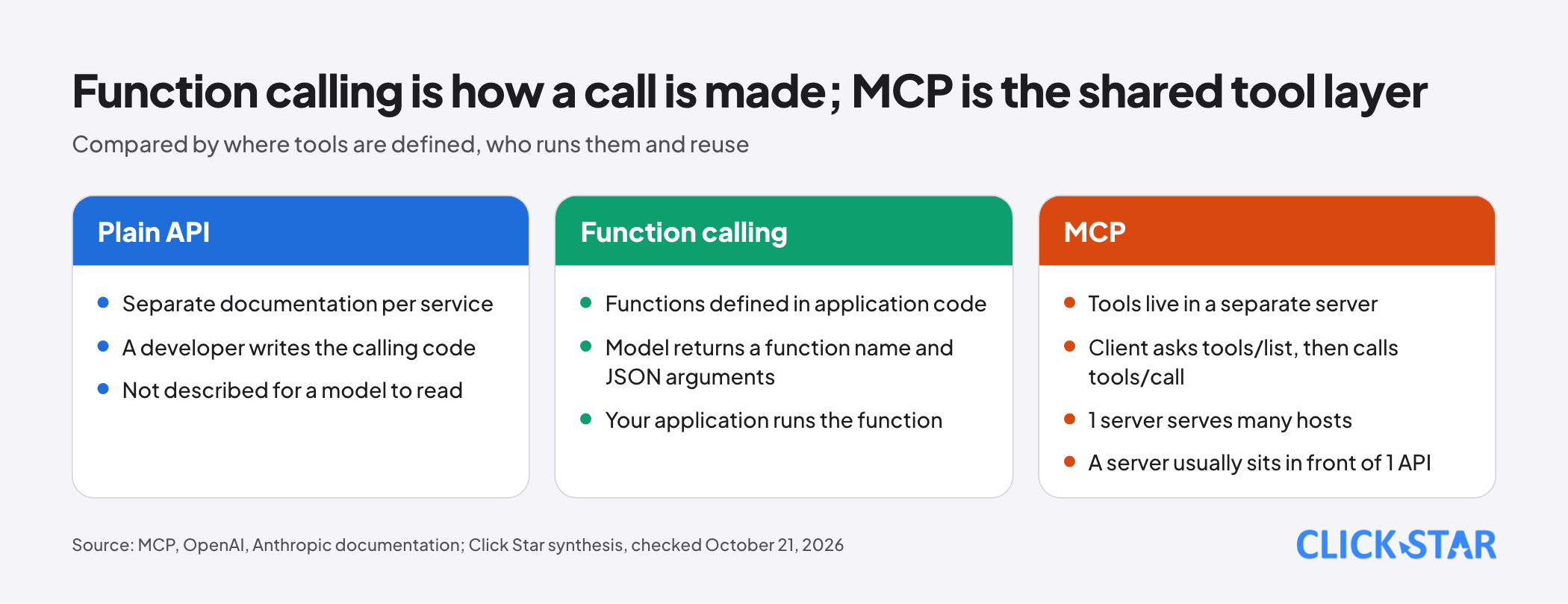
In OpenAI's function calling guide (read October 21, 2026), the model returns a function name and JSON arguments, your application runs the function and sends the result back. Anthropic's documentation describes the same loop for client tools.
With MCP, the tool lives in a separate server. The client asks tools/list to see what exists, then calls tools/call, and one server can serve many hosts. An MCP server usually sits in front of an API and describes it as tools with a JSON schema.
Click Star's inference, from how OpenAI and Anthropic describe MCP tools: function calling is how the model asks for a call; MCP is the standard layer where tools are declared and called. The two complement each other. Click Star has not read an official comparison with plugins and draws no conclusion.
Who supports MCP and who governs it
The Linux Foundation announcement of December 9, 2025 says Claude, Cursor, Microsoft Copilot, Gemini, VS Code and ChatGPT have adopted MCP. In documents read on October 21, 2026, OpenAI has an mcp tool in the Responses API, and Anthropic has an MCP connector (beta) that needs a server reachable over public HTTP.
A Google post dated July 7, 2026 lets agents in the Gemini API connect to remote MCP servers.
On governance, the project's Governance page (read October 21, 2026) records MCP as a project of LF Projects, LLC, with Lead Maintainers holding final authority. Membership belongs to individuals, with no seats reserved for companies.
Per the December 9, 2025 announcement, MCP is a founding project of the Agentic AI Foundation under the Linux Foundation, which has 8 Platinum members including AWS, Anthropic, Google, Microsoft and OpenAI. Anthropic says MCP's governance model stays unchanged.
Authentication and authorization: OAuth in the specification
Per the Authorization page (revision 2026-07-28), authorization is optional. HTTP implementations should follow it; stdio ones should not, and take credentials from the environment. A protected MCP server is an OAuth 2.1 resource server, the client is the OAuth client, and an authorization server issues tokens.
The flow: the client calls without a token, gets a 401 with a metadata link (RFC 9728), discovers the authorization server, then requests a token using PKCE and a resource parameter (RFC 8707) naming the target server.
The rule most worth remembering: an MCP server must check that a token was issued specifically for it, and must not accept or pass through any other token. The Enterprise-Managed Authorization extension lets a company's identity provider decide who may use which servers.
Click Star's inference: OAuth tells you who may call the server, not what the model does with the data it gets back. Fine-grained permissions, such as which rows or fields, are still enforced by the server and the systems behind it.
Security risks and how to control them
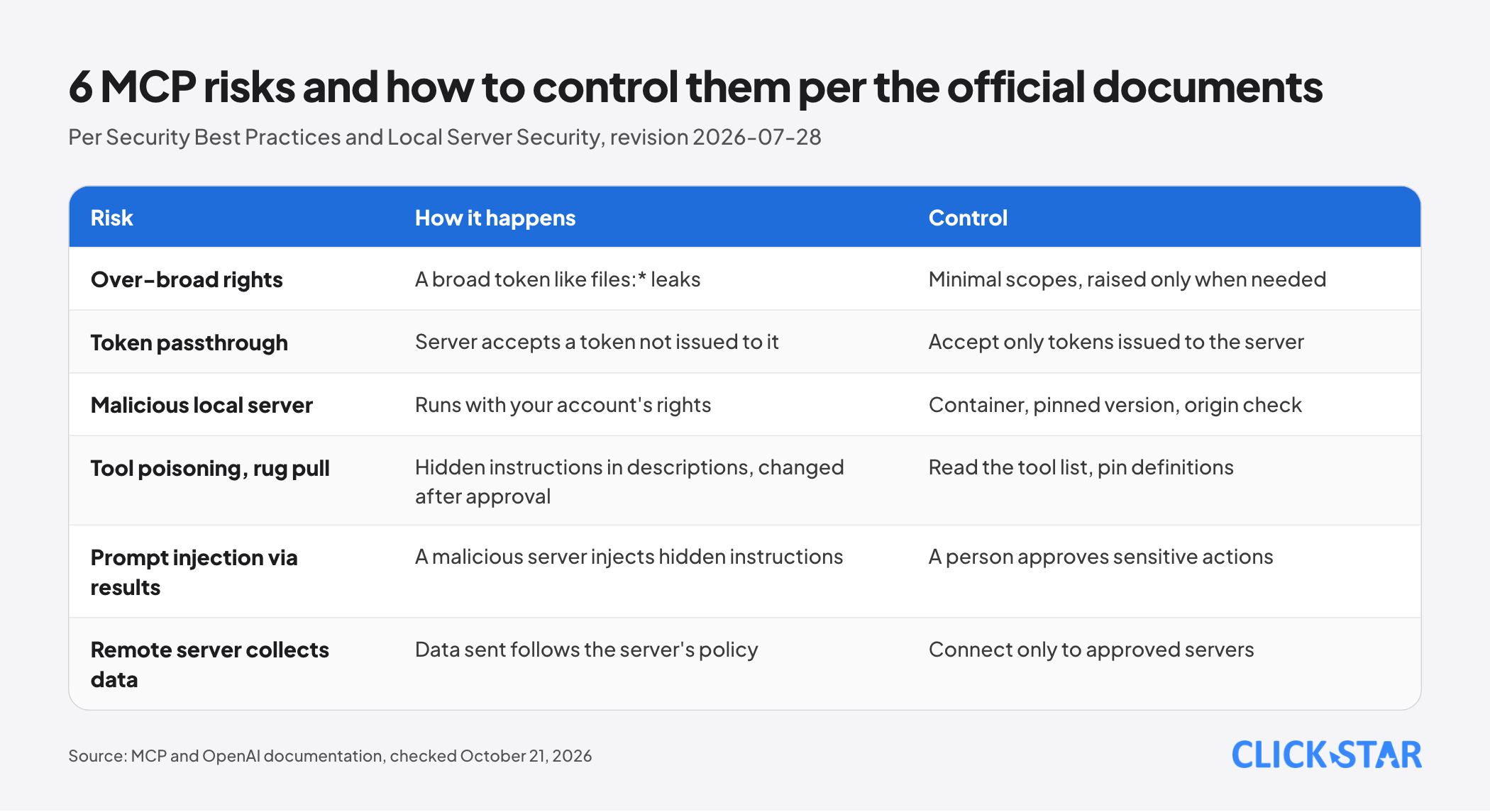
The Security Best Practices document (revision 2026-07-28) has 11 attack and mitigation sections, by Click Star's count. Tool poisoning and rug pulls are in the Local Server Security guide, not in that document. The list combines both.
- Over-broad permissions: a leaked token with rights like files:* or db:* opens the whole data surface. Start with minimal scopes and raise them only when needed.
- Token passthrough: a server accepts a token not issued to it and forwards it to the API behind. The specification forbids it: it bypasses controls and logs the wrong identity.
- Malicious local server: it runs with your account's rights and can read SSH keys and environment variables. Use a container, pin the version, check the package origin.
- Tool poisoning and rug pulls: tool names and descriptions are instructions the model reads, so they can hide commands and change after you approved them; all servers share one context and can affect each other. Read the tool list and choose clients that pin definitions.
- Prompt injection through results: OpenAI warns a malicious server can inject hidden instructions. Have a person approve sensitive actions.
- Remote server collecting data: per OpenAI, data sent to a server follows that server's own retention policy. Connect only to approved servers.
Local Server Security says no check can prove in advance what a server will do, so treat a third-party server as untrusted code with minimal rights. OpenAI requires approval by default before sharing data; Anthropic has the beta header mcp-client-2026-09-15 to pin the tool list.
When MCP is not needed
If only 1 application needs to call 1 API, function calling is enough, because that loop needs no intermediate server. If the process is fixed and the model need not choose tools, an automation flow with predefined steps is easier to control.
Cost is also a reason: per Anthropic, tool descriptions count toward input tokens, and per OpenAI, allowed_tools reduces cost and latency.
Click Star's view. MCP is worth trying when 2 or more AI applications need the same data sources, or when a business wants to switch model vendors without rewriting connections. The bigger risk is governance: who installs servers, approves permissions and reads logs.
Disclosure: Click Star sells AI integration and AI automation services, so it has a commercial interest here; the article therefore also names the cases where MCP is not needed.
A 4-step plan for Vietnamese businesses
A Click Star reference framework, not a measurement or rule: start small, read-only, with human approval and logs.
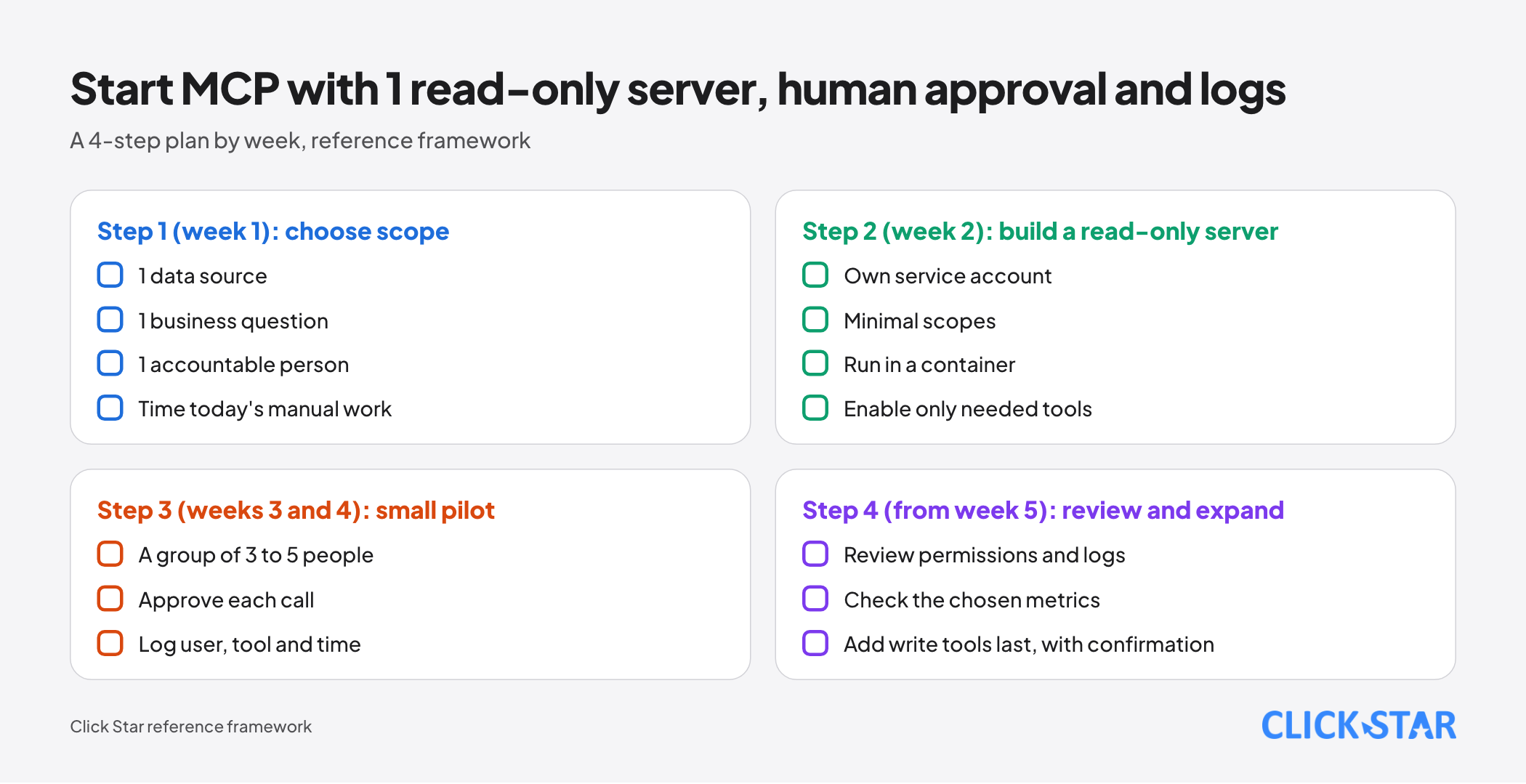
- Step 1 (week 1): choose 1 data source, 1 business question and 1 accountable person, and time today's manual work.
- Step 2 (week 2): build or choose 1 read-only server with its own service account, minimal scopes, a container and only the needed tools.
- Step 3 (weeks 3 and 4): pilot with 3 to 5 people, turn on per-call approval and log user, tool, parameters and time.
- Step 4 (from week 5): review permissions and logs and the metrics below, then decide whether to expand. Add write or delete tools last, with human confirmation.
If the source holds customer information, check personal data protection rules first; Click Star already has an article on that law.
Checklist for evaluating an MCP server
- Identifiable publisher, readable source, pinned version.
- Every tool description read with no odd instructions; write and delete tools listed.
- Token issued for the server, minimal scopes, no passthrough.
- You know where data goes and how long it is kept; the server is isolated.
- Logs exist, a person approves sensitive actions, and incidents have a revocation process.
How to measure
There is no Vietnamese benchmark, so measure against the manual baseline from step 1. Reference metrics: share of successful calls, share rejected by people, tokens spent on tool descriptions against tools actually called, task completion time. Check logs by taking any 20 calls and seeing whether user, tool, parameters and time can all be traced.
What is not known
Click Star has no measurement of MCP use in Vietnam, no independent count of servers and no real attack frequency. The security documents describe possibilities and defenses, not how often attacks occur.
Click Star has not read the Agentic AI Foundation's charter on who decides the specification, has not checked which clients support Enterprise-Managed Authorization, and has not read a comparison of MCP with plugins.
Common mistakes
- Installing a community server in a hurry on a machine holding SSH keys and key environment variables.
- Granting a broad token for convenience instead of minimal scopes.
- Letting a server forward the user's token to an API instead of using its own token.
- Opening write or delete tools before a read-only trial.
- Reviewing a server only at installation, not watching for changes to its tool definitions.
- Not turning on logs, so incidents cannot be traced.
- Using MCP where 1 simple API is enough.
Related posts


Need tailored advice for your business?
Click Star helps you build a solution that fits your industry and scale. We answer every question during business hours.