What to write so real customers find you? Keyword research
How to find keywords in your own business data, read search intent and assign each topic to 1 page. Based on official Google documentation.
Picture a furniture workshop. The owner wants the blog to cover "design trends", while customers keep phoning to ask "how much for a full kitchen cabinet set". The posts go out, but the phone stays quiet.
That is a made-up scenario. It happens when topics follow the business instead of the way customers type into Google, and keyword research fixes exactly that.
This article summarizes official Google documentation (Search Central, Search Console, Trends, Ads, Analytics), checked on October 26, 2026. It answers 3 questions: where to get keywords, what each tool tells you, and which page each keyword goes to.
Key points
- A keyword is how a customer describes a problem, not a search-volume figure. Google says its systems understand many phrasings, so you need not guess every variant.
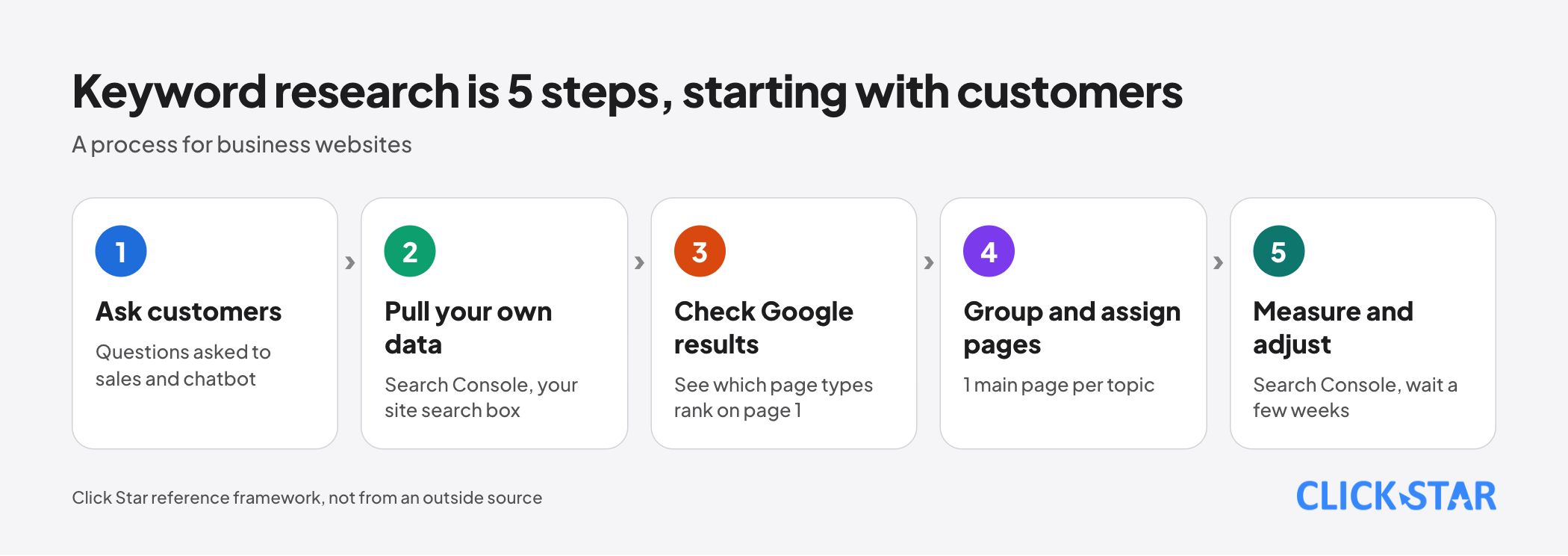
- A 5-step process: ask customers, pull your own data, look at Google's results, group keywords and assign them to pages, then measure and adjust.
- Start with data you already have: questions customers ask sales and the chatbot, queries in Search Console, and phrases typed into your website's search box.
- Google Trends gives relative interest on a 0 to 100 scale. Keyword Planner gives estimated search volume and needs a Google Ads account. Neither is an exact count.
- Each topic should have 1 main page. This is Click Star's rule, not a Google requirement.
- Measure page by page in Search Console and wait a few weeks: Google says changes can take hours to months to show.
What keyword research is, and why it is not just counting searches
Keyword research means finding what customers type when they need what you sell, then choosing topics and pages that answer those phrases.
Google's SEO Starter Guide (last updated December 10, 2025) says experts and newcomers often use different words, for example "charcuterie" and "cheese board".
So write the way readers talk. Do not worry about missing a variant: Google's language matching systems can relate a page to many queries even when the exact words are absent.
The page "How Does Google Determine Ranking Results" (no date shown, read October 26, 2026) adds that the system uses synonyms, so "change laptop brightness" still finds a page saying "adjust laptop brightness".
The Starter Guide also says Google Search does not use the meta keywords tag, and that keyword stuffing is against Google's spam policies.
Search intent: 3 groups who type 3 kinds of phrases
Search intent is what the person typing actually wants to do. Google says the first step in ranking is working out the intent behind a query. Words in the query also hint at the result type: "cooking" may bring up recipes and "pictures" may bring up images (same ranking page, read October 26, 2026).
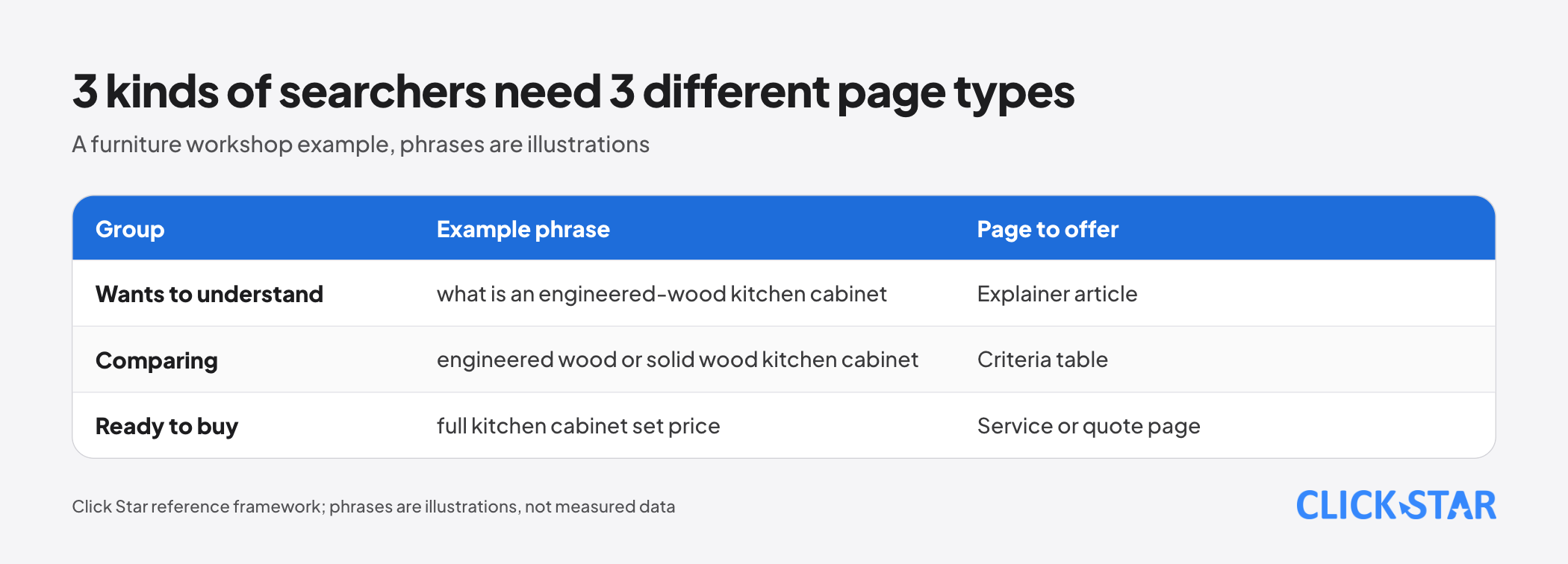
Click Star splits intent into 3 groups. This is a Click Star reference framework, not an official Google classification, and Click Star found no such split in Google's documentation.
Group 1 is wants to understand: "what is an engineered-wood kitchen cabinet", which needs an explainer. Group 2 is comparing: "engineered wood or solid wood kitchen cabinet", which needs a criteria table.
Group 3 is ready to buy: "full kitchen cabinet set price", which needs a service or quote page. These phrases are illustrations only, not search data.
Each intent needs a different page type: an explainer does not help someone who wants a price, and a sales page does not help someone who wants to understand. For shops with a physical location, Click Star already has a separate article on local SEO.
Finding keywords in your own business data
Your own data speaks for your own customers, so use it first. There are 3 sources you usually already have.
Questions customers ask sales and the chatbot
Open recent conversations, or ask the sales team to log them. Copy exactly how customers name the product and what they ask before buying.
Remove names, phone numbers and addresses before using a spreadsheet or an AI tool. Click Star already has a separate article on bringing AI into a business safely with customer data. How customers talk to sales may differ from how they type into Google, so check it in later steps.
Queries in Search Console
The Performance report shows which queries made your pages appear on Google (Click Star already has a separate article on reading Search Console). Open the Queries tab, which by default covers the last 3 months (Search Console Help page, no date shown, read October 26, 2026).
Look for phrases with many impressions but few clicks. Click Star's view: Google may be showing you while customers see no reason to click, or the page may rank low.
There are 2 limits. First, queries that no more than a few dozen people typed over 2 to 3 months are anonymized (Google post of October 19, 2022). Second, the report only lists phrases that made your pages appear.
The search box on your own website
Click Star's view: what customers type into your website's search box often shows what they could not find. According to the Analytics enhanced measurement page (no date shown, read October 26, 2026), the view_search_results event fires when the page address has 1 of 5 parameters: q, s, search, query or keyword.
The phrase is stored in the search_term parameter. If your site uses a different parameter name, add it in the advanced settings.
Google Trends and Keyword Planner: what they are for, what not to trust
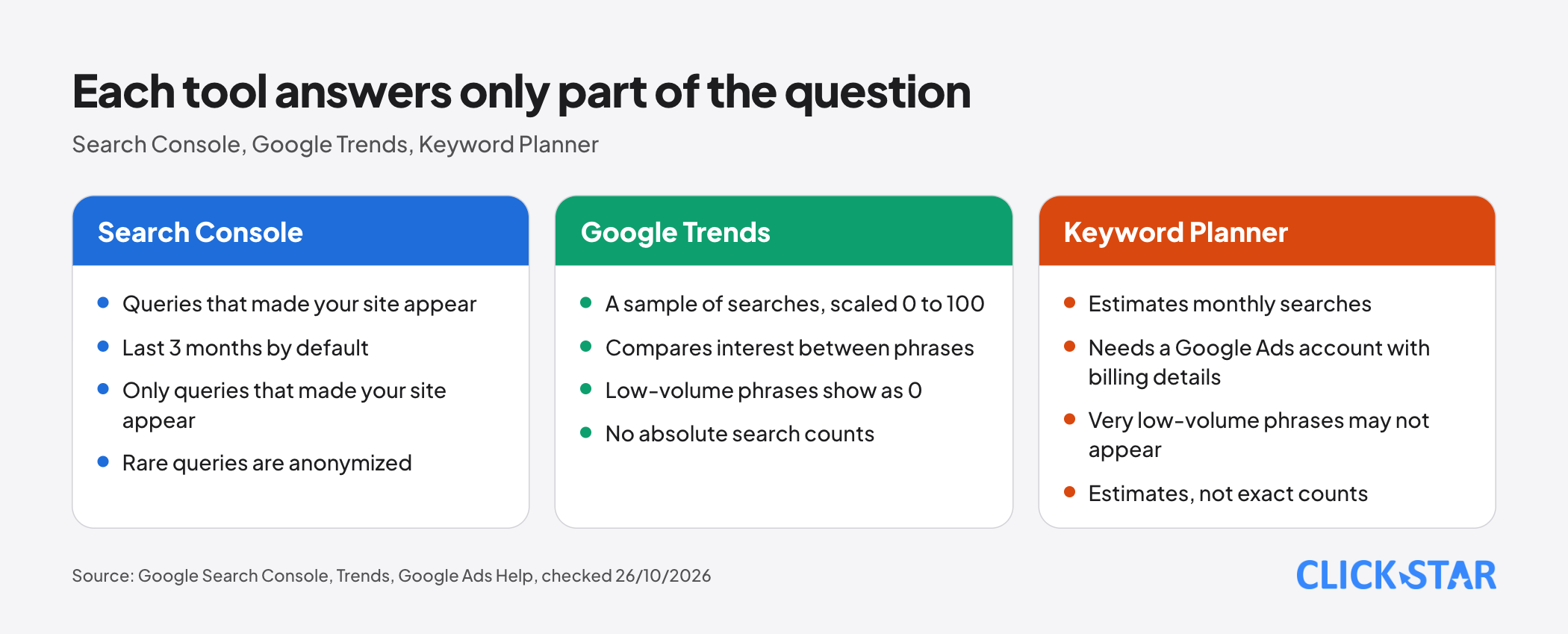
Search Console covers queries that already made your site appear. Trends and Keyword Planner cover the wider market.
Google Trends shows relative interest. According to the Trends FAQ (no date shown, read October 26, 2026), the data is a sample of searches. Each point is divided by total searches for that region and period, then scaled from 0 to 100.
So the number says which phrase draws more interest, not how many searches there were. Low-volume phrases show as 0, and Trends always adds statistical noise, most noticeable for phrases few people search.
According to the "Compare Trends search terms" page, Trends returns no results for spelling variations, synonyms, or singular and plural forms. Click Star's inference: for Vietnamese, test accented and unaccented spellings separately and record what you see.
Keyword Planner sits inside Google Ads. According to the Google Ads Help page (no date shown, read October 26, 2026), it suggests keywords and estimates monthly searches. To use basic features such as keyword ideas, you must finish account setup, including billing details.
Phrases with very low volume or in sensitive categories may not appear.
A sensible use: rank phrases within one topic, not promise "this many customers".
Checking Google's first page to see which page type it favors
Type each phrase into Google and note which pages rank first: guides, sales pages, comparison tables, videos or images. Click Star's view: that is the closest evidence of the content type that fits the phrase.
If page 1 is all product category pages and you plan a long how-to article, you may be picking the wrong page type. This is Click Star's judgment, not a Google rule.
Results differ by time, place, device and search history (Search Console Help page), so record the date, device and location when you check.
Grouping keywords by topic, 1 page per topic
Group phrases with the same meaning into 1 topic and assign it to exactly 1 page. "Kitchen cabinet price", "full kitchen cabinet quote" and "how much to build kitchen cabinets" mean the same thing, so they share a page.
This rule is Click Star's. Google's Starter Guide advises having 1 address per piece of content, but that is about the same content sitting at several addresses, not 2 different articles aimed at the same phrase. Click Star found no Google document covering the latter.
The reason to keep the rule: when 2 pages answer the same question, it is hard to know which one to fix.
On accented versus unaccented Vietnamese, Click Star found no clear Google documentation. A careful approach: write with correct accents, do not create a separate page for the unaccented form, then check in Search Console whether unaccented queries bring visitors to that page.
Deciding which topic to write first
There are usually more topics than you can write. The framework below is Click Star's own, not from an outside source: each topic gets 4 yes-or-no questions.
- Close to the business: does the topic lead to something the company sells?
- Clear intent: is the searcher close to deciding, or just curious?
- Something real to say: does the company have its own experience, photos, process or figures?
- Fits page 1: is the page type currently ranking one you can do well?
A topic that scores all 4 goes first. A topic with 3 waits in the queue. A topic with 2 or fewer is skipped, even if the search volume looks high.
Click Star's view. Keyword research should start by listening to customers, then use tools to check. A business's own data is more trustworthy than a generic estimate, because it comes from its own customers.
The biggest risk is trusting absolute numbers: Trends shows relative interest, Keyword Planner gives estimates, and Search Console hides some queries. This article does not use third-party "keyword difficulty" scores, because Click Star has not read their methods.
Disclosure: Click Star sells SEO-ready website design and digital marketing services, so it has an interest in businesses investing in this work.
Measuring results in Search Console
Measure page by page, not for the whole site. In the Performance report, filter by page address, then look at impressions, clicks and the queries that made the page appear. Compare mode lets you set 2 date ranges side by side.
Average position is the average of your page's topmost position each time it appears (Search Console Help page). Click Star finds it easy to misread, so do not use it as the only measure.
Wait long enough. According to the Starter Guide, some changes work within hours and others take months, so wait a few weeks before judging.
Before editing, record today's baseline (date, target query, impressions) to compare against.
A 30-day plan
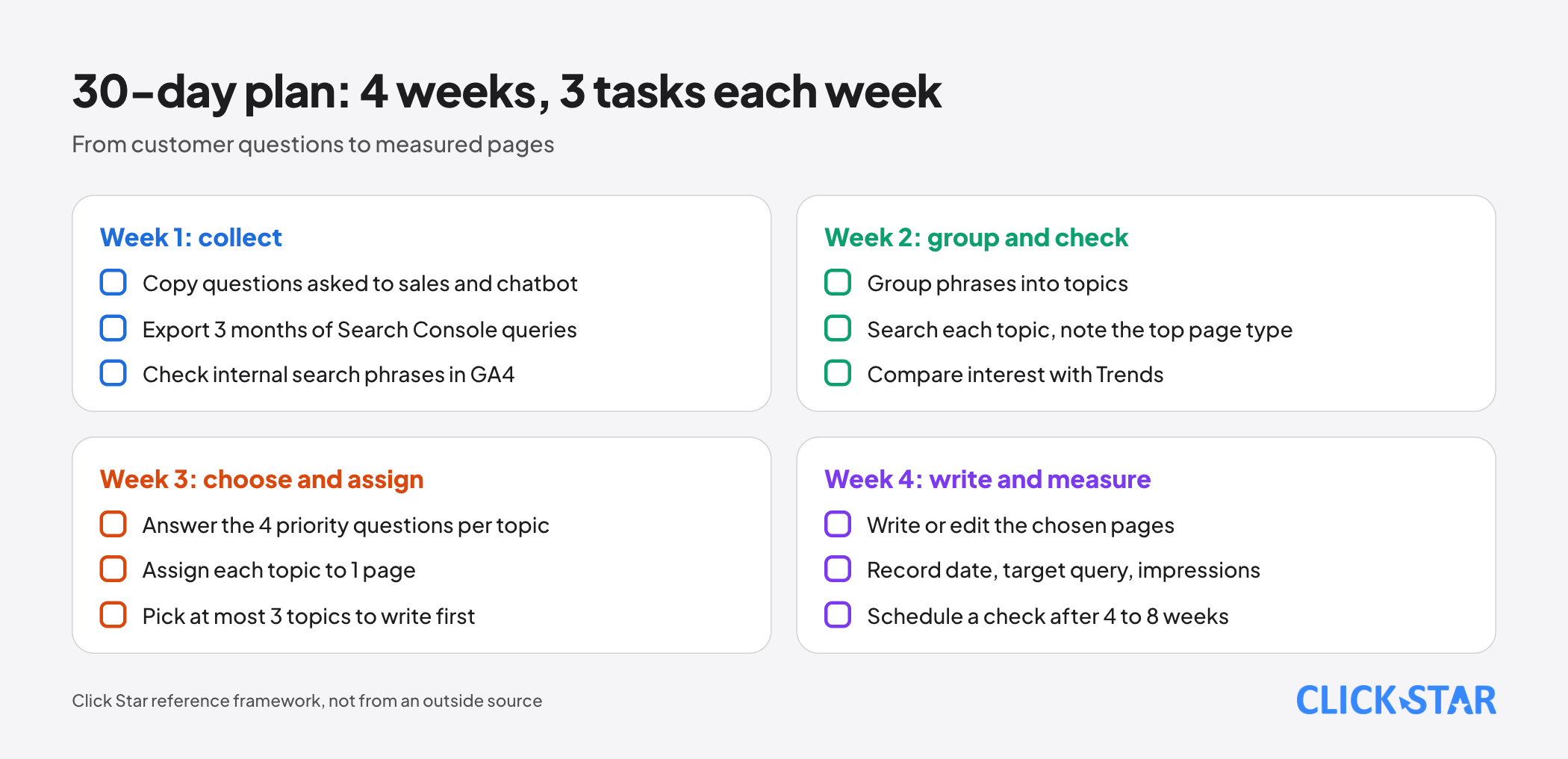
This is a Click Star reference plan, not taken from an outside source.
- Week 1: copy the questions customers ask sales and the chatbot (personal data removed); export 3 months of queries from Search Console; look at internal search phrases in GA4.
- Week 2: group phrases into topics; type each topic into Google and note the page type ranking first; compare interest with Trends.
- Week 3: answer the 4 priority questions for each topic; assign each topic to 1 new page or 1 page that needs editing; pick at most 3 topics to write first.
- Week 4: write or edit the chosen pages; record the date, target query and current impressions; schedule a Search Console check after 4 to 8 weeks.
Common mistakes
- Choosing topics to suit people inside the company without asking what customers typed.
- Treating Keyword Planner or Trends numbers as exact counts and promising results.
- Using an explainer for a phrase from someone ready to buy, or the reverse.
- Writing without first looking at Google's page 1.
- Aiming 2 pages at the same phrase and not knowing which to fix.
- Stuffing keywords into titles, URLs or the meta keywords tag.
- Judging the result after a few days, or editing without recording a baseline.
What is not known
Click Star gives no search volume for any Vietnamese keyword, because there is no open source to check against.
Click Star found no Google documentation on how accented and unaccented Vietnamese are handled.
The Keyword Planner page Click Star read does not say whether an account with no running ads sees specific numbers, or how well Vietnam is supported.
The 3 intent groups and the 4-question priority framework are Click Star's own method, not verified with outside data.
Related posts



Need tailored advice for your business?
Click Star helps you build a solution that fits your industry and scale. We answer every question during business hours.