Backup and recovery for small and mid-sized businesses: RPO, RTO, the 3-2-1 rule and how to test restores
What RPO and RTO mean, how the 3-2-1 rule applies and how to test restores. Based on NIST, CISA, PostgreSQL and Supabase documentation, checked to October 21, 2026.
Many businesses have backups but have never restored from them. Only when data is deleted by mistake, a disk fails or ransomware hits do they learn the backup is missing, too old or slow to rebuild.
This article covers RPO and RTO, the 3-2-1 rule, immutable backups, point-in-time recovery (PITR), SaaS data and restore tests. Main sources: NIST, CISA, the UK NCSC, AWS, Google Cloud, Microsoft, PostgreSQL and Supabase, checked on October 21, 2026.
Click Star already has articles on databases, Supabase Select and protecting customer data. This one asks: when data is lost, how much comes back and how fast?
Key points
- RPO is the maximum acceptable data loss, in time. RTO is the maximum acceptable downtime. The backup schedule drives RPO; the restore procedure drives RTO.
- Set targets per system, because a shorter RTO costs more (NIST). The 4-tier framework here is Click Star's own, not a measurement.
- CISA recommends the 3-2-1 rule. In a 2024 Sophos survey, 94% of ransomware victims said attackers tried to compromise their backups, so add an immutable or offline copy.
- PostgreSQL restores to a point in time with a base backup plus WAL logs. Supabase states a worst-case PITR RPO of 2 minutes, but Storage objects are not in backups.
- With SaaS, data is still the customer's responsibility and built-in recovery windows last days. A backup never restored cannot yet be counted as a backup.
What RPO and RTO mean
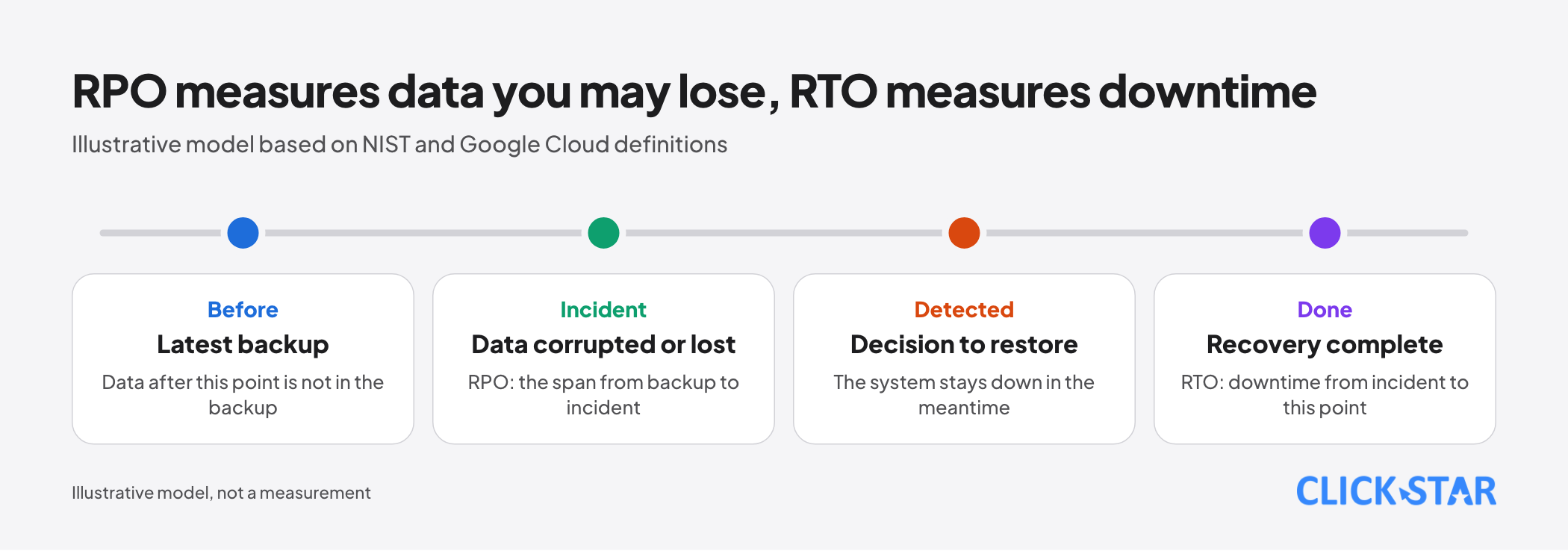
In NIST's glossary (read October 21, 2026, from NIST SP 800-34 Rev. 1, published 2010), RPO is the point in time to which data must be recovered after an outage. RTO is the maximum time components can stay in recovery before operations are affected.
Google Cloud (updated July 5, 2024) puts it closer to operators: RPO is the longest acceptable span of data loss, RTO the longest an application can stay offline. RPO measures time only, not how much data is lost.
NIST adds MTD, the maximum downtime leaders accept for a business process. RTO normally has to be shorter than MTD; RPO is not part of MTD. On cost, NIST describes a balance point: the shorter the RTO, the dearer the recovery solution.
The AWS disaster recovery whitepaper (no date shown) says backup frequency determines the achievable recovery point. Click Star infers: RPO comes from the schedule, RTO from the procedure.
Tiering systems by criticality
NIST describes a business impact analysis (BIA): ask each process owner how long a stop is tolerable, then choose technology. CISA also advises inventorying data and refining RPO and RTO to match business needs.
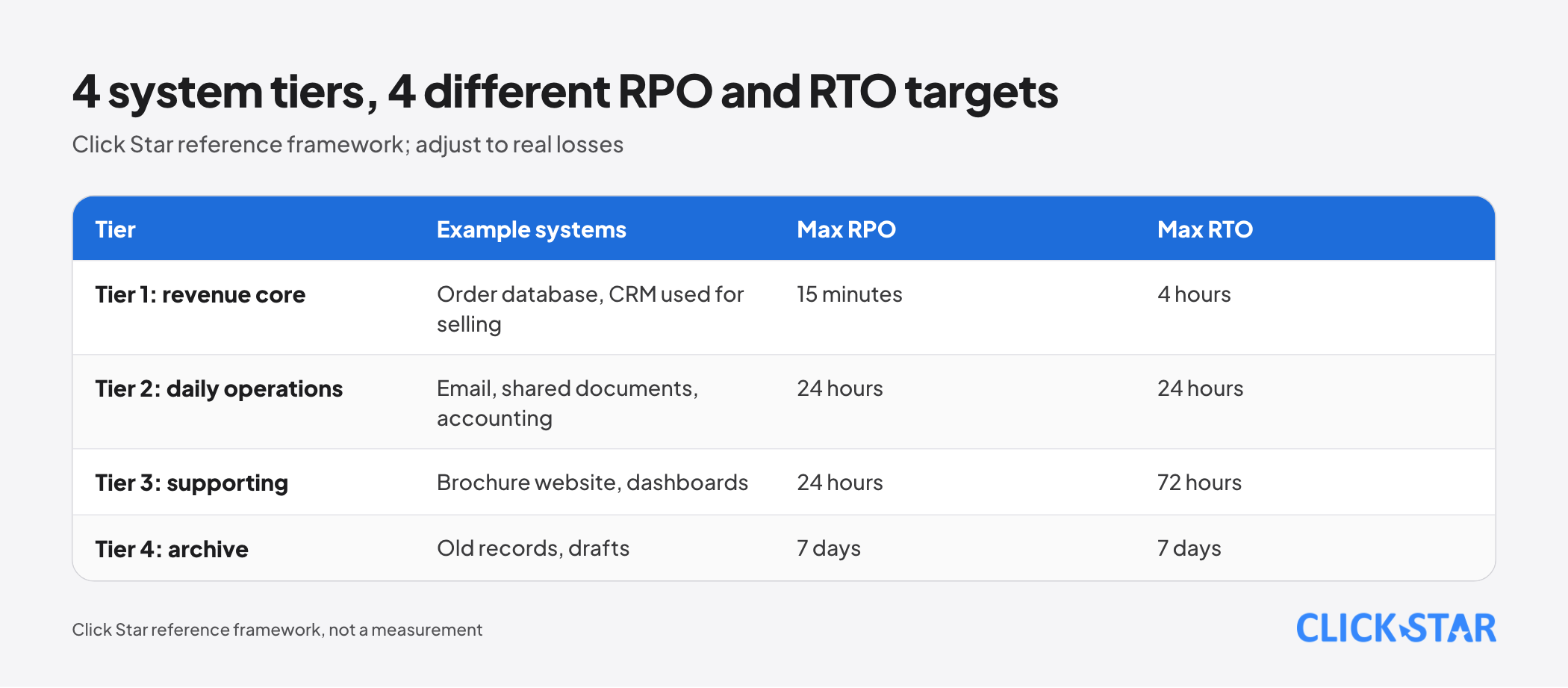
The 4 tiers below are Click Star's framework, not measurements and not from outside sources. Adjust them to your real losses.
- Tier 1, revenue core (order database, CRM used for selling): RPO 15 minutes, RTO 4 hours.
- Tier 2, daily operations (email, shared documents, accounting): RPO 24 hours, RTO 24 hours.
- Tier 3, supporting (brochure website, dashboards): RPO 24 hours, RTO 72 hours.
- Tier 4, archive (old records, drafts): RPO 7 days, RTO 7 days.
The tier follows the data, not the software: in 1 CRM, the customer list is tier 1 while old attachments may be tier 3.
The 3-2-1 rule and an immutable layer against ransomware
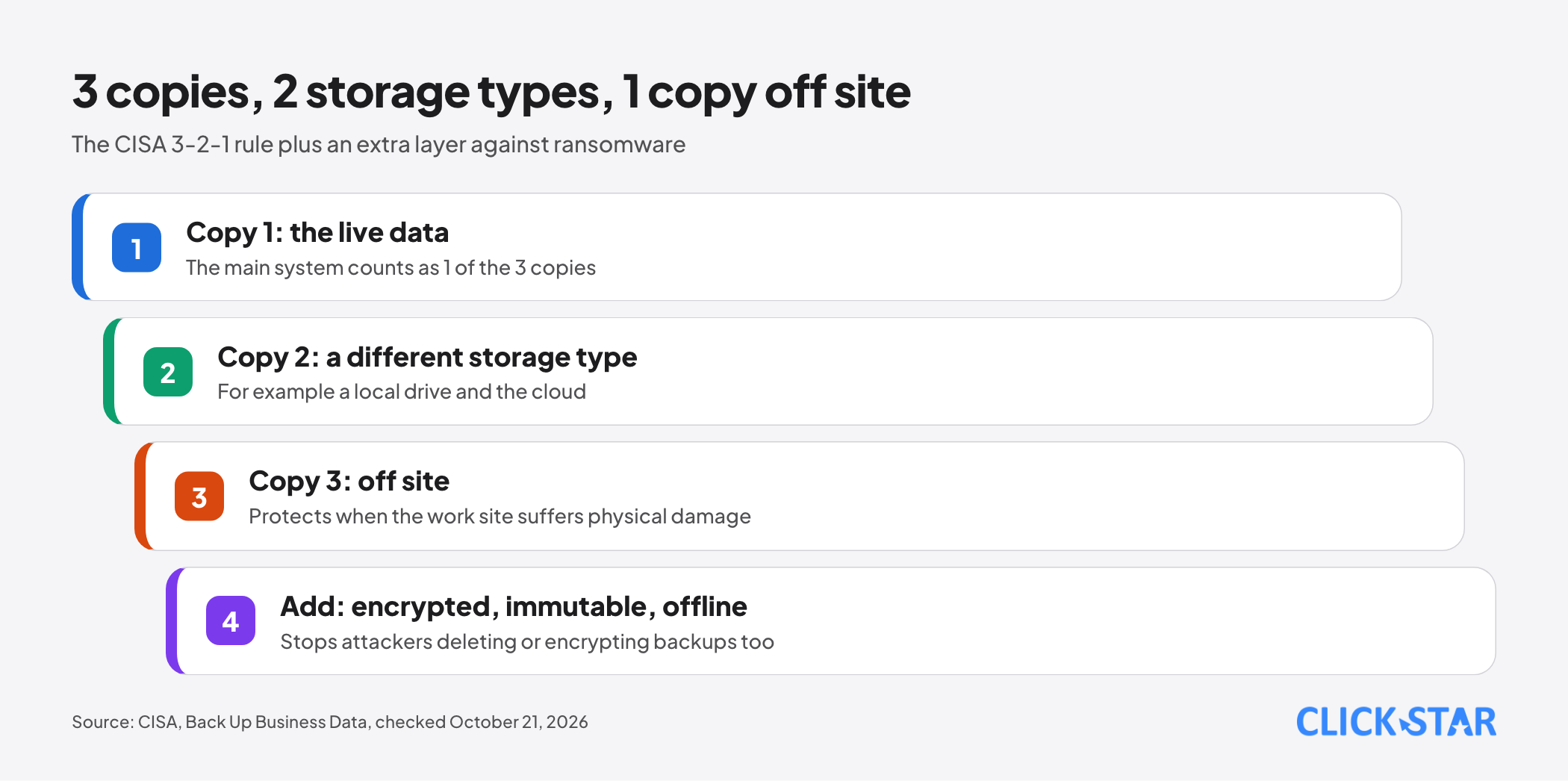
CISA's Back Up Business Data page (no date shown, read October 21, 2026) defines 3-2-1 as 3 copies of important data, on 2 media types, with 1 copy off site. CISA advises automated scheduled backups, encryption and an offline copy.
The rule is not enough when attackers target backups. In a Sophos-commissioned survey by Vanson Bourne in early 2024 of 2,974 professionals at ransomware victims, 94% said attackers tried to compromise their backups and 57% of attempts succeeded.
When backups were compromised, 67% paid the ransom (versus 36%) and median recovery cost was $3 million versus $375,000. Limits: a security vendor commissioned it, it covers only attacked organizations, and there is no equivalent for Vietnam.
CISA's AvosLocker advisory (October 11, 2023) advises encrypted, immutable backups. The UK NCSC (posted August 13, 2019, modified July 28, 2026) advises keeping at least 1 backup disconnected; for cloud, use multi-factor authentication and leave no valid credentials on idle backup clients.
AWS's S3 Object Lock documentation (no date shown) describes a write-once-read-many model. In compliance mode, no one can delete during the retention period, not even the root account; versioning must be on.
Replication is not a backup. AWS notes it may not protect against corrupted data or deliberate deletion without point-in-time copies, and advises a separate backup account in case one is compromised.
Point-in-time recovery with PostgreSQL and Supabase
In the PostgreSQL 18 documentation (section 25.3, read October 21, 2026), PITR combines 1 base backup with a continuous archive of write-ahead log (WAL) files, replayed up to the target time. pg_dump cannot be used for this, and the restore covers the whole cluster, not a part.
Configuration files are not in the WAL and must be backed up separately. WAL archiving should be tested before the first base backup.
Supabase's Database Backups page (read October 21, 2026, no update date) states Pro, Team and Enterprise projects get daily backups kept 7, 14 and up to 30 days. PITR is an add-on needing at least Small compute, with WAL uploaded about every 2 minutes, so worst-case RPO is 2 minutes. Enabling PITR stops daily backups.
During a restore the project is inaccessible, longer for large databases, so measure this RTO yourself. Backups exclude Storage objects, and deleting a project deletes its backups.
Click Star infers that a tier 1 system needing a 15-minute RPO cannot rely on daily backups; it needs PITR or equivalent, plus a separate path for uploaded files.
SaaS backup: Google Workspace, Microsoft 365 and CRM
Microsoft's Shared responsibility in the cloud page (updated August 24, 2026) says that in every model, including SaaS such as Microsoft 365, customer data is the customer's responsibility. Microsoft also says most data loss results from customer actions (resiliency article, updated January 27, 2026).
Built-in recovery windows are short. SharePoint and OneDrive (page updated July 1, 2026) have version history and a recycle bin; an item removed from the site recycle bin can be reached via support within 14 days, and Files Restore returns OneDrive to any point in the past 30 days.
On Google Workspace admin help pages (read October 21, 2026, no date), a super admin can restore a deleted user within 20 days and Drive data removed from trash within 25 days, by date range, not file by file.
Click Star treats these as undo features, not a backup policy: after the window the data is gone, and they fail if an admin account is taken over.
For CRM, Click Star has not read each vendor's backup documentation. Ask whether you can export everything including attachments, whether restore works per record or per system, and how long the recycle bin keeps items.
Testing restores: a backup you have not restored is not a backup yet
NIST SP 800-34 Rev. 1 calls testing critical, to be done close to real conditions with success criteria; its sample policy says annually. AWS says the only recovery path that works is the one tested frequently.
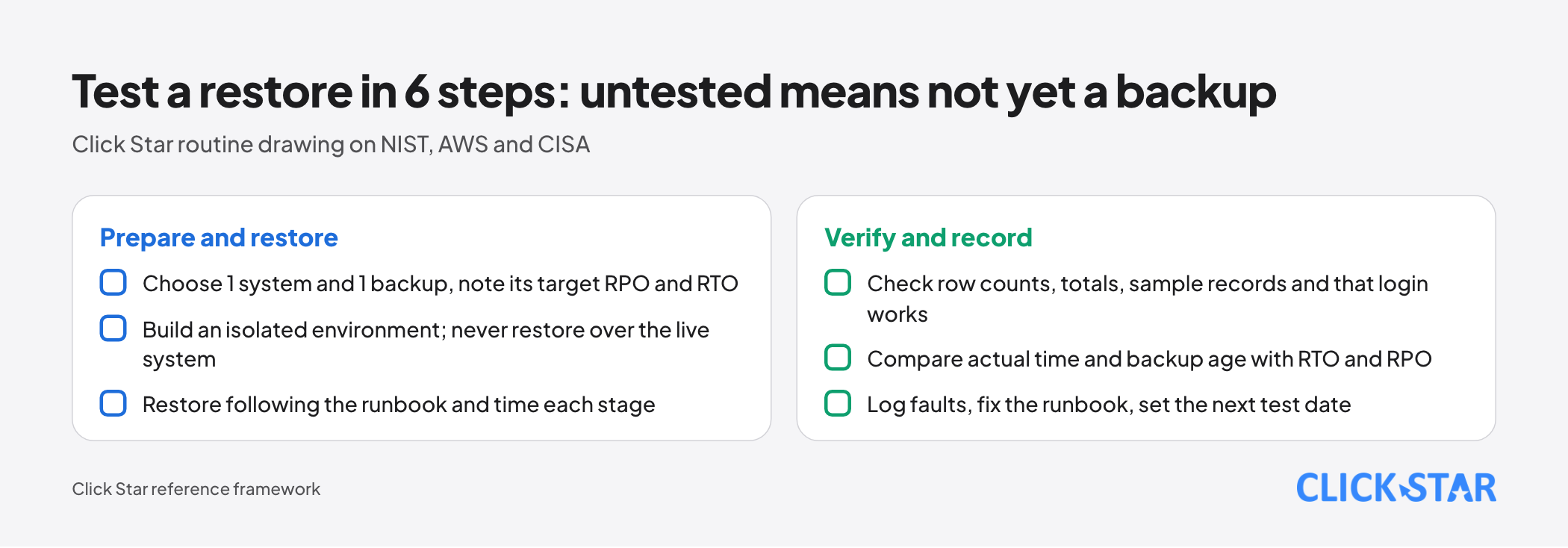
CISA advises testing full and partial restores and confirming a rollback of at least 7 days. No source sets a frequency for small businesses. Click Star's 6 steps:
- Step 1: choose 1 system and 1 backup, and write down its target RPO and RTO.
- Step 2: build an isolated environment; never restore over the running system.
- Step 3: restore following the runbook and time each stage.
- Step 4: check row counts, totals, sample records and that login works.
- Step 5: compare actual time and backup age with RTO and RPO.
- Step 6: log faults, fix the runbook and set the next test date.
Click Star's own frequency, not from sources: tier 1 every quarter, tier 2 every 6 months, tiers 3 and 4 every year.
Retention and deletion of personal data in backups
Click Star does not give legal advice. It read Law No. 91/2025/QH15 on personal data protection (passed June 26, 2025, effective January 1, 2026) through a copy on a secondary website, via a summarizing tool. Article 14 lists when data must be deleted (request, purpose completed, retention expired), requires safe deletion and bans intentionally recovering deleted data without permission.
The copy does not mention backups, so it is unclear how data requested for deletion but still in a backup is treated; Decree 356/2025/NĐ-CP was not read. Click Star's technical suggestion, pending a lawyer's view: set a finite backup retention, keep a log of deletion requests and re-apply it after every restore.
Costs
Supabase's page lists PITR with 7, 14 and 28 days of retention at about $100, $200 and $400 per month, excluding Small compute. Backblaze B2's pricing page (no date) lists offsite storage from $6.95 per TB per month, as an example only.
Click Star suggests comparing monthly cost with the loss from 1 hour of tier 1 downtime, using the business's own figures.
Sample incident scenario
An illustration, not a real case. A faulty update changes every product price; it is noticed 45 minutes later, and new orders came in meanwhile.
- Stop writes to the price table and read the log for the moment just before the statement.
- Restore to that moment into a new database; restoring over the live one would lose later orders.
- Load the correct prices into the live system, check sample products and log the time against the tier 1 RTO.
If instead an admin account is taken over and backups in the same account are deleted, only an offline or immutable copy elsewhere helps.
How to measure
- Actual restore time against RTO.
- Age of the latest restorable backup against RPO.
- Restore test success rate: tests passed divided by tests run in the period.
- Share of tier 1 and tier 2 systems tested in the period.
Click Star's view. The biggest risk is that nobody has measured the real RTO, not the backup technology. Set tiers before buying tools: usually only a few systems need an RPO in minutes. Click Star builds CRM, CDP, dashboards and custom software and could be hired to design backups, so cross-check outside sources.
30-day plan
- Week 1: inventory systems and data, assign tiers 1 to 4, and record RPO, RTO and an owner.
- Week 2: verify each system really has backups; add an immutable offsite copy for tiers 1 and 2; enable multi-factor authentication for admins.
- Week 3: restore 1 tier 1 system into an isolated environment, time it and log faults.
- Week 4: fix the runbook and schedule recurring tests.
Common mistakes
- Having backups but never restoring one, so the real RTO is unknown.
- Confusing replication with backup, so errors are copied to the other side too.
- Using the same admin account for backups and the main system.
- Assuming the SaaS vendor backs everything up, when the recovery window is only days.
- Setting 1 target for every system, which wastes money or leaves gaps.
- Forgetting what sits outside backups, such as Storage files and configuration files.
What is not known
Click Star has no measurement of how Vietnamese small businesses set RPO and RTO or test restores, and no Vietnam-specific ransomware figures. The Supabase, AWS, CISA and Backblaze pages show no update date, so features and prices may have changed.
The law was read through a secondary copy, Decree 356/2025/NĐ-CP was not read, and it is unclear how the law applies to data inside backups. The 4-tier framework and test frequency are Click Star's suggestions.
Related posts

Need tailored advice for your business?
Click Star helps you build a solution that fits your industry and scale. We answer every question during business hours.