Schema markup (JSON-LD) for business websites: which types are worth doing, how to write and test them
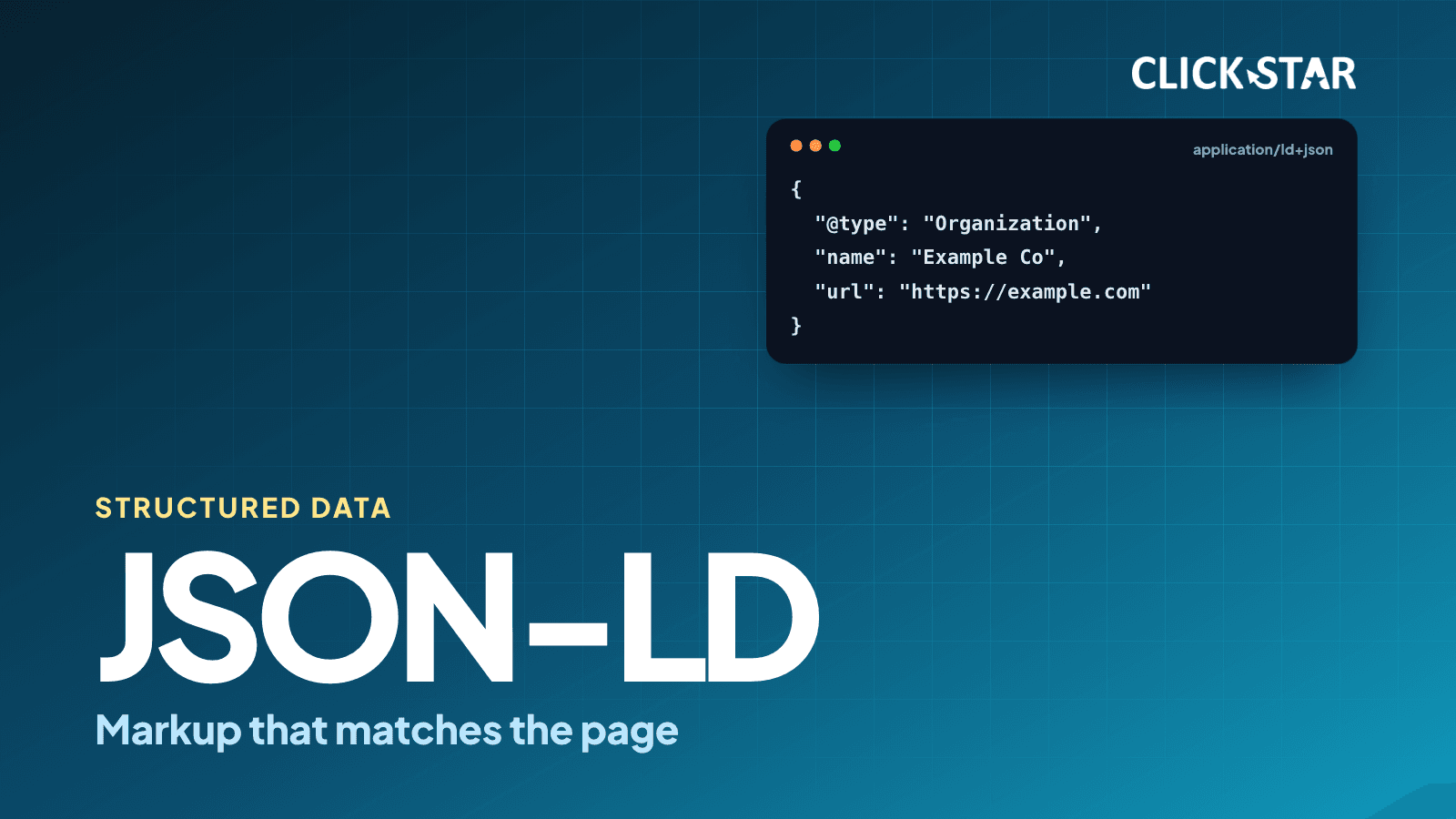
Explains JSON-LD, which schema types are still worth doing after Google ended FAQ and HowTo rich results, and how to write and test them, based on Google Search Central documentation read on October 22, 2026.
Schema markup (structured data) is code that describes a page's content to machines, and, in Click Star's opinion (not measured), it is often misread as a shortcut to the top of search results. In practice Google has been retiring rich result features, including FAQ and HowTo, so the list of types worth doing is shorter than it used to be.
This article draws on Google Search Central documentation, Next.js documentation and Search Console help, checked on October 22, 2026.
It answers: how JSON-LD differs from other formats, which types are still worth doing, how to write and test them, and which mistakes are common. Click Star sells SEO-ready websites, so it has a related interest; its opinions are set apart.
Key points
- Google supports 3 formats (JSON-LD, Microdata, RDFa), recommends JSON-LD, and says all 3 are fine if the markup is valid.
- Valid markup does not guarantee display. It only makes a page eligible, and it must match what readers can see.
- FAQ stopped appearing on May 7, 2026 and HowTo was removed on September 14, 2023, so do not add these 2 types to get rich results.
- Click Star's priority order (its own framework): Organization, Article, BreadcrumbList, then LocalBusiness, Product, Review snippet and Video when the page fits.
- Test with the Rich Results Test (Google's requirements) and the Schema Markup Validator (schema.org syntax), then watch Search Console.
What schema markup is and how Google uses it
Schema markup is structured data added to a page to name the entities on it: an organization, an article, a product, a place. According to Google's introduction page (updated December 10, 2025), Google Search supports JSON-LD, Microdata and RDFa, and recommends JSON-LD when your setup allows it.
JSON-LD sits in a script tag and is not mixed into visible text, so nested data is easier to express. Microdata and RDFa use attributes on the HTML tags themselves.
schema.org is the shared vocabulary. The same page says to treat the Search Central documentation as definitive for Google Search behavior, because schema.org has many properties that Google Search does not require.
On AI, Google's guide to optimizing for generative AI features (updated July 10, 2026) says structured data is not required for generative AI search and no special schema.org markup needs adding.
Rich results that were removed
Google's documentation changelog (read October 22, 2026) and a Search Central blog post record these milestones.
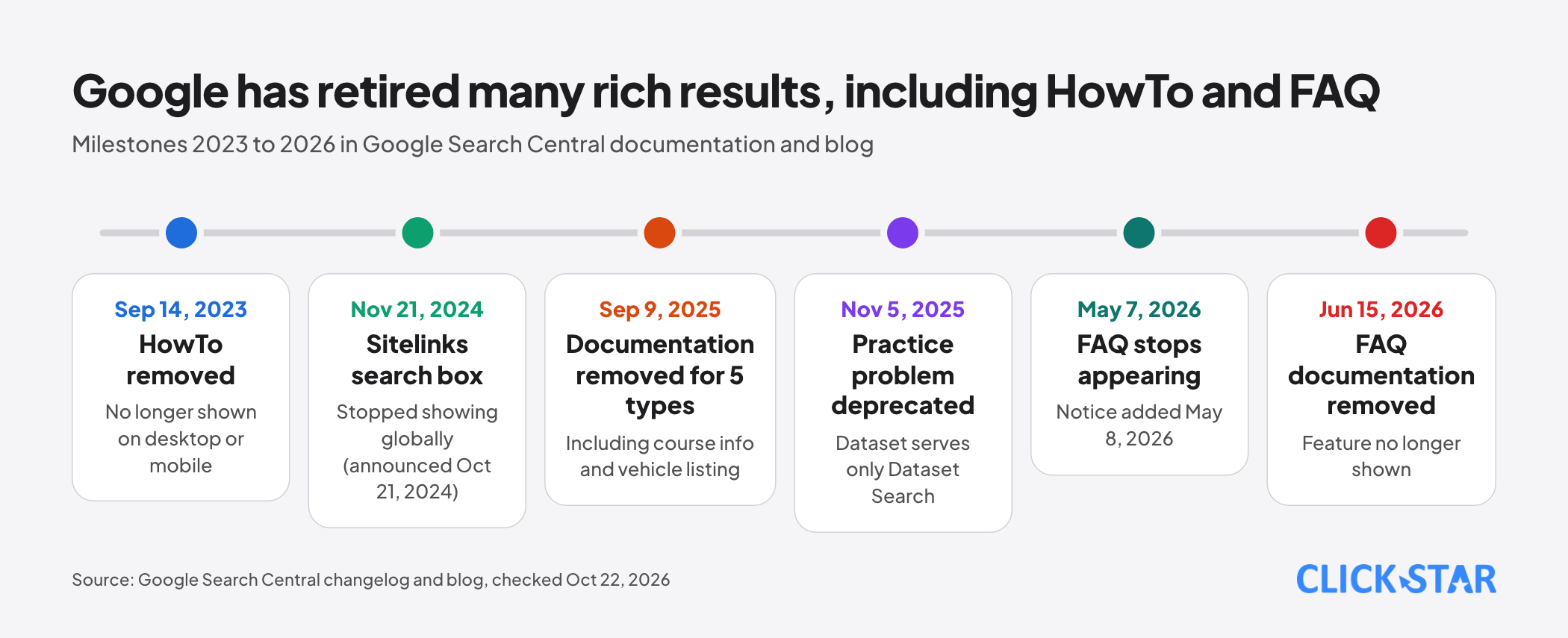
HowTo: on September 14, 2023 Google removed the HowTo documentation because the rich result no longer showed on desktop or mobile.
FAQ: on May 8, 2026 Google added a notice that the feature would no longer appear from May 7, 2026. On June 15, 2026 the FAQ documentation was removed because the feature no longer shows.
Other types: on September 9, 2025 Google removed the documentation for 5 types (course info, estimated salary, learning video, special announcement, vehicle listing). On November 5, 2025 it added a deprecation notice for practice problem and clarified that Dataset serves only Dataset Search.
Sitelinks search box: per the Search Central blog post "Farewell, Sitelinks Search Box" of October 21, 2024, Google stopped showing it from November 21, 2024 and said unsupported markup like this causes no errors in Search. The changelog records that on November 29, 2024 Google removed its documentation.
Google Search Central's gallery of rich results (updated October 16, 2026) has no FAQ or HowTo entry. Click Star found no document calling FAQ or HowTo markup harmful, but there is no reason to add it for display.
Which types are worth doing for a business website
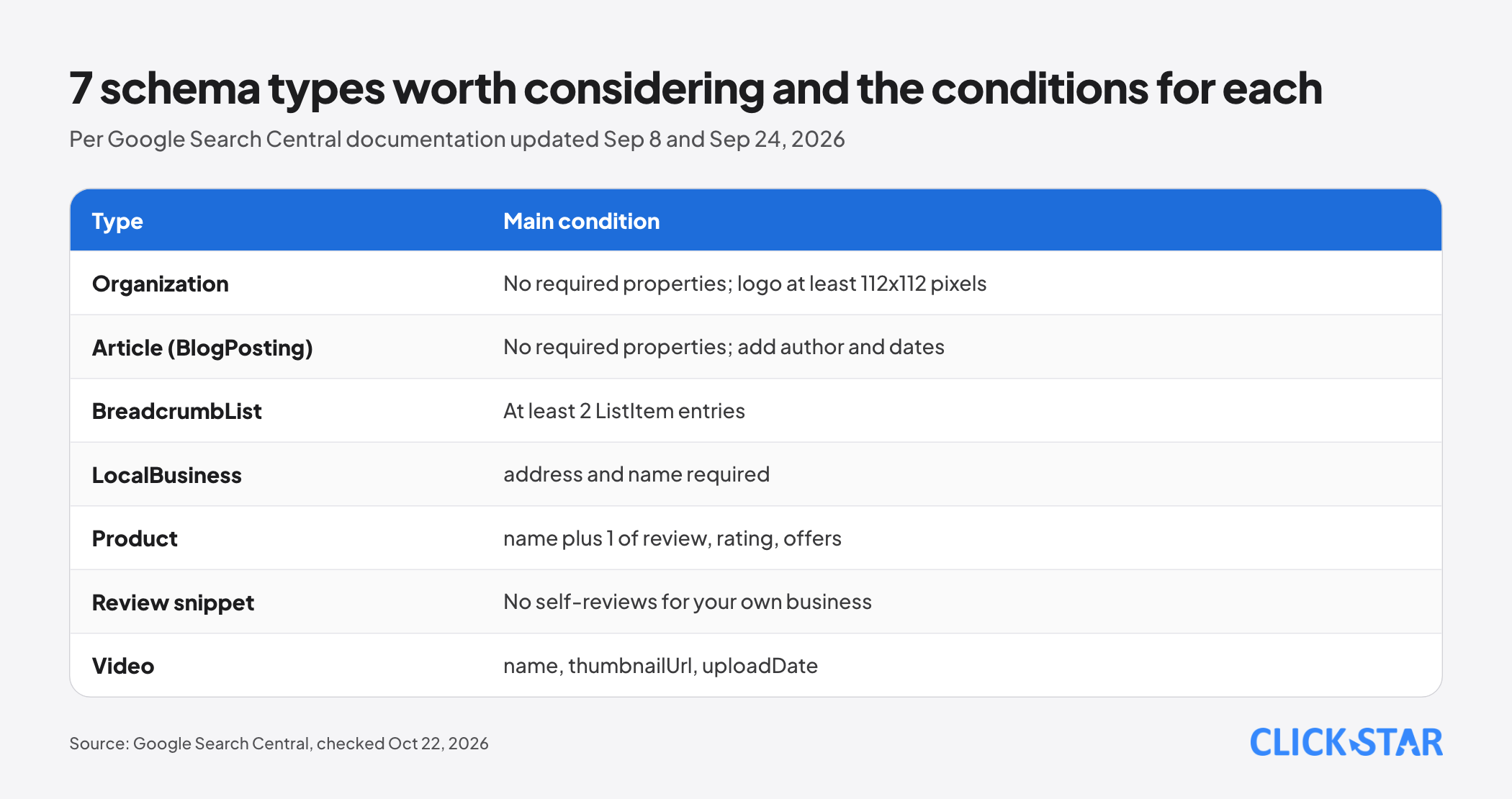
Organization. According to Google's Organization documentation (updated September 8, 2026) there are no required properties; add name, url, logo, sameAs, address and contactPoint where they apply. Place it on the home page or 1 about page. The logo must be at least 112x112 pixels and its URL crawlable.
Article (BlogPosting). Google's Article documentation (September 8, 2026) names 3 types, Article, NewsArticle and BlogPosting, with no required properties. Include headline, image, datePublished, dateModified and author (name and URL); author.name holds the name only, not a job title.
BreadcrumbList. According to Google's Breadcrumb documentation (September 8, 2026), it needs at least 2 ListItem entries, each with item, name and position; only the last may omit item.
LocalBusiness. According to Google's Local business documentation (September 8, 2026), it requires address and name; add openingHoursSpecification, geo, telephone and url. Click Star finds this type fits only when the business has a real location customers visit.
Product. According to Google's Product snippet documentation (September 8, 2026), it needs name and at least 1 of review, aggregateRating or offers. For pages where people can buy, the documentation suggests considering merchant listing markup.
Review snippet. Per Google's Review snippet documentation (September 8, 2026), pages using LocalBusiness or Organization are ineligible for stars if the reviewed entity controls reviews about itself, even through an embedded third-party widget. Reviews must be visible.
Video. According to Google's Video documentation (September 24, 2026), it needs name, thumbnailUrl and uploadDate.
Click Star's view. For a service business website, Organization, Article and BreadcrumbList form the base because almost every site fits them; the other 4 types only when the page has that content. This is Click Star's own reference framework, not a measurement and not from an outside source.
How to write correct JSON-LD
Google's General Structured Data Guidelines (updated July 10, 2026) say: do not mark up content readers cannot see, do not mark up false content such as fake reviews, put the data on the page it describes, use the most specific schema.org type, and do not block the page from Googlebot.
The Organization example below is illustrative data (example.com). Its JSON syntax was checked with a JSON parser and has not been run through the Rich Results Test.
{
  "@context": "https://schema.org",
  "@type": "Organization",
  "name": "Example Co.",
  "url": "https://example.com/",
  "logo": "https://example.com/images/logo.png",
  "sameAs": [
    "https://www.facebook.com/example",
    "https://www.linkedin.com/company/example"
  ],
  "contactPoint": {
    "@type": "ContactPoint",
    "telephone": "+84-28-0000-0000",
    "contactType": "customer service"
  }
}
The Article example (BlogPosting) is also illustrative; dates use ISO 8601 with a time zone.
{
  "@context": "https://schema.org",
  "@type": "BlogPosting",
  "headline": "Example article title",
  "image": [
    "https://example.com/images/post-16x9.jpg",
    "https://example.com/images/post-4x3.jpg",
    "https://example.com/images/post-1x1.jpg"
  ],
  "datePublished": "2026-10-01T08:00:00+07:00",
  "dateModified": "2026-10-15T09:30:00+07:00",
  "author": {
    "@type": "Person",
    "name": "Nguyen Van A",
    "url": "https://example.com/authors/nguyen-van-a"
  }
}
How to test
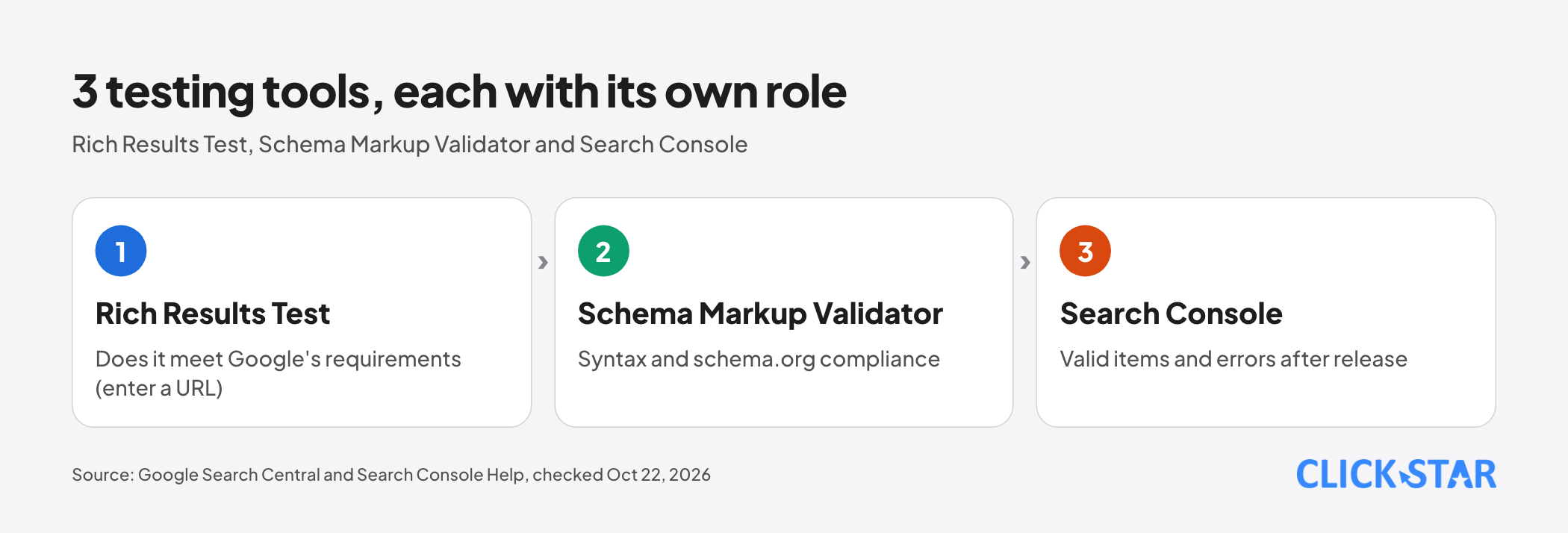
Rich Results Test checks against Google's requirements. According to the guide on generating structured data with JavaScript (updated December 10, 2025), enter a URL rather than pasting code, because the code box has limits such as CORS.
Schema Markup Validator (validator.schema.org) checks syntax and schema.org compliance, not Google's rich result types. Per Google's blog post "An update on the Structured Data Testing Tool" of December 15, 2020, it is the refocused version of the old Structured Data Testing Tool.
Search Console tracks results after release. According to Search Console help (no date shown, read October 22, 2026), the report counts valid and invalid items, splitting critical issues (which block rich results) from non-critical ones.
Reports exist only for supported types, such as Breadcrumbs, Product snippets, Merchant listings, Review snippets and Videos. Organization, Article and Local business are not on that list, so check them with the Rich Results Test and URL Inspection.
The general guidelines add 2 points: the Rich Results Test can miss errors, and violating the guidelines can trigger a manual action. A manual action removes rich result eligibility but does not affect web search ranking.
Implementing in Next.js and WordPress
Next.js. The Next.js documentation (updated March 2, 2026) recommends rendering JSON-LD as a script tag in a layout or page. JSON.stringify does not sanitize malicious strings, so replace the < character with \u003c to prevent XSS. It also says to use a native script tag, not next/script, since JSON-LD is data, not executable code.
WordPress. According to Google's introduction page, with WordPress, Wix or Shopify you may not be able to edit HTML directly; use the system's SEO settings page or install a plugin that lets you specify structured data.
The principle: know which types the plugin outputs, check the result in the Rich Results Test, and do not let theme and plugin both generate the same type, which easily creates mismatched duplicates. That is Click Star's technical opinion.
Click Star's view. For a new site, generating JSON-LD on the server from the same data as the interface is the way least likely to drift. Click Star's website service page mentions adding schema markup, so this article has a related interest; check results with the tools above, not a vendor's promise.
What to do
The 3 groups and 10 tasks below are Click Star's reference framework, not from an outside source.
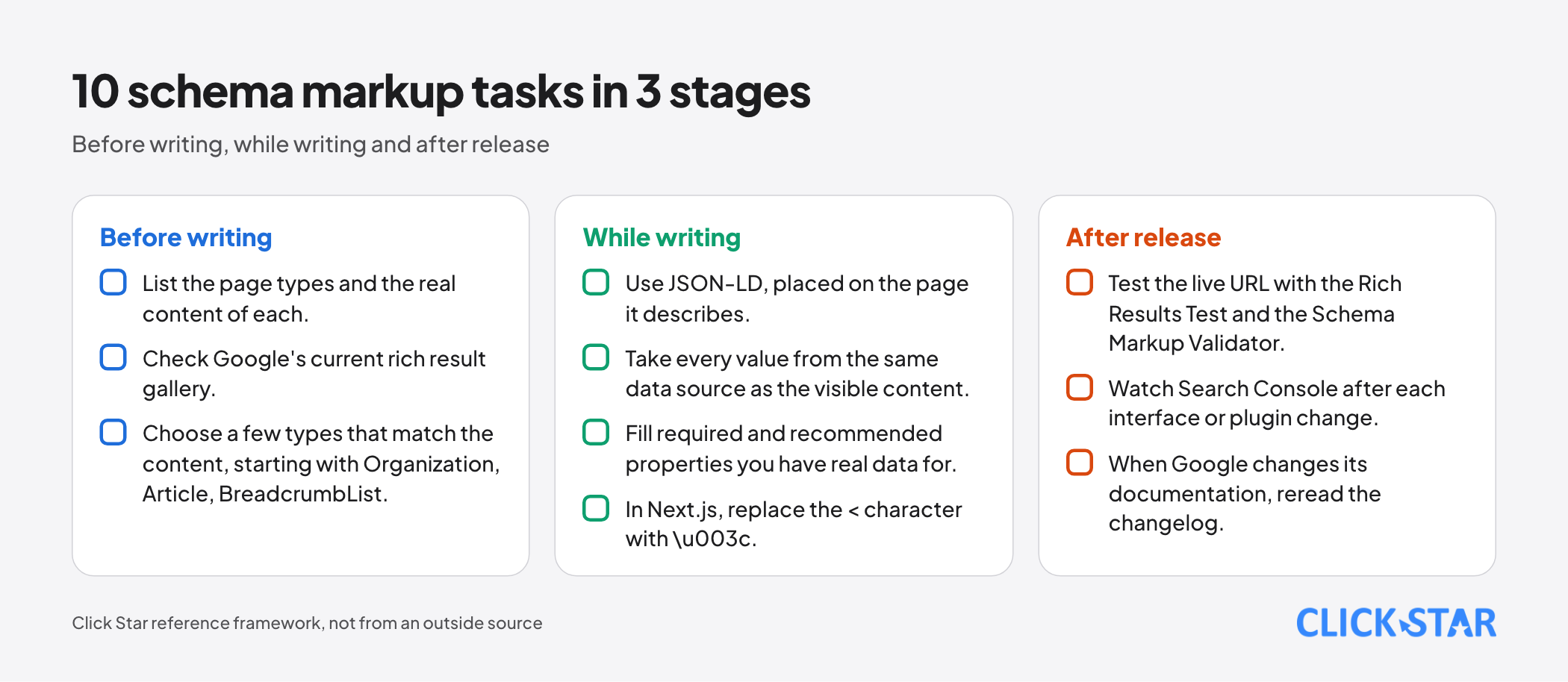
Before writing
- List the page types and the real content of each.
- Check Google's current rich result gallery.
- Choose a few types that match the content, starting with Organization, Article, BreadcrumbList.
While writing
- Use JSON-LD, placed on the page it describes.
- Take every value from the same data source as the visible content.
- Fill required and recommended properties you have real data for.
- In Next.js, replace the
<character with\u003c.
After release
- Test the live URL with the Rich Results Test and the Schema Markup Validator.
- Watch Search Console after each interface or plugin change.
- When Google changes its documentation, reread the changelog.
How to measure: for types that have their own report, valid and invalid items in Search Console, plus a comparison of pages with and without structured data in the performance report.
Common mistakes
- Adding FAQ and HowTo to get rich results, when these 2 features no longer display.
- Marking up content that is not on the page, or values that differ from the visible text.
- Reviewing your own business with LocalBusiness or Organization and expecting stars.
- Treating valid as guaranteed rich results or higher rankings.
- Letting the theme and a plugin both generate data, creating mismatched duplicates.
- Testing with only 1 tool: the Schema Markup Validator does not check Google's conditions, and the Rich Results Test can miss errors.
- Marking up once and never monitoring, when interface updates can break the data.
What is not known
Click Star has no independent measurement of the click gain from rich results for Vietnamese businesses. Click-through case studies on Google's introduction page were measured by the site owners themselves, so this article does not use them.
It is unclear which features will be removed next: the November 5, 2025 entry says retiring practice problem and Dataset is part of an ongoing effort to simplify the search results page, but it does not publish a list of what follows.
Click Star has not run the samples through the Rich Results Test, only checked JSON syntax, and has not tested specific WordPress plugins, so only principles are given.
Related posts



Need tailored advice for your business?
Click Star helps you build a solution that fits your industry and scale. We answer every question during business hours.