Local SEO and Google Business Profile for Businesses With Locations
This article covers what Google says about local ranking, which businesses qualify for a profile, how far review practices can go and which metrics to track, based on Google's official help pages.
Businesses with a shop, office or branch often ask how their name can appear when someone nearby searches on Google Search or Maps. The answer lies more in the Google profile than in the website.
This article uses Google Business Profile help and policy pages and Google Search Central documentation, checked up to October 22, 2026.
It covers local ranking factors, eligibility, review limits and measurement. Click Star offers digital marketing and SEO-ready website design, so it has a related interest.
Key points
- According to Google's help page, local results are based mainly on 3 factors: relevance, distance and prominence. Google publishes no weights and says ranking cannot be bought.
- A profile is for businesses with a place customers can visit or a service area. Virtual offices and mailboxes are not eligible; violations can mean suspension.
- Name, address, category, hours and phone must match reality; stuffing keywords, taglines or hours into the name is not allowed.
- Reviews feed into prominence, but gifts, discounts or payment for reviews are banned, as is inviting only happy customers.
- The Performance report shows views, calls, website clicks, directions and messages. These are interactions, not revenue.
- Multiple locations need 1 profile each, 1 clear owner and no duplicates, since duplicates are not shown and violating profiles can be suspended.
What Google says about local ranking
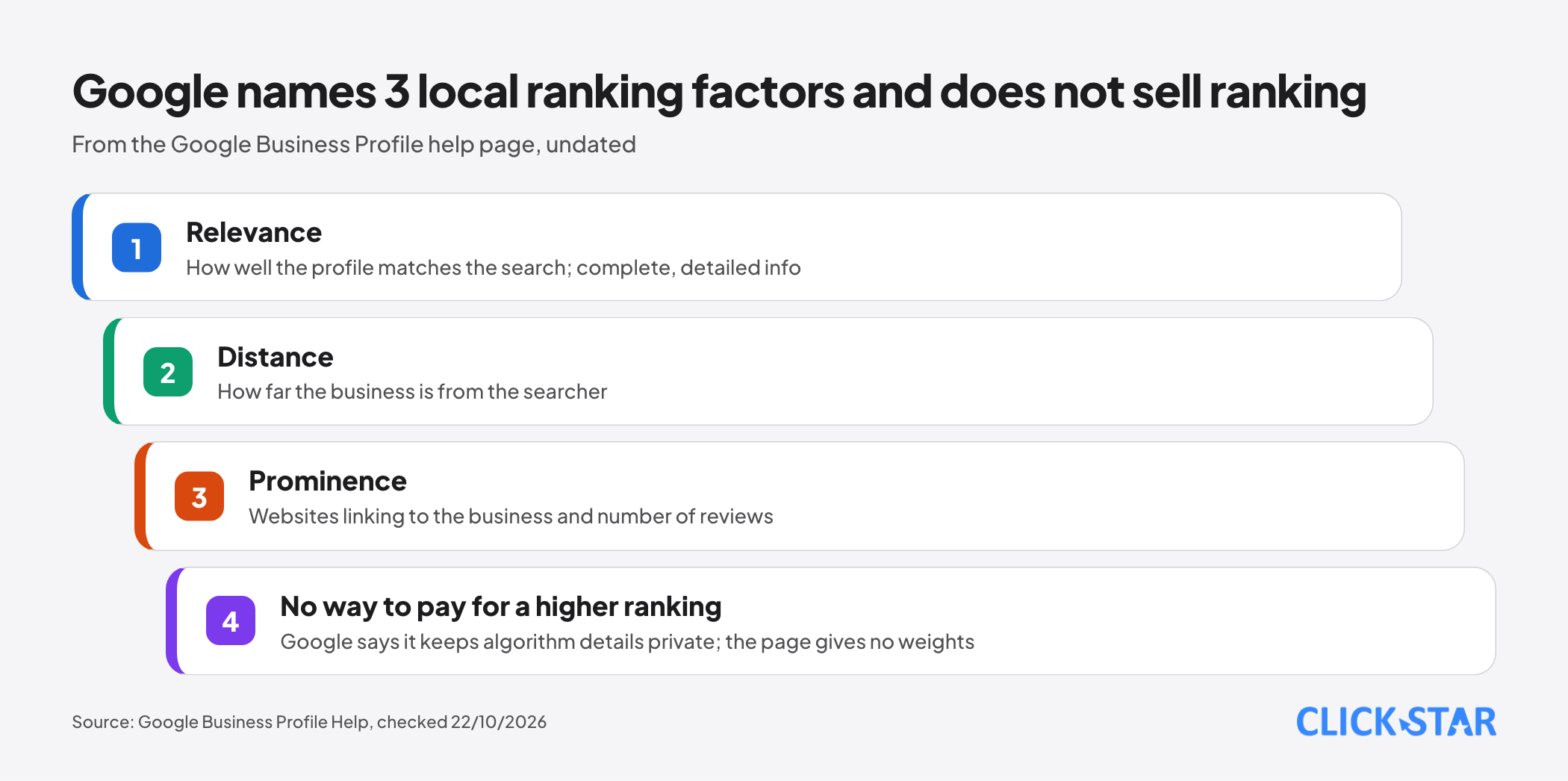
According to the page "Tips to improve your local ranking on Google" (undated, read October 22, 2026), local results rest mainly on relevance, distance and prominence. The summary line says "popularity" (Vietnamese: "mức độ phổ biến"), the explanation says "prominence" ("mức độ nổi bật"); this article follows the explanation.
Relevance is how well a profile matches the search; Google advises complete, detailed information. Distance is how far the business is from the searcher; if no location is shared, Google uses what it knows.
Prominence is how well known the business is. Per this page, it draws on websites linking to it and the number of reviews; more reviews and high ratings can help.
The page also says a better ranking cannot be requested or paid for, and Google keeps algorithm details confidential. Google advises verifying, keeping information accurate, adding photos and replying to reviews.
Limits: the page gives no weights. Beyond the profile it only names the number of websites linking to the business, not outside directories or website optimization, so Click Star makes no claim about them.
Which businesses are eligible for a profile
According to the page "Guidelines for representing your business on Google" (undated, read October 22, 2026), a business needs a location customers can visit or a service area where it travels to customers.
The address must be precise and match the real location. P.O. boxes are not accepted; floor or suite numbers are. A virtual office, where a business only rents an address, is not eligible.
A co-working office qualifies only with clear signage, customers received in business hours and the business's own staff on site.
A business that travels to customers, such as a repair service, should have 1 profile for its central office, set a service area and hide the address. The area generally stays within about 2 hours of driving.
Verification
According to the page "Verify your business on Google" (undated, read October 22, 2026), the owner must verify to edit information and interact with customers. Google picks the method per business: phone or text, email, video call or a postcard with a 5-digit code.
A postcard code usually arrives within 14 days and expires after 30 days. While waiting, do not edit the name, address or category or request a new code, because a new code invalidates the old one. After the code is entered, Google reviews for up to 5 business days.
Information must be accurate and consistent
The table summarizes the rules from the guidelines page above.
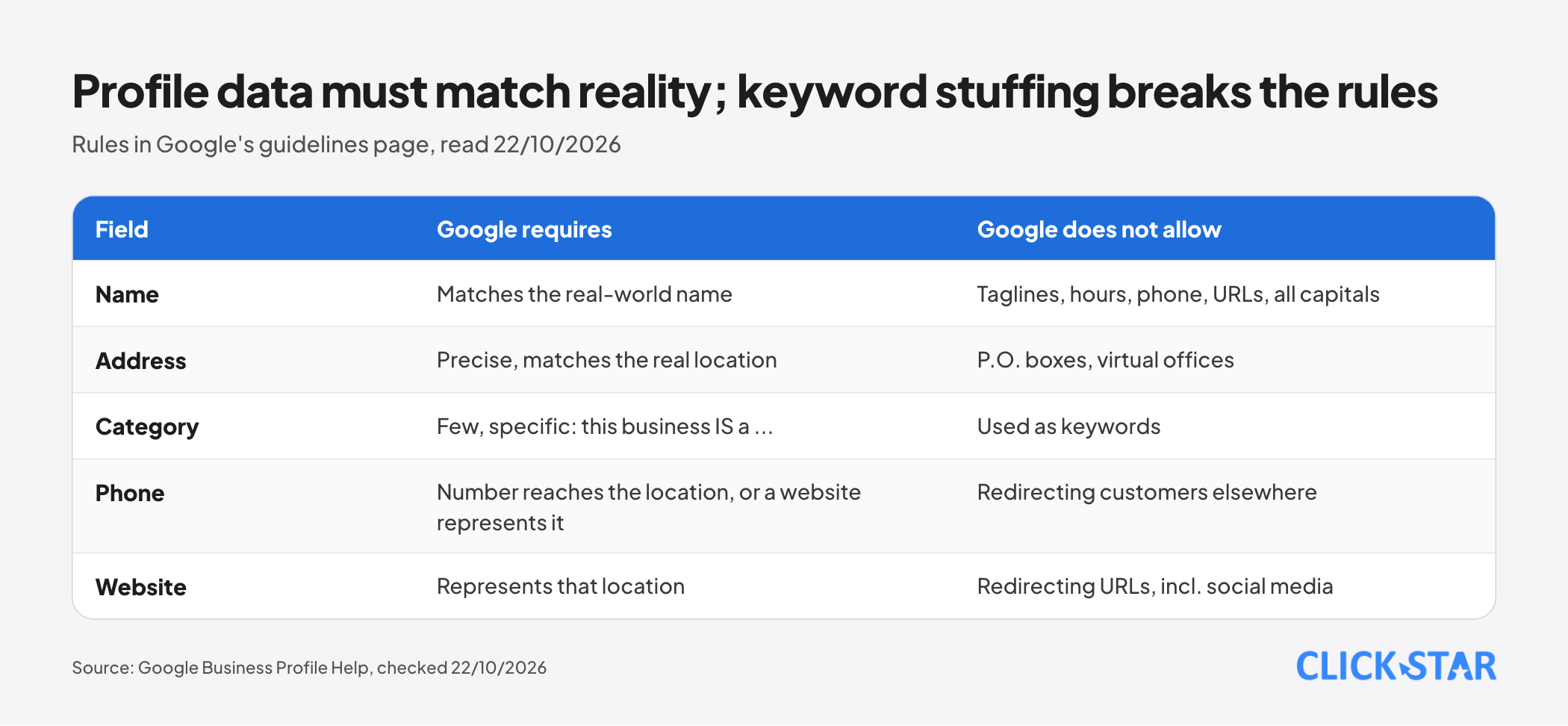
Name. The name must match the real-world name. Do not add taglines, hours, phone numbers, URLs, service descriptions, location details or all-capital words. Extra information in the name can lead to suspension.
Category. Use as few categories as possible, as specific as possible. Google's test: a category should complete the sentence "this business IS a ...", not "this business HAS a ...".
Phone and website. A business needs a phone number that reaches the right location, or a website that represents it; the number must be controlled by the business, and a local number is preferred over a call center. Numbers and URLs must not send customers elsewhere, including social media. The description must not contain links, promotions or prices.
Reviews: asking, replying and policy limits
According to the page "Tips to get more reviews" (undated, read October 22, 2026), a business can share a link or QR code for reviews; customers need a Google Account.
For replies, Google advises being professional, polite and brief. For negative reviews: apologize when appropriate, personalize, reply promptly, do not share the reviewer's private information, and move complex issues to phone or email.
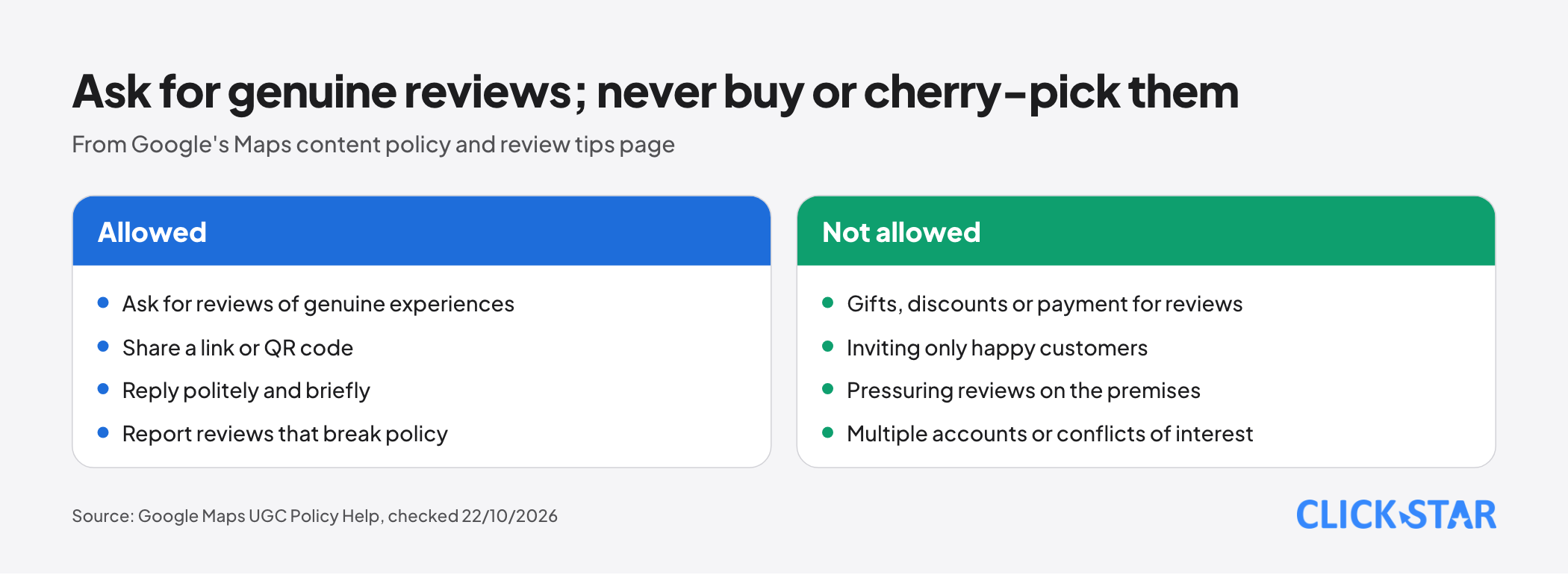
According to the page "Prohibited & restricted content" of the Maps content policy (undated, read October 22, 2026), the following are not allowed:
- Paid reviews, or reviews given for gifts, discounts, or free goods or services.
- Discouraging negative reviews or inviting only happy customers.
- Pressuring customers to review on the premises or asking for specific content, such as naming a staff member.
- Posting from multiple accounts at 1 person's direction, or reviews by people with a conflict of interest, such as employees, competitors or relatives.
A business may still ask customers to review a genuine experience, with no incentive and no influence on rating or content. Violating content is removed; accounts can lose privileges or be terminated.
What to measure
According to the page "Understand your Business Profile performance & insights" (undated, read October 22, 2026), the Performance report shows only metrics that apply to the business, including:
- Views: people who viewed the profile on Search and Maps, once per person per day at most.
- Directions: people who asked for directions, filtered for repeated taps, cancellations and spam.
- Calls, website clicks, messages: call-button taps (a phone number is required), website link clicks and distinct message conversations.
Per Google, the data includes both organic results and Google Ads; the page does not say how to separate them, so Click Star treats it as a combined metric.
Limit: these are taps, not proof that a call was answered or a customer bought. To link them to revenue, ask for the source at inquiry or record it in a CRM. This is a Click Star reference framework, not from outside sources.
Local landing pages and LocalBusiness structured data
The guidelines page says the phone number must reach the individual location or the website must represent it. So each location should have its own landing page whose address, hours and phone match the profile, and the profile should point to it.
According to Google Search Central's "Local Business (LocalBusiness) Structured Data" (updated September 8, 2026), structured data helps Google understand a business's hours and departments and can support knowledge panels in Search and Maps. The 2 required properties are address and name.
The documentation does not mention Business Profile, so Click Star does not claim this markup raises ranking. Click Star already has a separate article on structured data for business websites.
Multiple locations: profiles, central management and risks
A service business with several locations, each with its own service area and staff, may have 1 profile per location; where a location is a real place, each place gets 1 profile. For chains, Google requires the same name at every location in each country, with a few exceptions.
Bulk verification. According to the page "Verify Business Profiles in bulk" (undated, read October 22, 2026), a business needs 10 or more profiles, and service-area businesses are not eligible.
Duplicate profiles. According to the page "Resolve duplicate profiles & ownership issues" (undated, read October 22, 2026), duplicate profiles are not shown in Search or Maps. When profiles are merged, reviews are combined but replies may be lost.
Suspension. According to the page "Fix suspended or disabled profiles" (undated, read October 22, 2026), a profile that breaks the guidelines can be suspended. If an account is restricted, every profile it manages is suspended.
An appeal can be sent only once and may include a business registration, license, tax certificate or utility bill. Google says not to create a new profile for the same business when appealing.
Click Star's view. Central management gathers both work and risk, since an account-level restriction hits every profile. Use a company-owned account, not tied to 1 person, and record who may edit what. Click Star offers digital marketing and so has a related interest; this is a management opinion, not a measured result.
Vietnam context
Click Star found no Vietnam measurement of a Google profile's effect on visits or revenue, nor the share of Vietnamese businesses with one, so this article gives no figure for this market.
3 points from Google's documents apply. First, the address must match the real location; in Click Star's reading, an address that exists only on registration papers does not receive customers (a business that travels to customers can still hide its address). Second, an address without a street number can be pinned. Third, the documents opened name no required papers for verification.
30-day plan
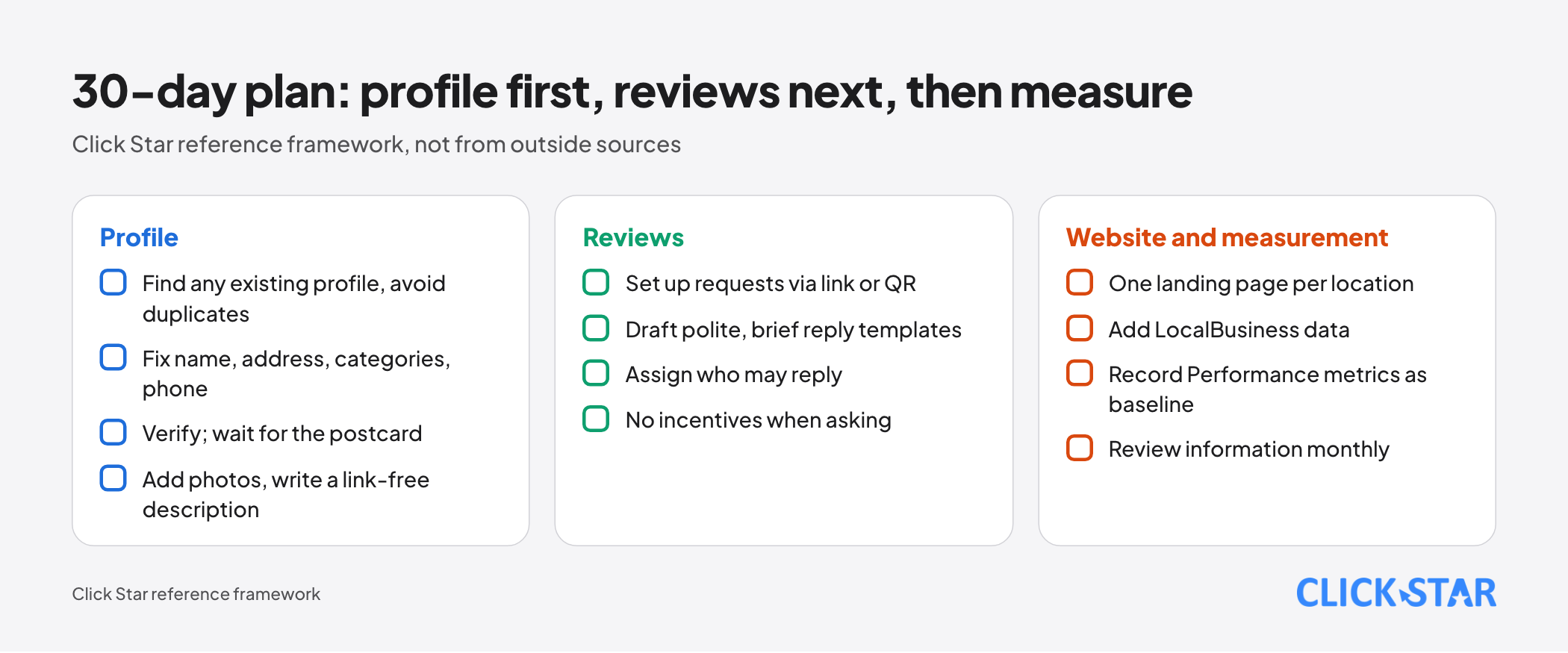
A Click Star reference framework, not taken from outside sources, in 6 steps:
- Days 1 to 3: find any existing profile to avoid duplicates, pick a company-owned owner account, fix name, address, specific categories, phone and hours.
- Days 4 to 10: submit verification; while a postcard is pending, do not edit name, address or category or request a new code.
- Days 11 to 15: upload exterior, interior, product and team photos and write a description without links or prices; do not edit categories until the code is entered.
- Days 16 to 20: build a landing page per location, add LocalBusiness data, point the profile to the right page.
- Days 21 to 25: set up a review request process with a link or QR code, draft reply templates, assign permissions.
- Days 26 to 30: record Performance metrics as a baseline, schedule monthly information checks.
Common mistakes
- Stuffing keywords, taglines or business hours into the profile name; Google says this can lead to suspension.
- Using a virtual office, a mailbox or a non-operating address as the customer address.
- Creating a new profile for a business that already has one, or recreating one after suspension.
- Editing the name, address, category or requesting a new code while a postcard is pending.
- Giving gifts for reviews, or inviting only happy customers to write reviews.
- Choosing many categories as if they were keywords, or using a phone number and URL that redirect elsewhere.
- Reading taps in Performance as revenue, or comparing months while forgetting the data includes Google Ads.
What is not known
Google does not publish the weights of the 3 factors. The pages read advise adding photos to improve local ranking but give no size of effect; posts and structured data are not named as ranking factors. There is no independent measurement for Vietnam.
Google's help pages show no date, so Click Star records the reading date. They were read through a summarizing tool, so check the original wording. Industry-specific policies were not checked.
Related posts



Need tailored advice for your business?
Click Star helps you build a solution that fits your industry and scale. We answer every question during business hours.