UTM and traffic sources: campaign naming rules that keep GA4 reports from drifting
The article explains each UTM parameter, how GA4 sorts channels and Click Star's campaign naming framework, based on Google Analytics, Google Ads and Meta documentation.
A single campaign can show up as 3 rows in a GA4 report because someone typed Facebook, another person facebook and someone else fb. Total traffic is still right but nobody can read which campaign worked.
This article reads Google Analytics, Google Ads and Meta documentation as of October 22, 2026. Google's and Meta's pages show no update date, so statements are what the pages said that day.
It covers what UTM does, how GA4 sorts channels and how to name things. Click Star has separate articles on Meta ads reports and unifying customer data.
Key points
- Google advises always using utm_source, utm_medium and utm_campaign, and adding utm_id to join cost data. Missing parameters show as (not set).
- UTM values are case sensitive: Meta and meta are 2 values.
- GA4's default channel group comes from built-in rules that cannot be edited (GA4 also offers custom channel groups). An invented medium can end up as Unassigned.
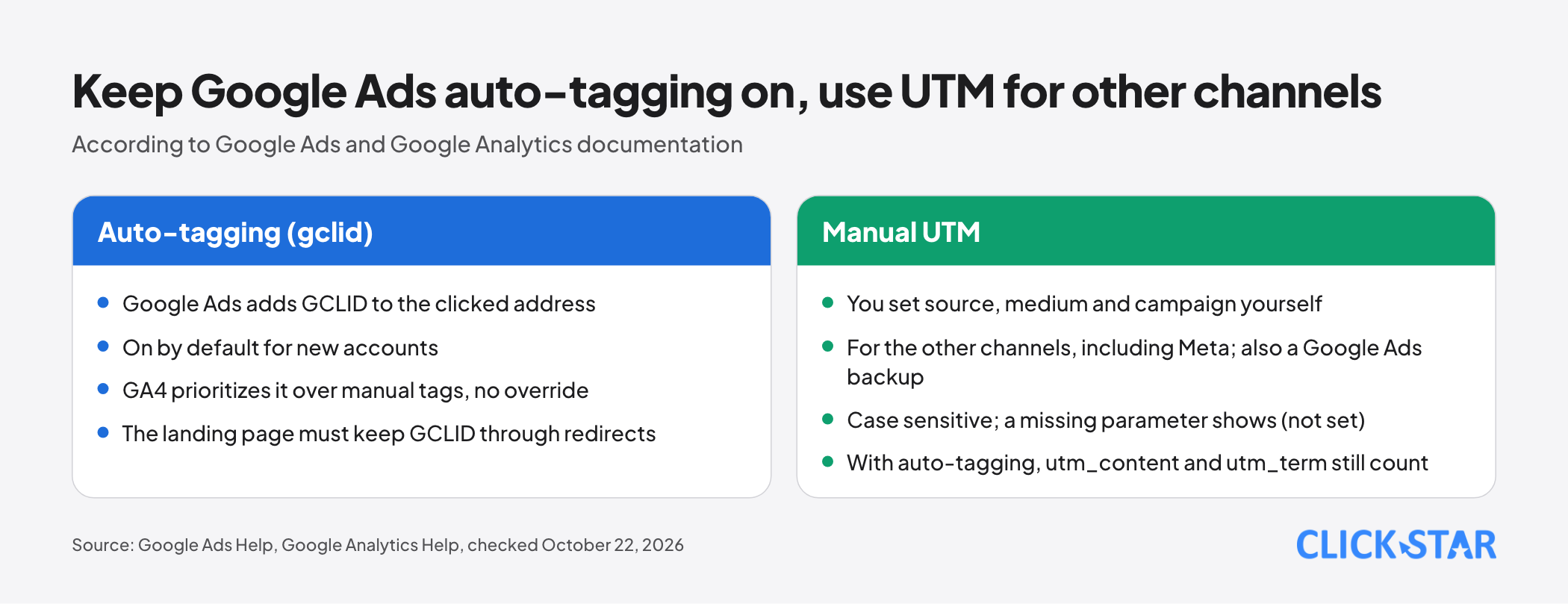
- For Google Ads, keep auto-tagging (gclid) on: GA4 prioritizes it over manual tags. UTM is for the other channels and a backup when gclid cannot be used.
- Meta's dynamic parameters keep the name from first publication, so name by the rule at creation.
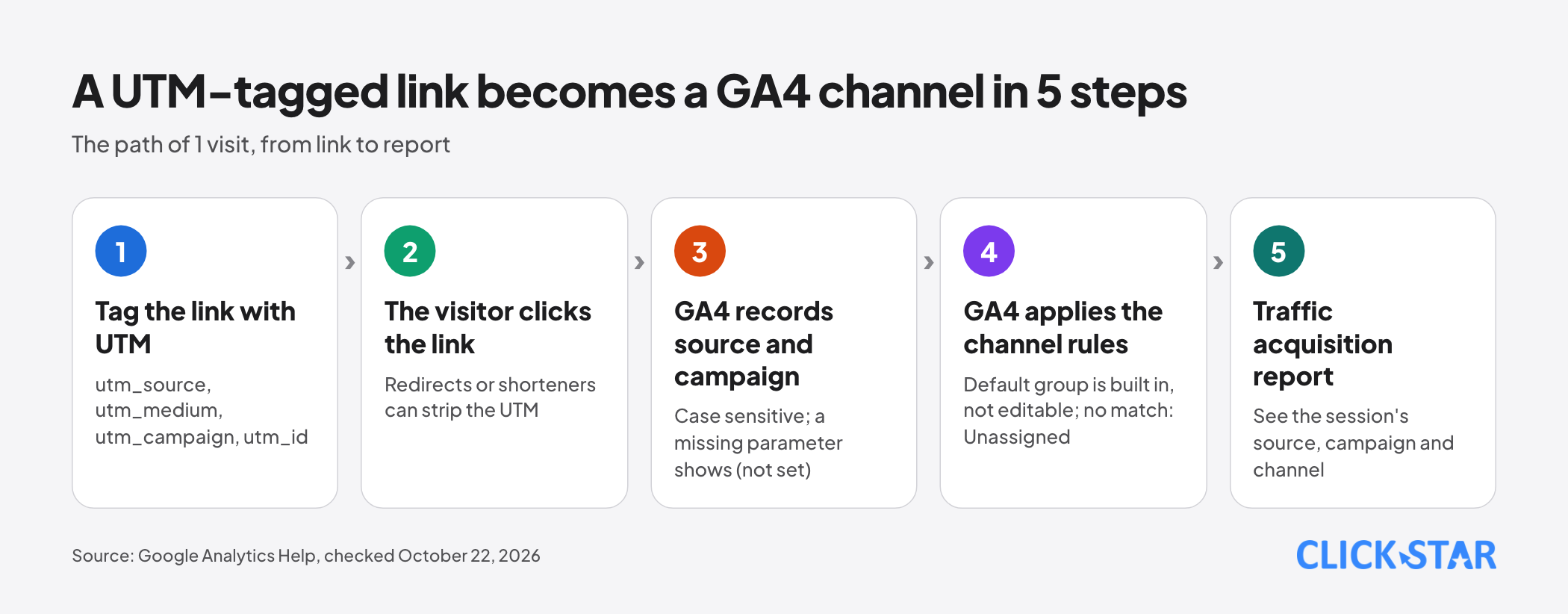
- Redirects and link shorteners can strip UTM: check the final address, then Realtime or DebugView.
What UTM is and what each parameter does
UTM parameters follow the question mark of a landing page address and tell GA4 where a visit came from. Per Google Analytics' URL builders page, the main parameters are:
- utm_source: where the visit was sent from, for example google, newsletter4.
- utm_medium: the type of medium, for example cpc, banner, email.
- utm_campaign: a product, slogan or promo code.
- utm_id: the campaign ID, shared with the campaign data uploaded to GA4.
- utm_term: the paid keyword.
- utm_content: tells content apart, for example 2 buttons in one email.
The page also lists utm_source_platform, utm_creative_format and utm_marketing_tactic (the last 2 are unreported). Once you set 1 UTM parameter, Google advises setting all, especially utm_source_platform; Click Star's framework below does not use it yet.
How GA4 sorts traffic into channels
GA4 puts each session into 1 channel using built-in rules on source, medium and campaign name. According to the Default channel group page, the definitions are not case sensitive and the default group cannot be edited; you can create custom channel groups and edit the primary channel group.
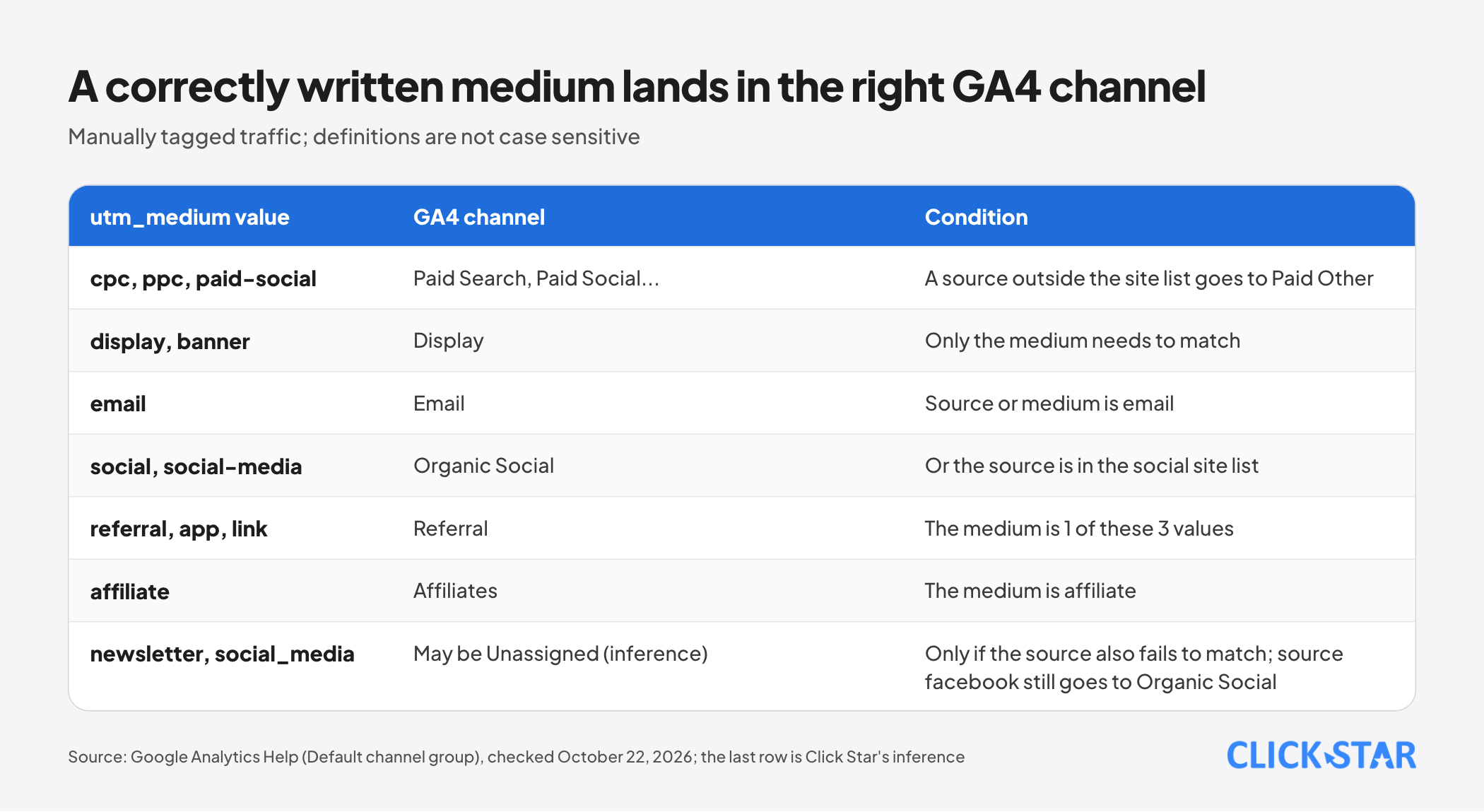
For manually tagged traffic the table also has rows for Organic Search, Audio and AI Assistant; these are the main rows, not a complete list:
- Paid Search, Paid Social, Paid Video: source in the matching site list and medium fits the paid pattern (contains "cp", is exactly "ppc" or "retargeting", or starts with "paid").
- Paid Shopping: as above, but a campaign name matching a pattern with "shop" or "shopping" can replace the source test.
- Cross-network: campaign name contains "cross-network".
- Paid Other: only the medium must fit the paid pattern.
- Display: medium is display, banner, expandable, interstitial or cpm.
- Email: source or medium is email, e-mail, e_mail or e mail.
- Organic Social: source in the social site list, or medium is social, social-media, sm.
- Organic Shopping: source in the shopping site list or campaign name matches the shop/shopping pattern.
- Organic Video: source in the video site list or medium contains "video".
- Mobile Push Notifications: medium ends with "push" or contains "mobile" or "notification"; or source is exactly "firebase".
- Referral: medium is referral, app or link.
- Affiliates: medium is affiliate.
- SMS: source or medium is sms.
- Direct: source is exactly "(direct)" and medium is "(not set)" or "(none)".
Per the table, a campaign name containing shop or cross-network, or a medium containing video or mobile, can put a session in a channel you did not intend.
Unassigned is the value when no rule matches. Click Star infers from the table, untested: the medium "newsletter" is not in the Email list, and "social_media" differs from "social-media".
These mediums only become Unassigned if no other rule matches: utm_source=facebook with social_media still lands in Organic Social because the source is in the social list.
Why reports drift: case, many spellings, missing parameters
Reports drift mainly because 1 thing is written many ways. The URL builders page advises 1 utm_source per platform, 1 utm_medium per channel (for example paid_social), a utm_campaign matching the campaign name, and lowercase.
The Import campaign data page cites 1 platform recorded as fb/cpc, Meta/cpc and facebook/paid, which automated integrations do not support. Cause 3 is missing parameters: a missing one shows as (not set).
Auto-tagging and manual UTM: how to use them together
According to Google Ads Help's About auto-tagging page, auto-tagging adds a GCLID parameter to the clicked address and is on by default for new accounts. The page says GA4 prioritizes it over manual tags with no override option.
Per the Traffic-source dimensions, manual tagging, and auto-tagging page, with both auto-tagging and manual UTM, source and medium come from auto-tagging; utm_content and utm_term still feed the Manual ad content and Manual term dimensions.
When gclid cannot be used and the URL has UTM, that page says cross-channel dimensions come entirely from UTM, with no condition attached.
The How traffic source dimensions are updated page (with the Consent Mode example of denied ad_user_data) says this is only for allowlisted properties. The two Google pages disagree on when it applies, so treat it as uncertain.
Meta ads: the URL parameters field and dynamic parameters
You enter parameters in the URL parameters field under Tracking in Ads Manager. According to the Add URL Parameters to Your Meta Ads page, they are appended to the Website URL and override duplicates and parameters set elsewhere, such as Instagram's defaults.
Meta states that from January 1, 2024, ad traffic may have Campaign Source, Campaign Medium (paid) and ad IDs added automatically.
According to the Specifications For URL Dynamic Parameters page, dynamic parameters include {{campaign.name}}, {{adset.name}}, {{ad.name}}, the .id parameters, {{placement}} and {{site_source_name}}, whose value is fb, ig, msg, th or an. Meta's example: utm_campaign={{campaign.name}}&utm_content={{ad.name}}.
Name-based parameters take the name from first publication. Renaming later does not change the value; to change it, the page says to create a new campaign, ad set or ad.
But the same page also says you can change URL parameters after publishing, though the ad set may re-enter the learning phase. The two statements do not match and the page does not say which case applies.
So if you set utm_campaign={{campaign.name}}, the campaign name in Ads Manager (at first publication) is the utm_campaign value. For ads promoting an existing post, parameters apply only to ad clicks; links in organic posts need their own UTM.
Internal links, redirects and link shorteners
Avoid putting UTM on links between pages of your own website, because UTM is for outside visits. That reasoning comes from a 2017 Smashing Magazine article (secondary source), not a Google page.
Older Universal Analytics documents say changing a utm value mid-session opens a new session. The Campaigns and traffic sources page says a new mid-session value attaches to later events without opening a new session.
Click Star's unchecked inference: internal UTM does not split the session but may write a wrong source into events. Measure internal banners with a click event.
Redirects are where UTM is most often lost. According to the Understand (direct) / (none) traffic page, redirects (for example https to http) and shorteners such as bit.ly can strip UTM.
Click Star's view. Source drift is usually a governance problem more than a technical one: correct tags still drift when 3 people name things without a shared sheet. Click Star sells digital marketing, dashboard, CRM and CDP services, so it has a stake here.
Click Star's naming rule framework
This is Click Star's reference framework, not an industry standard or an outside source. The utm_medium values match the channel table above:
- Write every value in lowercase, without diacritics or spaces, joining words with hyphens. Special characters must be URL-encoded, and Meta notes that spaces in URLs render as %20.
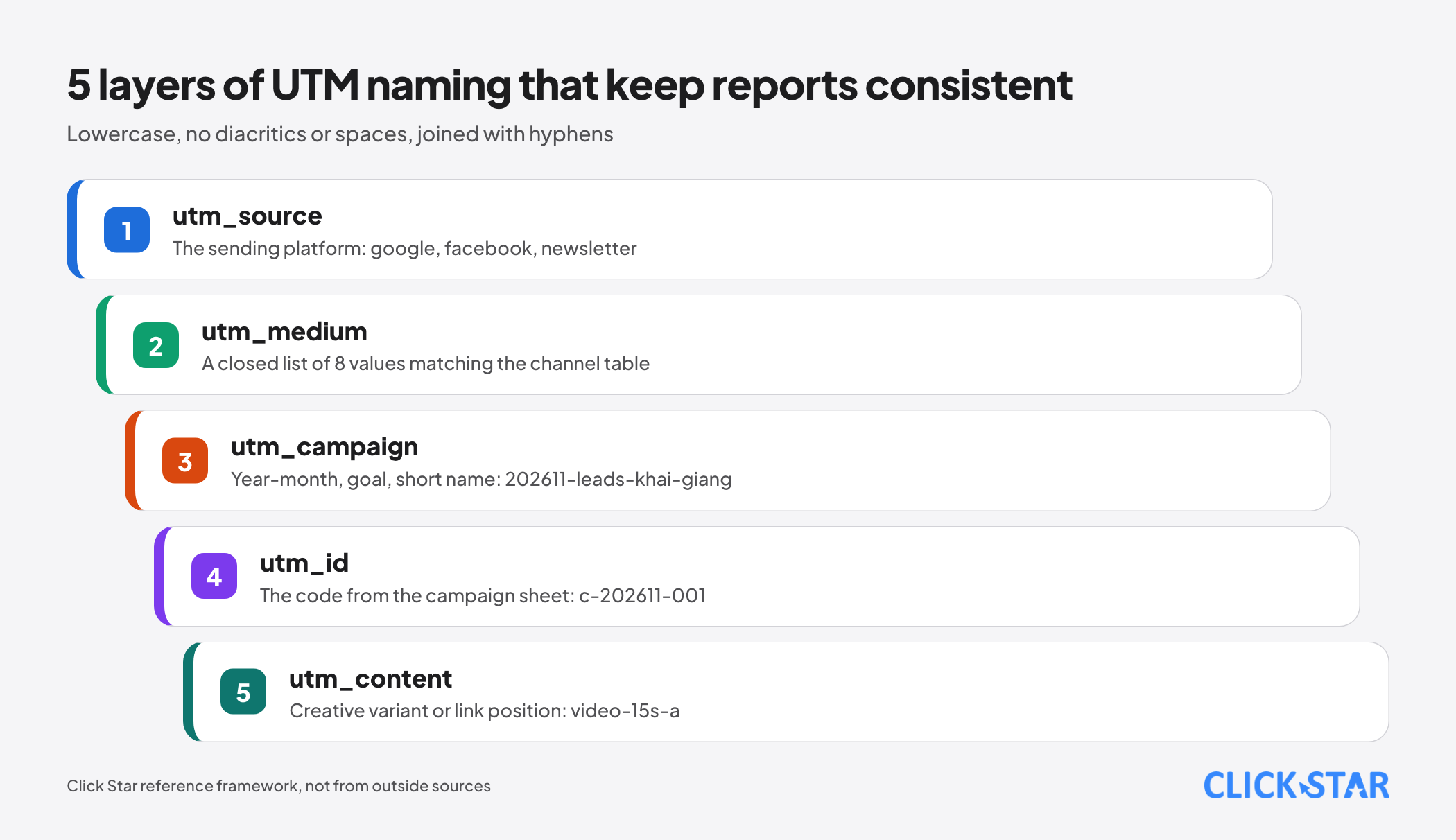
- utm_source: the platform or sending system, for example google, facebook, newsletter.
- utm_medium: a closed list of cpc, paid-social, display, email, sms, social, referral, affiliate.
- utm_campaign: year-month, goal, short name, for example 202611-leads-khai-giang. Name the campaign in Ads Manager exactly the same.
- utm_id: the code from the campaign sheet, for example c-202611-001.
- utm_content: the creative variant or link position, for example video-15s-a.
The campaign code sheet is 1 shared spreadsheet with: code, campaign name, source, medium, landing page, start date, end date, owner. Each campaign has 1 owner; new values join the closed list only via the sheet manager.
Storing the source in a spreadsheet or CRM
Store UTM when the customer leaves their details. A common way is hidden form fields recording utm_source, utm_medium, utm_campaign, utm_id, utm_content, landing page and time into the record.
Click Star's framework keeps 2 sets of columns, first and latest source, plus a separate column for the customer's own "how did you hear about us" answer. Calls, Zalo and Messenger usually carry no UTM (Click Star's unchecked view).
Per the Import campaign data page, importing cost needs utm_id, utm_source, utm_medium and utm_campaign on every non-Google destination URL, with exactly matching values; results show in the Non Google campaign report.
Check before launch: Realtime and DebugView
Check in 3 layers: the final address, Realtime or DebugView, then the Traffic acquisition report. First click the real link where it will run, such as a test email, and see if the final address keeps every parameter.
Per the Realtime report page, the user source card covers only processed users, so a brand-new visitor may be missing.
Per the Monitor events in DebugView page, turn on debug mode with Tag Assistant, then click an event to see its parameters. Events do not appear if Consent Mode is on and users have not consented to Analytics cookies.
Measuring source data health
Click Star suggests 4 weekly indicators (reference framework, not from outside sources). No source states a threshold; set an internal one.
- Distinct utm_medium values in 30 days, against the closed list.
- Share of sessions in Unassigned.
- Share of sessions with UTM but campaign (not set).
- Share of CRM leads with the source columns filled.
A 7-day plan
This is Click Star's reference framework, 1 task per day:
- Day 1: list every place links are placed; export 30 days of source and medium in GA4.
- Day 2: fix the closed medium list, the writing rules, the sheet owner.
- Day 3: create the campaign code sheet.
- Day 4: build link templates for email, social, partners; set Meta's dynamic parameters.
- Day 5: check auto-tagging, unknown-parameter handling on the landing page, redirects.
- Day 6: add source columns to forms and the CRM; send 1 test lead.
- Day 7: check with Realtime or DebugView; schedule a review of the 4 indicators.
Common mistakes
- Writing utm_medium in many ways for the same channel (cpc, CPC, ppc, paid).
- Sending email without UTM, so the source may be lost.
- Putting UTM on links between pages of your own website.
- Using redirects or shortened links without checking the final address.
- Renaming a Meta campaign after launch and assuming utm_campaign={{campaign.name}} changed with it.
- No owner for the rule sheet, so everyone adds their own mediums.
What is not known
Click Star did not open the downloadable list of social sources, so it does not know whether fb, ig or zalo land in Paid Social; run a small-budget test. No Google page speaks specifically about UTM on internal links, and it is unclear whether your property is allowlisted.
Click Star has not checked whether the parameters Meta adds from January 1, 2024 override yours, or how shorteners and in-app browsers such as Zalo's treat parameters. There is no Vietnam measurement of source drift.
Related posts

Need tailored advice for your business?
Click Star helps you build a solution that fits your industry and scale. We answer every question during business hours.