SEO-ready website: a technical checklist before launch
A 7-group technical checklist before a website launch, based on Google Search Central documentation: how to verify with official tools and the 24-hour, 7-day and 30-day checks. No ranking guarantee.
Many websites launch with a small mistake that has large consequences: the test environment's noindex still in place, robots.txt blocking the whole site, or old pages not redirected.
This is a technical pre-launch checklist in 7 groups, drawn on Google Search Central documentation, Search Console help and Google Analytics help, checked on October 21, 2026. Each group includes a way to verify it with Google's official tools.
Click Star already has separate articles on how Googlebot works, Core Web Vitals, SEO in the AI era, and choosing Next.js or WordPress. This one focuses on what to check, not that theory.
Key points
- Per Google's Technical requirements page (December 18, 2025), a page is eligible for indexing with 3 conditions: Googlebot is not blocked, the page returns HTTP 200, and the content is of a supported type. Eligible is not guaranteed.
- The worst launch errors are usually self-blocking: a leftover noindex or a mistaken robots.txt block. A robots.txt block also stops Google from reading noindex.
- A sitemap is optional and does not guarantee crawling, but it helps new sites with few external links.
- Old pages need 301 or 308 redirects URL by URL, kept for at least 1 year. Error pages must return a real 404 or 410 to avoid soft 404s.
- Structured data must match visible content. Google may rewrite titles and snippets, and sets no hard character limit.
- Field Core Web Vitals use a 28-day window and standard GA4 reports lag 24 to 48 hours, so check at 24 hours, 7 days and 30 days.
- The checklist helps a site avoid blocking itself. Google does not publish factor weights and does not guarantee rankings.
What this checklist guarantees
The checklist guarantees one thing: the website does not block itself through misconfiguration. According to Google's "How Search works" page (updated December 18, 2025), Google does not promise to crawl, index or serve a page, even if the page follows Search Essentials.
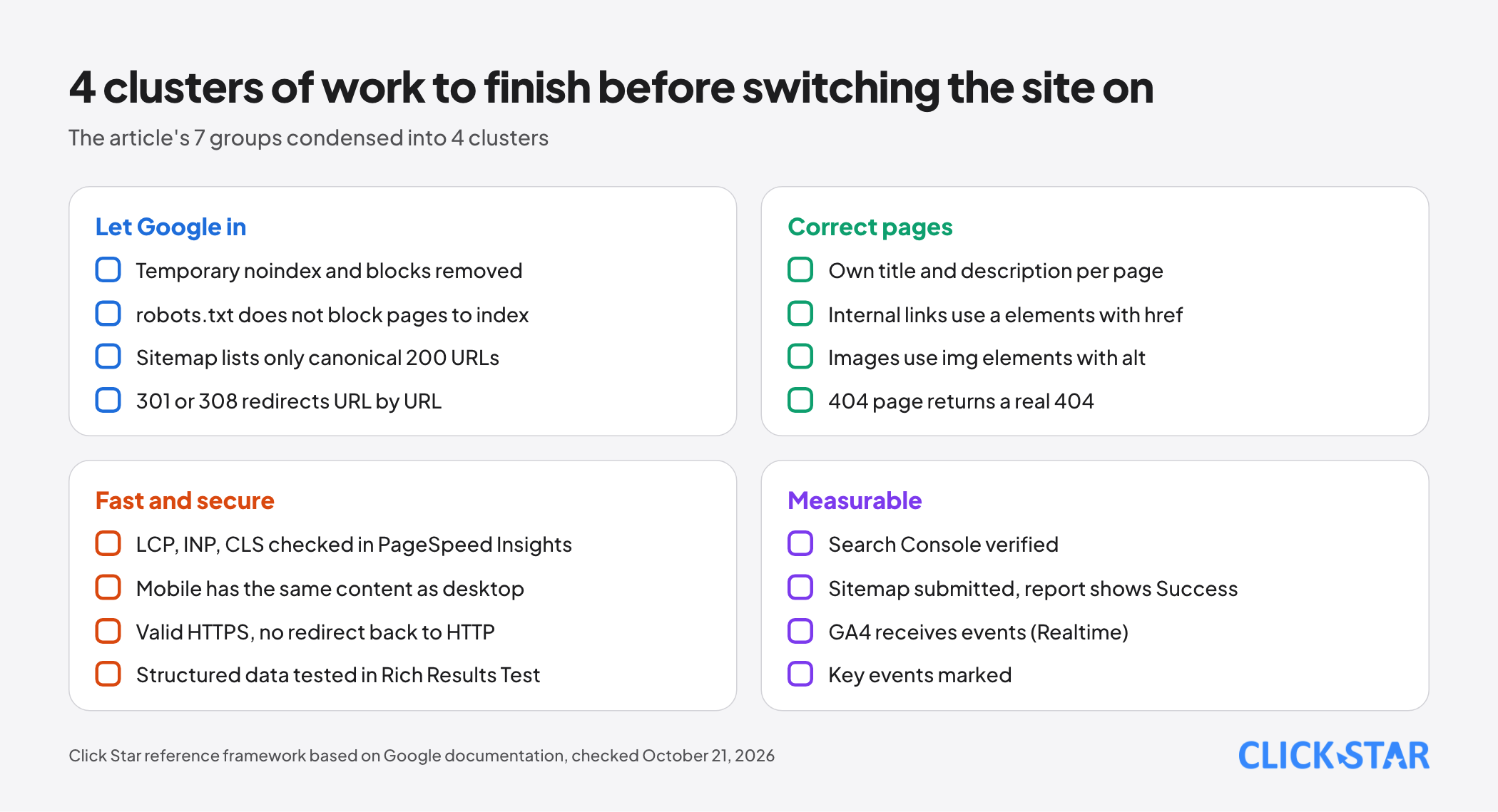
The image groups the 7 groups into 4 clusters. It is a Click Star reference framework, not a Google list.
Pre-launch review: 5 steps
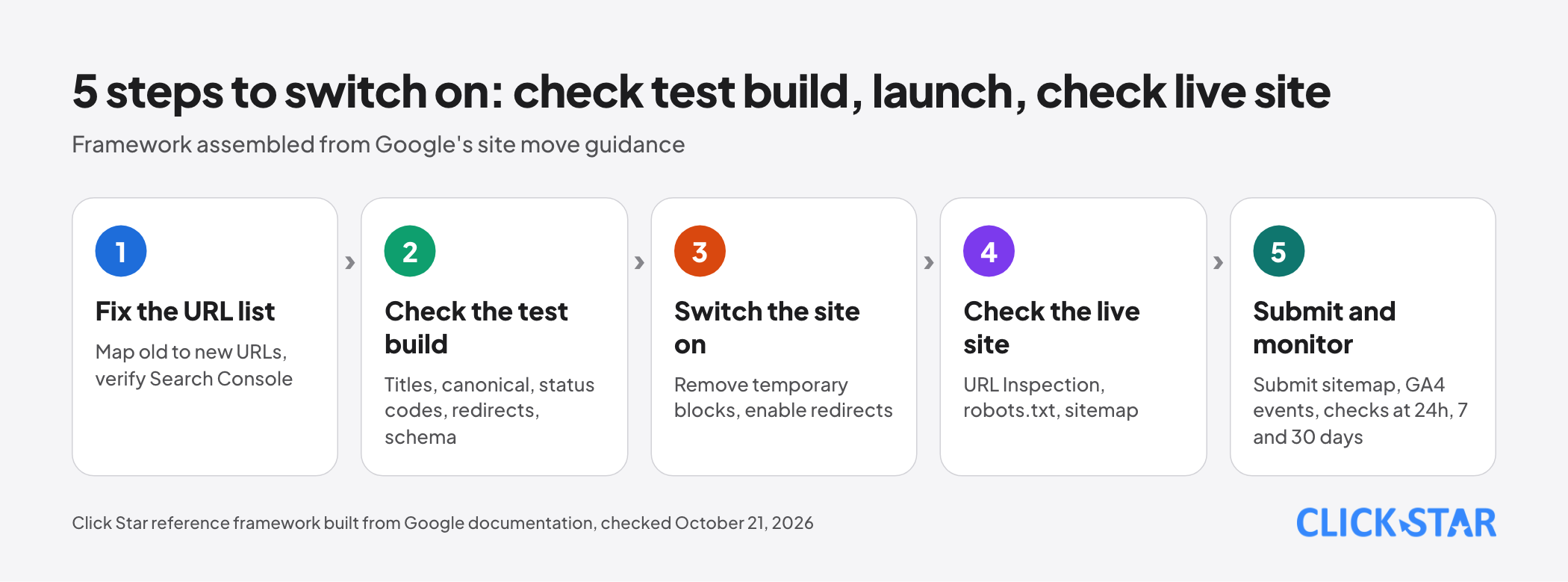
The order below is a Click Star reference framework, assembled from Google's site move guidance (no date shown, read October 21, 2026). It is written for sites that change URLs but also suits new sites.
- Step 1, fix the URL list: map each old URL to its new page; verify Search Console for every address variant.
- Step 2, check the test build: title, description, canonical, status codes, redirects, structured data.
- Step 3, switch the site on: remove temporary noindex and robots.txt blocks, enable redirects.
- Step 4, check the live site: URL Inspection, robots.txt and the sitemap at the real address.
- Step 5, submit and monitor: submit the sitemap, confirm GA4 receives events, check at 24 hours, 7 days and 30 days.
Group 1: access and indexing
Remove the test environment's noindex. According to Google's noindex page (updated December 10, 2025), the rule is set with a robots meta tag or an X-Robots-Tag HTTP header, and Googlebot must be able to crawl the page to read it. Check both places, because removing it from one may not remove the rule (Click Star's inference).
How to check: URL Inspection (live test) shows the raw HTML, HTTP headers and the "Indexing allowed?" field (tool help page, read October 21, 2026).
robots.txt. According to the introduction page (updated December 10, 2025), robots.txt mainly manages crawl traffic and is not a way to keep a page out of Google. A blocked URL that is linked from elsewhere can still be indexed, without a description.
The creation guide (updated November 21, 2025) states: the file is named robots.txt and sits at the root of the host. How to check: open /robots.txt in a private window and use the robots.txt report in Search Console.
Sitemap. According to "Learn about sitemaps" (updated December 10, 2025), a sitemap is not required and does not guarantee crawling.
The build guide (updated July 8, 2026) states: each file holds at most 50MB uncompressed or 50,000 URLs, with fully qualified absolute URLs. Click Star suggests listing only URLs that return 200 and are canonical. Submit through the Sitemaps report or a "Sitemap:" line in robots.txt.
Canonical. According to the canonical page (no update date shown, read October 21, 2026), redirects and rel="canonical" are strong signals and the sitemap is a weak one. Use absolute URLs, add a self-referencing canonical and link internally to the canonical URL.
How to check: URL Inspection shows your declared and Google-selected canonicals.
Status codes and redirects. According to Google's HTTP status code documentation (no update date shown, read October 21, 2026), 4xx codes lead to URLs being gradually dropped from the index, while 5xx makes Google slow its crawling. 301 and 308 are strong signals, while 302 is weak.
The redirects page (updated April 14, 2026) recommends server-side redirects. The site move guidance says to redirect each old URL to the most relevant page, not the homepage, avoid chains and keep redirects for at least 1 year.
A soft 404 is a page that returns 2xx with empty or error content (Google's soft 404 documentation, read October 21, 2026). Click Star infers that a custom 404 page must still return a real 404; test with a non-existent URL.
Group 2: pages and content
Title and description. According to the "SEO Starter Guide" (updated December 10, 2025), each page needs its own title and description that match its content. The title link (December 10, 2025) and snippet (April 20, 2026) pages say Google may rewrite them and sets no length limit. About 34 to 46 characters is Click Star's internal convention.
H1, URLs and links. The Starter Guide says the number of headings does not affect ranking. Link guidance: Google generally follows only a elements with an href, and every page should be linked from at least 1 other page.
Images. According to Google's image SEO guidance (updated March 2, 2026): use img elements because CSS background images are not indexed, and write short alt text that fits the content.
How to check. Open "View crawled page" in URL Inspection to review the HTML Googlebot received.
Group 3: structured data and hreflang
According to the introduction page (updated December 10, 2025), Google recommends JSON-LD; markup must describe content users can see, and it only makes a page eligible for rich results, with no guarantee. How to check: the Rich Results Test accepts a URL or code; after launch, use the rich result reports in Search Console.
A multilingual site needs hreflang. According to the "Localized versions" page (no update date shown, read October 21, 2026), there are 3 ways to declare it (link tags, HTTP header, XML sitemap), and using 1 is enough. Each version must list itself and the others, or Google ignores it.
Group 4: performance and mobile
Targets according to Google (updated December 10, 2025): LCP within 2.5 seconds, INP under 200 milliseconds, CLS under 0.1. The "page experience" page (September 22, 2026) says it is not a single signal.
How to check: PageSpeed Insights (read October 21, 2026) provides CrUX field data over 28 days at the 75th percentile, and Lighthouse lab data for debugging. A new site may have no field data yet.
Mobile-first. According to the mobile-first indexing page (updated December 10, 2025), Google indexes the mobile version. It needs the same main content, titles, descriptions, structured data, robots tags and alt text as desktop.
JavaScript. According to "JavaScript SEO basics" (read October 21, 2026), a noindex in the original HTML may stop Google from running JavaScript, so do not count on JavaScript to remove noindex.
Group 5: security and HTTPS
HTTPS is in Google's page experience self-check (September 22, 2026).
The HTTPS report in Search Console (read October 21, 2026) exists only for Domain and HTTPS URL-prefix properties and lists common causes such as an invalid certificate or HTTPS redirecting back to HTTP. Click Star adds: set a certificate expiry alert (an operational suggestion).
Symptom-based diagnosis table
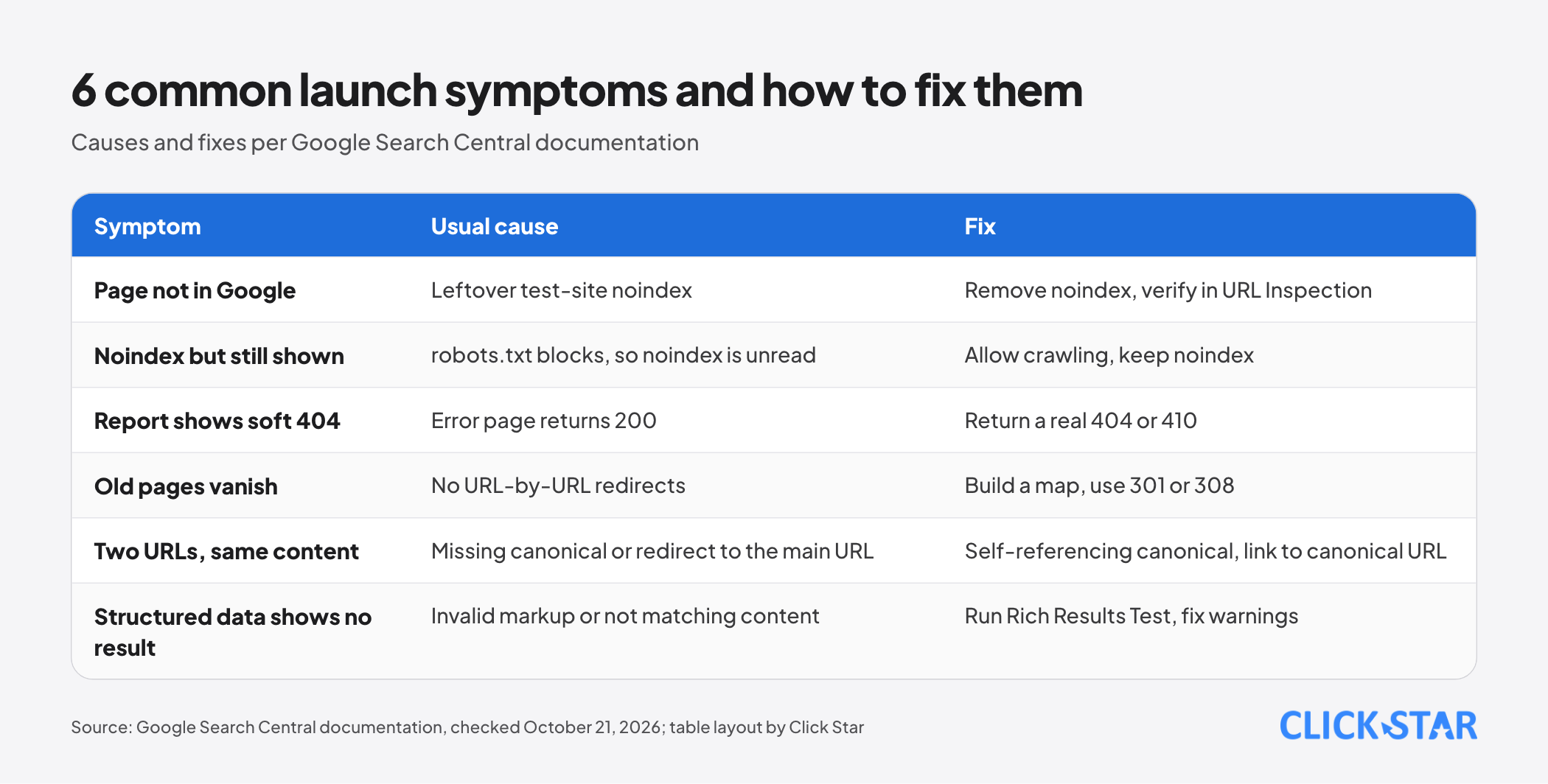
The table gathers 6 symptoms; causes and fixes come from the Google documentation above. The Page indexing report (read October 21, 2026) gives reasons for each group of unindexed URLs; not indexed is not always an error. "Validate fix" can take about 2 weeks.
Group 6: measurement
Search Console. According to the verification help page (read October 21, 2026), methods include HTML file, HTML tag, Analytics, Tag Manager and DNS; only DNS works for Domain properties.
GA4. According to the help page "Mark events as key events" (read October 21, 2026): in Admin, open Events and click the star on an existing event; for a new event, turn on "Mark as key event" when creating it.
Click Star suggests marking valuable actions (for example a form submission) before launch. How to check: the Realtime report shows the last 30 minutes, and standard reports can take 24 to 48 hours (the page "Confirm that you're collecting data", read October 21, 2026).
Group 7: after launch, checks at 24 hours, 7 days and 30 days
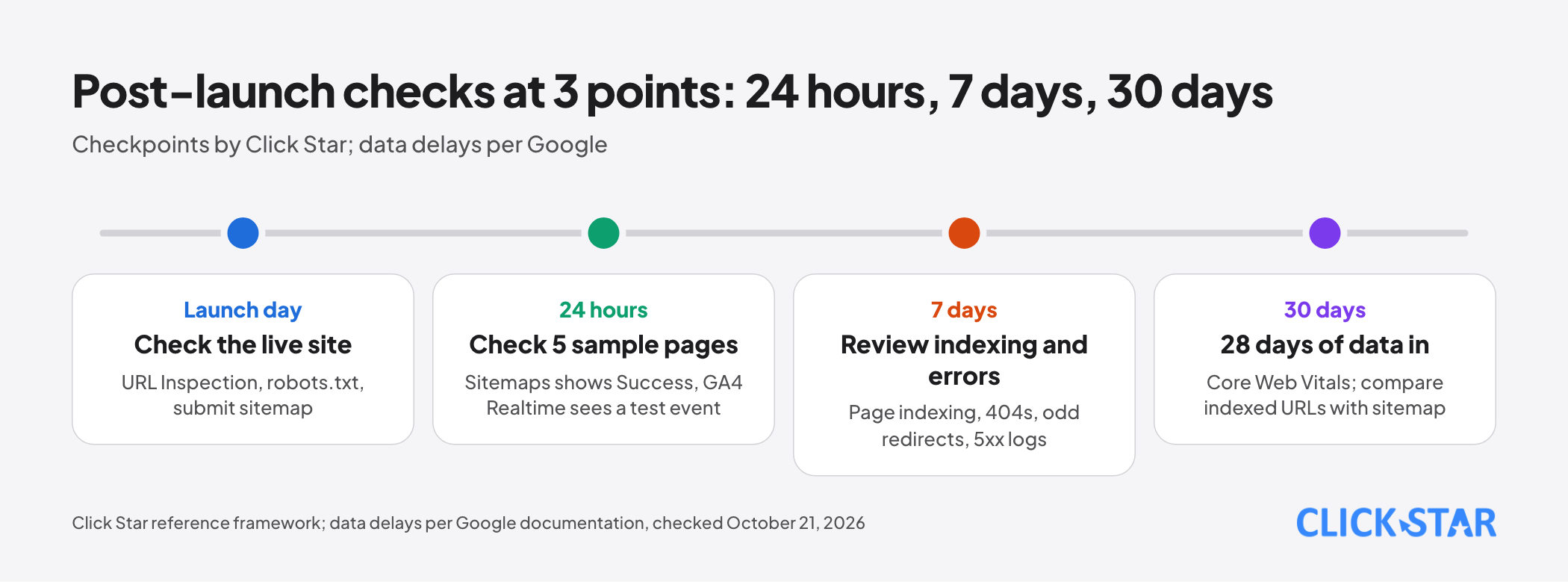
The checkpoints are a Click Star reference framework; data delays come from Google documentation.
- 24 hours: live-test 5 pages (the homepage, 1 service page, 1 article, 1 old redirected URL, 1 non-existent address); the Sitemaps report should show Success; GA4 Realtime should show 1 test key event.
- 7 days: review Page indexing and whether the reasons for non-indexed URLs match your intent; check 404s and unexpected redirects; check server logs for 5xx errors served to Googlebot.
- 30 days: the Core Web Vitals report uses 28 days of CrUX data, so only now is it complete; compare indexed URLs with the URLs in the sitemap.
Click Star's view. Click Star offers a website design service built for SEO, so this article has a related interest. What follows is a technical and governance judgment.
Launch risk sits in configuration more than content: one noindex does more harm than any title tweak, so check from Group 1 downward.
Click Star's published process includes an "SEO and measurement" step before launch, and a PageSpeed score of 90+ is stated as a target, not a commitment (service page, read October 21, 2026). This article does not promise rankings either.
What to do: a 4-week plan
A Click Star reference framework, not from an outside source.
- Week 1: inventory URLs, build the redirect table, verify Search Console.
- Week 2: finish title, description, H1, images and alt text; make the 404 page return 404; review internal links.
- Week 3: structured data, hreflang if needed, PageSpeed Insights, HTTPS certificate, GA4 key events.
- Week 4: rehearse the switch-on, then go live and run the 24-hour, 7-day and 30-day checks.
Common mistakes
- Leaving the test environment's noindex or Disallow in place, or removing the meta tag but not the header.
- Using robots.txt to "hide" a page and expecting noindex to work.
- Redirecting every old URL to the homepage or leaving long redirect chains.
- A well-designed 404 page that returns 200 and counts as a soft 404.
- Putting redirected, noindex or non-canonical URLs in the sitemap.
- Marking up invisible content, or treating a passing Rich Results Test as a sure rich result.
- Drawing conclusions after a few days, when Core Web Vitals need 28 days of data.
What is not known
Google does not publish factor weights, so no one can say how much ranking any item is worth. Click Star found no data on how many Vietnamese websites launch with such errors; "common" is technical inference.
There is no official source for the time from sitemap submission to indexing. The soft 404 documentation does not separately address custom-designed 404 pages, so the conclusion about the 404 code is inferred.
Related posts



Need tailored advice for your business?
Click Star helps you build a solution that fits your industry and scale. We answer every question during business hours.