Why does Google show the wrong page on a bilingual website?
How Google picks a page by language and 5 things to get right: separate URLs, two-way hreflang, self-referencing canonicals, no automatic language redirects, and unfinished translations. Based on Google Search Central, Next.js and MDN documentation.
Picture a company with a Vietnamese website and an English version. A visitor from abroad searches in English but Google shows the Vietnamese page, while a local visitor lands on the English one.
This article explains why that happens and how to prevent it: a separate URL per language, hreflang tags (which tell Google which page translates which), canonical URLs, no guesswork redirects, and unfinished translations.
The main sources are the Google Search Central, Next.js and MDN documentation, checked on October 24, 2026. No ranking gains are promised.
Key points
- Google recommends a separate URL per language, not cookies or browser settings, because Googlebot (Google's crawler) usually crawls from the USA and sends no
Accept-Language(the browser's preferred language). - hreflang only works when 2 pages point to each other. Each version lists itself and all others, with an ISO 639-1 code (Vietnamese is
vi). - Each version's canonical should point to itself. Versions count as duplicates only when the body is untranslated.
- Do not redirect visitors by guessed language. The language switcher should be a real link.
- For an unfinished translation, do not publish the URL, or use
noindex(tells Google to keep the page out of results) and remove it from hreflang (Click Star's framework). - Search Console retired the International Targeting report. Check with the HTML source, URL Inspection and external tools.
Bilingual website: how Google chooses the page language
According to Google Search Central (updated December 10, 2025), Google determines a page's language from its visible content, not the URL or the lang attribute. So each page should use 1 language for body and menu alike.
hreflang does not help Google guess the language. Per the localized versions documentation (updated September 21, 2026), it tells Google that pages are variants of the same content, so it can pick the right one for each searcher.
Click Star groups the causes of a wrong page into 3 (Click Star's grouping; each has a matching rule in Google's documentation):
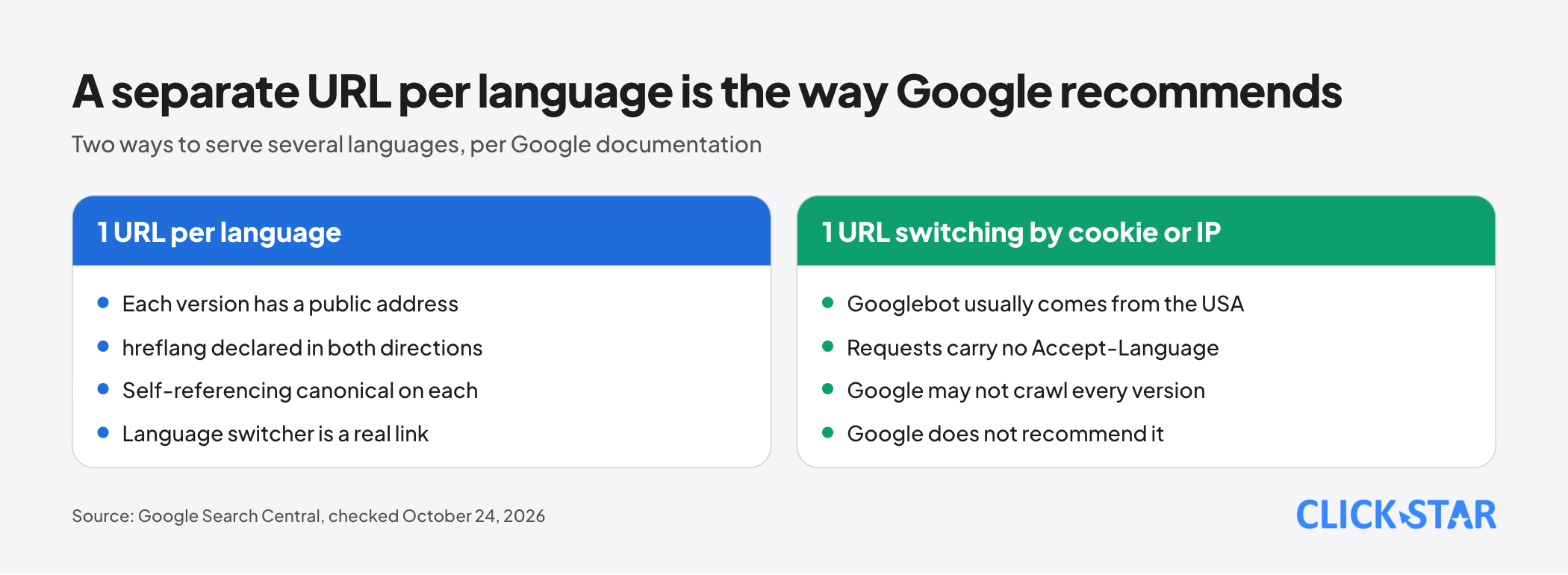
- 1 URL switches language by cookie, IP or browser, so Google sees only 1 version.
- hreflang is missing, has wrong codes, or the pages do not point to each other.
- A half-finished translation: only the menu and footer are translated.
One address per language: which URL structure
Google recommends using different URLs for each language version (updated December 10, 2025). If content changes dynamically, Google may not crawl every version, because Googlebot usually originates from the USA and sends no Accept-Language.
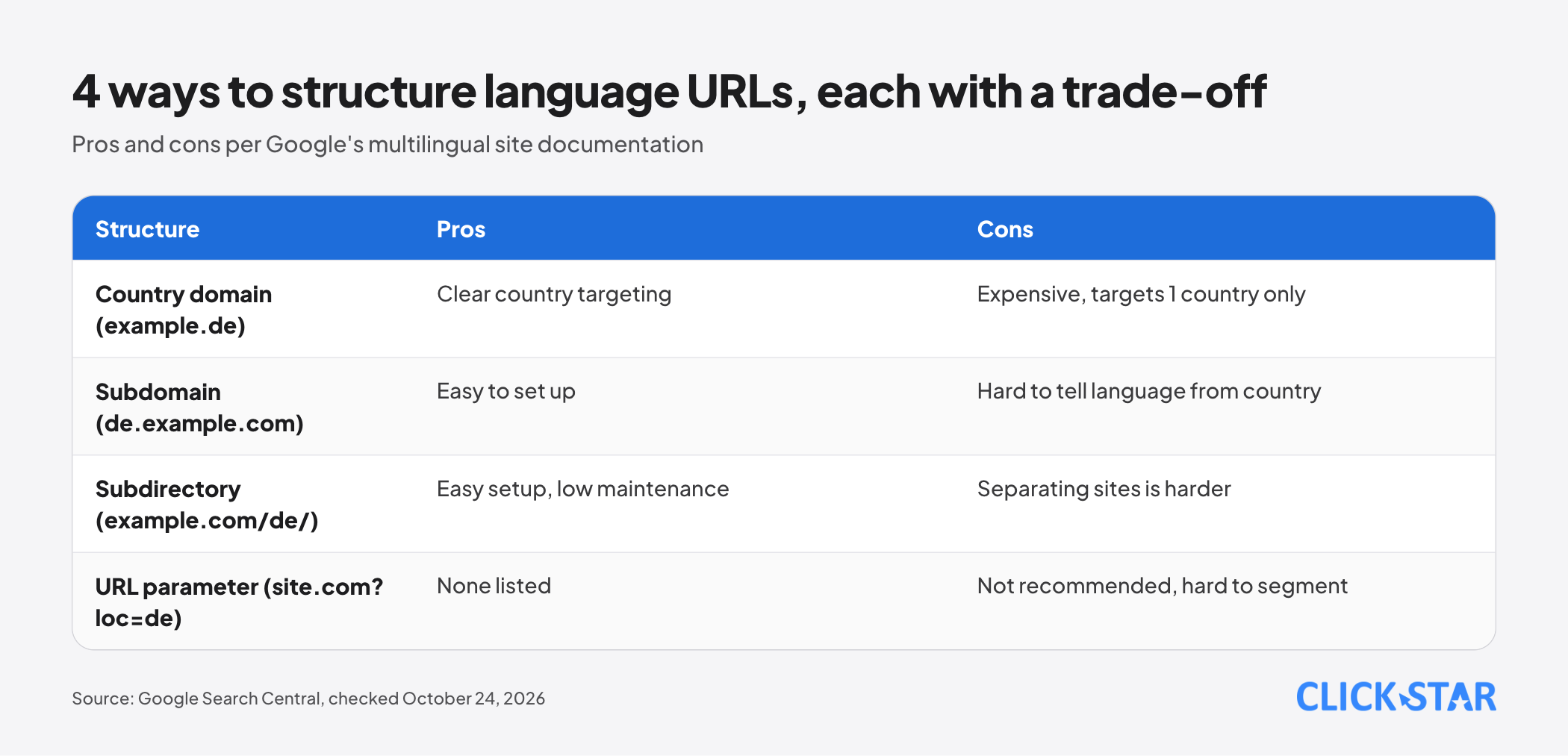
The same document lists 4 ways to structure the address:
- Country-specific domain (
example.de): clear country targeting, but expensive and it can target only 1 country. - Subdomain (
de.example.com): easy to set up, but users may not tell whether the label is a language or a country. - Subdirectory (
example.com/de/): easy to set up with low maintenance, but separating the sites is harder. - URL parameter (
site.com?loc=de): Google does not recommend it.
One point is easy to misread: a label such as en in a subdomain is not used by Google to determine the audience. Declare it explicitly with hreflang.
hreflang: how to declare it correctly
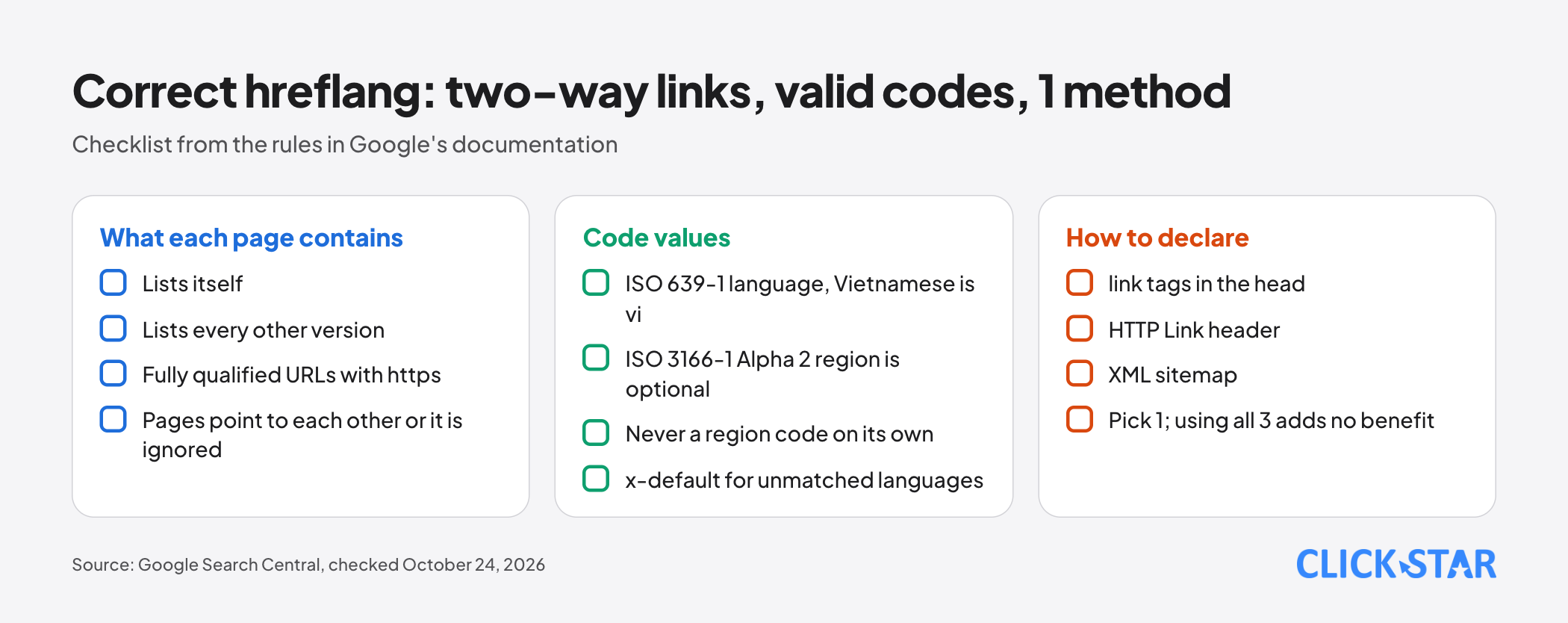
Google lists 3 equivalent ways: <link> tags in the <head>, the HTTP Link header (useful for PDFs) and an XML sitemap. Using all 3 adds no benefit and is harder to manage, so pick 1.
An illustrative example with example.com. Every version of the page carries the same tags:
<link rel="alternate" hreflang="vi" href="https://example.com/dich-vu" />
<link rel="alternate" hreflang="en" href="https://example.com/en/services" />
<link rel="alternate" hreflang="x-default" href="https://example.com/dich-vu" />
The rules Google states:
- Each version lists itself and every other version, with fully qualified URLs including
https. - If 2 pages do not point to each other, the annotations are ignored, so outsiders cannot claim to be a translation of your page.
- The tags must sit inside a valid
<head>.
Codes: the first part is the language (ISO 639-1), the optional second part is the region (ISO 3166-1 Alpha 2). The Library of Congress code list gives Vietnamese as vi, so vi is right and vn (a country code) is wrong.
A region code cannot stand alone, and UK has no effect. For 2 languages, vi and en are enough; add a region such as en-GB only when a version differs by country.
The x-default value is for visitors whose language matches no version; Google says it was designed for language selector pages.
Self-referencing canonical: why every version must claim itself
A canonical (the representative URL) says "this is the main URL for this content". Per Google, it is a hint, not a command (updated August 20, 2026).
With hreflang, the canonical must be in the same language, or the closest substitute (updated July 10, 2026). An /en page whose canonical points to the Vietnamese version contradicts itself (inferred from the rule above).
Language versions are duplicates only when the main content is in the same language. If only the header and footer are translated, the pages are clustered into 1.
Click Star already has a separate article on 301 redirects, canonical, robots.txt and sitemaps, so this covers only the language points.
Should you redirect by IP or browser language
No. Google advises against redirecting users to another language version based on a guess, because users and search engines may not see every version. Add links so they can choose.
MDN (modified July 4, 2025) says Accept-Language is only a hint and a server should not override an explicit choice. Safari and Chrome's incognito mode send only 1 language.
Some frameworks enable this by default. The Next.js Pages Router documentation (updated March 3, 2026) says that on a visit to /, Next.js guesses the language from Accept-Language and redirects if it differs from the default. localeDetection: false turns this off.
The approach Click Star suggests, not a Google standard:
- The root URL serves the default version without redirecting.
- To suggest a language, show a banner and let the visitor decide.
- The language switcher is an
<a href>link to the matching page, not just the home page.
According to Google, only links that are <a> elements with an href are reliably crawled (updated December 10, 2025).
What to do when a translation is not finished
Google warns that translating only the page template while the body stays in 1 language can make the same content appear several times in results. For the App Router, the Next.js documentation (updated June 10, 2026) uses notFound() to return a 404 when the language in the URL is unsupported; the same approach fits an untranslated article (Click Star's application).
Click Star suggests 2 options (a Click Star framework, not from outside sources):
- Option A: do not publish the English URL (return 404), do not list it in hreflang, and hide the switcher on the Vietnamese page.
- Option B: if the URL must exist, show a "translation in progress" notice, set
noindex, keep a self-referencing canonical and remove it from hreflang.
Set noindex with <meta name="robots" content="noindex"> or the HTTP header X-Robots-Tag: noindex. The page must not be blocked by robots.txt, or Googlebot never sees the rule. For less important pages, recrawling can take months.
Removing a noindex page from hreflang is Click Star's inference: it will not appear in results, so declaring it only adds noise. When the translation is done, remove noindex, add hreflang on both sides and add the URL to the sitemap.
Doing it in Next.js
In the App Router, the generateMetadata documentation (updated August 19, 2026) supports alternates.canonical and alternates.languages, which generate the canonical and hreflang tags. An illustrative example for the English page:
export const metadata = {
  alternates: {
    canonical: 'https://example.com/en/services',
    languages: {
      vi: 'https://example.com/dich-vu',
      en: 'https://example.com/en/services',
      'x-default': 'https://example.com/dich-vu',
    },
  },
}
Be careful with layouts. The same documentation says metadata from several segments of a route is shallowly merged, with duplicate keys replaced in order. Click Star infers that if alternates is set in the root layout, any page that does not redeclare it inherits that canonical.
How to check a bilingual website
Google retired the International Targeting report in Search Console but still uses hreflang. The Page indexing report also states, under "Alternate page with proper canonical tag", that alternate language pages are not detected by Search Console.
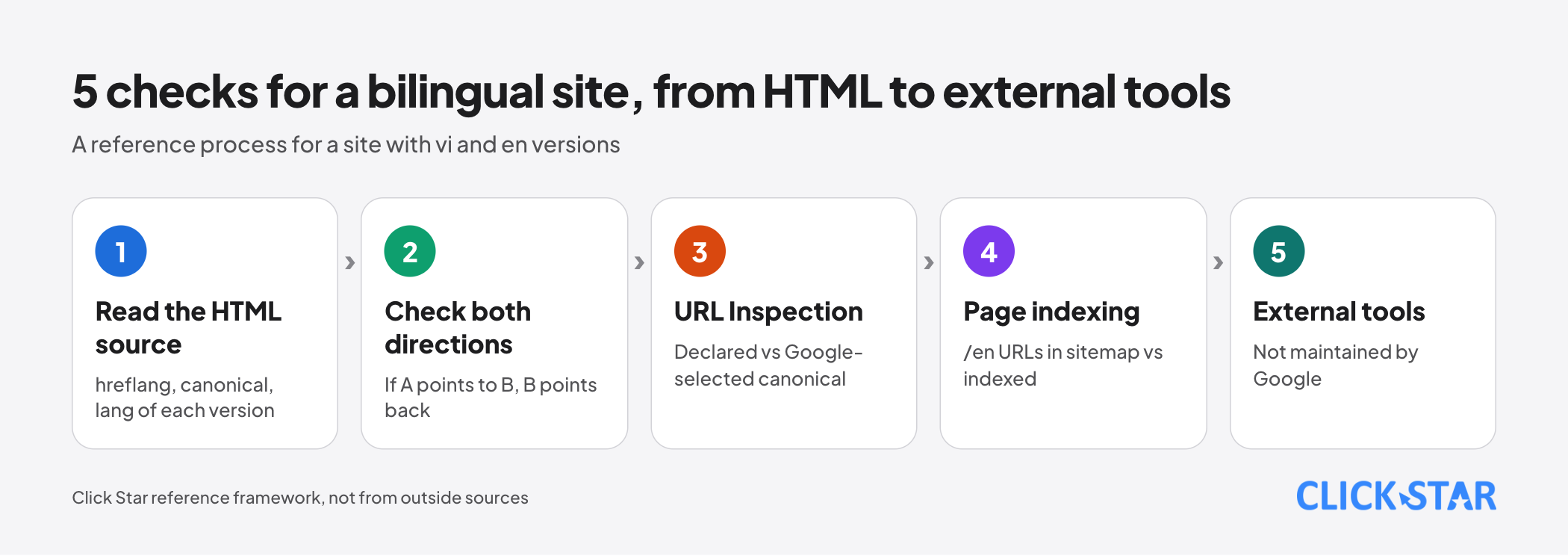
Click Star found no Google documentation for a dedicated hreflang report. Its 5-step process (a reference framework):
- Read the HTML source of each version: the full hreflang set, a self-referencing canonical, the right
lang. - Check both directions: if A points to B, B must point back to A.
- Use URL Inspection on an indexed page: compare "User-declared canonical" with "Google-selected canonical" and view the HTML Google received. The live test cannot predict the canonical.
- Compare the
/enURLs in the sitemap with those indexed in the Page indexing report (a Click Star measure). - Use an external hreflang tool. Google names 2 (by Aleyda Solis and Merkle) and says it does not maintain or verify them. Click Star has not tried them.
What this means for Vietnamese businesses
First ask whether you need an English version. Have one only when you translate fully and visitors need it, because a thin translation creates duplicate pages.
A .vn domain is a country-code domain, which Google treats as a strong signal that the site targets that country. To serve international visitors on the same domain, a subdirectory such as /en/ is easier to maintain.
Click Star's view. Many bilingual site errors come from process, not syntax: a page is published before its translation is done, or an automatic redirect is added "for convenience". Both break what Google needs: each version at its own public, consistent address.
On interest: Click Star offers SEO-standard website design, so this article may lean toward building sites correctly. Check it against Google's documentation.
A 5-working-day plan
A Click Star reference framework, not taken from outside sources:
- Day 1: build a 2-column table of matching Vietnamese and English URLs, fully translated pages only.
- Day 2: fix the URL structure and choose 1 way to declare hreflang.
- Day 3: add a self-referencing canonical, hreflang in both directions,
x-defaultand the rightlang. - Day 4: remove automatic redirects, add a switcher made of real links, and handle unfinished pages with option A or B.
- Day 5: run the 5-step check and record the URLs in the sitemap and the URLs indexed.
Common mistakes
- Using cookies or IP to switch language on the same URL, so Google sees only 1 version.
- Declaring hreflang on one side only: page A points to B but B does not point back.
- An
/encanonical that points to the Vietnamese version, or a canonical set in a layout that every page inherits. - Wrong codes:
vninstead ofvi, a region code standing alone, orUK. - Translating only the menu and footer while the body stays unchanged.
- Leaving the English URL public and indexable before the content exists.
- Building the language switcher with JavaScript and no
href, or always linking to the home page.
What is not known
Click Star found no Google figures on the gain from hreflang and has no measurements for Vietnam. It also found no Google documentation on a noindex page inside an hreflang set; the advice to remove it is Click Star's own.
Click Star could not open Bing's official documentation, so how Bing handles hreflang is not covered. There is also no general figure for how long Google takes to update after a fix.
Related posts



Need tailored advice for your business?
Click Star helps you build a solution that fits your industry and scale. We answer every question during business hours.